How to Create a Facebook Page for Your Ad Account: A Step-by-Step Setup Guide

Creating a Facebook Page for your business requires you to choose a Page name and category, add essential business information, and complete the Page before you use it for advertising. Meta Business Suite also lets you organize the Page with a Business Portfolio and create an Ad Account for your advertising activity. The Page name and category establish your business identity on Facebook, while the description, profile picture, cover photo, contact information, address, and hours give visitors the information they need. A complete Page also gives you a stronger foundation before you connect it to your advertising setup.
- How Do You Create a Facebook Page for Your Business?
- How Do You Choose the Right Page Category?
- What Information Do You Need to Add to the Page?
- How Do You Link Your Facebook Page to Your Ad Account?
- How Do You Add Your Ad Account to a Business Portfolio?
- How Do You Assign Page Roles for Ad Account Access?
- What Else Should You Know About Creating a Facebook Page for Your Business?
- What Is the Difference Between a Business Page and a Personal Profile?
- Can You Change Your Facebook Page Name and Category After Creating It?
- Can You Create Multiple Facebook Pages for the Same Business?
- Who Owns a Facebook Page After You Create It?
- Final Thought
- FAQs
- Do You Need a Personal Facebook Account to Create a Facebook Page?
- Is Business Verification Required to Run Facebook Ads?
- Can You Create a Facebook Page Without a Website?
- Can You Delete a Facebook Page After Creating It?
- Can You Create a Facebook Page for a Brand That You Do Not Own?
How Do You Create a Facebook Page for Your Business?
You can create a Facebook Page by entering your Page name, selecting a relevant category, and adding your business information. Meta currently supports Page creation through its Facebook and Meta Business Suite experiences, although the exact menu names can vary by account and interface.
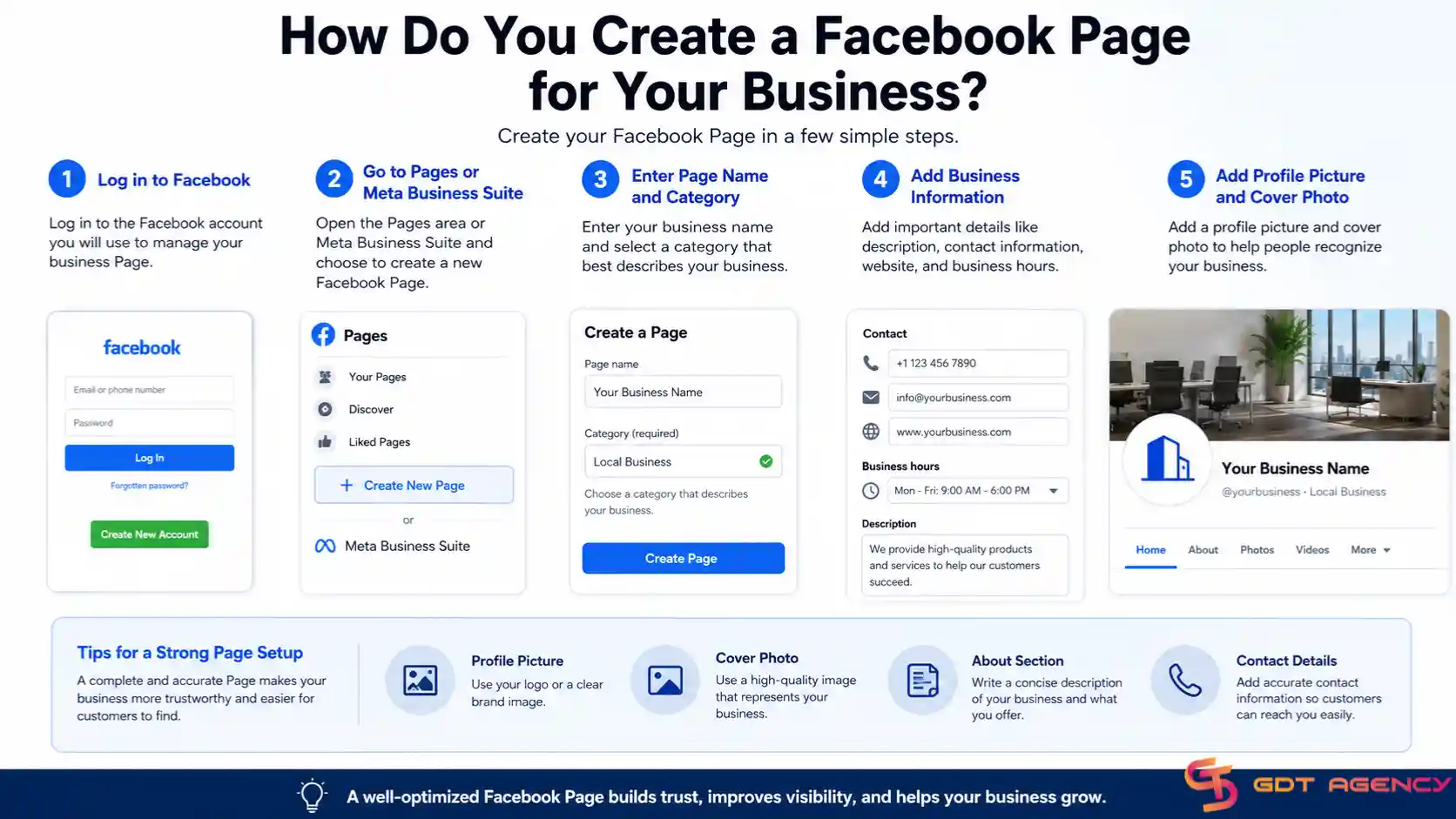
To begin, log in to the Facebook account that you will use to manage the business. You can then open the Pages area or Meta Business Suite and choose the option to create a new Facebook Page.
Once the Page creation form opens, enter the business name that customers should recognize. You should use a name that represents the actual business, brand, organization, or public-facing entity behind the Page. You should avoid treating the Page name as an advertising keyword field because the name should primarily identify the business.
Meta may ask you to select one or more categories during Page creation. Choose categories that accurately describe the business rather than selecting categories only because they appear popular or attractive.
After you create the basic Page, complete the information that visitors and potential customers will see. A strong setup should include a clear profile picture, a useful cover image, a concise description, contact details, and relevant business information.
How Do You Choose the Right Page Category?
As an expert at GDT Agency with nearly 10 years of experience working with Facebook ads across multiple types of ad accounts, from personal ad accounts to Facebook agency ad accounts, I have worked with businesses across different industries and advertising setups.
From this experience, I recommend choosing a Facebook Page category that accurately reflects the business because the category helps communicate what the Page represents. Common examples include Local Business, Company, Brand, service-based categories, retail categories, and other industry-specific options.
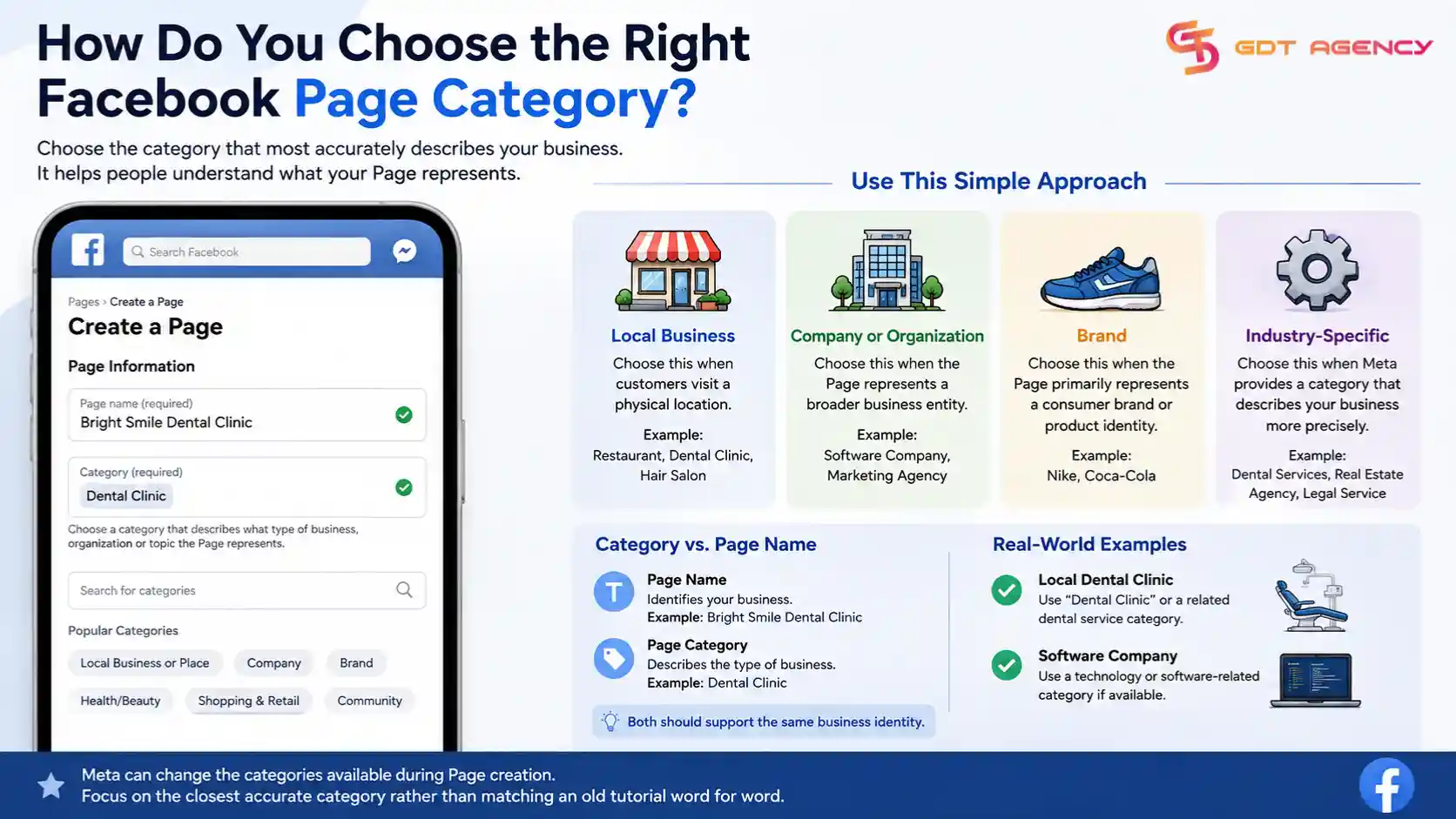
The right category depends on how the business operates and how customers interact with it. A local restaurant should use a category that describes food service, while an online software company should choose a category that reflects its company or technology identity.
You can use this simple approach when choosing a category:
- Choose a local business category when customers visit a physical location.
- Choose a company or organization category when the Page represents a broader business entity.
- Choose a brand-related category when the Page primarily represents a consumer brand or product identity.
- Choose an industry-specific category when Meta provides a category that describes the business more precisely.
For example, a local dental clinic should prioritize a category related to dental services rather than choosing a generic Company category. A software company can use a technology or software-related category if Meta provides a suitable option.
You should also distinguish the Page category from the Page name. The name identifies the business, while the category helps describe the type of business. These two attributes should support the same business identity.
Meta can change the categories available during Page creation, so you should focus on the closest accurate category rather than trying to match an old tutorial word for word.
What Information Do You Need to Add to the Page?
You should add the main business information immediately after creating the Facebook Page because visitors need enough information to understand who operates the Page and how they can contact the business.
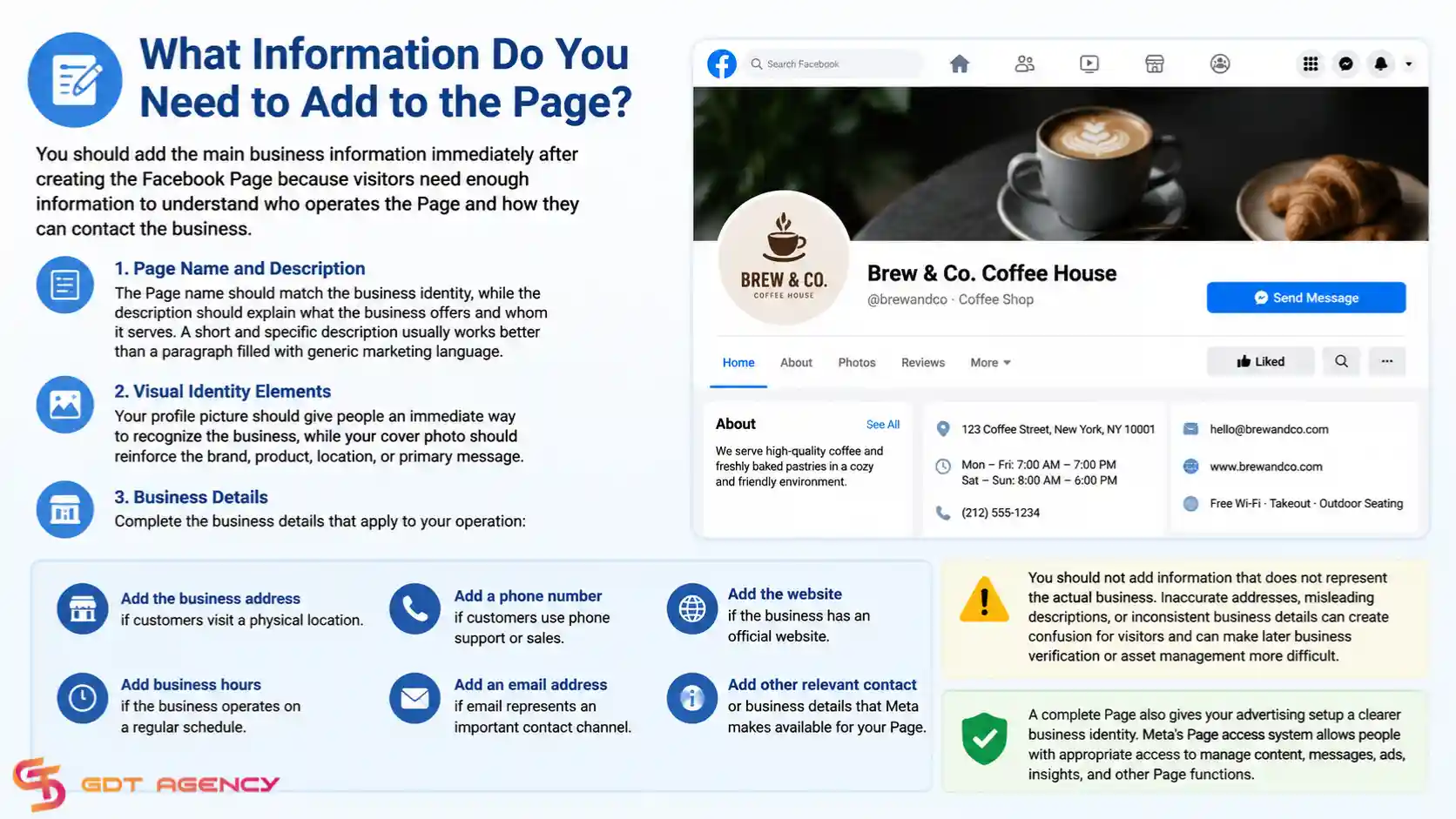
Start with the Page name and description. The Page name should match the business identity, while the description should explain what the business offers and whom it serves. A short and specific description usually works better than a paragraph filled with generic marketing language.
Next, add visual identity elements. Your profile picture should give people an immediate way to recognize the business, while your cover photo should reinforce the brand, product, location, or primary message.
You should then complete the business details that apply to your operation:
- Add the business address if customers visit a physical location.
- Add business hours if the business operates on a regular schedule.
- Add a phone number if customers use phone support or sales.
- Add an email address if email represents an important contact channel.
- Add the website if the business has an official website.
- Add other relevant contact or business details that Meta makes available for your Page.
You should not add information that does not represent the actual business. Inaccurate addresses, misleading descriptions, or inconsistent business details can create confusion for visitors and can make later business verification or asset management more difficult.
A complete Page also gives your advertising setup a clearer business identity. Meta's Page access system allows people with appropriate access to manage content, messages, ads, insights, and other Page functions.
How Do You Link Your Facebook Page to Your Ad Account?
You can connect your Facebook Page and Ad Account through the appropriate Meta Business Portfolio. The Page and Ad Account remain separate business assets, while the Business Portfolio provides the structure for managing them together.
If you are not familiar with Facebook ad accounts, you can refer to our dedicated article: What Is a Facebook Ad Account and How Does It Work for the full explanation.
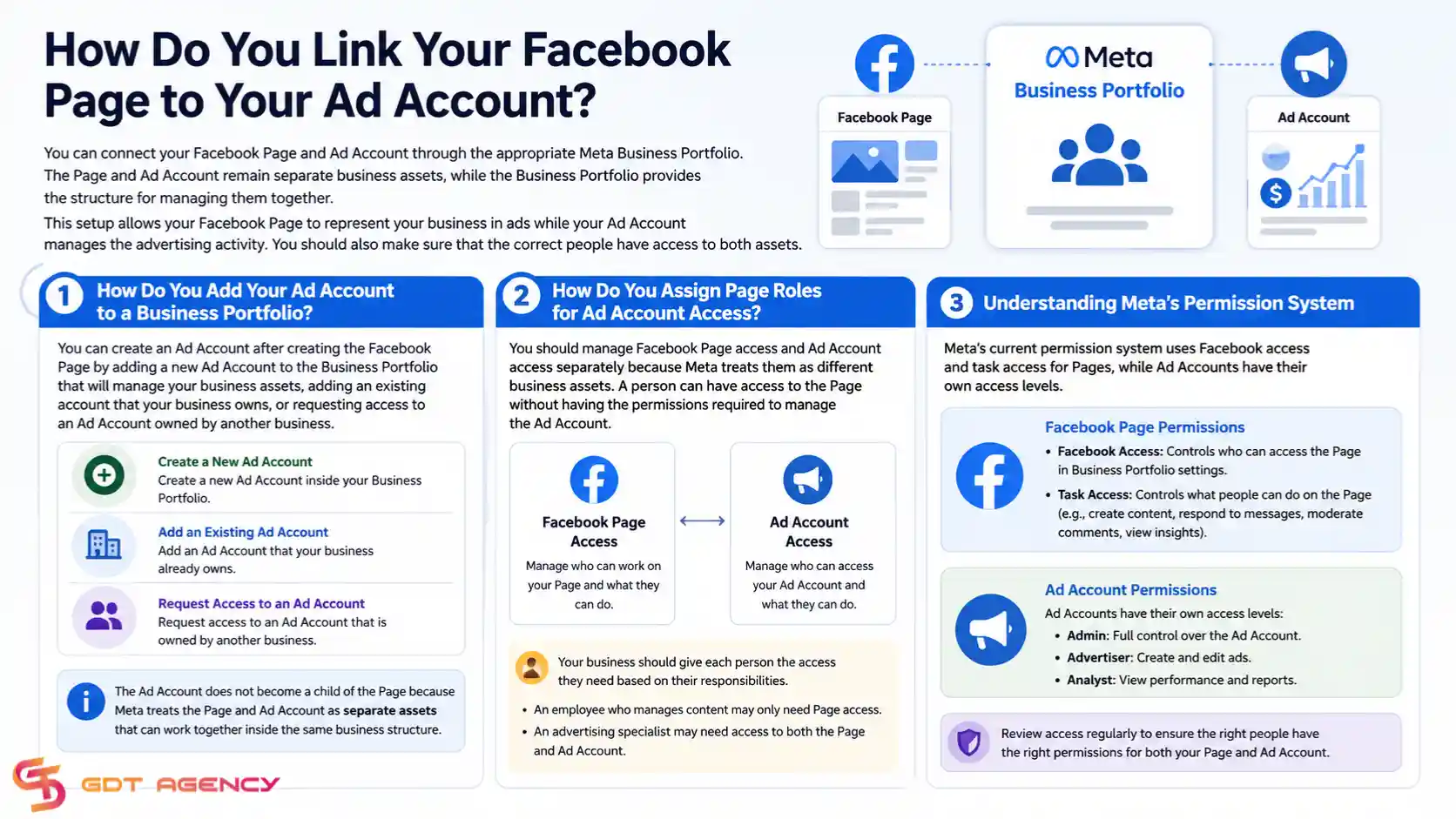
This setup allows your Facebook Page to represent your business in ads while your Ad Account manages the advertising activity. You should also make sure that the correct people have access to both assets.
For the detailed connection process, including asset ownership and access requirements, see our guide on How to Link a Facebook Page to a Facebook Ad Account.
How Do You Add Your Ad Account to a Business Portfolio?
You can create an Ad Account after creating the Facebook Page by adding a new Ad Account to the Business Portfolio that will manage your business assets, adding an existing account that your business owns, or requesting access to an Ad Account owned by another business.
The Ad Account does not become a child of the Page because Meta treats the Page and Ad Account as separate assets that can work together inside the same business structure.
How Do You Assign Page Roles for Ad Account Access?
You should manage Facebook Page access and Ad Account access separately because Meta treats them as different business assets. A person can have access to the Page without having the permissions required to manage the Ad Account.
Your business should give each person the access they need based on their responsibilities. An employee who manages content may only need Page access, while an advertising specialist may need access to both the Page and Ad Account.
Meta's current permission system uses Facebook access and task access for Pages, while Ad Accounts have their own access levels. For a detailed explanation of these permissions, see our guide on Facebook Page and Ad Account Access Roles.
>>> Once your Facebook Page is set up and connected to the ad account, make sure your Page and ads follow Meta's advertising requirements. See our Facebook Ad Account Policies: What Gets Approved and Banned guide to understand which content and practices can lead to rejection or account restrictions.
What Else Should You Know About Creating a Facebook Page for Your Business?
You should understand Page identity, Page settings, multiple Page structures, and Page ownership before you treat the setup as complete. These attributes affect how your business manages its Facebook presence after the initial Page creation.
The creation process gives you a Page, but the long-term structure determines who controls it, how customers identify it, and how the business manages additional Pages.
What Is the Difference Between a Business Page and a Personal Profile?
A Facebook Page represents a business, brand, organization, or public-facing entity, while a personal Facebook profile represents an individual person. The two assets serve different purposes even though people use a personal profile to access and manage Pages.
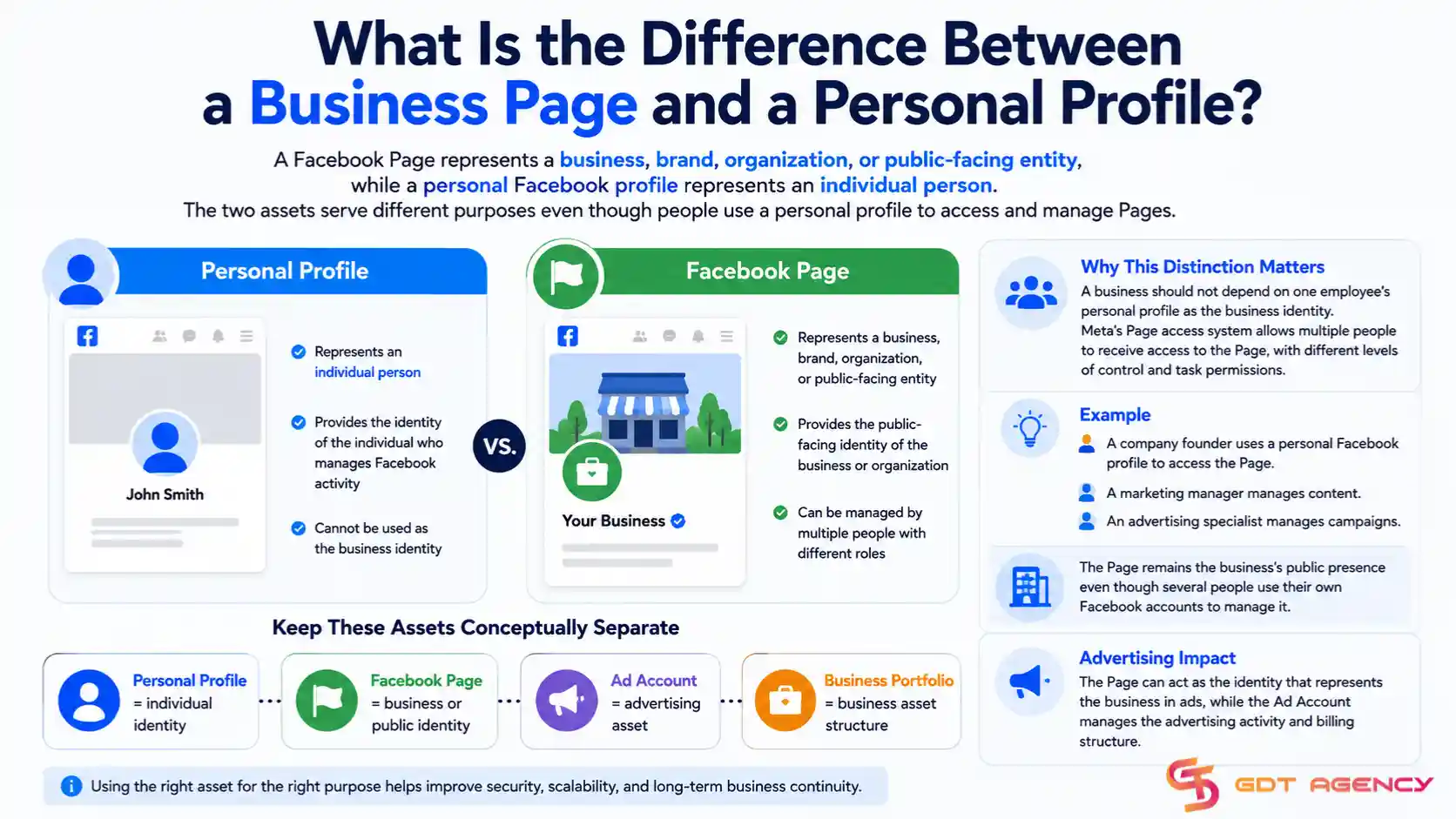
A personal profile provides the identity of the individual who manages Facebook activity. A Facebook Page provides the public-facing identity of the business or organization.
This distinction matters because the business should not depend on one employee's personal profile as the business identity. Meta's Page access system allows multiple people to receive access to the Page, with different levels of control and task permissions.
For example, a company founder may use a personal Facebook profile to access the Page, while a marketing manager manages content and an advertising specialist manages campaigns. The Page remains the business's public presence even though several people use their own Facebook accounts to manage it.
The difference also affects advertising. The Page can act as the identity that represents the business in ads, while the Ad Account manages the advertising activity and billing structure.
Therefore, you should keep these assets conceptually separate:
- Personal profile = individual identity
- Facebook Page = business or public identity
- Ad Account = advertising asset
- Business Portfolio = business asset structure
Can You Change Your Facebook Page Name and Category After Creating It?
Yes, you can change some Facebook Page information after creation, including the Page name and category, but Meta can apply restrictions or review requirements depending on the change.
You should still choose the original Page name carefully. A business should use the name that customers recognize instead of creating a temporary name and planning to replace it later.
You should also choose the initial category carefully because the category should accurately describe the business. If the business changes its focus, you can review whether the Page category should also change.
You should distinguish between a Page name and a Page username. The Page name appears as the primary Page identity, while the username helps create the Page's web address and discoverability. Meta treats these settings separately.
A business should also avoid making frequent identity changes without a clear reason. Consistent branding helps customers recognize the Page and helps the business maintain consistent information across its website, social profiles, and advertising materials.
Can You Create Multiple Facebook Pages for the Same Business?
Yes, a business can use multiple Facebook Pages when each Page serves a legitimate business purpose, such as a different location, brand, product line, market, or audience.
A company with physical locations in several cities may create separate Pages when each location needs its own address, hours, local content, and customer communication. A company with multiple brands may also maintain a separate Page for each brand.
However, multiple Pages create additional management responsibilities. Each Page can require its own content strategy, access permissions, customer messages, and advertising setup.
You should create another Page only when the second Page represents a meaningful difference in business identity or customer experience. A second Page should not simply duplicate the first Page because duplicate Pages can divide followers and create confusion about which Page represents the official business.
For example, an international company may maintain separate Pages for different markets when each market has different languages, locations, products, or customer support channels. The business can then manage those Pages within its broader Meta business structure where appropriate.
You should also keep ownership organized. When multiple Pages exist, the business should document which Business Portfolio owns each Page and which team members have access to each asset.
Who Owns a Facebook Page After You Create It?
The person who creates a Facebook Page does not necessarily represent the long-term business ownership structure. A business can organize the Page within a Business Portfolio and assign access to the people who need to manage it.
This distinction becomes important when a Page is created from a personal Facebook profile and later needs to become part of a formal business setup. Meta's business tools provide workflows for adding an existing Page to a Business Portfolio, requesting shared access, or creating a new Page directly within the business structure.
The business should establish ownership as early as possible when the Page represents a company. This approach reduces dependency on one employee or founder's account.
For example, suppose an employee creates a Page for a company and later leaves the company. The business can face access problems if the Page remains tied to that person's control and no other authorized users have sufficient access.
Meta's Page access system gives people with full control the ability to manage Page access and settings. Meta also warns that giving someone full control gives that person the ability to manage other access and potentially remove people or delete the Page.
The safest structure therefore separates ownership from day-to-day work. The business should control the business assets, while employees and agencies should receive the access required for their tasks.
Final Thought
Creating a Facebook Page for your Ad Account starts with establishing a clear and accurate business identity on Facebook. You should choose the right Page name and category, complete the essential business information, and organize the Page and Ad Account within the appropriate Business Portfolio.
You should also keep the Page, Ad Account, Business Portfolio, and personal Facebook account as separate assets with clearly defined roles. This structure gives your business a cleaner foundation for managing Facebook advertising as your campaigns, team, and advertising needs grow.
FAQs
Do You Need a Personal Facebook Account to Create a Facebook Page?
Yes, you generally need a personal Facebook account to create and manage a Facebook Page. Your personal profile provides your individual identity, while the Page represents your business or brand.
Is Business Verification Required to Run Facebook Ads?
No, Business Verification is not required for every business before it can run Facebook ads. Meta may require verification or additional business information depending on your business, account, industry, or advertising activity.
Can You Create a Facebook Page Without a Website?
Yes, you can create a Facebook Page without a website. You can add your website later, while the Page can still include your business name, description, contact details, profile picture, and other relevant information.
Can You Delete a Facebook Page After Creating It?
Yes, you can delete a Facebook Page if you have the required access. Before deleting it, you should review any connected advertising activity and business assets to avoid disrupting your campaigns or business operations.
Can You Create a Facebook Page for a Brand That You Do Not Own?
No, you should not create a Page that falsely represents a brand or business you do not own or have permission to represent. Agencies and marketing teams can manage a client's Page when the client authorizes the relationship and provides the appropriate access.
Articles in the category Facebook Ads Page Asset
No articles found in this category yet.