


How to Change Your Facebook Ad Account Timezone in 2026


To change the Facebook ad account time zone in 2026, you need to go to Payment Settings in Meta Ads Manager, click “Edit” under Business Info, and choose a new time zone. Keep in mind that you must have admin access to do this. When you confirm the change, Meta usually creates a new ad account instead of updating the current one, since timezone and currency cannot be edited after setup.

How To Change My Facebook Ad Account Time Zone?
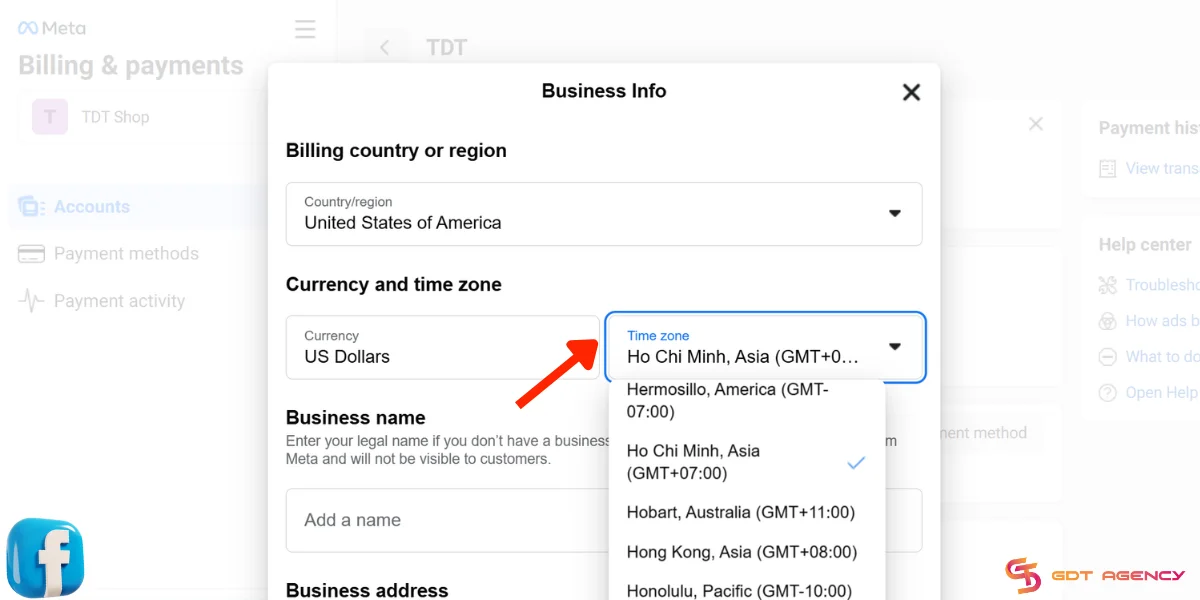
The process to change your Facebook ad account timezone is quite similar to changing the ad account currency, since both settings sit inside Payment and Billing.
However, it’s also essential to note that when you change your time zone, this closes the existing ad account, and ads created with the closed account will stop running. According to the official information released by Meta, you can’t reactivate this account. A new ad account will be created with the new time zone, and you can use this new ad account to run your ads.
Here’s how to change the time zone in Facebook Ads Manager in 2026:
- Go to Facebook (Meta) Ads Manager.
- Select Billing & Payments.
- Open Payment Settings.
- In the Business Info section, hit Edit.
- Change the time zone from the dropdown menu in the Currency and Time Zone section.
- Hit Save.
- Select Create New Account to perform the change.
Does Time Zone Matter In Facebook Ads And Why?
As an expert of GDT Agency who spent more than 5 years working with Facebook ads and Meta ads agency account, I can affirm that time zone plays an important role in Facebook ads, because it can control how ad data is tracked, how performance is reported, and when your budget resets. Using an inaccurate time zone on an ad account can lead to:
- Unmatched data: Discrepancies between time zones in Facebook Ads Manager and other tracking tools, such as Clickbank and Google Analytics, can lead to unmatched data and disrupt the synchronization process.
- Imprecise reporting and analytics: Misaligned time zones make it difficult to report and analyze campaign results precisely. Consequently, companies cannot make the most informed decisions.
- Inaccurate budget resetting: Facebook’s daily ad budget resets at 00:00 in your chosen time zone. Thus, you may not be able to allocate an ad budget and manage spending within 24 hours in the target time zone accurately.
Overall, the time zone on a Facebook ad account can impact its operation in different ways. Thus, knowing how to change Facebook time zone settings is an important skill for businesses looking to expand their markets beyond domestic borders.
Additional Strategies To Optimize Your Ads For Different Time Zones
Now that you know how to update your ad account time zone correctly, it’s crucial to grasp some strategies for optimizing ads across regions.
- Use scheduling: Facebook ad scheduling allows you to set specific times for your ads to be delivered when your potential customers are at their peak activity hours. You can select either using the viewer’s time zone or this ad account’s time zone.
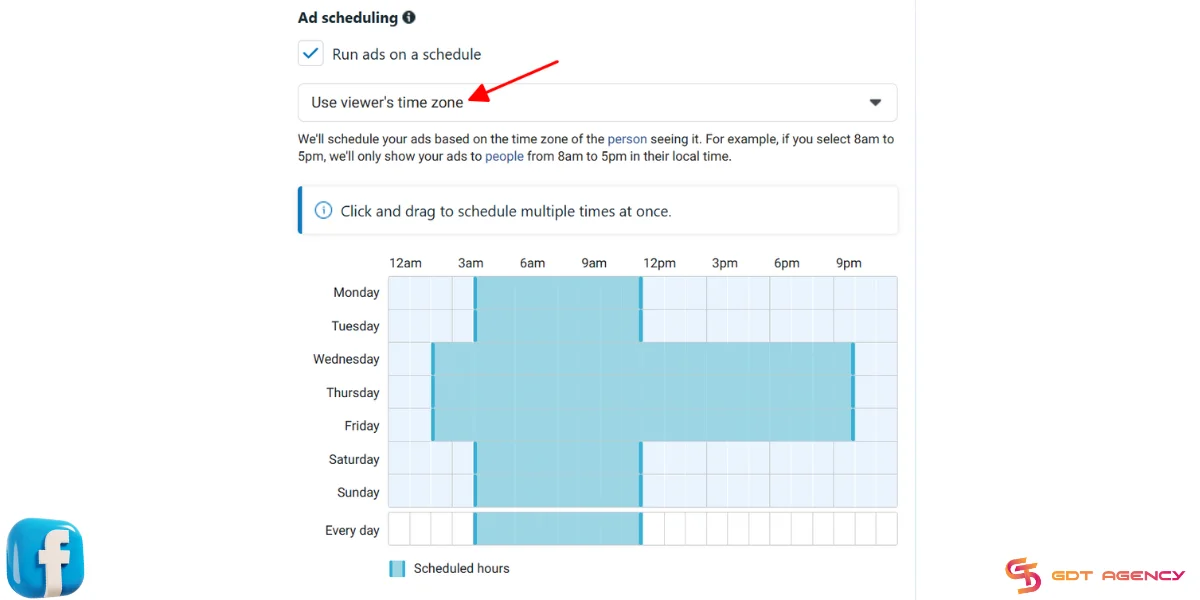
- Test different times: Do A/B tests with different schedules to identify the best timing for your ads. Analyze ad metrics to find when your audiences are the most responsive and set up your scheduling accordingly.
- Optimize content: While technical factors like time zones are still important, content matters the most. Focus on optimizing your ad content to maximize your results.
- Third-party tools: Third-party tools can help with time management for your Facebook ads. For example, Hootsuite allows advertisers to schedule posts and ads for different time zones. AdEspresso offers a variety of testing tools to test different delivery times across regions.
- Monitor and analyze: Regularly monitor and analyze the metrics of your ads to compare performance by time zone and make necessary adjustments.
FAQs
1. Can I change the timezone of an existing Facebook ad account?
No. Meta does not allow direct edits after the account is created.
2. How do I change the ad account timezone?
You go to Payment Settings, open Business Info, click “Edit,” and select a new timezone.
3. What actually happens when I change the timezone?
Meta creates a new ad account with the new timezone and closes the old one.
4. Will my campaigns keep running after the change?
No. All campaigns stop because the old ad account is no longer active.
5. Do I need admin access to change the timezone?
Yes. You must have admin permissions.
6. Will I lose my data or billing history?
No. Your data stays in the old account, but you cannot run ads from it anymore.
7. Is changing timezone similar to changing currency?
Yes. Both follow the same process and require creating a new ad account.
Final Thought
By understanding the importance of Facebook ad account time zones and following our instructions, you can manage the time zone settings of your accounts and make desired changes efficiently. Remember to apply outlined strategies to enhance the effectiveness of your Facebook campaigns and maximize ROI. Follow us, GDT Agency, for more useful advertising guides.

Follow if you find it useful


You can contact us, with our experience in successfully deploying thousands of conversion advertising campaigns, GDT Agency confidently believes we can help you optimize effectiveness and maximize cost savings with advertising operations.

How To Create A Facebook Prepaid Ad Account In 5 Minutes (2026)
A Facebook prepaid ad account is a manual payment account that requires advertisers to add
15/06/2026

Facebook Postpaid Ad Account: How It Works and When You Should Use It
A Facebook postpaid ad account is a billing model that lets advertisers run campaigns first
15/06/2026

Facebook BM2500: What It Really Means And How To Get It 2026
Facebook BM2500, also known as Business Manager 2500, is a high-level Meta Business Manager account
13/06/2026


