How to Fix a Restricted Facebook Ad Account?

A restricted Facebook ad account can be fixed by identifying the restriction type, resolving the root cause, and submitting a formal appeal via Meta’s Account Quality Center or Business Support Home. Most appeals require identity verification and supporting documentation; when submitted correctly, reinstatement typically takes 24 – 72 hours, though severe violations can extend the timeline to several weeks.
The most common cause of a restricted Facebook ad account is a policy violation – running ads that promote prohibited content, using misleading claims, or targeting audiences in ways Meta forbids. However, a failed billing payment or an unverified business identity can trigger the same restriction message, which is why many advertisers are confused when they have not changed anything about their ads. Understanding the specific cause behind your restriction determines which recovery path you take.
In situations where a standard review request is not enough, such as a permanently disabled account or a hack-triggered restriction, the recovery path is different and requires additional steps. This article covers all four scenarios in detail – starting with what account restriction actually means, moving through the causes, the fix process, and finally the edge cases that require a different approach entirely.
- How Do You Fix a Restricted Facebook Ad Account Step by Step?
- How Do You Access Meta Business Support Home to Troubleshoot a Restriction?
- How Do You Submit a Review Request for a Restricted Facebook Ad Account?
- What Identity Verification Steps Does Meta Require to Restore an Ad Account?
- What Are the Common Causes of a Restricted Facebook Ad Account?
- Which Facebook Advertising Policies Most Often Trigger Account Restrictions?
- Can a Failed Payment Cause a Facebook Ad Account Restriction?
- How Long Does It Take Meta to Review a Restricted Ad Account?
- What Happens If Your Facebook Ad Account Is Permanently Disabled and Cannot Be Restored?
- Can You Create a New Facebook Ad Account After a Permanent Disable?
- What Happens to Unused Prepaid Ad Credits When a Facebook Ad Account Is Disabled for 6 Months?
- How Does a Hacked Facebook Account Cause Ad Account Restrictions, and How Do You Recover?
- How Does Renting an Agency Facebook Ad Account Help Advertisers Avoid Restrictions?
- Final Thoughts
- Frequently Asked Questions
- 1. Can I run ads on a different ad account while my restricted account is under review?
- 2. Will Meta notify me when my restricted ad account is reinstated?
- 3. How many times can I request a review for the same restriction?
- 4. Does a restricted ad account affect other ad accounts in my Business Portfolio?
- 5. Can a restricted Facebook ad account still receive incoming messages or organic page activity?
- 6. What is the difference between a restricted ad account and a restricted Facebook personal profile?
How Do You Fix a Restricted Facebook Ad Account Step by Step?
You fix a restricted Facebook ad account by accessing Meta Business Support Home, identifying the specific restriction on your account, resolving the flagged issue, and submitting a formal review request – a process that takes between 5 and 30 minutes to complete and typically receives a response from Meta within 1-7 business days.
The fix process follows a specific sequence. Skipping steps or submitting multiple review requests for the same restriction slows down Meta’s review process and can result in an automatic denial. Follow the steps below in order.
How Do You Access Meta Business Support Home to Troubleshoot a Restriction?
You access Meta Business Support Home by navigating to business.facebook.com/business/help, selecting “Account Overview” from the left navigation panel, and clicking on the restricted ad account listed under your Business Portfolio.
Here is the exact navigation path step by step:
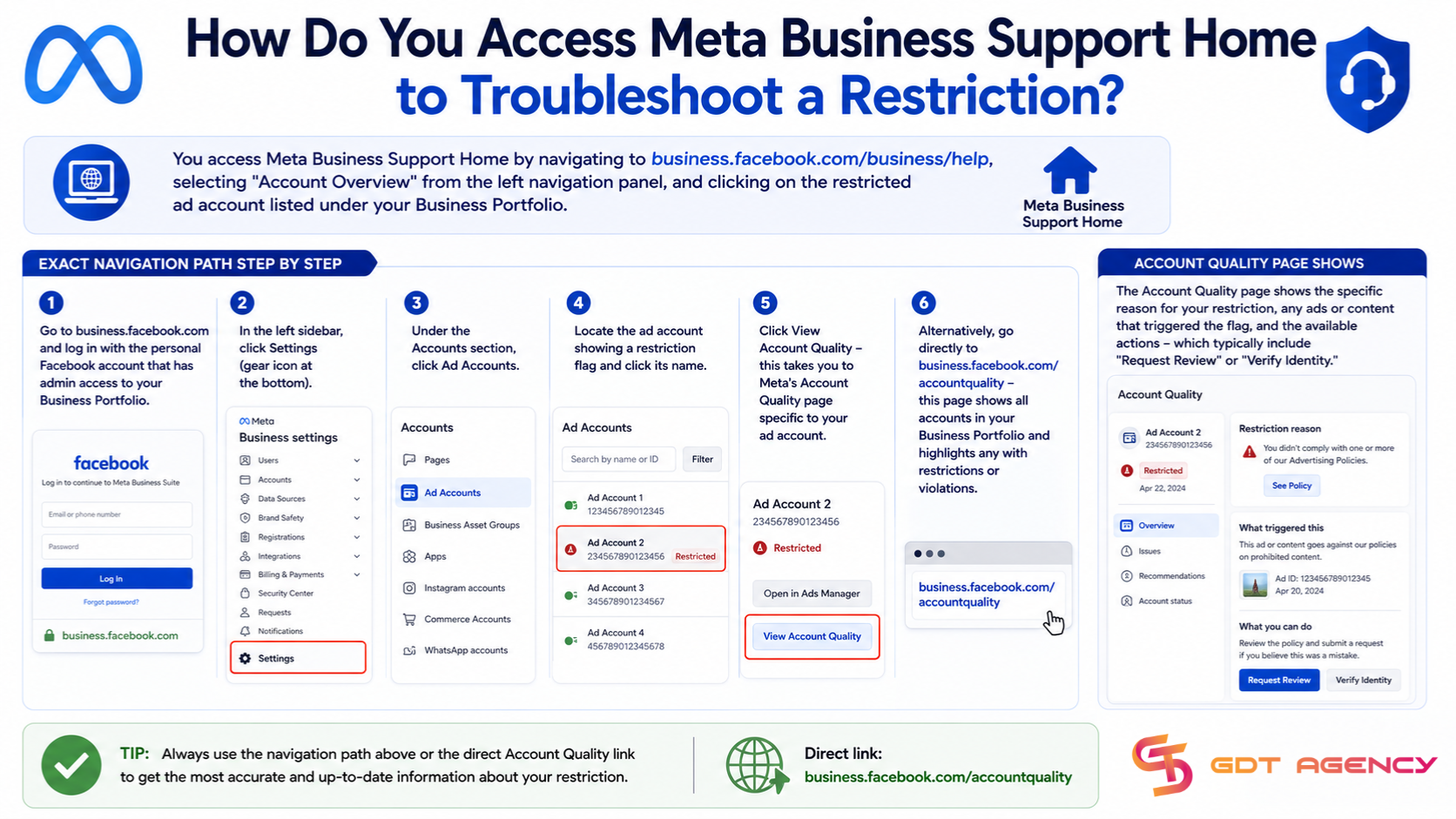
1. Go to business.facebook.com and log in with the personal Facebook account that has admin access to your Business Portfolio.
2. In the left sidebar, click Settings (gear icon at the bottom).
3. Under the Accounts section, click Ad Accounts.
4. Locate the ad account showing a restriction flag and click its name.
5. Click View Account Quality – this takes you to Meta’s Account Quality page specific to your ad account.
6. Alternatively, go directly to business.facebook.com/accountquality – this page shows all accounts in your Business Portfolio and highlights any with restrictions or violations.
The Account Quality page shows the specific reason for your restriction, any ads or content that triggered the flag, and the available actions – which typically include “Request Review” or “Verify Identity.”
How Do You Submit a Review Request for a Restricted Facebook Ad Account?
You submit a review request for a restricted Facebook ad account through the Account Quality page by clicking “Request Review” next to the flagged account, selecting the reason you believe the restriction was applied in error, and confirming the submission – the entire process takes under 5 minutes.
Follow these steps to submit a review request correctly:
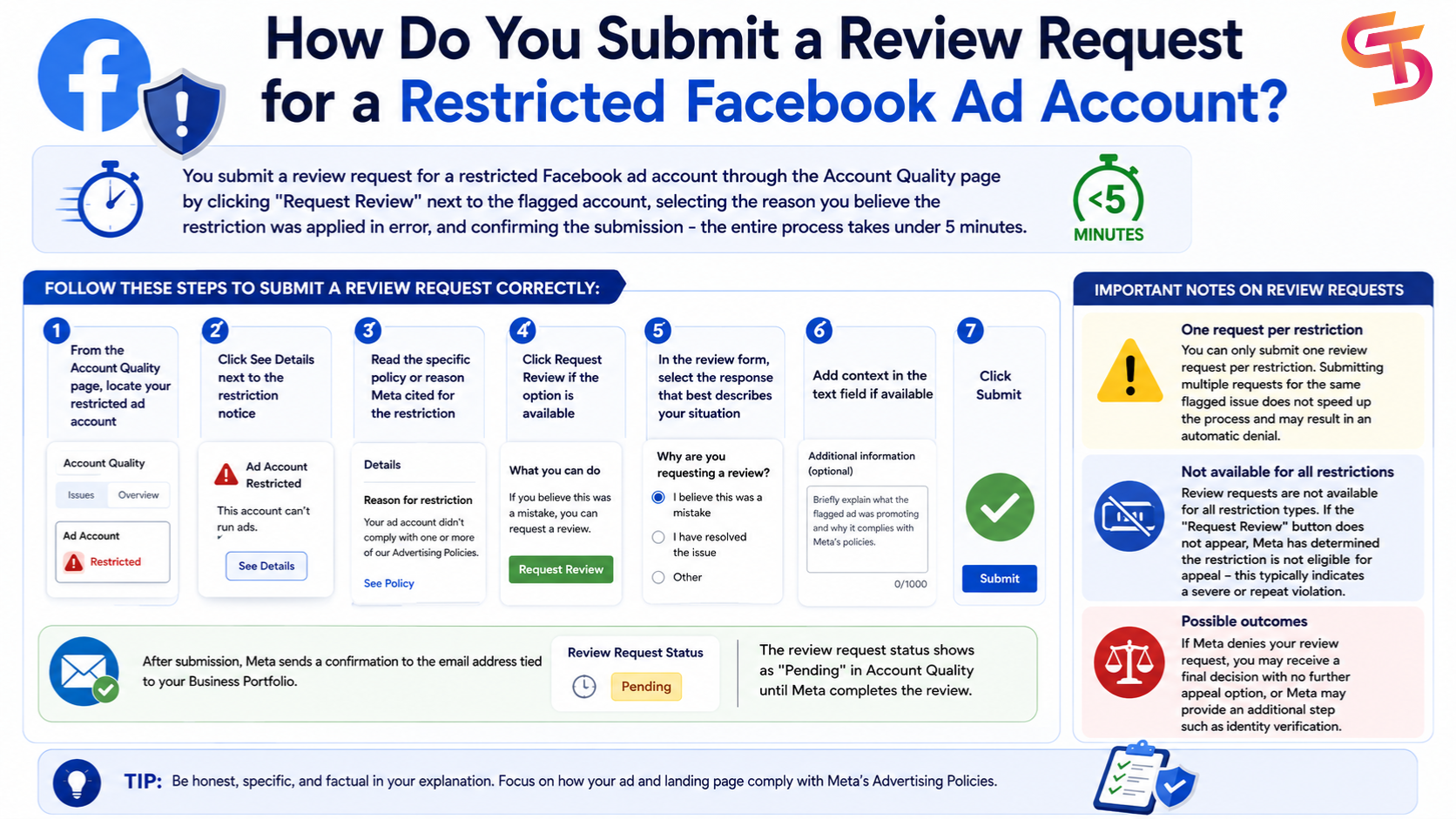
1. From the Account Quality page, locate your restricted ad account.
2. Click See Details next to the restriction notice.
3. Read the specific policy or reason Meta cited for the restriction.
4. Click Request Review if the option is available.
5. In the review form, select the response that best describes your situation – for example, “I believe this was a mistake” or “I have resolved the issue”
6. Add context in the text field if available – briefly explain what the flagged ad was promoting and why it complies with Meta’s policies; keep this factual and specific.
7. Click Submit.
After submission, Meta sends a confirmation to the email address tied to your Business Portfolio. The review request status shows as “Pending” in Account Quality until Meta completes the review.
Important notes on review requests:
- You can only submit one review request per restriction. Submitting multiple requests for the same flagged issue does not speed up the process and may result in an automatic denial.
- Review requests are not available for all restriction types. If the “Request Review” button does not appear, Meta has determined the restriction is not eligible for appeal – this typically indicates a severe or repeat violation.
- If Meta denies your review request, you may receive a final decision with no further appeal option, or Meta may provide an additional step, such as identity verification.
What Identity Verification Steps Does Meta Require to Restore an Ad Account?
Meta’s identity verification process for restricted ad accounts requires you to submit a government-issued photo ID – such as a passport or national ID card – through the Meta Verified ID submission portal, which confirms that the account is managed by a real person and not a fraudulent actor.
As the CEO and Founder of GDT Agency, with years of experience handling thousands of restricted ad accounts, I understand the identity verification requirement appears in two main scenarios: when Meta suspects unauthorized access to your account, or when your Business Portfolio lacks sufficient verification signals for the type of advertising you are running.
The verification process works as follows:
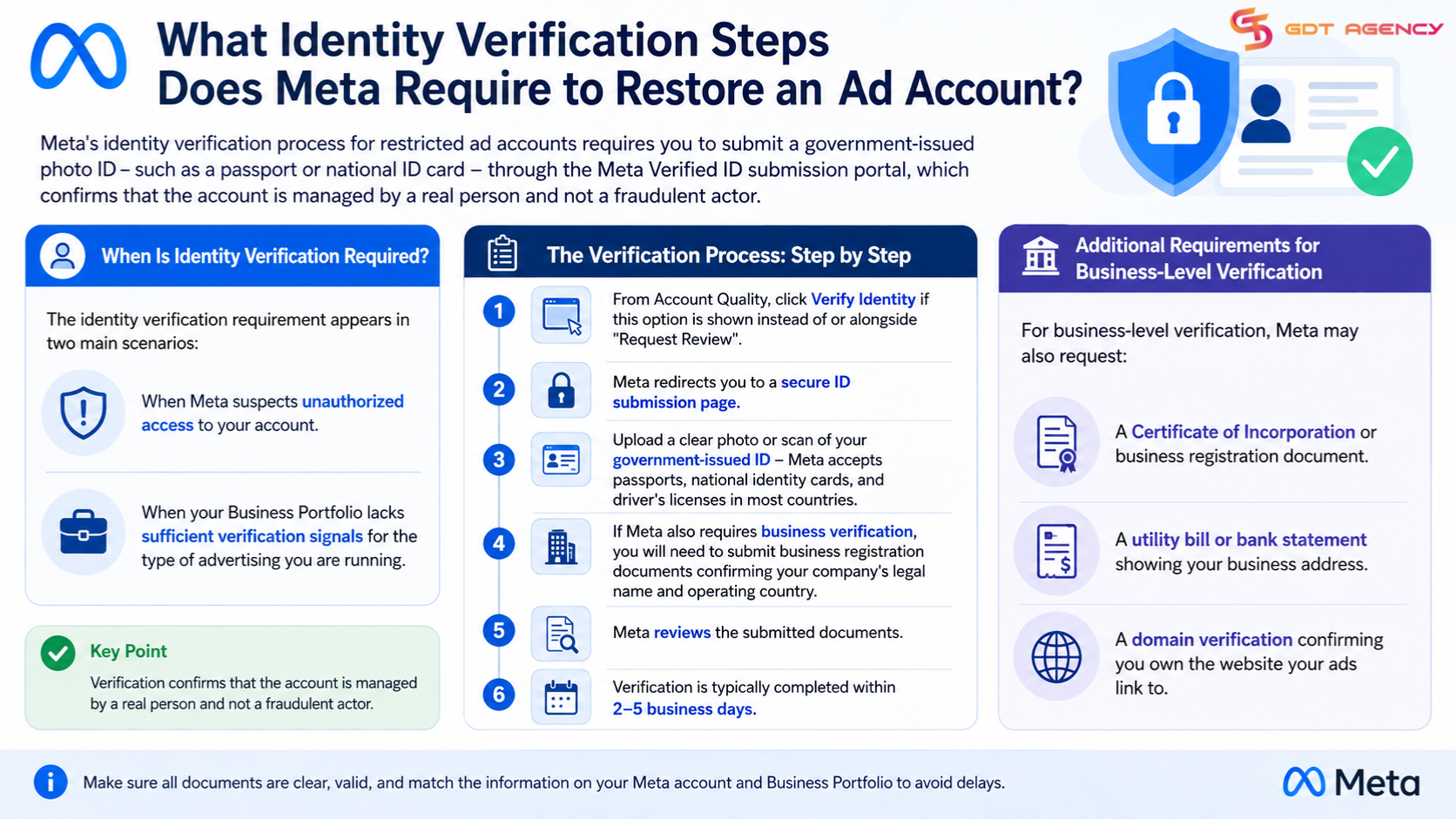
1. From Account Quality, click Verify Identity if this option is shown instead of or alongside “Request Review”
2. Meta redirects you to a secure ID submission page
3. Upload a clear photo or scan of your government-issued ID – Meta accepts passports, national identity cards, and driver’s licenses in most countries
4. If Meta also requires business verification, you will need to submit business registration documents confirming your company’s legal name and operating country
5. Meta reviews the submitted documents and typically completes verification within 2-5 business days
For business-level verification, Meta may also request:
- A Certificate of Incorporation or business registration document
- A utility bill or bank statement showing your business address
- A domain verification confirming you own the website your ads link to
→ If you want a complete understanding of every restriction type, appeal process, recovery timeline, and the difference between restricted and disabled accounts, read our comprehensive guide on Facebook Ad Account Recovery and Restriction.
What Are the Common Causes of a Restricted Facebook Ad Account?
There are 3 main categories of causes behind a restricted Facebook ad account: policy violations related to ad content or targeting, payment and billing failures, and suspicious account activity such as unauthorized access. Each category triggers a different type of restriction message from Meta, and each requires a different resolution path.
Understanding which cause applies to your situation saves significant time. An advertiser whose account was restricted due to a billing failure follows a completely different fix process than one whose ad was flagged for prohibited content.
Which Facebook Advertising Policies Most Often Trigger Account Restrictions?
Facebook advertising policy violations fall into 4 main groups that most commonly trigger account restrictions: prohibited content categories, misleading or deceptive ad claims, targeting policy violations, and landing page policy violations.
Specifically, the policy violations that Meta flags most frequently include:
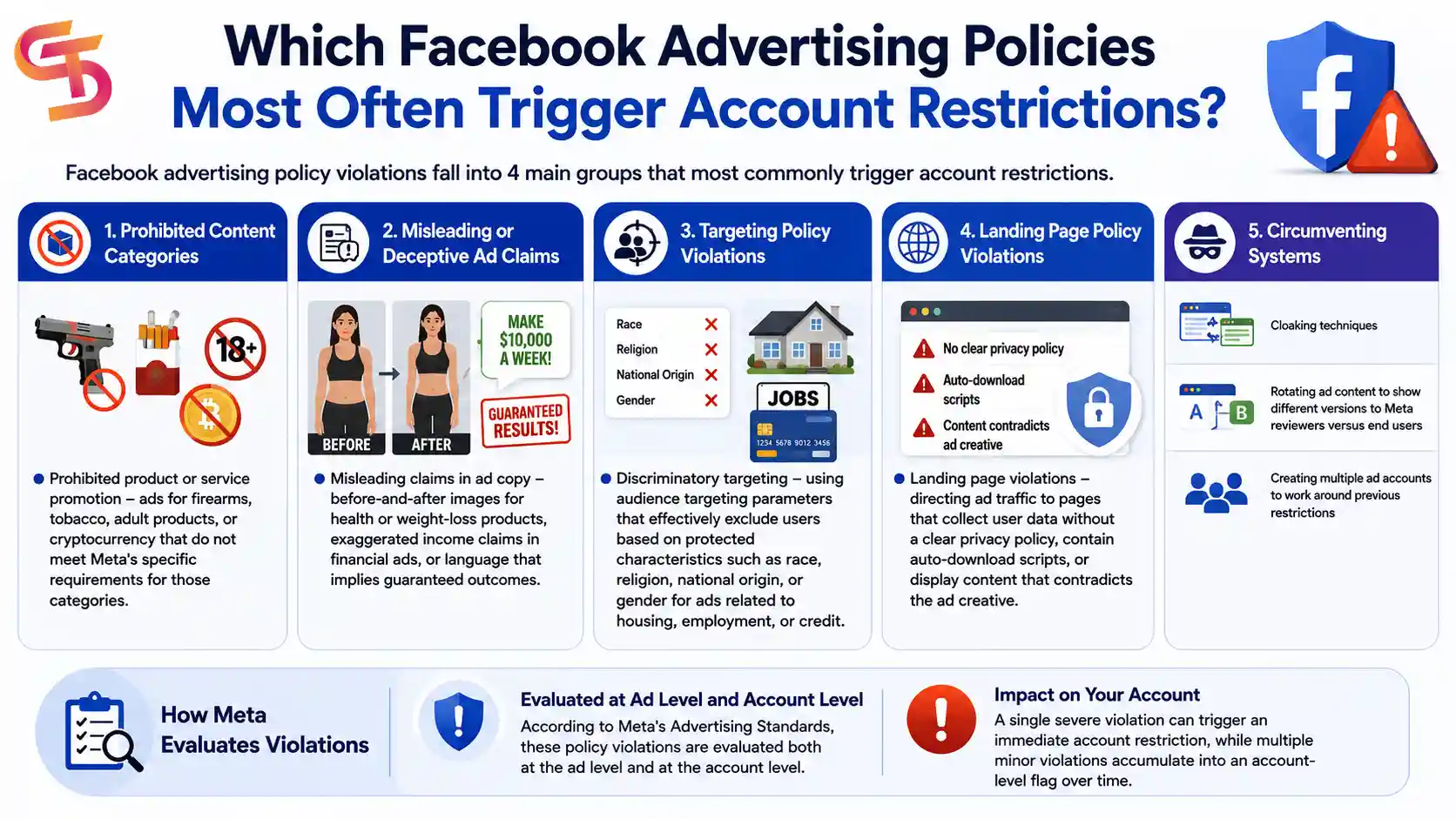
- Prohibited product or service promotion – ads for firearms, tobacco, adult products, or cryptocurrency that do not meet Meta’s specific requirements for those categories
- Misleading claims in ad copy – before-and-after images for health or weight-loss products, exaggerated income claims in financial ads, or language that implies guaranteed outcomes
- Discriminatory targeting – using audience targeting parameters that effectively exclude users based on protected characteristics such as race, religion, national origin, or gender for ads related to housing, employment, or credit
- Landing page violations – directing ad traffic to pages that collect user data without a clear privacy policy, contain auto-download scripts, or display content that contradicts the ad creative
- Circumventing systems – using cloaking techniques, rotating ad content to show different versions to Meta reviewers versus end users, or creating multiple ad accounts to work around previous restrictions
According to Meta’s Advertising Standards, these policy violations are evaluated both at the ad level and at the account level. A single severe violation can trigger an immediate account restriction, while multiple minor violations accumulate into an account-level flag over time.
Can a Failed Payment Cause a Facebook Ad Account Restriction?
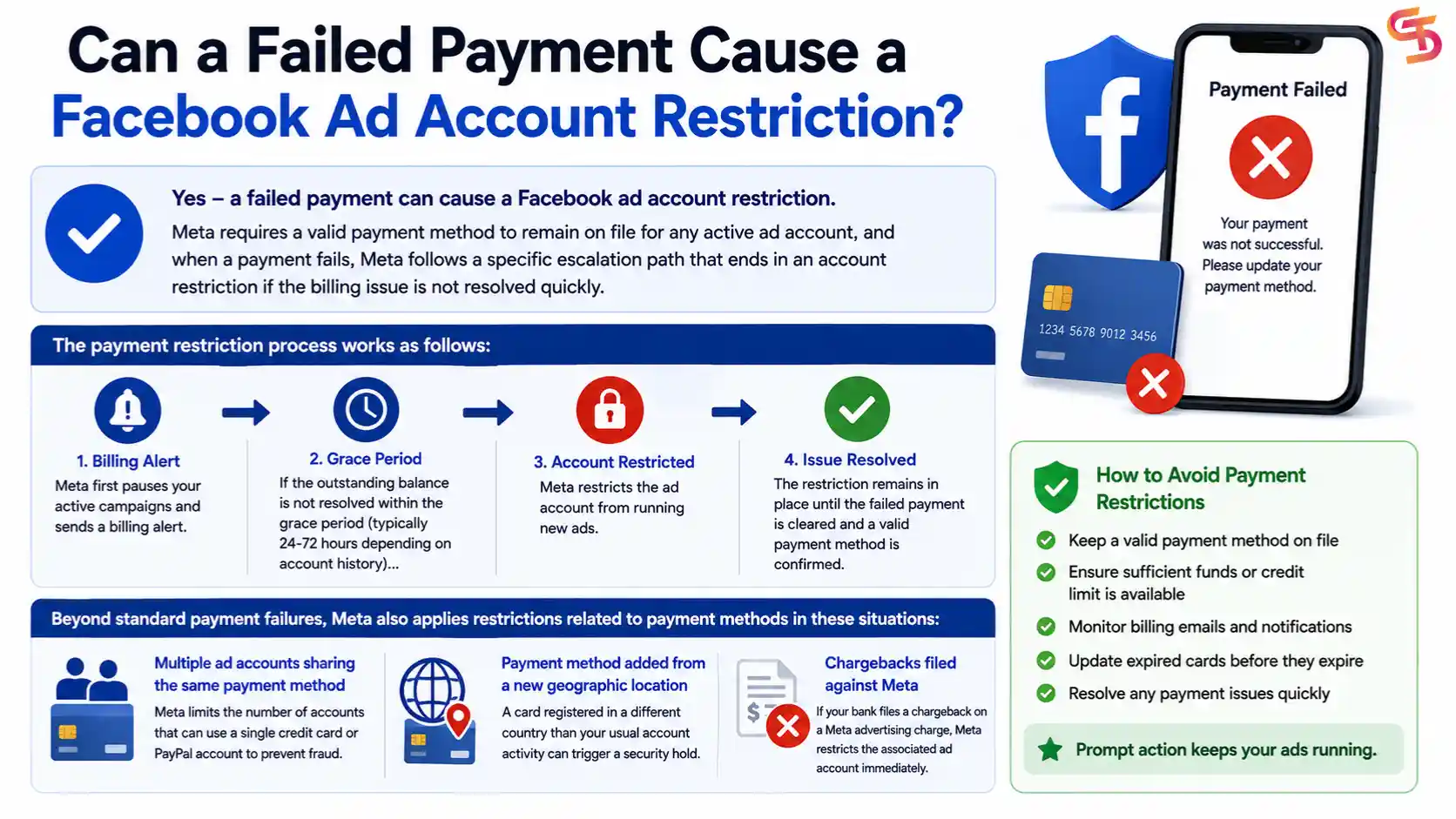
Yes – a failed payment can cause a Facebook ad account restriction. Meta requires a valid payment method to remain on file for any active ad account, and when a payment fails, Meta follows a specific escalation path that ends in an account restriction if the billing issue is not resolved quickly.
The payment restriction process works as follows: Meta first pauses your active campaigns and sends a billing alert. If the outstanding balance is not resolved within the grace period (typically 24-72 hours, depending on account history), Meta restricts the ad account from running new ads. The restriction remains in place until the failed payment is cleared and a valid payment method is confirmed.
Beyond standard payment failures, Meta also applies restrictions related to payment methods in these situations:
- Multiple ad accounts sharing the same payment method – Meta limits the number of accounts that can use a single credit card or PayPal account to prevent fraud
- Payment method added from a new geographic location – a card registered in a different country than your usual account activity can trigger a security hold
- Chargebacks filed against Meta – if your bank files a chargeback on a Meta advertising charge, Meta restricts the associated ad account immediately
How Long Does It Take Meta to Review a Restricted Ad Account?
Meta typically takes between 24 hours and 7 business days to review a restricted ad account, with the actual timeline depending on the type of violation flagged, the completeness of the information submitted in the review request, and current review queue volumes at Meta’s support team.
Simple restrictions – such as a billing failure that has been resolved or a first-time content flag on a minor policy issue – often receive a response within 24-48 hours. More complex cases involving identity verification, Business Portfolio-level restrictions, or repeat violations take longer, sometimes up to 14 business days.
The following factors affect how long your review takes:
- Type of restriction – payment-related restrictions resolve faster than policy violation reviews, which require a human reviewer to assess your ad content against Meta’s Advertising Standards
- Completeness of your submission – review requests that include a specific, factual explanation of why your ad complies with Meta’s policies move faster than blank submissions
- Account history – accounts with no previous violations tend to receive faster and more favorable reviews than accounts with a history of flagged content
- Volume at Meta Support – during high-traffic periods such as Q4, Meta’s review queues are longer, and response times increase.
While your review is pending, do not create a new ad account to replace the restricted one. Meta’s systems link ad accounts within the same Business Portfolio and to the same personal Facebook profile. Opening a new account while a review is pending is treated as an attempt to circumvent the restriction and can result in the new account being restricted immediately.
→ If you want a complete understanding of every restriction type, appeal process, recovery timeline, and the difference between restricted and disabled accounts, read our comprehensive guide on Facebook Ad Account Recovery and Restriction.
What Happens If Your Facebook Ad Account Is Permanently Disabled and Cannot Be Restored?
If Meta permanently disables your Facebook ad account with no reinstatement path, your remaining options are to verify whether a Business Portfolio-level appeal is possible, create a new ad account under a clean Business Portfolio if Meta’s policies permit it, or use an agency-managed ad account to continue advertising operations. A permanent disable with no review option available means Meta has classified the account as ineligible for advertising and will not reverse that decision through the standard appeal process.
This situation is different from a standard restriction. Meta communicates a permanent disable with language such as “This ad account has been disabled and is not eligible for reinstatement” in the Account Quality notification. When this message appears without a “Request Review” button, the account has reached the end of Meta’s enforcement process.
Can You Create a New Facebook Ad Account After a Permanent Disable?
You can create a new Facebook ad account after a permanent disable only if the disable was applied at the individual ad account level and not at the Business Portfolio or personal profile level. If Meta has restricted your Business Portfolio or flagged your personal Facebook profile, any new ad accounts you create within the same Business Portfolio will inherit the restriction automatically.
Before creating a new account, check the following:
- Go to Account Quality and check whether the restriction shows on the ad account only or on the Business Portfolio as a whole.
- If the Business Portfolio is restricted, creating a new ad account within it will not work – the new account receives the same restriction immediately.
- If only the individual ad account is disabled, you can create a new ad account within the same Business Portfolio, subject to Meta’s account creation limits (typically 1-2 ad accounts for new Business Portfolios, up to 25 for established ones with billing history).
Creating a new personal Facebook account and a new Business Portfolio solely to work around a permanent disability violates Meta’s Terms of Service. Meta’s systems detect shared billing information, device fingerprints, IP addresses, and pixel data that link the new account back to the disabled one.
What Happens to Unused Prepaid Ad Credits When a Facebook Ad Account Is Disabled for 6 Months?
Unused prepaid ad credits in a disabled Facebook ad account are permanently forfeited if the account remains ineligible for reinstatement for 6 consecutive months. Meta’s Advertising Standards state explicitly that prepaid services – including ad credits purchased in advance – are non-refundable once the account they are tied to reaches 6 months of ineligibility.
This policy applies specifically to prepaid credits, not to standard postpaid billing. If your ad account operated on a credit line or a monthly invoicing model, the outstanding balance works differently – Meta will still collect any amount owed, but no further charges are applied to a disabled account.
If you have a significant prepaid credit balance on a recently disabled account, submitting your review request quickly is important. The 6-month clock starts from the date of the disable notice, not from the date you become aware of it.
How Does a Hacked Facebook Account Cause Ad Account Restrictions, and How Do You Recover?
A hacked Facebook account causes ad account restrictions when the unauthorized user runs ads that violate Meta’s policies, depletes the ad account billing threshold, or triggers security alerts through unusual login activity – and Meta restricts the ad account as a security response even though the legitimate account owner did not cause the violation.
This scenario requires a two-track recovery process running simultaneously:
Track 1 – Secure the account:
1. Use Meta’s Hacked Account Recovery tool at facebook.com/hacked to report unauthorized access
2. Change your Facebook password immediately from a trusted device
3. Enable two-factor authentication on your personal Facebook account
4. Review and remove any unrecognized admin users from your Business Portfolio under Settings – People
5. Remove any unrecognized apps or integrations connected to your Business Portfolio
Track 2 – Appeal the ad account restriction:
1. Go to Account Quality and document that the policy-violating ads were created during unauthorized access
2. Submit a review request explaining the hack and referencing the account recovery report you filed
3. Include the approximate dates of unauthorized access so Meta’s review team can cross-reference the suspicious ad activity against the hack timeline
4. If Meta requires identity verification as part of the review, complete it – this confirms to Meta that a legitimate owner is now in control of the account
Recovery from a hack-triggered restriction takes longer than a standard review because Meta must verify both the security incident and the policy violation separately. Expect a 7-14 business day timeline in most cases.
How Does Renting an Agency Facebook Ad Account Help Advertisers Avoid Restrictions?
Renting a Facebook agency ad account helps advertisers avoid restrictions because agency-managed accounts operate under an established Business Portfolio with a verified billing history, strong account trust signals, and direct Meta Business Manager access – factors that significantly reduce the likelihood of automatic flags and policy holds compared to a new or individual-managed ad account.
Advertisers who have experienced repeated account restrictions often turn to agency ad account rental as a more stable advertising infrastructure. An agency account from a verified provider carries account-level credibility that takes years to build individually – including spending history, a clean violation record, and in some cases, a dedicated Meta account representative.
For advertisers running high-volume campaigns, advertising in restricted categories such as financial products or supplements, or operating in markets where Meta’s automated review system flags content more aggressively, agency ad account access provides a more reliable foundation than managing a standalone account.
GDT Agency provides agency-level Facebook ad account rental with verified Business Manager access for advertisers across multiple markets. Renting through an established agency account means your campaigns run under an account infrastructure that Meta’s system treats as high-trust, reducing the risk of the sudden restrictions that interrupt individual advertiser accounts.
Final Thoughts
A restricted Facebook ad account is a solvable problem for most advertisers – the key is identifying the exact cause before taking any action. A billing failure needs a different fix than a policy violation, and a hack-triggered restriction requires a two-track recovery that a standard review request alone will not resolve.
The single most common mistake advertisers make is submitting multiple review requests for the same restriction or creating a new ad account before the review completes. Both actions slow down Meta’s process and can turn a recoverable restriction into a permanent disable.
If your account cannot be reinstated through Meta’s standard review process, agency ad account rental is the most practical path to continuing your advertising operations without rebuilding account trust from scratch. Established agency accounts carry the billing history and verification signals that new accounts take months to develop.
The earlier you act after a restriction notice, the better your outcome. Start at Meta Business Support Home, document everything you submit, and follow the steps in order.
Frequently Asked Questions
1. Can I run ads on a different ad account while my restricted account is under review?
Yes, if you have a separate ad account under a different Business Portfolio that is not linked to the restricted one. However, creating a new ad account within the same Business Portfolio while a review is pending can signal circumvention to Meta and complicate your case.
2. Will Meta notify me when my restricted ad account is reinstated?
Yes. Meta sends an email notification to the address tied to your Business Portfolio when a review decision is made. You can also check the status directly in Account Quality at any time – the status changes from “Pending” to either “Reinstated” or “Not Eligible for Reinstatement.”
3. How many times can I request a review for the same restriction?
Once. Meta allows one review request per restriction. If Meta denies your first request, you may receive an option to submit additional documentation in some cases, but there is no unlimited appeal process. This is why submitting a complete, specific explanation on the first attempt matters.
4. Does a restricted ad account affect other ad accounts in my Business Portfolio?
It depends on the severity. A restriction applied to a single ad account does not automatically restrict other accounts in your Business Portfolio. However, if Meta elevates the enforcement to the Business Portfolio level – typically for repeat or severe violations – all ad accounts within that portfolio are affected.
5. Can a restricted Facebook ad account still receive incoming messages or organic page activity?
Yes. An ad account restriction only affects paid advertising functions. Your Facebook Page, organic posts, Messenger inbox, and Instagram profile connected to the same Business Portfolio continue to operate normally during an ad account restriction.
6. What is the difference between a restricted ad account and a restricted Facebook personal profile?
A restricted ad account limits your ability to run paid ads but leaves your personal profile and Business Portfolio intact. A restricted personal profile is a separate enforcement action that affects your ability to log in, post, or manage any Business assets tied to that profile – including all ad accounts you administer. If your personal profile is restricted, recovering it takes priority over the ad account appeal.