


How To Get The Facebook Ad Account ID In 4 Easy Ways 2026


When you advertise on Facebook, your ad accounts are given unique ID numbers. Facebook ad account ID is a unique 13 – 16 digit numerical identifier (often prefixed with “act_”) that acts as a digital fingerprint for your specific advertising account. So how to get the Facebook ad account ID? You can easily find it in the account drop-down menu in Meta Ads Manager, your browser’s address bar in Ads Manager, or in Business Settings.
Key Takeaways:
- Facebook ad account ID is a unique 13 – 16 digit numerical identifier (often prefixed with “act_”) that acts as a digital fingerprint for your specific advertising account.
- Advertisers can seek the Ad Account ID via the account drop-down menu in Meta Ads Manager, your browser’s address bar in Ads Manager, Business Settings, and Business Support Home.
- The Facebook ad account ID can be used to add an ad account to the Business portfolio or to get support from Facebook for problems like an account being disabled or restricted.
How To Get The Facebook Ad Account ID In Your Browser’s Address Bar
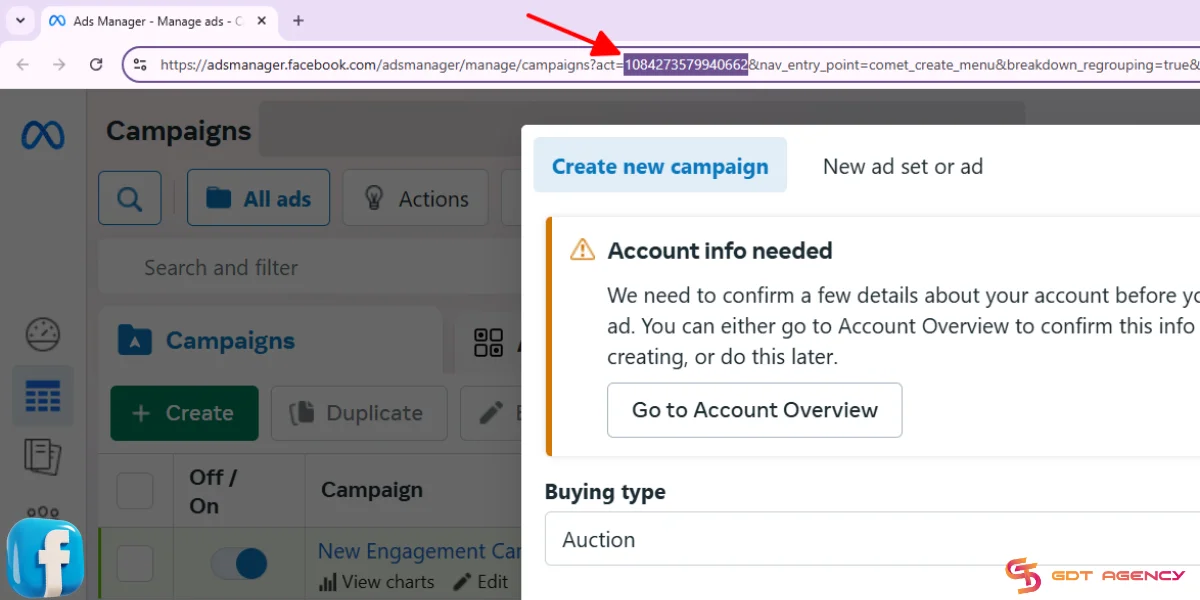
The shortest route to find your ad account ID on Facebook is to look it up in your browser’s address bar. As an expert at GDT Agency who has spent more than 5 years working with Facebook ads, here are the steps I often apply to get a Facebook ad account ID:
- Step 1: Go to Meta Ads Manager.
- Step 2: Find the number in your browser’s address bar. If you have trouble locating your ad account ID in the address bar, look for “act=” in the URL.
How To Get The Ad Account ID In Facebook Ads Manager
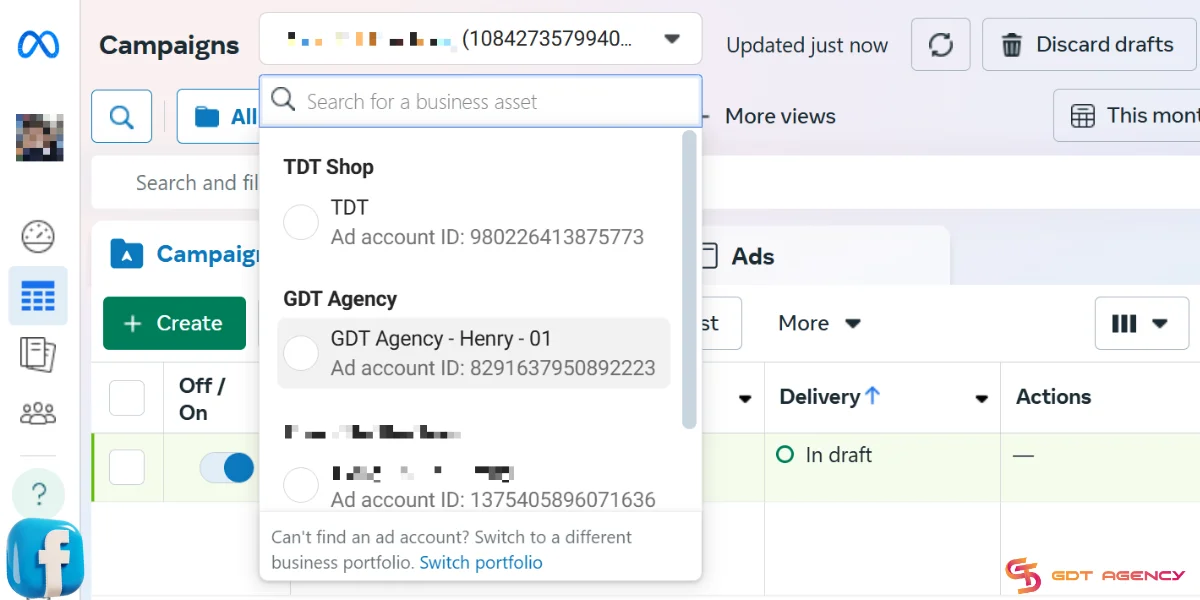
You can also find the ID number of an ad account in Ads Manager. If you have several ad accounts, do as follows:
- Access Ads Manager.
- Open the account dropdown menu at the top left of the dashboard.
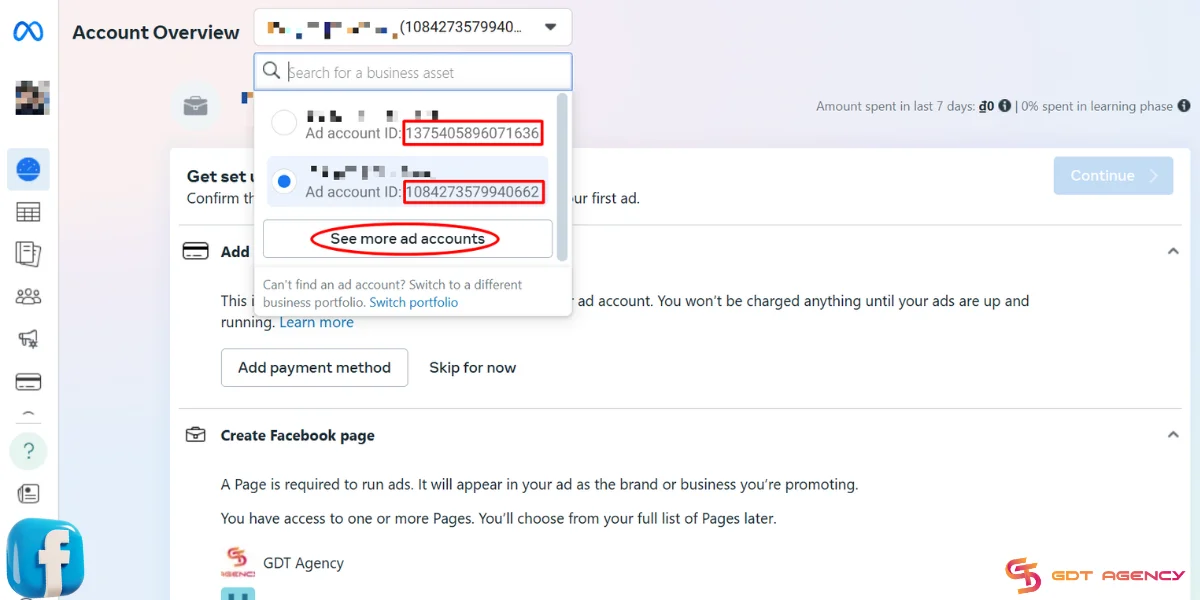
- Switch to the ad account you want to get the ID. You can click See more ad accounts to find it.
- You can view the ID number next to your ad account name.
How To Locate The Ad Account ID In Facebook Business Settings
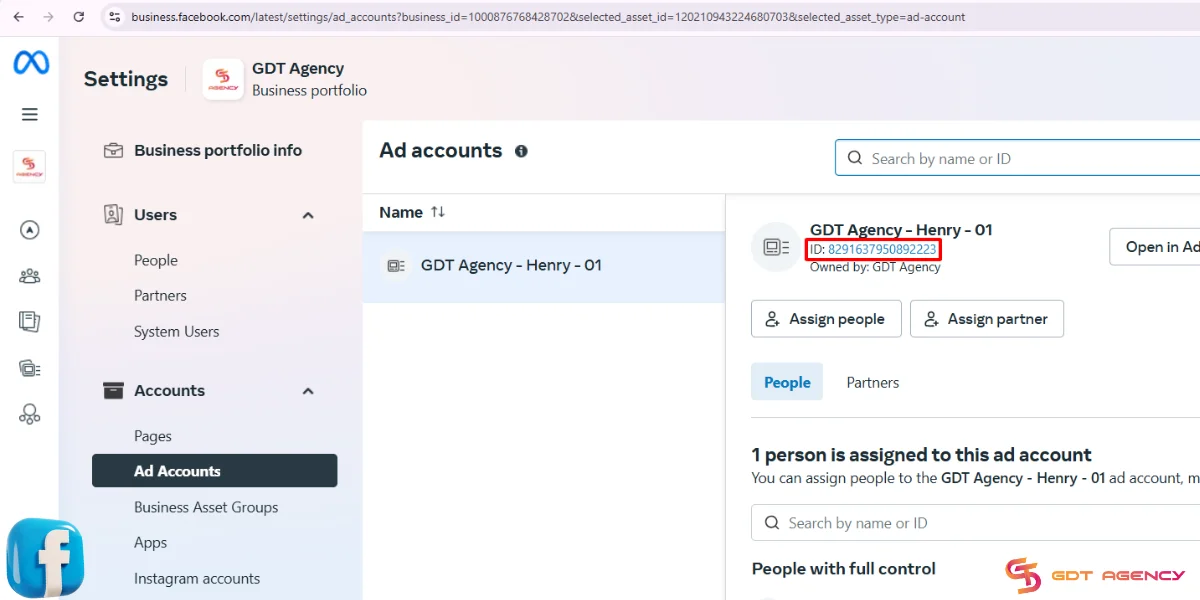
You can locate business ad accounts’ ID numbers in Meta Business Settings.
- From Ads Manager, select All Tools > Business Settings.
- Select Ad Accounts under the Accounts section.
- Tap the ad account to view its details, including name, ID, owner, etc.
- The ad account ID is highlighted in blue. You can click to copy it.
How To Find The Facebook Ad Account ID In Business Support Home
Last but not least, don’t miss Business Support Home. This is the center to monitor and troubleshoot all your Facebook ad assets, from your Facebook account, business manager accounts, ad accounts, pages, etc.
Here’s how to access the Business Support Home page.
- In Ads Manager, select All Tools > Business Support Home.
- Tap the ad account.
- The ad account ID is at the top left of the screen.
- You can also switch ad accounts in the dropdown menu at the top right.
What Is Your Facebook Ad Account ID Used For?
Every Facebook ad account has a unique ID that helps Meta identify and manage your advertising activity. This number works behind the scenes, but it plays an important role in how your campaigns run and how your account connects with other tools.
Get Facebook support
Your Facebook Ad Account ID acts as the main reference for managing your advertising activities. It gives you access to account data when you contact Facebook support about issues or campaign problems.
Support teams usually ask for this ID first to find your account in their system, especially when handling issues like billing errors, delivery problems, or unusual activity.
Connect Tools Like Pixels, Apps, Or Third-Party Platforms
Ad Account IDs help connect your Facebook ads with third-party tools like analytics platforms, CRM systems, and marketing software. These tools use your ID to sync data and manage campaigns, so you can track and optimize performance across different channels.
Share Account Access with Team Members or Partners
For businesses that work with agencies or consultants, the Ad Account ID also makes access sharing simple and secure. You can grant specific permissions without sharing login details, which keeps your account safe while allowing teams to manage campaigns together.

FAQs
1. What is a Facebook Ad Account ID?
A Facebook Ad Account ID is a unique 15 or 16-digit identification number assigned to every advertising account on Meta. It is used by Facebook’s system to track billing, permissions, and specific campaign data.
2. Where can I find my Ad Account ID?
You can find your ID in three main places:
- Ads Manager: Look at the URL in your browser address bar; the number following `act=` is your Account ID.
- Account Dropdown: Click on the account name menu in the top left corner of Ads Manager; the ID will be listed under the account name.
- Business Settings: Go to Business Manager > Accounts > Ad Accounts. The ID will be displayed in the center column.
3. Is my Ad Account ID the same as my Business Manager ID?
No. A Business Manager ID identifies the overall business “umbrella” that owns various assets, while an Ad Account ID identifies the specific workspace used to run ads. One Business Manager can own multiple Ad Account IDs.
4. Can I change my Facebook Ad Account ID?
No, an Ad Account ID is permanent. Once an account is created, the ID cannot be modified or transferred. If you need a different ID for organizational purposes, you must create a new ad account within your Business Manager.
5. Why do I need to provide my Ad Account ID to an agency?
Agencies like GDT Agency require your Ad Account ID to request formal access through their Business Manager. Providing the ID allows them to manage your campaigns, optimize performance, and handle technical issues without needing your personal login credentials.
6. Is it safe to share my Ad Account ID?
Sharing your ID is generally safe, as it is only a reference number. However, you should only provide it to trusted partners or tools. Knowing the ID alone does not give someone access to your account; you must still manually approve any access requests in your Business Settings.
7. Can I have multiple Ad Account IDs?
Yes. Depending on your Business Manager’s limit (which increases as you spend more and follow Meta’s policies), you can create multiple ad accounts. This is useful for managing different websites, currencies, or separate lines of business.
Final Thoughts
Whether you want to get access to another ad account or submit a request to Facebook ad support, knowing how to get the Facebook ad account ID is essential. Hope that this beginner’s guide with these detailed and easy ways can help you easily find your account ID.
If you have any questions, need additional help, or are interested in Facebook agency ad account, feel free to contact GDT Agency. Our expert team with seasoned experience is always ready to help you achieve your business marketing goals.

Follow if you find it useful


You can contact us, with our experience in successfully deploying thousands of conversion advertising campaigns, GDT Agency confidently believes we can help you optimize effectiveness and maximize cost savings with advertising operations.

How To Create A Facebook Prepaid Ad Account In 5 Minutes (2026)
A Facebook prepaid ad account is a manual payment account that requires advertisers to add
15/06/2026

Facebook Postpaid Ad Account: How It Works and When You Should Use It
A Facebook postpaid ad account is a billing model that lets advertisers run campaigns first
15/06/2026

Facebook BM2500: What It Really Means And How To Get It 2026
Facebook BM2500, also known as Business Manager 2500, is a high-level Meta Business Manager account
13/06/2026


