


Step-by-Step to Change Facebook Ad Account Currency in 2026


You can change your Facebook ad account currency through Payment Settings, but Meta does not actually modify the existing account. Instead, the system creates a new ad account with the new currency and shuts down the old one. This process only works if your balance is cleared, is limited to once every 60 days, and is not available for invoiced accounts, so in practice, it works the same as creating a new ad account and switching over.

Before You Change Facebook Ad Account Currency
Before you start the process, you need to understand a few rules that Meta enforces at the account level. These conditions decide whether you can change your currency at all.
- According to the official information released by Meta, you can only change your currency once every 60 days, and your ad account must have no outstanding balance at the time of the request. If you still owe money, Meta will not allow the change.
- You must have admin access to the ad account to manage payment settings. Without admin permissions, you cannot edit business information or trigger the currency update.
- Your available payment methods depend on the currency you choose, so you should confirm that your preferred method works with the new currency before making the switch, because it can affect how you run ads later.
- In some countries like Brazil, India, and Poland, Meta requires your business country and currency to match. This rule is strict, and Meta does not allow mismatches in these regions.
- If you select the wrong country or currency during account creation, you may not be able to fix it later. For example, you cannot switch to Brazil or use BRL if your account was not originally set up that way.
Step-by-Step To Change Facebook Ad Account Currency In 2026
As an expert at GDT Agency who has spent more than 5 years working with Facebook ads and Facebook agency ad account, I understand that changing your Facebook ad account currency in 2026 looks simple, but the process works differently than most advertisers expect.
You do not update the existing account. You trigger Meta to create a new ad account with the new currency and phase out the old one. That means you need to follow the steps carefully and prepare for a short transition to avoid billing issues or campaign disruption.
Step 1: Go to Your Payment Settings in Ads Manager.
You need to open Ads Manager and go to Billing or Payment Settings.

Then, click Payment Settings on the next window. Then you find the Business Info section where your currency and time zone sit.

This step matters because Meta only allows currency changes from this section. You cannot change it from the campaign or account overview pages.
Step 2: Edit Business info
You click Edit next to Business Info.

Under Currency and Time Zone, you can change the currency by clicking on the Currency section and selecting the new one from the dropdown menu.

Then scroll to the end and click Save.

This step triggers the core process. Meta prepares to generate a new ad account instead of modifying the existing one. Many advertisers miss this and expect a simple update.
Step 3: Confirm and Let Meta Create a New Account
As soon as you save the change, a warning from Facebook will appear, saying: Updating your currency requires a new ad account. It also warns that all ads created with your current ad account will stop running.
You confirm the change and save it. Meta creates a new ad account with the selected currency and closes the old one for future spending.

This step works this way because billing systems need consistency. A single ad account cannot mix currencies without breaking reporting and invoicing logic.
Step 4: Move Assets to the New Ad Account
You move your campaigns, pixels, custom audiences, and creatives to the new account. You reconnect tracking and verify events before launching ads again.
This step protects your performance data. If you skip proper migration, you risk losing tracking accuracy and optimization history.
Step 5: Set Up Billing Again
When you change your Facebook ad account’s currency, the available payment methods for your account may also change, based on the new currency you choose. Therefore, you should add your payment method to the new ad account and review billing settings. You clear any remaining balance in the old account.
Here are the payment methods that Facebook accepts for different currencies.
| Currency | Payment methods |
| US dollars | Visa Mastercard Discover Card American Express PayPal |
| Euros | Visa Mastercard American Express PayPal |
| Japanese yen | Visa Mastercard American Express JCB PayPal |
| Other currencies | Visa Mastercard American Express |
This step matters because payment methods and balances do not transfer. Your ads will not run if billing is incomplete.
>>> If you need a clear walkthrough, follow this guide on how to add a payment method to your Facebook ad account.
Change Facebook Ad Account Currency: Important Notes In 2025
A change in currency is irreversible and can leave lasting impacts on your ad account and ad campaigns. You should be aware of these cautions:
Your current ad account will be closed
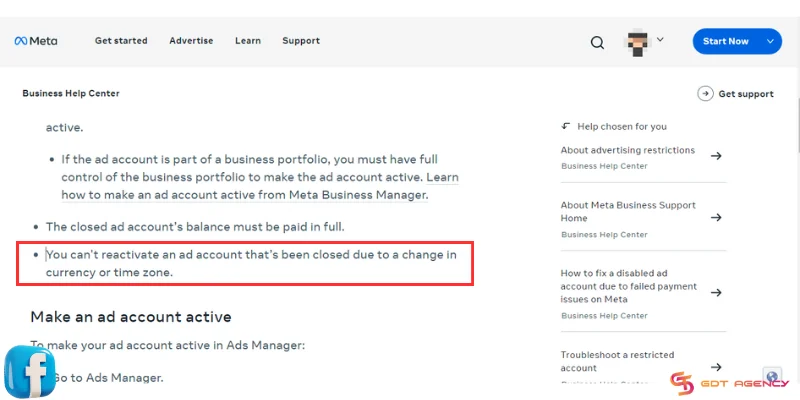
According to Facebook, when you update your currency or country/region, the way you’re taxed will be changed. Therefore, Facebook needs to close the existing ad account and create a new ad account for you.
An ad account closed due to a change in currency couldn’t be reactivated by any means. You can still view it, but you can’t create or run ads with the old ad account anymore.
Your existing advertising campaigns will stop
When you change Facebook ad account currency, all ads created with the old ad account will cease.
If you want to keep on winning ads with the current ad account, it would be wise to create a new ad account with the desired currency in your business portfolio.
FAQs
1. Can I change my ad account currency directly?
No, you cannot edit the currency of an existing ad account. Meta creates a new ad account with the new currency and stops the old one from running ads.
2. How often can I change my currency?
You can request a currency change once every 60 days. Meta will block any request made before that limit.
3. Do I need to clear my balance before changing currency?
Yes, your ad account must have no outstanding balance. Meta will not allow the change if you still owe money.
4. Will my campaigns and data transfer automatically?
No, Meta does not move your campaigns or assets automatically. You need to manually transfer your pixels, audiences, and creatives.
5. Do payment methods transfer to the new account?
No, you need to add a payment method again in the new ad account. Billing details do not carry over.
6. Can I change currency if I use monthly invoicing?
No, Meta does not allow currency changes for invoiced accounts. You need to create a separate ad account instead.
Conclusion
While advertisers can change Facebook ad account currency easily in several steps, it’s crucial to approach these alters with a strategic mindset. By understanding the implications, following the outlined steps meticulously, and paying attention to platform limitations, you can ensure a smooth transition to an appropriate currency and optimize your international advertising efforts. And don’t hesitate to reach out to GDT Agency if you encounter any troubles during the process. Our expert team is always ready to assist you in the journey to success with Facebook advertising.

Follow if you find it useful


You can contact us, with our experience in successfully deploying thousands of conversion advertising campaigns, GDT Agency confidently believes we can help you optimize effectiveness and maximize cost savings with advertising operations.

How To Create A Facebook Prepaid Ad Account In 5 Minutes (2026)
A Facebook prepaid ad account is a manual payment account that requires advertisers to add
15/06/2026

Facebook Postpaid Ad Account: How It Works and When You Should Use It
A Facebook postpaid ad account is a billing model that lets advertisers run campaigns first
15/06/2026

Facebook BM2500: What It Really Means And How To Get It 2026
Facebook BM2500, also known as Business Manager 2500, is a high-level Meta Business Manager account
13/06/2026


