


How to Complete Google Ads Account Verification in 2026?


Google Ads account verification is the process of confirming your identity or business information to comply with Google’s advertising policies. To verify a Google Ads account, sign in to your account, go to the verification notification or billing settings, and follow the instructions provided by Google. You usually need to submit business registration documents, government-issued ID, proof of address, or company details, depending on your account type and region.
Key Takeaways:
- Google Ads account verification helps confirm your identity or business information and keeps your account compliant with Google policies.
- You can verify your account by following the verification notice in Google Ads and submitting the required documents.
- Most advertisers need documents such as a government-issued ID, business registration certificate, or proof of address.
- Incorrect information, blurry documents, or mismatched billing details often cause verification delays or rejection.
- Failing to complete verification may pause campaigns or lead to account restrictions.
- Preparing accurate documents and responding quickly to Google requests can help speed up approval.
Step-by-Step Guide to Complete Google Ads Account Verification
Google Ads account verification is a process that allows Google to confirm the identity of advertisers and ensure ad transparency across its platform. Google may ask individuals or businesses to verify who they are, where they operate, and what services they promote.
As an account manager with years of experience working with Google Ads and Google Ads agency accounts at GDT Agency, I have seen a lot of cases where advertisers receive a notification inside the Google Ads dashboard asking them to complete verification within a deadline.
Here is the step-by-step on how to verify your Google Ads account:
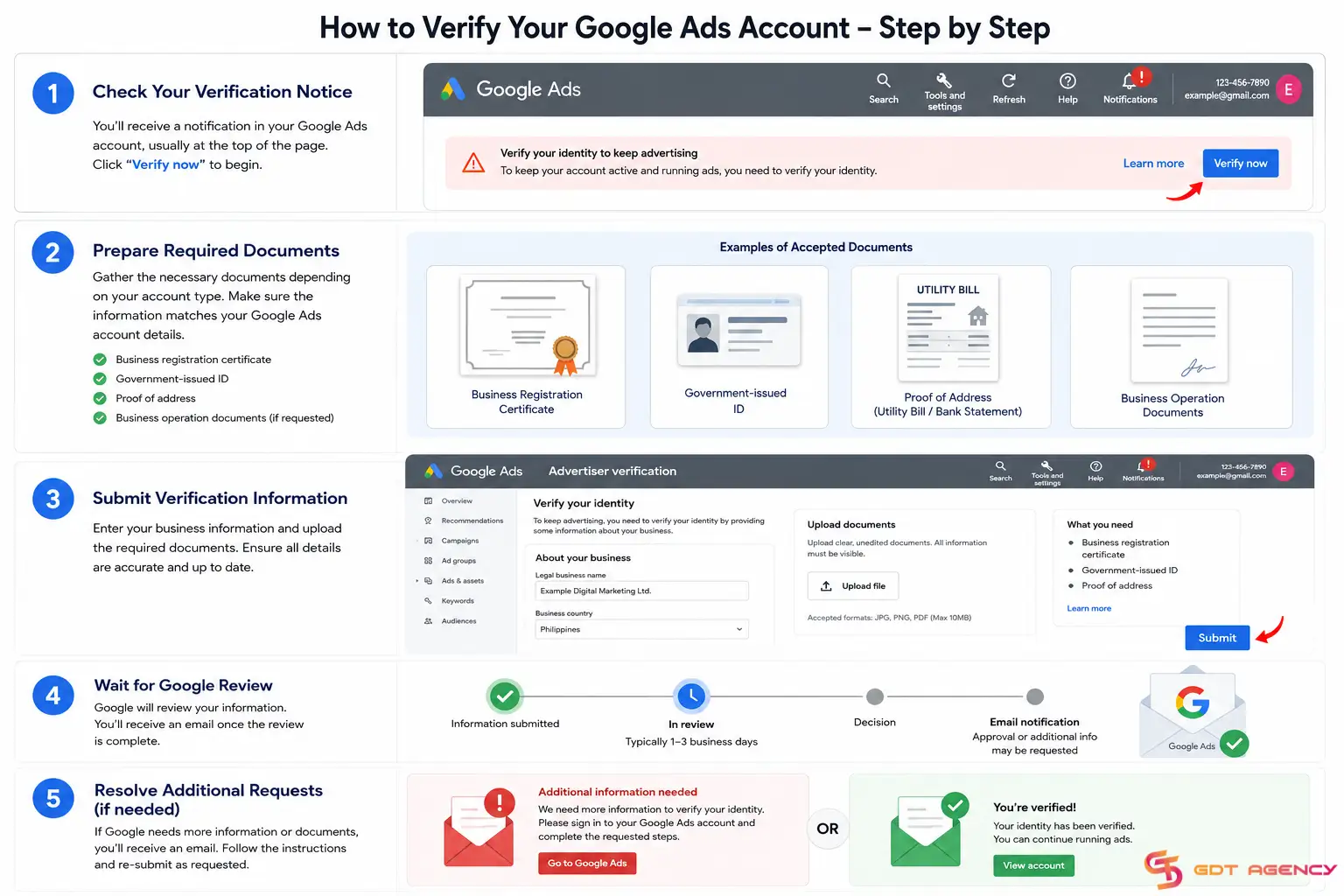
Step 1: Check Your Google Ads Verification Notice
Sign in to your Google Ads account and check for a notification requesting verification. Google usually displays this notice inside the account dashboard or sends an email linked to the account.
The notice explains what type of verification applies to your account, the deadline for submission, and the documents required. You should complete the process as soon as possible because missing the deadline may interrupt your campaigns.
Step 2: Prepare the Required Documents
Before starting verification, gather the documents Google may request. The required files depend on whether you run ads as an individual or a business.

For business accounts, Google commonly asks for:
- Business registration certificate
- Tax registration document
- Proof of business address
- Government-issued ID of an authorized representative
For individual advertisers, Google often requests:
- Passport
- National ID card
- Driver’s license
- Address verification documents
Your business name, address, and legal details should match the information inside the Google Ads billing profile. Small mismatches often cause verification delays.
Step 3: Submit Verification Information in Google Ads
Open the verification section in Google Ads by going to Tools & Settings > Billing > Advertiser verification to start the process and follow the instructions provided by Google. Upload clear images or PDFs of the required documents and enter your business details carefully.
You should double-check company names, addresses, and payment information before submission. Google reviews these details against official documents, so inconsistencies may trigger rejection.
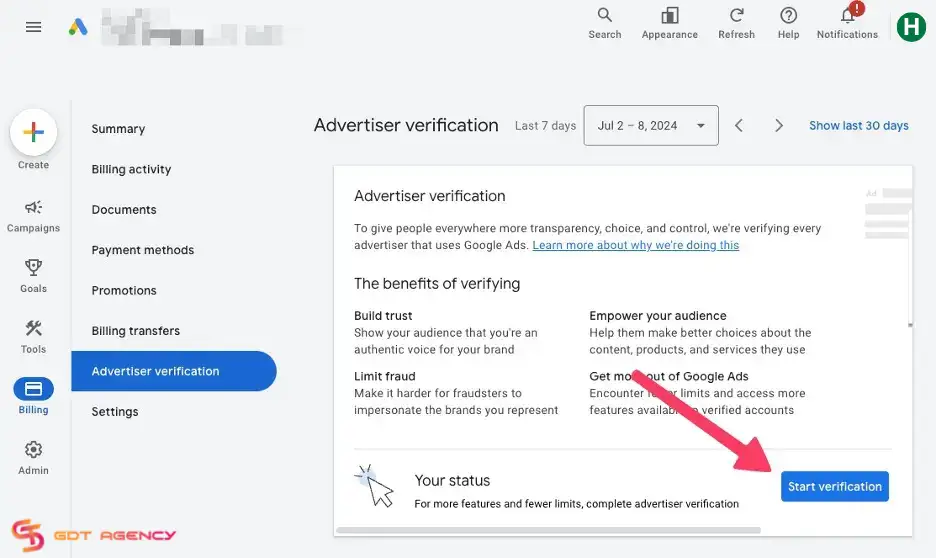
Keep in mind that you should avoid submitting blurry images, cropped documents, or expired identification. Google may reject incomplete or low-quality submissions.
Step 4: Wait for Google Review
After submission, Google reviews your information. Most verification requests take several business days, although some reviews may take longer depending on document complexity or additional checks.
Google sends an approval email after successful verification. If issues appear, Google may request extra documents or ask you to correct information.
Step 5: Resolve Additional Verification Requests
Some advertisers receive follow-up requests for more details. This situation often happens when uploaded information does not match billing records or business registration details.
If Google requests more information, respond quickly and upload updated documents. Delayed responses may pause ad delivery or extend review times.
Why Is Your Google Ads Account Asking for Verification?
Many advertisers wonder why Google suddenly asks for verification. In most cases, verification requests happen because Google runs routine compliance checks.
Common reasons include:
- Identity Transparency Requirements: Google wants advertisers to operate transparently. Verified advertiser information may appear publicly in ad disclosures.
- Suspicious Account Activity: Large spending changes, unusual payment behavior, or account modifications sometimes trigger verification reviews.
- Industry Compliance Rules: Advertisers in sensitive industries often face stricter requirements due to local regulations and Google policies.
- Geographic or Policy Reviews: Certain countries or regions may require additional advertiser verification based on local laws.
Who Needs Google Ads Identity Verification
Every Google Ads account must be uniquely verified. This applies to:
- Both the old unverified account and the new account.
- Account verification requests must be received via notification.
- Apply to the MCC (Multi-Account Management) account or personal account.
- Applies to businesses or individuals using Google Ads.
I want to emphasize that identity verification on Google Ads is required for every account, only once. Any new account you create will be subject to this rule.
What Documents Are Required for Google Ads Account Verification?
The documents required for Google Ads verification vary based on advertiser type, location, and business category.
- Business advertisers usually need legal registration documents that confirm company ownership and operational status. Google may request certificates of incorporation, tax documents, or business licenses.
- Individual advertisers usually verify identity through government-issued documents. Google often accepts passports, national IDs, and driver’s licenses.
Some industries may face additional verification requirements. Financial services, healthcare, and regulated industries often require extra compliance checks.
To reduce delays, ensure every document is:
- Valid and not expired
- High quality and readable
- Consistent with billing information
- Uploaded in accepted formats
Example: If you are an accounting firm, in addition to personal information and identity, you need to prove the relationship and provide the relevant license. Specifically, for an accounting firm, a business license is a requirement, but an additional license is not required because it is a type of support for the business.
In case you are a business company with a business that requires a mandatory license, you need to add the most accurate information.
What Happens If You Do Not Verify Your Google Ads Account?
If you do not verify your Google Ads account within 30 days of receiving a notification or failing to complete Google Ads account verification, it may result in account restrictions.
Google will pause all your campaigns, limit ad delivery, or suspend advertising activity entirely.
Unverified advertisers may also lose campaign momentum, conversion history, and optimization progress. If you depend on paid advertising for lead generation or sales, delays can affect business performance.
Completing verification early helps avoid disruptions and keeps campaigns running smoothly.
Tips to Complete Google Ads Account Verification Faster
You can speed up the verification process by following a few practical steps.
- Use Matching Business Information: Ensure your business name, address, and payment details match across documents and Google Ads settings.
- Upload High-Quality Documents: Clear, readable images reduce rejection risks.
- Avoid Changing Account Information During Review: Frequent billing or profile changes may slow verification.
- Respond Quickly to Google Requests: Fast responses help reduce delays when Google requests extra documents.
FAQs About Google Ads Account Verification
1. How long does Google Ads account verification take?
Google Ads account verification usually takes a few business days. However, complex reviews or additional document requests may extend processing time.
2. What documents do I need for Google Ads verification?
Google commonly requests government-issued IDs, business registration certificates, proof of address, or tax documents, depending on account type.
3. Why did my Google Ads verification fail?
Verification often fails because of blurry documents, inconsistent business information, expired IDs, or billing mismatches.
4. Can I run ads without verifying my account?
In some cases, yes, but Google may eventually require verification. Missing deadlines may pause campaigns.
5. How do I check my Google Ads verification status?
You can check verification progress inside the Google Ads dashboard under account notifications or billing settings.
6. Can I appeal a rejected Google Ads verification?
Yes. Google usually allows advertisers to resubmit documents or correct information after rejection.
7. Is Google Ads verification required for all advertisers?
Not always. However, Google increasingly requires verification for many advertisers to improve transparency and platform safety.
Final Thought
Google Ads account verification may feel complicated at first, but the process becomes straightforward when you prepare the right documents and follow Google’s instructions carefully.
If you have any questions, need expert guidance to elevate your campaigns, or want to cooperate with a trustworthy provider to rent a Google Ads agency account, don’t hesitate to reach out to GDT Agency. Our team of experienced professionals is ready to provide tailored solutions and support to help you achieve your advertising goals.

Follow if you find it useful


You can contact us, with our experience in successfully deploying thousands of conversion advertising campaigns, GDT Agency confidently believes we can help you optimize effectiveness and maximize cost savings with advertising operations.

How To Start A Google Ads Agency Account? A Complete Step-by-Step Guide
To start a Google Ads agency account, you need to create a Google Ads Manager
14/05/2026

How to Complete Google Ads Account Verification in 2026?
Google Ads account verification is the process of confirming your identity or business information to
14/05/2026

Google Ads Campaign Types: Complete Beginner Guide in 2026
Google Ads gives advertisers multiple campaign types because different business goals require different delivery systems.
12/05/2026


