


BitBrowser Review 2026: Is It Worth It for Media Buyers and Advertisers?


BitBrowser offers high value for media buyers who need cost-effective account isolation. This tool provides robust fingerprinting features at a lower price point than most competitors. With BitBrowser, users can manage multiple advertising profiles safely through its integrated RPA automation and proxy support. In fact, a lot of advertisers find the platform worth the investment for scaling operations without risking immediate account bans.
What is BitBrowser?
BitBrowser is an anti-detect browser designed for users who manage multiple online identities. BitBrowser revolutionizes multi-account management by creating fully isolated, anti-detect browser profiles for platforms like FB, TikTok, X (Twitter), WhatsApp, and more.
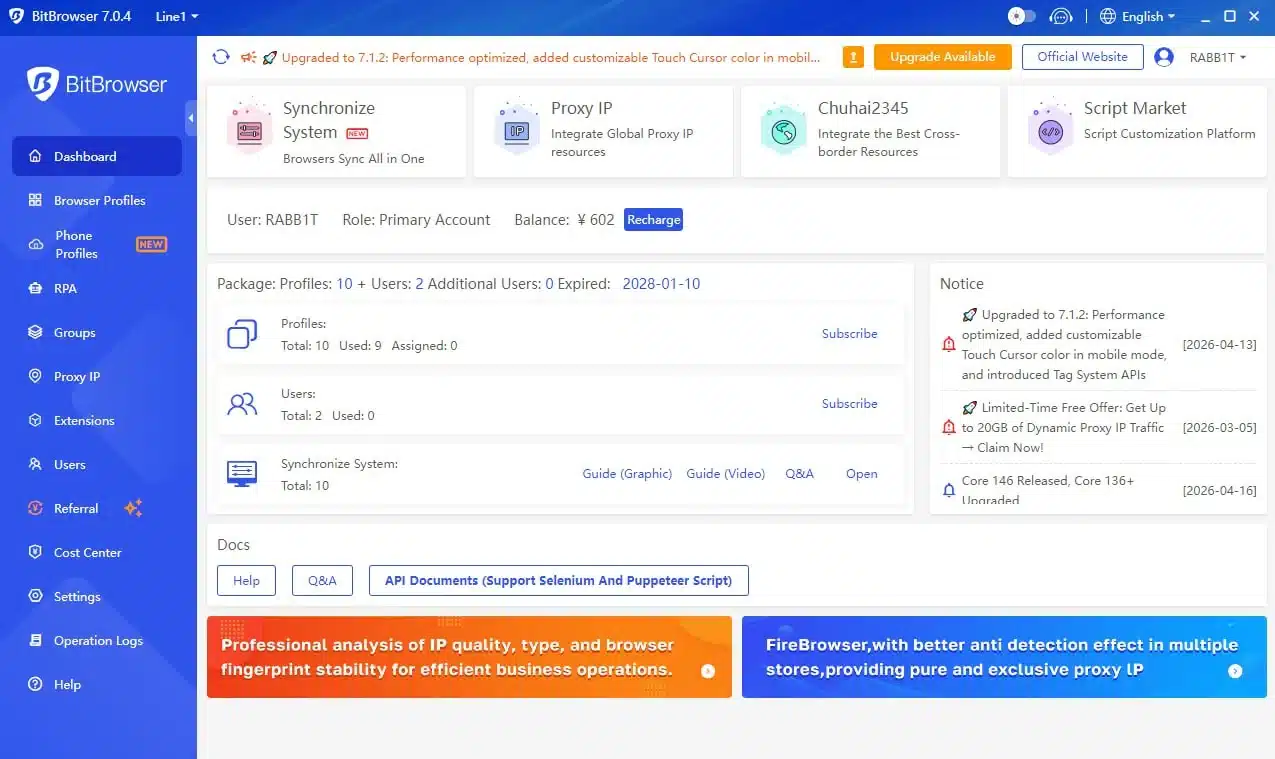
The tool allows advertisers to create isolated browser profiles, each window mimics a unique device fingerprint and operates under a separate proxy IP, ensuring zero correlation between accounts. When you use BitBrowser, every account looks like it is running on a completely different physical computer.
Why Advertisers Use Anti-Detect Browsers in 2026
Ad platforms like Meta have changed a lot in 2026, when the system looks beyond login details and checks device fingerprints, IP consistency, and behavior patterns. Currently, even a single small mistake (such as a shared IP connecting accounts or a reused browser environment) can raise flags and trigger restrictions.

Thus, the appearance of anti-detect browsers like BitBrowser is a life-jacket for advertisers to solve these problems by separating each account into its own controlled space. Here are the things BitBrowser can do for media buyers and advertisers.
1. Advanced Fingerprint Customization
BitBrowser allows users to control browser fingerprints in detail. Built on Google & Firefox kernels, it delivers true physical-level isolation, eliminating cross-profile tracking risks. The system can simulate different devices, operating systems, screen sizes, and hardware setups.
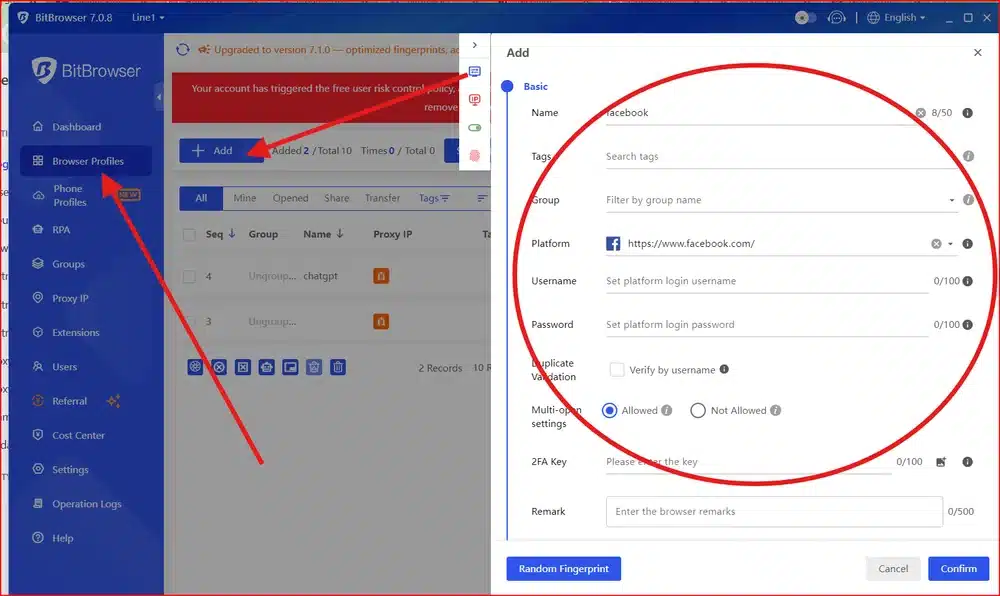
Each profile behaves like a unique user. That separation reduces the chance of accounts being linked together. For media buyers, this feature is not optional. It forms the foundation of safe scaling.
2. Multi-Account Management
BitBrowser lets users manage hundreds of profiles from a single dashboard. Each profile stores its own cookies, login sessions, and browsing data.
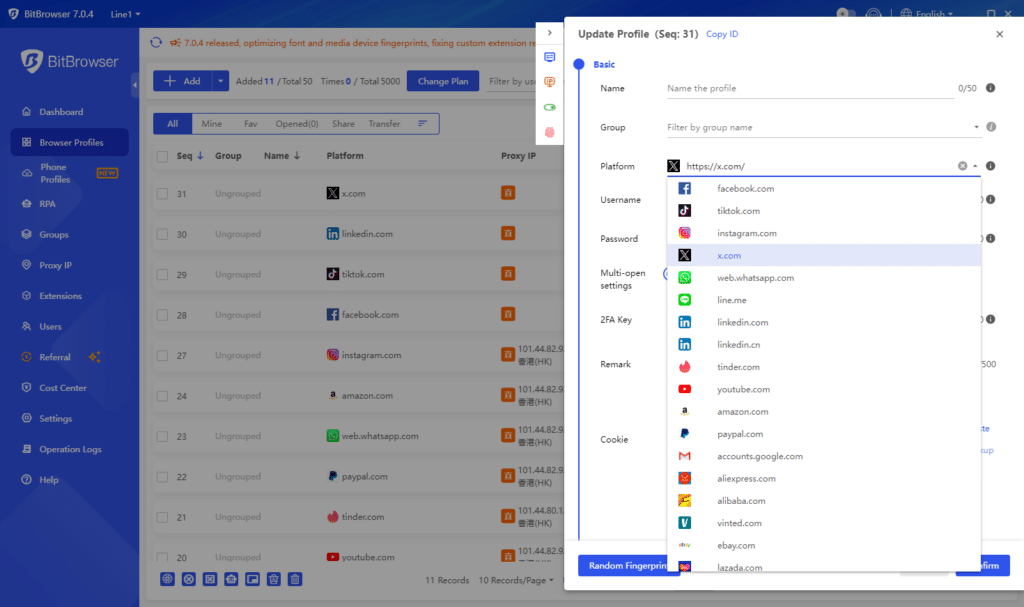
A team can organize accounts by client, campaign, or region. This structure helps agencies handle complex setups without confusion.
3. Built-in RPA Automation
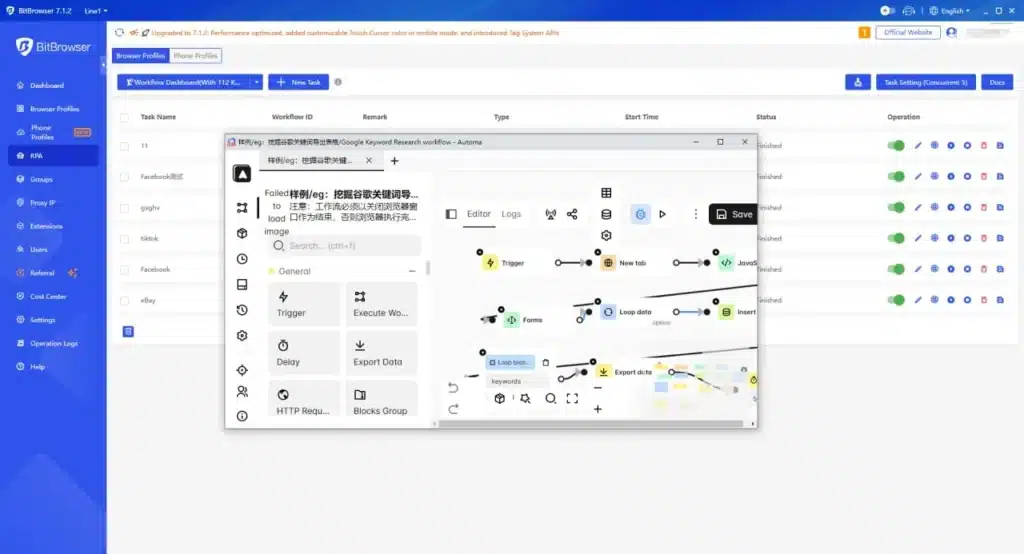
The platform features a Robotic Process Automation (RPA) tool. Users can automate repetitive tasks like logging into Facebook, clicking ads, or scrolling through feeds without writing code.
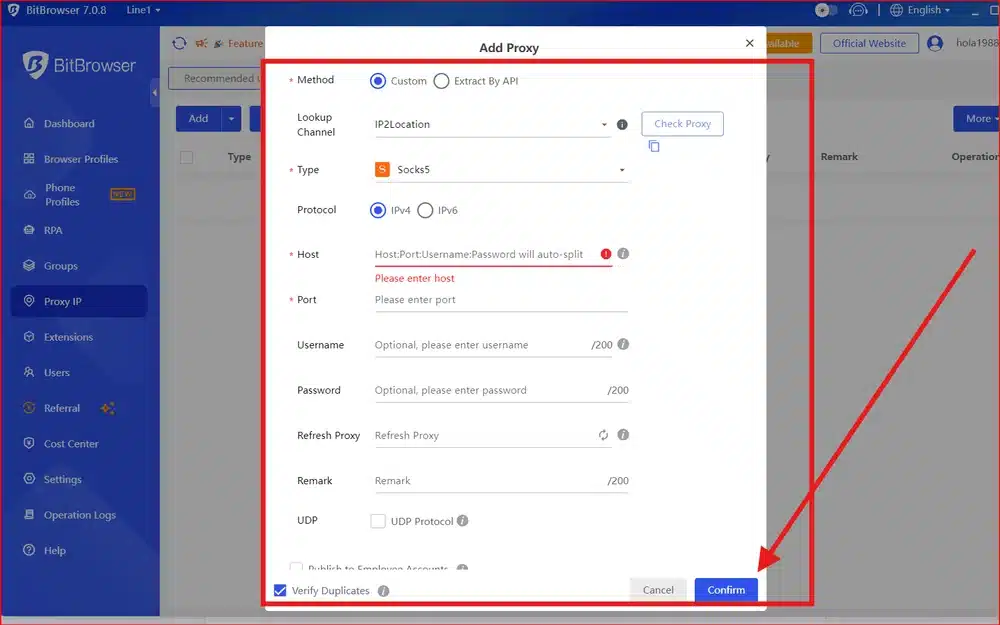
4. Proxy Integration
BitBrowser supports integration with various proxy types. Therefore, users can assign a different IP address to each profile. This pairing of fingerprint and IP creates a consistent identity for each account. That consistency plays a key role in avoiding platform restrictions.
5. Team Collaboration
BitBrowser includes features for team access and permission control. A manager can assign roles, limit access, and track activity. This setup works well for agencies that need to share accounts without exposing sensitive login details.
6. Cloud Phone Simulation and Mobile Environment Control
BitBrowser offers a cloud phone system that allows one device to control multiple cloud phones, which helps advertisers run mobile workflows without physical devices. A user can set up an environment quickly by assigning a proxy and accessing global markets without complex infrastructure.
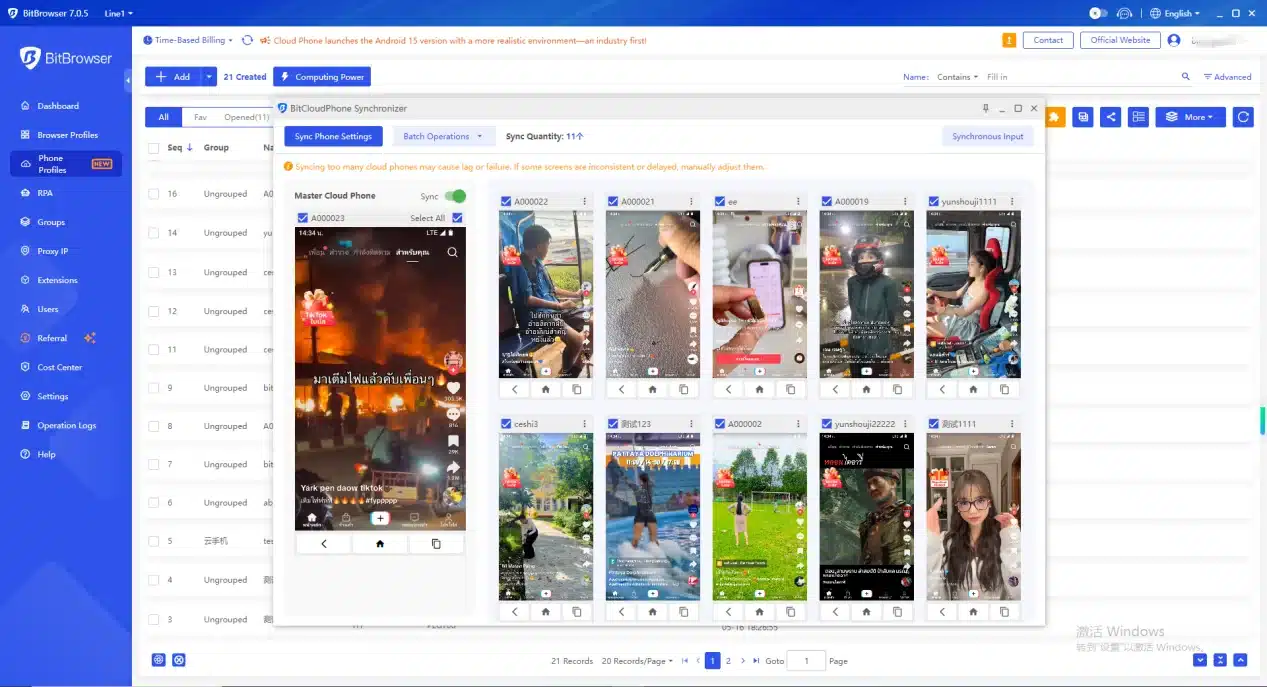
- Fast and Flexible Device Setup: BitBrowser syncs real device parameters automatically. A user can create a mobile profile and connect with a proxy in one click. The system also supports Google Play, which makes app access simple.
- Realistic Mobile Environment: BitBrowser simulates real device data to keep each profile consistent. The system adjusts language, time zone, GPS, carrier, SIM data, and device sensors. This setup helps reduce detection risk in mobile campaigns.
- Quick Device Rotation: BitBrowser allows users to switch between mobile environments in seconds. A media buyer can replace or test accounts quickly without slowing down operations.
- Team Control: BitBrowser supports sub-accounts with flexible permissions. A team can assign access, manage resources, and keep each account separate. This setup improves security and efficiency.
→ For advertisers who rely on mobile traffic and app-based campaigns, this feature adds another layer of control that goes beyond traditional browser setups.
BitBrowser: Real Pros & Cons
BitBrowser comes with real advantages and clear trade-offs, so you need to understand both sides before deciding if it fits your workflow.
| Pros | Cons |
|
|
Is BitBrowser Worth It for Advertisers?
To answer whether this tool is worth it for advertisers, GDT has conducted a small research study by reviewing real user feedback on Trustpilot.
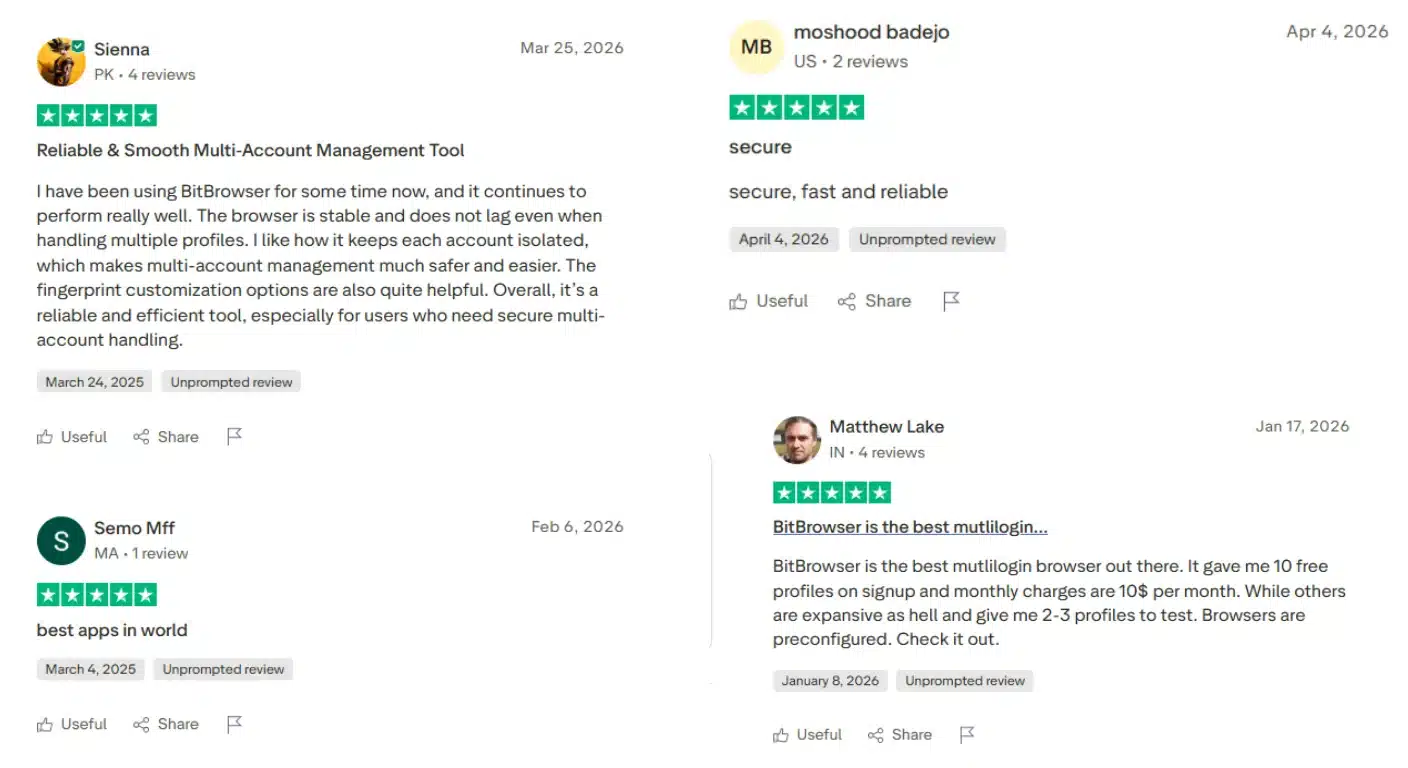
From the real user experiences that have been validated, BitBrowser is worth the investment for media buyers who prioritize cost-effectiveness and automation. BitBrowser provides everything a standard advertiser needs to stay safe.
It excels at managing social media accounts, running affiliate campaigns, and scaling e-commerce stores. It can help advertisers lower the risk of account bans, easier scaling across multiple accounts, and better control over campaign environments.
The combination of fingerprint isolation and affordable pricing makes it a reliable choice for 2026. If you are just starting, the free plan with 10 free browser profiles (fully functional) allows you to test the waters without any financial risk.
How Advertisers Can Use BitBrowser to Scale Effectively?
To scale the campaign effectively, advertisers have to combine anti-detect browsers with agency ad accounts.

BitBrowser solves only part of the problem. It can protect identity, but it cannot provide trusted ad accounts. Therefore, many advertisers still face issues when they use fresh or low-trust accounts, which lead to limited spending or restricted accounts without warning.
Why Agency Ad Account Matters for Scaling?
High-scale advertisers often hit limits with personal accounts because a personal account starts with no history. The platform treats it as a risk and will restrict spending, review ads more often, and slow delivery. These issues slow down campaigns and reduce consistency.
Instead of relying on fragile accounts, many media buyers now use managed solutions such as GDT Agency to access agency-level ad accounts. Agency ad accounts come with history. The platform already sees consistent spend and stable behavior, and that background changes how the system responds.

With a Facebook agency ad account, advertisers can get:
- Higher initial trust levels
- Higher and more stable spending limits
- Faster ad approvals
- Fewer unexpected restrictions
These setups provide higher spending limits and more stable delivery, which makes scaling more predictable. With an agency ad account, advertisers can focus on testing and scaling instead of fixing account issues every day.
How to Combine BitBrowser with High-Trust Agency Accounts?
To scale the campaign effectively, advertisers have to combine anti-detect browsers with agency ad accounts.
A smart setup starts with clear separation. BitBrowser creates isolated environments for each account. Each agency account should run inside its own browser profile with a dedicated proxy.
This structure keeps identities clean and reduces the chance of accounts being linked. A typical workflow looks like this:
- Assign one BitBrowser profile to one agency ad account
- Attach a consistent proxy to that profile
- Maintain stable login behavior and avoid sudden changes
- Keep activity patterns natural and predictable
This combination creates a balance between identity protection and account trust.
BitBrowser handles the technical layer. The agency account handles platform credibility. When both parts work together, campaigns run with fewer disruptions and better scaling potential.
FAQs
1. How is BitBrowser Different from Regular Browsers?
BitBrowser competes with tools like Multilogin, Kameleo, and GoLogin. Unlike those tools that often come with higher pricing or complexity, BitBrowser focuses on simplicity and cost balance.
BitBrowser allows multiple account logins without association risks. It lets you manage multiple accounts on the same platform simultaneously (each in a fully isolated environment), minimizing the chance of unwanted account linkages.
BitBrowser works best for users who want a reliable setup without overcomplication.
2. Who Should Use BitBrowser?
- Cross-border eCommerce: Manage multiple store accounts securely in separate windows.
- Social Media Management: Run account matrices (FB, TikTok, X, etc.) without bans.
- Web3 & Crypto: Safely handle multi-wallet logins, blockchain transactions, and privacy protection.
- Ads & SEO: Mask local data, switch IPs, and conduct secure market research without detection.
3. Is BitBrowser Enough on Its Own?
BitBrowser solves only part of the problem. It can protect identity, but it cannot provide trusted ad accounts. Therefore, advertisers need to combine anti-detect browsers with agency ad accounts for better results.
Conclusion
BitBrowser has become a familiar name among media buyers who need stability, scale, and control across multiple ad accounts. Hope that this article on BitBrowser review can provide you with an overall look at how it actually performs in real-world advertising workflows, what it does well, where it falls short, and whether it is a smart choice for serious advertisers today.

Follow if you find it useful


You can contact us, with our experience in successfully deploying thousands of conversion advertising campaigns, GDT Agency confidently believes we can help you optimize effectiveness and maximize cost savings with advertising operations.

Top 8 Anti-detect Browsers for Multi-Ad Accounts Management
Managing multiple ad accounts across platforms like Meta, Google, and TikTok can be a significant
25/05/2026

How to Get More Followers on Instagram to Grow Your Audience in 2026?
To get more followers on Instagram in 2026, you must focus on creating highly shareable
23/05/2026

How To Get TikTok Ad Credit For Your Business in 2026
The fastest way to get TikTok ad credit for your business in 2026 is by
22/05/2026


