What is CPP Facebook Ads: A Simple Guide to Cost Per Purchase


If you are running an e-commerce store or selling products directly through Meta, CPP (Cost Per Purchase) is likely the most important number on your dashboard. While metrics like clicks and impressions tell you how much attention you’re getting, CPP tells you the actual price you’re paying to make a sale. In this guide, we will break down what is CPP Facebook Ads, how to track CPP accurately, and how to bring that number down so you can keep more of your revenue.

What is CPP Facebook Ads?
In the world of Facebook Ads, CPP stands for Cost Per Purchase. It’s a key performance metric that tells you exactly how much money you are spending on advertising for each completed purchase by a campaign, ad set, or ad.

This indicator measures the efficacy of your ad campaigns and the cost-effectiveness of your marketing initiatives.
While other metrics like clicks or impressions measure engagement, CPP focuses entirely on the bottom line: revenue. Therefore, understanding this metric helps you figure out if your ads are actually profitable or if you’re just buying expensive traffic that doesn’t convert.
How To Calculate Facebook Ads CPP?
CPP calculates the average cost of acquiring each customer by dividing your total ad spend by the number of purchases made. In simple words, it’s the total amount spent on an ad campaign divided by the number of completed purchases.

Tracking CPP in Facebook Ads allows you to calculate the return on investment (ROI) of your Facebook advertising and adjust your campaigns to drive more sales at a lower cost.
For example, a local supermarket spends $1000 on a Meta Ads campaign to introduce a new online product, and 500 people buy that product. So CPP = $1000/500 = $2.
Why CPP Matters More Than Other Metrics?
As an expert of GDT Agency who has worked with Facebook advertising for more than 5 years, I have chance to access and connect with a lot of international customers, and one thing that I often see is that many advertisers get distracted by a low Cost Per Click (CPC).
However, if your clicks are cheap but nobody is buying, your CPP will be high, and you’ll eventually lose money. Therefore, monitoring your CPP will help you understand your profit margins. Let me explain it with the real study that I met in 2024 that came from my clients:
I used to have a client who sold a premium reusable water bottle at the retail price of $50, with the unit cost (COGS + Shipping) of $15. Initially, the brand ran a broad awareness campaign. The metrics looked fantastic at first glance:
- Total Spend: $2,000
- CPC (Cost Per Click): $0.20 (Very cheap traffic)
- Total Purchases: 40
- CPP: $50.00
However, though they drove 10,000 clicks to the site, the CPP matched the retail price. After paying $15 per bottle for manufacturing and shipping, the brand lost $15 on every single sale, totaling a $600 loss for the month.
Then they came for GDT Agency. We helped the team realize the broad audience was curious but not ready to buy. Then they tightened their targeting to “Frequent Shoppers” interested in “Sustainability” and improved the product page. Here were the metrics:
- Total Spend: $2,000
- CPC (Cost Per Click): $0.80 (Traffic became 4x more expensive)
- Total Purchases: 100
- CPP: $20.00
Though they received fewer clicks for the same budget, the traffic was high-intent.
- Revenue: $5,000 (100 sales x $50)
- Total Costs: $3,500 ($2,000 Ads + $1,500 Product/Shipping)
- Net Profit: $1,500
By focusing on lowering the CPP rather than the CPC, the brand turned a failing campaign into a profitable one ($15 profit/unit). This shows that paying more for a “quality” click often leads to a much lower cost per sale.
How To Track CPP in Facebook Ads
Facebook doesn’t always show CPP by default in the main reporting table. To see it:
1. Go to Ads Manager.
2. Click on the Columns dropdown menu (usually set to “Performance”).

3. Select Customize Columns.
4. Search for the “Purchase” conversion value, check the box, and click Apply.
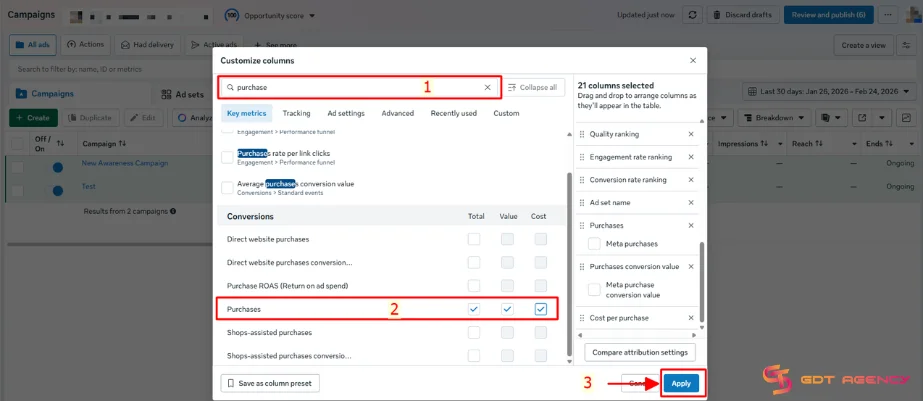
To track CPP in Facebook ads, advertisers can use the Facebook Pixel, which is a powerful tool that lets advertisers track the behavior of users on their website. To install Facebook Pixel on your website, follow these steps:
1. Go to Meta Events Manager
2. Click Connect data sources and select Web.

3. Enter a name for your pixel and click Create pixel. This will create a new ID that you can view in Events Manager. Note: Events from your Meta Pixel are added to a collection that contains events from several sources. Your new dataset ID is identical to your new pixel ID. Learn more about datasets.

4. Enter the URL of your website to see if there are easy ways to set up a partner connection, and then click Check. If there is a partner connection you can use, it will show up on the screen. To set up your pixel and events on your partner’s website, click Next and then follow the on-screen directions. If you can’t find a partner integration, hit Next.

5. Pick how you want your info to be linked to Meta: Get guidance (recommended) or Connect Manually.
- If you want help set up, choose Get Guidance. If you choose this choice, you can skip the rest of the steps in this article and just follow the steps shown on the screen in Events Manager.
- If you already know how you want to connect your data and don’t need help setting it up, choose Connect Manually. If you choose this choice, read this article all the way through and do what it says.
6. Choose to set up either the Meta Pixel and Conversion API or just Meta Pixel, then click Next. Follow the instructions in each option to set up Facebook Pixel.

Installing the Facebook Pixel and setting up events correctly lets you track your ad performance, helping you make smarter decisions to boost sales.
Factor Influencing Cost Per Purchase
In 2025, the Cost per Purchase of all campaign types for all industries on Facebook ranges from $47.49 to $55 (according to SuperAds).
Understanding the primary factors determining your CPP Facebook Ads will help you gain control of your Facebook Ads budget and increase your ROI. However, Facebook advertising costs vary based on many factors.
Recognizing these influential elements allows you to make data-driven decisions to improve campaign performance and reduce costs. Those factors are:
- Target Audience: The specificity and competition of your target audience can have a big impact on CPP. Narrower, more competitive audiences often result in higher costs.
- Ad relevance: Your ad content’s relevance and quality have a direct impact on CPP. Higher relevance ratings often lead to reduced expenses.
- Bid Strategy: The sort of bid strategy you use, such as cost cap, bid cap, or target cost, can affect your CPP.
- Ad Placement: The charges of various placements (for example, Facebook News Feed and Instagram Stories) can affect your overall CPP.
- Integration tools: Using integration technologies can help you automate your ad administration and increase productivity, perhaps lowering CPP by automating lead data transfer and improving targeting precision.
Based on my experience, Facebook Ads success is a journey, not a destination. By continually monitoring these critical aspects and constantly optimising your campaigns, you can effectively manage your Facebook Ads CPP and increase your return on investment. Remember, regular performance assessments and data-driven adjustments are essential for success.
Related Article: What Is CPM In Facebook Ads? A Complete Overview
How to Optimize CPP Facebook Ads
Enhancing your Cost Per Purchase (CPP) on Facebook Ads takes a systematic approach and an awareness of the best techniques. Here are some factors that help you improve your CPP.
Enhancing Ad Relevance and Quality
Invest in visually appealing and engaging creatives that will attract your audience’s attention and effectively convey your message.
Create convincing ad copy that addresses your target audience’s wants and aspirations, using language that reflects their beliefs and motives.
Don’t settle for a single ad version; constantly A/B test numerous variations of your creatives, headlines, and calls to action to see what works best. This iterative strategy helps you to improve your ads over time, ensuring they resonate with your target demographic and produce the best results.

Targeting the Right Audience
Reaching the proper audience is essential for Facebook Ads success and efficient CPP. Dive deep into Facebook’s Audience Insights tool to get a complete picture of your target group. Discover their interests, behaviors, and demographics to design highly targeted marketing that speaks to their needs.
Do not underestimate the power of retargeting! Reconnect with users who have previously engaged with your brand, website, or advertisements.
These “warm” consumers are already aware of your services and are more likely to convert, making retargeting an effective method for minimizing CPP and increasing sales.
Efficient Budget Management
Optimizing your Facebook Ads budget necessitates a systematic approach to budget management and lowering the CPP Facebook Ads.
Don’t settle for a single bidding technique; instead, experiment with both manual and automatic bidding to find the most cost-effective way for your campaigns.
Use ad scheduling to ensure that your ads appear during peak engagement hours when your target audience is most active online.
Continue to monitor the performance of your advertising and reallocate your budget accordingly. Shift resources to high-performing advertisements that are producing outstanding outcomes, and don’t be hesitant to stop or cancel underperforming ads that are draining your cash but not generating conversions.

Leveraging Lookalike Audiences
Facebook’s powerful Lookalike Audiences can help you reach new customers. Begin by building a “seed audience” of your most important clients, those with high lifetime value or engagement.
Facebook’s algorithms will then analyze this seed audience to locate users who share similar qualities, allowing you to reach a highly qualified pool of potential buyers.
As you scale your campaigns, you should gradually increase your lookalike audience (for example, from 1% to 2% lookalike) to retain audience quality and prevent diluting your targeting. This strategy ensures that you target the most receptive prospects while optimizing your Facebook Ads CPP.
Utilizing Facebook Pixel and Attribution
With the Facebook Pixel and attribution modeling, you can take advantage of data-driven insights. Install the Facebook Pixel on your website to track user behaviors, measure conversions, and collect useful data for optimization.
Go beyond last-click attribution and use Facebook’s multi-touch attribution approach to determine the full impact of each touchpoint in the customer journey. This comprehensive perspective enables you to better allocate your budget, prioritize high-performing channels, and make smart decisions to reduce your CPP while increasing your ROI.
Seasonal and Trend-Based Advertising
With well-planned timing, you can use Facebook ads to ride the wave of holiday trends and get people excited. Plan ads around holidays, special events, and changes in the seasons to get people more interested and get them to buy.

Keep up with the times by keeping an eye on industry trends and using timely and relevant topics in your ads and messages.
This proactive approach makes sure that your ads are relevant to what your target audience is interested in at the moment. This leads to more engagement, better conversion rates, and a lower CPP.
Rent Facebook Agency Account
Facebook Agency Account for rent gives you access to all of Facebook’s advertising tools. It’s an open and affordable way to help your business grow. Remove limits on your budget and the business you’re in to get the most out of targeted campaigns and achieve amazing results.
Businesses of all kinds can use this powerful tool because our service fees are very low. This way, everyone can enjoy the benefits of advanced Facebook advertising without spending a lot of money.
Conclusion
Optimizing your Facebook Ads CPP is an ongoing process that requires a data-driven approach, continuous monitoring, and a willingness to experiment and adapt. I hope that after reading this article, you can have an overview of What is CPP Facebook Ads, the factors that influence this crucial metric, and implement the strategies to improve it.
If you have any questions about CPP Facebook ads, need some expert guidance to elevate your campaigns, or are interested in a high-quality agency ad account for rent, don’t hesitate to contact GDT. Our team of experienced professionals is ready to provide tailored solutions and support to help you achieve your advertising goals.

Follow if you find it useful


You can contact us, with our experience in successfully deploying thousands of conversion advertising campaigns, GDT Agency confidently believes we can help you optimize effectiveness and maximize cost savings with advertising operations.