


Why is my Facebook ad stuck in review & what to do to fix it (2026)


If your Facebook ad has been stuck in review for a long time, you’re not alone. Many advertisers face this issue when launching new campaigns. If you’re trying to escape the Facebook ad stuck in review status, you’ve come to the right place. In this article on Facebook ad stuck in review, we’ll highlight all the possible reasons that can make your ad stuck in review, how long reviews usually take, and what you can do to make the process faster.

9 Main Reasons Why Facebook Ad Stuck In Review
As an advertising expert at GDT Agency who has spent more than 5 years working and managing Facebook campaigns, I summarize directly from my experience the most common reasons that make your Facebook ad stuck in review below:

Reason #1: Ad Policy Violations
To avoid sensitive ads, scam ads, or spread hate for a political or social agenda, Facebook requires advertisers to follow Facebook’s advertising policies and review every ad.
One might incur a violation by copying others’ ad styles or tones due to the fact that each content type and audience has its own requirements.
Reason #2: New Ad Accounts
Brand-new accounts have no “trust score” yet. They do not have a history of approved advertisements or payments normally experience longer review times.
Therefore, Meta’s AI is more likely to flag your first few campaigns for a manual human review to ensure you aren’t a bot or a scammer.
For new ad accounts in 2026, it is common for ads to remain “In Review” for 24 to 48 hours, though some may take longer.
Reason #3: Issues with Business Pages or Multiple Ad Accounts
Facebook ads often get stuck in review when there are trust issues at the Page or account level:
- If a Business Page has past policy warnings, frequent admin changes, or is connected to many ad accounts, Meta treats it as higher risk.
- Using multiple ad accounts to promote the same Page, domain, or offer can also signal policy circumvention.
- Adding inconsistent business details between the Page, Business Manager, domain, and payment profile, and Meta slows the process even more.
Instead of rejecting the ad outright, Facebook often keeps it “in review” as a soft control while it runs deeper trust and compliance checks.
Reason #4: Payment Information Mismatch
Virtual cards or mismatched payment information (name, ID, birthdate) might be the reason for the delay or rejection.
When the payment method, billing country, currency, or cardholder details do not align with the Business Manager, ad account, or Page location, Meta flags it as a trust risk and will keep it under review for extra verification.
Reason #5: Sensitive Topics
Sensitive topics like health, finance, politics, social, or controversial issues are more likely to get stuck in review because they require extra policy checks to make sure they are in compliance with the guidelines.
Reason #6: Text and Image Mismatch
Facebook may also delay or reject the ads if the visuals do not correspond to the message because it prioritizes genuine, consistent content.
When the copy says one thing but the image suggests something different, Meta’s system flags the ad as potentially misleading and often pauses it in review to check intent and accuracy.
As you can see in the picture that the image displays a beefsteak while the text is promoting the women’s running shoes.
Reason #7: Misleading Landing Pages
If the landing page content does not clearly match the ad message, uses fake urgency, or redirects users unexpectedly, Meta flags it as a potential deception risk and may hold it in review while verifying transparency and intent.
Reason #8: Editing Ads Under Review
Any edits made to the ad while it is under review can push the ad back to the start of Meta’s review queue, which causes the process to start afresh, and at least an additional 24 hours would be added.
Reason #9: Mandatory AI-Generated Content Disclosure
In 2026, Meta implemented a strict “Transparency First” policy regarding Artificial Intelligence.
According to this policy, any ad creative (visual, copy, or audio) generated by AI must be disclosed during setup. You must toggle the “Altered Content” or “AI Disclosure” switch in Ads Manager.
Meta has integrated advanced Forensic AI Scanners into the ad review flow to scan all submissions. If the system detects AI use but the “Altered Content” label is missing, the ad will be held indefinitely for a manual fraud check.
>>> Read more: 12 Top Reasons Facebook Ads Not Delivering & How To Fix [2025]
How Facebook Ad Review Systems Work?
Once you have crafted an advertisement, Facebook will review it to either approve or disapprove via both automation and manual review to validate the ads that comply with Facebook ad policies. Here is the way Facebook ad review systems work:
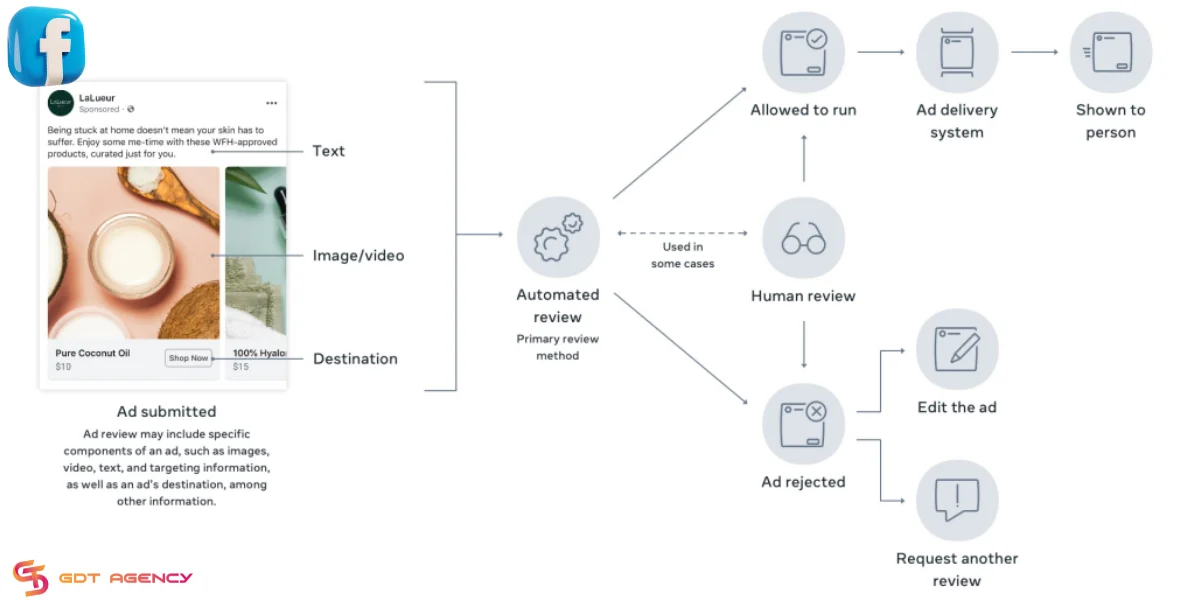
Currently, this process is gradually complicated. Though Facebook has trained its automated systems to quickly review submitted ads, there is always a team of specialists who recheck manually to ensure policy compliance.
Therefore, some ads get approved within 24 hours of submission, while others take longer to appear as “Pending in review.”
What ad components are reviewed?
The Facebook ad review process involves examining all elements of the submitted ads. To understand it better, refer to the content related to the anatomy of a Facebook Ad that I shared earlier. In summary, it includes:
- Media files
- Ad copy
- Description
- Landing page URL
- Target audience information

You need to ensure that those ad elements are clear and do not violate advertising policies. But of course, things don’t always go smoothly. If any component has issues, your Facebook ad may be not approved and stuck in review.
How Long are Facebook Ads in Review?
Typically, most submitted ads are reviewed within 24 – 48 hours. In special cases, reviews can even take up a week, especially if there’s a backlog or your ads need extra scrutiny.
If your ads are stuck in early 2026, the cause might be Meta’s latest “Andromeda” system migration, which is designed to tighten AI compliance. This core update has caused a documented sync lag between the Meta Content Library API and the front-end Ads Manager.
In many cases, your ad may already be “Approved” in the backend but remains “In Review” on your dashboard.
How To Fix A Facebook Ad Stuck In Review?
The next part of the article will cover some simple and quick ways to fix this problem and get your ads approved. First, let’s explore the simplest method in this list.
Trying to turn ads On/Off
Turning ads on or off is the most basic step you should try first if your ad is stuck in the In Review limbo. You can understand it immediately by looking at the image below:

By turning ads on or off, you can toggle the ads to reset the ad review process. This is a quick and straightforward way to check if Meta Ads Manager is undergoing issues or maintenance for feature updates.
If the problem is from Facebook’s end, this action will help your ad escape the In Review status.
Duplicate your ads
Duplicating an ad ID/ad set/campaign is an effective method that prompts the Facebook bot to reevaluate your ad. By doing this, the review process will start anew, and the testing distribution to different audiences will occur.
To duplicate an ad ID/ad set/campaign, you can access Ads Manager and follow the instructions in the image below:

After you duplicate and resubmit the new ad, Facebook will reinitiate the review process. There’s a high likelihood that the ad won’t be stuck in the “In Review” status anymore. If you’ve performed this action and the ad is still stuck, keep reading the following content.
Check your ad again and try some simple editing
If you’ve tried the two methods above without success, your ad has likely violated one of Facebook’s advertising terms.
What you need to do is review your ad content, every ad component, domain, landing page, etc. It must be cross-referenced with Meta Ads Policies.
Then make a necessary change by refining your ad copy, removing misleading language, or adjusting visuals to meet Meta’s guidelines, or reevaluating your landing page to match your ads and resubmission. Your ad might be approved immediately.
Contacting Facebook Support
If you have been waiting for more than 24 hours, but your Facebook Ad is still in review, you can consider submitting a manual review through the Facebook Help Center form.
1. Contact Facebook Support by following this link: https://www.facebook.com/business/help/support. When you access this link, Facebook will present the issues your advertising account is facing.
2. At this stage, carefully review the status of your ads. Then, provide a detailed description to the Facebook support team to explain the prolonged review issue. Let them know the ad ID and how long it has been pending review, and provide a screenshot of your ad if available. The more thoroughly you describe your problem, the faster the support team will understand and assist you in resolving the issue.
Pro Tips: Manual Escalation via Ad ID
If standard methods fail, use the direct Ad ID inquiry form. To find your Ad ID in the 2026 interface:
- Open Ads Manager and click on Columns.
- Select Ad ID to display the 15-17 digit code.
- Submit a ticket with the subject: “SLA Breach: Ad ID [Number] – Andromeda Technical Check Required.” This specific phrasing helps bypass generic bot responses.
Leveraging Meta Verified for Business
Meta Verified is no longer just a badge but it is a high-trust signal. Verified accounts are placed in a “Priority Review Queue,” significantly reducing the time spent in automated limbo.
If an ad is stuck for over 48 hours, Verified users have access to a dedicated concierge chat to request a manual push.
Expert Tips To Make Facebook Ads Approval Quickly
Owning a high level of reliability with unlimited spending accounts, like a Facebook agency account, can help your ads get reviewed and approved quickly, thanks to a long spending history and a high-quality score.

However, following expert tips is still essential to avoid potential issues and make your Facebook ads approved quickly, saving your time and effort.
Understanding ads policies
Understanding and complying with Meta Ads Policies is crucial to overcoming this problem. The ad review process may take time or get stuck due to violations of advertising policies.

Once you have a clear understanding and adhere to advertising policies, your ad review process will be smoother. This is an important aspect that every advertiser should pay attention to. Besides speeding up ad reviews, it also helps you avoid other issues and bans from Facebook.
Always monitor ad status
Regularly monitoring the status of your ads can be extremely helpful. This will help you discover which are pending review, or sometimes identify other issues, such as ads being delivered to the wrong target audience.

Stay updated with Facebook ads knowledge and news
This platform sometimes undergoes updates to provide new features for advertisers. There are periodical sweeps targeting new advertising accounts or those with suspicious activities. The important thing here is to know where to get these updates and news quickly and accurately.

Some places provide the most important and up-to-date information about Facebook ads freely. For example: BlackHatWorld, GDT Agency Blog, Facebook Groups, Reddit Communities, LinkedIn, etc.
These groups often have ad expert members who will help you stay updated with the latest knowledge and news about Facebook Ads.
Frequently Asked Questions:
1. Why does Facebook review my ads?
To avoid the situation of sensitive ads, scam ads that break laws laid down by governments, or spread hate for a political or social agenda, as well as safeguard the intentions of both advertisers and users, Facebook reviews every ad to ensure honest and high-quality creatives.
2. How long do Facebook ads stay in review?
Most ads are reviewed within 24 hours; however, this period can be extended to 48 hours or even longer in case the reviewing team is handling a large number of ads, the ads are too complex, or if the changes made are too small. During peak times, the waiting period can be longer.
3. What to do when an ad is stuck in review?
You can try turning your ad off and on again, making changes to it and resubmitting it, or duplicating it. Any of these actions can trigger a reset of the review process. If your ad is stuck for more than 48 hours, it is advisable to contact Meta’s support and ask for escalation.
4. How does Facebook review ads?
Facebook employs a combination of both automated and manual techniques to inspect whether the ads comply with its policies, thereby ensuring that the content is genuine and not misleading.
Summary
Having a Facebook Ad stuck in review can be frustrating and may lead to wasted time and money. What you need to do is carefully read and follow the steps outlined in this guide. I hope that this article can help you escape the Facebook ad stuck in review status and boost the ad time approval.
If you still have questions relevant to Facebook ads or Facebook agency account for rent or need additional help, feel free to contact our expert advertising team at GDT Agency for quick and timely assistance.

Follow if you find it useful


Was this helpful?
Thanks for your feedback!
You can contact us, with our experience in successfully deploying thousands of conversion advertising campaigns, GDT Agency confidently believes we can help you optimize effectiveness and maximize cost savings with advertising operations.


