
How Many Facebook Ad Accounts Can You Create and Manage


Facebook sets a hard cap on ad accounts, and that cap depends on your profile age, your spending history, and whether you use Business Manager. A new personal profile usually gets one ad account. An older profile with a clean payment record can unlock up to five. Business Manager changes the math again, because it lets you add more accounts once Facebook trusts your business.
Many advertisers hit this wall the moment they try to scale. They run one campaign successfully, then try to open a second account for a new client or a new product line, and Facebook blocks them. This happens because Facebook ties account creation to trust signals, not to willingness to spend.
Business Manager solves part of this problem, but it introduces its own rules. A Business Manager account starts with a small allowance too, and it grows only when you verify your business and build a spending history. Agencies that manage several clients often outgrow this limit within weeks.
Below, this article breaks down the exact numbers, explains how Facebook decides who gets more accounts, and shows what to do once you hit the ceiling. It also covers the internal limits inside a single ad account, since campaigns, ad sets, and ads all carry their own caps.
- How Many Facebook Ad Accounts Can You Create?
- What Is the Default Ad Account Limit for New Profiles?
- How Does Facebook Increase the Ad Account Limit Over Time?
- What Is the Difference Between Personal Ad Account Limit and Business Manager Limit?
- How Many Ad Accounts Can a Business Manager Hold?
- How Many People Can Manage One Ad Account?
- How Do You Manage Multiple Facebook Ad Accounts Efficiently?
- Should You Use Business Manager to Manage Multiple Accounts?
- What Are the Steps to Add a New Ad Account in Business Manager?
- What Happens When You Reach the Ad Account Limit?
- Why Does Facebook Show “Ad Account Limit Reached”?
- How Do You Request a Higher Ad Account Limit?
- What Are the Limits Inside a Single Facebook Ad Account?
- How Many Campaigns Can One Ad Account Have?
- How Many Ad Sets Can One Campaign Have?
- What Is the Difference Between a Regular Ad Account and an Agency Ad Account?
- Can You Rent an Agency Ad Account Instead of Waiting for Limit Increase?
- Final Thought
- FAQs
- Can I have more than one Facebook ad account on the same profile?
- Why did Facebook suddenly lower my ad account limit?
- Does verifying my business always raise my ad account limit?
- Is there a way to check my current ad account limit?
- Can an agency ad account replace my personal Business Manager entirely?
How Many Facebook Ad Accounts Can You Create?
A new personal profile can create one ad account. Facebook raises this number over time based on account age and ad spend.
Facebook treats every new profile as unverified. The platform assumes a new account carries more risk of fraud or policy violation, so it starts everyone at the same low limit. Once you build a track record of clean payments and policy-compliant ads, Facebook loosens the restriction.
What Is the Default Ad Account Limit for New Profiles?
A brand new Facebook profile can open exactly one ad account. Facebook applies this rule to every new user without exception, regardless of the business type or industry.
This restriction exists because new accounts have no history for Facebook to evaluate. Scammers often create fresh profiles to run fraudulent ads, so Facebook limits fresh accounts as a safety measure. The one-account rule stays in place until the profile shows consistent, legitimate activity.
Advertisers who need more than one account right away often misunderstand this rule. They assume payment method or business size drives the limit, but profile age and behavior matter more in the early stages.
How Does Facebook Increase the Ad Account Limit Over Time?
As an expert at GDT agency with more than 5 years of experience working with Facebook ads and Facebook agency ad accounts, there is one thing I can affirm: Facebook increases the ad account limit gradually as a profile accumulates spend and avoids policy strikes. The system reviews payment consistency, ad approval rates, and account age before granting more slots.

Consistent, on-time payments build the strongest case for an increase. A profile that spends steadily over several months, without failed charges or disputed transactions, signals reliability to Facebook. Clean ad reviews matter just as much, since accounts with frequent rejections or bans rarely see their limit expand.
Many advertisers on community forums report that their limit moved from one account to five after several months of active, policy-compliant spending. Facebook does not publish an exact formula, but the pattern holds across most reported cases: time plus trust equals more room to grow.
→ The number of ad accounts you can create is only one part of your Meta advertising setup. Factors like Business Manager trust, account hierarchy, ownership structure, and partner status all influence how your advertising operation scales over time. Learn more in our guide to Facebook Ad Account Infrastructure: What It Is & How It Works.
What Is the Difference Between Personal Ad Account Limit and Business Manager Limit?
A personal profile caps out at around five ad accounts, while Business Manager can hold more accounts and assign them across a larger team. Business Manager also separates business assets from personal profile data, which personal accounts cannot do.
This distinction matters most for agencies and larger advertisers. A personal account works fine for someone running one small campaign, but it breaks down fast once multiple people or multiple clients enter the picture.
How Many Ad Accounts Can a Business Manager Hold?
A Business Manager account starts with a limit of one ad account and expands as the business verifies its identity and builds spending history. Facebook raises this ceiling in stages rather than all at once.
Verification plays the biggest role in this expansion. A Business Manager that completes Meta Business Verification, submitting legal business documents and confirming ownership, moves through the tiers faster than one that skips verification. Agencies that manage rental or shared ad accounts often reach higher tiers, sometimes described informally as BM5 or BM25, once Facebook confirms their business legitimacy and payment reliability.
Spending consistency still matters here too. A Business Manager with a long record of successful payments and few policy violations earns expanded limits faster than one with a spotty history.
How Many People Can Manage One Ad Account?
Facebook allows up to twenty-five people to manage a single ad account, and one person can manage up to twenty-five ad accounts. This two-way cap keeps large teams from overloading a single asset.
Agencies that run several client accounts often bump against this rule from the account-management side rather than the account-creation side. A media buyer working across ten clients still has room under the twenty-five-account cap, but a large in-house team assigned to one account can hit the twenty-five-person limit surprisingly fast.
Facebook enforces this limit to prevent account sprawl and to keep permission management workable. Beyond twenty-five people, tracking who has access and why becomes difficult even for Facebook’s own systems.
How Do You Manage Multiple Facebook Ad Accounts Efficiently?
Business Manager centralizes multiple ad accounts under one login, assigns clear permission levels to each team member, and separates client assets from personal data. This structure prevents the chaos of switching between personal profiles.
Advertisers who try to manage several accounts through personal logins run into constant friction. They juggle multiple passwords, risk mixing up client budgets, and expose their personal profile to unnecessary business activity. Business Manager removes all three problems at once.
Should You Use Business Manager to Manage Multiple Accounts?
Yes, you should use Business Manager to manage multiple accounts, because it separates business assets from personal profiles, centralizes permissions, and supports team collaboration at scale.
A personal profile ties every ad account directly to one individual. If that person leaves a team or an agency, the account access leaves with them, which creates a serious continuity risk. Business Manager instead assigns account ownership to the business itself, so team changes no longer threaten access to active campaigns.
Business Manager also gives owners granular control over who can view reports, who can edit campaigns, and who can manage billing. This level of control simply does not exist inside a personal ad account setup.
What Are the Steps to Add a New Ad Account in Business Manager?
Adding a new ad account in Business Manager takes four steps: open Business Settings, select Accounts, click Add, and choose whether to create a new account, claim an existing one, or request access to a client’s account.
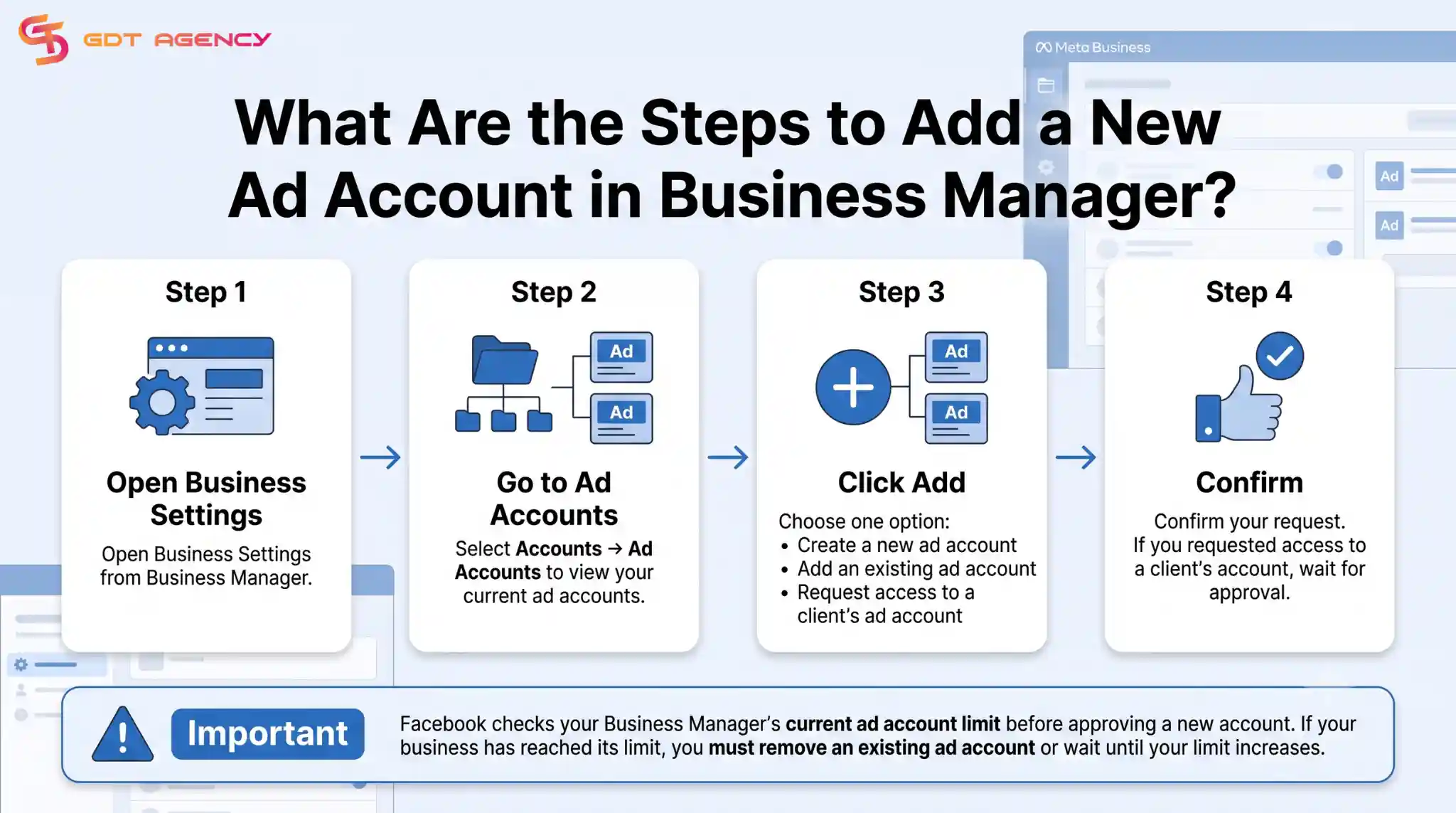
- Open Business Settings from the Business Manager menu.
- Select Accounts, then Ad Accounts, to see the current list.
- Click Add and choose the option that fits your situation: create a new account, add an existing account you own, or request access to a client’s account.
- Confirm the request and wait for approval if you requested access to someone else’s account.
Facebook reviews each new account request against the Business Manager’s current limit. If the business has already reached its cap, Facebook blocks the request until the limit increases or an existing account gets removed.
→ These steps assume you already have an existing ad account or a Business Manager. If you are setting up Facebook advertising for the first time, read How to Create a Facebook Ad Account and Access Meta Ads Manager for a complete walkthrough of creating your first ad account and navigating Meta Ads Manager.
What Happens When You Reach the Ad Account Limit?
Facebook shows an “Ad Account Limit Reached” message and blocks any new account creation until the business either increases its limit or removes an existing account. This message appears the moment a profile or Business Manager tries to exceed its current cap.
Advertisers often see this message right when they need a new account most, such as onboarding a new client or launching a separate product line. Understanding why it happens and how to fix it, saves significant time.
Why Does Facebook Show “Ad Account Limit Reached”?
Facebook shows this message because the profile or Business Manager has already used every available ad account slot allowed at its current trust level. The system will not create a new account until that ceiling moves.
Community reports on forums like r/FacebookAds confirm that newer profiles hit this wall around one account, while older ones cap out closer to five. Business Manager accounts hit similar walls at their own tiers. In every case, the message points to the same root cause: the account or business has not yet earned a higher limit.
How Do You Request a Higher Ad Account Limit?
Advertisers can request a higher ad account limit by completing Meta Business Verification, maintaining a clean payment history, and submitting a request through Business Manager support when the option appears.
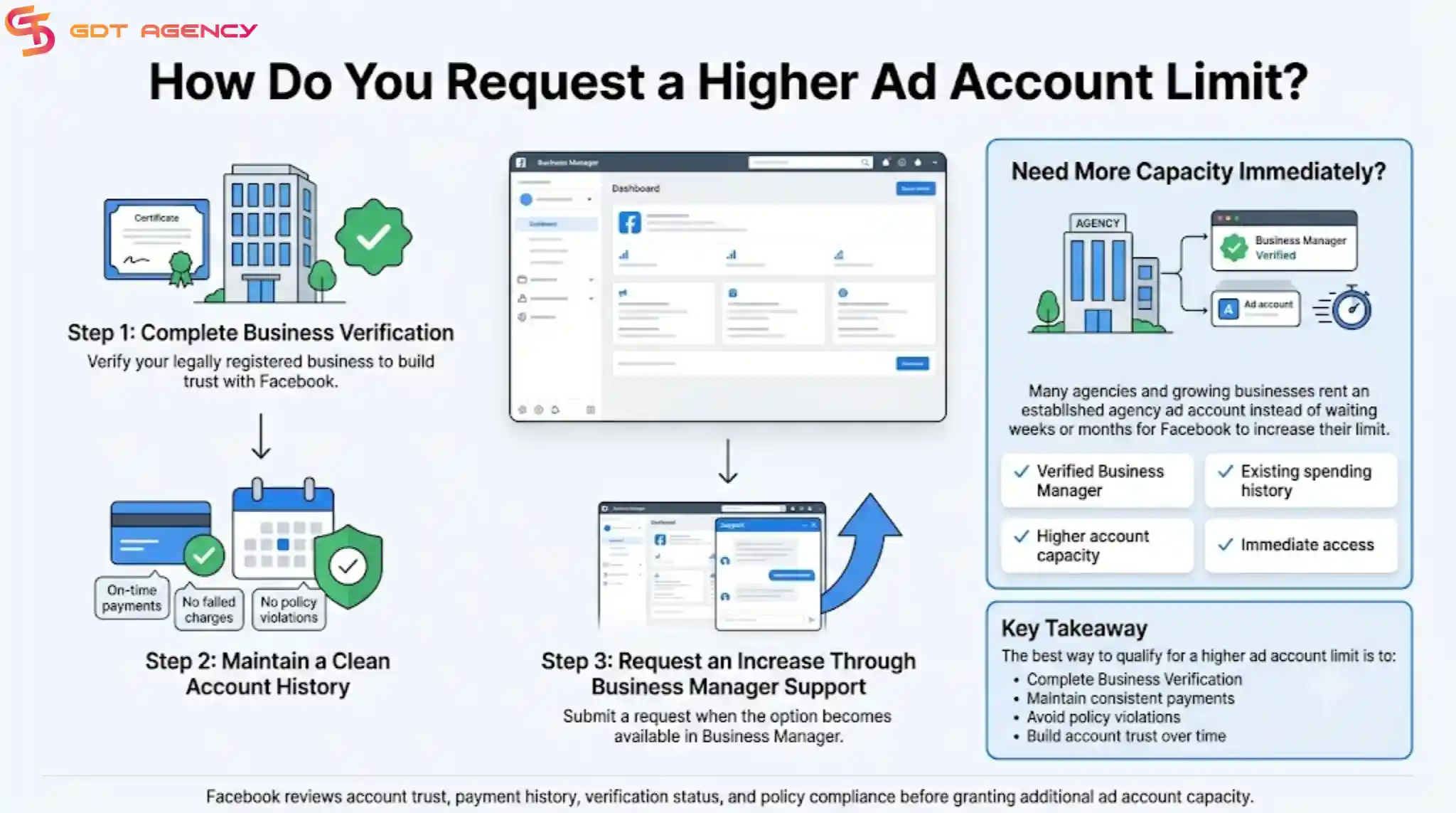
Verification remains the single most effective step. A verified business signals to Facebook that a real, legally registered company sits behind the account, which reduces perceived fraud risk. Consistent ad spend without payment failures or policy strikes reinforces that trust over time.
Some advertisers who need immediate capacity, such as agencies onboarding several clients at once, turn to renting an established Facebook agency ad account instead of waiting weeks or months for Facebook to raise their limit. This route gives immediate access to higher-tier Business Manager structures that already carry verified status and spending history.
What Are the Limits Inside a Single Facebook Ad Account?
A single Facebook ad account can hold up to 5000 campaigns, 5000 ad sets, and 50 ads per ad set. These numbers apply regardless of how many total ad accounts a business owns.
Advertisers rarely hit these internal ceilings unless they run extremely large, multi-market operations. Still, understanding these limits helps larger teams plan campaign structure before they run into unexpected blocks.
How Many Campaigns Can One Ad Account Have?
One ad account can hold up to five thousand campaigns at any given time. Facebook counts both active and paused campaigns toward this total, so old, unused campaigns still take up space.
Large advertisers running dozens of product lines or seasonal promotions should archive or delete unused campaigns regularly. This practice keeps the account well below the ceiling and keeps the account manager interface easier to navigate.
How Many Ad Sets Can One Campaign Have?
Facebook allows up to five thousand ad sets across an entire ad account, and each ad set can contain up to fifty individual ads. This structure supports even the largest advertisers running detailed audience segmentation.
Agencies that test many audience segments per campaign should track ad set counts closely, since aggressive testing across dozens of campaigns can approach the account-wide ad set ceiling faster than expected.
What Is the Difference Between a Regular Ad Account and an Agency Ad Account?
A regular ad account belongs to one individual or one verified business, while an agency ad account belongs to a marketing agency that manages campaigns on behalf of multiple clients under one shared Business Manager structure.
Regular accounts work well for a single business running its own campaigns. Agency ad accounts, often organized into tiers like BM1, BM5, or BM25 based on how many ad accounts the structure can hold, solve a different problem: they let one agency manage many client accounts under a verified, high-trust Business Manager without asking every client to build their own account history from scratch.
Can You Rent an Agency Ad Account Instead of Waiting for Limit Increase?
Yes, businesses can rent Facebook agency accounts instead of waiting for Facebook to raise their personal or Business Manager limit. Renting gives immediate access to a verified, higher-tier account structure that already carries an established spending history.
This route appeals most to agencies and advertisers who need to scale quickly across multiple clients or markets. Building trust with Facebook from a brand-new profile can take months, and that delay costs real revenue for businesses that need to launch campaigns now. Renting an established agency account skips that waiting period entirely, since the account already has verification, payment history, and a proven track record behind it.
Final Thought
Facebook ties every ad account limit to trust, not to how much money you want to spend. A new profile starts small on purpose, and it grows only after Facebook sees clean payments and steady activity over time. Business Manager works the same way at a bigger scale, so agencies that need speed often choose to rent a verified account instead of waiting months for their own limit to rise. Whichever path you take, plan your account structure early. A business that understands these limits before it scales avoids the frustration of hitting a wall mid-campaign.
FAQs
Can I have more than one Facebook ad account on the same profile?
Yes, you can hold more than one ad account on the same profile once Facebook raises your limit past the starting cap of one. Most profiles reach five accounts after months of consistent spending and clean payment history.
Why did Facebook suddenly lower my ad account limit?
Facebook lowers an ad account limit after it detects policy violations, failed payments, or suspicious activity tied to the account. A sudden drop usually means the system flagged something during a recent review.
Does verifying my business always raise my ad account limit?
Verification raises your odds of a higher limit, but it does not guarantee an immediate increase. Facebook still checks spending history and policy compliance alongside verification before it grants more accounts.
Is there a way to check my current ad account limit?
You can check your current limit inside Business Settings under the Ad Accounts section, where Facebook shows how many accounts you already hold against your total allowance.
Can an agency ad account replace my personal Business Manager entirely?
An agency ad account can run alongside your personal Business Manager, but it does not have to replace it. Many agencies keep their own Business Manager for internal use and rent additional agency accounts for client work that needs faster scaling.