
How to Recover a Disabled Facebook Ad Account (Step-by-Step Guide)

You can recover a disabled Facebook ad account by submitting an appeal through Meta Business Support Home, and in most cases, the process takes 3 to 5 business days to get a response. The key is knowing which type of disability you are dealing with before you take any action, because a policy violation and a payment failure each follow a different recovery path.
Facebook disables ad accounts for three main reasons: policy violations, failed payments, and suspicious activity. Each reason has its own fix. Mixing up the steps – for example, submitting an appeal for a payment issue instead of clearing the balance – will delay your recovery and may reduce your chances of getting the account back.
Once your account is back, prevention matters as much as recovery. Most advertisers who get disabled a second time do so because they returned to running ads without reviewing what triggered the disable in the first place. A few hours spent checking your policy compliance and billing setup can save weeks of downtime later.
If your appeal gets rejected and Facebook permanently closes the account, you still have options. Renting an agency-level Facebook ad account gives you immediate access to a trusted account with a clean history – without waiting on Meta’s review process. Below is a complete step-by-step guide covering all of this.
- How to Recover a Disabled Facebook Ad Account – Step by Step
- How to Check Your Account Status on Meta Business Support Home
- How to Submit an Appeal for a Disabled Facebook Ad Account
- How to Fix a Disabled Facebook Ad Account Caused by Payment Failure
- How Long Does Facebook Take to Review a Disabled Ad Account Appeal?
- What Are the Common Reasons Facebook Disables an Ad Account?
- Which Facebook Ad Policies Most Commonly Trigger Account Disables?
- Can a Failed Payment Disable Your Facebook Ad Account?
- How to Prevent Your Facebook Ad Account from Getting Disabled Again
- What Facebook Ad Policies Should You Review Before Running Ads Again?
- How to Set Up a Backup Payment Method to Avoid Account Disables
- What Are Your Options When Facebook Permanently Disables Your Ad Account?
- Can Facebook Permanently Disable an Ad Account Without Warning?
- Is Creating a New Facebook Ad Account After a Permanent Ban Allowed?
- How Does Renting an Agency Facebook Ad Account Work as an Alternative?
- Final Thoughts
- Frequently Asked Questions
- 1. Can I recover a disabled Facebook ad account without submitting an appeal?
- 2. How many times can I appeal a disabled Facebook ad account?
- 3. Does a disabled ad account affect my personal Facebook account?
- 4. Can I run ads on a new ad account while my original account is under appeal review?
- 5. How do I know if my Facebook ad account is disabled or just restricted?
- 6. What happens to my active ads when Facebook disables my ad account?
- 7. Is there a faster way to recover a disabled Facebook ad account?
How to Recover a Disabled Facebook Ad Account – Step by Step
You can recover a disabled Facebook ad account in 4 steps: check your account status on Meta Business Support Home, identify the reason for the disable, submit an appeal or fix the payment issue, then wait for Meta’s review decision.
Follow these steps in order. Skipping step one – checking your exact account status – is the most common mistake advertisers make. The action you need to take depends entirely on what type of disability Meta applied to your account.
How to Check Your Account Status on Meta Business Support Home
Meta Business Support Home is the central dashboard where you can see the exact status of every ad account connected to your Business Portfolio. Go to business.facebook.com/business/support to access it.
Once you are inside, click “Account Overview” in the left menu. You will see all accounts listed with their current status. Look for the account flagged as restricted or disabled. Click on it to see the specific reason Meta gives for the action taken.
There are three status types you might see, and each one requires a different response:
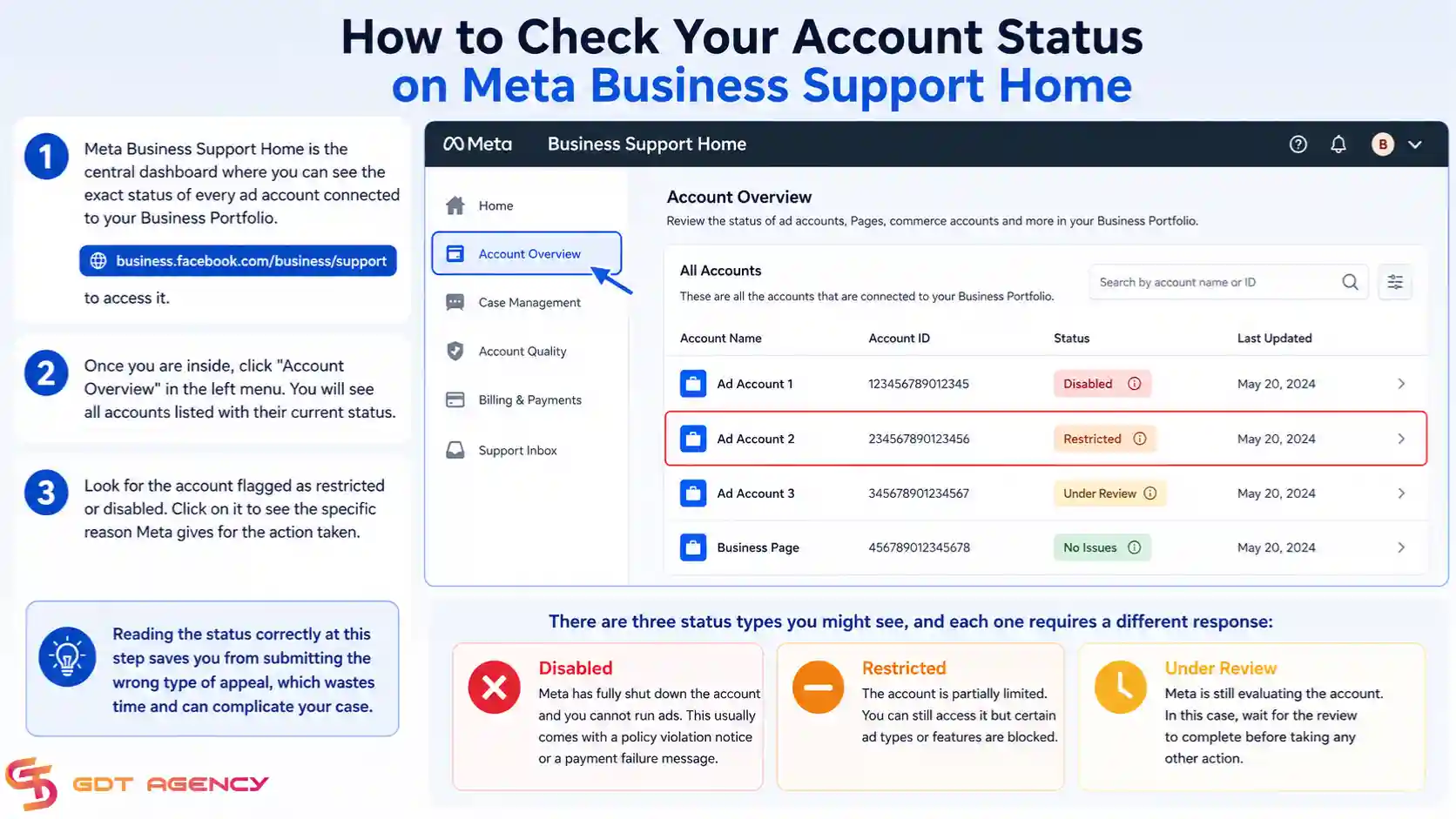
- Disabled Ad Account– Meta has fully shut down the account, and you cannot run ads. This usually comes with a policy violation notice or a payment failure message.
- Restricted Ad Account – The account is partially limited. You can still access it, but certain ad types or features are blocked.
- Under Review – Meta is still evaluating the account. In this case, wait for the review to complete before taking any other action.
Reading the status correctly at this step saves you from submitting the wrong type of appeal, which wastes time and can complicate your case.
How to Submit an Appeal for a Disabled Facebook Ad Account
If your account was disabled due to a policy violation or suspicious activity, you submit an appeal directly through Meta Business Support Home. The appeal form is available on the same page where you saw the disabled status.
Here is how to submit the appeal:
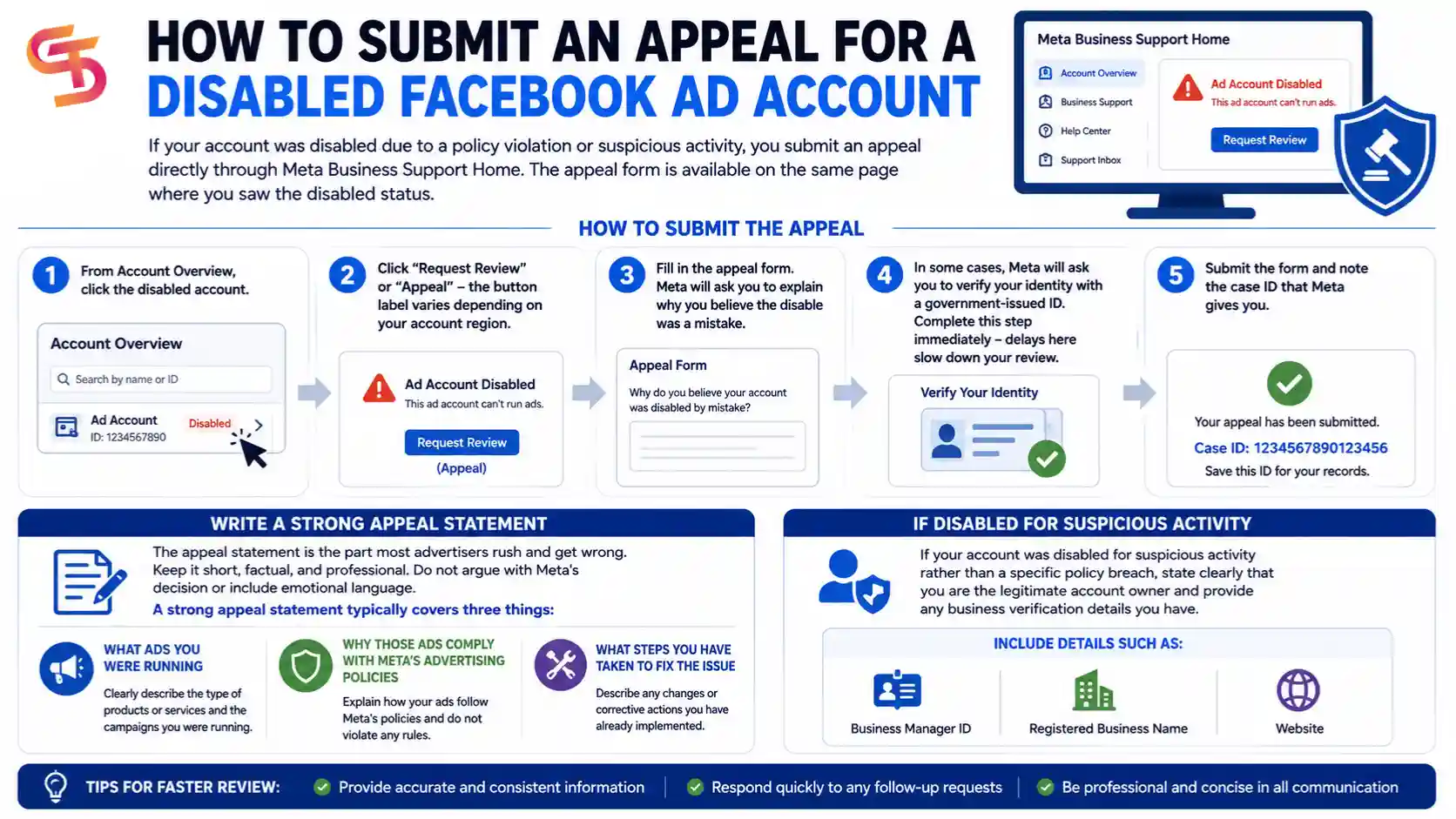
1. From Account Overview, click the disabled account.
2. Click “Request Review” or “Appeal” – the button label varies depending on your account region.
3. Fill in the appeal form. Meta will ask you to explain why you believe the disable was a mistake.
4. In some cases, Meta will ask you to verify your identity with a government-issued ID. Complete this step immediately – delays here slow down your review.
5. Submit the form and note the case ID that Meta gives you.
The appeal statement is the part most advertisers rush and get wrong. Keep it short, factual, and professional. Do not argue with Meta’s decision or include emotional language. A strong appeal statement typically covers three things: what ads you were running, why those ads comply with Meta’s advertising policies, and what steps you have taken to fix the issue if there was a real violation.
If your account was disabled for suspicious activity rather than a specific policy breach, state clearly that you are the legitimate account owner and provide any business verification details you have – such as your Business Manager ID, registered business name, or website.
How to Fix a Disabled Facebook Ad Account Caused by Payment Failure
If Meta disabled your account because of a failed payment, the fix does not go through the appeal process. You need to clear the outstanding billing balance and update your payment method directly in Ads Manager.
Here is the process:
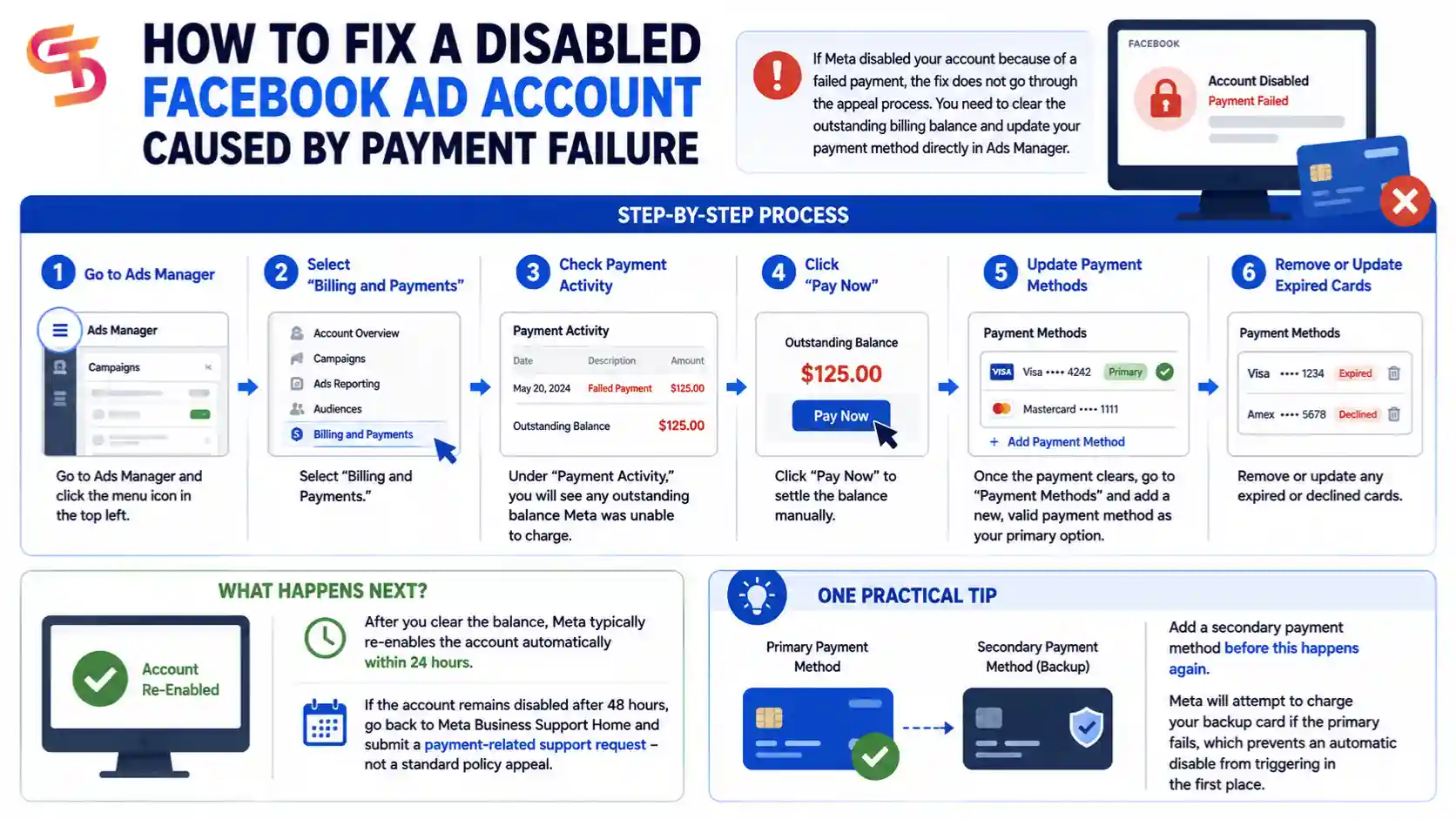
1. Go to Ads Manager and click the menu icon in the top left.
2. Select “Billing and Payments.”
3. Under “Payment Activity,” you will see any outstanding balance that Meta was unable to charge.
4. Click “Pay Now” to settle the balance manually.
5. Once the payment clears, go to “Payment Methods” and add a new, valid payment method as your primary option.
6. Remove or update any expired or declined cards.
After you clear the balance, Meta typically re-enables the account automatically within 24 hours. If the account remains disabled after 48 hours, go back to Meta Business Support Home and submit a payment-related support request – not a standard policy appeal.
One practical tip: add a secondary payment method before this happens again. Meta will attempt to charge your backup card if the primary fails, which prevents an automatic disable from triggering in the first place.
How Long Does Facebook Take to Review a Disabled Ad Account Appeal?
As CEO and Founder of GDT Agency, with years of experience working with Facebook ad accounts, and experience dealing with thousands of cases of disabled ad accounts, I can affirm that Facebook typically takes 3 to 5 business days to review a disabled ad account appeal, though some cases take up to 2 weeks depending on the volume of appeals Meta is processing and the complexity of your account history.
After you submit your appeal, you will receive a confirmation email from Meta with a case reference number. You can track the status of your appeal by going back to Meta Business Support Home and checking the “Support” tab in the left menu. Your open cases will appear there with their current review status.
During the review period, do not submit multiple appeals for the same account. Each new submission restarts the review queue and extends your wait time. Submit once, then wait.
If the review period exceeds 10 business days with no update, you can use the Meta Business Help Center live chat to follow up. Have your case ID ready when you contact them. Representatives cannot override review decisions, but they can confirm whether your case is still in the queue or has been missed.
→ A disabled ad account is only one type of enforcement action. For a complete breakdown of all restriction types, appeal processes, and recovery scenarios, see our Facebook Ad Account Recovery and Restriction guide.
What Are the Common Reasons Facebook Disables an Ad Account?
Facebook disables ad accounts for 3 main categories of reasons: policy violations, payment failures, and suspicious account activity. Knowing which category applies to your account determines the fastest path to recovery.
Understanding the cause is not just useful for recovery – it is essential for prevention. Advertisers who fix the symptom without addressing the root cause tend to face the same disable again within weeks. Below are the two most common causes in detail.
Which Facebook Ad Policies Most Commonly Trigger Account Disables?
The Facebook ad policies that most commonly trigger account disables fall into three groups: prohibited content, restricted categories run without proper authorization, and misleading claims in ad copy.
Here is a breakdown of each:
- Prohibited content includes anything Meta bans outright, regardless of industry. Common examples are ads promoting tobacco products, adult content, weapons, surveillance tools, or anything that violates Meta’s Community Standards. Even one ad with prohibited content can trigger an account-level disable.
- Restricted categories cover industries that Meta allows but requires prior authorization for – such as financial services, credit products, housing, employment, and political ads. Running ads in these categories without completing Meta’s authorization process will trigger a disable. The fix here is to complete the required authorization through Meta’s Ad Authorization tool, then appeal.
- Misleading claims cover ad copy that overpromises results, uses fake urgency, implies a personal endorsement Meta did not authorize, or mimics the appearance of news articles. Meta’s algorithm flags these at the creative level, but repeated flags can disable the account.
Before you run any new ads after recovery, review the full list of prohibited and restricted content at Meta’s Advertising Standards page. Pay particular attention to the “Before You Advertise” section, which outlines the categories that require pre-approval.
Can a Failed Payment Disable Your Facebook Ad Account?
Yes, a failed payment can disable your Facebook ad account. Meta uses an automatic billing system that charges your payment method when your ad spend reaches a set billing threshold. If that charge fails and Meta cannot collect the balance after multiple attempts, it disables the account to stop further spending that it cannot collect.
The most common reasons a payment fails include an expired credit card, insufficient funds, a bank security block on the transaction, or a card that was replaced but not updated in Ads Manager. In some cases, banks flag Meta’s billing as an unusual transaction and block it automatically – even when the card is valid and has sufficient funds.
The important distinction here is that a payment-related disability is not a policy violation. It does not go on your account’s policy record, and it does not make future appeals harder. As long as you clear the balance and update the payment method, Meta restores the account without requiring an appeal.
How to Prevent Your Facebook Ad Account from Getting Disabled Again
You can prevent your Facebook ad account from being disabled again by reviewing Meta’s advertising policies before running new ads and setting up a reliable backup payment method. These two steps address the two most common causes of account disables.
Most repeat disables happen within 30 days of recovery – usually because the advertiser returned to running the same type of ads without checking what triggered the original disable. The steps below are the practical minimum every advertiser should complete before reactivating ad spend.
What Facebook Ad Policies Should You Review Before Running Ads Again?
There are 3 core policy documents you should read before running ads again after a disable: Meta’s Advertising Standards, the Commerce Policies, and the Community Standards.
Here is what each document covers and why it matters:
- Meta Advertising Standards covers what is allowed and prohibited in ad content, targeting, and landing pages. This is the primary document that determines whether your ads get approved or flagged. Pay close attention to the sections on prohibited content and restricted categories – these two sections account for the majority of policy-related disables.
- Meta Commerce Policies apply if you run ads promoting products or services for sale. These policies govern what you can sell through Facebook and Instagram, including requirements around product descriptions, pricing transparency, and prohibited product categories. If your ads link to a product catalog or a Shop, this document is directly relevant.
- Meta Community Standards set the baseline for acceptable content across all of Meta’s platforms. Ad content is held to these standards in addition to the advertising-specific rules. Anything that would violate Community Standards – such as content that targets people based on protected characteristics – will also violate the ad policies.
After reading these documents, run your planned ad creatives through Meta’s Ad Preview tool and check your landing page against the landing page quality guidelines. Meta reviews landing pages as part of ad approval – a compliant ad pointing to a non-compliant page can still trigger a flag.
How to Set Up a Backup Payment Method to Avoid Account Disables
You can avoid payment-related account disables by adding a secondary payment method in Ads Manager so Meta has an alternative if your primary card fails. Here is how to set it up:
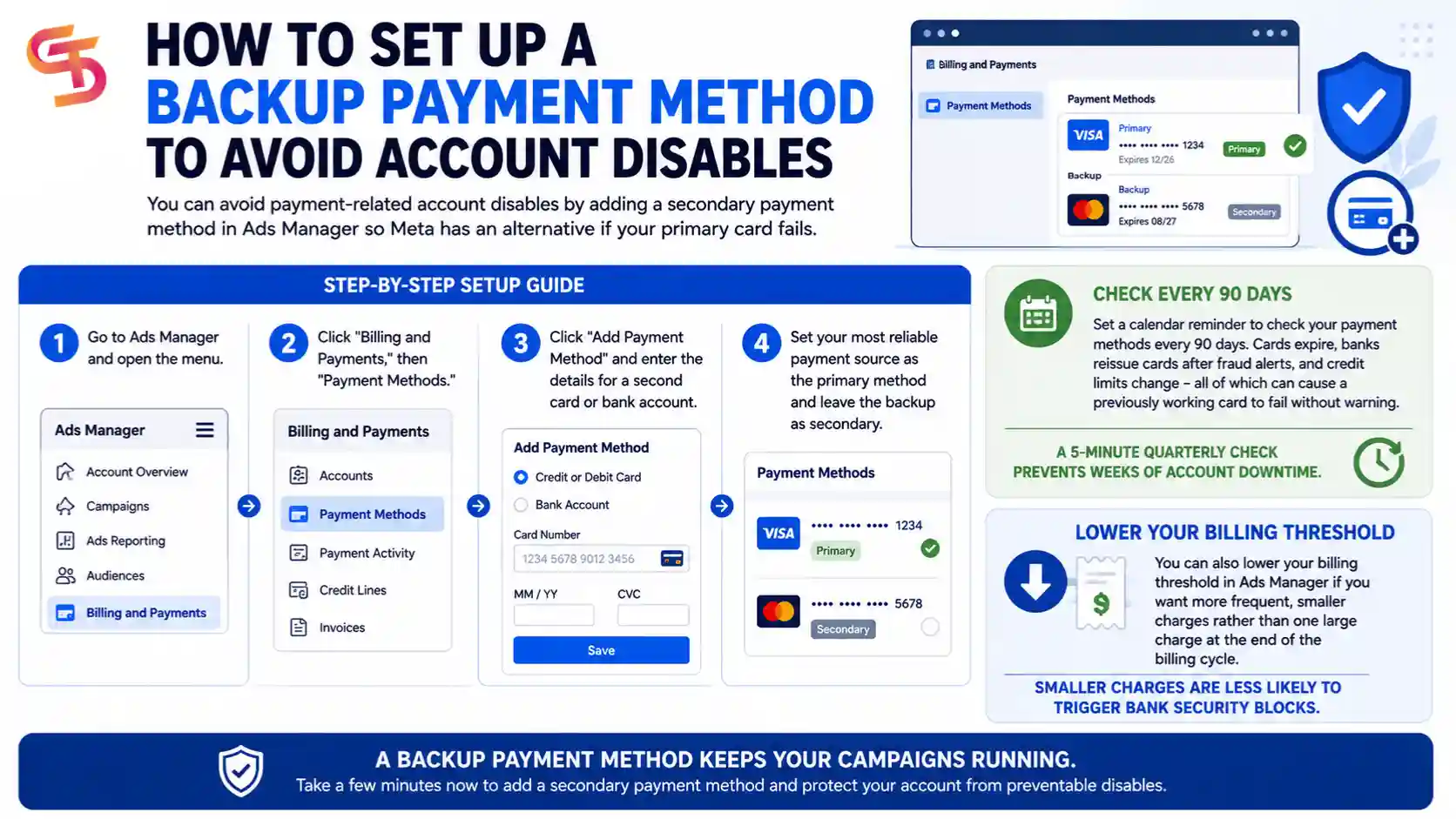
1. Go to Ads Manager and open the menu.
2. Click “Billing and Payments,” then “Payment Methods.”
3. Click “Add Payment Method” and enter the details for a second card or bank account.
4. Set your most reliable payment source as the primary method and leave the backup as secondary.
Beyond adding a backup, set a calendar reminder to check your payment methods every 90 days. Cards expire, banks reissue cards after fraud alerts, and credit limits change – all of which can cause a previously working card to fail without warning. A 5-minute quarterly check prevents weeks of account downtime.
You can also lower your billing threshold in Ads Manager to receive more frequent, smaller charges rather than a single large charge at the end of the billing cycle. Smaller charges are less likely to trigger bank security blocks.
What Are Your Options When Facebook Permanently Disables Your Ad Account?
When Facebook permanently disables your ad account, you have 3 options: submit a final appeal through the Meta Business Help Center, open a new ad account under a different Business Portfolio, or rent an agency-level Facebook ad account to resume advertising immediately.
The right choice depends on how urgently you need to get back to running ads and whether Meta left any path open for appeal. Below is what each option means in practice.
Can Facebook Permanently Disable an Ad Account Without Warning?
Yes, Facebook can permanently disable an ad account without prior warning in specific situations. While Meta typically issues warnings or restricts accounts before a full disable, certain violations trigger an immediate permanent ban with no escalation period.
These situations include: repeated violations of the same policy after previous warnings, advertising in prohibited categories such as illegal products or services, coordinated inauthentic behavior detected across multiple accounts linked to the same Business Manager, and identity fraud during the appeal verification process. If Meta detects that you submitted false documentation during an appeal – such as an altered government ID – it will permanently close the account and flag the Business Manager.
In these cases, the standard appeal process is not available. The only remaining option is to contact Meta through the Business Help Center and explain your situation, though approval rates for permanent bans are very low.
Is Creating a New Facebook Ad Account After a Permanent Ban Allowed?
No, creating a new Facebook ad account after a permanent ban is not allowed under Meta’s Terms of Service. Meta ties permanent bans to the individual advertiser and the Business Manager, not just to the specific ad account. Opening a new account on the same Business Manager, using the same payment method, or advertising from the same device or IP address will typically result in the new account being flagged and disabled quickly.
This is what advertisers refer to as the account trust score problem. When Meta permanently disables an account, it records signals associated with that advertiser – payment methods, device fingerprints, IP addresses, and Business Manager IDs. New accounts that share any of these signals inherit the risk profile of the banned account, which means they start with a low trust score and get flagged faster.
Trying to work around a permanent ban by creating multiple new accounts also escalates the situation. Meta can extend the ban to your personal Facebook profile, which removes your ability to run any Meta advertising permanently.
How Does Renting an Agency Facebook Ad Account Work as an Alternative?
Renting a Facebook agency ad account works by giving advertisers access to a high-trust ad account owned and managed by a Meta Business Partner or authorized agency – without the advertiser needing to own or create the account themselves.
Agency ad accounts are accounts with an established advertising history, consistent spending patterns, and a clean policy record. Meta assigns these accounts a higher trust level than newly created accounts, which means ads go through review faster and are less likely to trigger automated flags during the first weeks of spending.
Here is how the rental process typically works:
- You contact an agency that offers ad account rental services, such as GDT Agency.
- The agency grants you access to run ads through their account under a shared Business Manager structure.
- You manage your own campaigns, creatives, and budgets. The agency account sits above yours as the account owner.
- You pay a rental fee, typically calculated as a percentage of your monthly ad spend or a fixed monthly rate.
The main advantage for advertisers who have been permanently banned is continuity – you can resume advertising the same day without waiting for Meta’s review process. The account already has the trust history Meta looks for when approving ads and scaling budgets.
The practical consideration is choosing a reputable agency partner. A legitimate agency will be transparent about its account structure, the policies you must follow, and the terms of the rental agreement. GDT Agency, for example, provides agency-level accounts for Facebook, Google Ads, and TikTok with clear rental terms for advertisers in this exact situation.
Final Thoughts
Recovering a disabled Facebook ad account takes patience, but the process is straightforward when you follow the right steps. Check your account status first, identify the exact reason for the disable, then take the action that matches that reason – whether that is submitting an appeal or clearing a payment balance. Skipping ahead without knowing the cause is where most advertisers lose time.
Prevention is worth more than recovery. A few minutes reviewing Meta’s advertising policies and keeping your payment methods current will do more for your ad account’s long-term health than any appeal strategy. Most disabilities are avoidable.
If your account is permanently closed and Meta has exhausted your appeal options, that is not the end of your advertising. Renting an agency-level Facebook ad account gives you a clean, trusted account to keep your campaigns running while you work through the longer resolution process – or permanently, if that is the more practical path for your business.
Frequently Asked Questions
1. Can I recover a disabled Facebook ad account without submitting an appeal?
Yes, in one specific case, if the disability was caused by a failed payment. You can recover the account by clearing the outstanding billing balance and updating your payment method in Ads Manager, without going through the standard appeal process. For all other types of disabilities, you need to submit an appeal through Meta Business Support Home.
2. How many times can I appeal a disabled Facebook ad account?
Meta allows one active appeal per disabled account at a time. If your first appeal is rejected, you can submit a second appeal through the Meta Business Help Center with additional supporting information. There is no hard limit on the number of appeals, but submitting the same appeal multiple times without new information rarely changes the outcome.
3. Does a disabled ad account affect my personal Facebook account?
A disabled ad account does not automatically affect your personal Facebook profile in most cases. However, if Meta determines that the violations were serious – such as fraud, coordinated inauthentic behavior, or repeated policy breaches across multiple accounts – it can extend the disablement to your Business Manager and, in extreme cases, to your personal profile.
4. Can I run ads on a new ad account while my original account is under appeal review?
Technically yes, if the disable was on a specific ad account and not on your entire Business Manager. You can open a new ad account within the same Business Manager and run ads while waiting for the review decision. However, if the original disable was caused by a policy violation, running ads on a new account with similar content can trigger a disable on the new account as well.
5. How do I know if my Facebook ad account is disabled or just restricted?
Go to Meta Business Support Home at business.facebook.com/business/support and click “Account Overview.” Disabled accounts show a red status label and a notice that all advertising has been stopped. Restricted accounts show a warning label but remain partially active – you can still access the account, but certain features or ad types are blocked. The status label on the Account Overview page is the most reliable way to confirm which one applies to you.
6. What happens to my active ads when Facebook disables my ad account?
All active ads stop running immediately when Meta disables your ad account. Any campaigns that were live are paused automatically. Ads do not resume on their own after the account is recovered – you need to manually reactivate each campaign after Meta restores account access.
7. Is there a faster way to recover a disabled Facebook ad account?
There is no official fast-track process for ad account appeals. However, if you have a Meta Business Partner or work with a Meta-authorized agency, they may have a dedicated support channel that can escalate cases faster than the standard appeal queue. This is one practical advantage of working with an agency partner – access to priority support on account issues.