
Facebook Ads Account Spending Limit: What It Is and How It Works


An account spending limit on Facebook Ads is a cumulative cap you set on the total amount an ad account can spend before Facebook automatically pauses all active ads. Unlike a daily or campaign budget, this limit applies to the account as a whole and does not reset on a recurring schedule. Understanding how this cap functions is essential for any advertiser who wants to control total ad expenditure without relying solely on budget settings at the campaign level.
Beyond the definition, most advertisers also want to know how to adjust this cap once it is set. In particular, Facebook allows account owners to increase, lower, or remove the spending limit at any time through Ads Manager billing settings, provided the account meets certain payment method requirements. Equally important, advertisers need to understand what actually happens the moment an account hits its limit, since this directly affects campaign performance and delivery continuity.
Beyond that, spending limit is frequently confused with daily budget or campaign budget, even though the three concepts operate at completely different levels of the account structure. To clarify this distinction, the following sections break down each concept side by side so advertisers can see exactly where spending limit fits within Facebook’s broader budget architecture.
Finally, for agencies managing rented or shared ad accounts — a use case central to how many agencies operate — spending limit behavior can differ from what a standard, self-owned account experiences. Let’s explore each of these points in detail below.
- What Is The Account Spending Limit On Facebook Ads?
- Is Account Spending Limit the Same as Daily Budget or Campaign Budget?
- How Do Ad Account Spending Limits on Facebook Ads Work?
- How To Set Up Your Facebook Account Spending Limit?
- Setting Account Spending Limit
- Setting Campaign Spending Limit
- Setting Your Daily Spending Limit
- What Happens When You Reach the Account Spending Limit?
- How to Resolve an Account That Has Hit Its Spending Limit?
- Can You Change or Remove the Account Spending Limit?
- How To Increase The Account Spending Limit on Facebook Ads
- How to Remove the Account Spending Limit Completely?
- Conclusion
- FAQs
- 1. What happens when my Facebook ad account reaches its spending limit?
- 2. Does the account spending limit affect Facebook ad performance?
- 3. Why is my Facebook account spending limit so low?
- 4. Can I remove my Facebook account spending limit?
- 5. What is the difference between an account spending limit and a billing threshold?
- 6. How can I increase my Facebook account spending limit faster?
- 7. Can a Facebook agency ad account have a higher spending limit?
What Is The Account Spending Limit On Facebook Ads?
An ad account spending limit is a flexible lifetime cap on the total amount of money that your ad can spend across all campaigns that you’re running from the time you set it.
In Facebook ads, there are 3 types of spending limits you may encounter that can be set to a campaign, an ad account, or on a daily basis.
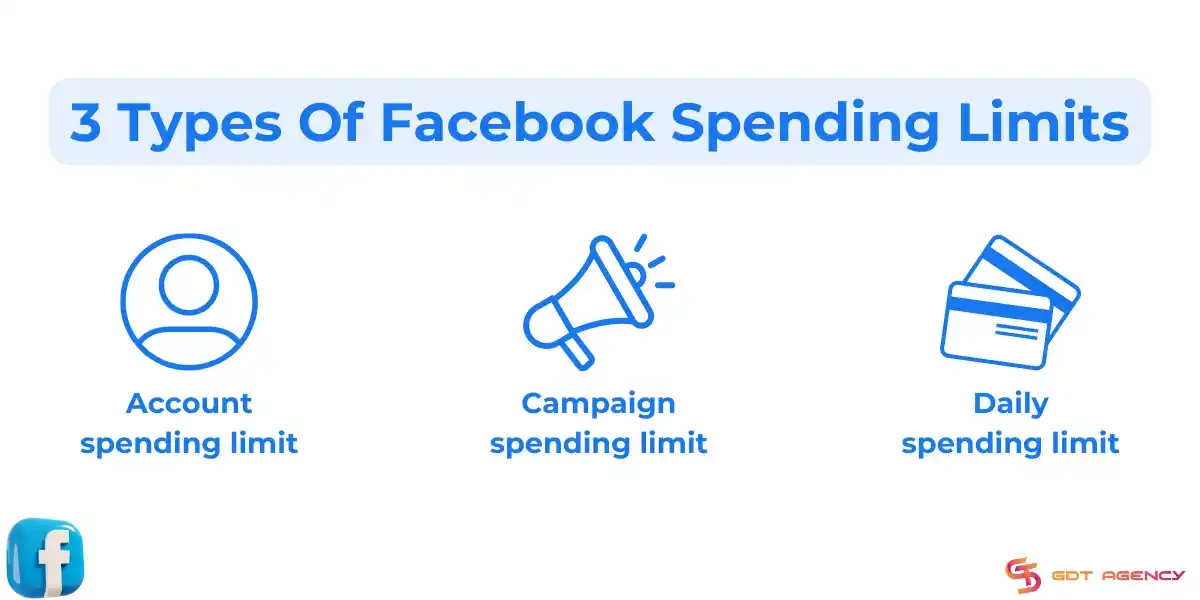
- Account spending limits: control how much you can spend across all campaigns running on an ad account in a lifetime. When the spending amount reaches the limit, all ads running on this account will turn off.
- Campaign spending limits: the highest amount you are willing to spend on a campaign for a lifetime. When this limit is reached, all ads in this campaign will be paused.
- Daily spending limits: control how much you can spend in a day. When your expenditure reaches this limit, Facebook will stop delivering your ads until 00:00 in your ad account’s time zone.
By setting an ad account spending limit, advertisers can control costs and ensure that they don’t exceed the desired ad budget. When aligning the limit with the overall advertising budget, you can optimize results for your business.
Is Account Spending Limit the Same as Daily Budget or Campaign Budget?
No, account spending limit is not the same as daily budget or campaign budget — the account spending limit governs cumulative lifetime spend across the entire account, daily budget governs recurring spend within a single campaign or ad set that resets every 24 hours, and campaign budget governs total spend for one specific campaign’s duration.
In contrast to the account-wide, non-resetting nature of the spending limit, a daily budget is designed for pacing: Facebook aims to spend approximately that amount each day and may fluctuate up to a certain percentage above or below it depending on delivery opportunities. A campaign budget, whether daily or lifetime, applies narrowly to that one campaign and has no bearing on any other campaign running in the same account.
| Control | Scope | Reset Behavior |
| Account Spending Limit | Entire ad account | Does not reset; cumulative until changed |
| Daily Budget | Single campaign/ad set | Resets every 24 hours |
| Campaign Budget (Lifetime) | Single campaign | Fixed total for campaign duration |
This table compares the three spending controls by scope and reset behavior, showing why they must be configured together rather than treated as interchangeable settings.
How Do Ad Account Spending Limits on Facebook Ads Work?
As an expert at GDT Agency who has more than 5 years of experience working with Facebook ads accounts, especially Facebook agency ad accounts, I know that most scaling issues come from advertisers confusing spending limits with budgets, or trying to push spend too fast on a new account. Therefore, understanding how this system works is critical if you plan to scale Facebook ads steadily.
The account spending limit works by tracking total accrued cost across the entire ad account and comparing that running total against the cap the advertiser has set, pausing delivery the instant the two numbers meet. To break this down further, the mechanism operates independently of campaign-level or ad set-level budget pacing.
Specifically, Facebook’s billing system continuously sums the cost of every impression, click, and conversion charged across all active campaigns in the account. This is a lifetime, cumulative count — it does not reset daily, weekly, or monthly the way a campaign budget does. As a result, an account with a $5,000 spending limit will stop delivering once total spend since the limit was set (or last reset) reaches $5,000, even if that happens in three days or three months.
How To Set Up Your Facebook Account Spending Limit?
Your account spending limit can be managed in Facebook Ads Manager, on both mobile devices and desktops. In which each type of spending limit has its own way to set up:
Setting Account Spending Limit
You and all account admins can set a spending limit for your ad account in Facebook Ads Manager to prevent exceeding your planned amount. Here’s how to set a spending limit on a Facebook ad account:
Step 1: Access Payment Settings
Log in to Facebook and navigate to Facebook Ads Manager.
Select Billing and Payments from the left sidebar.
Then, click Payment Settings.
You can switch to the ad account you want to manage the spending limit from the dropdown menu at the top right.
Step 2: Go to Account spending limit
Scroll down the Payment Settings page.
The Account Spending Limit section is under the Payment Methods section.
Step 3: Choose your action
Click on the (…) on the right and see available options.
If you haven’t set up a spending limit for your ad account, you can select Set Limit.
If you need to increase or reduce the spending limit, hit Change.
If you want to remove your spending limit, click Remove.
If you want to reset the amount spent to $0, choose Reset.
Step 4: Set up your account spending limit
When you hit Set Limit or Change, a pop-up window appears,
Here, you can select:
When you want this limit to reset. You may just set it to reset automatically on the 1st day of every month. Or you put it to manually reset only when you make changes.
The spending limit you want to set. Enter the desired amount here. Remember that this limit does not include taxes, so the actual billed amount can be higher.
Step 5: Review and save the limit
Once you’ve done with your Facebook account spending limit settings, select Save to confirm the changes.
Finally, review the notification and hit Done.
Setting Campaign Spending Limit
For the campaign spending limit, you can use CBO (campaign budget optimization) to set the campaign lifetime budgets instead and leave them untouched. Here’s how to set a spending limit for a Facebook campaign:
Step 1: Go to Campaign
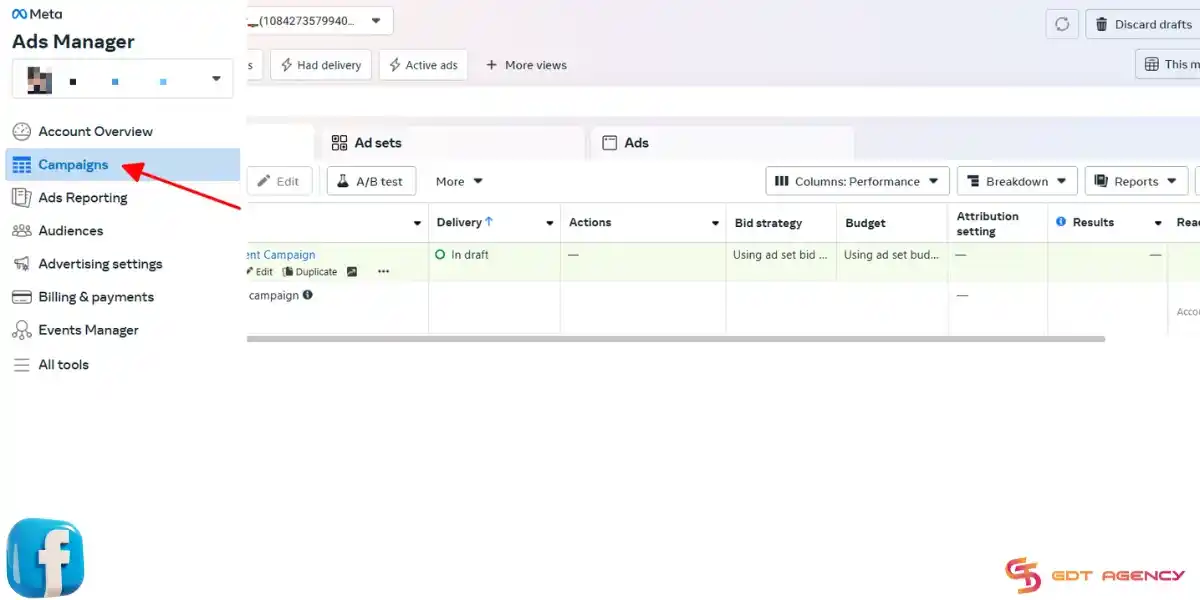
Navigate to Facebook Ads Manager, then select Campaigns
Find the campaign you want to set a limit for in the campaign column.
Step 2: Edit the campaign
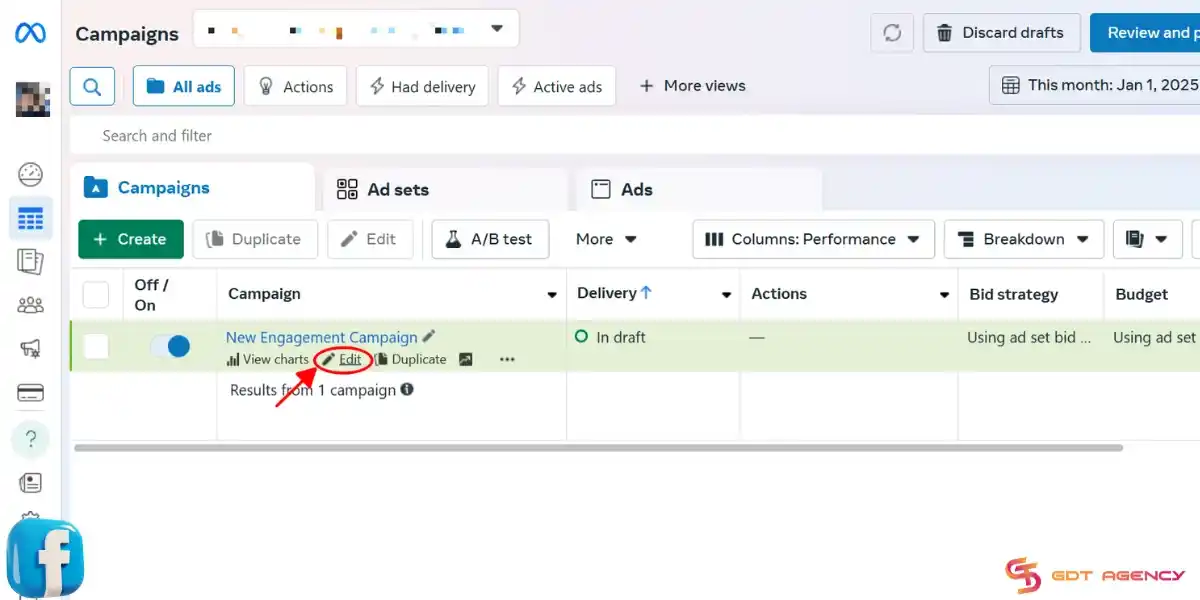
Under the campaign title, select Edit.
In the Campaign details section, select Show More Options
Step 3: Add a campaign spending limit
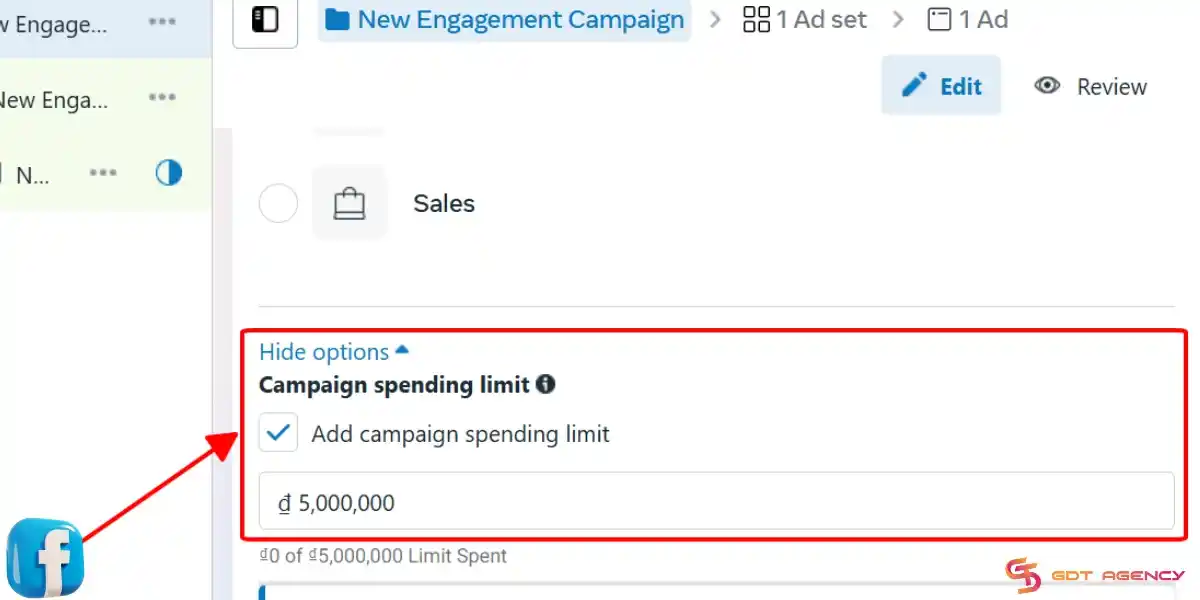
- Select Add campaign spending limit.
- Enter your desired limit.
Step 4: Save the campaign spending limit
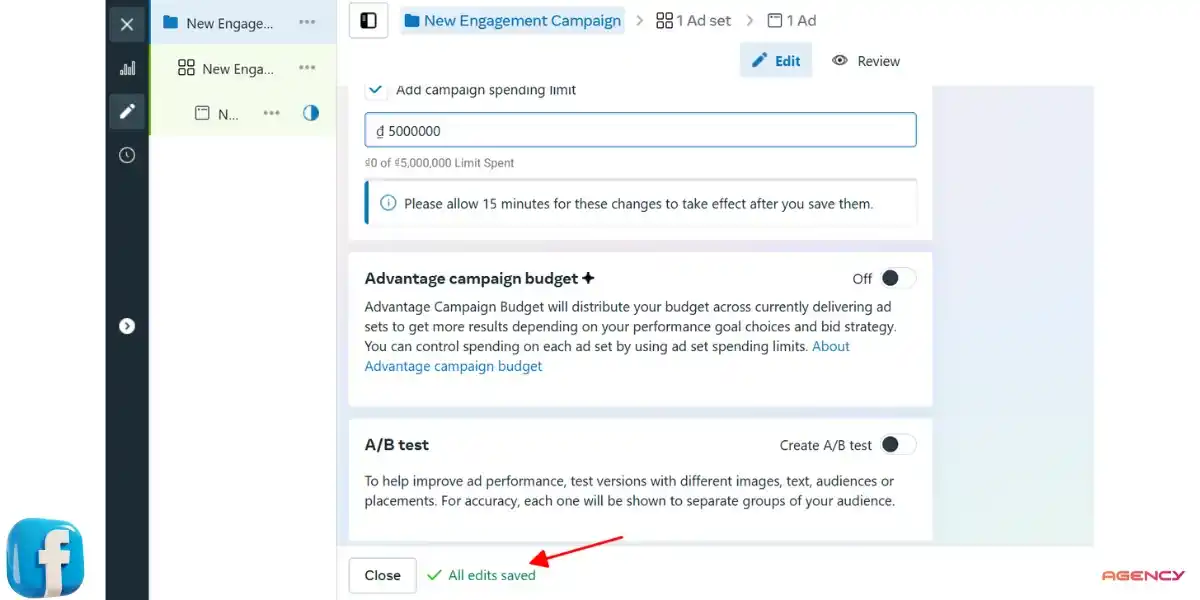
- Click Save.
- Wait 15 minutes for this change to apply.
Like account spending limits, campaign spending limits are optional. You can change or remove them anytime.
Setting Your Daily Spending Limit
Unlike the account or campaign spending limits that you can set up by yourself, the daily spending limit is set up by Meta. Meta sets this limit mainly to manage risk. The daily spending limit will be set based on how reputable your ad account is:
- New ad accounts with low reputation often have low daily spending limits.
- Aged and high-spending accounts may have a higher threshold.
- Exceptionally trusted ad accounts like Facebook agency accounts can have unlimited spending limits, which allows advertisers to scale their budgets freely.
What Happens When You Reach the Account Spending Limit?
When an account reaches its spending limit, all active ads across every campaign in that account pause immediately, delivery stops account-wide, and Facebook sends a notification to the account admin flagging that the limit has been hit. This is not a gradual slowdown — it is an instant, hard stop.
Consequently, any campaigns mid-flight lose delivery momentum, which can disrupt the learning phase of the ad set algorithm and reduce performance efficiency once ads resume. In addition, scheduled ads that were set to launch after the limit is reached will not go live until the limit is raised or removed.
How to Resolve an Account That Has Hit Its Spending Limit?
Resolving this issue requires either raising the existing spending limit to a higher amount or removing it altogether, both done through the same Billing → Payment Settings panel described earlier.
1. If you are using a postpaid ad account and have reached the spending limit, you need to change or remove it. You can follow the usual steps to reset, remove, or change the spending cap, or click the “Manage spending limit” button from the notification for quick access.
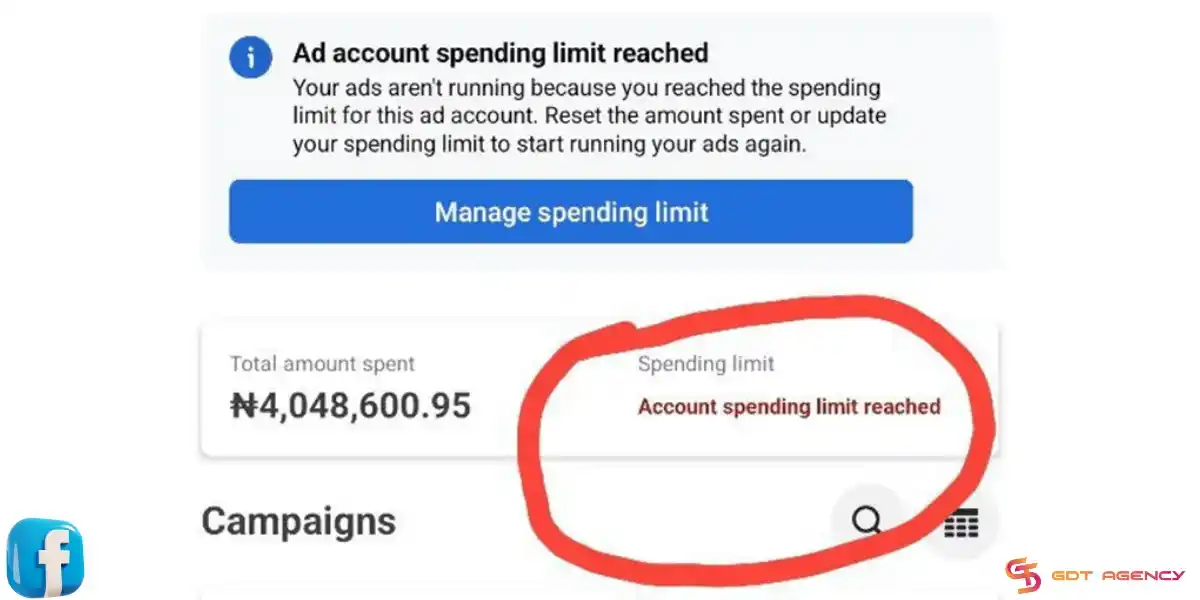
2. If you are using prepaid ad accounts and receive a notification that you need to increase or reset the account spending limit. Just top up your balance and ignore the notification. Your ads are still working anyway.
→ Once the change is saved, paused ads typically resume delivery within minutes, though the ad set may re-enter a brief learning phase if the pause lasted longer than a few hours.
Can You Change or Remove the Account Spending Limit?
Yes, advertisers can both change and remove the account spending limit, for three main reasons: the setting is fully editable by the account owner or an admin with billing permissions, Facebook does not require a waiting period to adjust it, and there is no minimum or maximum restriction beyond what the account’s payment method supports.
That said, changing this setting does carry some practical considerations. For instance, increasing the limit takes effect immediately, while removing it entirely allows the account to spend without a lifetime cap, relying instead on individual campaign budgets and the account’s payment threshold as the only remaining spend controls.
How To Increase The Account Spending Limit on Facebook Ads
Increasing the account spending limit on Facebook ads is not instant. Facebook raises limits based on trust, not requests alone. The goal is to show stable behavior over time. Here are some tips to increase the account spending limit that you can refer to:
1. Spend Consistently, Not Aggressively: Remember to avoid jumping budgets too fast. Based on my experience, gradual and consistent spending will create stability signals. Accounts that try to scale sharply often stay capped longer.
2. Keep Payment History Clean: You should use a reliable payment method and avoid failed charges. Repeated payment issues are one of the fastest ways to block limit increases.
3. Follow Policy Carefully: Violating Facebook policy will slow down trust growth. Even small disapprovals can affect how quickly Facebook raises your limit. Therefore, you have to read and follow the Facebook ad policy carefully.
4. Let the Account Age Naturally: New ad accounts almost always start with low limits. Time matters. Accounts that run smoothly for weeks or months are more likely to get higher caps.
5. Use Business Manager and Verified Assets: Accounts connected to a verified Business Manager, domain, and business information tend to gain trust faster.
6. Avoid Frequent Changes: Constantly creating and deleting campaigns, ad sets, or accounts can raise red flags. Therefore, keep changes intentional and measured.
→ Low spending limits can do more than restrict your budget. They can also prevent your campaigns from generating enough optimization events for Meta’s algorithm to exit the learning phase. If your campaigns remain in the Learning or Learning Limited status, read our guide on Facebook Ads Stuck in Learning Phase in 2026: How To Get Out Quickly to learn how to stabilize delivery and improve campaign performance.
How to Remove the Account Spending Limit Completely?
Removing the spending limit entirely requires clicking “Edit” on the same billing panel and selecting the option to set no limit, rather than entering a numeric value. Once confirmed, the account no longer has a cumulative spend ceiling, and delivery is governed solely by campaign-level budgets and the standard payment threshold billing cycle.
Agencies managing multiple client accounts often remove this limit once an account has built sufficient trust and billing history, shifting spend control entirely to campaign-level budget management for more granular oversight.
Conclusion
The ad account spending limit on Facebook ads is Facebook’s way of controlling risk while your account builds trust. I hope that this article can help you understand more about the account spending limit on Facebook ads to avoid sudden pauses and scale in a controlled way.
If you have any questions or need additional help, don’t hesitate to contact GDT Agency. Our expert team is always ready to help. You can also follow GDT Agency for more useful information as well as knowledge about Facebook ads!
→ Raising your account spending limit gives you the ability to invest more in advertising, but successful scaling requires more than simply increasing your budget. If you want to grow your campaigns while maintaining consistent performance, read our guide on How to Scale Your Facebook Ad Account Budget Without Losing ROAS for proven scaling strategies and common mistakes to avoid.
FAQs
1. What happens when my Facebook ad account reaches its spending limit?
When your ad account reaches its account spending limit, Meta immediately pauses all active campaigns under that account, even if your campaign and ad set budgets still have available funds. Your ads will not resume until you increase, remove, or reset the account spending limit.
2. Does the account spending limit affect Facebook ad performance?
No. The account spending limit does not influence Meta’s delivery algorithm, optimization, or campaign performance. It only acts as a billing cap. Once the limit is reached, Facebook stops spending until you update the limit.
3. Why is my Facebook account spending limit so low?
New ad accounts usually receive lower spending limits because Meta has not established enough trust. Your limit depends on several factors, including your payment history, policy compliance, account age, spending consistency, and overall account quality. As your account builds a positive history, Meta may gradually increase your spending capacity.
4. Can I remove my Facebook account spending limit?
Yes. If you no longer want a lifetime spending cap, you can remove it from Billing & Payments > Payment Settings > Account Spending Limit in Ads Manager. Once removed, your campaigns will continue spending according to their campaign or daily budgets until you manually set a new limit.
5. What is the difference between an account spending limit and a billing threshold?
An account spending limit is a lifetime cap that you set to control the maximum amount your ad account can spend. A billing threshold is determined by Meta and specifies how much you can spend before your payment method is charged. Reaching your billing threshold triggers a payment, while reaching your account spending limit pauses your ads.
6. How can I increase my Facebook account spending limit faster?
Meta does not allow advertisers to request a higher spending limit manually. The best way to receive a higher limit is to build account trust by maintaining successful payments, following Meta’s advertising policies, spending consistently over time, verifying your business assets, and avoiding sudden budget increases or repeated account changes.
7. Can a Facebook agency ad account have a higher spending limit?
Yes. Facebook agency ad accounts often have significantly higher or even effectively unlimited spending capacity because they operate under trusted agency infrastructure with established payment histories. This allows advertisers to scale campaigns more easily without being restricted by the lower spending limits commonly assigned to new personal ad accounts.