
How to Run High-Converting Facebook Ads for SaaS Companies: A Step-by-Step Guide

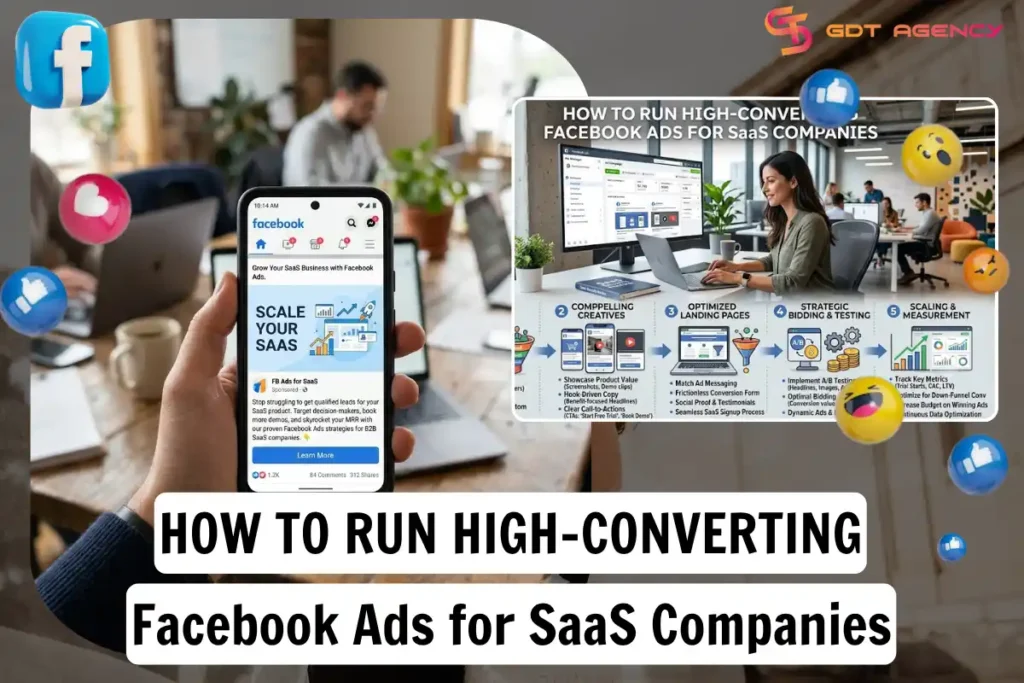
Running high-converting Facebook ads for SaaS company requires seven core steps: campaign setup, audience targeting, ad creative, funnel building, budget planning, mistake avoidance, and performance tracking. Each step answers one part of the buyer’s decision, from the first impression in the news feed to the moment they enter a credit card on the signup page. A SaaS company that skips any one of these steps usually pays for clicks that never turn into trial users.
Audience targeting sits at the center of this process because SaaS products sell to a narrow, specific buyer. A generic broad audience wastes budget on people who will never open a B2B tool, so the targeting step decides whether every other step even has a chance to work. Once the audience is locked in, ad creative becomes the next lever, since the same audience responds differently to a demo video versus a static testimonial graphic.
Budget and funnel design work together to turn a click into a paying customer. A SaaS company can build the sharpest ad on Facebook, but if the landing page loads slowly or the trial signup form asks for ten fields, the ad spend disappears with nothing to show for it. This guide walks through the exact sequence GDT Agency applies for SaaS clients, from campaign objective selection down to the pixel events that track a paid conversion weeks after the click.
Beyond the seven core steps, this guide also covers a real account case showing the process in action. Below, we cover how a SaaS company named Arbor scaled qualified leads by 2.4x in 90 days using a GDT Facebook agency account, with the specific tactics and numbers behind that result.
- How Do You Set Up a Facebook Ad Campaign for a SaaS Product?
- Which Campaign Objective Works Best for SaaS Ads?
- How Do You Structure a SaaS Facebook Ad Account for Scale?
- How Do You Target the Right Audience for Facebook Ads for SaaS?
- What Audience Segments Convert Best for SaaS?
- How Do Lookalike Audiences Work for SaaS Companies?
- What Ad Creative Formats Convert Best for SaaS Companies?
- What Copy Formula Works for SaaS Ad Creative?
- How Do You Design a SaaS Ad for Mobile Feed?
- How Do You Build a High-Converting Funnel from Facebook Ad to SaaS Signup?
- What Landing Page Elements Increase SaaS Trial Signups?
- How Do You Set Up Facebook Pixel Tracking for SaaS Conversions?
- How Much Budget Do You Need to Run Facebook Ads for a SaaS Company?
- How Do You Scale Budget After Initial Testing?
- What Are the Common Reasons SaaS Facebook Ads Fail to Convert?
- How Do You Measure and Optimize SaaS Facebook Ad Performance?
- Case Study: How Arbor Scaled Qualified Leads by 2.4x in 90 Days with a GDT Facebook Agency Account
- The Challenge Before Working With GDT Agency
- What We Do To Help Arbor Boost Qualified Leads in 90 Days?
- Results After 90 Days
- Final Thoughts
- FAQs
- Do You Need a Big Budget to Run Facebook Ads for a SaaS Company?
- What Is the Difference Between the Leads Objective and the Conversions Objective?
- What Are the Main Types of Facebook Ad Creative for SaaS Companies?
- How Do You Fix a Facebook Ad Account That Keeps Getting Restricted?
- How Long Does It Take to See Results from SaaS Facebook Ads?
How Do You Set Up a Facebook Ad Campaign for a SaaS Product?
You set up a Facebook ad campaign for a SaaS product by choosing a conversion-based objective, structuring the account by funnel stage, and connecting the Facebook pixel before the first dollar spends. This sequence matters because SaaS buyers move through a longer decision path than a typical e-commerce shopper.
Setting up the campaign starts inside Ads Manager, where the objective selection shapes everything that follows. Facebook’s algorithm optimizes delivery toward whatever action the campaign objective points to, so a SaaS company that picks the wrong objective trains the algorithm to find the wrong people.
Which Campaign Objective Works Best for SaaS Ads?
The Leads objective works best for demo-based SaaS products, while the Conversions objective works best for self-serve trial signups. Leads keeps the entire process inside Facebook through an instant form, which lowers friction but gives less qualified data. Conversions sends the user to your own landing page, which adds a step but produces a stronger, pixel-tracked signal.
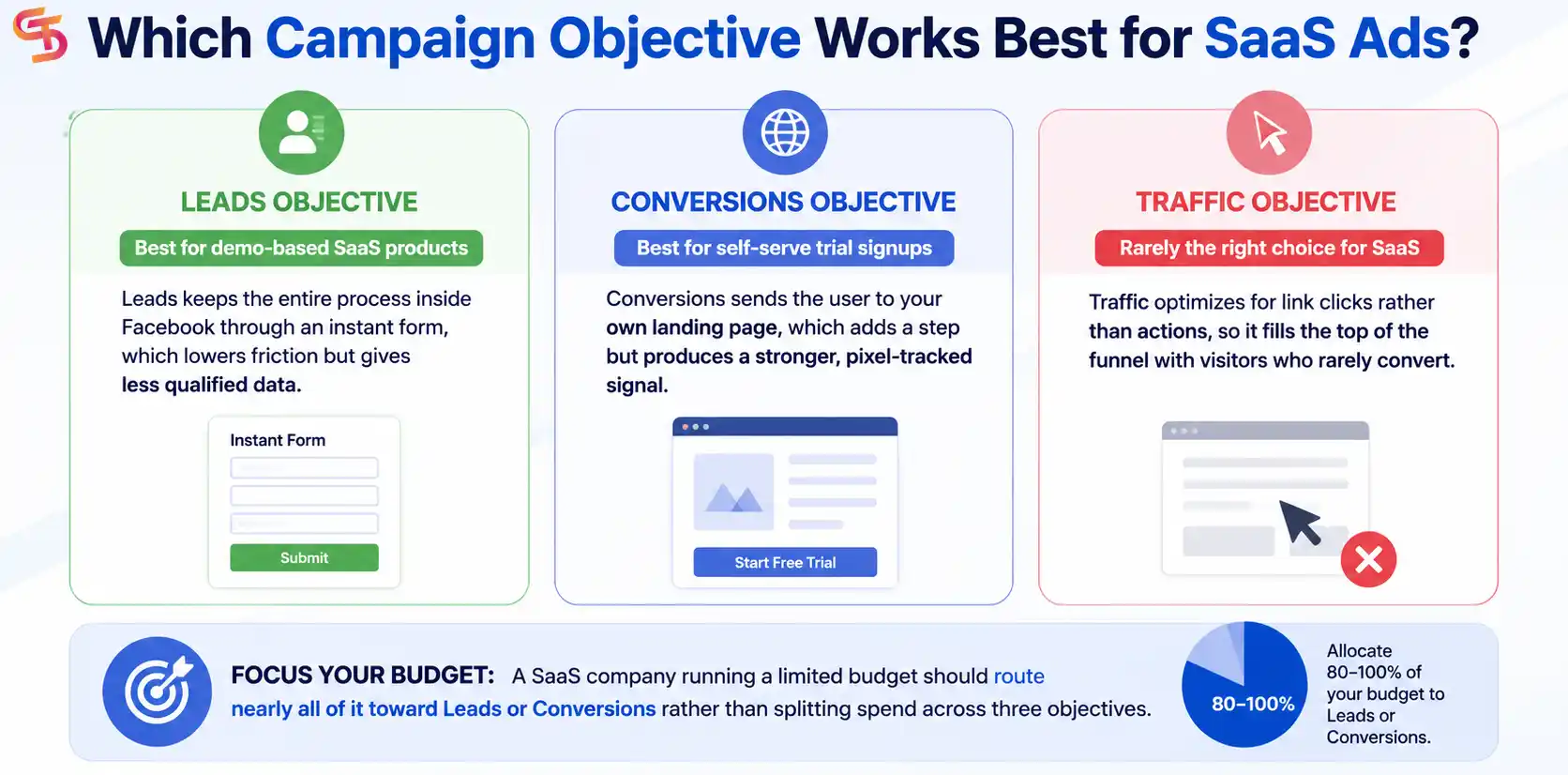
Traffic objective rarely earns its place in a SaaS campaign. It optimizes for link clicks rather than actions, so it fills the top of the funnel with visitors who rarely convert. A SaaS company running a limited budget should route nearly all of it toward Leads or Conversions rather than splitting spend across three objectives.
How Do You Structure a SaaS Facebook Ad Account for Scale?
You structure a SaaS Facebook ad account for scale by separating campaigns into cold, warm, and retargeting funnel stages, each with its own budget and creative set. This structure lets you see which stage produces qualified leads and which stage burns spend without return.
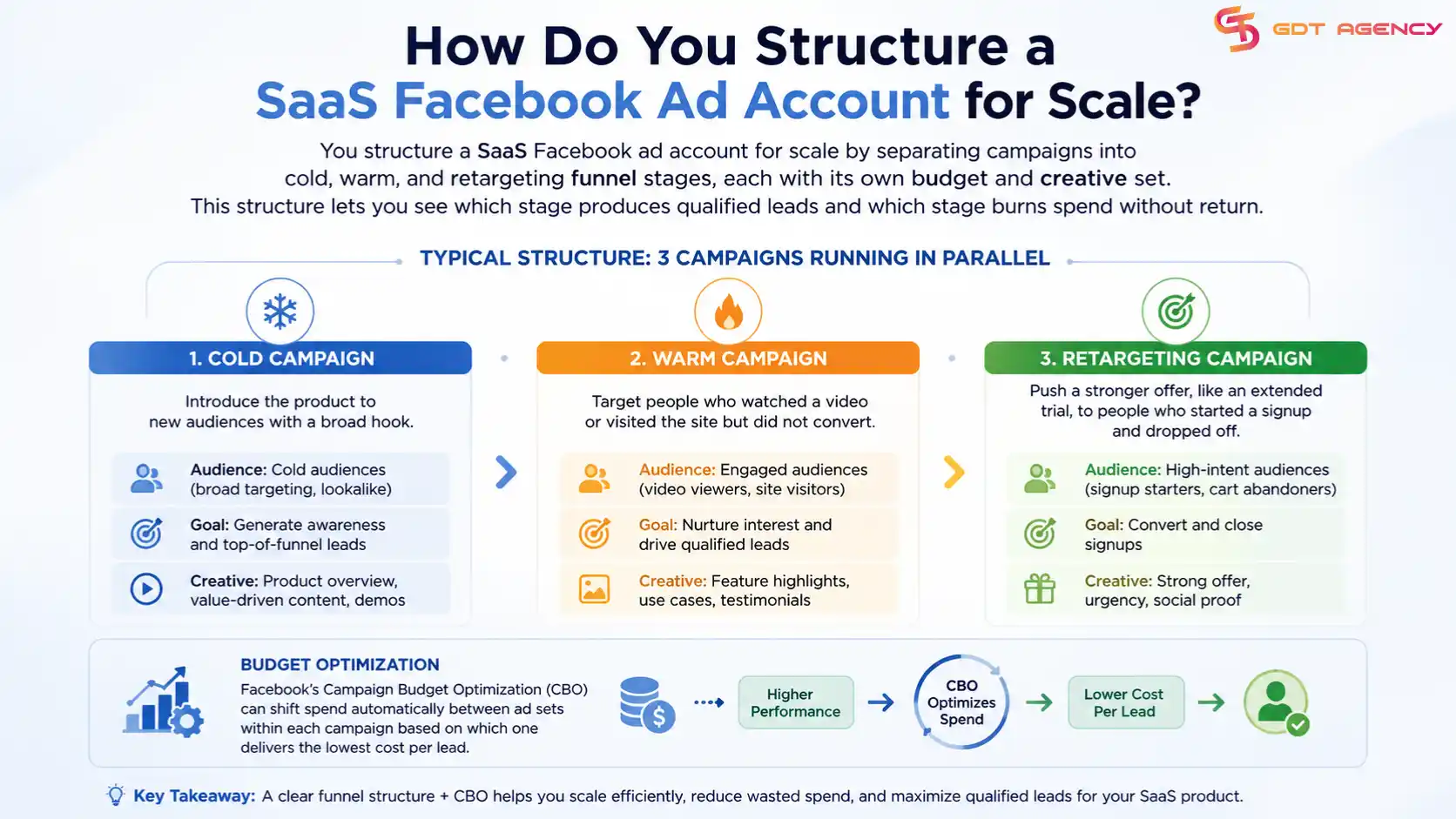
A typical structure looks like three campaigns running in parallel. The cold campaign introduces the product to new audiences with a broad hook. The warm campaign targets people who watched a video or visited the site but did not convert. The retargeting campaign pushes a stronger offer, like an extended trial, to people who started a signup and dropped off. Facebook’s Campaign Budget Optimization tool can then shift spend automatically between ad sets within each campaign based on which one delivers the lowest cost per lead.
How Do You Target the Right Audience for Facebook Ads for SaaS?
You target the right audience for SaaS Facebook ads by combining job title, industry, and company size targeting with behavior signals tied to your product category. B2B SaaS buyers rarely respond to interest-based targeting alone, since interests capture hobbies rather than job function.
This difference reflects a broader pattern across industries. Each business category, from SaaS and ecommerce to healthcare and education, requires different audience signals, campaign objectives, and account strategies. Learn more in our guide to Facebook Ad Account by Business Type: Use Cases and Verticals.
Facebook’s detailed targeting lets advertisers layer job titles like “marketing manager” or “operations director” on top of company size ranges. This layering narrows the audience down to people who hold budget authority or influence over a purchase decision, rather than casual browsers who share a general interest in software.
What Audience Segments Convert Best for SaaS?
Warm and retargeting segments convert best for SaaS ads, often at two to three times the rate of cold audiences. Cold audiences serve a different purpose: they build awareness and feed the retargeting pool, but they rarely convert on the first exposure to a B2B product.
The warm segment includes people who watched at least 50% of a demo video, visited the pricing page, or engaged with the company’s Facebook or Instagram profile. The retargeting segment narrows further to people who started a trial signup form but abandoned it, or who visited the site more than twice in the last two weeks. Both segments respond well to a stronger, more specific offer than the cold audience sees, since they already understand what the product does.
How Do Lookalike Audiences Work for SaaS Companies?
Lookalike audiences work for SaaS companies by using existing customer data as a seed list, then asking Facebook to find new users who share similar behavior patterns. The quality of the seed list determines the quality of the lookalike, so a list built from paying customers outperforms a list built from free trial signups alone.
A SaaS company usually builds three lookalike tiers: one based on customers who paid for at least three months, one based on trial users who completed onboarding, and one based on website visitors who spent more than two minutes on the pricing page. The tighter the seed list, the smaller the resulting lookalike audience, but the higher the match quality.
What Ad Creative Formats Convert Best for SaaS Companies?
Video demos, feature carousels, and testimonial-style static images convert best for SaaS companies, each serving a different stage of the buyer journey. Video demos work well cold, since they explain the product before the viewer has any context. Carousels work well warm, since they let a returning visitor scan multiple features at their own pace.
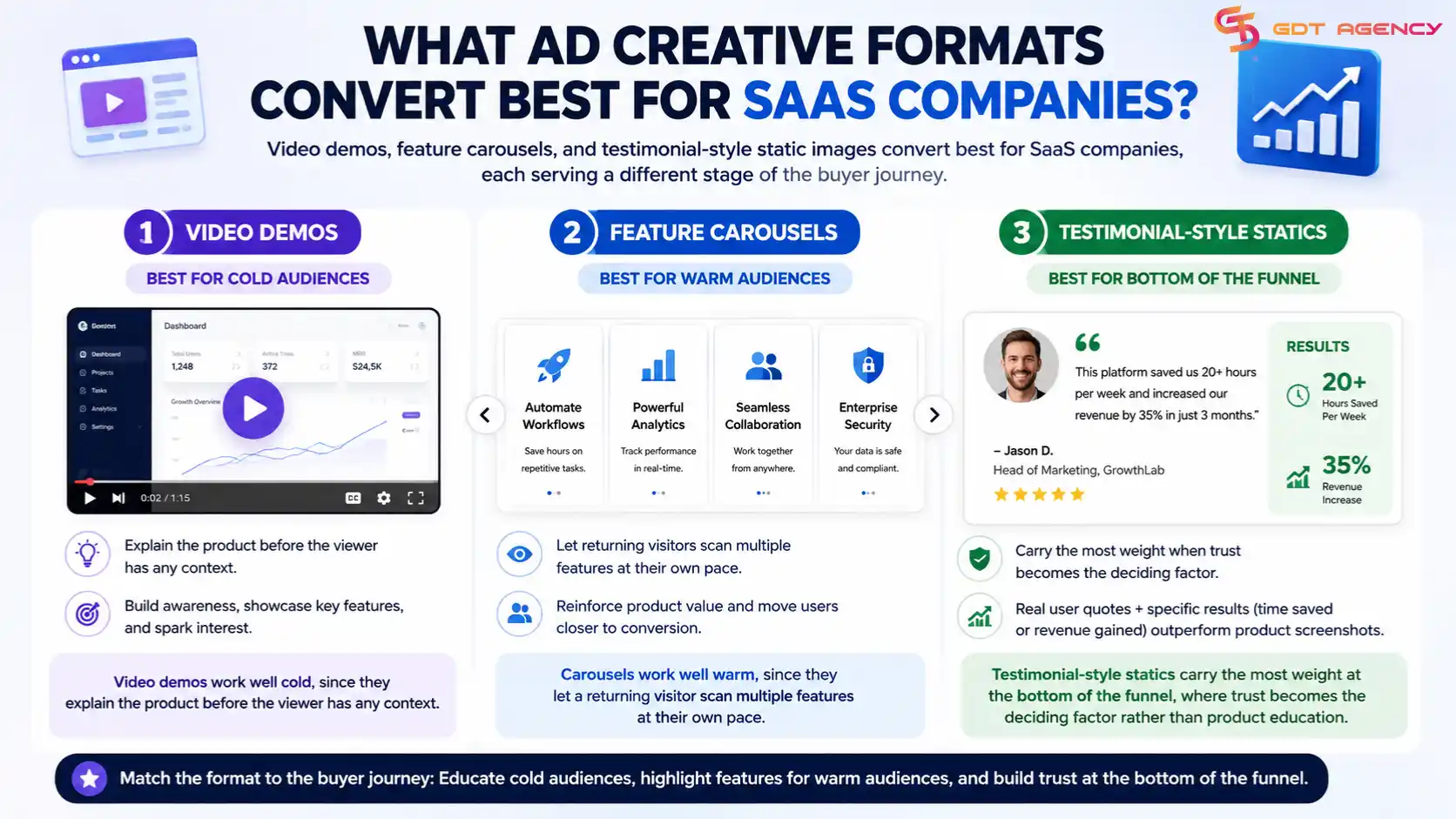
Testimonial-style statics carry the most weight at the bottom of the funnel, where trust becomes the deciding factor rather than product education. A screenshot of a real user quote, paired with a specific result like time saved or revenue gained, outperforms a polished product screenshot at this stage.
What Copy Formula Works for SaaS Ad Creative?
The pain point, solution, proof, call-to-action formula works consistently for SaaS ad copy. The opening line names a specific frustration the target buyer already feels, the second line introduces the product as the fix, the third line backs the claim with a number or quote, and the final line gives one clear next step.
This formula keeps the ad short enough for a mobile feed while still answering the three questions every SaaS buyer asks before clicking: what problem does this solve, does it work, and what happens if I click. Skipping the proof line is the most common mistake here, since SaaS buyers are naturally skeptical of software claims without evidence attached.
How Do You Design a SaaS Ad for Mobile Feed?
You design a SaaS ad for mobile feed using a 4:5 or 1:1 aspect ratio, minimal text overlay, and a hook that lands within the first three seconds of any video. Facebook still limits ad reach when overlay text covers too much of the image, so keeping text under roughly 20% of the frame protects delivery.
Video ads need the strongest hook in the opening three seconds because most viewers scroll past without sound and without waiting for a slow build-up. A demo video that opens directly on the product interface, rather than a logo animation or company introduction, holds attention longer and reduces the drop-off rate that Facebook’s algorithm penalizes.
How Do You Build a High-Converting Funnel from Facebook Ad to SaaS Signup?
You build a high-converting funnel from Facebook ad to SaaS signup by matching the landing page message to the ad’s exact promise and removing every unnecessary step between the click and the signup form. Message mismatch is the single biggest funnel leak in SaaS advertising, since a visitor who clicked on one promise and lands on a different headline usually leaves within seconds.
The funnel works best when the ad’s headline, image, and offer all repeat on the landing page in the same order. If the ad promises a free 14-day trial, that exact phrase and timeframe should appear above the fold on the landing page, not buried further down the scroll.
What Landing Page Elements Increase SaaS Trial Signups?
Short forms, visible social proof, and a single call-to-action button increase SaaS trial signups the most. A form asking only for name and email converts noticeably higher than one asking for company size, job title, and phone number upfront, since each additional field gives the visitor another reason to hesitate.
Social proof placed next to the form, rather than lower on the page, reassures the visitor at the moment they decide whether to commit. A single, repeated call-to-action button also outperforms a page offering multiple competing actions like “Book a Demo” and “Start Free Trial” side by side, since competing choices slow down the decision rather than speeding it up.
How Do You Set Up Facebook Pixel Tracking for SaaS Conversions?
You set up Facebook pixel tracking for SaaS conversions by placing standard events on the trial start page, the demo request confirmation page, and the paid upgrade page. These three events give Facebook’s algorithm the signal it needs to find more users who take the same actions.
The trial start event should fire only after the form submits, not when the page loads, since a premature trigger sends false signals to the algorithm. Pairing the pixel with the Conversions API adds a second data channel that survives browser tracking restrictions, which has become increasingly important since Apple’s iOS privacy changes reduced the reliability of browser-based pixel data alone.
How Much Budget Do You Need to Run Facebook Ads for a SaaS Company?
A SaaS company needs enough testing budget to gather at least 50 conversions per ad set before drawing conclusions, which usually means $1,500 to $3,000 per month during the first 30 days. This range varies by industry and average deal size, but it gives the algorithm enough data to exit the learning phase and optimize delivery.
Testing budget and scaling budget serve different purposes, so a SaaS company should never blend them into one number. Testing budget exists to find the winning audience and creative combination. Scaling budget exists to push more spend behind whatever already works, once the cost per lead sits below the target.
How Do You Scale Budget After Initial Testing?
You scale budget after initial testing by increasing spend in increments of 20% every three to four days, rather than doubling the budget overnight. Facebook’s delivery algorithm resets part of its learning phase when a budget jump is too large, which temporarily raises costs right when a SaaS company expects the campaign to perform better.
Campaign Budget Optimization helps during the scaling phase by letting Facebook shift the increased budget toward whichever ad set already shows the lowest cost per lead. A SaaS company watching this process should still check performance every few days, since even a well-optimized campaign can fatigue as the same audience sees the same creative repeatedly.
What Are the Common Reasons SaaS Facebook Ads Fail to Convert?
The most common reasons SaaS Facebook ads fail to convert fall into three groups: wrong campaign objective, weak or generic offer, and a landing page that does not match the ad’s message. Each of these mistakes shows up early in a campaign’s data, usually within the first week of spend.
A wrong objective sends the algorithm chasing the wrong outcome, so even strong creative cannot fix a campaign built on the Traffic objective when the goal is trial signups. A weak offer, like a vague “learn more about our platform,” fails to give the viewer a specific reason to act rather than scroll past. A mismatched landing page breaks the trust built by the ad itself, since visitors expect continuity between what they clicked and what they see next.
How Do You Measure and Optimize SaaS Facebook Ad Performance?
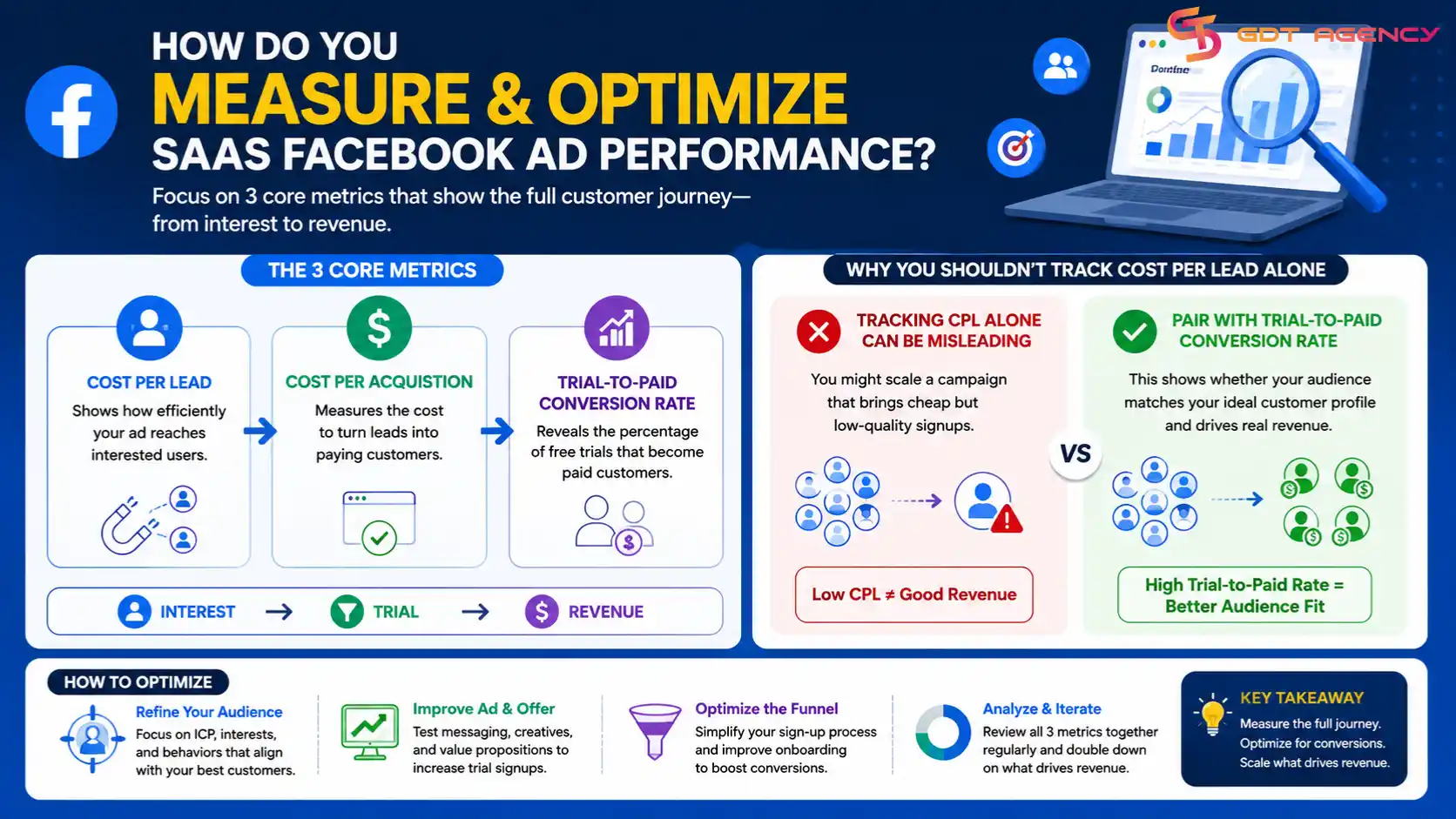
You measure and optimize SaaS Facebook ad performance using three core metrics: cost per lead, cost per acquisition, and trial-to-paid conversion rate. Cost per lead tells you how efficiently the ad reaches interested users, while cost per acquisition and trial-to-paid rate tell you whether those leads turn into revenue.
Tracking cost per lead alone can mislead a SaaS company into scaling a campaign that produces cheap but low-quality signups. Pairing it with trial-to-paid conversion rate reveals whether the audience matches the ideal customer profile. A campaign with a low cost per lead but a poor trial-to-paid rate usually needs a targeting adjustment, not more budget.
Case Study: How Arbor Scaled Qualified Leads by 2.4x in 90 Days with a GDT Facebook Agency Account
“Arbor” typically refers to Arbor (arbor.eco), a specialized carbon accounting and sustainability platform that is designed to help product-based companies measure and reduce their environmental impact through data-driven insights.
As they evolved into a global SaaS platform, Arbor has collaborated with industry leaders to pioneer effective climate strategies. This growth has led to increased demand across multiple regions, solidifying their position as a trusted partner in the space.
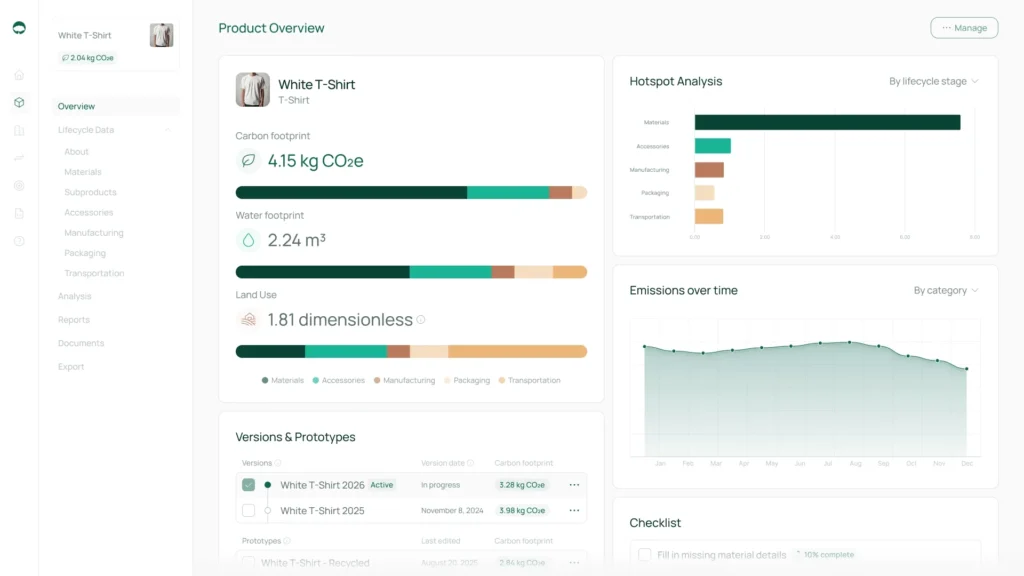
Arbor focuses on Product Carbon Footprinting (PCF), targeting an audience of ESG leaders, sustainability managers, and operations teams in North America, Europe, Australian market.
Unlike traditional platforms that only look at a company’s overhead (office electricity, travel), Arbor drills down into the actual items being sold.
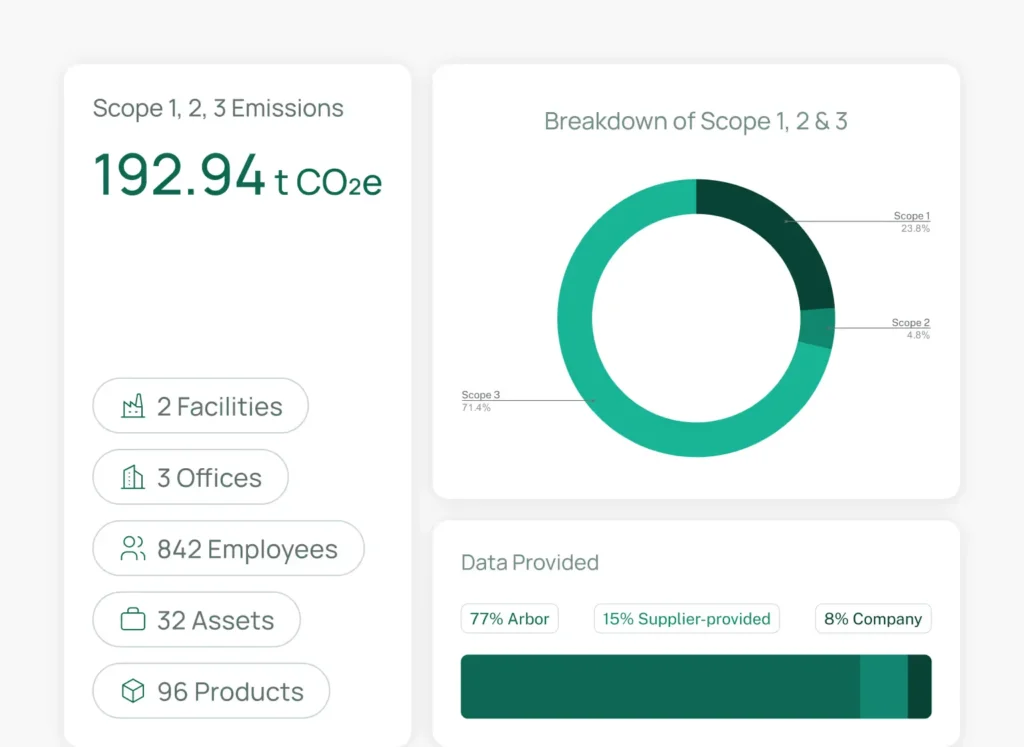
- Life Cycle Assessment (LCA): It automates the calculation of emissions from cradle to grave, which covers raw materials, manufacturing, transport, use, and disposal.
- Scope 1, 2, and 3: It tracks direct emissions (Scope 1 & 2) and, most importantly, the complex supply chain emissions (Scope 3), which usually make up the bulk of a company’s footprint.
- Hotspot Analysis: This feature pinpoints exactly which material, supplier, or shipping route is contributing the most to a product’s carbon intensity.
Despite fast growth, Arbor maintained a strong internal culture built around its original mission. That clarity and passion played an important role in how the company approached marketing and scaling.
The Challenge Before Working With GDT Agency
To support their growth, Arbor chose Facebook Ads as a primary lead acquisition channel at first. However, before partnering with GDT Agency, Arbor faced recurring issues when running Facebook Ads at scale:
- Ad accounts hit spending limits early without a clear warning
- Sustainability-related messaging triggered longer review times
- Lead volume dropped significantly whenever budgets increased
- Account instability caused frequent campaign resets
- Lost pixel data and audience insights with every restart
Alex Todorovic, CEO & Co-founder of Arbor, shared with us that these problems made it difficult for the marketing team to forecast the pipeline and support sales growth.
The passion and mission that drove Arbor’s team forward were being blocked by infrastructure problems they couldn’t solve internally.
What We Do To Help Arbor Boost Qualified Leads in 90 Days?
Alex told us that after consistently getting limitations with the account, like hitting spending limits or long ad review times, he realized that without a strong advertising foundation, even high-performing campaigns are vulnerable to disruption. That’s why they found us.
After gathering clear information about Arbor, GDT Agency approached Arbor’s growth in 3 clear periods, focusing on stability first, then scale.
Period 1: Account Stability and Compliance (Days 1-30)
- Migrated to Facebook agency accounts for unlimited spending, better stability, and faster approvals.
- Conducted a comprehensive audit of ad copy, landing pages, and lead forms.
- Adjusted messaging to focus on platform capabilities rather than guaranteed outcomes.
- Repositioned sustainability claims within compliance guidelines.
- Launched campaigns with conservative budgets to build account trust ($800/day starting spend)
- Monitored account health metrics daily (feedback score, ad relevance diagnostics).
- Set up 3 core campaign structures, testing different audience segments
- A/B tested 8 ad variations focusing on business outcomes vs. environmental impact
Period 2: Controlled Scaling (Days 31-60)
- Increased budget by 25% weekly (Week 5: $1,190/day, Week 6: $1,488/day, Week 7: $1,860/day).
- Horizontal scaling: expanded from 3 to 7 campaign structures.
- Tested 5 new audience segments across different regions.
- Launched retargeting campaigns for website visitors and video viewers.
- Continuous monitoring of account health and feedback scores.
- A/B tested 12 new ad creatives based on Phase 1 learnings.
- Optimized landing pages based on heatmap data.
- Regular bi-weekly calls with Arbor’s team on lead quality feedback.
- Paused underperforming ad sets (anything above $280 CPL).
- Scaled the top 3 performing campaigns by duplicating successful ad sets.
Period 3: Optimization and Predictable Growth (Days 61-90)
- Optimized creative rotation based on demo-to-customer conversion data
- Refined lead forms: reduced from 7 fields to 5 fields (company size + role only)
- Reallocated 40% of the budget toward North America (the highest conversion market)
- Scaled top-performing campaigns to $2,100/day without triggering limits
- Implemented 3-tier retargeting sequences: Tier 1: Website visitors (last 7 days), Tier 2: Video viewers 75%+ (last 14 days), Tier 3: Lead form openers who didn’t submit (last 30 days)
- Launched lookalike audiences based on demo attendees (1%, 2%, 3%)
- Paused 4 underperforming audience segments
- Introduced seasonal messaging aligned with Q4 sustainability planning cycles
- Added social proof elements (customer logos, case study snippets) to top ads
- Set up automated rules for budget pacing and cost control
Results After 90 Days
Below is Arbor’s results comparison table from the end of period 1 (day 30) to period 3 (day 90):
| Performance Metric | Period 1 (Day 30) | Result After 90 Days |
| Total Leads Generated | 127 leads | 305 qualified leads (2.4x increase) |
| Cost Per Lead (CPL) | $224 | $154 (31% reduction) |
| Daily Ad Spend | $950 (stable, no limits) | $1,850 average / $2,100 peak (no limits) |
| Lead Form Completion Rate | 34% | 48% |
| Demo Booking Rate | 18% of leads | 29% of leads |
| Demo Show-up Rate | Not recorded (67% at Day 45) | 72% |
| Account Health Score | Excellent (no warnings) | Excellent (zero shutdowns across 90 days) |
At the end of the 90-day period, Arbor achieved:
- 2.4x increase in qualified leads (from baseline to Day 90)
- 31% reduction in cost per qualified lead
- Zero Facebook ad account shutdowns across the entire period
- Stable daily spend above $1,800 without hitting limits
- Higher demo show-up rates and improved sales alignment
- Predictable pipeline that the team could rely on for forecasting
Facebook Ads transformed from a risk factor into a predictable lead source that supported Arbor’s mission to help more companies with their climate strategies.
More importantly, Arbor’s team could focus on what they do best: having meaningful conversations with companies ready to take climate action, rather than worrying about disabled ad accounts.
Disclaimer: Results mentioned in this case study are specific to Arbor and their market conditions during the 90-day period. Individual results will vary based on product, offer, market, execution, and timing. GDT Agency does not guarantee specific outcomes.
>>> Maybe you are also interested in: Facebook Ads for Fulfillment Companies: How GIP Attracts Ecommerce Clients
Final Thoughts
Running high-converting Facebook ads for a SaaS company comes down to matching each step to the buyer’s decision path, from the first campaign objective to the pixel event that confirms a paid conversion. Skipping a step, like launching without a clear funnel structure or budget plan, tends to show up later as wasted spend rather than an early warning sign.
The Arbor case study makes one point clear. A SaaS company can run every step in this guide correctly and still hit a wall if the ad account itself cannot support the spend needed to scale. Choosing the right account structure, whether that means fixing a personal account’s trust issues or moving to an agency account built for scale, sits underneath every other decision in this guide.
FAQs
Do You Need a Big Budget to Run Facebook Ads for a SaaS Company?
No, a SaaS company does not need a big budget to start Facebook ads, but it does need enough budget to reach 50 conversions per ad set during testing. A smaller budget simply means the testing phase takes longer, since the algorithm needs a set amount of data before it can optimize delivery.
What Is the Difference Between the Leads Objective and the Conversions Objective?
The Leads objective collects signups through an instant form inside Facebook, while the Conversions objective sends users to your own landing page to complete the signup. Leads work faster with less friction, while Conversions produce stronger pixel data at the cost of one extra step for the user.
What Are the Main Types of Facebook Ad Creative for SaaS Companies?
The main types of Facebook ad creative for SaaS companies are video demos, feature carousels, and testimonial-style static images. Video demos work best for cold audiences, carousels work best for warm audiences, and testimonials work best at the bottom of the funnel where trust decides the outcome.
How Do You Fix a Facebook Ad Account That Keeps Getting Restricted?
You fix a Facebook ad account that keeps getting restricted by identifying the trust score issue behind the restriction, then either rebuilding the account’s history or moving to an established agency account. The Arbor case study in this guide shows this exact fix in practice, where switching to a GDT agency account removed the spend cap that blocked scaling.
How Long Does It Take to See Results from SaaS Facebook Ads?
Most SaaS companies see early signal within 30 days, once the testing budget produces enough conversions to judge performance, and stronger results within 90 days once the budget scales. The Arbor case study followed this same 90-day timeline to reach its 2.4x increase in qualified leads.