
Should You Use a Personal Facebook Account or Create a Separate Ad Account?

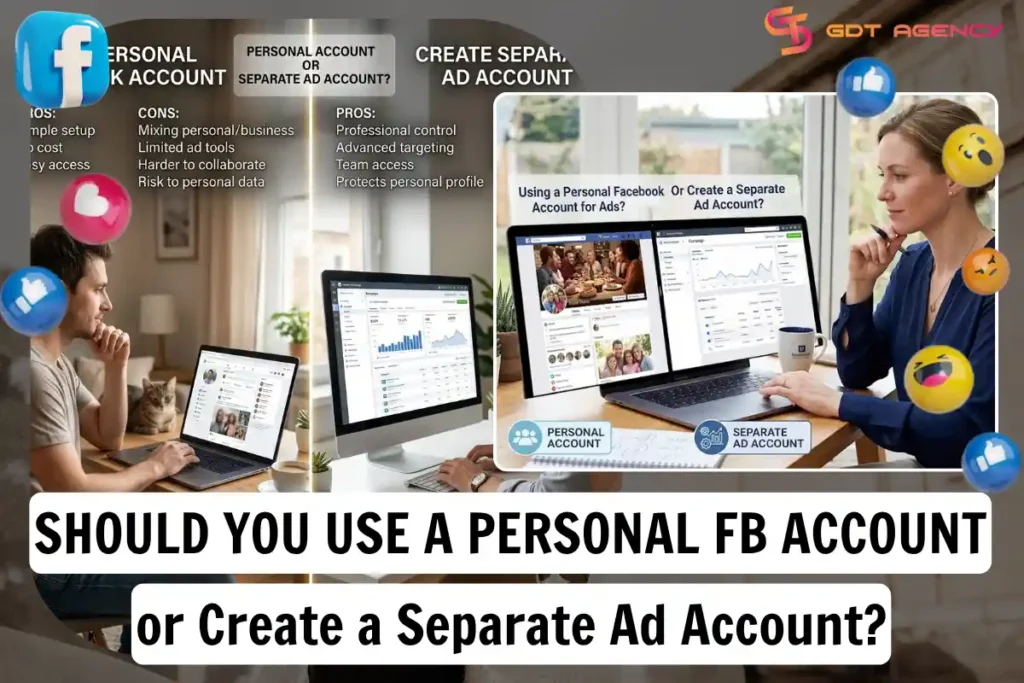
You should create a separate ad account instead of running ads from your personal Facebook account. A separate Facebook personal ad account keeps your billing, campaigns, and business data in one place. It also protects your personal profile from policy strikes tied to ad activity. Small advertisers ask this question often, because Facebook allows you to boost a post from a personal profile.
A personal account works for casual boosting, but it hits limits fast once you scale up. You can’t add team members to a personal account the way you can with a Business Manager. You also can’t run multiple campaigns side by side without mixing personal activity with business activity. This makes tracking harder, not easier.
A separate ad account solves this by giving you a dedicated space for ad campaigns, payment methods, and audience data. Meta built the Ads Manager system around ad accounts, not personal profiles. Setting one up takes a few minutes and requires a Business Manager, a payment method, and basic business information.
Below, we break down the risks of using a personal account for ads, how ad accounts differ from personal profiles, how to set one up, and which option fits your situation. We also cover what happens when accounts get flagged, restricted, or shut down, since most advertisers overlook this part until it happens to them.
- Should You Use Your Personal Facebook Account for Ads?
- What Happens If Facebook Flags Your Personal Account for Ads Activity?
- Can a Personal Account Run Ads Without a Business Manager?
- What Is the Difference Between a Personal Account and an Ad Account?
- What Does a Personal Account Do on Facebook?
- What Does an Ad Account Do on Facebook?
- How Do You Create a Separate Facebook Ad Account?
- What Do You Need Before Creating an Ad Account?
- How Long Does It Take to Set Up an Ad Account?
- Personal Account vs Separate Ad Account: Which One Should You Choose?
- When Does a Personal Account Make Sense?
- When Does a Separate Ad Account Make Sense?
- What Are the Risks of Mixing a Personal Account With Ad Activity?
- Can Your Personal Profile Get Disabled Because of Ad Account Issues?
- What Is Business Verification and Why Does It Matter?
- Can You Rent an Ad Account Instead of Creating One?
- What Happens to Your Ads If Your Ad Account Gets Disabled?
- Final Thoughts
- FAQs
- Can I run Facebook ads without a Business Manager?
- Will using my personal account for ads get me banned?
- Do I need Business Verification to create an ad account?
- Is renting an ad account safe?
- How fast can I start running ads after creating an ad account?
Should You Use Your Personal Facebook Account for Ads?
No, as an expert at GDT Agency with years of experience working with multiple account types from standard to Facebook agency ad accounts, I highly recommend you should not use your personal Facebook account for ads because of 3 reasons that stand out: policy risk, limited features, and poor scalability.
Facebook’s ad policies apply differently to personal profiles than to ad accounts built inside Business Manager.
Personal profiles were designed for social interaction, not advertising infrastructure. When you push ad spend through a personal account, you expose your profile to the same review process that governs business ad accounts, but without the safety net a Business Manager gives you.
The biggest risk is enforcement action against your profile. If Meta’s automated systems detect a policy violation, they can restrict your personal account, not just the ad. Your friends list, messages, photos, and everything else tied to that profile become collateral damage in a dispute that started over one ad.
What Happens If Facebook Flags Your Personal Account for Ads Activity?
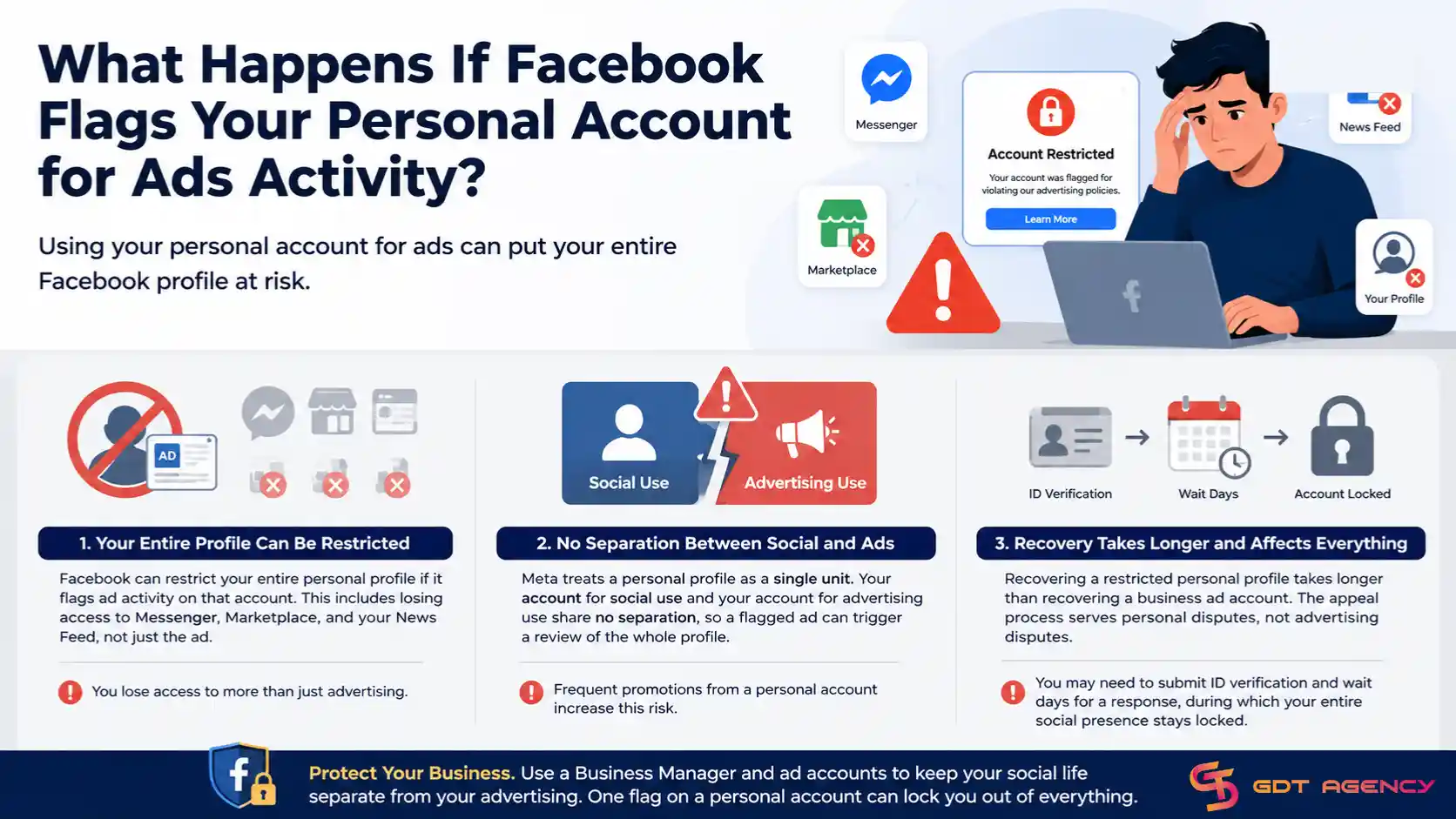
Facebook can restrict your entire personal profile if it flags ad activity on that account. This includes losing access to Messenger, Marketplace, and your News Feed, not just the ad.
This happens because Meta treats a personal profile as a single unit. Your account for social use and your account for advertising use share no separation, so a flagged ad can trigger a review of the whole profile. Advertisers who run frequent promotions from a personal account face this risk with every new ad they publish.
Recovering a restricted personal profile takes longer than recovering a business ad account, and the appeal process serves personal disputes, not advertising disputes. You may need to submit ID verification and wait days for a response, during which your entire social presence stays locked.
Can a Personal Account Run Ads Without a Business Manager?
A personal account can boost a post without a Business Manager, but it can’t run structured campaigns, use detailed targeting, or manage multiple ads at once. Boosting is a simplified version of advertising built for casual use.
Real campaign management requires Ads Manager, and Ads Manager runs on ad accounts that live inside Business Manager. Without Business Manager, you lose access to Custom Audiences, Lookalike Audiences, conversion tracking through the Meta Pixel, and campaign-level budget controls.
Anyone running paid promotions with a goal, whether that’s sales, leads, or app installs, needs these tools. Boosting a post from a personal profile might get a few extra likes, but it won’t give you the reporting or targeting precision a proper ad account provides.
What Is the Difference Between a Personal Account and an Ad Account?
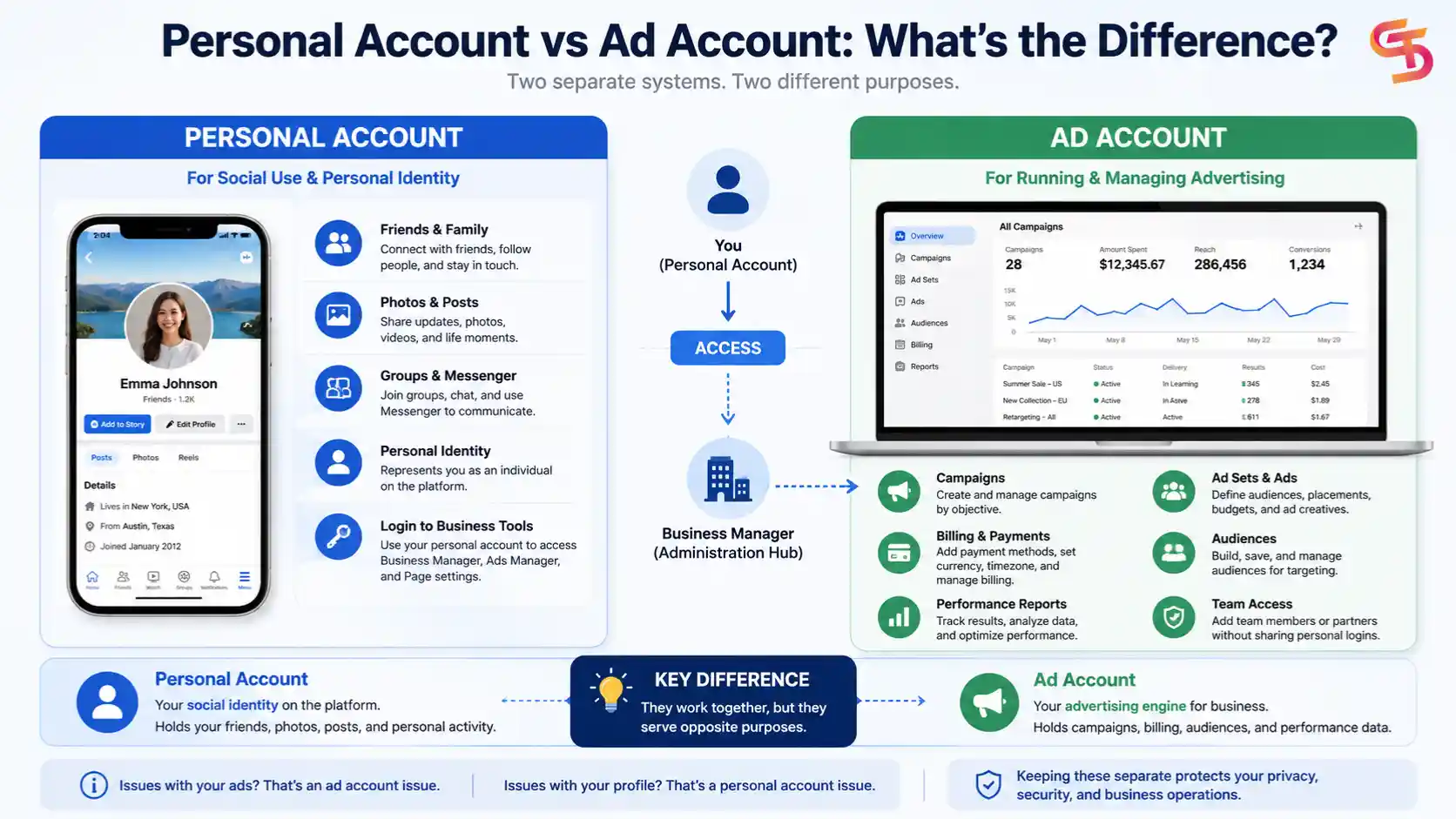
A personal account represents your individual profile for social use. An ad account is a business tool built to run and manage advertising campaigns. The two serve opposite purposes, even though people often confuse them.
Your personal account holds your friends, photos, and personal activity. Your ad account holds your campaigns, ad sets, billing details, and performance data. Meta keeps these systems separate on purpose, because mixing personal identity with business advertising creates privacy and compliance problems.
Understanding this difference matters because it changes how you troubleshoot problems. If your ad gets rejected, that’s an ad account issue. If your profile gets locked, that’s a personal account issue. Treating them as the same thing leads to confusion when something goes wrong.
What Does a Personal Account Do on Facebook?
A personal account lets you connect with friends, join groups, post updates, and use Facebook’s core social features. It’s the identity layer of the platform, the profile that represents you as an individual.
Every personal account also acts as an admin login for business tools. You need a personal account to access Business Manager, Ads Manager, or a Facebook Page’s settings. The personal account itself doesn’t hold ad campaigns or billing information. It’s the key that unlocks those tools.
This is why Meta requires a personal profile even for business advertising. Someone has to administer the business tools, and that person logs in through their own personal account.
What Does an Ad Account Do on Facebook?
An ad account stores your campaigns, ad sets, ads, billing information, and audience data in one place. It runs and manages paid advertising, separate from personal or social activity.
Every ad account connects to a payment method, a time zone, and a currency, and these settings apply to every campaign run through that account. You can also assign multiple people access to a single ad account through Business Manager, which lets teams or agencies collaborate without sharing personal login details.
A well-organized ad account groups your campaigns by objective, keeps historical performance data intact, and gives you an audit trail for every dollar spent. Meta’s Business Help Center describes an ad account as a grouping of all your ad activity, including campaigns, ads, and billing details, under one structure built for that purpose.
How Do You Create a Separate Facebook Ad Account?
You create a separate ad account by setting up a Business Manager, adding a payment method, and configuring your ad account settings inside Meta Business Suite. The process takes about 10 to 15 minutes if you have your business details ready.
Before creating a new ad account, it’s helpful to understand how Meta organizes advertising assets. Learning about Facebook ad account infrastructure can help you set up Business Manager, Pages, Pixels, and user permissions correctly from the start, reducing configuration issues later.

Start by creating a Business Manager account if you don’t already have one. From there, go to Business Settings and select “Add an Ad Account.” You’ll name the account, pick your time zone and currency, and connect a Facebook Page you plan to advertise for.
Once the ad account exists, add a payment method under Billing settings. Meta accepts major credit cards, debit cards, and in some regions, PayPal. Your ad account can’t publish campaigns until it has a valid, verified payment method attached.
What Do You Need Before Creating an Ad Account?
Before creating an ad account, you need a Business Manager account, a valid payment method, and a Facebook Page connected to your business. These three pieces form the foundation of every functioning ad account.
You’ll also want your business name, address, and a brief description ready, since Meta asks for this information during setup. If you plan to run ads targeting the European Union or other regions with stricter rules, you may need to complete Business Verification before your account can spend beyond a set threshold.
Having a clear objective for your first campaign helps too. Ads Manager asks you to choose a campaign objective right after setup, and picking the wrong one early can affect how your ad delivery and reporting get structured later.
How Long Does It Take to Set Up an Ad Account?
Setting up an ad account takes about 10 to 15 minutes, but full readiness to spend can take longer if Meta requires additional verification. Basic setup, naming, time zone, currency, and payment method happen almost instantly.
If your account triggers a review for Business Verification or ad account limits, the wait can stretch to a few days. New advertisers and accounts spending in regions with stricter ad transparency rules face this review more often than established accounts with a spending history.
Once verification clears, your ad account can publish campaigns right away. Advertisers running time-sensitive promotions should build this potential delay into their launch timeline instead of assuming instant access.
Personal Account vs Separate Ad Account: Which One Should You Choose?
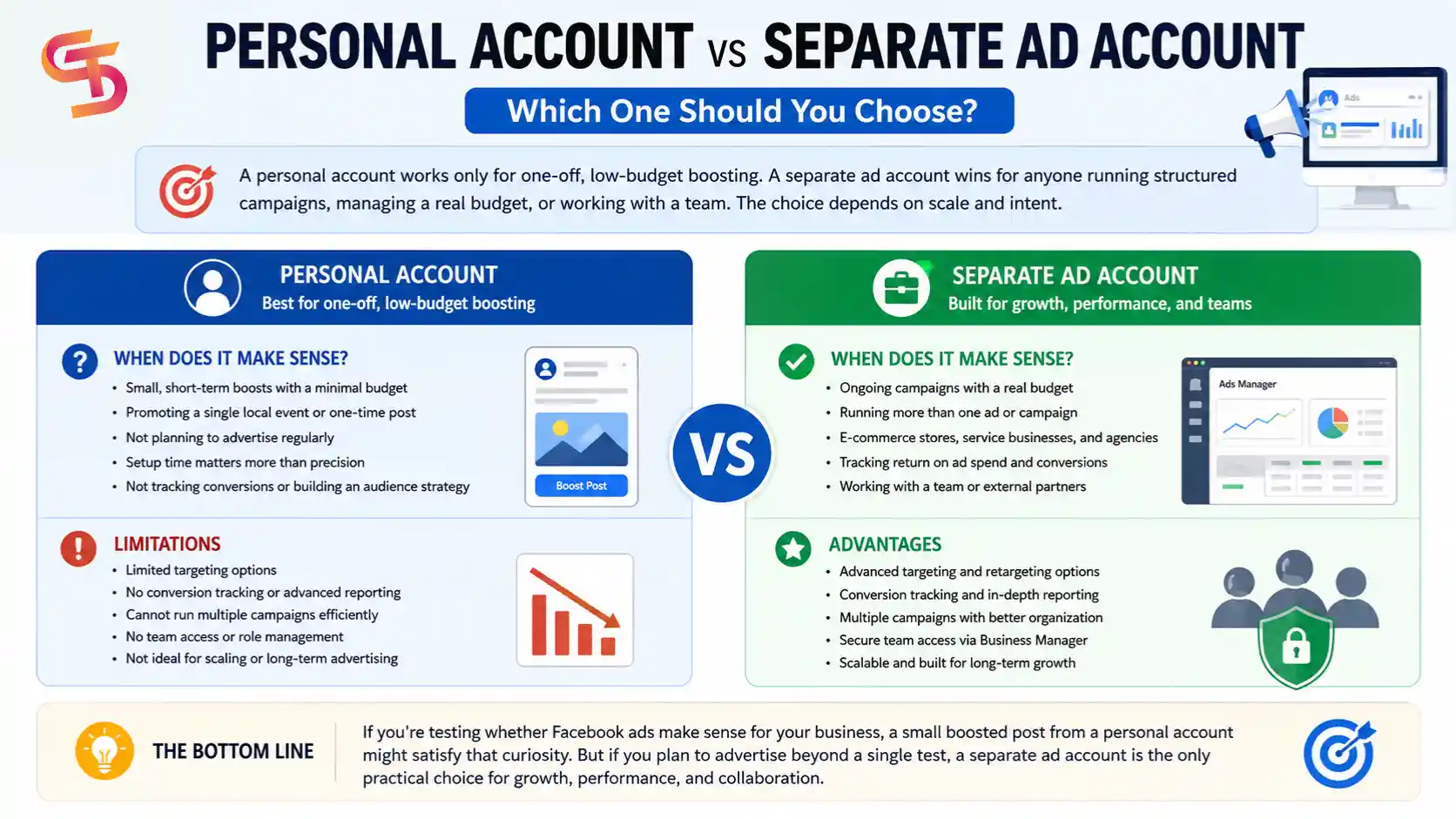
A personal account works only for one-off, low-budget boosting. A separate ad account wins for anyone running structured campaigns, managing a real budget, or working with a team. The choice depends on scale and intent.
If you’re testing whether Facebook ads make sense for your business, a small boosted post from a personal account might satisfy that curiosity without much setup. But this approach caps out fast and offers no path to real optimization.
A separate ad account gives you room to grow. It supports multiple campaigns, detailed audience targeting, conversion tracking, and team collaboration from day one. Most businesses that plan to advertise beyond a single test post should skip the personal account route.
When Does a Personal Account Make Sense?
A personal account makes sense only for small, short-term boosts with a minimal budget, such as promoting a single local event or a one-time post. It suits people who aren’t planning to advertise regularly.
This approach fits situations where setup time matters more than precision, like a neighborhood bake sale or a small community announcement. The advertiser isn’t tracking conversions or building an audience strategy, so the limits of a personal account don’t create real friction.
Outside these narrow cases, relying on a personal account creates more problems than it solves, especially once ad spend or frequency increases.
When Does a Separate Ad Account Make Sense?
A separate ad account makes sense for any business running ongoing campaigns, spending a real budget, or working with more than one person on ad management. This covers most businesses advertising on Facebook today.
E-commerce stores, service businesses, agencies, and anyone tracking return on ad spend need the reporting and targeting tools that only come with a proper ad account. Teams also need the access controls Business Manager provides, since sharing a personal login is insecure and against Meta’s terms.
Once you plan to run more than a single ad, a separate ad account stops being optional and becomes the only practical choice.
What Are the Risks of Mixing a Personal Account With Ad Activity?
Mixing a personal account with ad activity risks account restriction, loss of access to your Facebook profile, and disruption to any ad campaigns tied to that profile. These risks compound because personal and business consequences become linked.
Meta’s enforcement systems don’t separate a policy strike related to ads from your overall account standing. A single flagged ad can trigger a broader review of your profile, and that review can affect features that have nothing to do with advertising, like Messenger or group access.
This is the core argument for keeping business advertising inside a dedicated ad account. Isolating your ad activity limits the damage from any single policy issue, so a problem with one campaign doesn’t threaten your entire online presence.
Can Your Personal Profile Get Disabled Because of Ad Account Issues?
Yes, your personal profile can get disabled because of ad account issues if Meta ties repeated ad policy violations back to the individual behind the account. This connection exists because personal accounts serve as admins for ad accounts.
If an ad account under your management repeatedly violates advertising policies, Meta’s review process can extend beyond the ad account and reach the personal profile administering it. This is more likely with severe or repeated violations than a single minor policy miss.
Advertisers managing multiple ad accounts, such as agencies, face higher exposure here, since one problematic client account can put the admin’s personal profile at risk without careful management.
What Is Business Verification and Why Does It Matter?
Business Verification is Meta’s process for confirming that a business is legitimate. It matters because it unlocks higher ad account limits and reduces the chance of unexpected restrictions. Meta asks for documents like a business registration or utility bill to complete this process.
Verified businesses generally get more stability across their ad accounts. Meta treats verified businesses as lower-risk, which can reduce the frequency of account reviews and give advertisers more room to scale spend without triggering automatic holds.
As your business grows, Meta’s advertising infrastructure becomes more important than simply creating another ad account. Larger advertisers and agencies often use advanced Business Manager setups such as Facebook BM2500 to organize multiple ad accounts and scale operations more efficiently. Learn more in our guide on Facebook BM2500.
Business Verification isn’t always required for small-scale advertising, but any business planning to spend consistently or scale up should complete it early, before growth forces a rushed verification process.
Can You Rent an Ad Account Instead of Creating One?
Yes, you can rent an ad account instead of creating one. Agencies offer this option to advertisers who face account creation restrictions or need higher spending limits than a new account allows. Renting gives instant access to an already-verified, established ad account.
This route works well for advertisers in regions with stricter ad account approval processes, or for businesses that hit spending caps on a new account. A rented account typically comes with an existing trust score, which can mean fewer reviews and smoother ad delivery.
Renting isn’t the right fit for everyone, since it involves working through a third party and following that provider’s account management rules. For advertisers blocked by account creation issues, though, it’s a practical alternative to waiting out a lengthy verification process.
What Happens to Your Ads If Your Ad Account Gets Disabled?
If your ad account gets disabled, all active campaigns stop running immediately, and you lose access to that account’s historical data until the issue gets resolved or appealed. Ad delivery halts the moment Meta applies the restriction.
You can typically appeal the decision through Meta’s Business Help Center, and the review process usually takes anywhere from a few hours to several days depending on the reason for the restriction. Serious or repeated violations take longer to resolve than first-time, minor issues.
Advertisers who keep backup ad accounts or work with an agency-managed account reduce this downtime, since campaigns can shift to a working account while the disabled one goes through appeal. Relying on a single ad account with no backup leaves your entire ad presence exposed to one enforcement decision.
Final Thoughts
Running ads from a personal Facebook account might feel convenient at first, but it puts your entire online identity at risk to skip a 15-minute setup process. A separate ad account keeps your business advertising contained, organized, and protected from the kind of enforcement action that can lock you out of your own profile.
If you plan to advertise on Facebook, whether that’s a single campaign or an ongoing strategy, setting up a proper ad account through Business Manager is the only approach that scales. It gives you the tools, protection, and structure a personal profile was never built to provide.
FAQs
Can I run Facebook ads without a Business Manager?
You can boost a post without one, but you can’t run full campaigns, use detailed targeting, or track conversions without a Business Manager and a proper ad account.
Will using my personal account for ads get me banned?
It can lead to restrictions on your profile if Meta flags the ad activity, especially with repeated or serious policy violations.
Do I need Business Verification to create an ad account?
Not always for small-scale advertising, but it becomes necessary once you want higher spending limits or plan to scale your ad account.
Is renting an ad account safe?
It can be safe when done through a reputable provider, and it’s a common solution for advertisers facing account creation restrictions or spending caps.
How fast can I start running ads after creating an ad account?
Basic setup takes about 10 to 15 minutes, though some accounts require additional review before they can spend beyond a certain limit.