


You create a Facebook Business ad account through Meta Business Suite, then set up payment, assign user roles, and connect it to your Business Portfolio. This process takes only a few steps, but each step affects how well you can run and scale your ads later. A Facebook Business ad account works differently from a personal ad account, since it separates your business spending from your personal profile and gives you room to add team members or agencies.
Before you create the account, you need a few basic details ready: your business name, time zone, currency, and a valid payment method. Once the account exists, you still need to configure payment settings correctly, or your ads won’t run. Beyond payment, you also need to decide who on your team gets access and what each person can do inside the account. Many advertisers also confuse the ad account with Meta Business Suite itself, so it helps to know where one tool ends and the other begins before you go further.
What Is a Facebook Business Ad Account?
A Facebook Business ad account is a container that holds all the ad campaigns, billing information, and audience data tied to one business. It sits inside Meta’s advertising system and works alongside your Facebook Page, Instagram account, and Business Portfolio. To understand more about these components and connect behind the scenes, see our guide on Facebook Ad Account Infrastructure: What It Is & How It Works.
As an expert at GDT Agency with years of experience working with multiple types of Facebook ad accounts, from standard to Facebook agency ad accounts, I believe that you can think of the ad account as the engine room of your advertising. Everything you build in Ads Manager, from campaign structure to audience targeting, runs through this one account. Each ad account carries its own unique ID number, which Meta uses to track spending, billing, and compliance history.
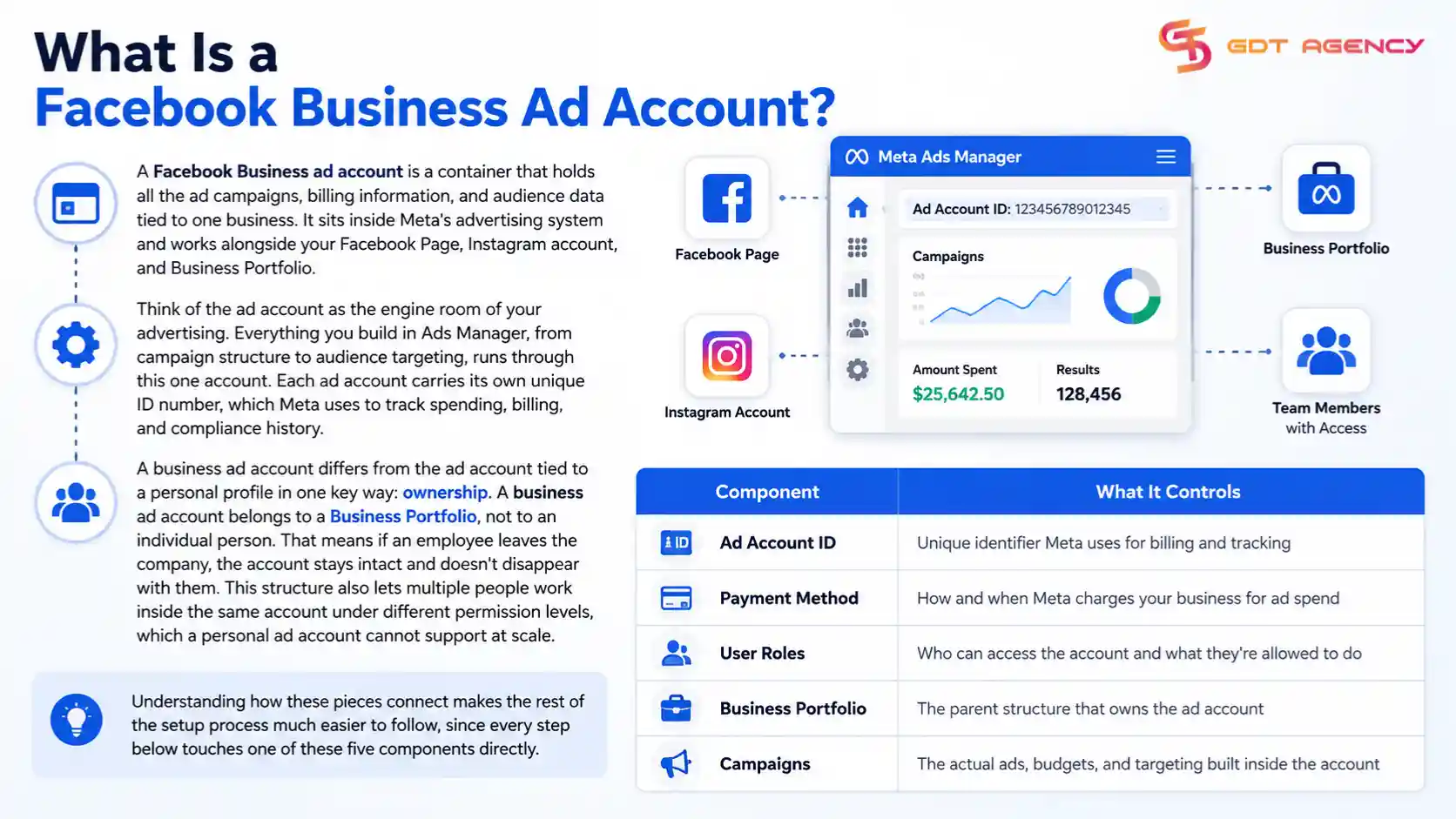
A business ad account differs from the ad account tied to a personal profile in one key way: ownership. A business ad account belongs to a Business Portfolio, not to an individual person. That means if an employee leaves the company, the account stays intact and doesn’t disappear with them. This structure also lets multiple people work inside the same account under different permission levels, which a personal ad account cannot support at scale.
The table below summarizes the core parts that make up a Facebook Business ad account and what each part controls:
| Component | What It Controls |
| Ad Account ID | Unique identifier Meta uses for billing and tracking |
| Payment Method | How and when Meta charges your business for ad spend |
| User Roles | Who can access the account and what they’re allowed to do |
| Business Portfolio | The parent structure that owns the ad account |
| Campaigns | The actual ads, budgets, and targeting built inside the account |
Understanding how these pieces connect makes the rest of the setup process much easier to follow, since every step below touches one of these five components directly.
How Do You Create a Facebook Business Ad Account?
You create a Facebook Business ad account by opening Meta Business Suite, going to Business Settings, and selecting “Add” under Accounts, then Ad Accounts. From there, Meta asks for your business details and walks you through account setup in a few short screens.
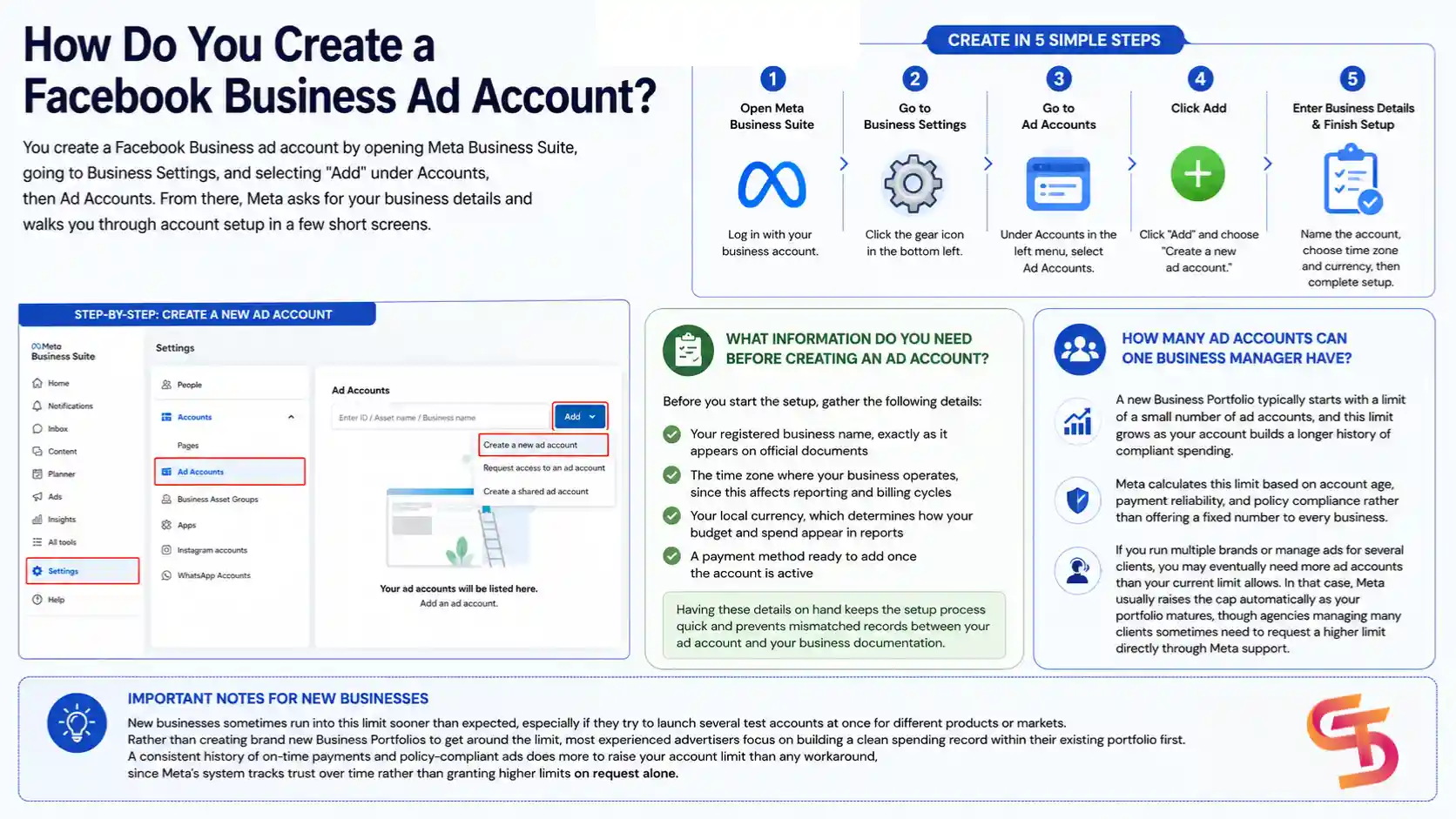
To start, log into Meta Business Suite with the account tied to your business. Navigate to Business Settings, then find the “Accounts” section in the left menu and click “Ad Accounts.” Select “Add,” then choose “Create a new ad account.” Meta will ask you to name the account, pick your time zone, and select your currency. Pay attention to time zone and currency here, since Meta locks both once the account is active and changing them later requires creating a brand new account.
What Information Do You Need Before Creating an Ad Account?
Before you start the setup, gather the following details:
- Your registered business name, exactly as it appears on official documents
- The time zone where your business operates, since this affects reporting and billing cycles
- Your local currency, which determines how your budget and spend appear in reports
- A payment method ready to add once the account is active
Having these details on hand keeps the setup process quick and prevents mismatched records between your ad account and your business documentation.
How Many Ad Accounts Can One Business Manager Have?
A new Business Portfolio typically starts with a limit of a small number of ad accounts, and this limit grows as your account builds a longer history of compliant spending. Meta calculates this limit based on account age, payment reliability, and policy compliance rather than offering a fixed number to every business.
If you run multiple brands or manage ads for several clients, you may eventually need more ad accounts than your current limit allows. In that case, Meta usually raises the cap automatically as your portfolio matures, though agencies managing many clients sometimes need to request a higher limit directly through Meta support.
New businesses sometimes run into this limit sooner than expected, especially if they try to launch several test accounts at once for different products or markets. Rather than creating brand new Business Portfolios to get around the limit, most experienced advertisers focus on building a clean spending record within their existing portfolio first. A consistent history of on-time payments and policy-compliant ads does more to raise your account limit than any workaround, since Meta’s system tracks trust over time rather than granting higher limits on request alone.
How Do You Set Up Payment for a Facebook Ad Account?
You set up payment for a Facebook ad account by adding a payment method under Business Settings, then confirming billing details tied to your business. Meta charges this payment method automatically once your ads start running, based on either a daily threshold or a set billing cycle.
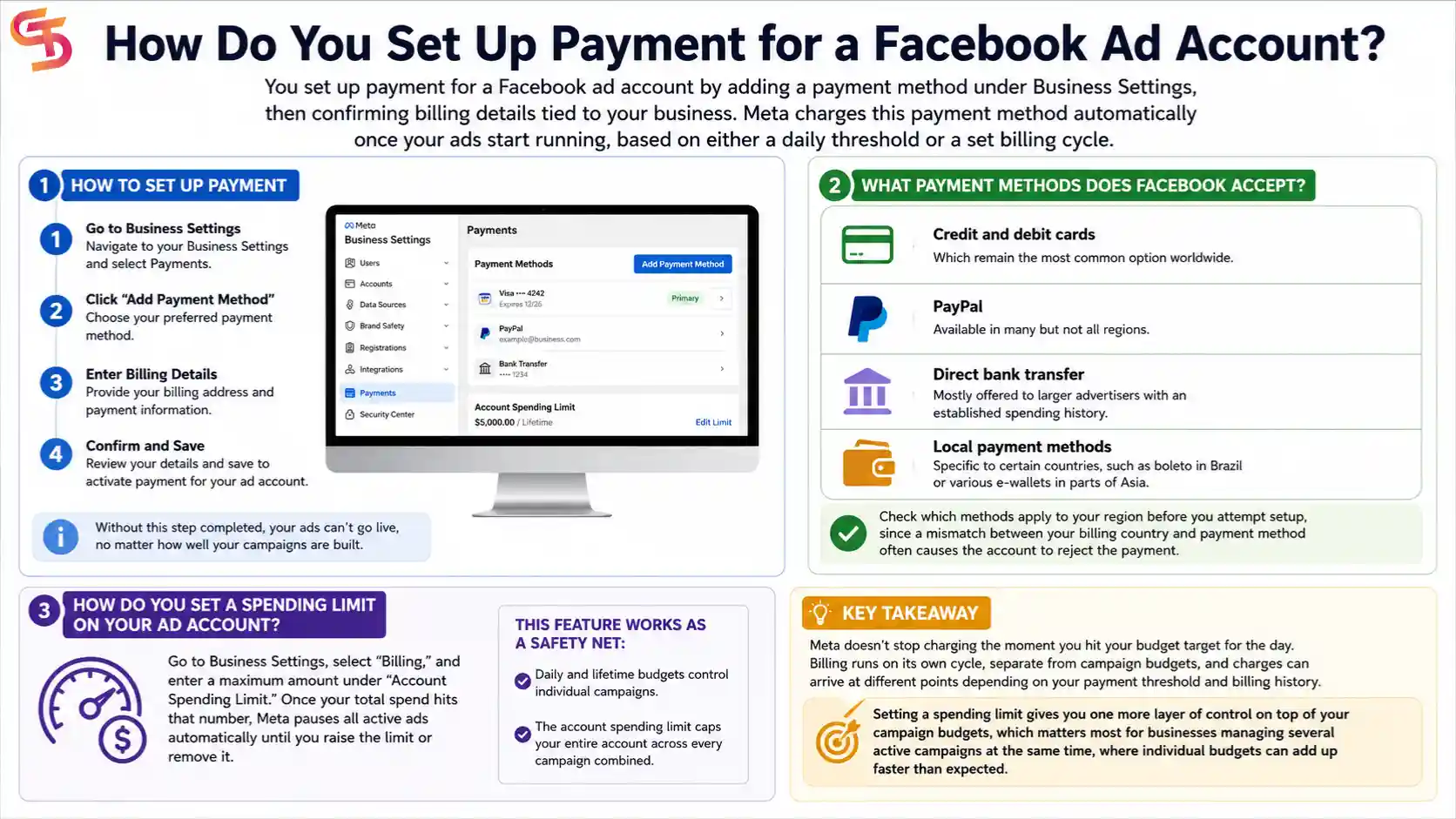
Once your ad account exists, go to Business Settings, select “Payments,” and click “Add Payment Method.” Meta then asks for your billing address and payment details before activating the account for spending. Without this step completed, your ads can’t go live, no matter how well your campaigns are built.
What Payment Methods Does Facebook Accept?
Meta accepts several payment types, though availability depends on your country:
- Credit and debit cards, which remain the most common option worldwide
- PayPal, available in many but not all regions
- Direct bank transfer, mostly offered to larger advertisers with an established spending history
- Local payment methods specific to certain countries, such as boleto in Brazil or various e-wallets in parts of Asia
Check which methods apply to your region before you attempt setup, since a mismatch between your billing country and payment method often causes the account to reject the payment.
How Do You Set a Spending Limit on Your Ad Account?
You set a spending limit by going to Business Settings, selecting “Billing,” and entering a maximum amount under “Account Spending Limit.” Once your total spend hits that number, Meta pauses all active ads automatically until you raise the limit or remove it.
This feature works as a safety net rather than a daily budget tool. Daily and lifetime budgets control individual campaigns, while the account spending limit caps your entire account across every campaign combined. Many small businesses use this setting early on to avoid unexpected charges while they learn how Meta’s auction system responds to their budgets.
Meta doesn’t stop charging the moment you hit your budget target for the day. Billing runs on its own cycle, separate from campaign budgets, and charges can arrive at different points depending on your payment threshold and billing history. Setting a spending limit gives you one more layer of control on top of your campaign budgets, which matters most for businesses managing several active campaigns at the same time, where individual budgets can add up faster than expected.
How Do You Manage User Roles and Permissions on an Ad Account?
You manage user roles by adding people through Business Settings and assigning each person a specific permission level, such as Admin, Advertiser, or Analyst. Each role controls exactly what that person can view, edit, or spend within the account.
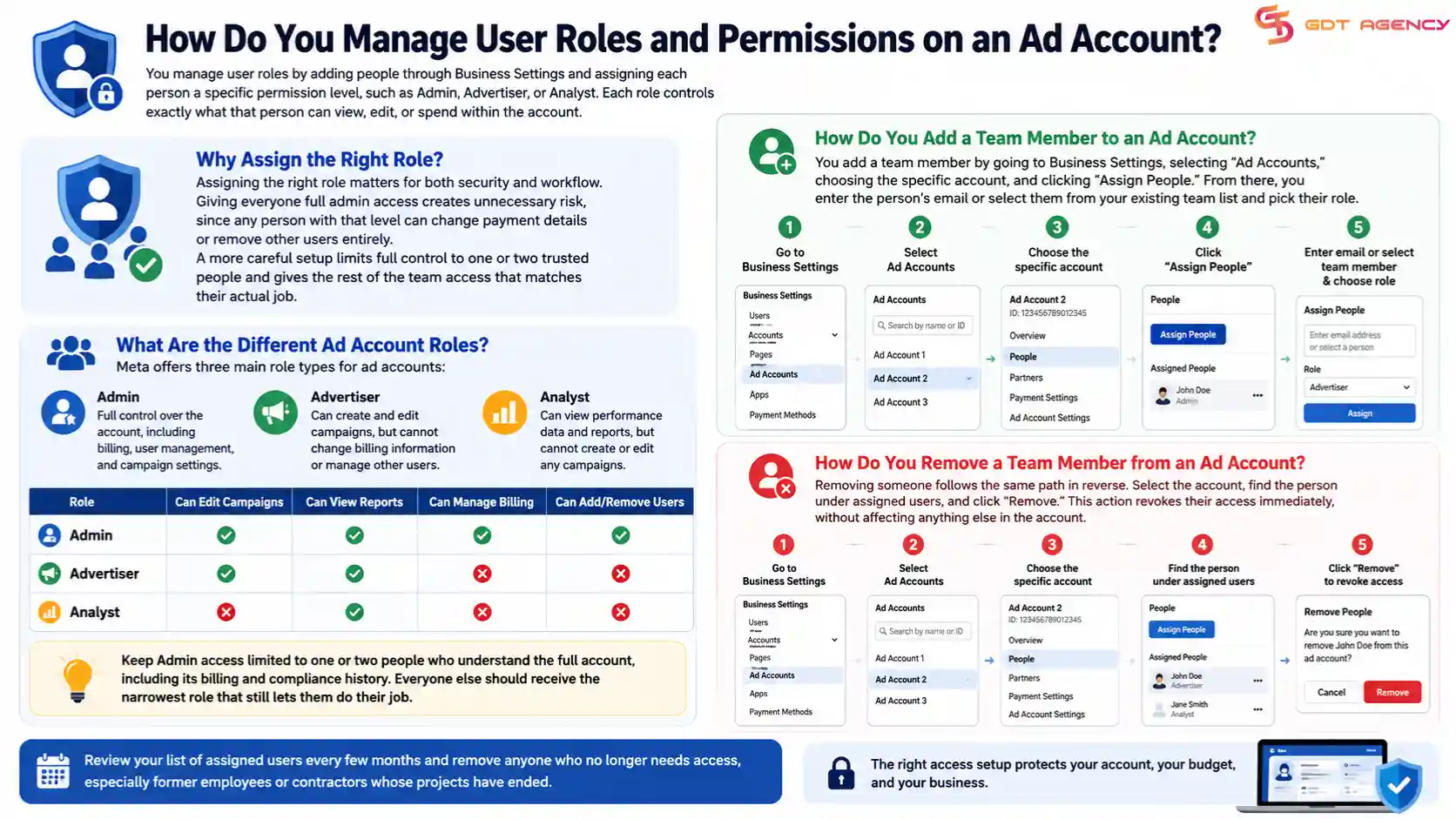
Assigning the right role matters for both security and workflow. Giving everyone full admin access creates unnecessary risk, since any person with that level can change payment details or remove other users entirely. A more careful setup limits full control to one or two trusted people and gives the rest of the team access that matches their actual job.
What Are the Different Ad Account Roles?
Meta offers three main role types for ad accounts:
- Admin: Full control over the account, including billing, user management, and campaign settings
- Advertiser: Can create and edit campaigns, but cannot change billing information or manage other users
- Analyst: Can view performance data and reports, but cannot create or edit any campaigns
Choose roles based on responsibility rather than convenience. A freelance media buyer, for example, usually only needs Advertiser access, not full Admin rights.
The table below breaks down what each role can and cannot do, which makes it easier to decide who on your team needs which level of access:
| Role | Can Edit Campaigns | Can View Reports | Can Manage Billing | Can Add/Remove Users |
| Admin | Yes | Yes | Yes | Yes |
| Advertiser | Yes | Yes | No | No |
| Analyst | No | Yes | No | No |
Keep Admin access limited to one or two people who understand the full account, including its billing and compliance history. Everyone else should receive the narrowest role that still lets them do their job.
How Do You Add or Remove a Team Member from an Ad Account?
You add a team member by going to Business Settings, selecting “Ad Accounts,” choosing the specific account, and clicking “Assign People.” From there, you enter the person’s email or select them from your existing team list and pick their role.
Removing someone follows the same path in reverse. Select the account, find the person under assigned users, and click “Remove.” This action revokes their access immediately, without affecting anything else in the account. Review your list of assigned users every few months and remove anyone who no longer needs access, especially former employees or contractors whose projects have ended.
How Do You Add an Ad Account to Your Business Portfolio?
You add an ad account to your Business Portfolio by opening Business Settings, selecting “Ad Accounts,” and choosing “Add” to either create a new account or connect an existing one you already have access to. Meta gives you three main paths here, depending on whether the account already exists and who owns it.
If you already manage an ad account outside your current Business Portfolio, you can request access to it, claim ownership if it’s unclaimed, or ask the current owner to share access with your portfolio directly. Each path requires verification, and Meta may take a short review period before the connection goes through, especially for accounts with an existing spending history.
What Is the Difference Between a Personal Ad Account and a Business Ad Account?
A personal ad account ties directly to one individual’s Facebook profile, while a business ad account belongs to a Business Portfolio and can be shared across a team. If the person behind a personal ad account loses access to their profile, the account and its data go with them.
A business ad account avoids that risk. Ownership sits with the company rather than one employee, so staffing changes don’t threaten your ad history or account standing. Most brands running any meaningful ad spend choose the business setup for this reason alone, even before considering the added benefits of team access and reporting structure.
If you’re still deciding whether to advertise from your personal Facebook profile or create a dedicated business setup, read our guide on Should You Use a Personal Facebook Account or Create a Separate Ad Account. It explains the differences in ownership, billing, team access, and long-term scalability so you can choose the right structure before launching campaigns.
Can You Have Multiple Ad Accounts Under One Business Manager?
Yes, one Business Manager (now called Business Portfolio) can hold multiple ad accounts, up to whatever limit Meta has assigned to that portfolio based on its history and standing. Larger companies or agencies managing several brands or clients often run many ad accounts side by side within a single portfolio.
This setup keeps each brand or client’s spending, audiences, and reporting separate, while still letting the same team manage everything from one login. Agencies in particular rely on this structure, since it lets them onboard new clients without creating a new business login each time.
Final Thoughts
Setting up a Facebook Business ad account takes a few clicks, but running it well takes ongoing attention. Get the basics right at the start: correct time zone, correct currency, a payment method that matches your billing country. From there, keep your user roles tight and review them regularly, watch your spending limit, and treat any policy warning as something to fix right away rather than ignore.
Most of the trouble advertisers run into later comes from decisions made in the first setup, like giving Admin access to too many people or skipping the Business Portfolio connection altogether. A clean, well-organized account from day one saves you time and protects your ad history as your business grows.
Frequently Asked Questions
Can I change my ad account’s time zone or currency after creation?
No. Meta locks both settings once the account goes active. If you need a different time zone or currency, you’ll need to create a new ad account and start fresh.
Do I need a Facebook Page before creating a Business ad account?
Yes. You need at least one Facebook Page connected to your Business Portfolio before you can run ads, since most ad formats require a Page to display alongside them.
Can one person own multiple Business Portfolios?
Yes. A single person can manage several Business Portfolios under one personal profile, though each portfolio operates independently with its own ad accounts, Pages, and team members.
What happens to my ad account if I close my Business Portfolio?
Closing a Business Portfolio removes access to everything tied to it, including ad accounts, unless you transfer ownership elsewhere first. Always move or export what you need before closing a portfolio.
How long does it take for a new ad account to get full trust from Meta?
There’s no fixed timeline. Meta builds trust gradually based on consistent, policy-compliant spending, so accounts that avoid violations and pay on time tend to see higher limits within a few months.
Can an agency manage my ad account without owning it?
Yes. You can share access to your ad account with an agency’s Business Portfolio without transferring ownership, which lets them run campaigns while you keep full control of billing and final account ownership.