
How to Fix Facebook Ad Stuck in Review Fast in 2026

You can fix most stuck ads fast by running a quick set of checks across 5 areas: creative and copy triggers, landing page issues, page and account trust signals, Payment or verification gaps, and technical delays. Then duplicate the ad instead of editing it in place, since an edit resets the review timer to zero. If the ad still has not cleared after 48 hours with no issue on your end, you should contact Meta support directly rather than waiting further. Below, this guide breaks down each cause in detail, walks through the fix steps, and compares a stuck review against other ad status issues like Rejected and Learning Limited.
- How to Fix a Facebook Ad Stuck in Review
- Quick Checks Before You Wait It Out
- Steps to Speed Up the Review
- When and How to Contact Meta Support
- Why Is My Facebook Ad Stuck in Review?
- Creative and Copy Triggers
- Landing Page and Destination URL Issues
- Profile, Page, and Account Trust Signals
- Account, Financial, and Verification Triggers
- Technical and System Variables
- Why Does Facebook Review Ads
- How Do Facebook Ad Review Systems Work?
- What ad components are reviewed?
- What Happens If Your Ad Fails Review Again?
- Final Thoughts
- Frequently Asked Questions
- Is Your Facebook Ad Really Stuck in Review?
- How long is too long for a Facebook ad to be in review?
- Will editing my ad while it’s in review speed things up?
- Does a stuck review mean my ad will get rejected?
- Can I speed up review by contacting Meta support right away?
- Does account spend level affect how fast an ad gets reviewed?
How to Fix a Facebook Ad Stuck in Review
You can fix a stuck ad by running a quick set of checks across your creative, landing page, account trust signals, and payment status, applying targeted fixes based on what you find, and contacting Meta support if the ad still has not cleared after 48 hours.
After dealing with this status many times, I have learned what usually keeps an ad stuck in review. As an expert at GDT Agency with nearly 10 years of experience working with Facebook ads across multiple account types, from standard to Facebook agency account,, I understand that most stuck ads can be resolved by checking a few key areas in the right order.
Most stuck ads resolve within the first two steps below, without ever needing a support ticket. Work through these steps in order, since each one rules out a specific cause before you move to the next, and skipping ahead often wastes time on the wrong fix.
Quick Checks Before You Wait It Out
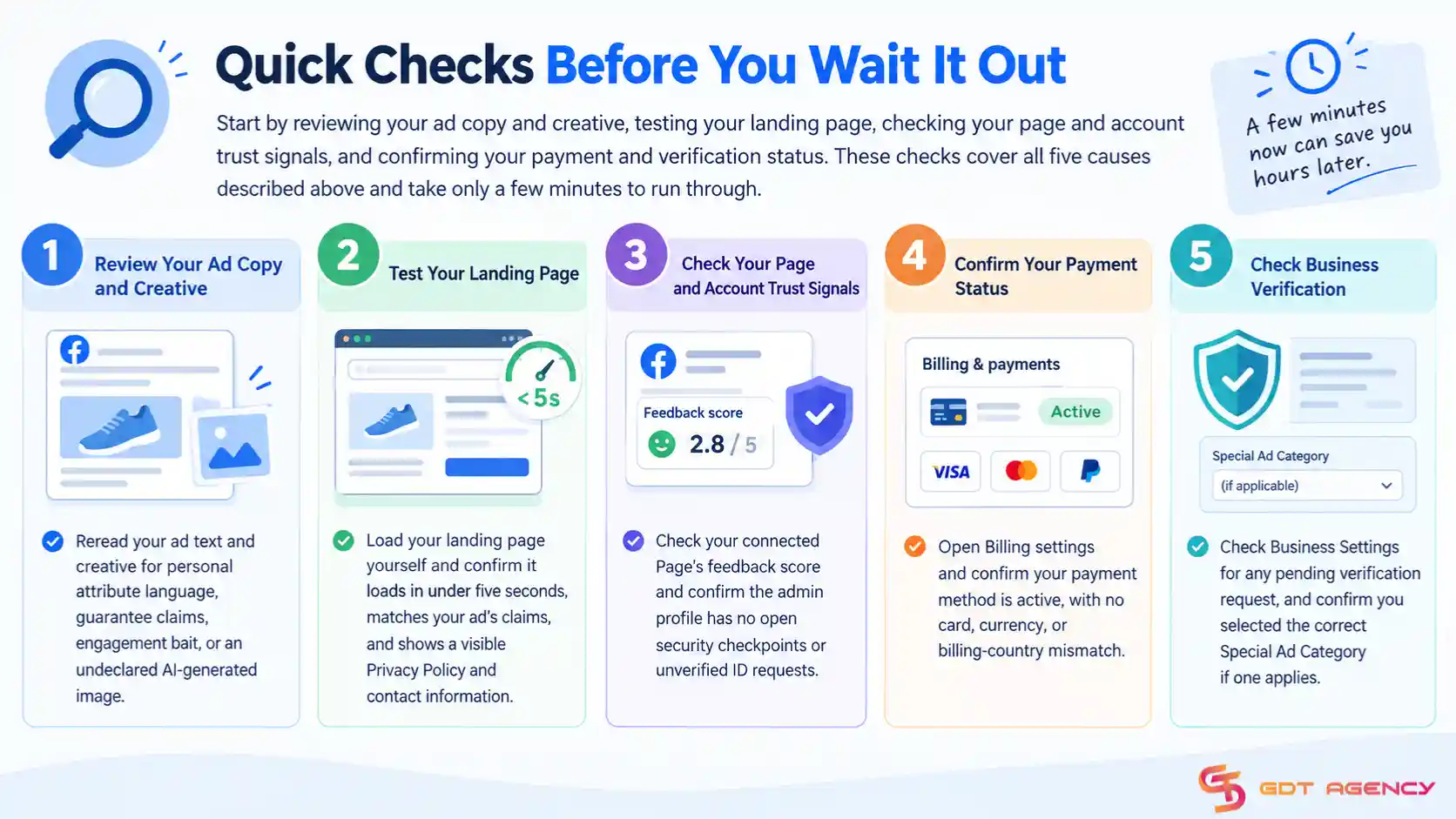
Start by reviewing your ad copy and creative, testing your landing page, checking your page and account trust signals, and confirming your payment and verification status. These checks cover all 5 causes described above and take only a few minutes to run through.
- Reread your ad text and creative for personal attribute language, guarantee claims, engagement bait, or an undeclared AI-generated image.
- Load your landing page yourself and confirm it loads in under five seconds, matches your ad’s claims, and shows a visible Privacy Policy and contact information.
- Check your connected Page’s feedback score and confirm the admin profile has no open security checkpoints or unverified ID requests.
- Open Billing settings and confirm your payment method is active, with no card, currency, or billing-country mismatch.
- Check Business Settings for any pending verification request, and confirm you selected the correct Special Ad Category if one applies.
Steps to Speed Up the Review
Duplicate the stuck ad and submit the copy as a new ad, since this often resets the ad into a fresh review queue rather than leaving it stuck behind whatever caused the original delay. Avoid editing the original ad while it waits, because any edit restarts its review timer from zero and adds another full waiting period on top of the one you already spent.

If your ad copy touches a sensitive category, rewrite the flagged language before you resubmit rather than sending the same version again. Advertisers who submit the same flagged content twice typically see the same delay repeat itself, sometimes longer the second time. Community reports on Meta’s own support forums and advertiser groups confirm that duplicating the ad, rather than editing it in place, clears most stuck reviews within a few hours once the underlying issue has been addressed.
Beyond duplication, a few additional steps help in specific cases:
- Pause and republish the ad set if the ad has been stuck for over 24 hours with no policy flag visible.
- Switch to a simpler creative format, such as a single image instead of a carousel, if the ad has been stuck across multiple resubmissions.
- Remove any pixel or tracking parameter errors from your landing page URL, since a broken URL can also trigger a manual review.
- Spread out large batch publishes instead of pushing dozens of ads live at once, especially through the API, since bulk ingestion can throttle the whole batch into a slower queue.
When and How to Contact Meta Support
Contact Meta support once your ad has stayed in review for more than 48 hours with no policy or payment issue on your end. Meta’s Business Help Center provides a direct request form for ad review delays under its Troubleshooting section, and this route works faster than posting in public advertiser forums.
Submit your ad ID, account ID, and a short description of the issue when you file the request, along with a note confirming you have already checked policy compliance and payment status. Meta typically responds within one to three business days, though response times vary based on current support volume and your account’s spend tier. Accounts on Meta’s higher support tiers, usually tied to monthly ad spend, often get a faster response through a dedicated account representative rather than the general support queue.
>>> For a broader look at related issues, see our guide to Facebook Ads Account Error: Guide for Every Error Type 2026.
Why Is My Facebook Ad Stuck in Review?
There are 5 main categories behind a stuck review: creative and copy triggers, landing page issues, page and account trust signals, payment or verification problems, and technical delays on Meta’s platform.
Each category points to a different fix, so identifying the right one saves you time and prevents you from applying the wrong solution. The 5 categories below cover almost every case advertisers run into, and most stuck ads trace back to one of them rather than a mix of several.
Creative and Copy Triggers
Automated filters flag direct or indirect references to a viewer’s personal traits, such as medical conditions, financial distress, or protected characteristics, under Meta’s Personal Attributes Policy. Phrasing like “Are you struggling with debt?” or “Do you have acne?” reads as if the ad already knows something about the specific person seeing it, which pushes the ad into deeper review.
Unrealistic claims and guarantees carry the same risk. Language promising instant financial returns, immediate weight loss, disease cures, or guaranteed outcomes trips Meta’s anti-scam and health-claims models, often leading to disapproval or an extended manual review. Misleading interactive elements, such as fake play buttons, fake checkboxes, or “click here to see if you qualify” engagement bait, fail Meta’s initial safety checks for the same reason.

2 areas worth flagging with an update, since guidance here has shifted:
- Meta no longer auto-rejects all before-and-after imagery for weight loss or cosmetic products as of a July 2026 policy change. Review now depends mainly on the claim paired with the image, such as a guaranteed result or a specific timeline, rather than the image alone, though close-ups of body parts and medical procedures still commonly trigger extended review.
- Meta also now requires an AI disclosure label on photorealistic synthetic images, carousels, slideshows, and video that are AI-generated or heavily AI-edited; an undeclared AI image that automated tools detect as photorealistic can trigger an extended security hold. AI-written copy or minor edits like color correction do not need this disclosure.
Common creative and copy triggers worth checking before you resubmit include:
- Personal attribute language that implies knowledge of a viewer’s health, finances, body, or protected characteristics
- Guarantee or superlative language such as “cure,” “guaranteed results,” or “instant returns”
- Fake buttons, fake checkboxes, or misleading engagement-bait phrasing
- Undeclared AI-generated or heavily AI-edited photorealistic imagery
- Heavy text density on an image, which does not trigger rejection outright but can still slow review and reduce reach
Landing Page and Destination URL Issues
Your destination URL has to meet the same advertising standards as your creative, since Meta’s review system crawls the landing page alongside the ad itself. A page that makes a claim your ad copy does not make, or vice versa, slows down policy verification and often ends in disapproval for misrepresentation.
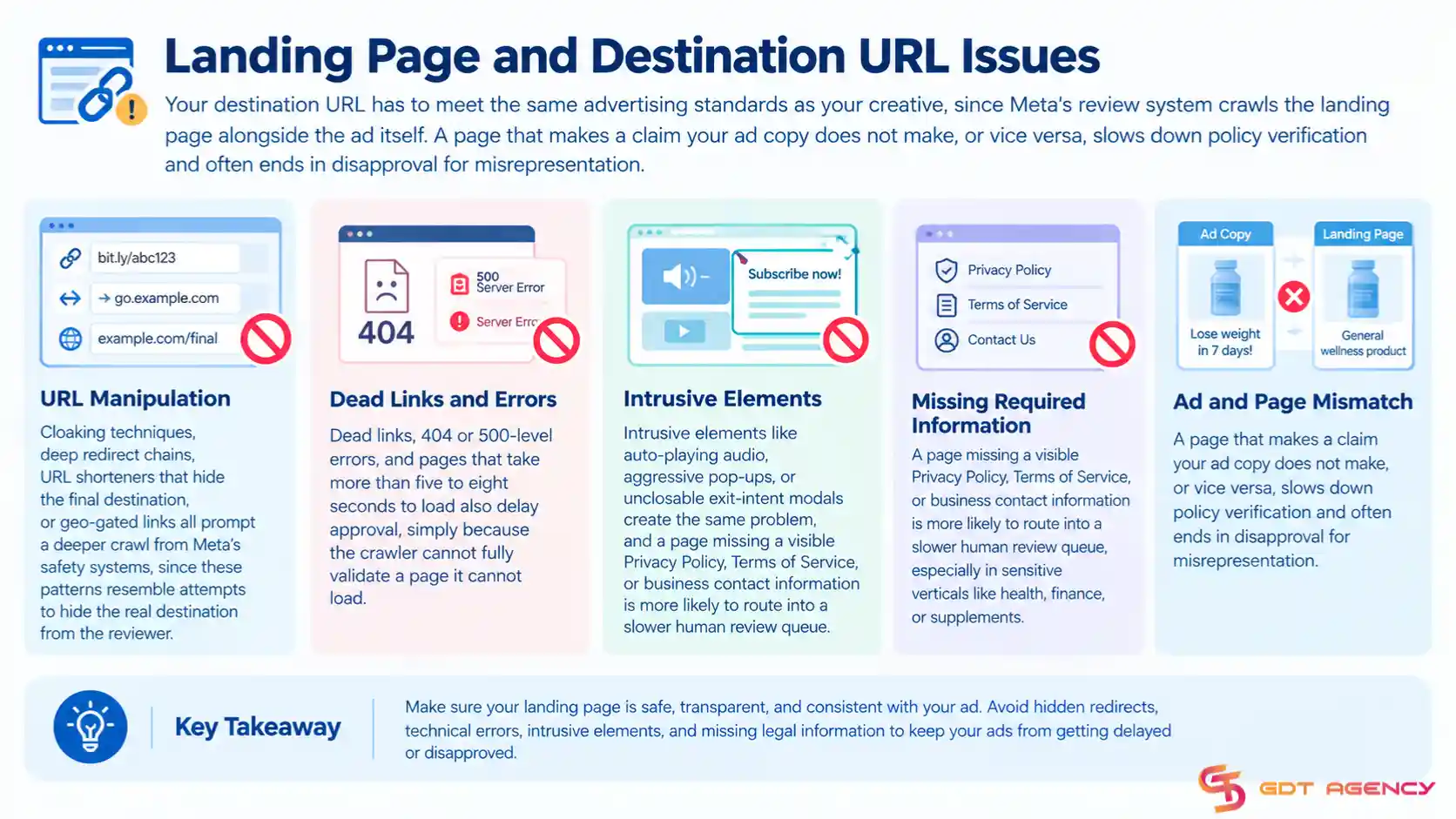
Cloaking techniques, deep redirect chains, URL shorteners that hide the final destination, or geo-gated links all prompt a deeper crawl from Meta’s safety systems, since these patterns resemble attempts to hide the real destination from the reviewer. Dead links, 404 or 500-level errors, and pages that take more than five to eight seconds to load also delay approval, simply because the crawler cannot fully validate a page it cannot load. Intrusive elements like auto-playing audio, aggressive pop-ups, or unclosable exit-intent modals create the same problem, and a page missing a visible Privacy Policy, Terms of Service, or business contact information is more likely to route into a slower human review queue, especially in sensitive verticals like health, finance, or supplements.
Profile, Page, and Account Trust Signals
The Facebook Page connected to your ad carries its own trust score, and a page with low customer feedback, a recent name change, or a past Community Standards violation draws heightened scrutiny on every ad it runs. A brand-new page that starts running ads immediately after creation faces stricter automated sandboxing than an established page with organic activity and a positive history.

The personal profile managing your Business Manager matters too. An admin profile with a recent security checkpoint, an unverified ID, unusual IP or device activity, or a prior restriction can drag down review speed across the whole account. A fast burst of “Hide Ad” or “Report Ad” signals during early impression testing can also pull an already-active ad back into review and cut its delivery sharply.
Account, Financial, and Verification Triggers
An unverified business, an expired card, or a failed payment charge stops Meta’s review system from clearing your ad, since Meta checks that your account can actually pay before it approves delivery. Incomplete Business Verification or missing two-factor authentication on admin accounts produces the same freeze. As of 2026, Meta explicitly requires every ad account to be tied to a verified business or individual, and failing to complete that verification when asked can lead to the account being disabled outright.
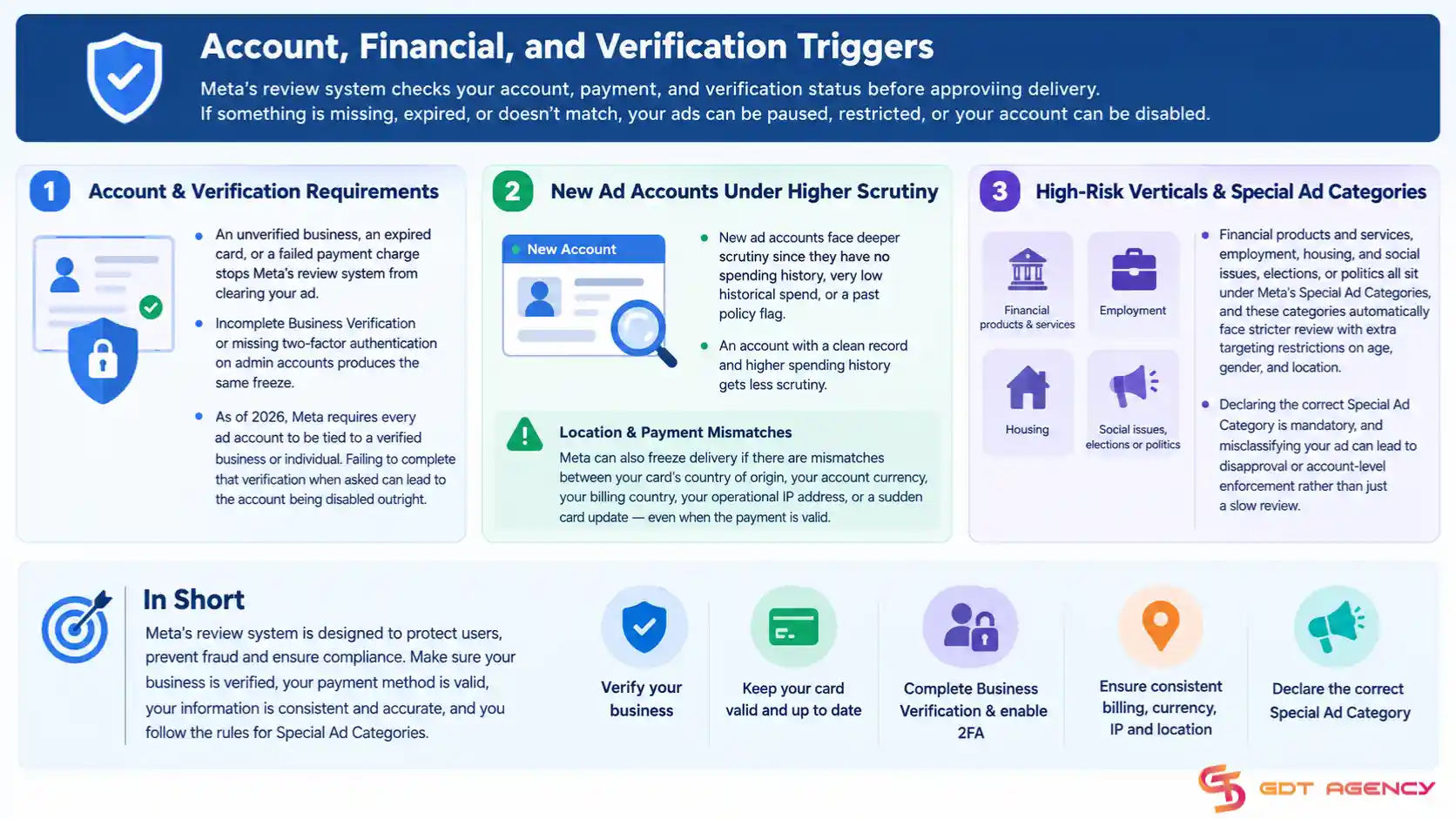
New ad accounts face deeper scrutiny too, since an account with no spending history, very low historical spend, or a past policy flag gets sandboxed harder than a mature account with a clean record. Mismatches between your card’s country of origin, your account currency, your billing country, your operational IP address, or a sudden card update can also freeze the delivery queue by triggering Meta’s internal fraud safeguards, even when the payment itself is valid.
High-risk verticals add a further layer. Financial products and services, employment, housing, and social issues, elections, or politics all sit under Meta’s Special Ad Categories, and these categories automatically face stricter review with extra targeting restrictions on age, gender, and location. Declaring the correct Special Ad Category is mandatory, and misclassifying your ad can lead to disapproval or account-level enforcement rather than just a slow review.
Technical and System Variables
Editing your budget, targeting, placements, creative, or copy while an ad is still under review resets the review timer and re-queues the ad from the start, which is the single most common self-inflicted delay advertisers run into. Peak season congestion adds to this, since Meta’s review system slows platform-wide during Q4 holidays, Black Friday and Cyber Monday, and other major shopping events.
Publishing dozens of ad sets or ads at once, especially through the API, can overload Meta’s ingestion endpoints and force the entire batch into a throttled queue rather than a normal one. Occasionally, Meta’s own backend systems desynchronize and leave an ad showing “In Review” indefinitely even after the ad has already been processed internally. Duplicating the ad set without making any edits is the standard workaround advertisers use to force a fresh review when this happens.
Why Does Facebook Review Ads
Meta reviews ads to avoid sensitive ads, scam ads, or ads that spread hate for a political or social agenda and ensure they align with Facebook’s advertising policies, which are designed to protect users and maintain the platform’s integrity.
You can think of it in a simple way: Meta reviews ads to answer one question: “Is this ad safe, honest, and trustworthy for users?”
If the answer is unclear, the ad stays in review longer or gets flagged for manual checks. In 2026, this process has become even more central to how the platform functions, focusing on four primary goals:
- Enforce Advertising Policies: Meta needs to make sure every ad follows its rules. These policies cover things like misleading claims, prohibited products, and inappropriate content. If advertisers could publish anything without checks, the platform would quickly fill with scams, fake offers, and harmful messaging.
- User Safety and Privacy: The most critical reason is to prevent the promotion of illegal or dangerous products. People use Facebook and Instagram to connect, not to feel tricked or overwhelmed by bad ads. Therefore, Meta reviews ads to filter out content that feels spammy, aggressive, or irrelevant, like weapons, drugs, and counterfeit goods. This step helps keep users engaged and prevents them from losing trust in the platform.
- Preventing Scams and Deception: Normally, online advertising attracts bad actors who try to exploit users. Meta uses automated systems and manual checks to detect suspicious behavior like “get-rich-quick” offers, misleading health claims, and financial scams. Ads that look risky often stay in review longer for deeper inspection. By verifying the legitimacy of the offer and the destination (your landing page), they attempt to ensure that what a user clicks on is what they actually get.
- Improving User Experience: No one likes a feed full of “clickbait” or low-quality content. Meta reviews ads to filter out content that feels spammy, aggressive, or irrelevant to ensure they aren’t disruptive, overly sensational, or visually offensive. This step helps keep users engaged and prevents them from losing trust in the platform. High-quality ads keep users on the platform longer, which is ultimately better for both Meta and legitimate advertisers like you.
How Do Facebook Ad Review Systems Work?
Once you have crafted an advertisement, Facebook will review it to either approve or disapprove it via both automation and manual review to validate that the ads comply with Facebook ad policies. Here is the way Facebook ad review systems work:
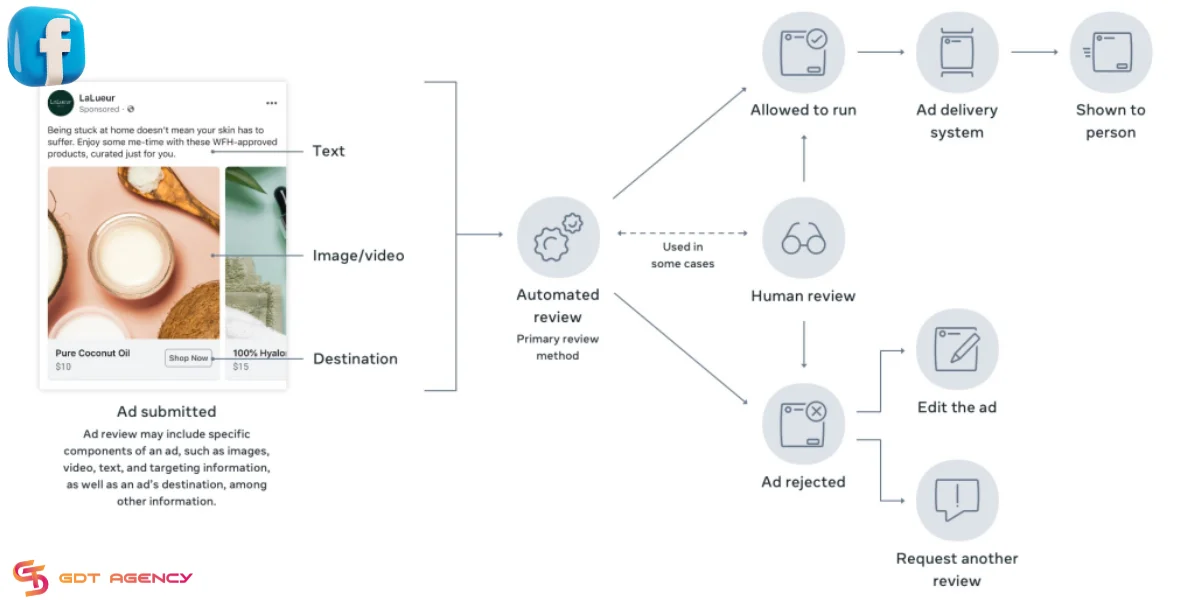
Currently, this process is gradually complicated. Though Facebook has trained its automated systems to quickly review submitted ads, there is always a team of specialists who recheck manually to ensure policy compliance.
What ad components are reviewed?
The Facebook ad review process involves examining all elements of the submitted ads. To understand it better, refer to the content related to the anatomy of a Facebook Ad that I shared earlier. In summary, it includes:
- Images, video, or text
- Targeting information
- Ad destination (where an ad directs people, such as a Facebook Page or website)
- Special Ad Categories
- Advertiser permissions
- Other critical components and information
You need to ensure that those ad elements are clear and do not violate advertising policies. But of course, things don’t always go smoothly. If any component has issues, your Facebook ad may not be approved and may be stuck in review.
What Happens If Your Ad Fails Review Again?
An ad that fails review a second time enters a Rejected status with a specific policy reason attached, and repeated failures can lower your account’s overall quality standing over time. Meta tracks how often an account submits ads that violate policy, and a pattern of rejections can trigger stricter review on future ads across the entire account, not just the one that failed.
Review the exact rejection reason listed in Ads Manager before you submit again, since resubmitting the same flagged content usually leads to another rejection and adds another mark against your account’s history.
If you believe the rejection was a mistake, use Meta’s appeal option inside Ads Manager rather than duplicating the ad again, since an appeal goes to a human reviewer instead of the automated system that issued the original rejection. Appeals typically take longer than a standard review, but they carry more weight when you believe Meta’s automated system made an error rather than catching a genuine policy issue.
>>> If your ad gets approved but remains stuck without stable delivery, the issue may have shifted from review to the learning phase. See our guide on Facebook Ads Stuck in Learning Phase to learn why this happens and how to fix it.
Final Thoughts
A stuck ad review almost always traces back to one of 5 categories: a creative or copy flag, a landing page problem, a page or account trust signal, a payment or verification gap, or a temporary technical backlog on Meta’s side. Once you know which one applies, the fix is usually quick, whether that means rewriting a line of copy, fixing a slow-loading page, or updating your payment method.
Frequently Asked Questions
Is Your Facebook Ad Really Stuck in Review?
Yes, your ad is stuck in review if it stays in the “In Review” status for more than 48 hours without a decision from Meta. Most ads clear review within a few hours, and almost all clear within 24 hours under normal conditions.
How long is too long for a Facebook ad to be in review?
Anything past 48 hours without a status update counts as too long. Most ads clear within 24 hours, so a delay beyond two full days usually points to a specific policy, payment, or system issue.
Will editing my ad while it’s in review speed things up?
No, editing an ad while it’s under review restarts the review process from the beginning. Duplicating the ad as a new submission works better than editing the original.
Does a stuck review mean my ad will get rejected?
No, a stuck review is a pending state, not a decision. Many ads that sit in review for an extended period still clear and go active once Meta finishes its check.
Can I speed up review by contacting Meta support right away?
No, Meta generally asks advertisers to wait at least 24 to 48 hours before filing a support request, since most ads resolve on their own within that window.
Does account spend level affect how fast an ad gets reviewed?
Yes, accounts with a longer history and consistent spend tend to see faster review times than new or low-spend accounts, since Meta factors account trust into how it prioritizes review.