

How to Fix Facebook Ad Stuck in Review Fast in 2026
You can fix most stuck ads fast by running a quick set of checks across 5 areas: creative and copy triggers, landing page issues, page…
You can recover a Facebook ad account by identifying why it stopped working, then following the correct fix or appeal path for that specific cause. Most accounts fall into one of 4 states: disabled, restricted, closed, or affected by a technical error, and each one calls for a different response. Facebook gives most advertisers a standard recovery path through the Meta Business Help Center. This path starts with a self-service check, moves to an appeal if the check fails, and ends with a manual review from Facebook's support team. Advertisers who follow each step in order and who submit accurate business information recover access faster than those who file appeals through the wrong form or skip verification.
You recover a Facebook ad account by checking its current status, following the specific fix tied to that status, and submitting an appeal if the issue requires Meta's review. This process applies whether the account is disabled, restricted, or closed, though the exact screens and buttons differ slightly between Meta Business Suite and Ads Manager.
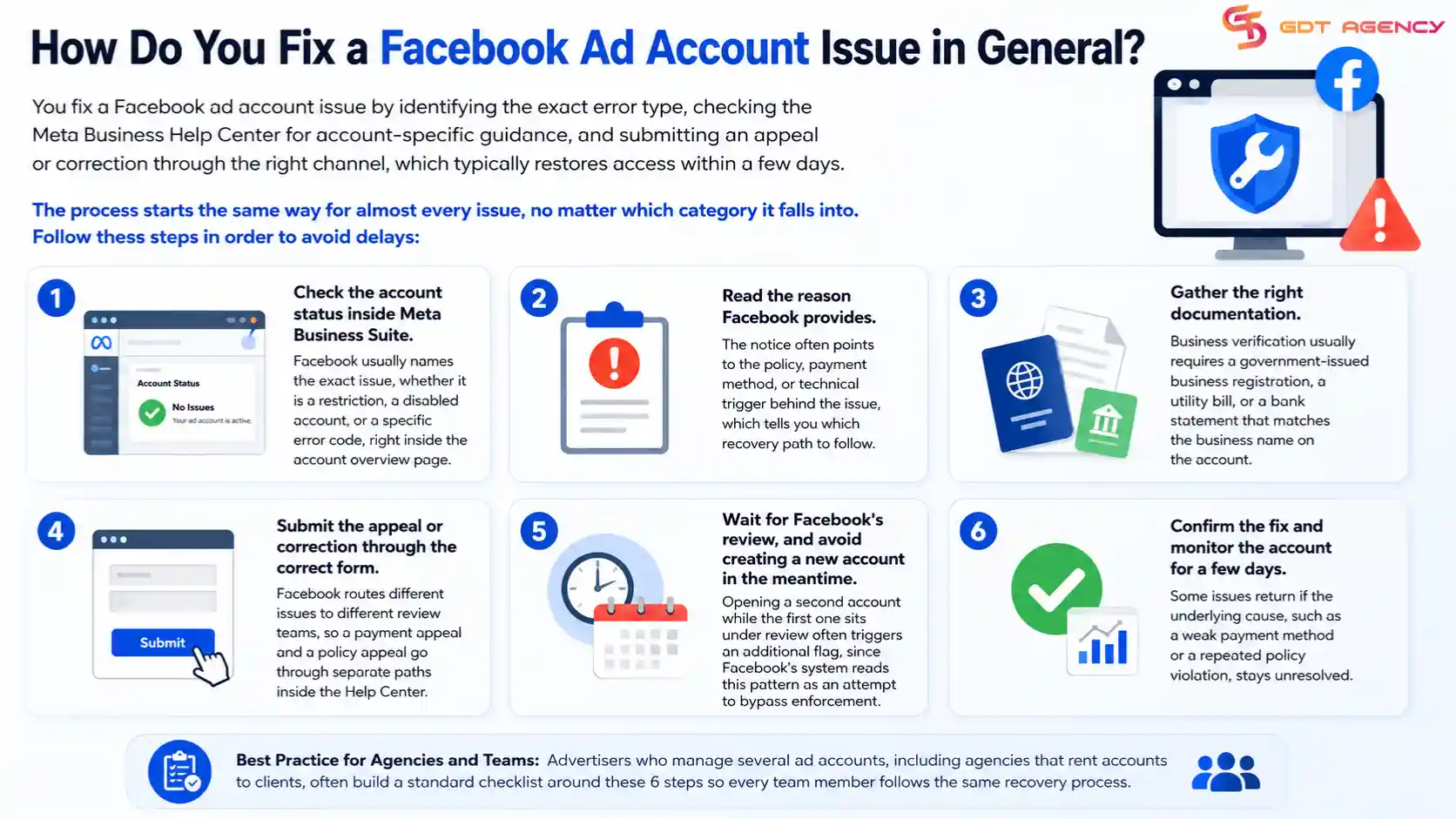
The process starts the same way for almost every issue, no matter which category it falls into. Follow these steps in order to avoid delays:
Advertisers who manage several ad accounts, including agencies that rent accounts to clients, often build a standard checklist around these 6 steps so every team member follows the same recovery process.
As an expert at GDT Agency with nearly 10 years of experience working with Facebook ads across multiple ad accounts, from standard to Facebook agency ad accounts, I have dealt with a wide range of account problems and seen how the same issue can affect advertisers differently depending on the account’s history, setup, and activity.
Based on my experience, Facebook ad account issues fall into 4 main types: restricted, disabled, closed, or affected by a technical error, based on how each problem blocks your advertising activity.
Each type comes from a different trigger inside Facebook's system, and each one needs its own recovery path. The sections below break down what causes each issue and where you can find a full fix for it.
Before troubleshooting an account problem, it helps to understand how a Facebook ad account works, including its relationship with campaigns, billing, permissions, and business assets. Our guide on What Is a Facebook Ad Account and How Does It Work covers these fundamentals in detail.
A restricted Facebook ad account is an account that keeps its login access but loses some or all of its ability to run ads, usually because Facebook's automated system flagged a policy risk.
Facebook applies a restriction when it detects a pattern it considers risky, rather than a single confirmed violation. Common triggers include repeated ad rejections in a short time, a sudden jump in ad spend, payment activity that looks inconsistent with past behavior, or content that touches a sensitive category like health, finance, or politics. The restriction can apply to the whole account or to a single campaign, and Facebook usually shows a banner inside Ads Manager that names the reason.
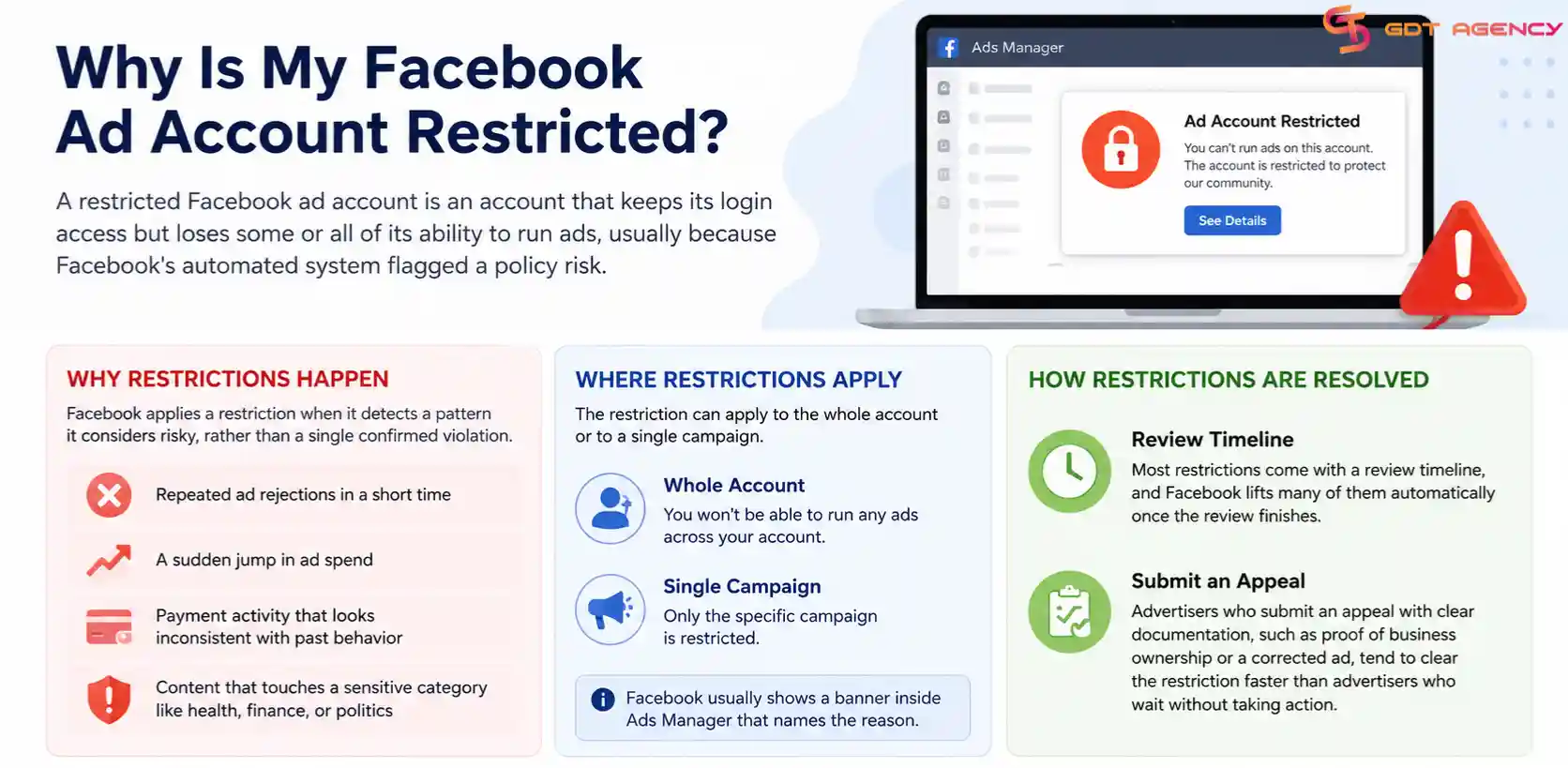
Most restrictions come with a review timeline, and Facebook lifts many of them automatically once the review finishes. Advertisers who submit an appeal with clear documentation, such as proof of business ownership or a corrected ad, tend to clear the restriction faster than advertisers who wait without taking action. For the full step-by-step recovery process, see our guide on how to fix a restricted Facebook ad account.
→ For a detailed overview of what Facebook allows and prohibits, see our guide to Facebook Ad Account Policies: What Gets Approved and Banned.
A disabled Facebook ad account is an account that Facebook has fully deactivated, which blocks the owner from accessing Ads Manager, editing campaigns, or spending budget until Facebook restores it.
Facebook disables an account for reasons that go beyond a single flagged ad. The most common causes include repeated or severe policy violations, suspicious login activity from unfamiliar locations or devices, a failed business verification, or a payment method that Facebook's fraud system rejects. Unlike a restriction, a disabled account usually shows no partial access at all, and the account owner sees a full block screen instead of a warning banner.
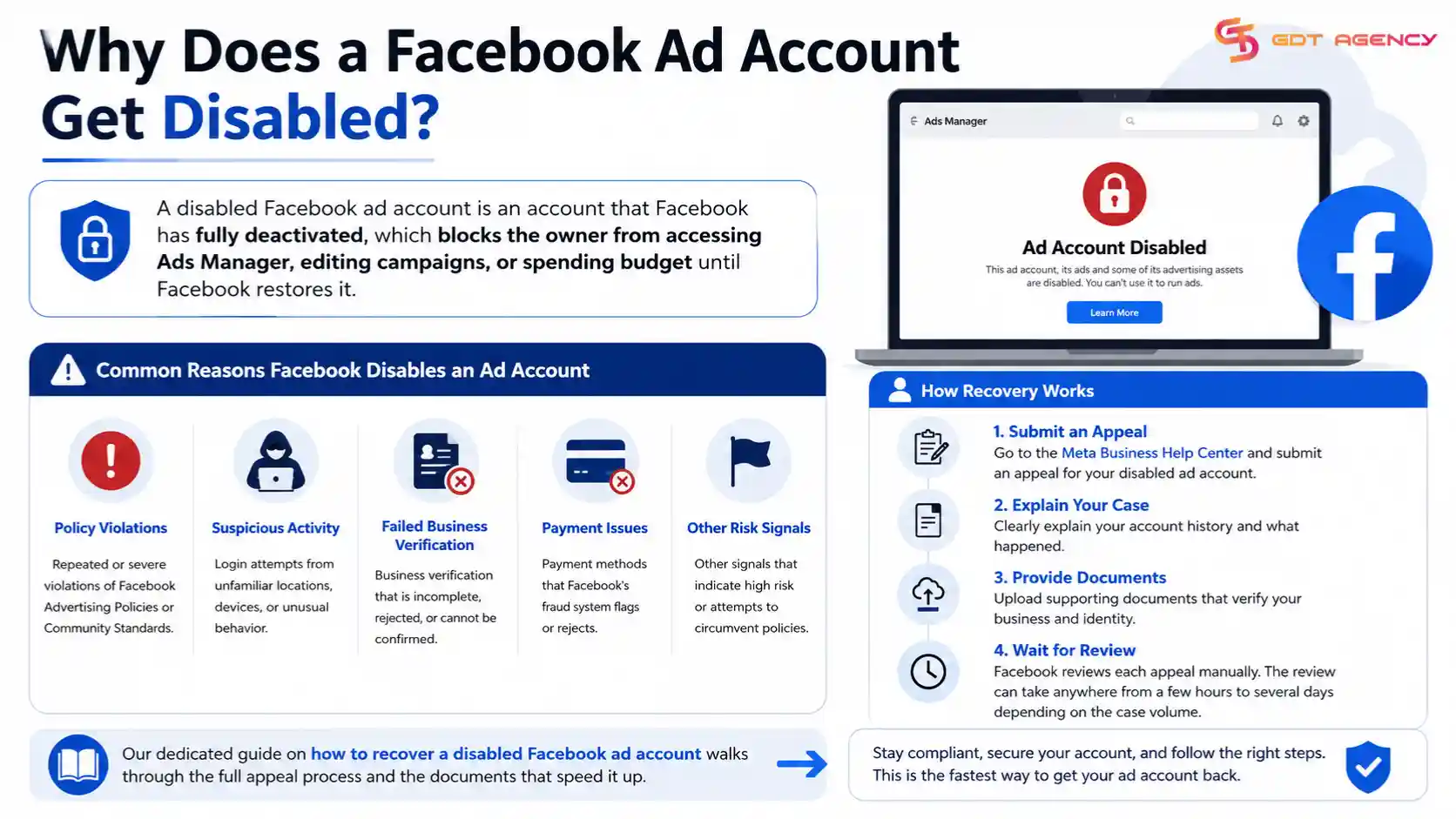
Recovery starts with an appeal through the Meta Business Help Center, where the advertiser explains the account history and provides supporting documents. Facebook reviews each appeal manually, and the review can take anywhere from a few hours to several days depending on the case volume. Our dedicated guide on how to recover a disabled Facebook ad account walks through the full appeal process and the documents that speed it up.
Facebook ad accounts run into 8 common error types: ad account not spending, ad account not delivering, stuck in review, stuck in learning phase, campaign errors, authentication errors, update errors, and general Ads Manager errors.
Each error occurs at a different stage of the advertising workflow, so the correct fix depends on where the problem happens.
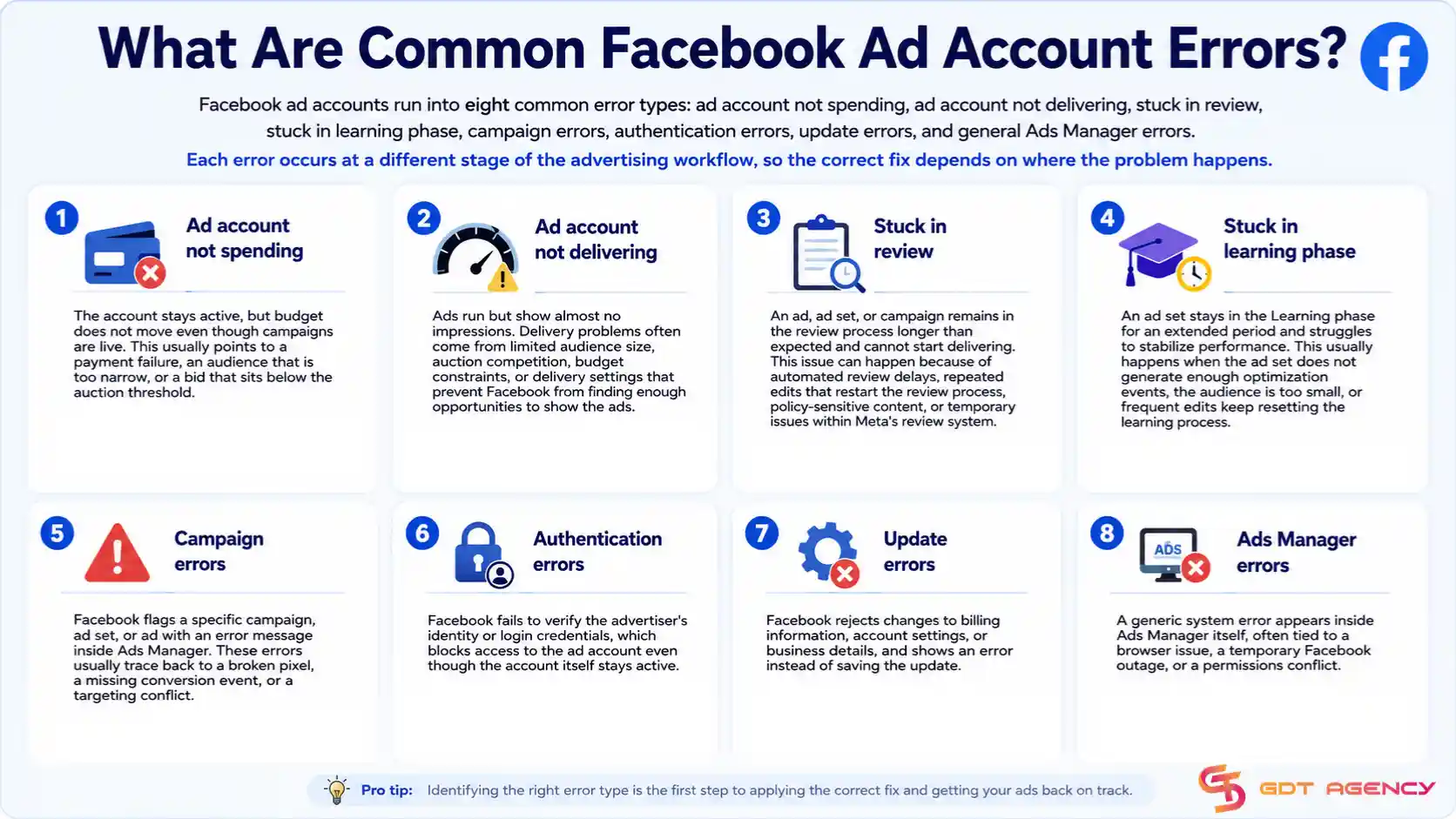
→ Each Facebook Ads account error has different causes and fixes. See our Facebook Ads Account Error: Guide for Every Error Type 2026 to understand what each error means, why it happens, and how to troubleshoot it.
Your account is closed if it no longer appears as active in Ads Manager and shows a "closed" status instead of "disabled." Closed accounts fall into 2 categories: ones you or a teammate closed voluntarily, and ones Meta closed automatically, often after long periods of inactivity or unresolved billing issues.
The recovery path differs depending on which type of closure applies. A voluntarily closed account generally reopens faster than one Meta closed on its own, since the second case sometimes requires the same appeal process used for disabled accounts.
Facebook ad account recovery typically takes anywhere from a few hours to several weeks, depending on the type of issue and how you're resolving it. Automatic reviews tend to move fastest, while appeals tied to identity or business verification usually take the longest.
To break this down further, a few patterns show up consistently:
Because of this range, it helps to submit any requested documentation as completely and accurately as possible the first time. Incomplete submissions are one of the most common reasons a review drags out longer than expected.
Another factor worth noting is account history. A brand-new account with no prior activity sometimes gets reviewed more cautiously than an established one with years of clean spending behind it, simply because Meta has less data to confirm the account is legitimate. If your account has been reinstated once before for a similar issue, a second review can also take longer, since Meta tends to apply extra scrutiny to repeat flags even when each individual case looks minor on its own.
No, not every Facebook ad account can be recovered, since Meta reserves permanent disablement for accounts tied to serious or repeated policy violations. In those cases, no appeal button appears, and support tickets typically confirm that the decision is final rather than offering a path to reinstatement.
One more thing worth flagging: even a legitimate, well-run business can end up with a permanently disabled account if it shares a payment method, IP address, or device with another account Meta already flagged for abuse. This kind of association-based disable is harder to appeal successfully, since the violation technically belongs to a different account rather than yours, and Meta's automated systems don't always separate the two cleanly.
If you've gone through the appeal process and received a final decision with no further review option, the next section covers what your options look like from there.
If your Facebook ad account cannot be recovered, your main options are setting up a new account under a different Business Portfolio, or using a rented agency account while you rebuild your own account history.
You prevent future ad account issues by keeping your billing information current, avoiding sudden large jumps in daily spend, and reviewing Meta's advertising policies before launching new campaign types. Beyond that, a few habits consistently reduce the risk of another disable, restriction, or closure:
Recovering a Facebook ad account comes down to 2 things: figuring out exactly what happened, and following the right path for that specific issue instead of guessing. Most disabled, restricted, or closed accounts do come back once you submit the correct appeal with the right documentation, and knowing the realistic timeline ahead of time makes the wait easier to plan around. For the smaller number of cases that end in a permanent decision, a new account or a rented one keeps your campaigns moving while you sort out the root cause. Either way, the fastest path back to running ads starts with correctly identifying the problem in front of you, not with trying every fix at once.
Yes, in most cases. A disabled account can be reactivated by submitting an appeal through Account Quality, though the outcome depends on the reason Meta gave for the disable and whether it counts as a first-time or repeat issue.
Check Account Quality for an appeal or review option. If none appears next to the disabled status, that generally signals a permanent decision rather than a temporary one.
A new ad account under a different Business Portfolio can get you running ads again, but it starts with no spending history, so it typically needs a slower budget ramp-up than an established account.
Deactivation without warning often ties to the 56-day inactivity rule, an unresolved billing issue, or a policy flag that triggered an automatic review rather than a manual one.
No. A restricted account usually keeps running existing campaigns while blocking a specific action, like raising the budget, whereas a disabled account stops all activity until the issue is resolved.

You can fix most stuck ads fast by running a quick set of checks across 5 areas: creative and copy triggers, landing page issues, page…

Facebook Ads not delivering happens due to 8 main groups of causes, ranging from billing and budget limits to page health, creative errors, and tracking…
Facebook ads stop spending money for 10 common reasons, and each one has a direct fix you can apply today. The ten reasons are a…

You can recover a disabled Facebook ad account by submitting an appeal through Meta Business Support Home, and in most cases, the process takes 3…
A restricted Facebook ad account can be fixed by identifying the restriction type, resolving the root cause, and submitting a formal appeal via Meta’s Account…