

How to Add an Agency to Your Facebook Ad Account via Business Portfolio
You can add an agency to your Facebook ad account through Meta Business Portfolio by entering the agency’s Business ID and assigning the appropriate permission…

You get access to a client's Facebook ad account by sending a request through their Business Portfolio or directly inside Ads Manager, then waiting for the account owner to approve your role. Business Portfolio requests work best for agencies managing multiple clients, while a direct Ads Manager invite suits smaller, one-off engagements. Before you send any request, you need specific information from the client, including their Business Manager ID and the exact name of the ad account. This information determines how fast the request goes through and whether you land the right permission level from the start. Below, we break down the request process step by step, the information you need to prepare, and what access really involves once it's granted.
You request access to a client's ad account through one of two main channels: the Business Portfolio (formerly Business Manager) or directly inside Ads Manager. Both methods send an invitation to the account owner, who must approve it before you can start working.
As an expert at GDT Agency who has spent nearly 10 years working on clients’ Facebook ad accounts via multiple Facebook ads accounts from standard to Facebook agency ad accounts, one thing I know is that choosing the right channel depends on how the relationship is structured.
Agencies working with multiple clients typically rely on Business Portfolio requests because they keep every client account organized under one dashboard. Freelancers or small teams handling a single account often find the direct Ads Manager route quicker, since it skips the extra setup a Business Portfolio requires.
Business Portfolio requests connect your agency's Business Manager account directly to the client's ad account, making them the standard method for agencies handling several clients at once.

To send a request through Business Portfolio:
This method keeps a clear audit trail of who has access and at what level, which becomes useful when managing several client accounts under one agency structure.
Requesting access directly in Ads Manager works well when a Business Portfolio setup isn't necessary, such as short-term projects or single-client freelance work.
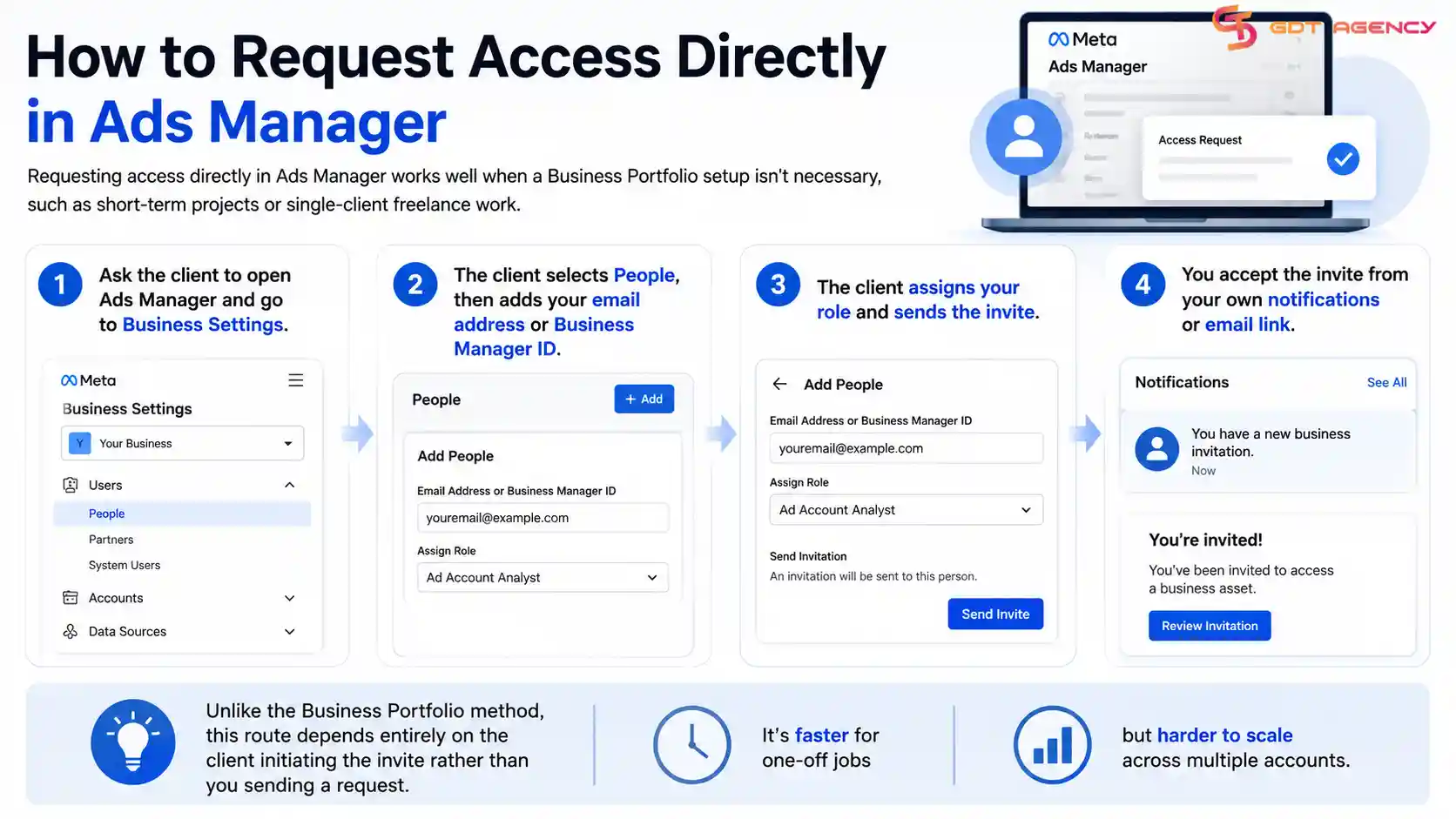
To request access this way:
Unlike the Business Portfolio method, this route depends entirely on the client initiating the invite rather than you sending a request. It's faster for one-off jobs but harder to scale across multiple accounts.
>>> After gaining access, check the account's tracking setup and make sure the Meta Pixel is installed correctly. See our Facebook Pixel Setup Guide: How to Install Meta Pixel for the complete setup process.
You need the client's Business Manager ID or Ad Account ID, the exact name of the ad account, and confirmation of which role you're requesting before sending an access request.
Gathering this information upfront prevents delays, since a mismatched ID or wrong account name is one of the most common reasons requests get stuck or ignored. Clients unfamiliar with Ads Manager often don't know where to find their own Business Manager ID, so walking them through it saves back-and-forth later.
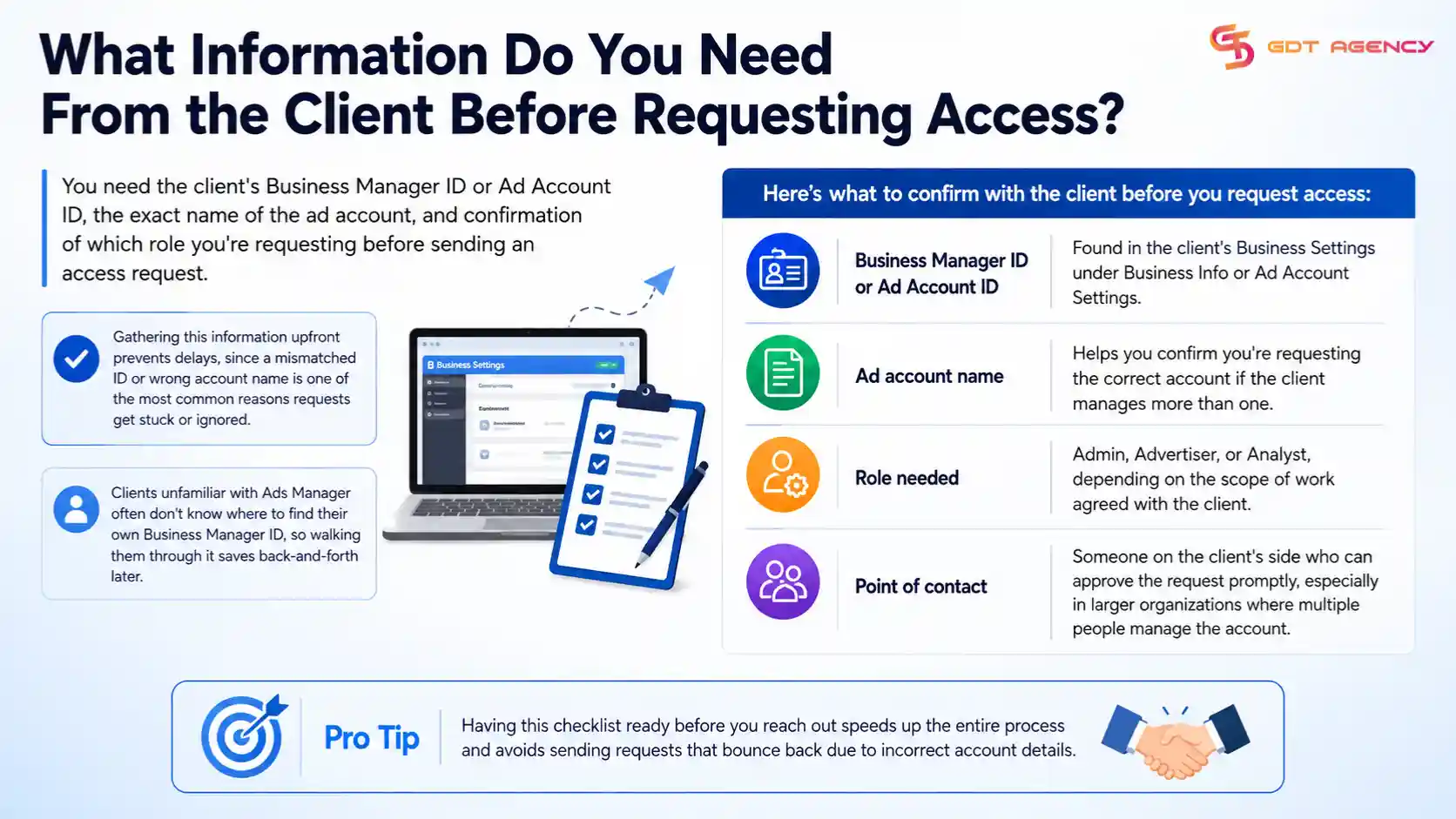
Here's what to confirm with the client before you request access:
Having this checklist ready before you reach out speeds up the entire process and avoids sending requests that bounce back due to incorrect account details.
Facebook ad account access is a permission grant that allows a person or business outside the account owner's organization to view, manage, or analyze an ad account without owning it. The account owner controls who receives access and can revoke it at any point.
Access differs from account ownership in a fundamental way: the person granted access works within the boundaries the owner sets, and every action still ties back to the original account and its billing. This structure lets agencies run campaigns, adjust budgets, or pull performance reports for a client without ever taking control of the account itself.
Meta built this permission system around Business Portfolios specifically so that multiple people, agencies, or partners could collaborate on the same ad account safely. The owner assigns roles that limit what each person can see or change, which keeps the account secure even when several outside parties are involved.
>>> If you're unfamiliar with how Facebook ad accounts work, see our guide to What Is a Facebook Ad Account and How Does It Work. Understanding how Facebook ad accounts work can also help clarify why different users and businesses may need different levels of access.
If a client denies or delays access, you should first confirm they understand what role you're requesting and why, since many delays come from confusion rather than refusal.
Clients who aren't familiar with Ads Manager sometimes hesitate because they don't fully understand what permissions they're granting. Walking them through exactly what an Advertiser or Analyst role can and can't do often resolves the hesitation faster than resending the request.

If the delay continues, try these steps:
Persistent denial after these steps usually points to a business decision rather than a technical issue, in which case it's worth having a direct conversation about the client's concerns before requesting access again.
GDT Agency provided an agency ad account to a cosmetics e-commerce brand that wanted to run Meta Ads across Southeast Asia. The client planned to manage its own campaigns, while GDT Agency provided the advertising infrastructure and account support.
After the account was set up, the client needed to approve GDT Agency's access request so the agency could provide account-level support. The client initially delayed the request because the team was unsure whether approving access would give GDT Agency control over its entire Business Portfolio.
We had to explain that the requested permission applied to the relevant advertising asset and did not transfer ownership of the client's Business Portfolio. The team also showed the client where to find the pending request in Meta Business Settings and confirmed that the client's Business Admin needed to approve it.
The client approved the request after confirming the permission scope. GDT Agency then continued providing support for the agency ad account while the client's internal team remained responsible for creating and managing its own advertising campaigns.
This case shows why clients should understand the exact access level an agency ad account provider requests. A clear explanation of permissions can resolve concerns without requiring the client to grant broader access than necessary.
Partner access and employee access differ in who receives the permission: partner access goes to an outside Business Portfolio, such as an agency, while employee access goes to an individual person added directly to the account.
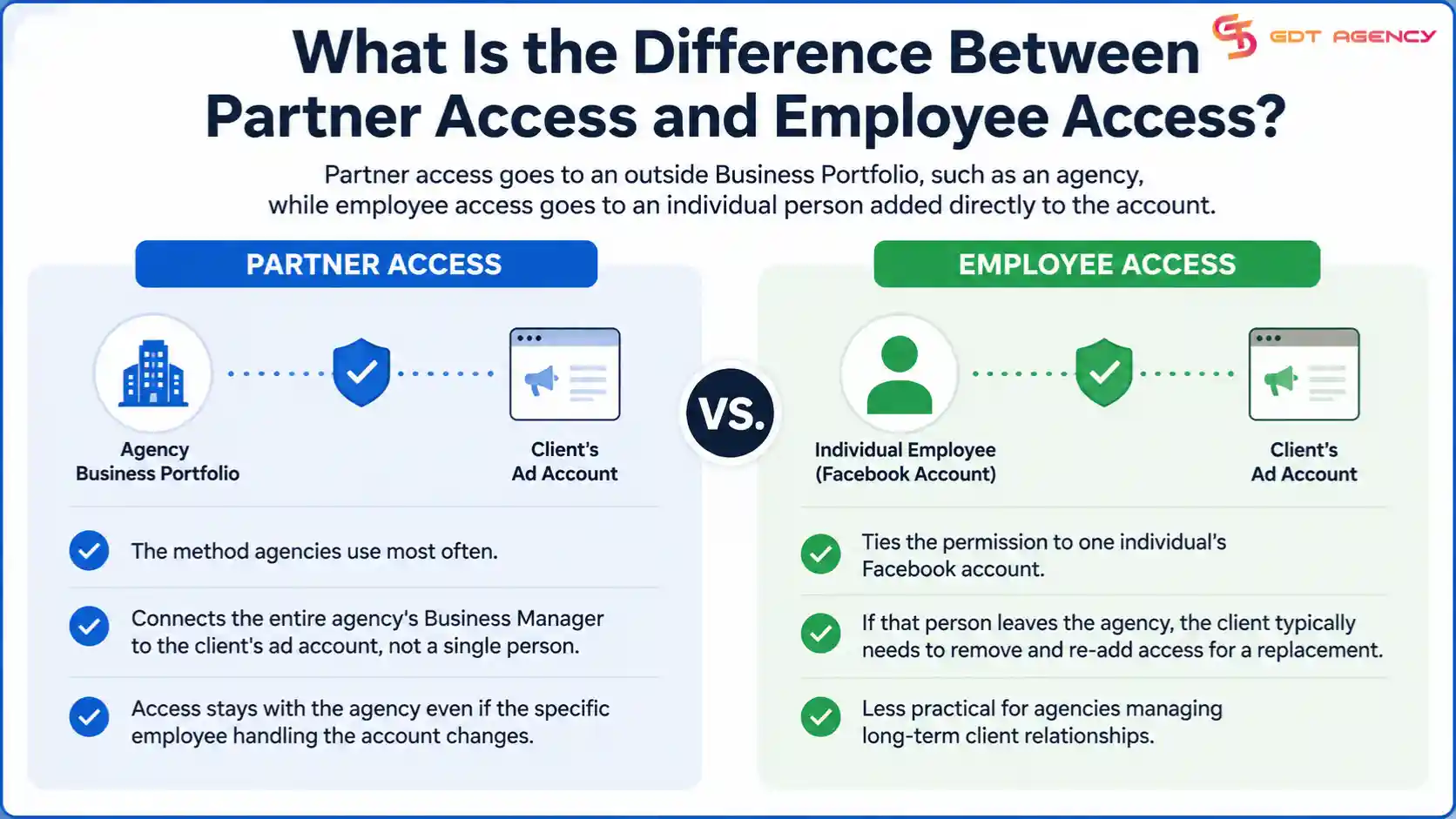
Partner access is the method agencies use most often, since it connects the entire agency's Business Manager to the client's ad account rather than a single person's login. This means the access stays with the agency even if the specific employee handling the account changes.
Employee access, by contrast, ties the permission to one individual's Facebook account. If that person leaves the agency, the client typically needs to remove and re-add access for a replacement, which makes employee access less practical for agencies managing long-term client relationships.
You revoke access after a contract ends by having the client remove the agency's Business Portfolio or the individual's account from their Ads Manager People or Partners settings.
The account owner initiates this step, not the agency, since only the owner has the authority to remove access. Clients should go to Business Settings, locate the agency or individual under Partners or People, and select Remove. This action is immediate and cuts off all visibility and editing rights right away.
Agencies should build this step into their offboarding checklist for every client relationship, since leaving old access in place creates unnecessary security risk for both sides once the engagement is over.
If the client's ad account is restricted, new access requests may fail to process, or existing access may be limited until the restriction is resolved.
Meta places restrictions on accounts that violate advertising policies, and these restrictions often block certain account functions, including adding new people or partners. If you're trying to request access to a restricted account, the client typically needs to resolve the underlying issue with Meta first before any new permissions can be granted.
In cases where access was already granted before the restriction, some functions like editing campaigns or adjusting budgets may become temporarily unavailable, even though your role still shows as active in the account settings.
No, you generally cannot get access to a client's ad account without either you or the client having a Business Manager account, since Meta's permission system runs through Business Portfolio infrastructure.
Older, personal-profile-based ad accounts still exist in limited cases, but Meta has pushed almost all business advertising into the Business Portfolio structure. If a client's ad account isn't yet connected to a Business Manager, the first step is helping them set one up before any access request can move forward.
Setting up a Business Manager takes only a few minutes and is typically a one-time step, after which the standard Business Portfolio access request process applies as described earlier in this article.
Getting access to a client's Facebook ad account comes down to using the right channel, Business Portfolio or direct Ads Manager, and having the correct account details ready before you send the request. Most delays happen because of missing information or a client who isn't familiar with the approval process, not because access is hard to grant in itself.
Once access is set up, treat it as an ongoing responsibility rather than a one-time task. Revoke access promptly when a contract ends, keep track of which role each team member holds, and confirm with the client whenever the scope of work changes. This keeps the relationship secure on both sides and avoids leftover permissions that neither party remembers to clean up.
Approval time depends entirely on the client, since Meta doesn't set a fixed window for responding to access requests. Most clients approve within a day or two once they understand what the request is for, but the process can stall if the request sits unnoticed in their Business Settings.
Yes, you can request access using a personal Business Manager account, though agencies typically use a dedicated agency-level Business Manager to keep client access organized and separate from personal accounts.
Request the Analyst role if your work only involves viewing performance data, since it grants reporting access without the ability to edit campaigns, budgets, or account settings.
No, access isn't permanent. The client can remove your role at any time from their Business Settings, and agencies should also proactively ask to be removed once a project or contract ends.
Yes, a client can grant access to multiple agencies or individuals at the same time, each with their own assigned role, and Meta's permission system tracks each party's activity separately within the account.
You can add an agency to your Facebook ad account through Meta Business Portfolio by entering the agency’s Business ID and assigning the appropriate permission…

A Facebook ad account rental agreement is a written service contract between an advertiser and a Meta-certified agency that grants account access in exchange for…

Buying agency BM access gives media buyers and affiliate teams a direct path to verified Facebook Business Managers with high spending limits, admin rights, and…