
How to Recover a Hacked or Compromised Facebook Ad Account

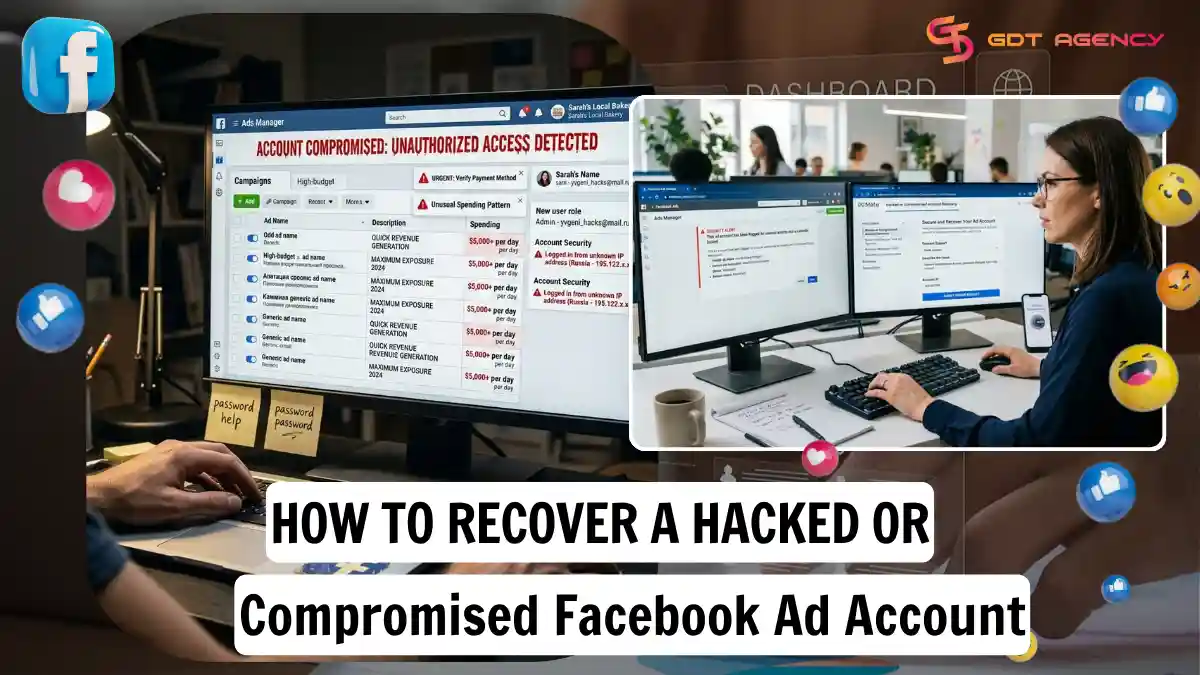
You recover a hacked or compromised Facebook ad account by locking down access first, then reporting the breach to Facebook, then stopping any ads the attacker started. Each step limits the damage a little more, and skipping one usually means the attacker gets back in or the ad spend keeps draining your card. Below, you will find the exact steps to recover the account, report it to Facebook, and shut down any unauthorized ad spend. We will also cover what happens when the breach reaches beyond a single ad account into your entire Business Portfolio.
- How Do You Recover a Hacked or Compromised Facebook Ad Account?
- How Do You Secure Your Account with Two-Factor Authentication?
- How Do You Remove Unauthorized Admins from Business Manager?
- How Do You Report a Hacked Ad Account to Facebook?
- How Do You Stop Unauthorized Ads from Running on Your Account?
- How Do You Recover a Compromised Business Portfolio (Not Just an Ad Account)?
- Final Thoughts
- FAQs
- How do you know if your Facebook ad account has been hacked?
- What does unauthorized activity look like in Ads Manager?
- Is your ad account hacked or just restricted?
- How do you prevent your Facebook ad account from being hacked again?
- What are the best security practices for ad account access?
How Do You Recover a Hacked or Compromised Facebook Ad Account?
You recover a hacked Facebook ad account through 3 core actions: changing your password immediately, enabling two-factor authentication, and removing any admin the attacker added. Facebook expects these steps in that order because each one closes a different door the attacker used to get in.
Before starting the recovery process, you should understand what a Facebook ad account is and how it works to easily identify which account, assets, and access permissions may have been compromised, so you can take the right recovery steps without overlooking other affected assets.
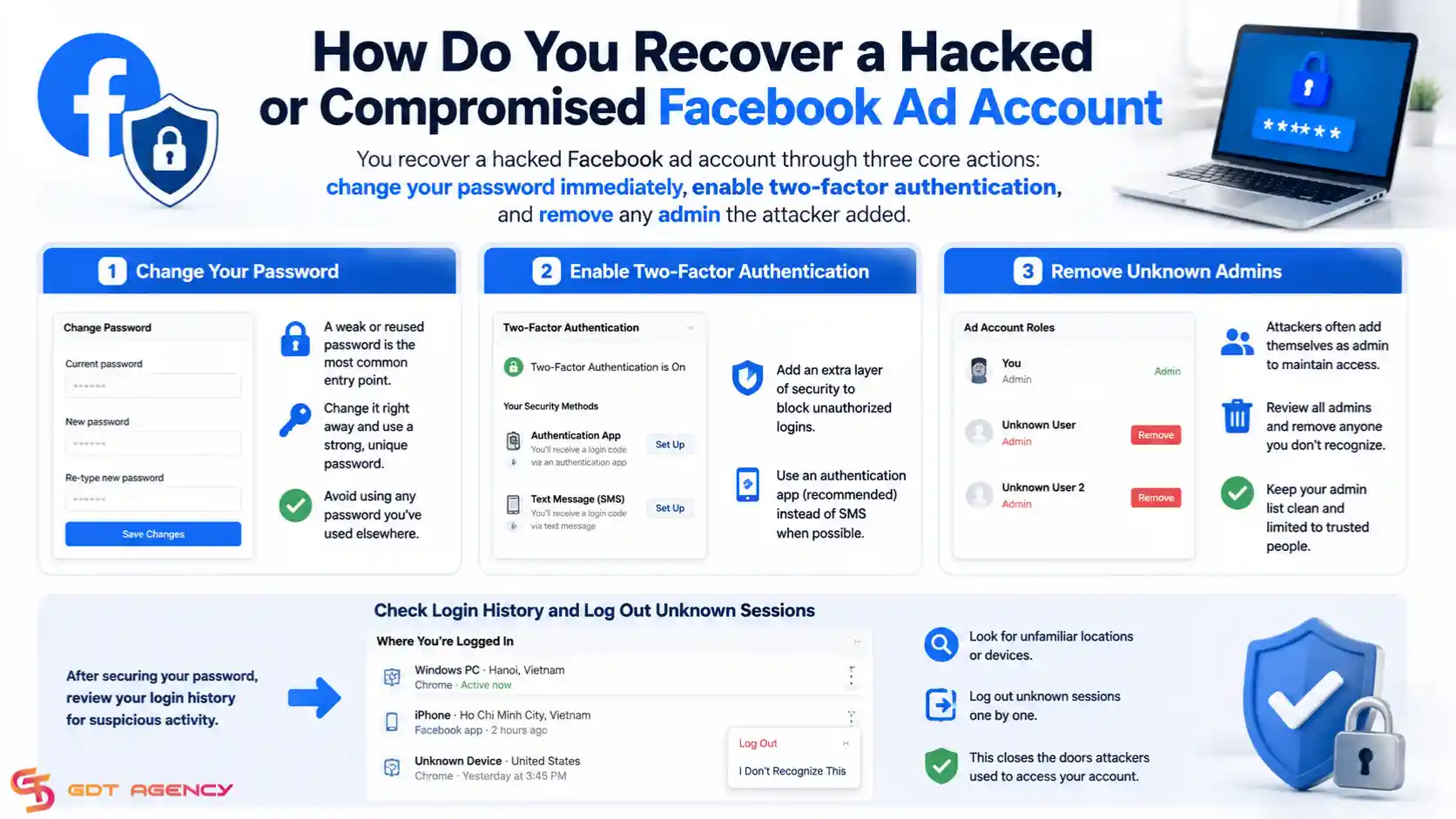
Start with the password. A weak or reused password is the most common entry point for account takeovers, so change it right away and pick something you have never used on another site. From there, move into your security settings and check the login history for locations or devices you don't recognize. If you see unfamiliar sessions, log them out one by one.
How Do You Secure Your Account with Two-Factor Authentication?
You secure your account with two-factor authentication by turning it on inside Settings, choosing an authentication method, and confirming the setup with a code. This single step blocks most repeat attacks because a stolen password alone can no longer get an attacker back in.
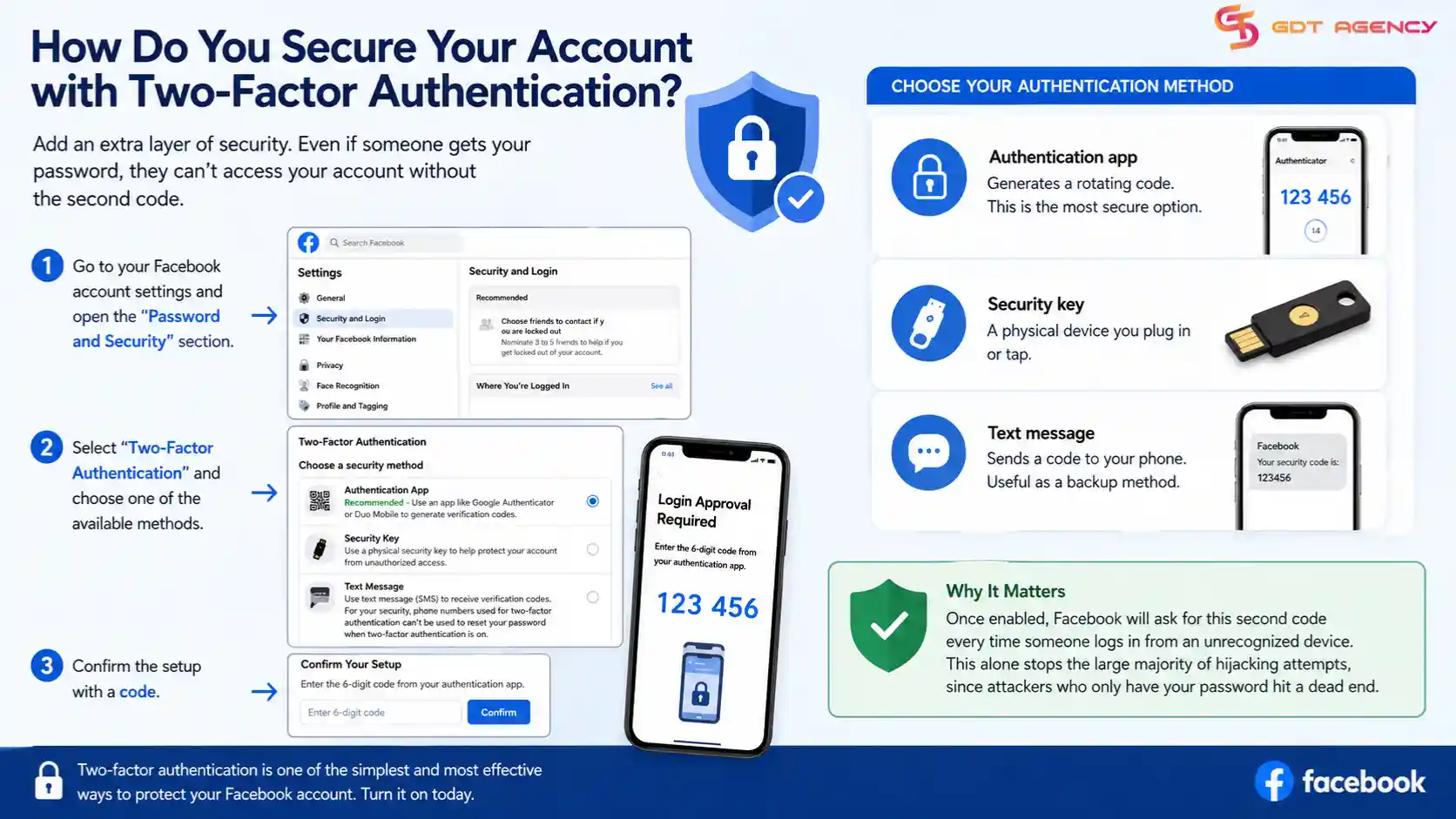
Go to your Facebook account settings and open the "Password and Security" section. Select "Two-Factor Authentication" and choose one of the available methods:
- Authentication app: generates a rotating code, considered the most secure option
- Security key: a physical device you plug in or tap
- Text message: sends a code to your phone, useful as a backup method
Once enabled, Facebook will ask for this second code every time someone logs in from an unrecognized device. This alone stops the large majority of hijacking attempts, since attackers who only have your password hit a dead end.
How Do You Remove Unauthorized Admins from Business Manager?
You remove unauthorized admins from Business Manager by opening Business Settings, checking the People tab, and revoking access for anyone you don't recognize. Attackers often add themselves as an admin first, because that role lets them keep control even after you change your password.
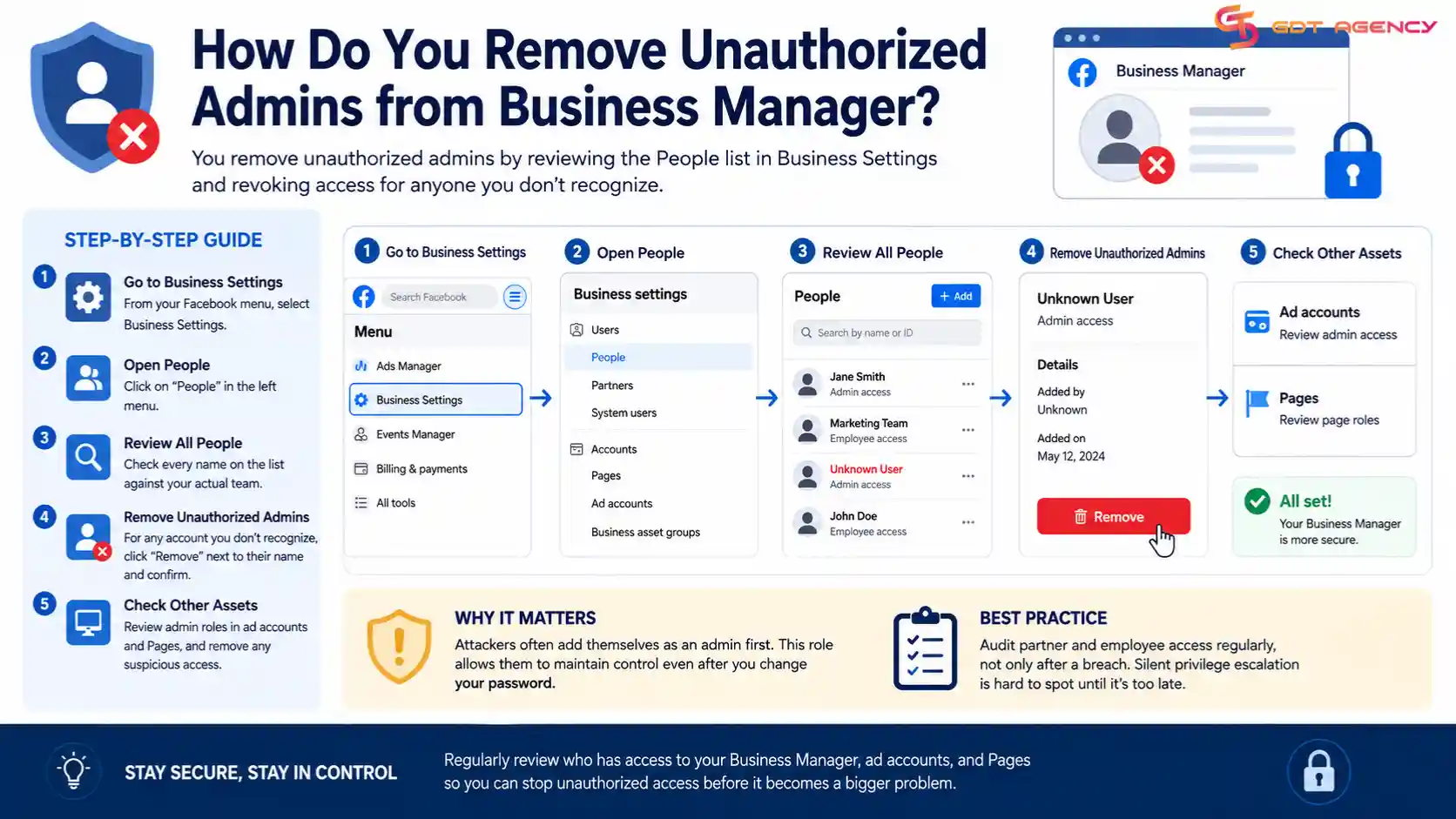
Open Business Settings and click on "People." Review every name on the list against your actual team. If you find an account you don't recognize, click "Remove" next to their name and confirm the action. Do the same check inside individual ad accounts and Pages, since an attacker with Business Manager access can plant admin roles in more than one place. Facebook's own Business Help Center recommends auditing partner and employee access on a regular basis, not only after a breach, precisely because this kind of silent privilege escalation is hard to spot until it's too late.
→ If you need to create a new ad account after recovering from a compromised account, follow our guide on How to Set Up a Facebook Ad Account for the complete setup process.
How Do You Report a Hacked Ad Account to Facebook?
You report a hacked ad account to Facebook by visiting facebook.com/hacked and following the guided recovery flow, which asks you to confirm your identity and walks you through securing the account. Facebook built this specific tool because standard password resets don't always work once an attacker has changed your recovery email or phone number.
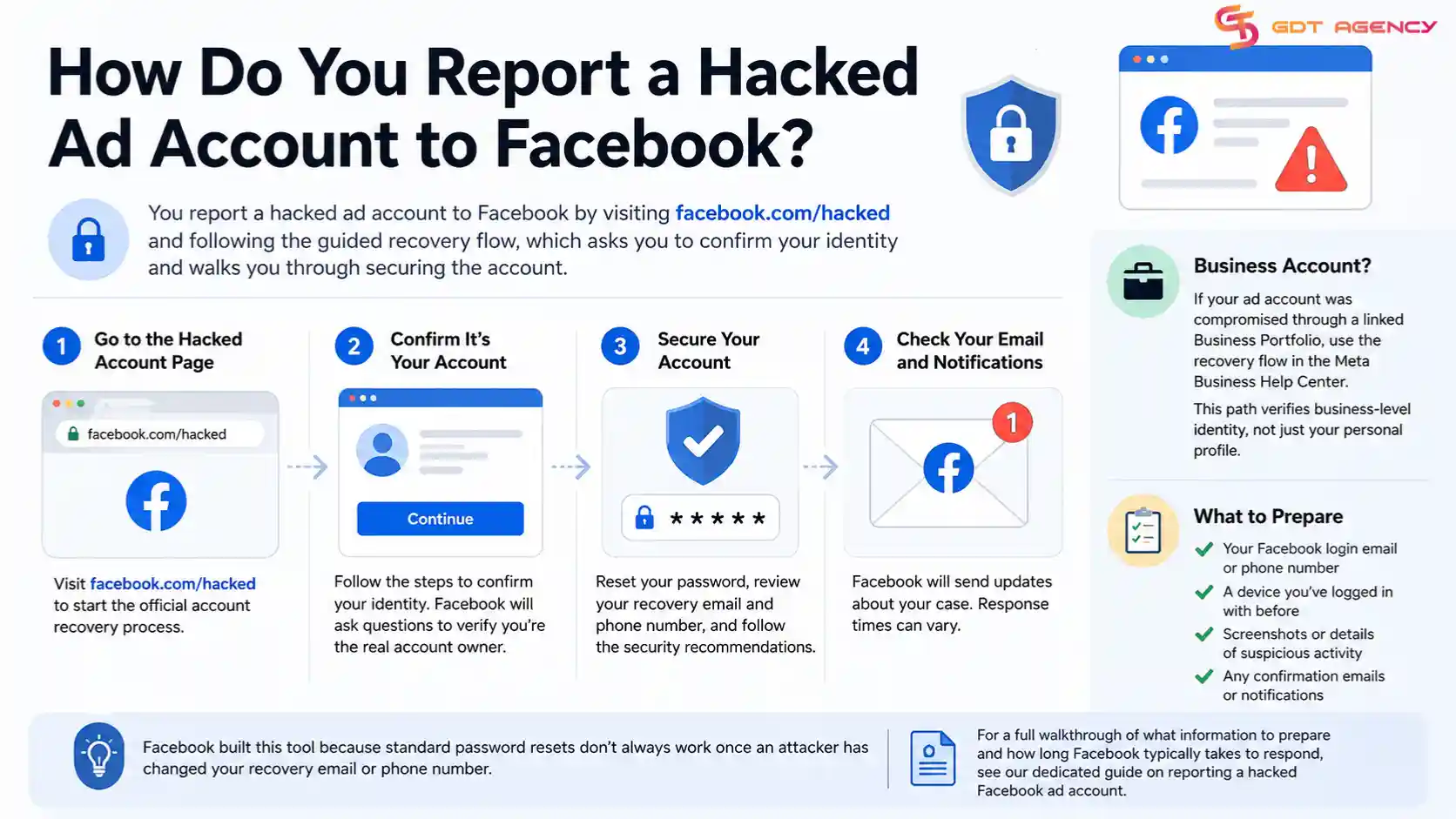
Start the process from a device you have logged into Facebook with before, since this helps the system confirm you're the real account owner. If your business account or ad account was compromised through a linked Business Portfolio, use the equivalent flow inside the Meta Business Help Center instead, since that path checks business-level identity rather than a personal profile alone. For a full walkthrough of what information to prepare and how long Facebook typically takes to respond, see our dedicated guide on reporting a hacked Facebook ad account.
How Do You Stop Unauthorized Ads from Running on Your Account?
As an expert at GDT Agency with nearly 10 years of experience working with Facebook ads across multiple types of ad accounts, from standard accounts to Facebook agency accounts, I have seen how quickly a compromised ad account can turn into a serious financial and operational problem. In many cases, the biggest risk does not come from losing access itself, but from unauthorized campaigns continuing to spend money while the account owner is trying to regain control.
You stop unauthorized ads by pausing every active campaign the moment you spot the breach, then checking your billing history for charges you didn't authorize. Every minute an unauthorized campaign keeps running is money leaving your account, so this step should happen in parallel with securing your login, not after it.
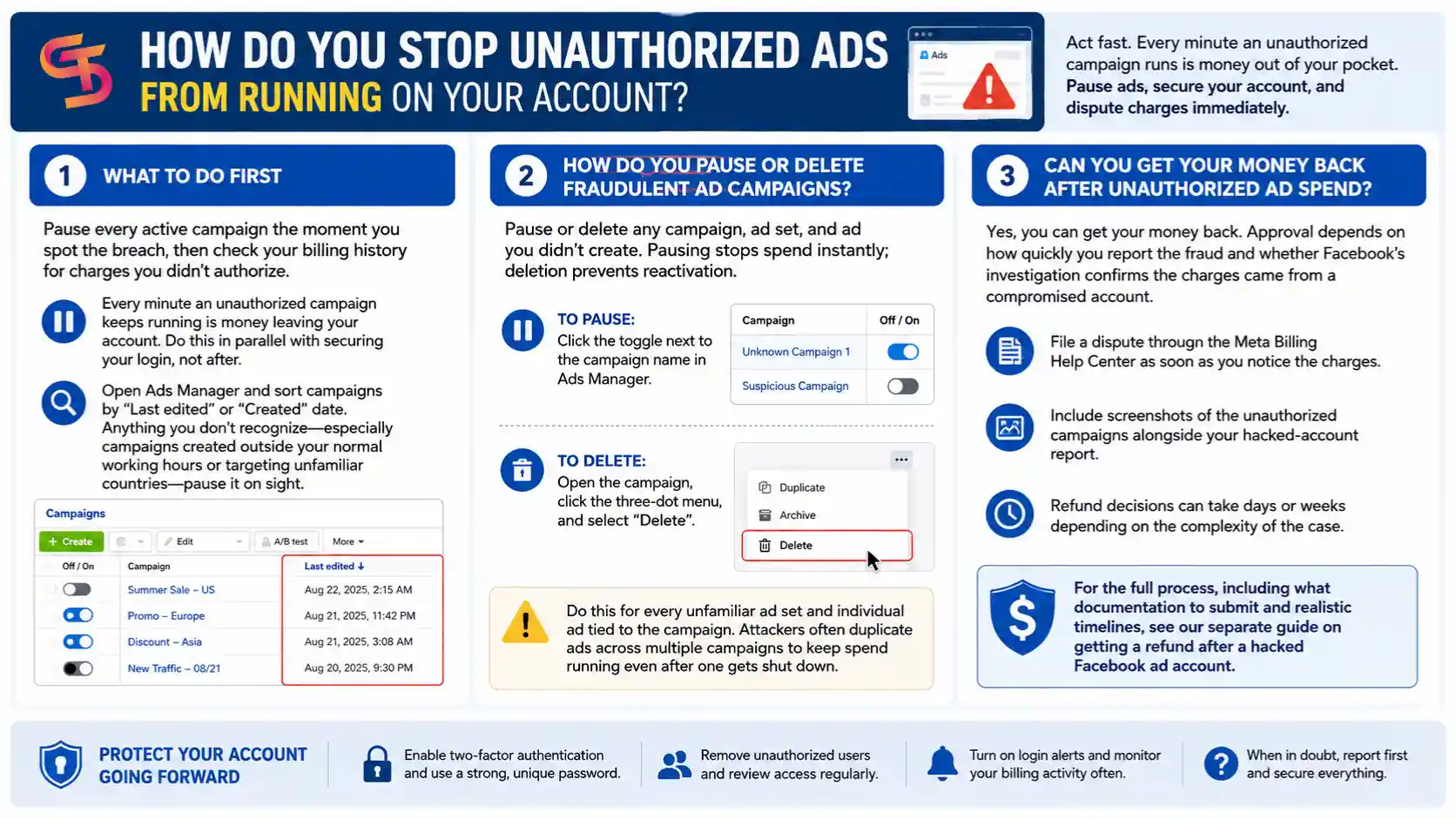
Open Ads Manager and sort campaigns by "Last edited" or "Created" date. Anything you don't recognize, especially campaigns created outside your normal working hours or targeting unfamiliar countries, is worth pausing on sight.
How Do You Pause or Delete Fraudulent Ad Campaigns?
You pause or delete fraudulent ad campaigns by selecting them in Ads Manager and switching their status off, or removing them entirely if you're certain you didn't create them. Pausing stops the spend immediately, while deletion prevents the attacker from reactivating the same campaign if they regain access before you finish securing the account.
To pause a campaign, click the toggle next to its name in Ads Manager. To delete it, open the campaign, click the three-dot menu, and select "Delete." Do this for every unfamiliar ad set and individual ad tied to the campaign as well, since some attackers duplicate ads across multiple campaigns to keep spend running even after one gets shut down.
Can You Get Your Money Back After Unauthorized Ad Spend?
Yes, you can get your money back after unauthorized ad spend, though approval depends on how quickly you reported the fraud and whether Facebook's investigation confirms the charges came from a compromised account rather than your own activity. Facebook reviews these cases individually, so a fast report with clear evidence gives you the best chance at a refund.
File a dispute through the Meta Billing Help Center as soon as you notice the charges, and include screenshots of the unauthorized campaigns alongside your hacked-account report. Refund decisions can take days or weeks depending on the complexity of the case. For the full process, including what documentation to submit and realistic timelines, see our separate guide on getting a refund after a hacked Facebook ad account.
How Do You Recover a Compromised Business Portfolio (Not Just an Ad Account)?
You recover a compromised Business Portfolio the same way you recover a single ad account, but with one extra layer: you also need to check every asset connected to that portfolio, including Pages, other ad accounts, and pixels, since an attacker with portfolio-level access can touch all of them at once. A single ad account breach stays contained to that account, but a Business Portfolio breach spreads across everything tied to it.
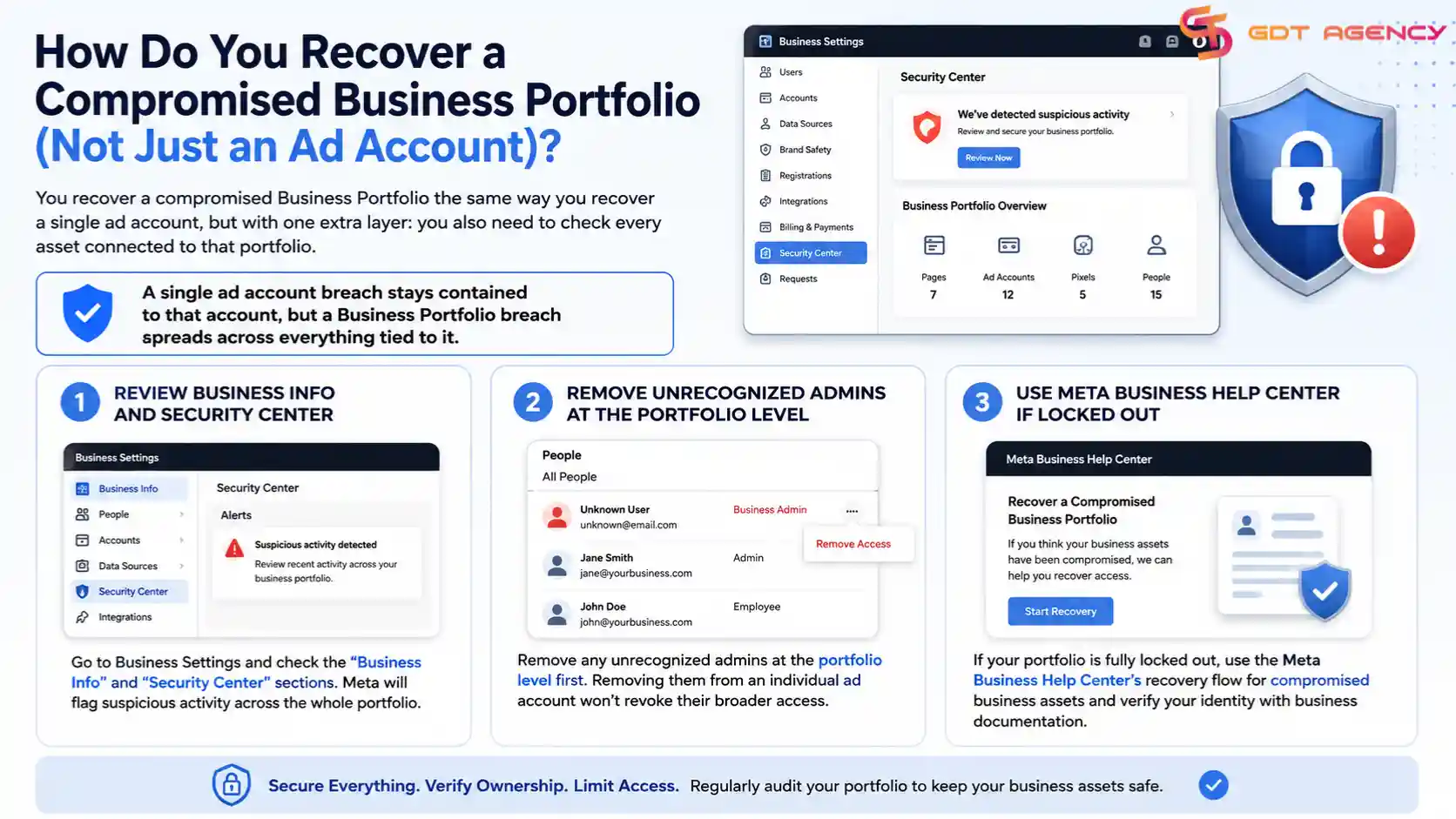
Start by reviewing the "Business Info" and "Security Center" sections inside Business Settings, where Meta flags suspicious activity across the whole portfolio rather than one account. Remove unrecognized admins at the portfolio level first, since removing them from an individual ad account won't revoke their broader access. If your portfolio has been fully locked out, use the Meta Business Help Center's dedicated recovery flow for compromised business assets, which verifies your identity against business documentation rather than a personal login alone.
What's the Difference Between a Hacked Ad Account and a Hacked Business Portfolio?
A hacked ad account only affects the specific account the attacker accessed, while a hacked Business Portfolio can expose every ad account, Page, and asset connected to that business, making the second scenario far more damaging. This distinction matters because the recovery steps and the scope of the cleanup differ significantly between the two.
| Scope | Hacked Ad Account | Hacked Business Portfolio |
| What's affected | One ad account only | All linked ad accounts, Pages, and assets |
| Where admins are removed | Inside that ad account's settings | At the portfolio level in Business Settings |
| Recovery flow | facebook.com/hacked | Meta Business Help Center's business recovery flow |
| Typical cause | Stolen personal login | Stolen admin credentials or added rogue partner |
Because a portfolio breach touches more assets, treat any sign of unauthorized access at the business level as urgent. Check every connected ad account individually, even if only one showed suspicious activity at first, since attackers with portfolio access rarely stop at a single account.
Final Thoughts
A hacked Facebook ad account rarely announces itself clearly, so the fastest recovery comes from acting the moment something looks off rather than waiting for confirmation. Change your password, turn on two-factor authentication, and pause any campaign you don't recognize before you even finish reporting the breach to Facebook. That order protects your budget while the formal recovery process runs in the background.
The steps above cover the core recovery path, but the work doesn't stop once you regain access. Review your Business Portfolio for hidden admins, tighten who has permission to spend on your behalf, and treat security as an ongoing habit instead of a one-time fix. Accounts that get hacked once are often targeted again if the underlying weak point, whether that's a reused password or an unchecked partner list, never gets addressed.
FAQs
How do you know if your Facebook ad account has been hacked?
Watch for logins from unfamiliar locations, ad campaigns you didn't create, a changed payment method, or an email and phone number you never updated. Any one of these on its own is worth investigating, and two or more together usually confirm a breach.
What does unauthorized activity look like in Ads Manager?
It usually shows up as new campaigns with unfamiliar names, budgets that jump without explanation, or an admin listed in Business Settings that your team never added. Check the "Last edited" timestamp on campaigns, since attackers often work outside your normal hours.
Is your ad account hacked or just restricted?
A hacked account shows signs someone else accessed it, like unrecognized logins or new admins, while a restricted account gets flagged by Facebook for a policy violation and usually comes with a notification explaining why. If you received a policy warning instead of noticing strange activity, you're likely dealing with a restriction, not a hack.
How do you prevent your Facebook ad account from being hacked again?
Keep two-factor authentication on at all times, use a unique password you don't reuse anywhere else, and complete business verification for your Business Portfolio. These three steps close the most common entry points attackers rely on.
What are the best security practices for ad account access?
Limit admin access to only the people who actually need it, review your Business Manager's People tab on a regular schedule, and require business verification before granting anyone partner-level permissions. Fewer people with access means fewer chances for a stolen credential to reach your account.
Articles in the category Facebook Ad Account Security
No articles found in this category yet.
