

How To Set A Facebook Ads Account Spending Limit?
You can set a Facebook Ads account spending limit directly inside Ads Manager, under Billing settings. This limit acts as a hard stop, so Facebook…
You manage your Facebook ad account payment method through the Ads Manager or Business Settings, where you can add a new card or bank account, edit existing details, and check which methods your account accepts. This process directly controls whether your ads run without interruption, since Facebook charges your active payment method automatically once your spending reaches a set threshold or billing date. The sections below walk through the full management process first, then cover these secondary concerns in detail.
As an expert at GDT Agency with nearly 10 years of experience working with Facebook ads via multiple accounts, from standard to Facebook agency ad accounts, I have seen how payment setup can directly affect campaign continuity and account management.
Based on my experience, you manage your Facebook ad account payment method by opening Payment Settings in Ads Manager, then adding, editing, or reviewing the cards and accounts linked to your ads. Facebook applies these settings the moment you save them, and any pending ad spend charges to the method marked as primary.
To carry out this process correctly, you need to understand what a payment method actually covers, which types Facebook accepts, and how the add and edit steps work in practice. Before you manage your payment method, you should understand how your Facebook ad account handles billing and advertising activity. Learn more about What Is a Facebook Ad Account and How Does It Work to understand the account structure first.
A Facebook ad account payment method is the card, bank account, or digital wallet linked to your ad account that Facebook charges for ad spend. It sits inside the Payment Settings section of Ads Manager or Business Manager, tied directly to the specific ad account you use to run campaigns.
Every ad account needs at least one active payment method before Facebook allows ads to go live. Once set, this method absorbs charges based on your billing threshold, which is the spending limit Facebook allows before it processes a charge, or on a fixed monthly billing date, depending on your account setup. Without a valid payment method, campaigns pause automatically and stay inactive until you add a working one.
→ Before adding or updating a payment method, make sure your ad account is connected to the correct Facebook Page. If you still need to create one, follow our How to Create a Facebook Page for Your Ad Account: A Step-by-Step Setup Guide.
Facebook accepts 5 main payment method types for ad accounts: credit cards, debit cards, PayPal, direct bank transfers, and Meta Pay. Availability varies by country, currency, and account type, so not every advertiser sees all five options in their Payment Settings menu.
The table below breaks down these categories along with a short note on where each one commonly applies.
| Payment Method Type | Common Use Case | Availability Note |
| Credit Card | Standard automatic billing | Available in most countries |
| Debit Card | Standard automatic billing | Requires online transaction support |
| PayPal | Alternative automatic billing | Limited to select regions |
| Bank Transfer | Manual or invoiced payment | Mostly for larger advertisers |
| Meta Pay | Unified Meta payment wallet | Rolling out by market |
Credit and debit cards remain the most common choice because Facebook processes them instantly and applies automatic billing without extra steps. PayPal works similarly but depends on regional support, while bank transfers usually apply to advertisers with higher spending volumes who qualify for manual invoicing. Meta Pay, the newer unified payment system across Meta's apps, is expanding gradually and may not appear yet in every account.
Facebook accepts Visa, Mastercard, and American Express as the main acceptable cards for ad accounts, along with select domestic cards depending on the advertiser's country. These cards need to support online transactions, since Facebook cannot process cards restricted to in-store or ATM use only.

Prepaid cards and gift cards generally do not work as a primary payment method, because Facebook requires a card capable of handling recurring charges tied to ongoing ad spend. A one-time balance card fails once the linked funds run out, which interrupts campaign delivery. If you plan to fund ads with a prepaid option, check with your card issuer first to confirm it supports repeat automatic transactions before adding it to your account.
You add a payment method to a Facebook ad account by opening Ads Manager, navigating to Billing and Payments, and selecting Add Payment Method from the Payment Settings panel. Facebook then asks for card or account details before verifying and activating the method.
To complete this step, follow the sequence below:
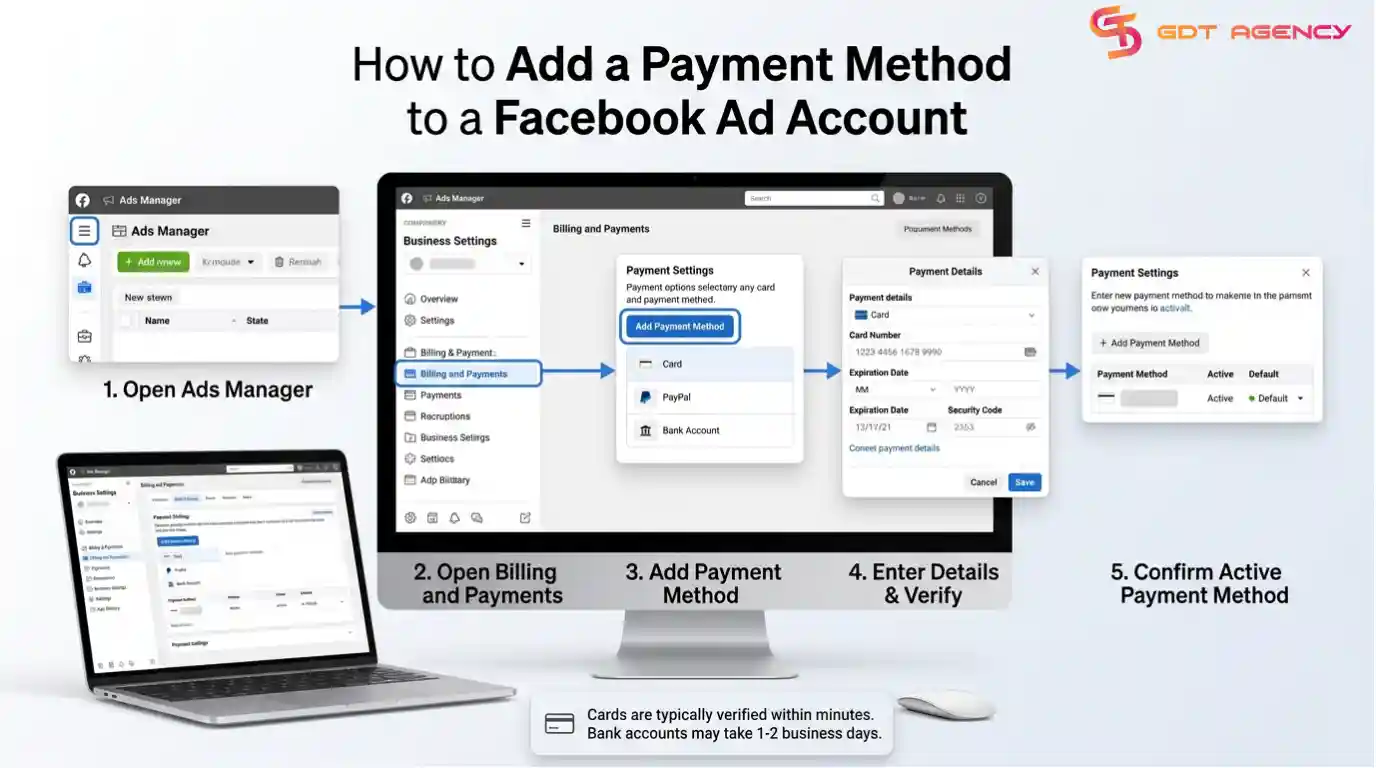
Confirm the new method appears as active in your Payment Settings list
Facebook typically verifies a new card within a few minutes, though bank accounts can take one to two business days depending on your country. Once verified, you can set the new method as your default or keep it as a backup option alongside your existing one.
You add a bank account as a payment method by selecting the bank transfer option inside Payment Settings, then entering your account and routing details for verification. Facebook only offers this option in specific countries, so check availability before starting the process.
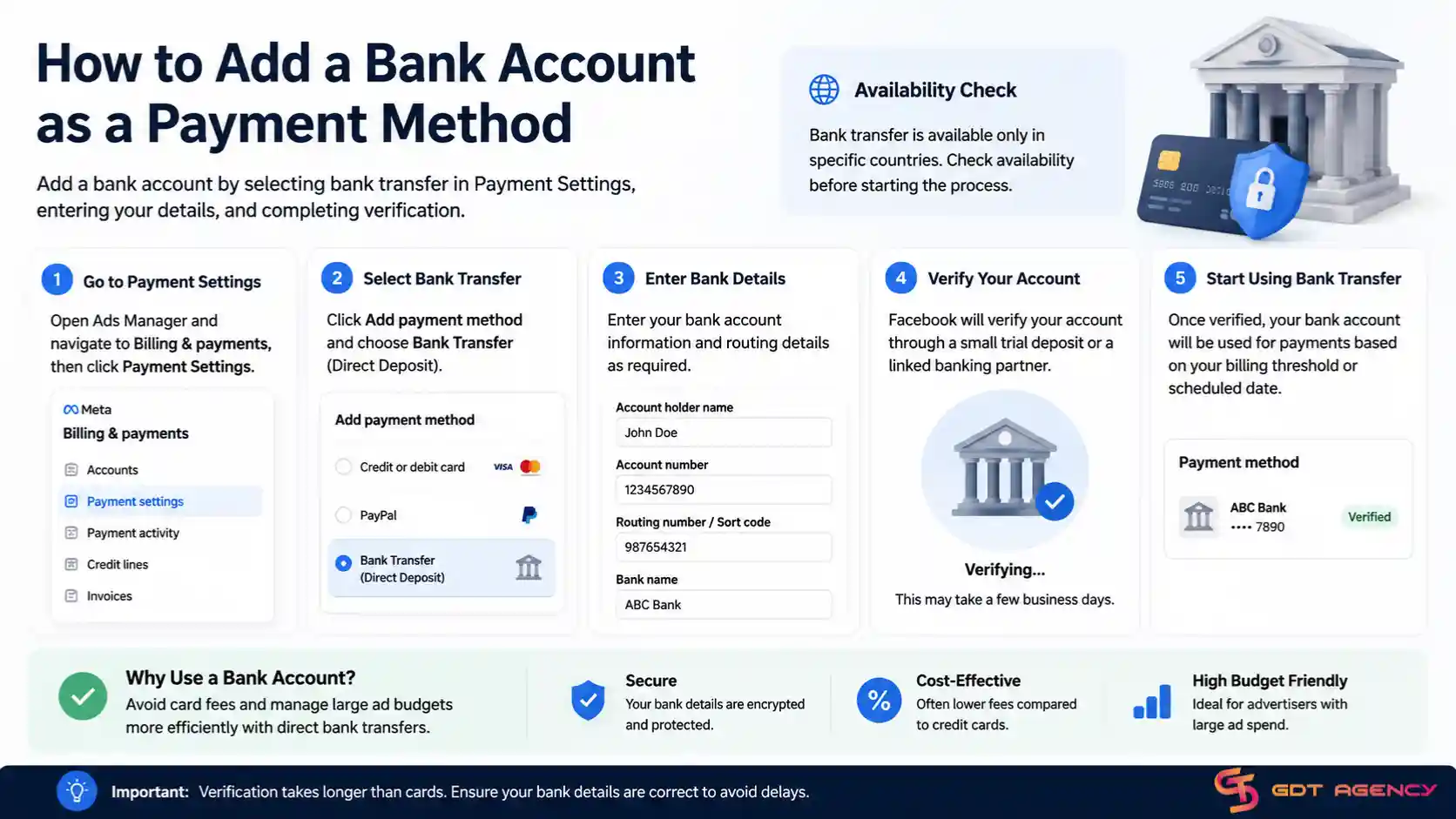
Bank account verification usually takes longer than card verification, since Facebook needs to confirm ownership through a small trial deposit or a linked banking partner. This step matters for advertisers who prefer to avoid card fees or who manage large ad budgets that benefit from direct transfers. Once verified, the bank account functions the same way a card does, absorbing charges based on your account's billing threshold or scheduled date.
You can add a personal payment method to a business ad account if you have admin or advertiser access to that account, though Facebook recommends using a dedicated business card whenever possible. This distinction matters because personal cards tied to business spending can complicate expense tracking and tax reporting.
If you manage ads for a client or run a small operation without a separate business card, adding a personal method works the same way as any other card addition inside Payment Settings. Keep in mind that whoever owns the payment method receives the billing statements directly, so coordinate this arrangement clearly with anyone else who has access to the account to avoid confusion over who covers the ad spend.
You edit a payment method on a Facebook ad account by opening Payment Settings, selecting the existing method, and updating the card number, expiration date, or billing address as needed. Facebook re-verifies the updated details before applying them to future charges.
This step becomes necessary when a card expires, gets reissued with a new number, or when your billing address changes. To edit a method:

If the card fails verification during this process, Facebook flags it and asks you to try again or add a different method instead. Keeping payment details current prevents unexpected campaign pauses caused by outdated card information.
Beyond the core setup and editing process, advertisers commonly run into a handful of related payment questions once their account becomes active. These issues sit outside the basic management flow but still affect how smoothly campaigns run day to day.
Automatic payment charges your linked card or bank account whenever your ad spend hits a billing threshold or a fixed monthly date, while manual payment requires you to add funds to your account balance before ads run. Facebook assigns most new advertisers to automatic payment by default.
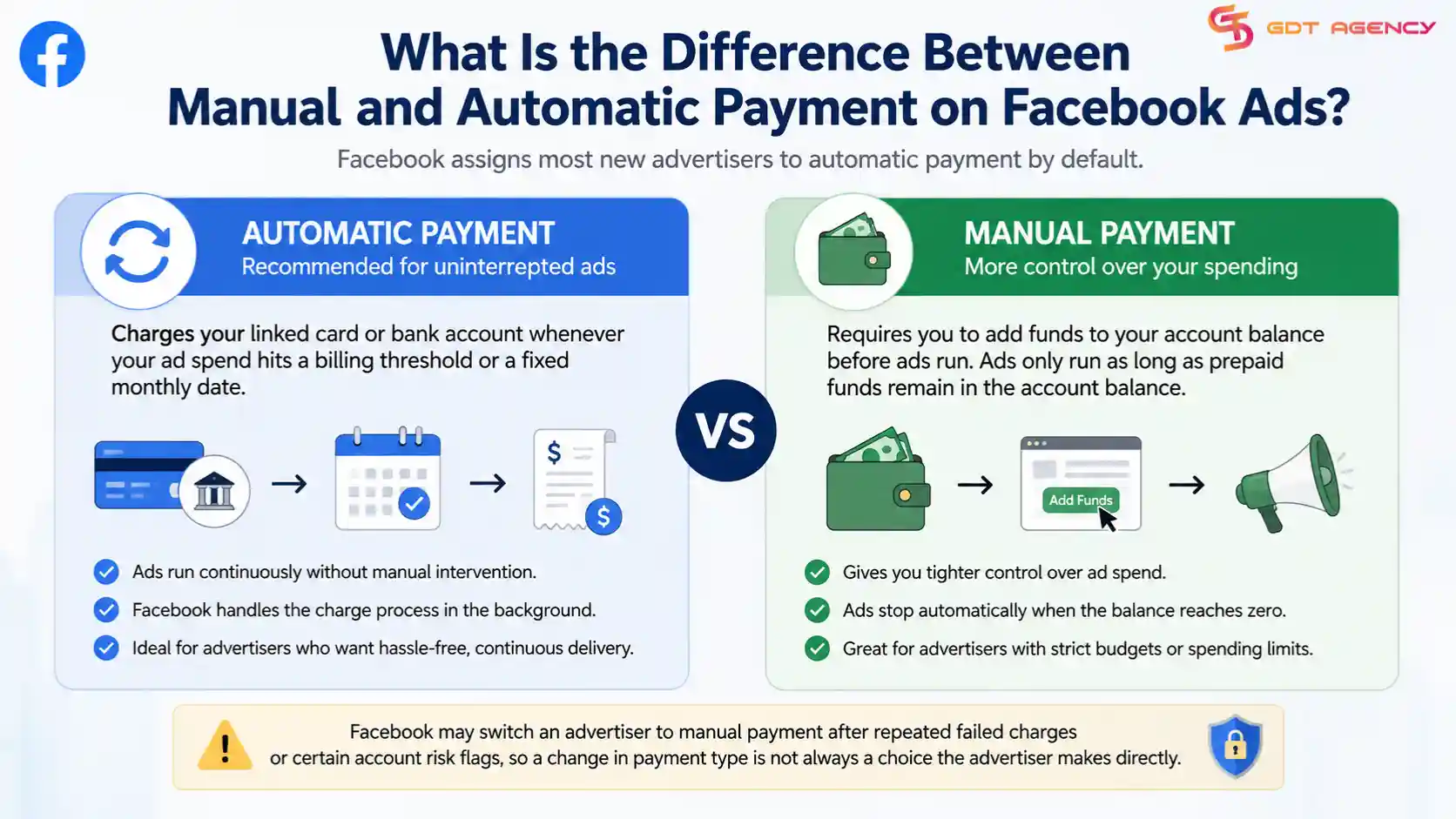
Automatic payment works well for advertisers who want ads to run continuously without manual intervention, since Facebook handles the charge process in the background. Manual payment, on the other hand, gives advertisers tighter control over spending, since ads only run as long as prepaid funds remain in the account balance. Facebook sometimes shifts an advertiser to manual payment after repeated failed charges or certain account risk flags, so a change in payment type is not always a choice the advertiser makes directly.
Yes, you can link multiple payment methods across multiple Facebook ad accounts, though each individual ad account can only have one primary payment method active at a time for automatic billing. Facebook allows a backup method per account, which activates only if the primary method fails.
Advertisers managing several ad accounts under one Business Manager often assign different cards to different accounts to separate budgets by client or campaign type. Facebook does not impose a fixed cap on how many payment methods a Business Manager can hold overall, but each ad account still processes charges through its own designated primary method rather than pulling from a shared pool.
Choosing a default ad account works separately from choosing a default payment method. When you manage multiple ad accounts under one Business Manager, Facebook lets you set which ad account loads first when you boost a post or launch a campaign from a Page, through the Ad Account Settings menu. This selection only controls which account handles the ad request, while the payment method tied to that specific account still determines how the charge gets billed.
A Facebook ad account shows no payment methods available when the account faces a restriction, when the advertiser's country or currency lacks supported payment options, or when a technical error blocks the Payment Settings panel from loading correctly. This message typically appears right before an advertiser tries to launch a first campaign.
Restricted accounts, often flagged for policy violations or unusual billing activity, temporarily lose access to adding new payment methods until Facebook resolves the review. Advertisers in regions with limited payment infrastructure may also see fewer options than advertisers in larger markets. If the issue looks like a technical glitch rather than a restriction, clearing the browser cache or trying a different device usually resolves it.
Sometimes the payment form itself fails to submit, even when the account has no restriction. This usually happens when card details do not match the billing address on file, when the browser blocks a required script, or when a temporary error hits Facebook's payment processor. Double-check that every field matches your bank's records exactly, then retry the form after refreshing the page. If the form keeps rejecting valid details, switching to a different payment type or contacting Meta Business Support resolves most remaining cases.
Facebook debits your bank account for ads either when your spending reaches your billing threshold or on a fixed monthly billing date, whichever happens first. New advertisers typically start with a lower threshold that increases gradually as their payment history builds trust with Facebook's billing system.
This billing cycle means an active advertiser with high daily spend might see charges every few days, while a lower-budget account might only get billed once a month. Checking the Billing and Payments section inside Ads Manager shows the exact threshold and next billing date for any specific account, which helps advertisers plan cash flow around ad spend more accurately.
Managing a Facebook ad account payment method comes down to three actions: adding a valid card or bank account, keeping those details current, and understanding which type Facebook accepts in your region. Get these right, and your campaigns run without unexpected pauses tied to billing problems.
The secondary issues covered above, from payment limits across accounts to unclear debit timing, tend to surface only after an account has been active for a while. Knowing what causes them ahead of time saves you from troubleshooting mid-campaign, when a paused ad account costs you real reach and momentum.
Yes, you can use the same card or bank account across multiple Facebook ad accounts under one Business Manager. Facebook processes each ad account's charges separately, even when they share the same underlying payment method.
If your Facebook ad payment fails, Facebook pauses your active campaigns and prompts you to update or replace the payment method before ads resume. Repeated failures can also trigger a temporary restriction on your account's billing capabilities.
No, Facebook does not charge a fee for adding a payment method to an ad account. Any additional charges you see typically come from your card issuer or bank, not from Facebook itself.
Yes, you can remove a payment method from your Facebook ad account as long as another valid method remains active or no pending charges are tied to the one you want to delete. Facebook blocks removal of a payment method that still has an outstanding balance.
Yes, you can close a payment account linked to your Facebook ads by removing all payment methods and disabling billing in your Ad Account Settings, though Facebook requires you to settle any outstanding balance first. Closing the payment side of an account does not delete the ad account itself, so campaigns simply stay inactive until a new payment method gets added.
Facebook usually verifies a new card within a few minutes, while bank account verification can take one to two business days. Verification time depends on your bank's response speed and the payment type you add.
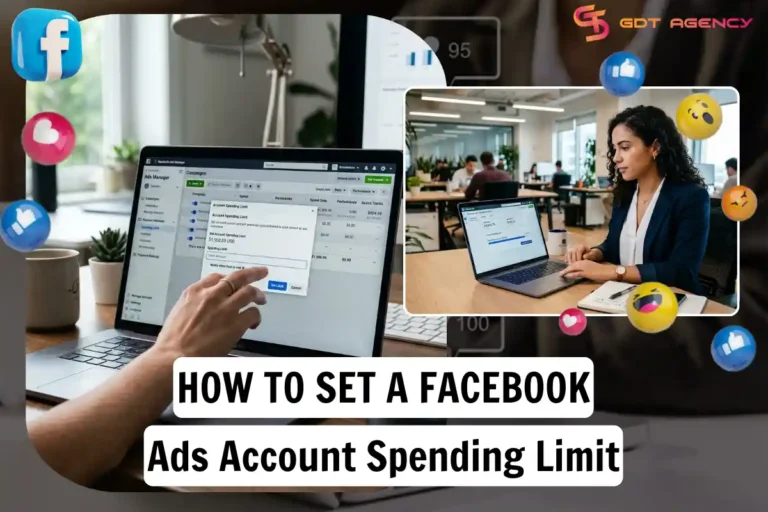
You can set a Facebook Ads account spending limit directly inside Ads Manager, under Billing settings. This limit acts as a hard stop, so Facebook…

You add credit to your Facebook ad account by redeeming an Ad Credit coupon inside Payment Settings, or, if your account runs on Monthly Invoicing,…