

How to Fix Facebook Ad Stuck in Review Fast in 2026
You can fix most stuck ads fast by running a quick set of checks across 5 areas: creative and copy triggers, landing page issues, page…
A Facebook ads account error is any problem that stops your account from creating, publishing, or running ads normally. Advertisers usually run into one of 7 recurring error types: authentication errors, update errors, ad set errors, campaign errors, ads stuck in review, ads stuck in the learning phase, and delivery problems like ads not spending or not delivering. Each type has its own warning signs, and knowing which one you're facing is the first step before applying any fix.
Beyond identifying the error, most advertisers also want a general approach to fixing account problems, since Meta usually resolves errors through a similar sequence of checks regardless of the specific type. Below, this guide walks through each error type, a general fix framework, and the impact these errors have on your results.
A Facebook ads account error is a technical or policy-related block that prevents an ad account from functioning as expected, ranging from failed logins to ads that never leave the review queue.
As an expert at GDT Agency who has nearly 10 years of experience working with Facebook ads across multiple account types, from standard accounts to Facebook agency ad accounts, I have encountered and helped resolve a wide range of account errors that can interrupt campaign delivery and affect advertising performance.
These errors show up at different levels of the account, from the account itself down to individual ad sets and campaigns, and each level produces a different symptom. To recognize which error you're dealing with, it helps to look at where in the account the problem surfaces. The 7 types below cover nearly every account error advertisers report.
Authentication errors happen when Facebook cannot verify who is trying to access the ad account, usually during login or when adding a new payment method. The account may show a "session expired," "couldn't confirm it's you," or repeated two-factor authentication prompts that don't clear.
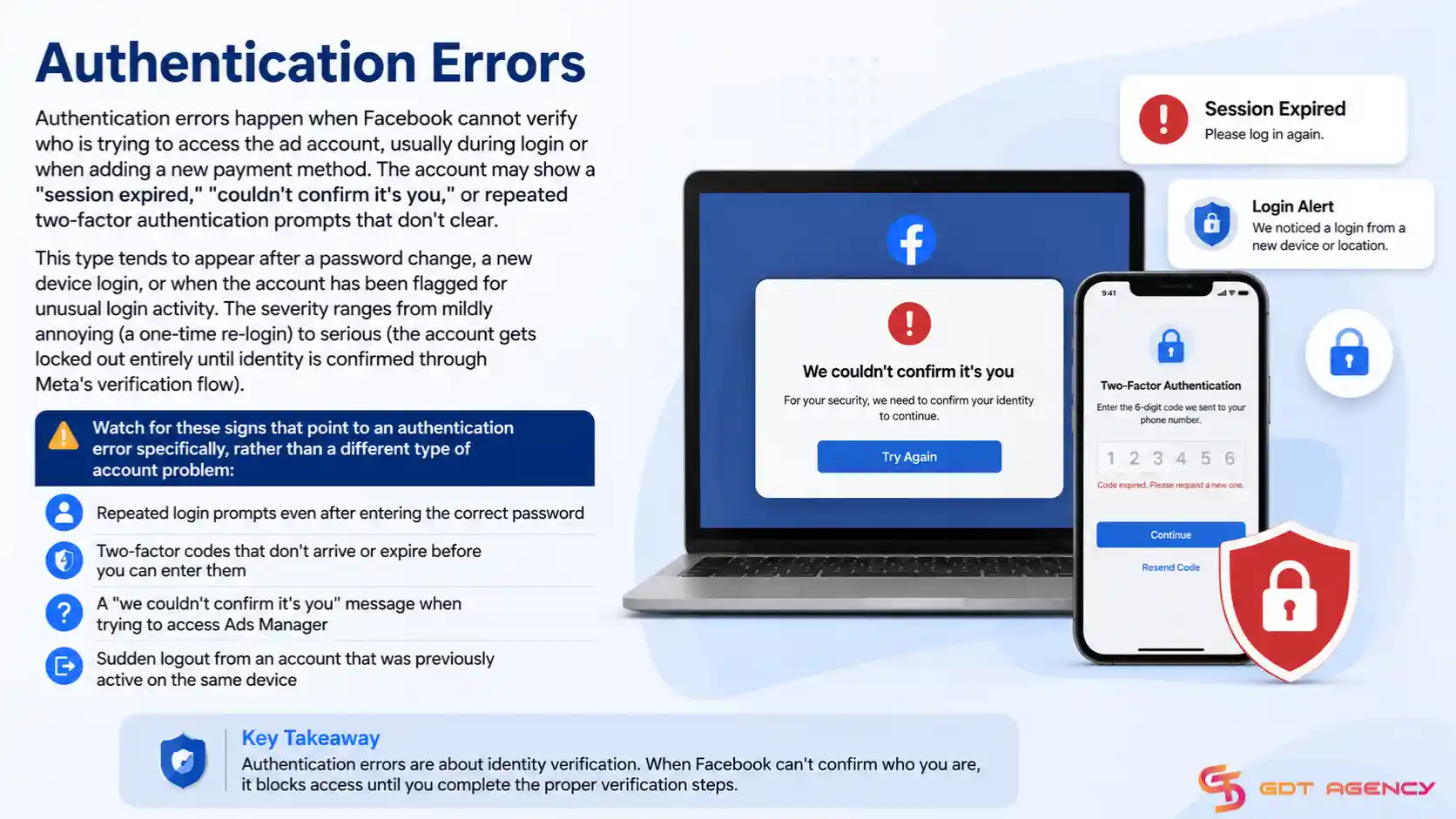
This type tends to appear after a password change, a new device login, or when the account has been flagged for unusual login activity. The severity ranges from mildly annoying (a one-time re-login) to serious (the account gets locked out entirely until identity is confirmed through Meta's verification flow).
Watch for these signs that point to an authentication error specifically, rather than a different type of account problem:
This error occurs when changes to account details, such as the business name, ad account name, time zone, or payment method, fail to save. The interface usually shows a generic "something went wrong" message or reverts the field to its previous value after saving.
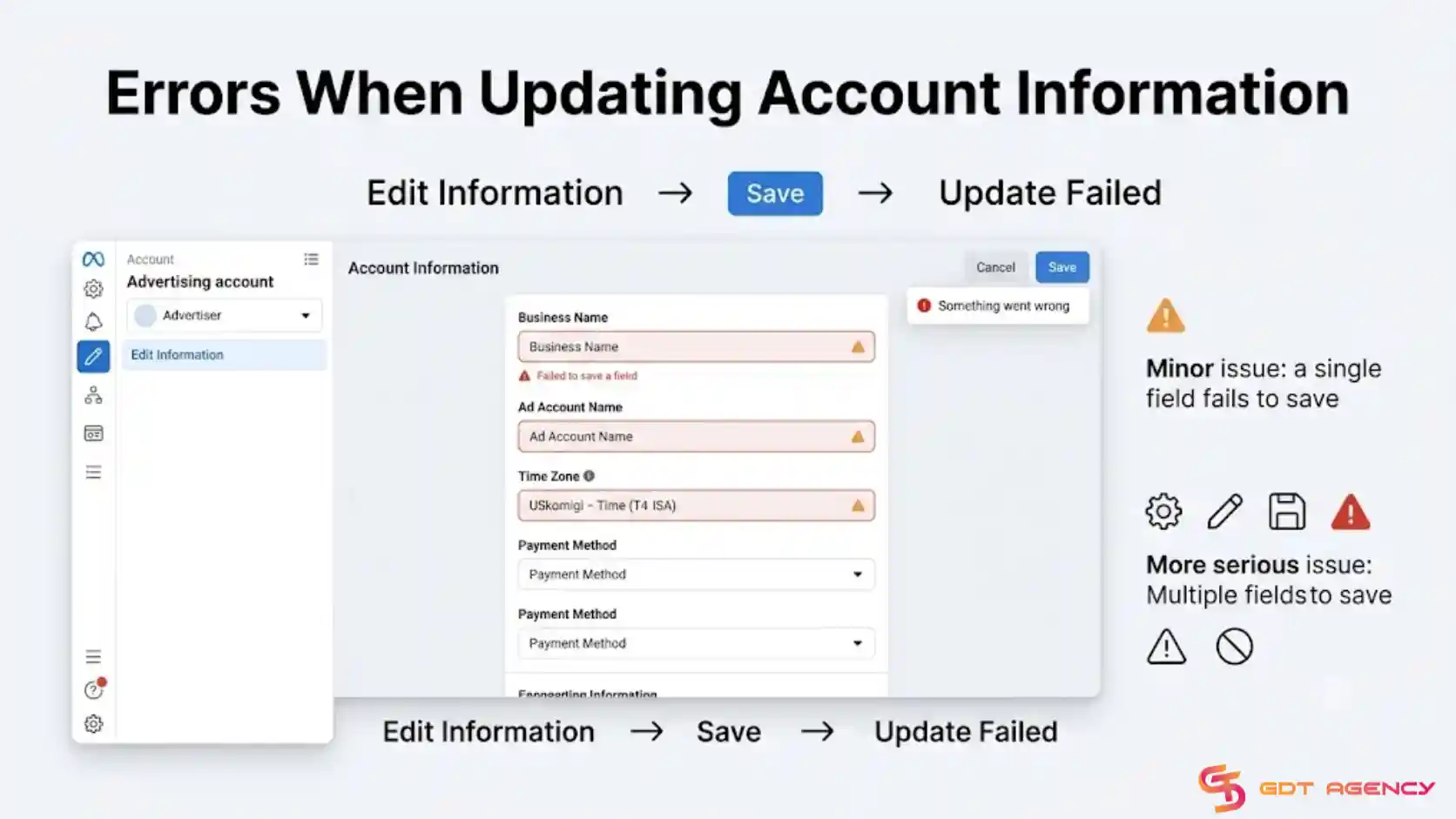
Update errors are usually minor and temporary, often caused by a browser cache issue or a brief Meta system glitch. However, if the error persists across multiple attempts and devices, it can signal a deeper account restriction that's blocking edits specifically, which is more serious and worth watching closely.
A quick way to gauge severity is to check how many fields are affected. If only one field (like the time zone) won't save, the issue is likely minor and temporary. If every field you try to edit fails, including basic ones like the account name, that pattern points to something more serious happening at the account level rather than a single glitch.
Ad set errors appear when a specific ad set fails to publish or run, even though the campaign and other ad sets in the account work fine. Common signs include a red error icon next to the ad set name, a "budget or bid too low" warning, or an ad set stuck in "processing" for hours.
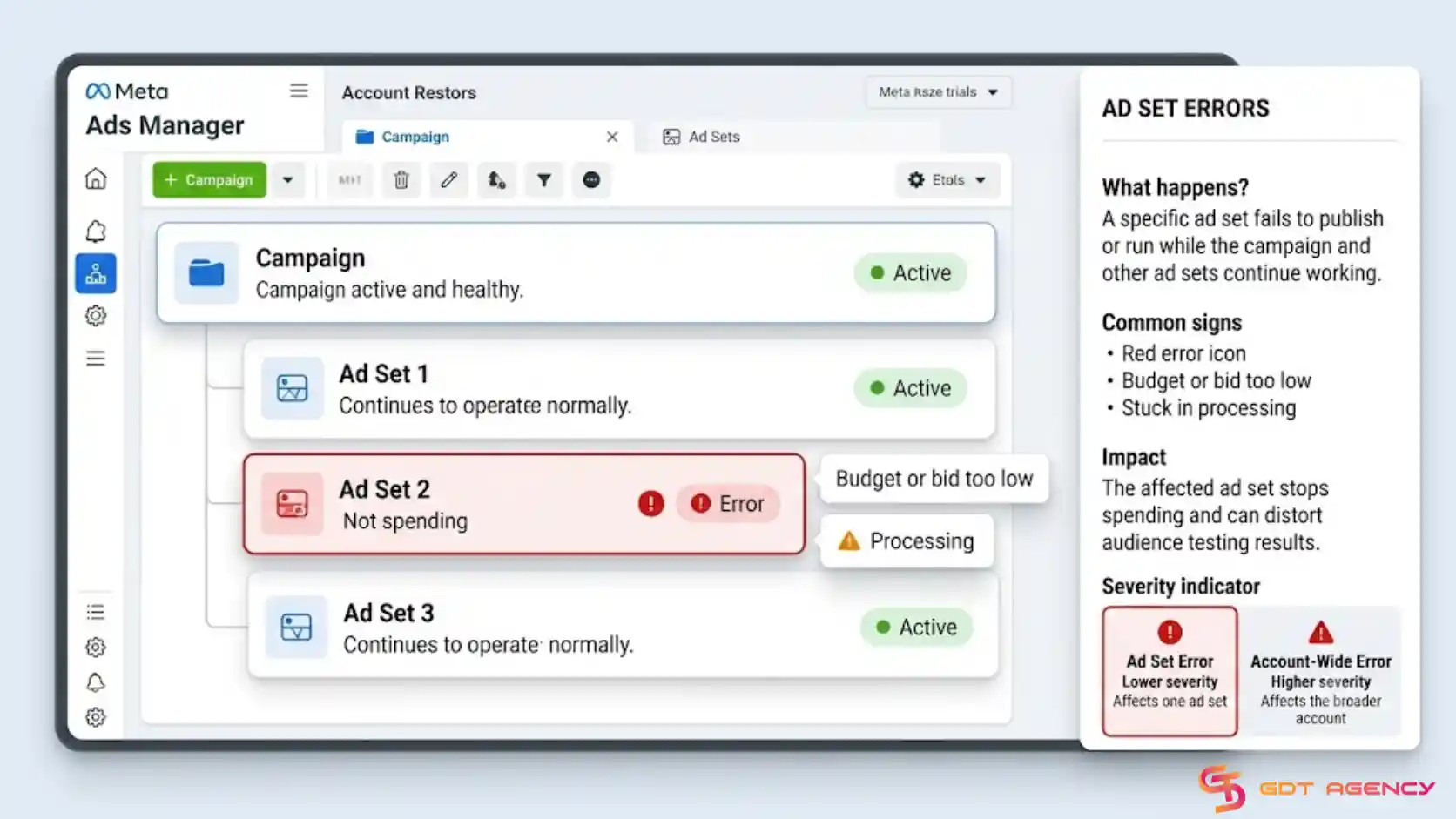
Because these errors are isolated to one ad set rather than the whole account, the severity is usually lower than an account-wide error. Still, an ad set stuck in error status stops spending entirely for that audience segment, which can distort testing results if left unresolved.
Campaign errors are broader than ad set errors and affect an entire campaign, including all ad sets and ads nested inside it. Typical symptoms include the campaign showing "not delivering" status account-wide, a policy violation flag at the campaign level, or a campaign that won't publish no matter how many times it's edited.
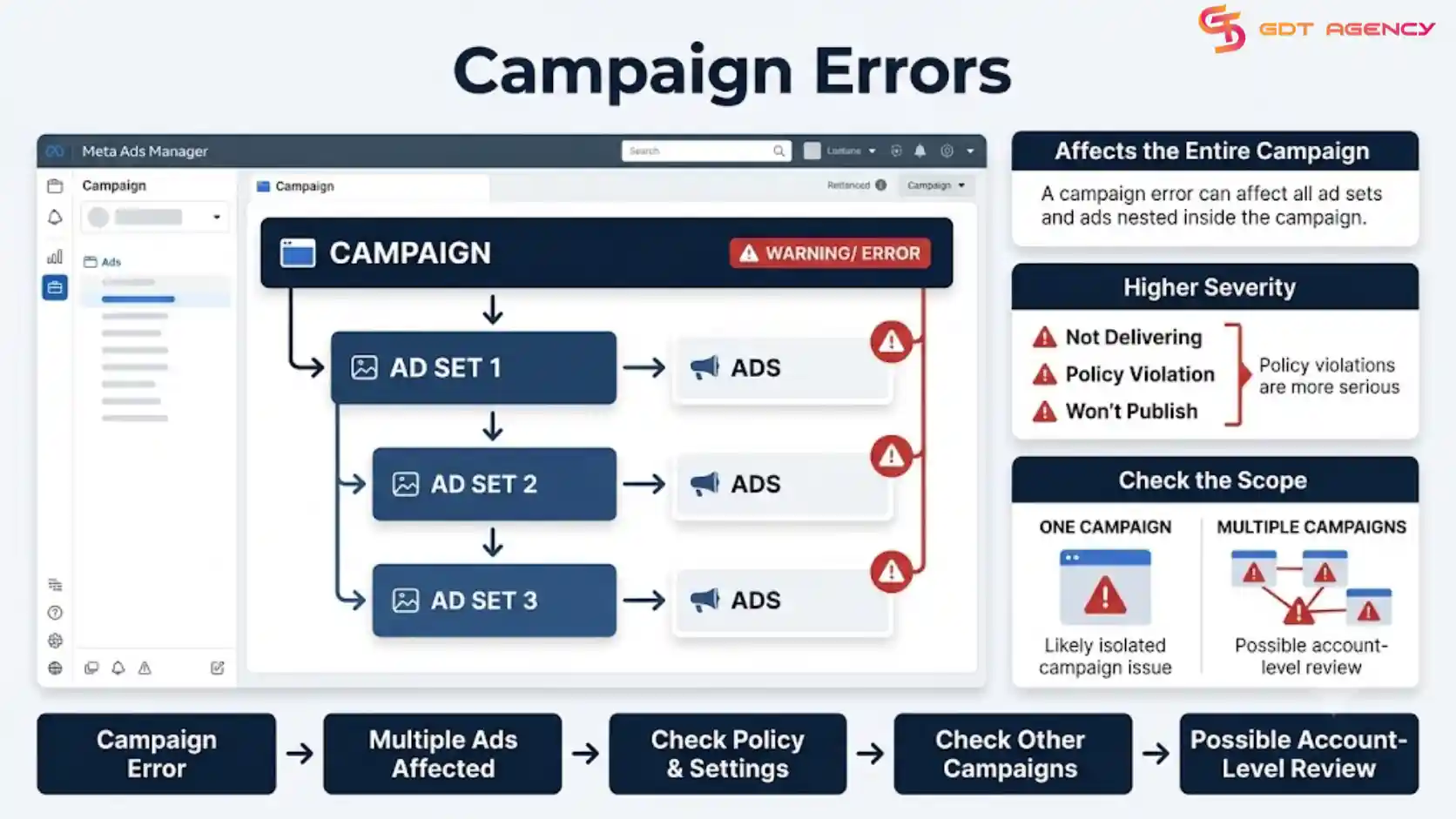
Campaign-level errors carry more weight than ad set errors because they can halt every ad tied to that campaign objective at once. A campaign error tied to a policy violation is more severe than one caused by a budget setting, since policy issues can escalate to account-level review if ignored.
Advertisers can gauge severity by checking the scope of the flag: a single-campaign error usually stays contained, but if the same warning appears across multiple campaigns at once, that's a sign the account itself, not just one campaign, is being reviewed.
Ads stuck in review sit in "In Review" status well beyond Meta's typical review window, which is usually within 24 hours. The ad simply doesn't move to "Active" or "Rejected," leaving advertisers unsure whether it will ever go live.
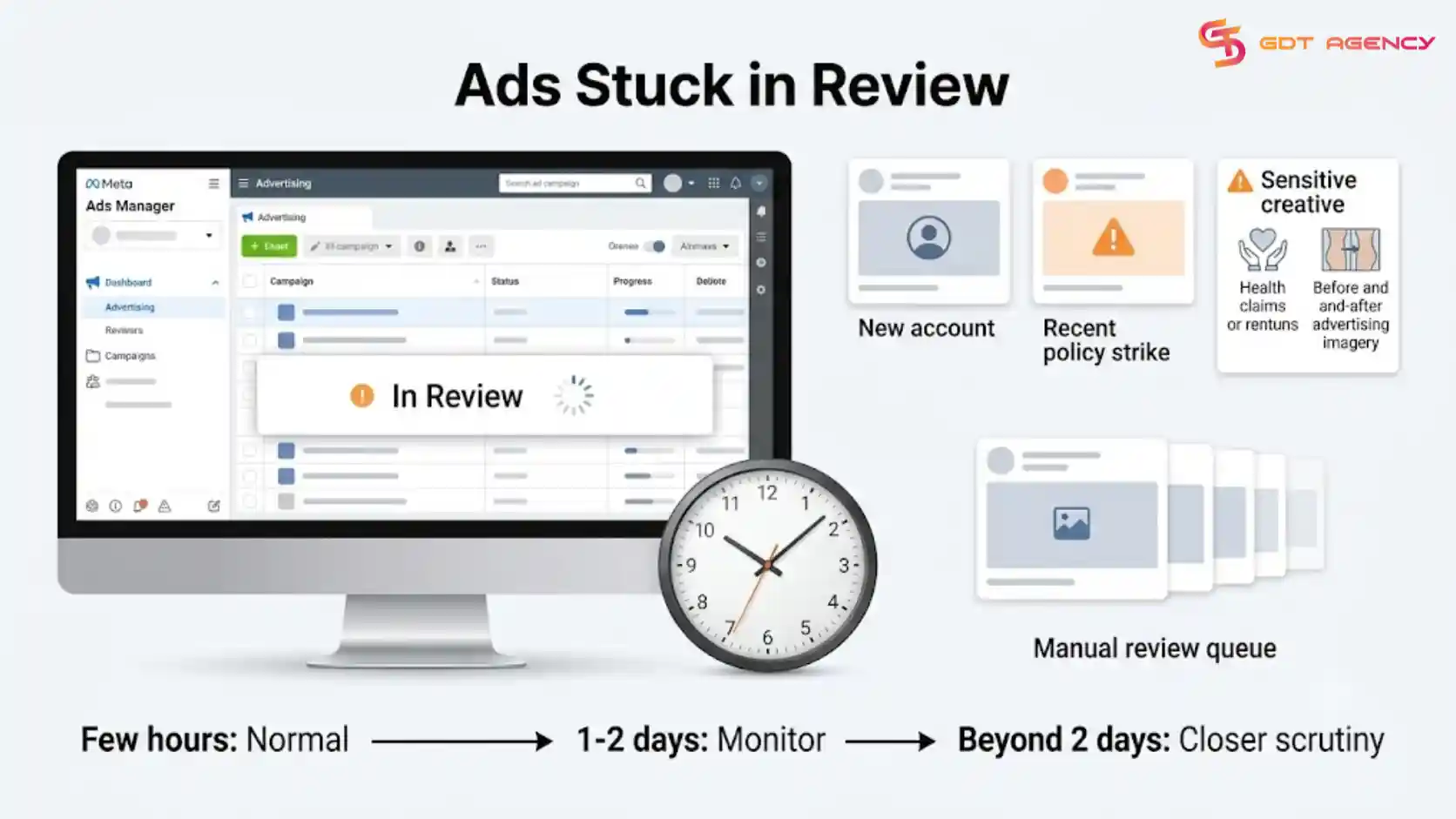
This is one of the more frustrating error types because there's often no error message at all, just a stalled status. Review delays tend to be more common for new accounts, accounts with a recent policy strike, or ads using sensitive creative elements like health claims or before-and-after imagery. The longer an ad sits in review, the more likely it's caught in a manual review queue rather than a simple backlog.
Severity here scales with time: a delay of a few hours past the usual window is normal, a delay of one to two days is worth monitoring, and anything beyond that, especially paired with other ads in the same account also stalling, suggests the account is under closer scrutiny rather than a one-off ad issue.
Ads stuck in the learning phase never exit "Learning" status into "Learning Limited" or full optimization, even after running for an extended period. Meta's delivery system typically needs about 50 optimization events within a seven-day window to exit learning; falling short of that resets or extends the phase indefinitely.
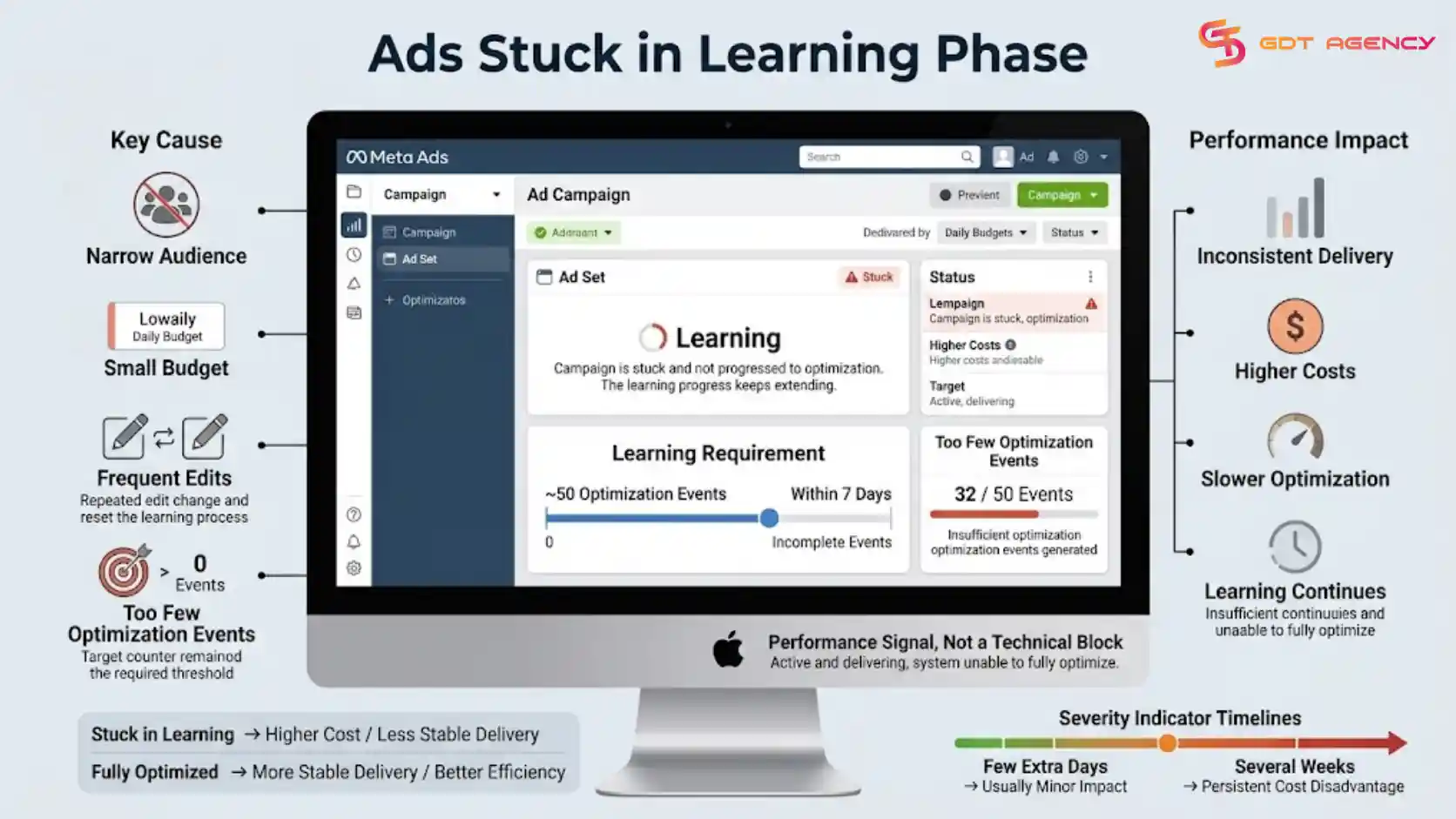
This error is more of a performance signal than a technical block, since the ad still runs, but delivery stays inconsistent and costs tend to run higher during extended learning. It's most common on ad sets with narrow audiences, small budgets, or frequent edits that reset the learning phase before it completes.
The severity depends on how long the ad set stays stuck. A short delay of a few extra days rarely changes results much, but an ad set that never exits learning after several weeks is effectively running at a permanent cost disadvantage compared to a fully optimized ad set targeting the same audience.
Ads not spending means the budget simply isn't being used, while ads not delivering means the ad isn't being shown to the target audience even when spend is technically active. Not spending usually points to a payment, budget, or audience-size issue, while not delivering more often points to a bidding, creative approval, or competition problem within the auction.
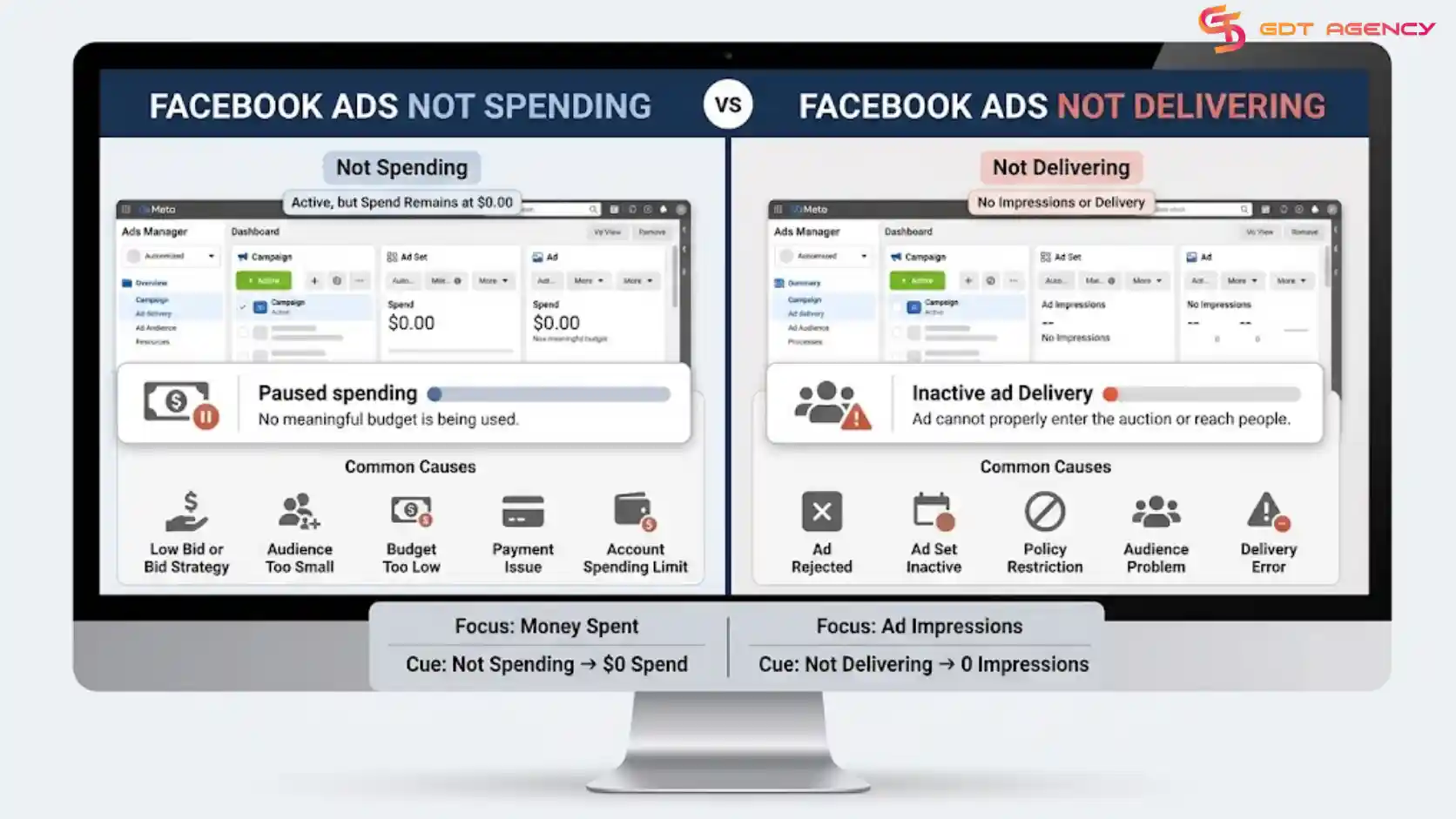
In practice, not spending is the more visible symptom, since the spend graph shows a flat line. Not delivering can be harder to catch early because Facebook may report full budget usage while impressions and reach stay unusually low relative to the audience size and bid.
Both problems share overlapping causes, such as an overly narrow audience or a low bid relative to auction competition, but the severity leans higher for not spending, since a flat spend graph means the campaign is generating zero results rather than just underperforming ones.
>>> Not every Facebook advertising problem comes with a specific error message. For a broader look at common account problems and their solutions, see our guide on Facebook Ad Account Recovery: Guide to Fix Account Issues.
Fixing a Facebook Ads account error generally follows a 3-step approach: identify which type of error is occurring, rule out the most common causes first, and escalate to Meta support only if the standard fixes don't resolve it. Because each error type above has different root causes, the fastest path to a fix starts with correctly diagnosing the type before applying any specific solution.
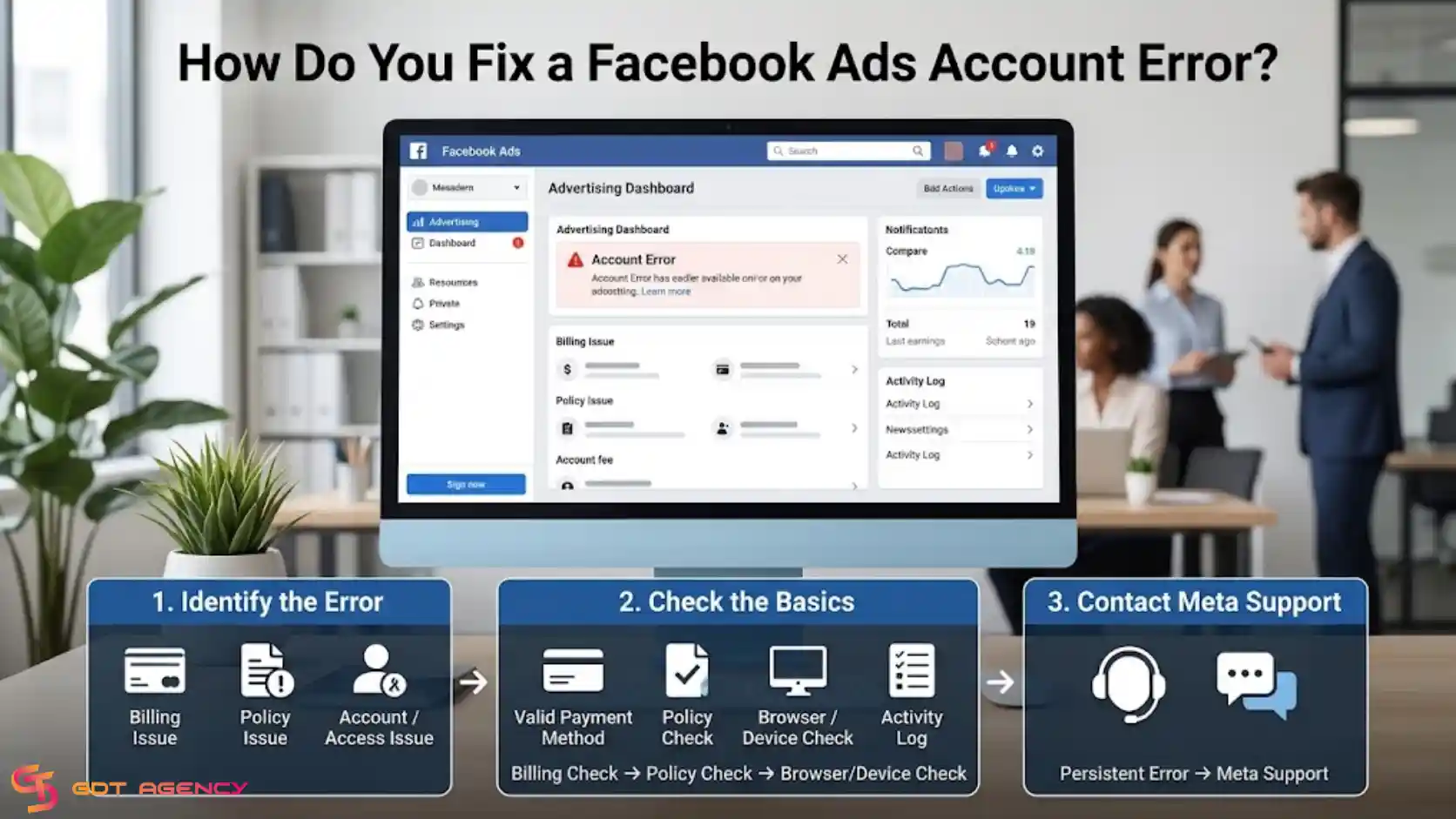
Rather than repeating the fix steps for every error type here, since each one has its own dedicated troubleshooting breakdown, this section covers the general framework advertisers should follow across all error types.
Most account errors clear up after a short sequence of checks: confirming the payment method is valid and not expired, checking Ads Manager for policy notifications tied to the account, clearing browser cache or trying a different browser, and reviewing the account's recent activity log for flagged changes.
These steps work as a first pass because a large share of account errors trace back to one of three causes: a billing issue, a policy flag, or a temporary platform glitch. Running through this checklist before digging into error-specific fixes saves time and rules out the easiest explanations first.
A simple order to follow:
Advertisers should contact Meta support when an error persists after basic troubleshooting, when the account shows no clear error message despite a stalled campaign or ad, or when the issue involves account access, disabled status, or a payment dispute that can't be resolved through self-service tools.
Meta support becomes necessary once the problem moves beyond what's visible or editable in Ads Manager, since some restrictions, especially those tied to policy review or account integrity checks, require manual review on Meta's side. Reaching out through Meta Business Help Center or, for agency-managed accounts, through the account provider's support channel, is the appropriate next step at that point.
An account error is typically a technical or temporary problem, while an account restriction is a deliberate limitation Meta places on the account, usually tied to a policy violation or a risk review. Errors tend to resolve on their own or with a basic fix, while restrictions require appeal, verification, or a waiting period set by Meta.
The two are easy to confuse because both can stop ads from running or block certain account actions. The clearest distinguishing signal is the message language: errors usually reference a technical term like "failed" or "couldn't process," while restrictions reference policy, review, or account status directly.
Yes, a Facebook Ads account error can affect campaign performance, for at least three reasons: it can pause spend entirely, it can reset the learning phase and inflate costs, and it can reduce delivery even when the campaign technically stays active. The extent of the impact depends on which error type is involved and how long it goes unresolved.
An account-wide error, such as a payment failure or a disabled account, stops spend across every active campaign at once, which directly costs the advertiser reach and conversions during the downtime. A narrower error, like an ad set stuck in error status, only affects that one segment, but still skews test results if the advertiser doesn't notice the gap in data.
Errors tied to the learning phase carry a more subtle cost. According to Meta's own guidance on campaign delivery, ad sets that repeatedly reset out of learning tend to show higher cost per result and less stable delivery than ad sets that exit learning normally. Left unresolved, an error that keeps resetting the learning phase can quietly raise acquisition costs for weeks without ever showing up as a hard stop in Ads Manager.
Reporting an account error to Meta support starts in the Meta Business Help Center, where advertisers can select the specific error type, attach a screenshot, and describe when the issue started. For account-level issues like disabled status or payment disputes, Meta routes the report to the relevant review team automatically based on the category selected.
Advertisers should include the exact error message text, the date it first appeared, and any recent account changes (like a new payment method or updated business information) when submitting the report, since this context speeds up the review process on Meta's end.
If an error persists after trying every standard fix, the next step is to document the issue thoroughly and escalate through Meta Business Help Center, or through the account provider for rented accounts, rather than continuing to retry the same steps. Persistent errors that resist standard troubleshooting usually require a manual review on Meta's side.
At this stage, it also helps to check whether the error correlates with a recent account change, a new device, or a flagged transaction, since providing that detail in the support request often shortens the review timeline compared to a generic report.
In the meantime, avoid making repeated edits to the affected campaign, ad set, or account setting while waiting on a response. Frequent changes during an open review can reset the review clock or make it harder for Meta's support team to pinpoint what triggered the error in the first place.
A Facebook ads account error is rarely a mystery once you know which type you're looking at. Authentication errors, update errors, ad set errors, campaign errors, ads stuck in review, ads stuck in learning, and delivery issues each leave their own trail of signs, and spotting the right one early saves time down the line. From there, the fix usually comes down to the same starting point: check billing, check policy status, then move on to the error-specific steps.
Left unresolved, these errors don't just sit quietly. They pause spend, inflate costs during the learning phase, or reduce delivery even when the campaign looks active on the surface. Catching the error type early, and knowing when it's time to escalate to Meta support instead of retrying the same fix, keeps that cost to a minimum.
A Facebook Ads account error is any issue that prevents an advertiser from properly accessing, managing, funding, or running ads through an ad account. These errors can appear as payment failures, account restrictions, campaign delivery problems, permission issues, or technical glitches within Meta Ads Manager.
Your Facebook ad account may show an error because of payment problems, policy violations, incorrect account settings, insufficient permissions, or temporary technical issues on Meta's platform. The best way to identify the cause is to check the exact error message and determine whether the issue affects the account, campaign, ad set, payment method, or Business Manager.
Yes, you can fix many Facebook Ads account errors yourself. Common solutions include updating the payment method, checking account permissions, correcting campaign settings, clearing browser cache, or submitting an appeal when Meta restricts the account. However, some restrictions require Meta to review and restore the account.
The resolution time depends on the type of error. Technical issues may disappear within minutes or hours, while payment reviews and account restriction appeals can take several days. Complex cases that require manual review may take longer.
Some errors can stop active campaigns immediately, especially account restrictions, payment failures, or spending limit issues. Other technical errors may only affect specific actions, such as editing campaigns or updating account information, while existing ads continue running normally.
You should contact Meta Support when basic troubleshooting does not resolve the issue, especially if your ad account is disabled, incorrectly restricted, repeatedly rejected without a clear reason, or affected by a persistent technical error. Before contacting support, collect screenshots of the error message and relevant account details to help explain the issue clearly.
You can fix most stuck ads fast by running a quick set of checks across 5 areas: creative and copy triggers, landing page issues, page…

Facebook Ads not delivering happens due to 8 main groups of causes, ranging from billing and budget limits to page health, creative errors, and tracking…
Facebook ads stop spending money for 10 common reasons, and each one has a direct fix you can apply today. The ten reasons are a…