

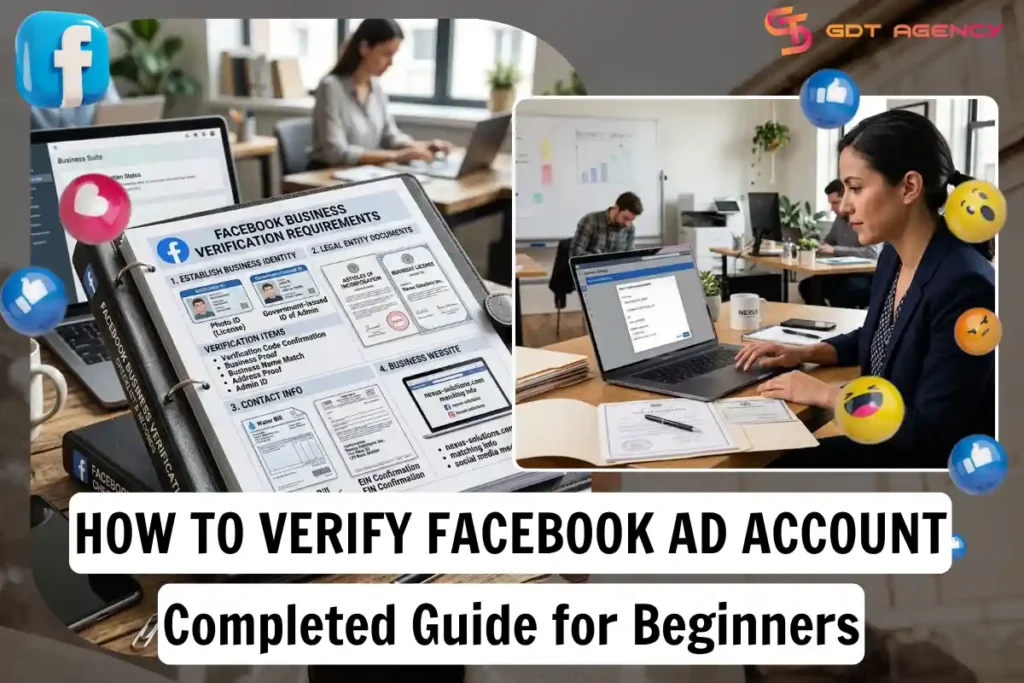
You verify your Facebook ad account by confirming your phone number, then completing business verification inside Meta Business Suite with a few core documents. Phone verification comes first for almost every advertiser. Business verification comes next, and it only applies once your account crosses certain spending or feature thresholds, or once you want access to tools like custom domains, higher API limits, or political and social issue ads. Meta checks your business against public records such as a registration number, a tax ID, or a matching website domain. Most advertisers finish both steps in under an hour, though business verification can take longer if Meta needs to review your paperwork manually. Below, we walk through the full verification process step by step, then cover the documents Meta accepts, the different verification types you’ll run into, and what to do if your submission gets rejected.
How to Verify Facebook Ad Account: Step-by-step Guide
You verify a Facebook ad account in two stages: phone verification through Ads Manager, and business verification through Meta Business Suite. Facebook ad account verification is a set of identity and business checks Meta runs on advertisers to confirm that they are real, legitimate entities before allowing them to spend money or run certain types of ads on the platform.
As an expert at GDT Agency with nearly 10 years of experience working with Facebook ads across multiple types of ad accounts, from standard to high-quality Facebook agency account, I have seen how account verification plays an important role in keeping advertisers eligible to use Meta’s advertising platform.
Verification isn’t a single action but a layered process. Each stage checks a different thing. Phone verification proves you’re a real, single user. Business verification proves your business actually exists and matches the name on your ad account. Here’s how to work through both.
How to Complete Phone Verification
You complete phone verification by opening Ads Manager, going to your account settings, and entering a code Meta texts or calls to your registered number. The whole step usually takes under five minutes.
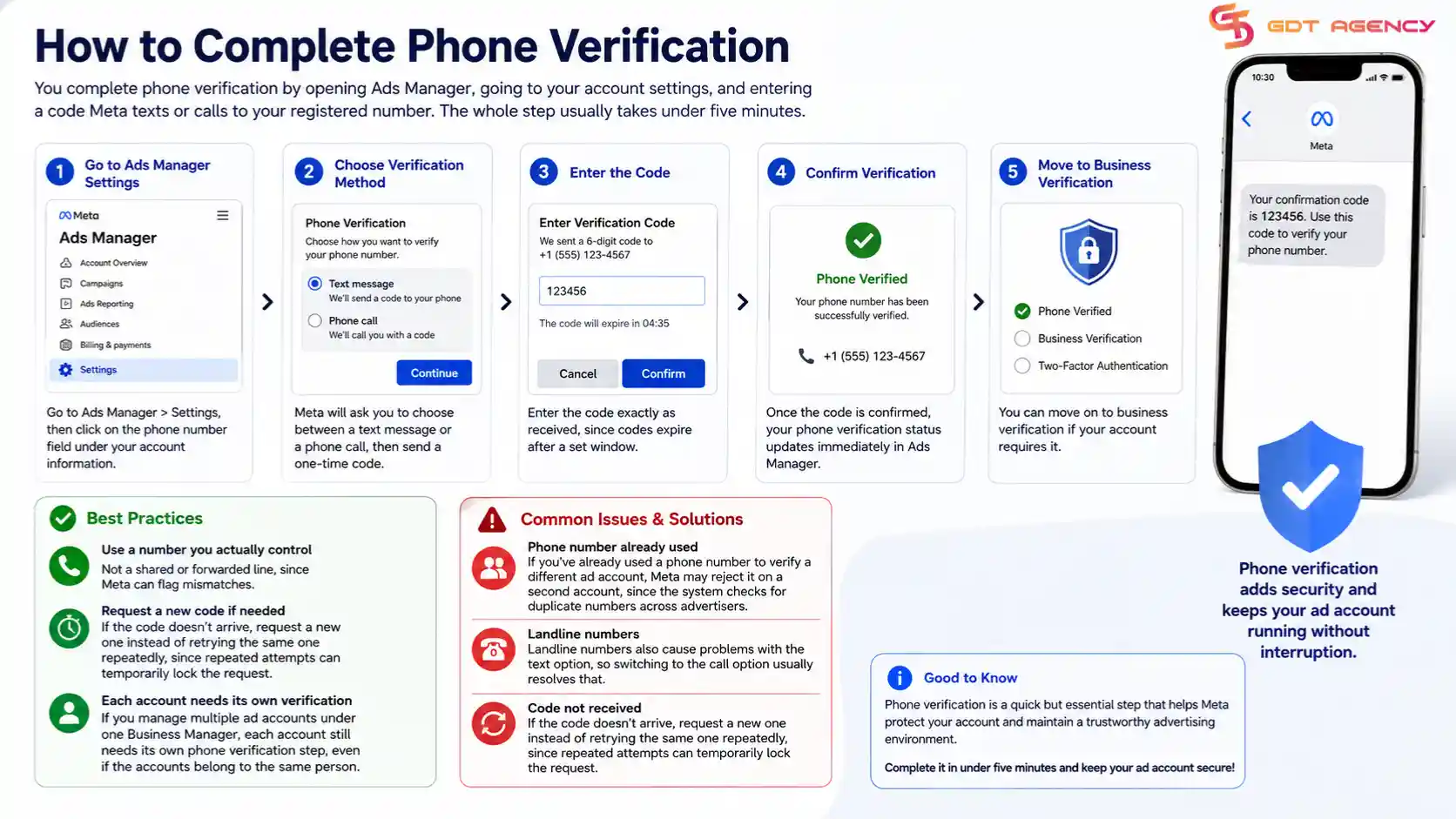
To start, go to Ads Manager > Settings, then click on the phone number field under your account information. Meta will ask you to choose between a text message or a phone call, then send a one-time code.
- Enter the code exactly as received, since codes expire after a set window.
- Use a number you actually control, not a shared or forwarded line, since Meta can flag mismatches.
- If the code doesn’t arrive, request a new one instead of retrying the same one repeatedly, since repeated attempts can temporarily lock the request.
Once the code is confirmed, your phone verification status updates immediately in Ads Manager, and you can move on to business verification if your account requires it.
A few situations trip advertisers up here. If you’ve already used a phone number to verify a different ad account, Meta may reject it on a second account, since the system checks for duplicate numbers across advertisers. Landline numbers also cause problems with the text option, so switching to the call option usually resolves that. If you manage multiple ad accounts under one Business Manager, each account still needs its own phone verification step, even if the accounts belong to the same person.
How to Complete Business Verification in Meta Business Suite
You complete business verification by opening Meta Business Suite, going to Business Settings, and submitting your legal business name, address, and a supporting document that matches Meta’s records.
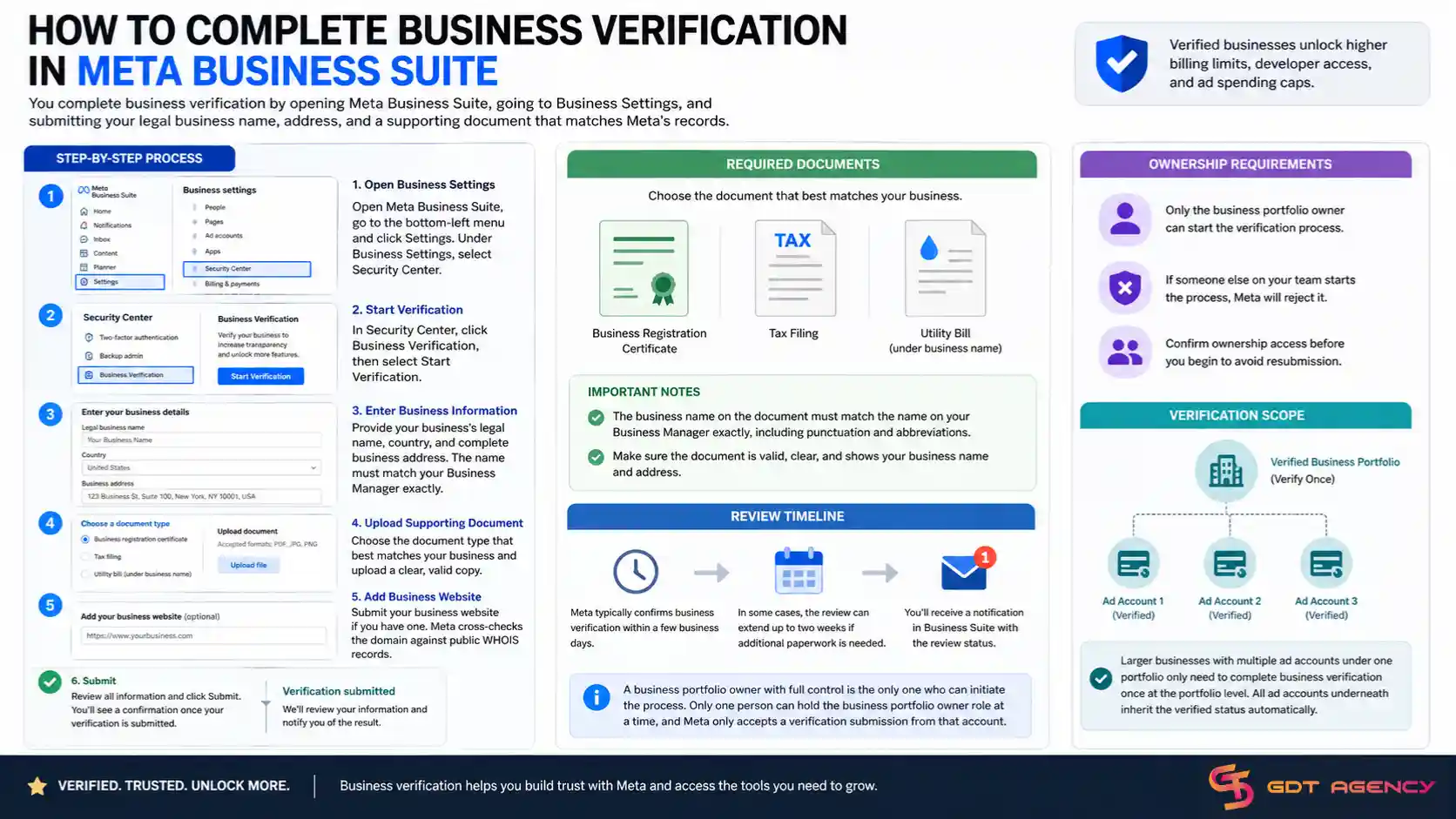
Open Business Settings > Security Center > Business Verification, then click Start Verification. Meta will ask for your business’s legal name, country, and address, followed by a document upload.
- Choose the document type that best matches your business (registration certificate, tax filing, or utility bill under the business name).
- Make sure the business name on the document matches the name on your Business Manager exactly, including punctuation and abbreviations.
- Submit a matching business website if you have one, since Meta cross-checks the domain against public WHOIS records.
Meta typically confirms business verification within a few business days, though it can extend to two weeks if the review team requests additional paperwork. Meta’s Business Help Center notes that a business portfolio owner with full control is the one who initiates this process, and once approved, verification unlocks features tied to billing limits, developer access, and ad spending caps.
Only one person can hold the business portfolio owner role at a time, and Meta only accepts a verification submission from that account. If someone else on your team starts the process, Meta will reject it, so confirming ownership access before you begin saves a round of resubmission. Larger businesses with multiple ad accounts under one portfolio only need to complete business verification once at the portfolio level, and every ad account underneath inherits that verified status automatically.
→ If you are setting up your Facebook ad account for the first time, complete the account setup before starting verification. Our guide How to Set Up a Facebook Ad Account will walk you through the setup process and the key information you should prepare before verification.
What Documents Do You Need for Facebook Business Verification?
You need 3 main categories of documents for Facebook business verification: a business registration document, proof of address, and in some cases a document proving your relationship to the business.
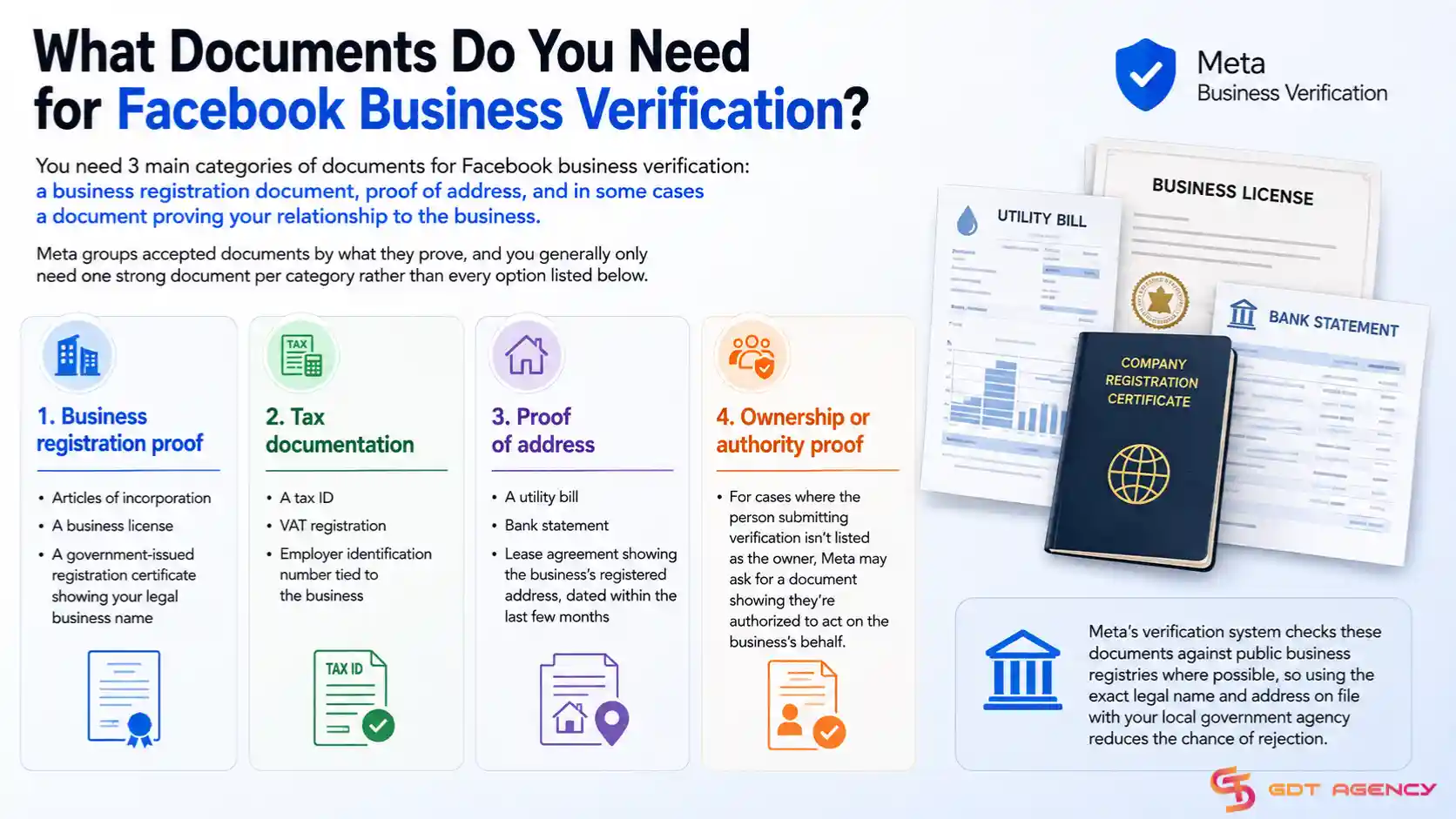
Meta groups accepted documents by what they prove, and you generally only need one strong document per category rather than every option listed below.
- Business registration proof: articles of incorporation, a business license, or a government-issued registration certificate showing your legal business name.
- Tax documentation: a tax ID, VAT registration, or employer identification number tied to the business.
- Proof of address: a utility bill, bank statement, or lease agreement showing the business’s registered address, dated within the last few months.
- Ownership or authority proof: for cases where the person submitting verification isn’t listed as the owner, Meta may ask for a document showing they’re authorized to act on the business’s behalf.
Meta’s verification system checks these documents against public business registries where possible, so using the exact legal name and address on file with your local government agency reduces the chance of rejection.
| Document Category | Accepted Examples | Common Rejection Reason |
| Business registration | Articles of incorporation, business license | Name doesn’t match Business Manager exactly |
| Tax documentation | Tax ID, VAT registration, EIN letter | Document is expired or unreadable |
| Proof of address | Utility bill, bank statement, lease | Document older than a few months |
| Ownership/authority | Signed authorization letter | Submitter isn’t listed as an authorized user |
This table breaks down what Meta accepts in each document category alongside the reason that category most often gets rejected, so you can double-check your paperwork against the right column before submitting.
Advertisers running the process for the first time often submit only one document and assume that’s enough. In practice, Meta frequently asks for at least two categories, typically registration proof plus an address document, before it approves the request in full.
What Are the Different Types of Facebook Verification?
There are 4 main types of Facebook verification: phone verification, identity confirmation, business verification, and Meta Verified, and they exist to check different things about the advertiser.
Each type serves a distinct purpose in Meta’s trust system, and advertisers often need to complete more than one depending on their account activity.
- Phone verification confirms you’re a real person with a working, unique phone number.
- Identity confirmation checks a government-issued ID against the name on your account, mainly required for political and social issue advertisers.
- Business verification confirms your company is a real, registered entity that matches public records.
- Meta Verified is a separate, paid subscription that adds a verified badge, impersonation protection, and priority account support on top of whatever verification level you already hold.
While phone verification serves as a basic account-level check, the other three types address different requirements related to advertiser identity, business legitimacy, and public trust. The table below compares these three verification types based on their purpose, who needs them, their impact on advertising, and whether they can replace other verification requirements.
| Verification Type | Main Purpose | Who Needs It? | Impact on Advertising | Cost | Does It Replace Other Checks? |
| Business Verification | Confirms the legal business or organization behind an advertising account. | Businesses and organizations that need access to certain advertising features, spending levels, or business tools. | Can affect access to higher spending limits and certain advertising features. | Free | No. It does not replace identity confirmation or Meta Verified. |
| Identity Confirmation | Confirms the identity of the person or organization responsible for certain regulated advertising. | Advertisers running political, election, or issue ads that fall under Meta’s transparency requirements. | Helps advertisers meet legal and platform requirements for regulated ads. | Free | No. It serves a specific compliance purpose. |
| Meta Verified | Provides a public verification badge, enhanced credibility, and account support. | Individuals, creators, and businesses that choose to subscribe to the service. | It does not directly unlock higher ad spending limits or replace required advertising verification. | Paid subscription | No. It sits separately from Meta’s required business and identity checks. |
In short: Business Verification focuses on business legitimacy and advertising access, Identity Confirmation focuses on regulated advertising compliance, and Meta Verified focuses on public trust and account support. An advertiser may need more than one, depending on the type of business and advertising activity.
Why Did Your Facebook Ad Account Verification Fail?
Facebook ad account verification most commonly fails because of a mismatch between the business name on your documents and the name on your Business Manager, expired or low-quality document scans, or an address that doesn’t match public records.
Meta’s review process is strict about exact matches, and small inconsistencies cause more rejections than people expect.
- Name mismatches: even a missing “LLC” or a different spelling between your document and your Business Manager name can trigger rejection.
- Poor document quality: blurry scans, cropped edges, or documents where key details aren’t legible get rejected automatically in many cases.
- Outdated address information: proof of address documents older than a few months, or addresses that don’t match your registration paperwork, commonly fail review.
- Using a personal document for a business account: submitting a personal ID when Meta is asking for business registration proof leads to an automatic mismatch.
Fixing a failed verification usually means correcting the specific mismatch Meta’s rejection notice points to, then resubmitting with a document that names the business exactly as it appears in Business Manager.
Meta caps the number of verification attempts within a given period, so treating each submission carefully matters more than resubmitting quickly. Before trying again, check your rejection notice for the specific reason given, since Meta typically states whether the issue was the name, the address, the document quality, or the document type. Correcting only that specific issue, rather than swapping out the entire document set, tends to produce faster approval on the second attempt.
How Long Does Facebook Verification Take?
Facebook verification typically takes anywhere from a few minutes for phone verification to two weeks for business verification, depending on how much manual review your documents require.
Phone verification resolves almost instantly once the code is entered correctly. Business verification runs through both an automated check against public records and, in many cases, a manual review step, which is why the timeline stretches longer. Advertisers submitting clean, exact-match documentation tend to see approval closer to the lower end of that range, while accounts flagged for additional review can wait longer.
Is Facebook Ad Account Verification Required to Run Ads?
No, Facebook ad account verification isn’t required for every advertiser, but it becomes mandatory once you hit specific spending thresholds, run political or social issue ads, or want access to advanced business features.
Small accounts running standard product or service ads at modest budgets can often operate for a while without triggering a verification request. However, once Meta’s systems flag unusual spending patterns, high daily budgets, or requests for expanded permissions, verification becomes a gate you can’t skip.
The clearest case is political and social issue advertising, where identity confirmation is required by law in many countries before Meta will approve a single ad. Beyond that, business verification becomes necessary if you want a verified badge, custom conversions API access, or the ability to manage multiple ad accounts under one business portfolio. Advertisers who skip verification when it’s requested typically see their ad account restricted from spending until the check is complete, so treating verification as optional once Meta asks for it isn’t a workable strategy.
Agencies and advertisers managing several ad accounts tend to hit the verification requirement sooner than solo advertisers, simply because higher account counts and larger combined budgets draw more attention from Meta’s automated review systems. If you’re planning to scale spend or add more accounts under one Business Manager, it’s worth completing business verification early rather than waiting for Meta to request it, since an unplanned restriction mid-campaign can pause active ad delivery.
What Happens If You Don’t Verify Your Facebook Ad Account?
If you don’t verify your Facebook ad account when Meta requests it, your account gets restricted from spending, and in some cases ads already running get paused until verification is complete.
The restriction isn’t a warning; it’s a hard block. Meta stops new ad delivery, holds pending campaigns, and in the case of unverified political or social issue ads, the ads are rejected outright rather than paused. Accounts that ignore repeated verification requests risk longer-term account-level restrictions that go beyond a single campaign, since Meta treats unresolved verification as a trust signal about the account overall.
>>> Maybe you are also interested in: How to Increase Your Facebook Ad Account Creation Limit
Final Thoughts
Verifying a Facebook ad account comes down to two checks: confirming your phone number and, once your account needs it, confirming your business through Meta Business Suite. The process itself is straightforward as long as your documents match what’s already on file with your local business registry, since name and address mismatches cause most rejections.
The bigger mistake advertisers make isn’t the paperwork. It’s timing. Waiting until Meta forces the issue mid-campaign means active ads get paused right when you need them running. Completing business verification early, before your spend or account activity triggers a mandatory check, keeps campaigns moving without interruption.
Frequently Asked Questions
Do I need to verify every ad account under my Business Manager separately?
No. Business verification applies at the business portfolio level, so once your business is verified, every ad account under that same portfolio inherits the verified status.
Can someone other than the account owner submit business verification?
Only the business portfolio owner with full control can start the process. If someone else on your team submits it, Meta rejects the request.
Does Meta Verified replace the need for business verification?
No. Meta Verified is a paid subscription that sits on top of standard verification. You still need to pass business or identity checks first before the paid badge applies.
What’s the fastest way to fix a rejected verification?
Read the specific reason in Meta’s rejection notice and fix only that issue, usually a name mismatch, an outdated address, or a low-quality scan, rather than resubmitting a completely new set of documents.
How many times can I resubmit if verification keeps failing?
Meta limits the number of attempts within a given period, so it’s worth double-checking every document against your Business Manager name and address before each submission rather than resubmitting quickly.