

You create a Facebook prepaid ad account by setting up a Business Account first, then choosing Available Funds as your payment method, and finally confirming the account before you launch ads. This setup lets you pay for ads with money you add in advance instead of a credit card, so you never risk an unexpected charge. Before you start the setup, you need to check a few things first. Facebook only offers Available Funds in certain countries, and you need a valid Business Account plus basic company details ready before the option even appears in your settings. Here’s a full walkthrough, starting with the setup steps you actually need to follow.
How to Create a Facebook Prepaid Ad Account (Step by Step)
You create a Facebook prepaid ad account in three steps: set up your Business Account, select Available Funds as your payment method, and confirm the account before you launch a campaign. Each step builds on the last, so skipping one usually means Facebook pushes you back to fix it before you can run any ads.
Here’s how each step works in practice.
Step 1: Set Up Your Facebook Business Account
Your Facebook Business Account is the foundation everything else sits on. You cannot add Available Funds, run ads, or manage billing without one, so this step comes first no matter what payment method you plan to use.
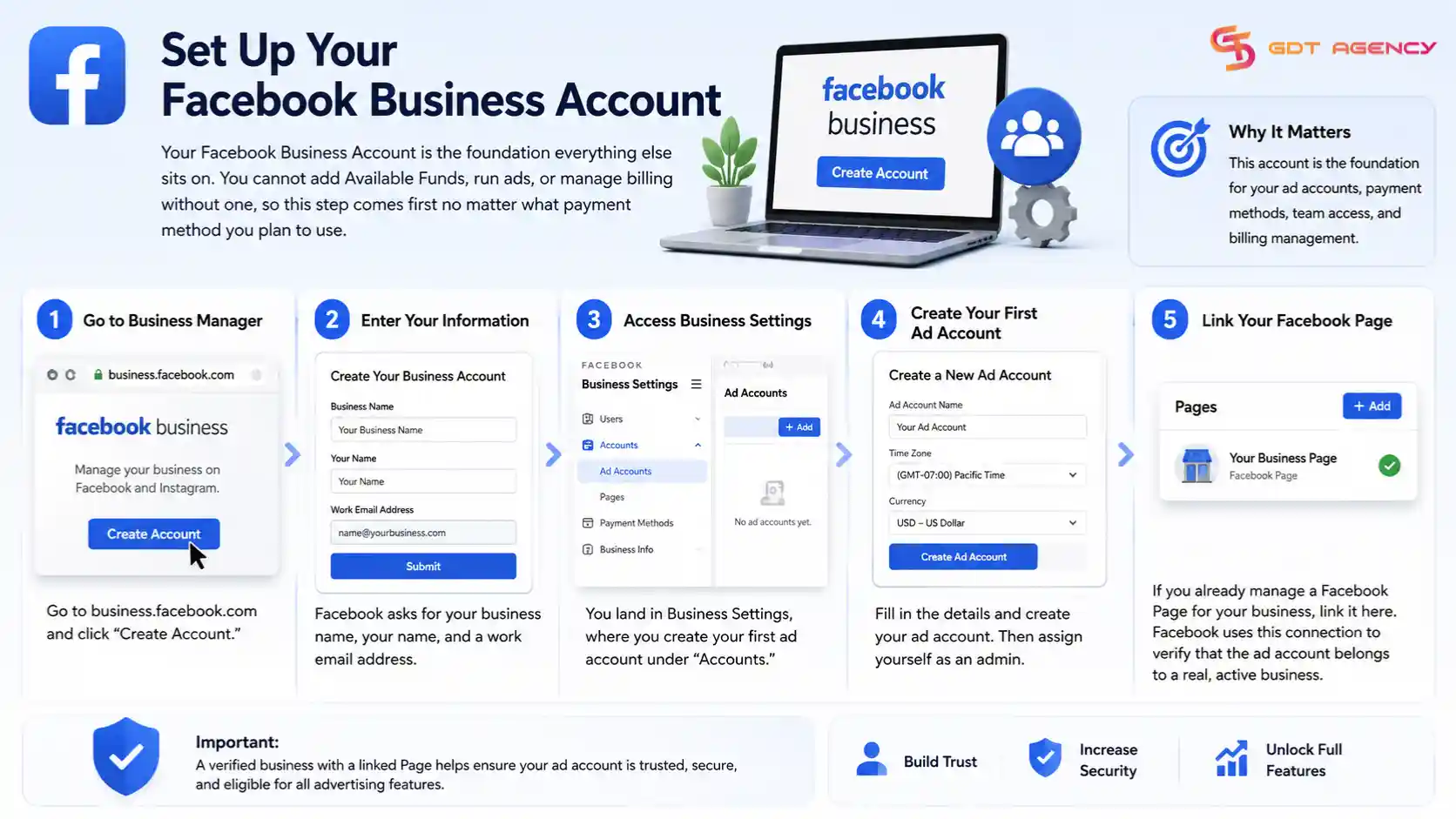
To create it, go to business.facebook.com and click “Create Account.” Facebook asks for your business name, your name, and a work email address. You then land in Business Settings, where you create your first ad account under “Accounts” and assign yourself as an admin.
If you already manage a Facebook Page for your business, link it here too. Facebook uses this connection to verify that the ad account belongs to a real, active business rather than a placeholder profile.
Step 2: Choose Available Funds as Your Payment Method
Available Funds is the payment method that turns a standard ad account into a prepaid one. You select it from your ad account’s Payment Settings, under “Add Payment Method,” instead of adding a credit or debit card.
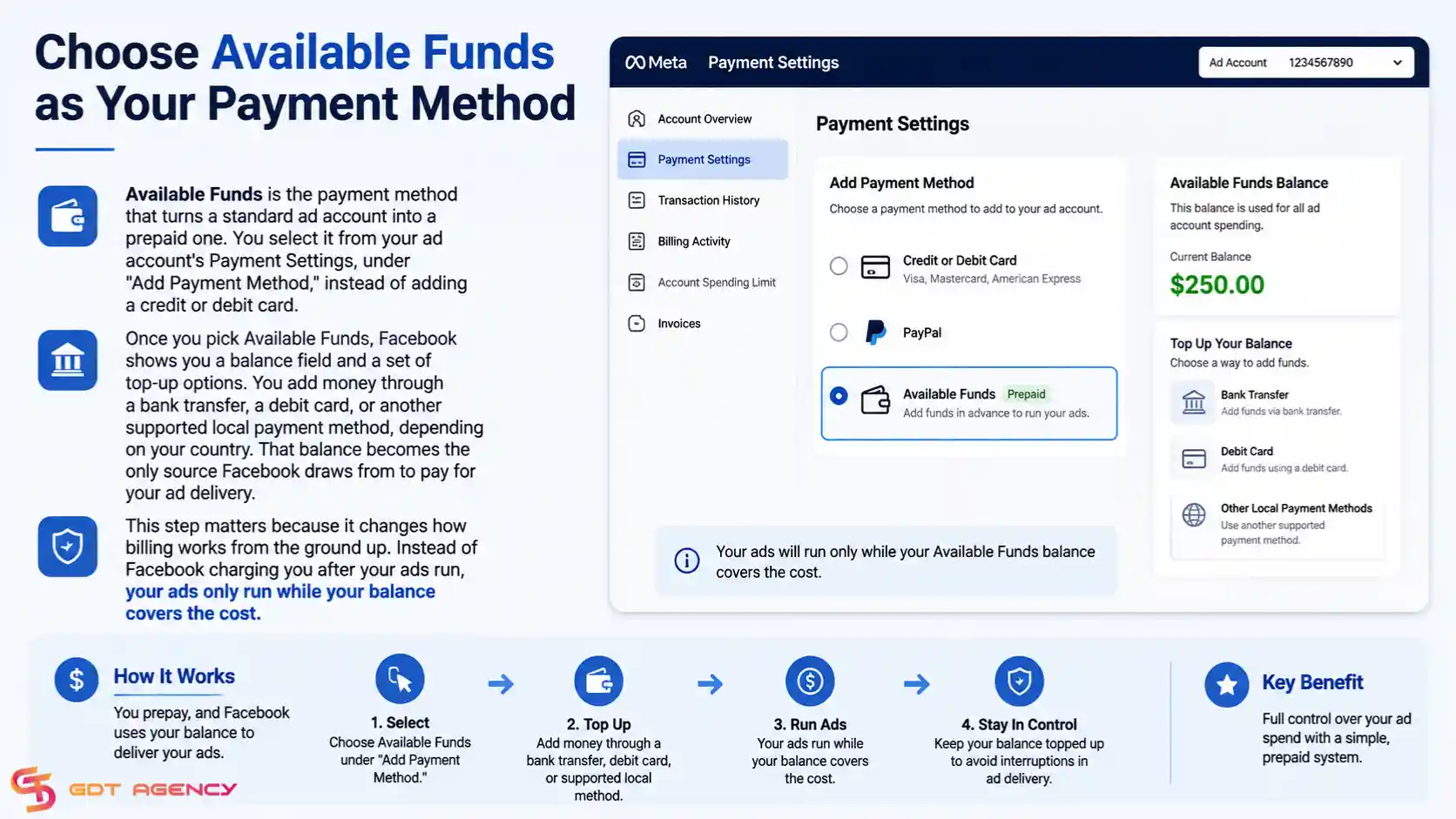
Once you pick Available Funds, Facebook shows you a balance field and a set of top-up options. You add money through a bank transfer, a debit card, or another supported local payment method, depending on your country. That balance becomes the only source Facebook draws from to pay for your ad delivery.
This step matters because it changes how billing works from the ground up. Instead of Facebook charging you after your ads run, your ads only run while your balance covers the cost.
Step 3: Confirm and Activate Your Prepaid Ad Account
You confirm your prepaid ad account by checking that your Available Funds balance shows as active in Ads Manager and that your account status reads “Active” rather than “Pending” or “Restricted.” This final check makes sure Facebook has processed your top-up and cleared your account to spend.
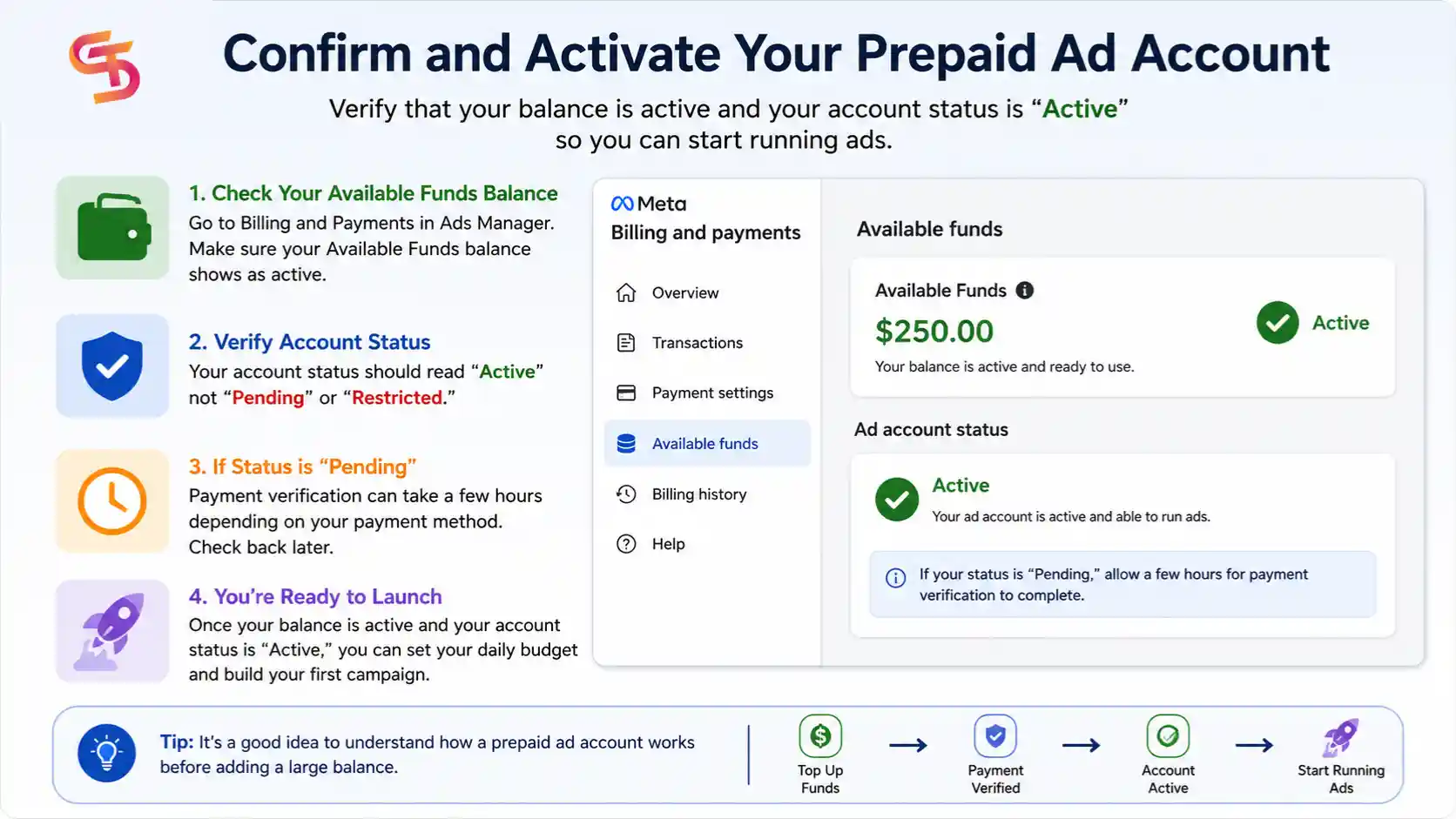
Go to Billing and Payments inside Ads Manager to see this status. If your balance shows correctly and your account is active, you are ready to launch your first campaign. If the status still says “Pending,” give it a few hours, since payment verification can take some time depending on your payment method.
With the account active, you can move on to setting your daily budget and building your first campaign. But before you top up a large balance, it helps to understand exactly what a prepaid ad account is and how it works day to day.
→ Before you can create a Facebook prepaid ad account, you must have a personal Facebook account. Your personal account is used only to verify your identity and access Meta’s advertising tools. If you’re unsure whether you should advertise directly from your personal account or create a separate ad account for your business, read Should You Use a Personal Facebook Account or Create a Separate Ad Account to understand how Meta separates personal profiles from advertising infrastructure.
What Is a Facebook Prepaid Ad Account?
A Facebook prepaid ad account with Available Funds is a payment setup where you add money to your ad account balance before your ads run, and Meta deducts your spend from that balance as it happens. It gives you a spending cap you control directly, since your ads stop running once the balance runs out.
Meta introduced Available Funds as a way to let new advertisers, especially in regions with limited access to credit cards or automatic billing, run ads without needing a formal credit line. Instead of connecting a card that gets charged after your ads spend money, you fund the account upfront.
Is a Facebook Prepaid Ad Account the Same as Available Funds?
Yes, a Facebook prepaid ad account and Available Funds refer to the same thing. “Prepaid” is the term most advertisers use in everyday conversation, while Available Funds is the official name Meta uses inside Ads Manager and its Help Center.
You will see both terms used interchangeably across guides, forums, and Meta’s own documentation. If a support article mentions Available Funds as a balance you top up before running ads, it is describing the exact same feature that most people call a prepaid account.
Facebook Prepaid Ad Accounts: Benefits and Limitations
Many advertisers believe that Facebook prepaid ad accounts are the safest option because they eliminate automatic charging and give complete control over ad spending. Others intentionally choose prepaid billing to reduce the risk of payment failures and avoid unexpected charges.
However, as an expert at GDT Agency who has spent more than 5 years working with multiple Facebook ad accounts, from standard to Facebook agency ad accounts, I can affirm that prepaid billing does not automatically make an ad account more stable or lower risk.
While prepaid ad accounts can improve spending control, they also come with tradeoffs such as interrupted delivery when funds run out, limited spending flexibility, and more difficulty recovering unused balances in certain situations. Below is the table of benefits and limitations of Facebook prepaid ad accounts:
| Benefits | Limitations |
|
|
Facebook Prepaid vs Postpaid Ad Account: What’s the Difference?
A Facebook prepaid ad account charges your balance before ads run, while a postpaid ad account charges your card or bank account after ads have already delivered. The difference comes down to timing: prepaid draws from money you already added, postpaid bills you for spend that already happened.
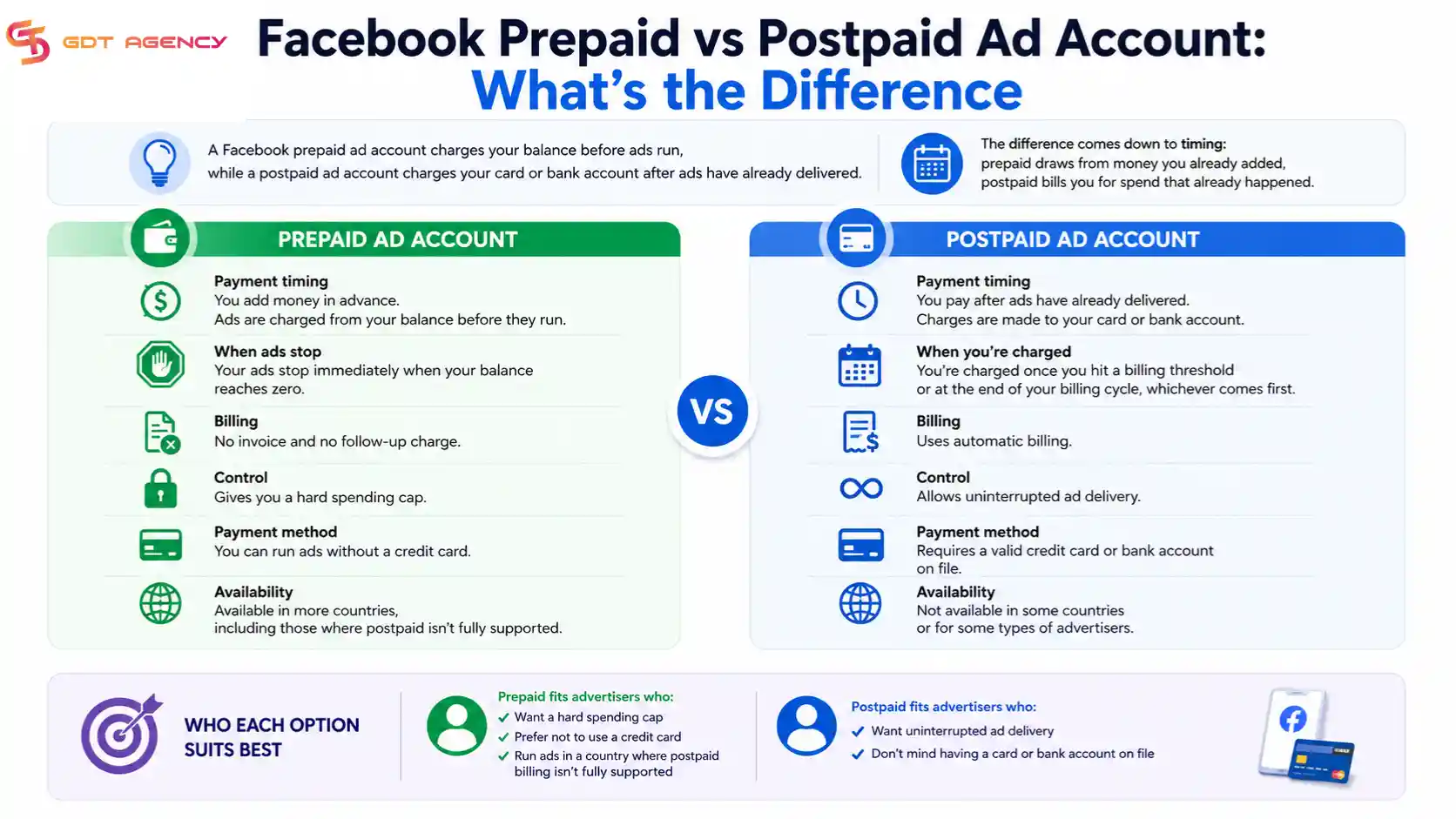
Prepaid accounts suit new advertisers who want to avoid unexpected charges, since you can never spend more than what you have loaded. Postpaid accounts, tied to automatic billing, tend to suit advertisers with an established track record who want their campaigns to keep running without manual top-ups getting in the way.
→ The choice between prepaid and postpaid billing depends on how your Facebook ad account is structured. Our guide to Facebook Ad Account Infrastructure: What It Is & How It Works explains how Meta’s account architecture, payment systems, and Business Manager work together to support different advertising setups.
Is a Facebook Prepaid Ad Account Available in Your Country?
Facebook prepaid ad account is not available in every country, since Meta rolls out Available Funds gradually and only supports it in a specific list of markets. Meta’s own Business Help Center confirms that people in supported countries who have not advertised on Facebook before can create an ad account funded this way.
You can find out if your country qualifies directly inside your ad account setup flow. When you reach Payment Settings, Facebook only shows Available Funds as an option if your billing country supports it. If you don’t see it, your account defaults to standard payment methods like credit or debit cards instead.
Eligibility can also depend on your account history. Meta designed Available Funds mainly for new advertisers setting up their very first ad account, so an older account with an existing payment method may not be offered the same option later.
If Available Funds isn’t available where you’re based, that doesn’t shut the door on prepaid-style spending control. Renting an agency-level ad account through a trusted partner is one common workaround, and we’ll come back to that option later in this guide.
How Do You Add Funds to a Prepaid Ad Account?
You add funds to a prepaid ad account by opening Billing and Payments in Ads Manager, selecting “Add Funds” under Available Funds, and completing the top-up through a supported payment option like a bank transfer or debit card. The exact options you see depend on your billing country.
Once you submit a top-up, Facebook usually reflects the new balance within a few minutes for card payments, though bank transfers can take longer to clear. You can set a recurring reminder to check your balance, since Facebook does not automatically top up a prepaid account for you.
What Are the Spending Limits on a Prepaid Ad Account?
The spending limit on a prepaid ad account is your Available Funds balance itself, meaning your ads can never spend more money than you’ve added. This differs from a payment threshold on a postpaid account, which controls how much Facebook lets you accumulate before it bills you.
Meta’s Business Help Center draws a clear line between three related terms: your budget (what you plan to spend on a campaign), your spending limit (an optional cap you set manually), and your prepaid balance (the actual funds available to draw from). On a prepaid account, all three work together, but your balance is the hard ceiling that overrides the other two.
Can You Switch From Prepaid to Postpaid Later?
Yes, you can switch from a prepaid to a postpaid ad account later, though the option to do so depends on your account history and your billing country’s supported payment methods. Facebook generally lets you add a credit or debit card in Payment Settings once your account has an established spending history.
Switching does not delete your existing Available Funds balance right away. Facebook typically lets you use up any remaining balance before your new payment method takes over, so you don’t lose money in the transition.
Final Thoughts
Creating a Facebook prepaid ad account comes down to three steps: set up your Business Account, choose Available Funds as your payment method, and confirm the account before you spend. Once it’s active, the real work is managing your balance and knowing when a prepaid setup still fits your business.
A prepaid account gives you a hard spending cap and removes the risk of a surprise charge, which makes it a solid starting point for new advertisers or anyone who prefers not to link a card. But it also has a ceiling. Once your ad spend outgrows what a personal Available Funds balance can support, or you run into repeated account restrictions, an agency-level ad account becomes the more practical next step.
Either way, the setup itself takes minutes. The decisions around funding, limits, and long-term scaling are what actually deserve your attention.
FAQs
Is a Facebook prepaid ad account safe to use?
Yes, a Facebook prepaid ad account is safe to use, since it draws only from the balance you add rather than storing a card that could be charged unexpectedly. Your ads simply stop running once your balance runs out, so you never owe money beyond what you’ve already deposited.
Can you get a refund on unused Available Funds?
Yes, you can request a refund on unused Available Funds through Meta’s Business Help Center, though processing times vary depending on your original payment method. Bank transfers and debit card top-ups typically take longer to refund than other supported methods.
What happens if your prepaid balance runs out mid-campaign?
Your ads pause automatically the moment your prepaid balance reaches zero, and Facebook stops delivery until you add more funds. Your campaign settings stay saved, so you don’t lose your targeting or creative work. Ads simply resume once your balance is topped up again.
Does a prepaid ad account go through the same ad review process as a postpaid one?
Yes, a prepaid ad account goes through the same ad review process as a postpaid account, since Meta applies its advertising policies equally regardless of payment method. Your payment setup has no bearing on how your ad creative or targeting gets reviewed.
Can you run multiple ad accounts under one Available Funds balance?
No, you cannot run multiple ad accounts under one Available Funds balance, since each ad account holds its own separate balance. If you manage several ad accounts, you need to add funds to each one individually through its own Payment Settings.