

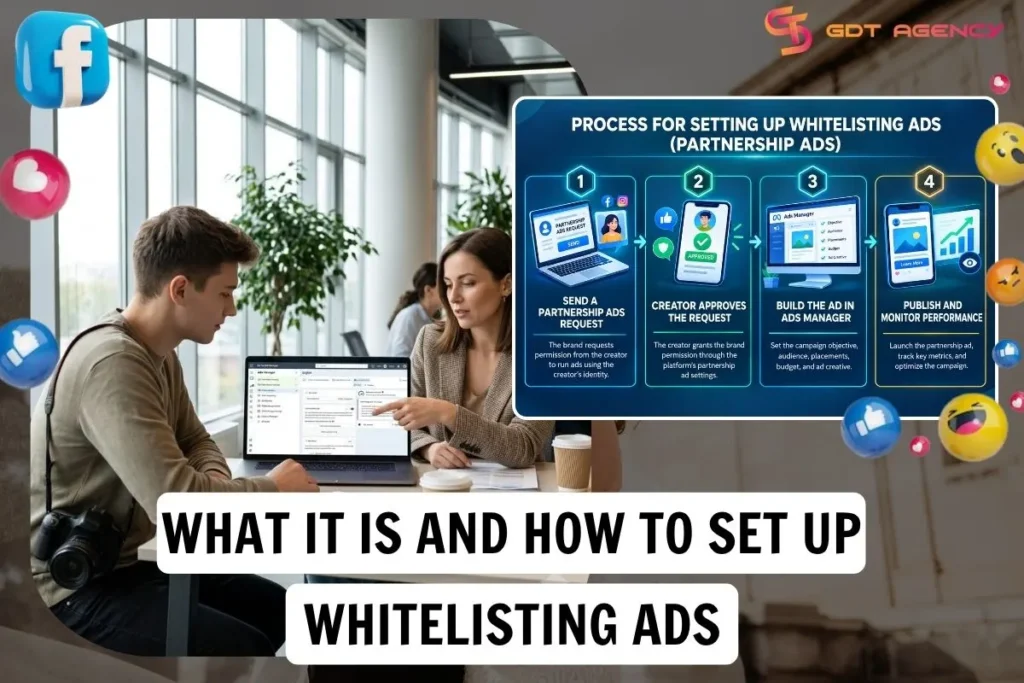
Whitelisting Ads on Meta is an industry term for giving a brand or agency permission to run Meta Partnership Ads using a creator’s authorized Facebook identity. Meta Partnership Ads have 2 main permission types: Account-level permissions and Content-level permissions.
Account whitelisting follows 4 sequential steps: send an account-level Partnership Ads permission request, have the creator approve it, create the Partnership Ad in Ads Manager, publish and monitor the campaign. Below, this guide walks through each step in order, then covers the creative practices that make a whitelisted ad actually perform.
What is a Whitelist Facebook Ad Account?
Whitelisting Ads or Influencer whitelisting on Meta lets a brand or agency run paid ads from an influencer’s Facebook page, profile or Instagram account using Meta’s Partnership Ads format. The brand controls the budget, targeting, creative and reporting, while the creator’s name, profile photo and handle appear on the ad.
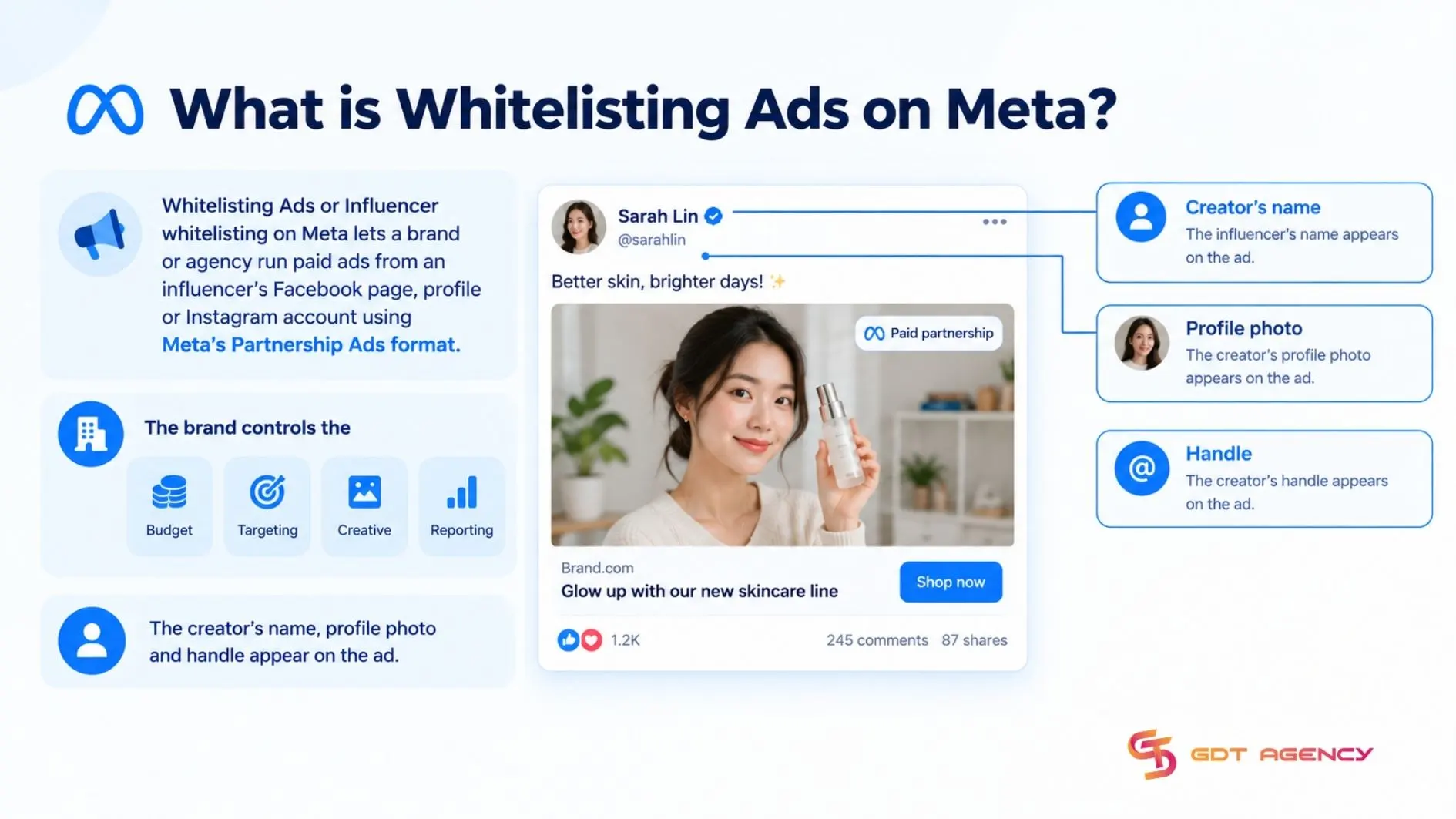
As an expert at GDT Agency with nearly 10 years of experience working with Facebook Ads across multiple account types, from standard to Facebook agency accounts in various industries. I’ve seen many advertisers assume that standard brand ads and whitelisting ads are the same. In practice, a Whitelisting Ad is set up, funded and managed from the brand’s ad account, but it can appear under the creator’s identity. The brand controls the campaign, budget, targeting and reporting, while the creator’s handle and profile add trust and social proof.
How does Whitelisting Ads work?
Whitelisting ads let a creator grant a brand or agency’s ad account permission to publish ads under the creator’s handle, so the brand controls the campaign while the ad displays the creator’s identity. The Ad may appear in supported placements such as Feed, Reels, Stories, or Marketplace.
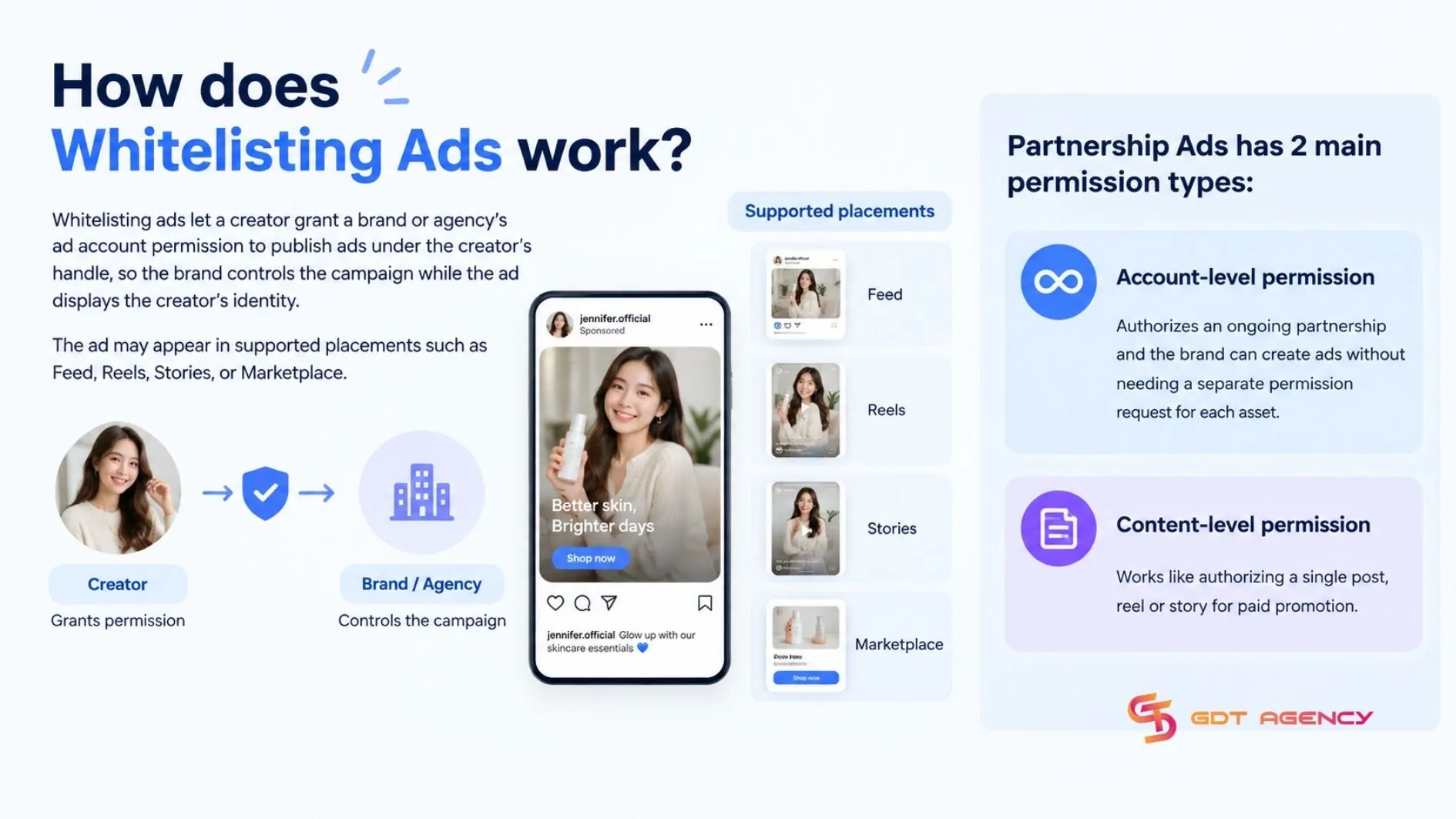
Partnership Ads has 2 main permission types:
- Account-level permission authorizes an ongoing partnership and the brand can create ads without needing a separate permission request for each asset.
- Content-level permission works like authorizing a single post, reel or story for paid promotion.
What are the benefits of Whitelisting Ads?
Influencer whitelisting lets a brand get the authenticity of creator content while keeping full control of paid media performance. The brand can test different hooks, CTAs, audiences and creator assets then optimize toward the combinations that drive the strongest results.
>>> Before setting up Partnership Ads permission, it helps to know how Facebook ad account infrastructure works, including how ad accounts, business assets, permissions and creator access connect within Meta’s ecosystem.
How to Set Up Whitelisting Ads for Partnership Ads?
Account whitelisting for Facebook Ads requires 4 steps: send an account-level Partnership Ads permission request, have the creator approve it, create the Partnership Ad in Ads Manager and publish and monitor the campaign.
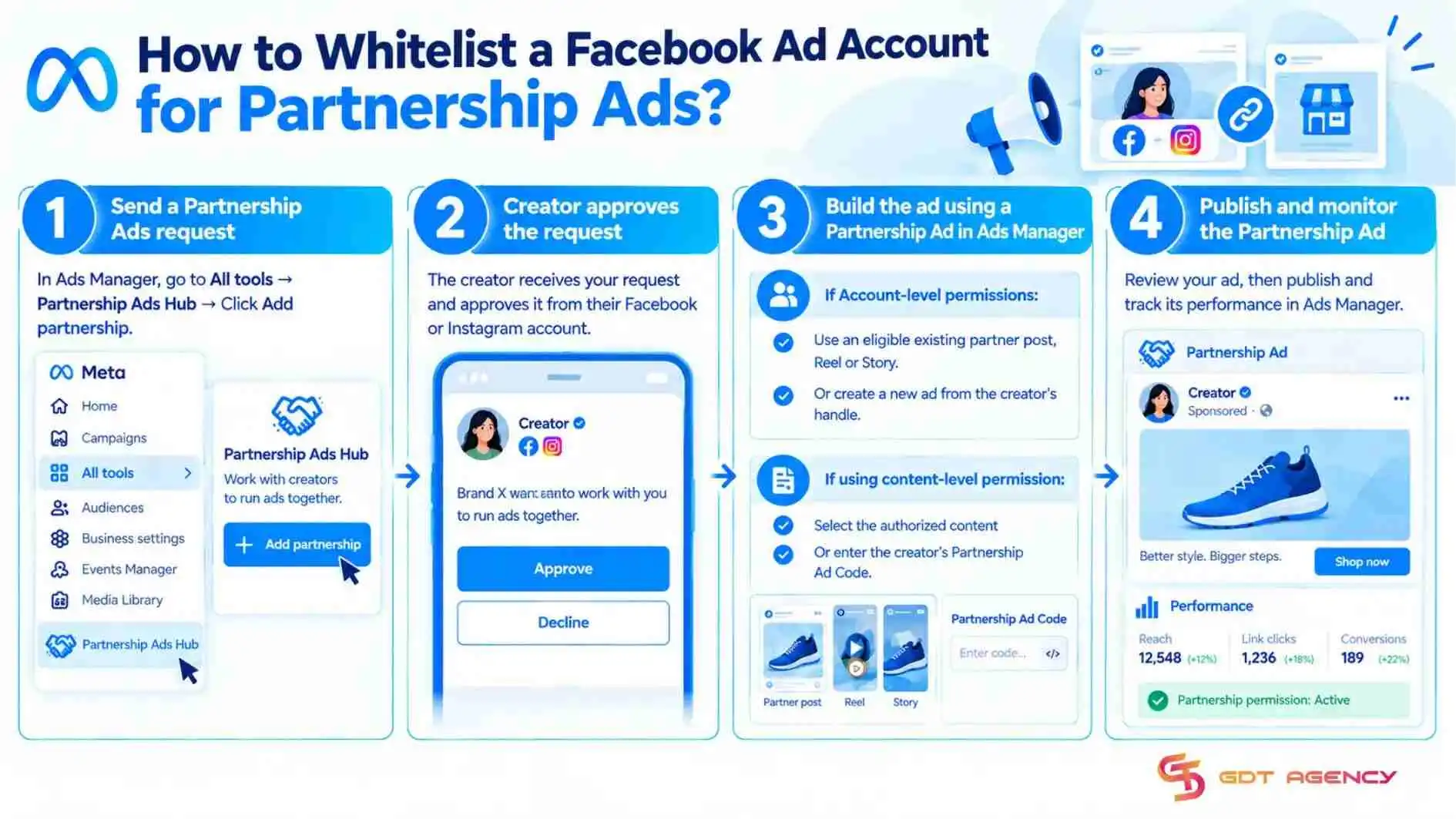
Step 1: Send a Partnership Ads request
The first step is to initiate the permission request, which tells Meta which creator identity a specific ad account wants to use.
This request is what starts the authorization chain:
- In Ads Manager, go to All tools → Partnership Ads Hub → Click Add Partnership
- Search for and select the creator’s Instagram account or Facebook Page
- Select the brand or agency ad account that will run the ads
- Click Send request
Step 2: Creator approves the request
The creator reviews and accepts the request. Account-level permission is generally appropriate for an ongoing partnership because it allows the advertiser to create Partnership Ads from the creator’s handle without requesting permission for every individual ad.
For a one-off campaign, content-level permission is usually more appropriate. The creator can authorize a specific post, Reel or Story, typically by enabling Allow brand partners to boost or sharing a partnership ad code. Content-level permission is narrower and does not provide the broader access associated with an account-level partnership.
Step 3: Build the ad using a Partnership Ad in Ads Manager
With approval in place, the brand builds the actual campaign inside Ads Manager.
- Set the campaign objective, budget, audience and placements
- At the ad level, select Partnership Ad → choose the authorized creator identity
Use an eligible existing partner post, Reel or Story, or create a new ad from the creator’s handle when account-level permission allows it. If using content-level permission, select the authorized content or enter the creator’s Partnership Ad Code.
Step 4: Publish and monitor the Partnership Ad
The final step is publishing the ad and keeping an eye on how the partnership holds up once it’s live. After launch, monitor both performance and authorization status. Creators can revoke Partnership Ads permissions at any time, which may prevent creation or affect delivery of ads that rely on that permission.
Before publishing, you should verify the following to make sure everything is set up correctly:
- The correct creator and brand identities
- The paid-partnership disclosure and applicable tags
- The selected placements and creative format
- The landing page, tracking parameters and conversion setup
- Any policy or content eligibility warning in Partnership Ads Hub
>>> Once your Facebook Ad Account is properly whitelisted for partnership ads, you can explore how to set up a Collaborative Ad Account Facebook enables brands and retailers to work together on product-focused advertising campaigns.
What creative best practices work for Whitelisted Ads?
4 creative practices consistently drive performance in whitelisted ads: matching the creator’s voice, using UGC content, hooking viewers within the first seconds and applying a natural CTA strategy.
Standard brand ad creative may underperform when it feels disconnected from the creator identity displayed in the ad. For example, when it is overly corporate, heavily scripted or inconsistent with the creator’s usual content. However, brand-produced creative can still perform well when it is adapted to the partnership context validated through testing.
How should ad copy match the creator’s voice?
Ad copy in a whitelisted campaign should match the creator’s voice, because the ad runs under their name, and corporate-sounding copy creates a disconnect that hurts performance immediately.
- Write in first person (“I’ve been using…” rather than “Our product…”)
- Match the creator’s actual tone, whether casual, technical or enthusiastic
- Reference the creator’s specific experience with the product rather than generic claims
Why does UGC-Style content outperform polished production?
UGC-style content outperforms polished production in whitelisted ads because it looks native to the feed, and authenticity is the entire premise behind advertising through a creator’sidentity in the first place.
- Phone-shot video testimonials
- Unboxing or first-impression clips
- “Day in my life” formats featuring the product
- Before-and-after demonstrations
- Screen recordings for software or app products
Over-produced, studio-quality content works against the format; the more an ad looks like a native post, the more it earns the trust the creator built with their audience.
What techniques maximize hook and CTA performance?
Hook and CTA performance in whitelisted ads depends on two things: capturing attention within the first 3 seconds and closing with a call to action that still sounds like the creator talking.
In Reels and Stories placements, where most Partnership Ads perform best, the opening needs to work immediately:
- Open with a bold claim or surprising statement
- Show the product right away instead of building up to it
- Use movement and close-ups to stop the scroll
- Add text overlays for viewers watching with sound off
The CTA then carries that same tone through to the close, layered across the video, the caption and the on-screen text:
- Mid-video CTA: the creator mentions the product and how to get it
- End CTA: a direct call to action paired with the link
- Caption CTA: “link in bio” or “tap to shop” language
Keeping the CTA conversational rather than pushy, something closer to “I genuinely think you should try this” than “Buy now,” keeps the ad consistent with everything that came before it in the creative.
Final Thoughts
Whitelisting Ads on Meta is a permission that a creator authorizes a brand or agency to run paid ads from the creator’s handle using the Partnership Ads format. Setting it up takes 4 steps: send a request in Partnership Ads, get the creator’s approval, build the ad in Ads Manager, publish and monitor the campaign. Whitelisting Ads lets a brand borrow a creator’s existing trust instead of building it from scratch. Matching the creator’s voice, using UGC-style content and a natural CTA helps that trust carry through to results.
FAQs
Is whitelisting ads free to set up on Meta?
Yes, costs begin when the campaign runs, through the ad spend in the brand’s ad account and any compensation the brand agrees with the creator.
Is whitelisting the same as Partnership Ads?
Yes. “Whitelisting” is the informal, older term still widely used in the industry, while “Partnership Ads” is Meta’s current official name for the same account-level permission format.
Can a creator revoke whitelisting permission at any time?
Yes, a creator can revoke whitelisting permission in Meta Business Suite by going to Partnership Ads and choosing Remove, Revoke Permission or Stop Partnership Ads.
Can you whitelist ads on Instagram as well as Facebook?
Yes, a creator can authorize a brand through either a Facebook Page or an Instagram account. The brand then selects that authorized identity at the ad level in Ads Manager and the ad can run in supported placements such as Feed, Reels, Stories or Marketplace.
Does the creator retain ownership of their original content?
Yes, whitelisting permission is a license, not an ownership transfer. The creator keeps the copyright in their original video, photo, caption and other creative elements, while the brand may use the approved content within the scope Meta and the agreement allow.