


A Commerce Account is the Meta business asset in Commerce Manager that connects your business’s catalog, Facebook Page and Instagram account to Meta’s commerce tools. In Meta Ads, this asset sits behind your Facebook Shop and catalog-based campaigns, so it determines where your product inventory lives and which connected Page or Instagram account can sell those products.
Setting up a Commerce Account requires 3 steps in Commerce Manager: choosing the owning Business Portfolio, setting the checkout method & sales channels and adding a catalog with shipping & return policies. Below, this guide explains what a Commerce Account is, how it works, each setup in detail and how it differs from a Facebook Shop.
What is a Commerce Account in Meta Ads?
A Commerce Account in Meta Ads is the backend account in Commerce Manager that lets a business sell and manage products across Facebook and Instagram. It holds your product catalog, shop settings, commerce policies and permissions.
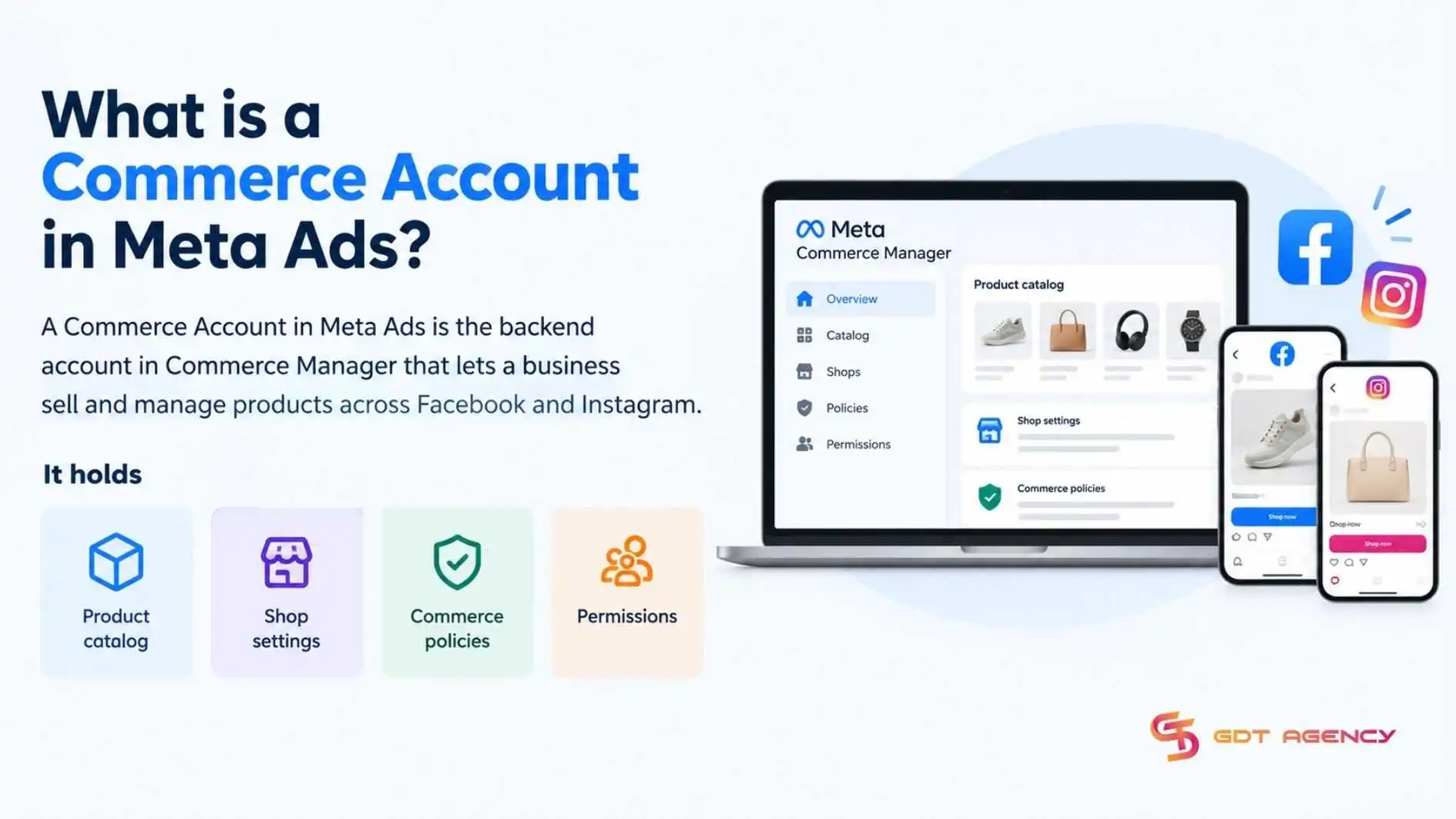
A Commerce Account in Meta Commerce Manager has 3 core functions: supplying catalog data for Advantage+ Catalog Ads, organizing commerce assets within a Meta Business Portfolio and supporting website checkout setup and payouts.
- Supplying catalog data: Feeds product titles, images, pricing and stock status into Advantage+ Catalog Ads and Dynamic Product Ads (DPA)
- Organizing commerce assets: Connects your Facebook Page, Instagram professional profile, and your domain, Pixel and Conversions API so your shop and ads share the same business and product data across Meta
- Supporting website checkout: Connect the catalog and selling channel to website-based checkout, order fulfillment, returns, and payment workflows
As an expert at GDT Agency with nearly 10 years of working with Facebook Ads via multiple account types, from standard to Facebook Agency Accounts, I have seen many advertisers assume that a Commerce account in Facebook Ads can be created and run independently like a standard ad account. In reality, this asset only becomes useful once it’s connected to a product catalog, Pixel and a verified selling channel.
>>> A solid infrastructure is essential before connecting your assets. Before setting up, learn how Facebook ad account infrastructure works
What does it connect?
Within the Meta Ads ecosystem, a Commerce Account connects 4 components: the Business Portfolio, product catalog, the Facebook Page or Instagram account and Shop.
- Business Portfolio: Owns the Commerce Account and controls who has admin access
- Catalog: Supplies the product data used by Shop and catalog-based ads
- Facebook Page or Instagram account: Acts as the selling surface where products appear to shoppers
- Shop: Displays the catalog’s products to customers on Facebook or Instagram
How does it work?
A Commerce Account works as the operational layer between your product data, Meta’s commerce surfaces and your Meta Ads. You add product data to a catalog, connect it to your Page or Instagram account and Pixel. Then Meta uses those connected assets to support Shops and product-based advertising. For Advantage+ Catalog Ads, Meta automatically selects relevant items from the catalog for each person based on their interests, intent and online actions.
For an online fashion brand GDT Agency has worked with, creating a Commerce Account is necessary for a business with many products. Before setup, the brand sold 180 products and ran Facebook and Instagram Ads to bring shoppers to its website. After 3 months, it averaged 1,200 orders per month, but managing products and ads had become difficult.
Product data was updated by hand across several channels, ads ignored stock status and 8 to 12 out-of-stock products were still advertised each month. The brand then set up a Commerce Account in Commerce Manager and moved all 180 products into one catalog, so price and stock status could feed its ads. The table compares 5 metrics before and after the Commerce Account and catalog setup: ad spend, orders per month, cost per order, catalog management time and ads for out-of-stock products.
| Metric | Before | 3 months After |
| Monthly ad spend | About $15,000 | About $15,000 |
| Orders per month | 1,200 | 1,500 (+25%) |
| Cost per order | $12.5 | $10 (-20%) |
| Catalog management time | About 20 hours per week | About 6 to 8 hours per week |
| Share of ads promoting out-of-stock products | About 5% | Under 2% |
These results come from the Commerce Account and catalog setup together with how the brand then used the catalog in its ads. For business with many products, setting up both turns product data into an asset that can be managed, synced and reused across commerce and ads.
How to set up a Commerce Account in Meta Ads?
Setting up a Commerce Account requires 3 steps in Commerce Manager: choose the owning Business Portfolio, set the checkout method and sales channels, add a catalog with shipping and return policies.
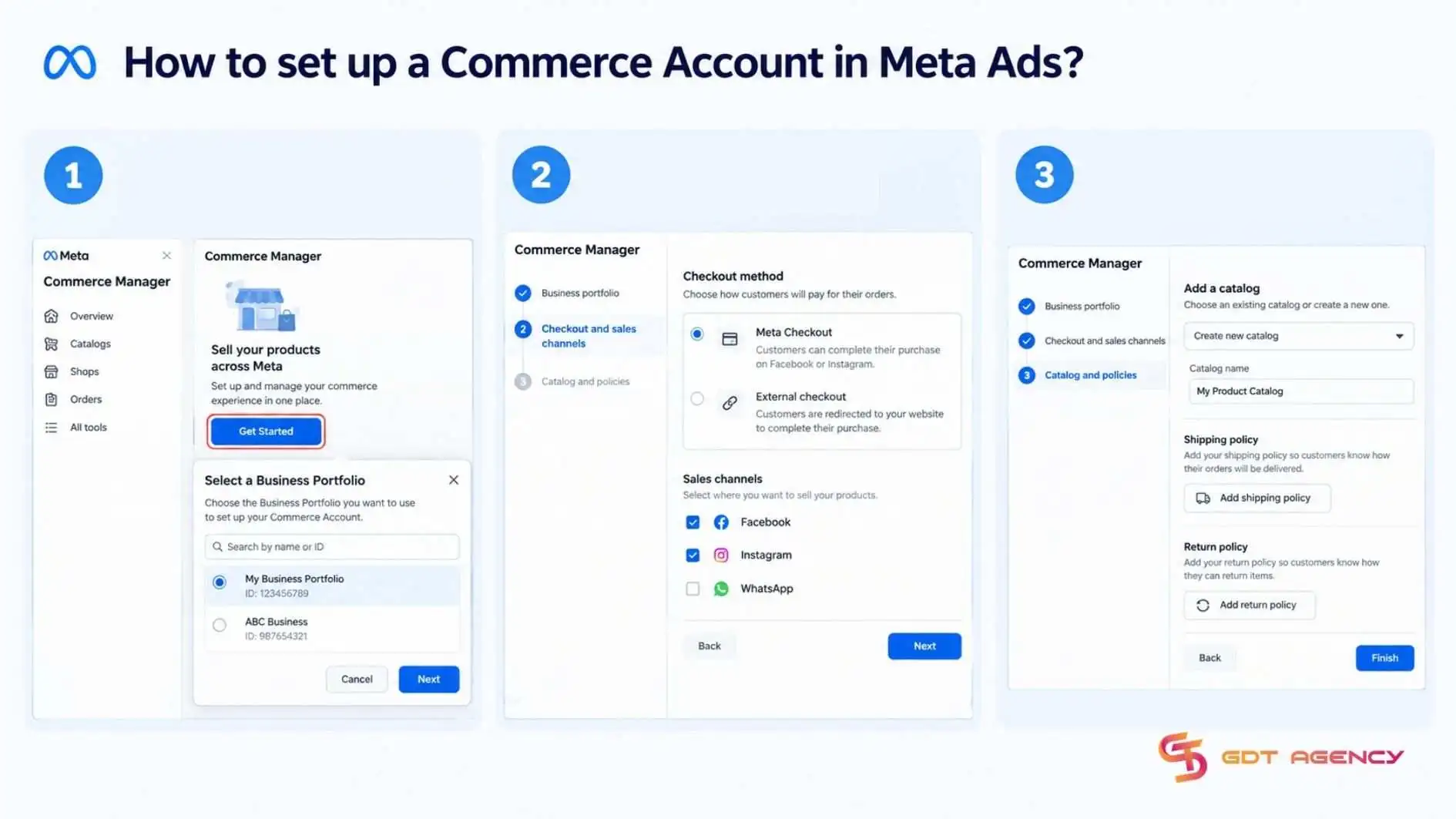
Here is a step-by-step guide on how to set up a Commerce Account in Meta Ads:
- Open Commerce Manager > Select Get Started > Select the Business Portfolio
- Choose the checkout method and sales channels
- Add a catalog, set shipping and return policies
What do you do before setting up?
Before setting up a Commerce Account, confirm 5 things: Business Portfolio admin access, a Facebook Page, permission to manage the Page and catalog, a business website and product data.
- A Business Portfolio (shown as a business portfolio in some Meta screens) where you are an admin
- A Facebook Page and if you will sell on Instagram, a professional Instagram account connected to the same Business Portfolio
- Permission to manage the Page and the product catalog
A business website, if customers will buy on your site - Product data ready: titles, images, prices, availability, product links, and variants
How to connect a Commerce Account for Meta Ads?
Connecting a Commerce Account for Meta Ads has 3 steps: complete the commerce setup in Commerce Manager, connect your Meta Pixel or dataset, select that catalog when creating a catalog-based campaign in Ads Manager and publish the ad.
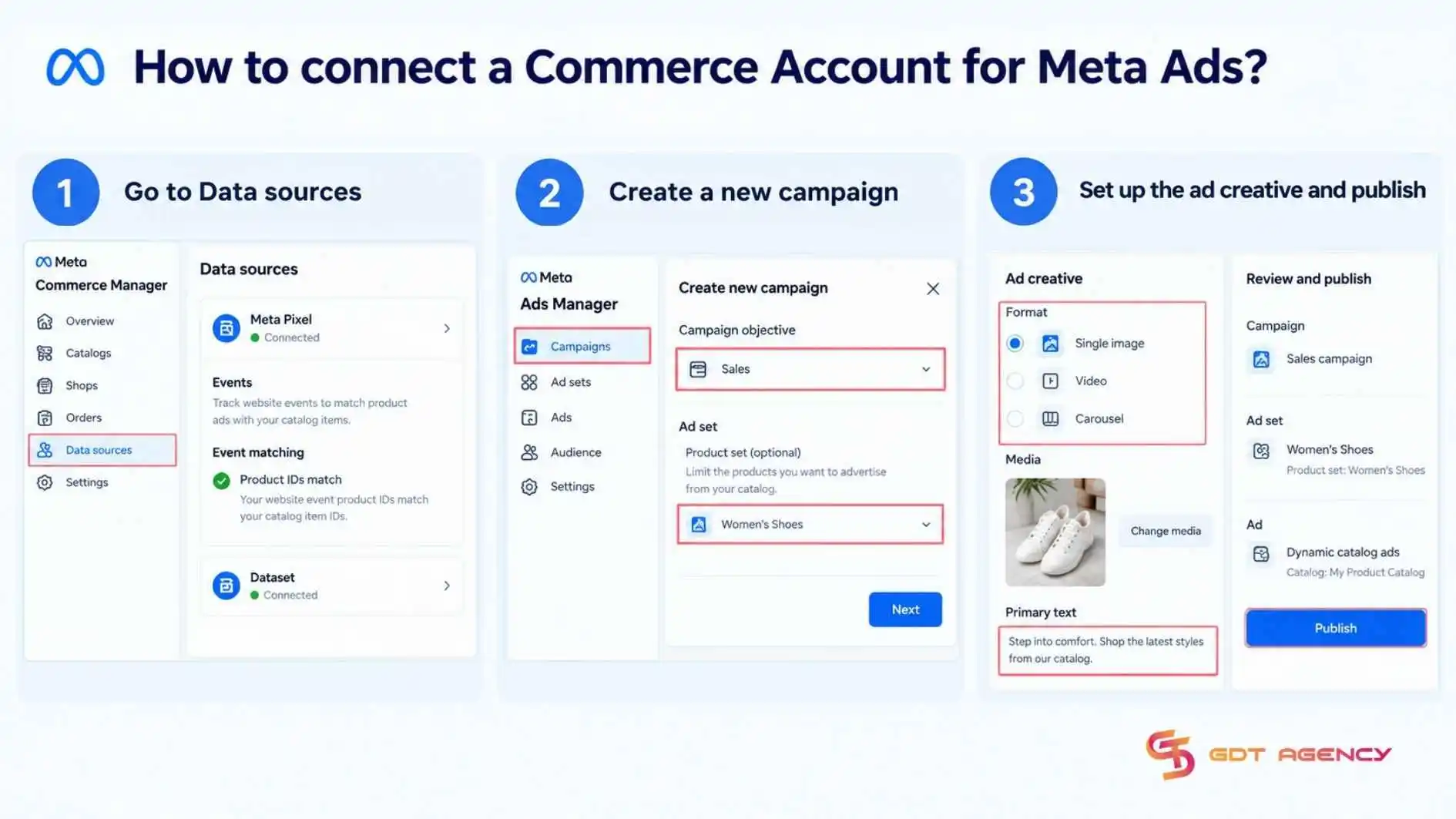
Here is a step-by-step guide to connect a Commerce Account for Meta Ads:
- Connect your Meta Pixel or dataset to the catalog, and make sure product IDs in website events match catalog item IDs
- In Ads Manager, create a campaign suited to your goal. At the ad set level, choose a product set if you want to limit the advertised products, such as Women’s Shoes or Best Sellers
- Build the creative and publish, and Meta can dynamically select catalog products based on campaign setup and user signals
>>> After setting up your Commerce Account, you learn how to create a Facebook Prepaid Ad Account for an alternative way to manage ad payments.
How is a Commerce Account different from a Facebook Shop?
A Commerce Account and Facebook Shop differ in 5 ways: role, visibility, catalog, orders and best use. The table below lines them up side by side, so you can see where responsibility sits before configuring each one
| Aspect | Commerce Account | Facebook Shop |
| Role | The backend commerce setup in Commerce Manager | The customer-facing storefront where people browse products on Facebook and Instagram |
| Visibility | Internal, managed in Commerce Manager | Public, shown on a Page or Instagram profile |
| Catalog | Connects and manages the catalog | Displays products from the connected catalog |
| Orders | Routes and tracks orders | Presents the buying experience to customers |
| Best use | Configuration, compliance and payouts | Product discovery and purchase |
What is a Facebook Shop?
A Facebook Shop is a business’s online storefront on Facebook, where customers can browse products, view collections and purchase, powered by the Commerce Account behind it.
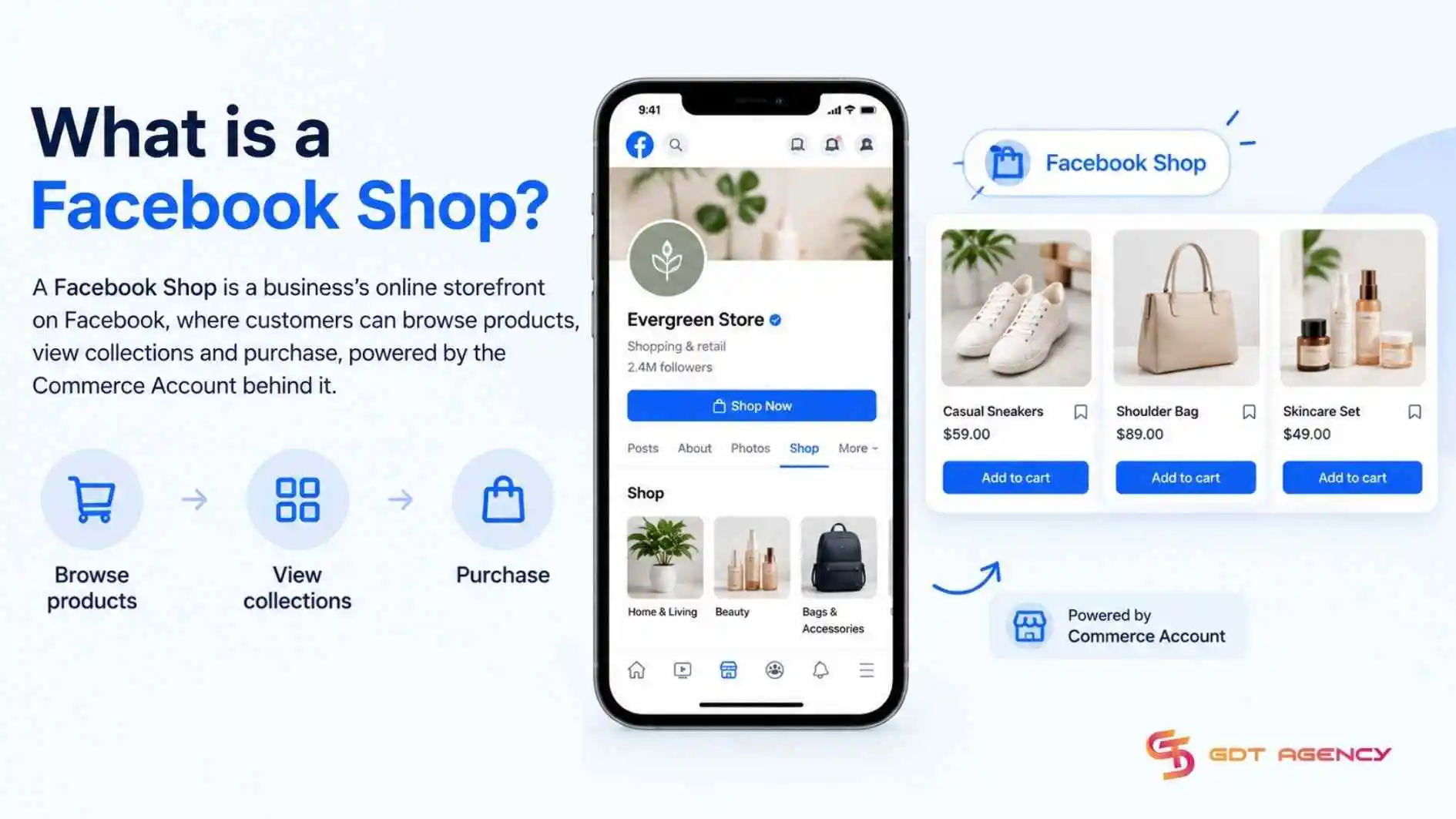
In other words, the Shop is the surface and the Commerce Account is the structure. Shoppers open the Shop to view collections, product pages and prices, but none of that content is stored in the Shop. It pulls from the catalog connected through the Commerce Account, which is why a well-organized catalog produces a better storefront than any amount of manual design work.
How does a Commerce Account connect with a Facebook Shop?
A Commerce Account connects with a Facebook Shop in 5 steps: create the Commerce Account, choose a Facebook Page, connect one product catalog to the Shop, choose the checkout method and publish the Shop.
- Create an account: Create in Meta Commerce Manager by providing business details, settings and a product catalog
- Choose a Facebook Page: The Page is where the Shop appears to customers
- Connect a product catalog: The catalog supplies the products shown in the storefront
- Choose the checkout method: checkout on Facebook or directing shoppers to your website
- Publish the Shop: You can then manage products, collections, visibility and connected channels from Commerce Manager.
Key Takeaways for Commerce Account
A Commerce Account is the backend asset in Commerce Manager that ties a business’s catalog, Facebook Page, Instagram account and Shop into one commerce setup and it supplies the product data behind catalog-based ads. Creating a Commerce Account takes 3 steps: choosing the owning Business Portfolio, setting the checkout method and sales channels and adding a catalog with shipping and return policies.
Unlike a Facebook Shop, a Commerce Account is the structure that manages it, so confirming your prerequisites first keeps both the setup and the Meta Ads connection running without gaps.
- Confirm Business Portfolio admin access, a Facebook Page, catalog permissions and product data
- Choose the owning Business Portfolio, set the checkout method and sales channels, then add a catalog with shipping and return policies
- Connect your Meta Pixel or dataset to the catalog and match product IDs in website events to catalog item IDs
- Select the catalog at the ad set level in Ads Manager, then build the creative and publish
- Publish the Shop once the catalog, Page and checkout method are connected
FAQs
Do you need a Facebook Page before creating a Commerce Account?
No, Meta lets you create a new Facebook Page during the Commerce Manager setup. To create a Commerce Account and set up a shop, you’ll need to provide business details, connect or create a catalog and select a Facebook Page to connect to the shop. If you don’t have a Page yet, choose “Create new Facebook page” during setup.
Do you need a website for on-platform checkout?
Yes, Meta’s Commerce Eligibility Requirements say your Facebook Page or Instagram Business Account must represent a single, verified domain associated with your business. However, since Meta phased out messaging checkout in 2025, website checkout is now the default, so a website checkout URL is required.
Can you connect Instagram to your Commerce Account?
Yes, you can connect Instagram during Step 2 by linking an Instagram Business account to the same Business Portfolio and Page, which lets the shop and catalog appear on Instagram.
Can you link more than one catalog to a Commerce Account?
No, Meta limits each Commerce Account to one connected catalog for Shops. Once a catalog is chosen when setting up your Facebook or Instagram Shop, the connection is permanent and cannot be swapped or combined with other catalogs in the same Commerce Account.
Is a Commerce Account required to run Advantage+ Catalog Ads?
No, Meta requires a product catalog in Commerce Manager, plus a connected Meta Pixel with the required product events to launch Advantage+ Catalog Ads.