
What are Facebook Lead Ads and how to create?

Facebook Lead Ads are Meta ads that collect contact details, such as name, email address or phone number. In practice, this lets advertisers capture interest in the moment, instead of sending people to an external page and hoping they complete a form there.
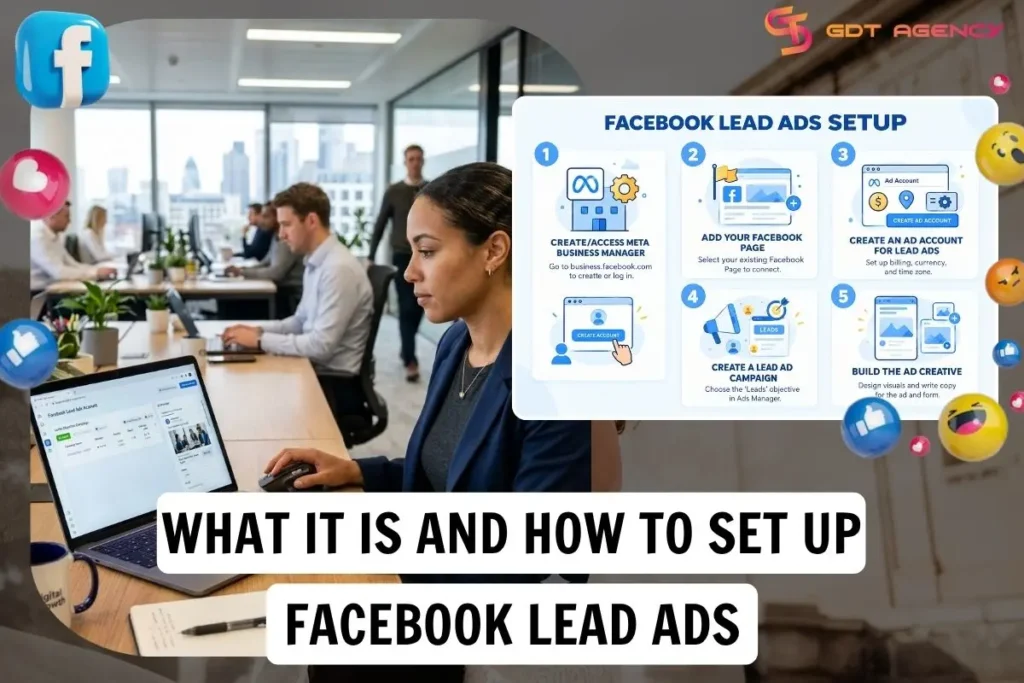
Creating Facebook Lead Ads takes 5 steps in Ads Manager: create or access a Meta Business Manager, add a Facebook Page, create a dedicated ad account, build a Lead Ad campaign and assemble the Ad creative with its Instant Form. Below, this guide breaks down each step, then explains when an Instant Form fits and when a landing page works better.
- What are Facebook Lead Ads?
- How does it work?
- Why use Facebook Lead Ads?
- How to create Facebook Lead Ads?
- Step 1: Create/access Meta Business Manager
- Step 2: Add your Facebook Page
- Step 3: Create an ad account for Lead Ads
- Step 4: Create a Lead Ad campaign
- Step 5: Build the Ad Creative
- Should you use Facebook Lead Ads or a landing page?
- How are Facebook Lead Ads different from a landing page?
- When to run Instant Forms?
- When to run landing pages?
- Key Takeaways for Facebook Lead Ads
- FAQs
- Can you check Lead Ads in Ads Manager?
- Do you need a website to run Facebook Lead Ads?
- Can you run Lead Ads on Instagram too?
- Can you connect Facebook Lead Ads account leads directly to a CRM?
- Does Facebook Pixel support tracking Facebook Lead Ads performance?
What are Facebook Lead Ads?
Facebook Lead Ads are a Meta ad format for collecting contact details from people interested in your product or service, built around the Leads objective in Ads Manager. The format helps you reach likely prospects and collect their details while their interest is fresh.
A Facebook Lead Ads setup connects 3 components: the Ad creative, the Instant Form and the lead delivery.
- Ad creative: earns the tap with an image, video or carousel and a clear call to action (CTA)
- Instant form: collects contact details inside the app, with a privacy policy link and a completion screen
- Lead delivery: stores each submission in Meta’s Leads Center and passes it to your customer relationship management (CRM) system
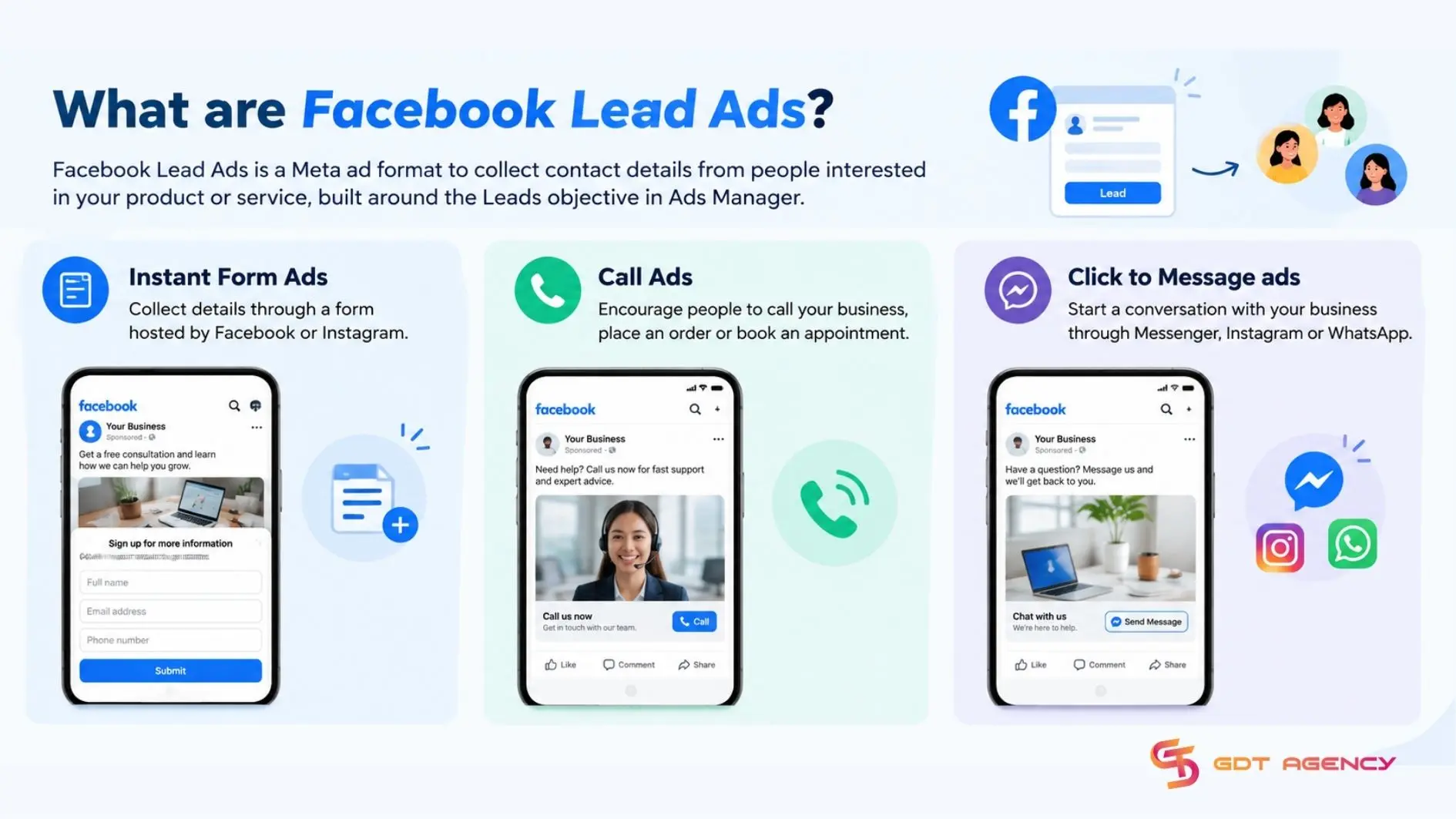
Meta’s Lead Ads include 3 formats: Instant Form Ads, Call Ads, and Click to Message ads.
- Instant Form Ads: collect details through a form hosted by Facebook or Instagram
- Call Ads: encourage people to call your business, place an order or book an appointment
- Click to Message ads: start a conversation with your business through Messenger, Instagram or WhatsApp
With nearly 10 years at GDT Agency working with Facebook Ads from standard accounts to Facebook agency accounts for retail and ecommerce, I’ve seen many advertisers default to an Instant Form for every goal. An Instant Form suits quick information capture, like a newsletter sign-up or a quote request, but when customers need to see details, book an appointment, or make a complex decision, a landing page may fit better. Matching the format to the goal decides whether a lead campaign helps your sales team or only fills the dashboard.
>>> Before setting up Facebook Lead Ads, read more about how Facebook Ad Account Infrastructure works to understand how your ad account, pages, permissions, and billing work together.
How does it work?
Facebook Lead Ads show an ad, send interested people to a form, collect their contact details and deliver them to you for follow-up. With an Instant Form, Meta can pre-fill known contact fields, reducing friction and allowing users to submit without leaving the app. After submission, you can access the leads in Leads Center, download them from Ads Manager or connect the form to a CRM for follow-up.
Why use Facebook Lead Ads?
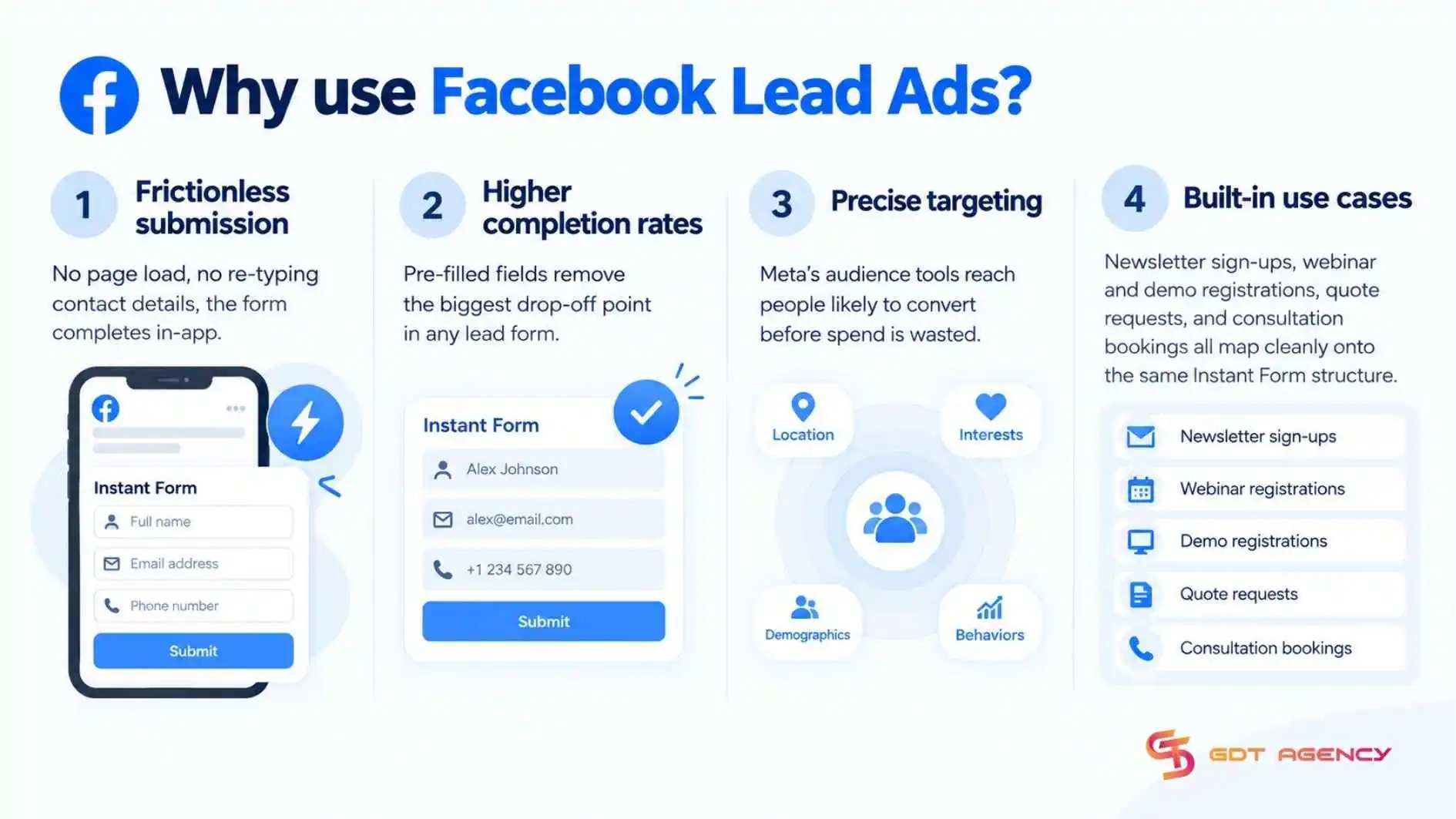
Businesses use Facebook Lead Ads for at least 4 reasons: frictionless submission, higher completion rates from pre-filled forms, precise targeting that qualifies leads before they reach a sales team and built-in use cases.
- Frictionless submission: no page load, no re-typing contact details, the form completes in-app
- Higher completion rates: pre-filled fields remove the biggest drop-off point
- Precise targeting: Meta’s audience tools reach people likely to convert before spend is wasted
- Built-in use cases: newsletter sign-ups, webinar and demo registrations, quote requests, and consultation bookings all map cleanly onto the same Instant Form structure
Beyond direct conversion, the leads collected this way also feed retargeting audiences and CRM follow-up sequences. Every submission carries a name, contact method, and often a qualifying answer that a sales or marketing team can act on immediately. To put this to work, connect the Instant Form to your CRM so each submission starts your follow-up sequence.
How to create Facebook Lead Ads?
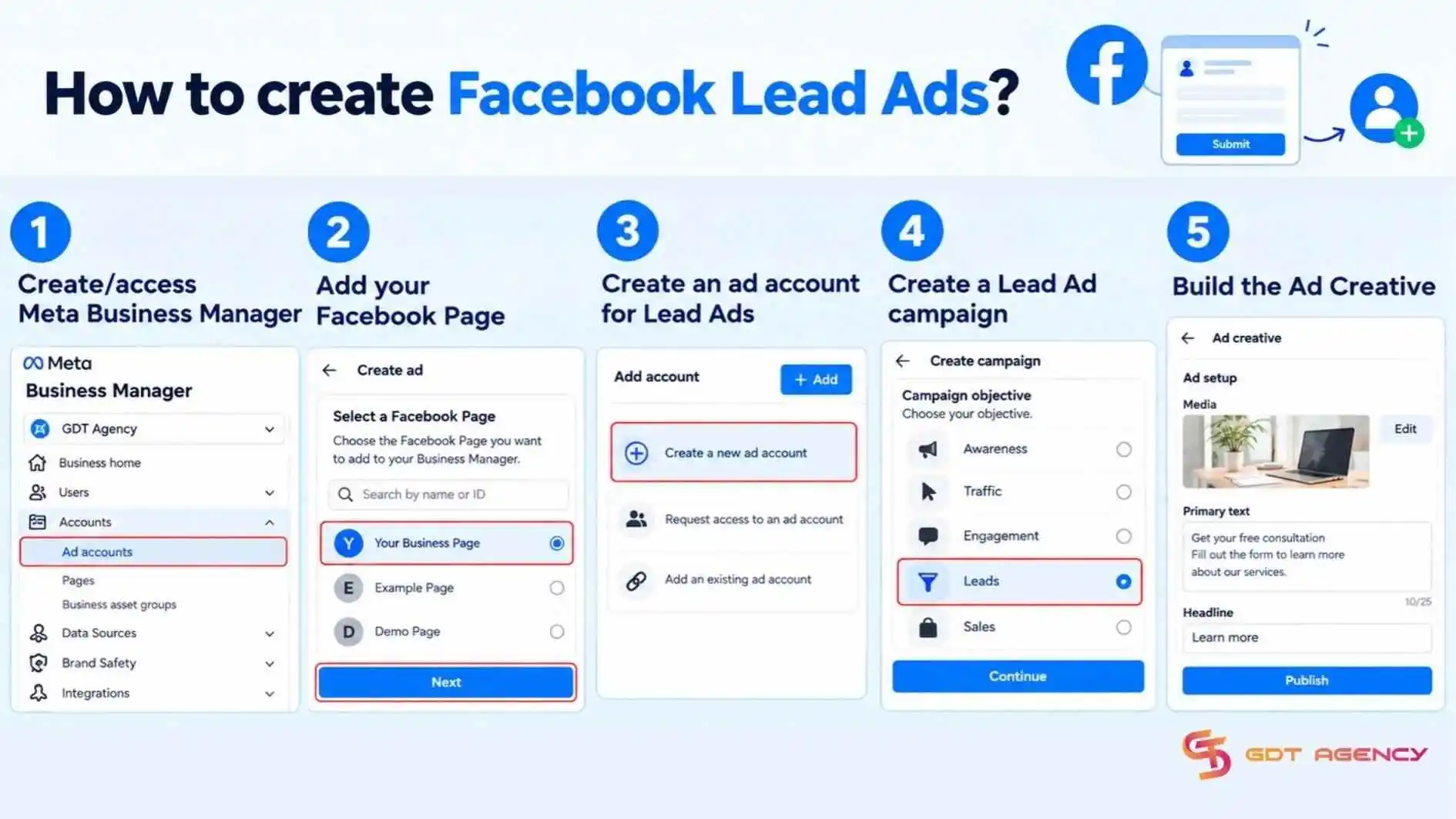
Creating Facebook Lead Ads requires 5 steps: create or access a Business Manager, add a Facebook Page, create an ad account, build a Lead Ad campaign, and assemble the Ad creative. Once these are in place in that order, an account is Lead Ads-ready.
Step 1: Create/access Meta Business Manager
First, create a new Business Manager or confirm access to an existing one, since every other asset in this process, the Page, the ad account and the campaign, needs to sit under the same business.
- Go to business.facebook.com and select “Create Account” if none exists yet
- If a Business Manager already exists, confirm admin-level access before continuing
- Name the Business Manager after the actual business, not the campaign, since it will host future assets too
Step 2: Add your Facebook Page
Connect the Page that will run the Lead Ad, since Instant Forms are published under a Page’s identity and its accepted Terms of Service, not the ad account alone.
- Go to Business Settings > Accounts > Pages, then select “Add”
- Either connect an existing Page or request access if another admin owns it
- Confirm the Page has a completed profile, since incomplete Pages can delay ad review
Step 3: Create an ad account for Lead Ads
Creating a dedicated ad account gives the Lead Ads campaign its own billing and reporting home, separate from any other campaigns the business may already be running.
- Go to Business Settings > Accounts > Ad Accounts, then select “Add” and “Create a New Ad Account”
- Assign a clear, identifiable name that references the lead-generation purpose
- Attach a payment method, since campaigns cannot deliver without active billing
Step 4: Create a Lead Ad campaign
To create the campaign, select the Leads objective in Ads Manager, which unlocks the specific ad set and ad-level settings that Instant Forms depend on.
- Open Ads Manager, click “Create,” and choose the Leads objective
- At the ad set level, confirm the Page selected matches the one connected in step 2
- Set budget, schedule, and audience targeting as with any other campaign objective
Step 5: Build the Ad Creative
Design the visual or video asset alongside the Instant Form, since both publish together as a single Lead Ad.
- Choose an image, video, or carousel format for the primary creative
- Build the Instant Form with a welcome screen, contact questions, and a privacy policy
- Add a thank-you screen with a clear next step, such as a website link or phone number
>>> After creating Facebook Lead Ads, you may also explore how to set up and run a Facebook test account to test campaign structures, creatives and targeting before scaling.
Should you use Facebook Lead Ads or a landing page?
Facebook Lead Ads win on speed and quick information capture, while landing pages are better when customers need to see details, book an appointment or make a complex decision. In WordStream’s 2026 analysis of more than 1,800 Facebook campaigns, they found that Facebook lead campaigns average an 8.54% conversion rate, a $27.39 cost per lead and a 2.7% click-through rate. Treat these averages as a reference point for Lead Ads alone, since they don’t compare Lead Ads with landing pages.
The right choice depends on what the person must do before they are ready to talk to you, so the sections below break the decision into its parts: how the 2 formats differ, when to run an Instant Form and a landing page.
How are Facebook Lead Ads different from a landing page?
Comparing Facebook Lead Ads with a landing page across 5 criteria shows where each approach fits: Location, user experience, lead volume & cost per lead (CPL), lead quality and design & content control. The table below puts both options side by side, so you can match each to your offer before you commit budget.
| Factor | Lead Ads | Landing Page |
| Location | Inside Facebook or Instagram | On your website |
| User experience | Pre-filled from Meta profile data | Lower friction |
| No automatic Meta pre-fill | More steps, page load time and scrolling | Lead volume & cost |
| Lead volume & cost | Higher | Lower |
| Lead quality | Lower intent | More qualified |
| Design & content control | Limited | Full control |
When to run Instant Forms?
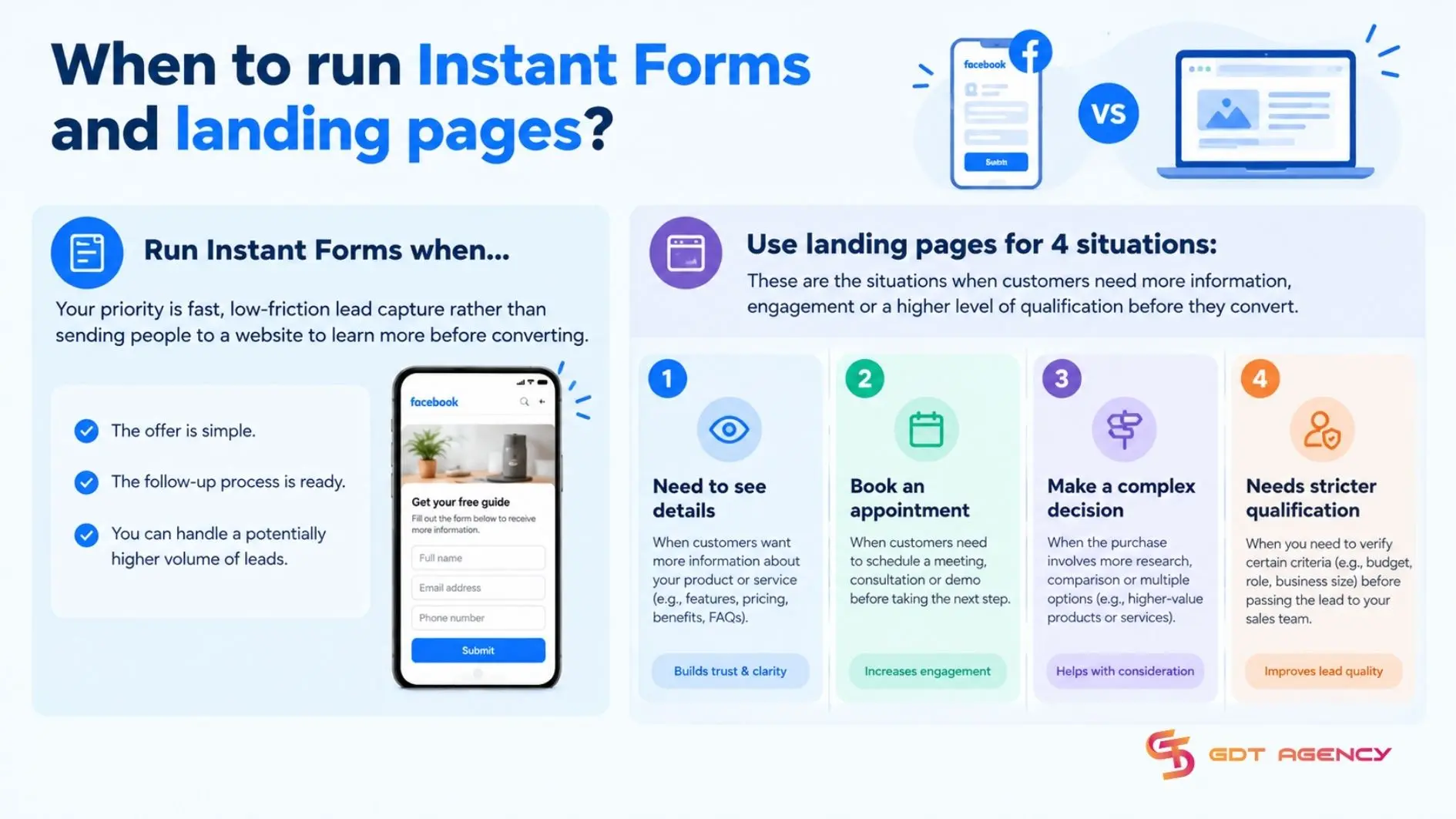
Run Instant Forms when your priority is fast, low-friction lead capture rather than sending people to a website to learn more before converting. They work best in 4 situations:
- Simple offer: newsletter signups, free guides, webinar registrations, discount alerts
- Broad audience testing: they help you quickly collect a larger pool of leads before narrowing by interest, location or qualifying answers
- Mobile campaigns: Instant Forms reduce steps because users don’t leave Facebook or Instagram and contact fields may be pre-filled.
- Automated follow-up: if leads receive an email, WhatsApp message, Messenger reply or CRM sequence immediately, Instant Form can work well even when lead intent varies
Avoid relying on Instant Forms when users need substantial information before converting, such as high-ticket B2B services, complex financial products, custom quotes or long sales cycles. In those cases, a landing page gives you more room for proof, pricing context, case studies and detailed qualification.
When to run landing pages?
There are 4 situations that favor landing pages: customers need to see details, book an appointment, make a complex decision or the lead needs stricter qualification, grouped by how much the visitor must understand first.
- Seeing details: a landing page has room for specifications, pricing, images and answers to common questions
- Booking an appointment: a landing page can embed a scheduling tool, so the visitor picks a time on the spot instead of waiting for a callback
- Making a complex decision: when the offer needs explanation or comparison, a landing page gives the visitor space to read, compare and come back later
- Stricter qualification: a landing page lets you control which fields you ask and make the answers required and a visitor who waits for a page to load and read before typing has already shown more commitment.
One business software consultancy that GDT Agency has worked with ran Facebook Lead Ads with an Instant Form to collect consultation requests for a new order management service. After 30 days, it had 1,200 leads at a $5 cost per lead (CPL). Sales found that only 26% answered the first call, 65% needed basic pricing and features re-explained, and just 30% remembered submitting the form. With 120 qualified leads (10%), the cost per qualified lead was $50.
Once it saw this, the business switched its main consultation offer to a landing page with pricing information, product benefits and a booking page. The table below shows the 30-day results of both approaches, an Instant Form and a landing page for Facebook Lead Ads, on 5 metrics: Leads, CPL, first call answers, qualified lead rate and cost per qualified lead.
| Metric | Instant Form | Landing page |
| Leads | 1,200 | 650 |
| Cost per lead | $5 | $9,2 |
| Leads answering the first call | 26% | 61% |
| Qualified lead rate | 10% | 30% |
| Cost per qualified lead | $50 | $30,67 |
The landing page cut submissions from 1200 to 650 and raised CPL from $5 to $9.2. Yet cost per qualified lead fell from $50 to $30.67, because the qualified lead rate rose from 10% to 30%. Judge a switch by cost per qualified lead rather than cost per form and keep the Instant Form for lighter offers such as a guide or checklist.
Key Takeaways for Facebook Lead Ads
Facebook Lead Ads are Meta ads that collect contact details through an Instant Form inside Facebook and Instagram. Creating Lead Ads takes 5 steps in Ads Manager, from choosing the Leads objective to publishing the ad.
An Instant Form suits quick information capture, while a landing page fits offers where customers need to see details, book an appointment or make a complex decision. Choosing the right format for each offer can help improve lead quality and reduce the real cost of each conversation.
FAQs
Can you check Lead Ads in Ads Manager?
Yes, you can check Lead Ads in the Page’s Leads Center, which lists every submission with the option to filter, sort, and download as a spreadsheet. Ads Manager also reports lead volume and cost per lead at the campaign level, without opening individual submissions,
Do you need a website to run Facebook Lead Ads?
No, if you use Instant Forms. You can collect name, email, phone number and custom qualifying questions, then access submissions in Leads Center or export them from Ads Manager.
Can you run Lead Ads on Instagram too?
Yes, Lead Ads can run on Instagram in addition to Facebook, using the same Instant Form mechanism and the same underlying ad account and campaign setup. Placement can be selected manually or left to Meta’s automatic placement optimization across both platforms
Can you connect Facebook Lead Ads account leads directly to a CRM?
Yes, Facebook Lead Ads can be connected directly to a CRM, so new submissions can appear in your CRM automatically and in real time rather than requiring a manual CSV download.
Does Facebook Pixel support tracking Facebook Lead Ads performance?
Yes, but Facebook Pixel tracks website actions, not the native Instant Form submissions inside Facebook Lead Ads. For Instant Forms, Meta records lead submissions itself in Ads Manager and Leads Center.