
How to Increase Your Facebook Ad Account Creation Limit


You can increase your Facebook ad account creation limit by verifying your business on Meta Business Manager and building a solid ad spend history over time. Meta ties this limit directly to how much trust your Business Manager has earned, so the more verified and active your account looks, the higher your limit climbs. This process usually happens in stages, not all at once, and most businesses see their limit grow from 2 accounts up to 5, then eventually higher tiers. Below, we’ll walk through what the creation limit means, how to raise it step by step, and what to do if raising it isn’t fast enough for your growth plans.
- How Do You Increase Your Facebook Ad Account Creation Limit?
- Verify Your Business on Meta Business Manager
- Build Ad Spend and Account History Over Time
- Maintain Strict Policy Compliance
- What Is the Facebook Ad Account Creation Limit?
- How Many People Can Manage One Ad Account?
- What Are the Different Ad Account Creation Limit Tiers?
- What Other Facebook Ad Account Limits Should You Know About?
- Why Isn’t Your Ad Account Creation Limit Increasing?
- Does the Ad Account Creation Limit Reset on Its Own?
- What Happens When You Reach the Ad Account Limit?
- Final Thoughts
- FAQs
- Can You Increase Your Facebook Ad Account Creation Limit?
- How long does it take for Facebook to increase your ad account creation limit?
- Does Meta charge a fee to increase your ad account creation limit?
- Can you request a limit increase directly from Meta support?
- What is the maximum number of ad accounts a Business Manager can have?
- Does creating a new Business Manager reset your ad account creation limit?
How Do You Increase Your Facebook Ad Account Creation Limit?
You can increase your ad account creation limit mainly through three actions: completing business verification, building a track record of steady ad spend, and keeping your account free of policy violations. All three work together, and skipping any one of them usually slows down the whole process.
As an expert at GDT Agency with nearly 10 years of experience working with Facebook ads across different types of ad accounts, from regular personal ad accounts to high-quality Facebook agency ad accounts, I have seen how Meta’s ad account creation limits can affect advertisers who need to manage multiple accounts.
During my time at GDT Agency, one question I hear frequently from advertisers is, “Can I increase my ad account creation limit?” Yes, you can. However, Meta does not simply increase the limit because you request it. The platform evaluates your business activity, account history, and compliance before deciding whether to give your Business Manager access to more ad accounts.
Let’s break down exactly what each step involves and why it moves the needle with Meta’s system.
Verify Your Business on Meta Business Manager
Business verification is the single fastest way to raise your account limit, and Meta walks you through it directly inside Business Settings. To start, go to your Business Manager, click Business Settings, then Security Center, and select Start Verification.
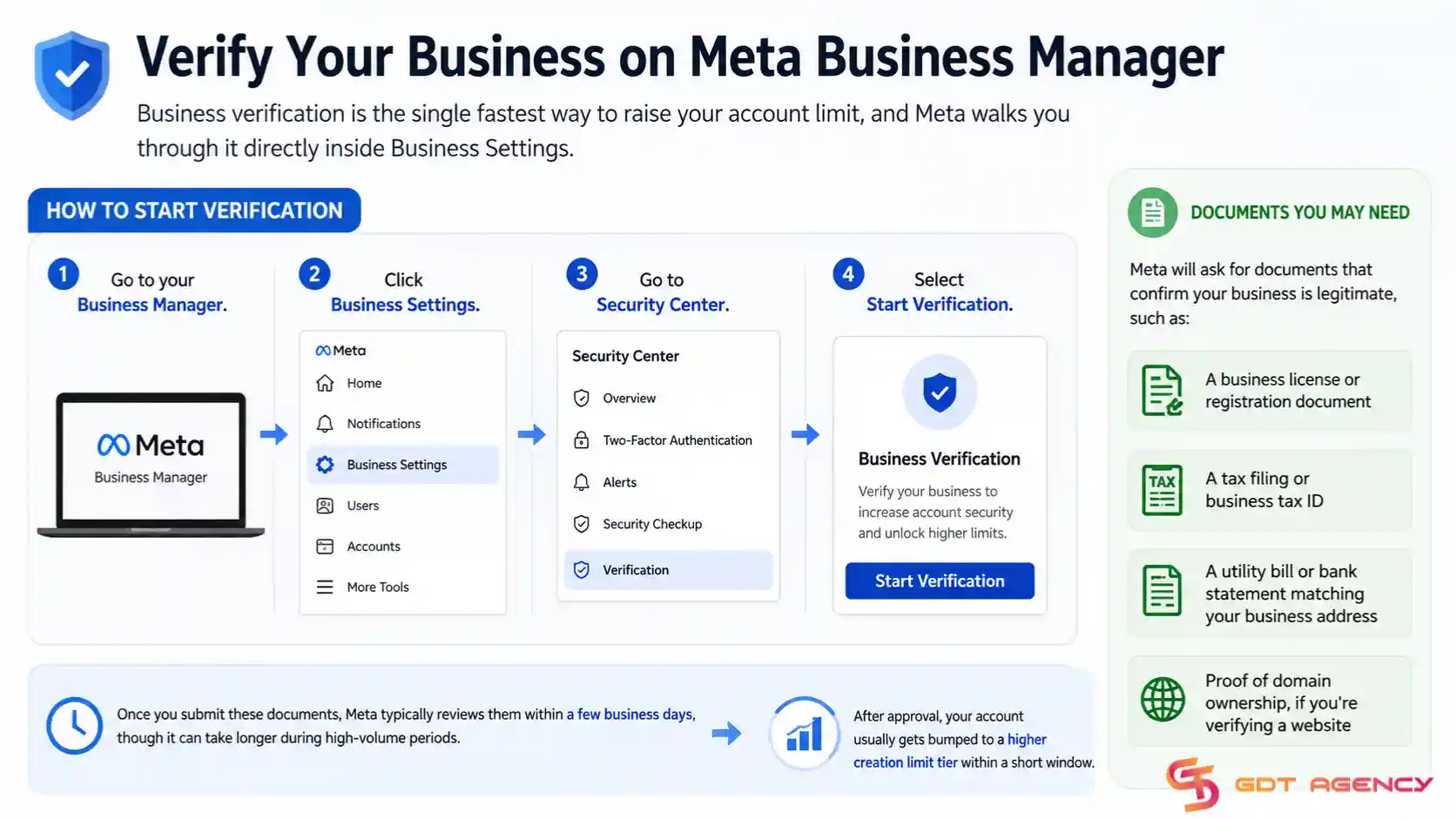
Meta will ask for documents that confirm your business is legitimate, such as:
- A business license or registration document
- A tax filing or business tax ID
- A utility bill or bank statement matching your business address
- Proof of domain ownership, if you’re verifying a website
Once you submit these documents, Meta typically reviews them within a few business days, though it can take longer during high-volume periods. After approval, your account usually gets bumped to a higher creation limit tier within a short window.
Build Ad Spend and Account History Over Time
A consistent ad spend history tells Meta your account behaves like a real advertiser rather than a temporary or suspicious one. Accounts with months of steady spending, no payment failures, and no policy strikes tend to see their limits rise on a predictable schedule.
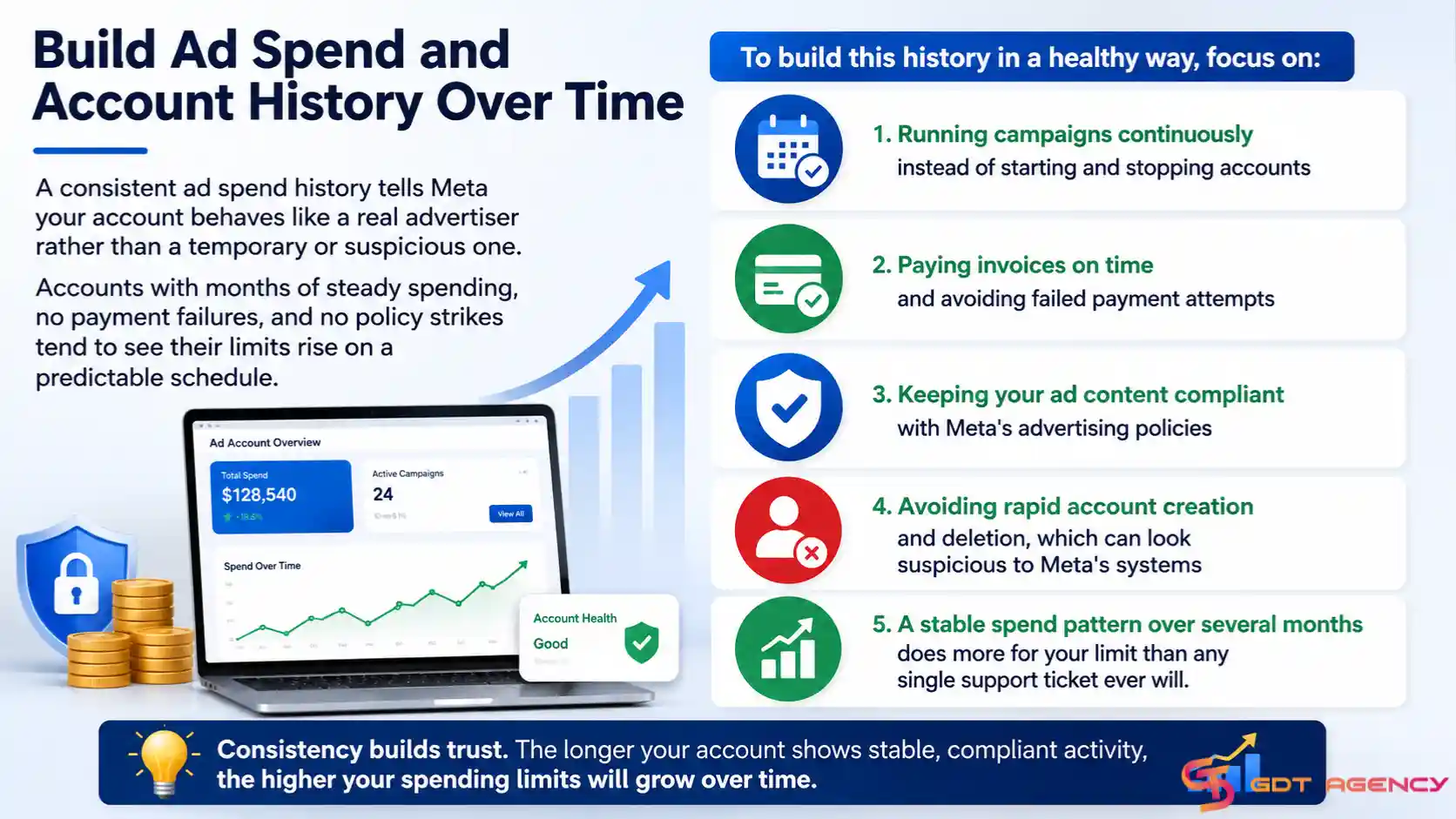
To build this history in a healthy way, focus on:
- Running campaigns continuously instead of starting and stopping accounts
- Paying invoices on time and avoiding failed payment attempts
- Keeping your ad content compliant with Meta’s advertising policies
- Avoiding rapid account creation and deletion, which can look suspicious to Meta’s systems
A stable spend pattern over several months does more for your limit than any single support ticket ever will.
Maintain Strict Policy Compliance
A clean policy record keeps your limit moving up, since even one serious violation can freeze your tier regardless of how strong your verification and spend history look. Meta weighs compliance just as heavily as the other two factors, and it often gets overlooked.
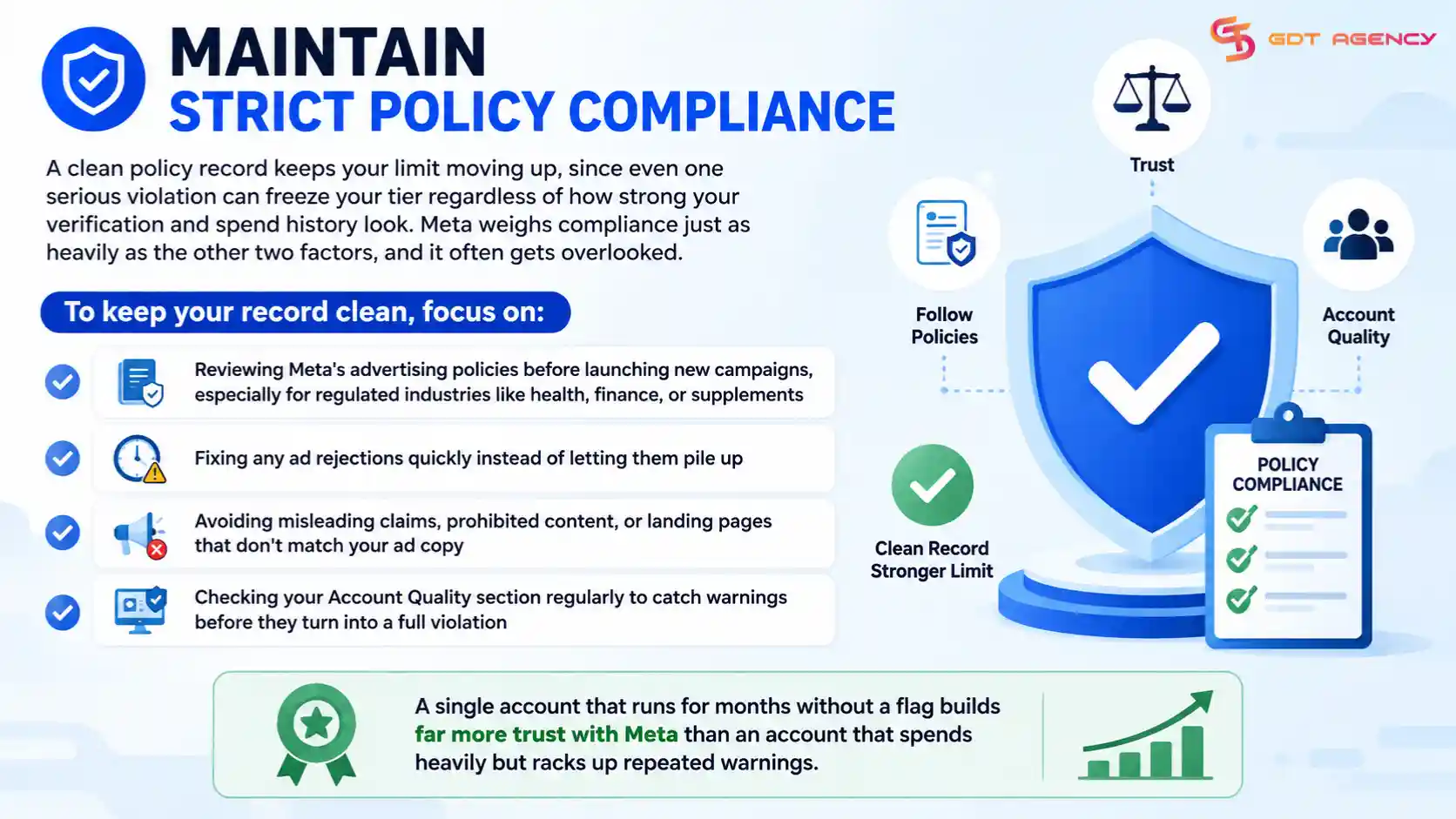
To keep your record clean, focus on:
- Reviewing Meta’s advertising policies before launching new campaigns, especially for regulated industries like health, finance, or supplements
- Fixing any ad rejections quickly instead of letting them pile up
- Avoiding misleading claims, prohibited content, or landing pages that don’t match your ad copy
- Checking your Account Quality section regularly to catch warnings before they turn into a full violation
A single account that runs for months without a flag builds far more trust with Meta than an account that spends heavily but racks up repeated warnings.
What Is the Facebook Ad Account Creation Limit?
The Facebook ad account creation limit is a cap Meta sets on how many ad accounts you can create under a single Business Manager. Meta introduced this limit to prevent bad actors from spinning up dozens of throwaway ad accounts for scams or policy violations. New Business Manager accounts typically start with a limit of just 2 ad accounts.
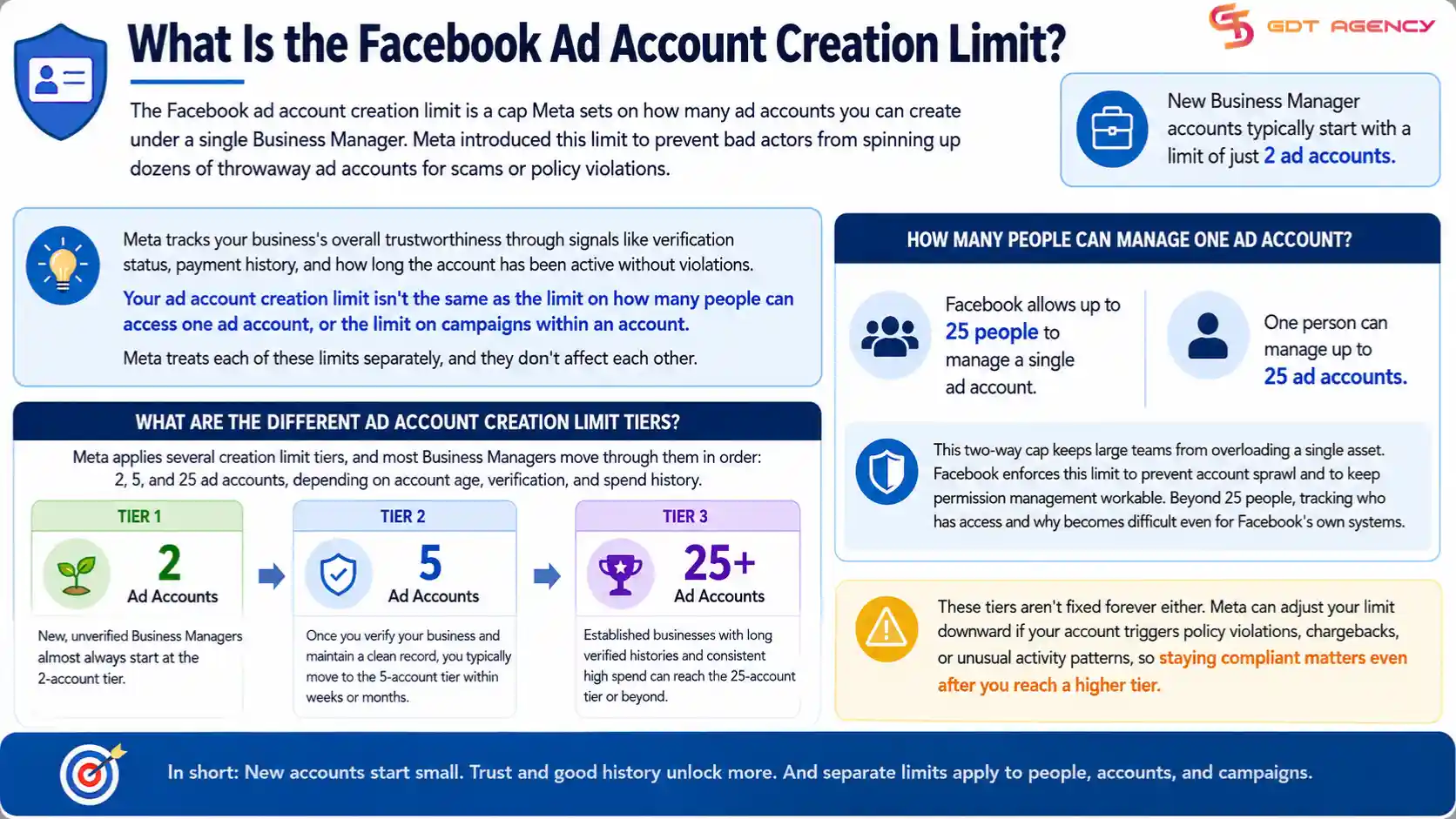
That starting number feels restrictive if you manage multiple brands, clients, or product lines. Meta tracks your business’s overall trustworthiness through signals like verification status, payment history, and how long the account has been active without violations.
Your ad account creation limit isn’t the same as the limit on how many people can access one ad account, or the limit on campaigns within an account. Meta treats each of these limits separately, and they don’t affect each other. Understanding this distinction matters, because a lot of confusion online happens when advertisers mix these limits up while troubleshooting.
→ If you are new to Facebook advertising, start with our guide on How to Create Facebook Ad Account to learn how to create and set up your first Facebook ad account before dealing with account creation limits.
How Many People Can Manage One Ad Account?
Facebook allows up to 25 people to manage a single ad account, and one person can manage up to 25 ad accounts. This two-way cap keeps large teams from overloading a single asset.
Agencies that run several client accounts often bump against this rule from the account-management side rather than the account-creation side. A media buyer working across 10 clients still has room under the 25-account cap, but a large in-house team assigned to one account can hit the 25-person limit surprisingly fast.
Facebook enforces this limit to prevent account sprawl and to keep permission management workable. Beyond 25 people, tracking who has access and why becomes difficult even for Facebook’s own systems.
What Are the Different Ad Account Creation Limit Tiers?
Meta applies several creation limit tiers, and most Business Managers move through them in order: 2, 5, and 25 ad accounts, depending on account age, verification, and spend history. Each tier represents a jump in trust level that Meta assigns to your business.
New, unverified Business Managers almost always start at the 2-account tier. Once you verify your business and maintain a clean record, you typically move to the 5-account tier within weeks or months. Established businesses with long verified histories and consistent high spend can reach the 25-account tier or beyond, though Meta doesn’t publish an exact formula for when each jump happens.
These tiers aren’t fixed forever either. Meta can adjust your limit downward if your account triggers policy violations, chargebacks, or unusual activity patterns, so staying compliant matters even after you reach a higher tier.
→ If you are setting up a new account for the first time, follow our guide on How to Set Up a Facebook Ad Account: A Step-by-Step Guide to complete the setup correctly and avoid common configuration issues.
What Other Facebook Ad Account Limits Should You Know About?
Beyond the creation limit, Facebook applies separate limits on campaigns, ad sets, and ads within each individual account. These limits work independently from your creation limit, and they matter just as much once you start scaling a single account rather than creating new ones.
Knowing how these limits interact helps you decide whether you actually need more ad accounts, or whether you just need to manage your existing accounts more efficiently.
Ad Account Creation Limit vs. Campaign and Ad Set Limits
The creation limit controls how many ad accounts you can open, while campaign and ad set limits control how much activity fits inside each account you already have. Meta caps the number of campaigns, ad sets, and ads per account separately from the account creation limit, and hitting one doesn’t affect the other.
- One ad account can hold up to 5000 campaigns at any given time. Facebook counts both active and paused campaigns toward this total, so old, unused campaigns still take up space.
- Facebook allows up to 5000 ad sets across an entire ad account, and each ad set can contain up to 50 individual ads. This structure supports even the largest advertisers running detailed audience segmentation.
Why Isn’t Your Ad Account Creation Limit Increasing?
Your ad account creation limit likely isn’t increasing because your business verification is incomplete, your spend history is too short, or your account has a recent policy flag. These three issues cause the vast majority of stuck limits.
An incomplete or rejected verification is the most common culprit. If Meta flagged a document as unclear or mismatched with your business details, the verification process stalls silently, and many advertisers don’t notice until they check their Security Center status directly.
A short or inconsistent spend history is the second common cause. If your account is brand new or has gaps where campaigns paused for weeks at a time, Meta’s system reads that as lower trust, even if nothing went wrong. Finally, any recent policy violation, even a minor one, can freeze your limit at its current tier until the flag clears from your record. Checking your Account Quality section inside Business Manager will show you if a violation is holding your limit back.
Does the Ad Account Creation Limit Reset on Its Own?
No, the ad account creation limit does not reset on its own in the sense of dropping back to a lower number without cause, but it also doesn’t increase automatically without meeting the verification and spend requirements. Meta’s system only adjusts the limit in response to specific triggers, whether that’s positive progress like verification or negative signals like policy violations.
Advertisers sometimes expect their limit to bump up after a certain amount of time passes, but Meta doesn’t work on a fixed calendar schedule. The limit moves based on account behavior and trust signals, not on the number of days since account creation.
What Happens When You Reach the Ad Account Limit?
Facebook shows an “Ad Account Limit Reached” message and blocks any new account creation until the business either increases its limit or removes an existing account. This message appears the moment a profile or Business Manager tries to exceed its current cap.
Facebook shows this message because the profile or Business Manager has already used every available ad account slot allowed at its current trust level. The system will not create a new account until that ceiling moves.
Community reports on forums like r/FacebookAds confirm that newer profiles hit this wall around one account, while older ones cap out closer to five. Business Manager accounts hit similar walls at their own tiers. In every case, the message points to the same root cause: the account or business has not yet earned a higher limit.
Final Thoughts
Raising your Facebook ad account creation limit comes down to two things: verifying your business and keeping a clean, consistent spend history. Skip either one and your limit stays put, no matter how long you wait. If your limit is stuck, check your verification status and Account Quality section first, since those two spots reveal most of the reasons behind a frozen tier.
If you need more accounts right now and can’t wait on the verification timeline, renting an agency account through a provider like GDT Agency gets you running without the delay. Either path works, so pick the one that matches how fast you actually need to scale.
FAQs
Can You Increase Your Facebook Ad Account Creation Limit?
Yes. Meta can increase your ad account creation limit based on factors such as business verification, consistent ad spend, and a clean policy record. Meta may increase the limit automatically as your business builds a trustworthy advertising history.
How long does it take for Facebook to increase your ad account creation limit?
It varies, but most advertisers see a limit increase within a few weeks to a few months after completing business verification and maintaining steady ad spend. Meta doesn’t publish a fixed timeline, since the increase depends on account behavior rather than a set schedule.
Does Meta charge a fee to increase your ad account creation limit?
No, Meta doesn’t charge any fee to raise your limit. The process runs entirely through business verification and account history, both of which are free to complete inside Business Manager.
Can you request a limit increase directly from Meta support?
In most cases, no. Meta’s system raises your limit automatically once your account meets the verification and spend requirements, and support tickets rarely speed up the process. Focus on completing verification instead of waiting on a support response.
What is the maximum number of ad accounts a Business Manager can have?
The maximum depends on your business’s verification status and history, with well-established, verified businesses often reaching 25 accounts or more. Meta doesn’t publish an absolute cap, since it adjusts limits case by case based on trust signals.
Does creating a new Business Manager reset your ad account creation limit?
Yes, a brand-new Business Manager starts back at the base tier, usually 2 ad accounts, regardless of the limit your previous Business Manager reached. This is why advertisers who need scale fast often turn to rented agency accounts instead of starting fresh Business Managers repeatedly.