
Google Ads Verification News: Latest Policy Changes Advertisers Must Track


Google Ads advertiser verification has changed several times in the past year, and advertisers who ignore these updates risk account suspension. The most recent Google Ads verification news include a stricter Circumventing Systems Policy that went into effect in November 2025, a relocated verification page inside the Google Ads console, and an expanded financial advertiser verification program across Europe. These shifts affect how advertisers submit documents, how long verification takes, and what happens when an account gets flagged.
Beyond the policy updates themselves, advertisers also need to know whether verification applies to them, what documents Google asks for, and how the process differs between the US and the EU. Many advertisers assume verification is a one-time step, but Google can re-trigger it at any point, sometimes because of branded keyword usage or a change in account activity.
This article walks through every major update, explains the document requirements in plain terms, and compares how the US and EU programs work. It also covers common problems advertisers run into, such as a verification status that stays stuck on pending for weeks. By the end, you will know exactly what changed, what Google expects from you, and how to avoid a suspended account.
- What Are the Latest Google Ads Verification Policy Changes?
- What Changed With the Circumventing Systems Policy in November 2025?
- Why Did Google Move the Verification Page in Google Ads Console?
- Is Google Ads Verification Mandatory for All Advertisers?
- What Documents Are Required for Advertiser Verification?
- How Does Verification Differ Between the US and EU?
- Why Is My Google Ads Verification Pending or Stuck?
- What Triggers Google Ads Re-Verification for Branded Keywords?
- What Happens If You Fail Advertiser Verification?
- How Long Does Google Ads Verification Typically Take?
- What Is the Difference Between Advertiser Verification and Business Verification?
- Final Thoughts
- Frequently Asked Questions
- Does Google Ads verification expire?
- Can an agency complete verification on behalf of a client?
- What happens to active campaigns during the verification process?
- Does verification status affect Google Ads account ratings or Quality Score?
- Can advertisers speed up a pending verification review?
What Are the Latest Google Ads Verification Policy Changes?
As an expert at GDT Agency with nearly 10 years of experience working with Google Ads through multiple accounts, from standard to Google Ads agency accounts, I always have to update the latest information on advertising platforms.
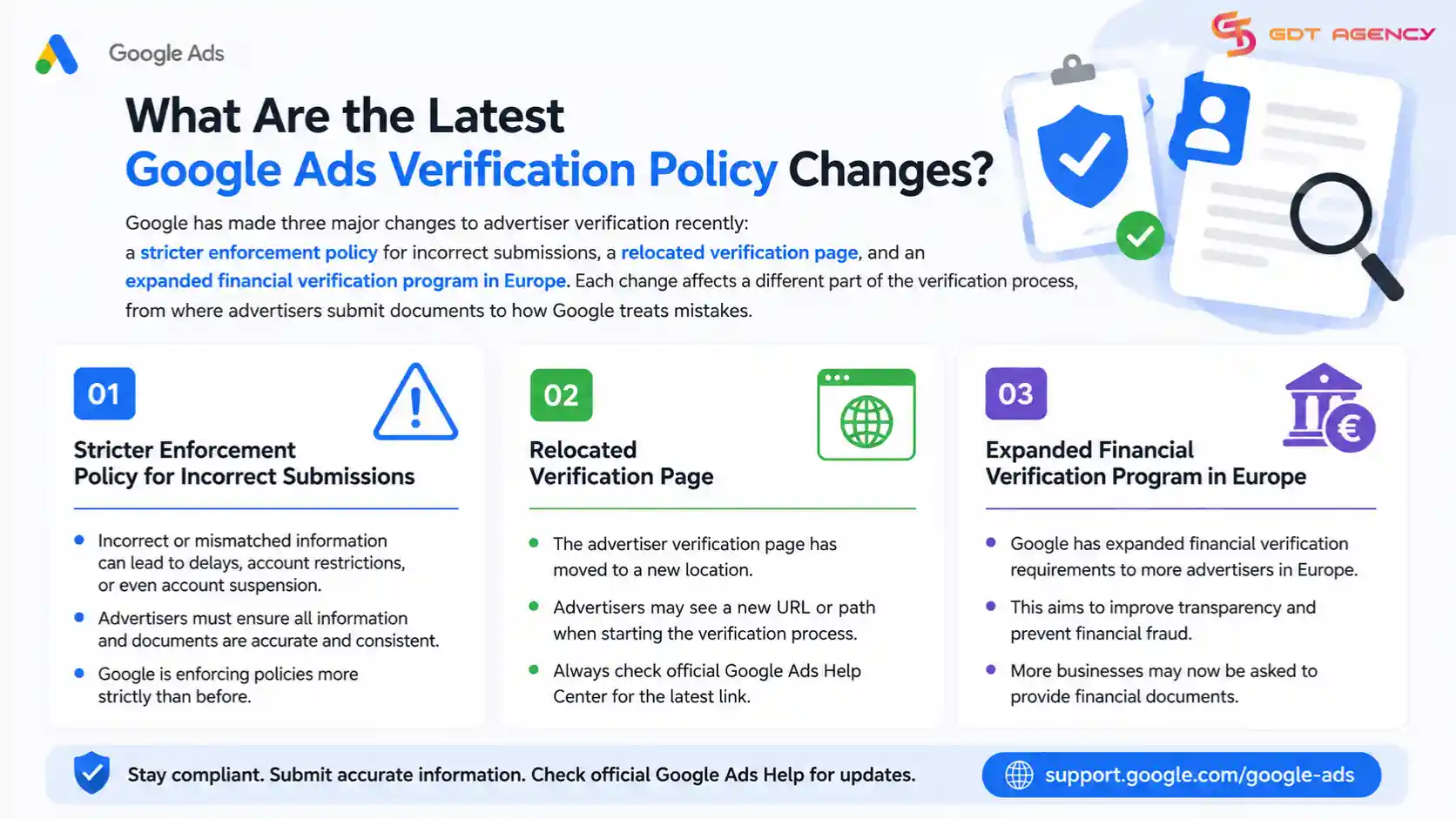
Recently, Google has made three major changes to advertiser verification: a stricter enforcement policy for incorrect submissions, a relocated verification page, and an expanded financial verification program in Europe. Each change affects a different part of the verification process, from where advertisers submit documents to how Google treats mistakes.
Below is a closer look at the two changes that have generated the most confusion among advertisers.
What Changed With the Circumventing Systems Policy in November 2025?
Google now treats incorrect or misleading verification submissions as a violation of its Circumventing Systems Policy. Before this update, a failed verification attempt usually just meant the advertiser had to resubmit documents. Now, Google can flag a mismatched or falsified submission as an attempt to bypass its verification systems, which carries much harsher consequences.
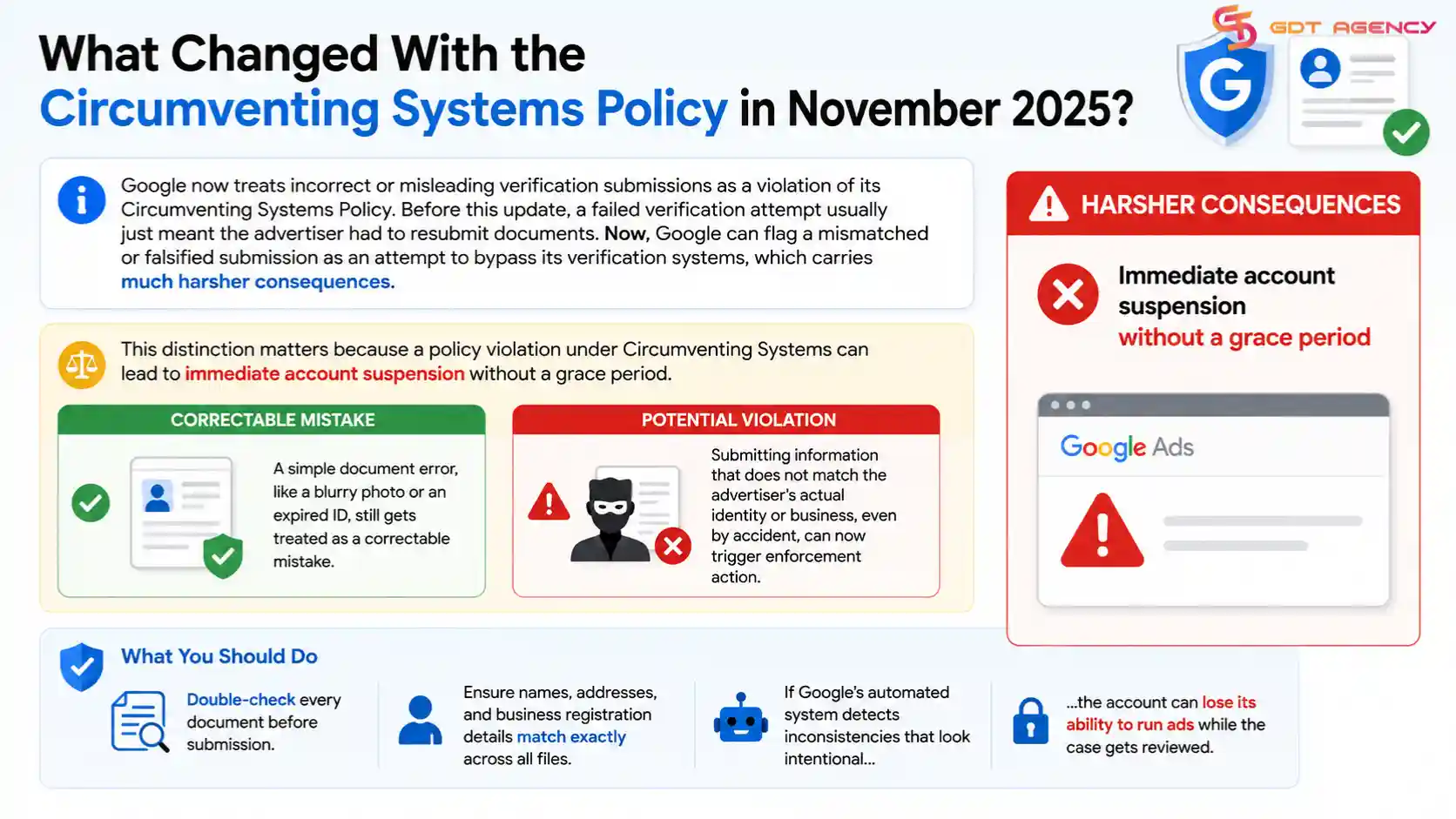
This distinction matters because a policy violation under Circumventing Systems can lead to immediate account suspension without a grace period. A simple document error, like a blurry photo or an expired ID, still gets treated as a correctable mistake. But submitting information that does not match the advertiser’s actual identity or business, even by accident, can now trigger enforcement action.
Advertisers should double-check every document before submission. Names, addresses, and business registration details need to match exactly across all files. If Google’s automated system detects inconsistencies that look intentional, the account can lose its ability to run ads while the case gets reviewed.
Why Did Google Move the Verification Page in Google Ads Console?
Google moved the advertiser verification page from its old location into the Admin section, under Policy and Account. Advertisers who bookmarked the old URL or followed outdated support articles often can’t find the page anymore, which has caused a wave of confused posts in the Google Ads Community.
The new path groups verification alongside other compliance tools, which makes sense from Google’s side since verification status now affects more account-level decisions than before. To find it, go to the gear icon in the top right of Google Ads, select Admin, then Policy and Account, and look for the verification status card.
This move happened without much public announcement, so many long-time advertisers only discovered it when their verification status suddenly seemed to disappear from the old menu. If you manage multiple accounts, it’s worth updating any internal documentation or training materials that reference the old navigation path.
Is Google Ads Verification Mandatory for All Advertisers?
Yes, Google Ads verification is mandatory for most advertisers, though the exact requirement depends on your account type, spending level, and industry. Google applies it broadly to protect users from fraudulent or misleading ads, and accounts that skip verification eventually lose the ability to serve ads.
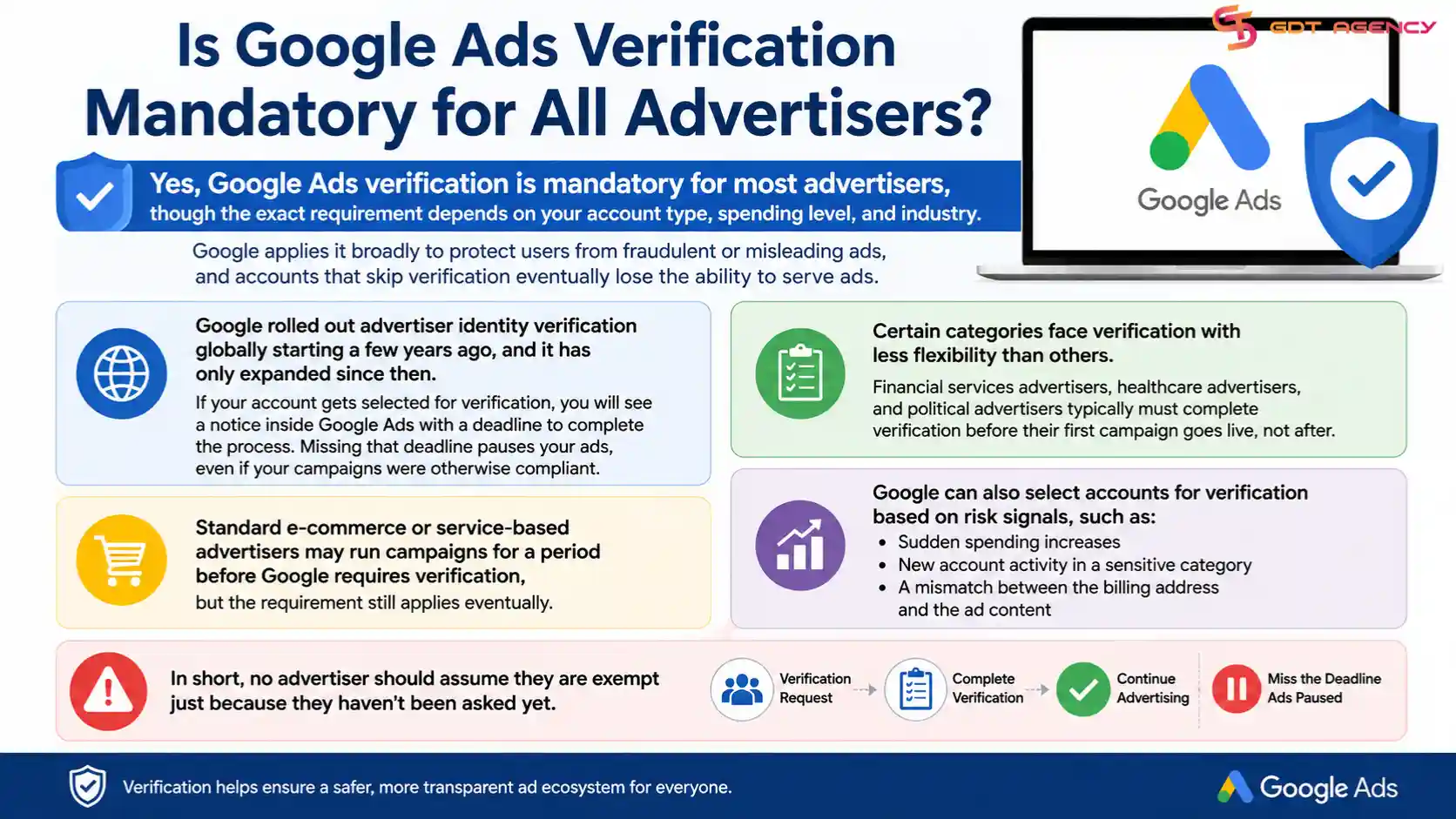
Google rolled out advertiser identity verification globally starting a few years ago, and it has only expanded since then. If your account gets selected for verification, you will see a notice inside Google Ads with a deadline to complete the process. Missing that deadline pauses your ads, even if your campaigns were otherwise compliant.
Certain categories face verification with less flexibility than others. Financial services advertisers, healthcare advertisers, and political advertisers typically must complete verification before their first campaign goes live, not after. Standard e-commerce or service-based advertisers may run campaigns for a period before Google requires verification, but the requirement still applies eventually.
Google can also select accounts for verification based on risk signals, such as sudden spending increases, new account activity in a sensitive category, or a mismatch between the billing address and the ad content. In short, no advertiser should assume they are exempt just because they haven’t been asked yet.
What Documents Are Required for Advertiser Verification?
Advertiser verification requires three main types of documents: a government-issued photo ID, proof of business legitimacy, and a live selfie that matches the ID photo. Google groups these requirements by whether the advertiser is an individual or a registered business.
For individual advertisers, Google typically asks for a passport, driver’s license, or national ID card. The selfie requirement, which Google added more broadly within the past year, asks the advertiser to take a real-time photo that Google’s system compares against the submitted ID. This step exists specifically to prevent someone from using a stolen or borrowed identity document.
For business advertisers, Google usually requests one of the following, depending on the country:
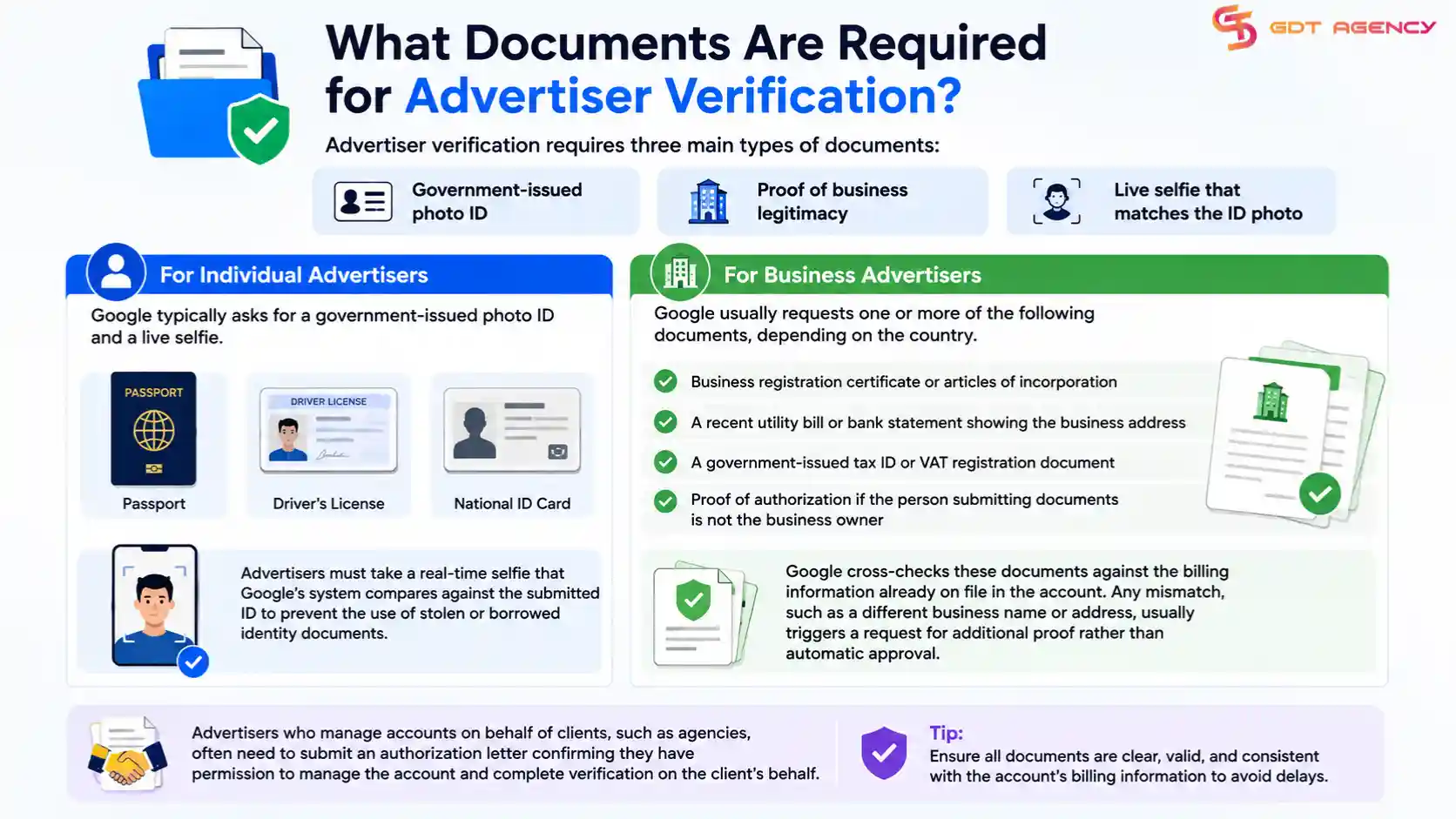
- Business registration certificate or articles of incorporation
- A recent utility bill or bank statement showing the business address
- A government-issued tax ID or VAT registration document
- Proof of authorization if the person submitting documents is not the business owner
Google cross-checks these documents against the billing information already on file in the account. Any mismatch, such as a different business name or address, usually triggers a request for additional proof rather than automatic approval.
Agencies that need access to dedicated advertising infrastructure can also learn how to rent a Google Ads agency account, including the rental process, requirements, and key benefits.
Advertisers who manage accounts on behalf of clients, such as agencies, often need to submit an authorization letter confirming they have permission to manage the account and complete verification on the client’s behalf.
How Does Verification Differ Between the US and EU?
US advertiser verification focuses mainly on identity confirmation, while EU verification adds a mandatory financial advertiser layer that goes further than what most US advertisers experience. Google expanded this financial verification requirement across the EU specifically to help users identify trustworthy financial service providers, following pressure from European regulators around financial ad fraud.
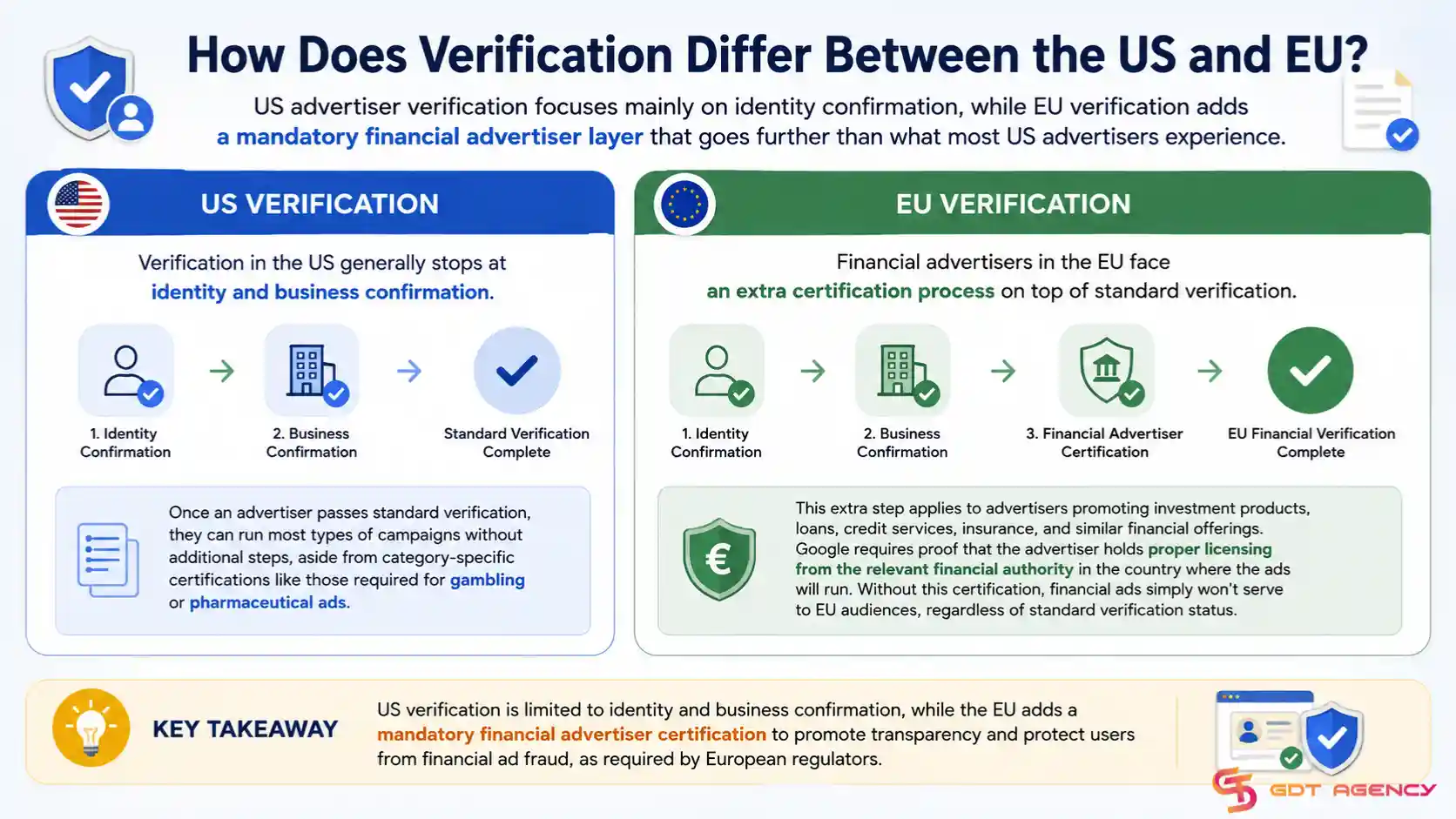
In the US, verification generally stops at identity and business confirmation. Once an advertiser passes standard verification, they can run most types of campaigns without additional steps, aside from category-specific certifications like those required for gambling or pharmaceutical ads.
In the EU, financial advertisers face an extra certification process on top of standard verification. This applies to advertisers promoting investment products, loans, credit services, insurance, and similar financial offerings. Google requires proof that the advertiser holds proper licensing from the relevant financial authority in the country where the ads will run. Without this certification, financial ads simply won’t serve to EU audiences, regardless of standard verification status.
The table below summarizes the main differences advertisers should know.
| Requirement | United States | European Union |
| Identity verification | Required | Required |
| Business verification | Required | Required |
| Financial advertiser certification | Not required for most categories | Mandatory for financial services |
| Regulatory basis | Google internal policy | Google policy plus EU financial regulation |
This table compares core verification requirements between the US and EU so advertisers can quickly see where the extra EU financial certification step applies. Advertisers running campaigns in both regions should treat these as separate compliance tracks rather than assuming one verification covers both.
Why Is My Google Ads Verification Pending or Stuck?
A Google Ads verification stuck on pending usually means Google’s review team needs more time, found a minor mismatch in the submitted documents, or is waiting on a manual review step that automated systems can’t complete. Advertisers on the Google Ads Community frequently report pending statuses lasting anywhere from a few days to several weeks, even after submitting every requested document.
The most common reason for delays is a small inconsistency between the account’s billing information and the submitted documents. For example, if the business name on file reads “Smith Consulting LLC” but the submitted registration certificate says “Smith Consulting,” Google’s system may flag it for manual review instead of approving it automatically.
Another frequent cause is document quality. Blurry scans, cropped edges, or expired IDs get rejected or held for review rather than approved outright. Advertisers should resubmit clear, high-resolution copies and confirm every document is currently valid before uploading.
If verification stays pending for more than two weeks with no update, advertisers can contact Google Ads support directly and request a manual status check. Posting in the Google Ads Community sometimes surfaces a faster response too, since Google occasionally has support staff monitor those threads for account-specific issues.
What Triggers Google Ads Re-Verification for Branded Keywords?
Google can re-trigger verification when an advertiser’s campaign bids on branded keywords tied to another company or trademark, since this pattern often signals impersonation or unauthorized use of a brand name. This re-verification step exists to confirm the advertiser has a legitimate connection to the brand terms they’re targeting.
Once re-verification triggers, Google gives advertisers a 30-day window to complete the new verification request. If the advertiser misses that deadline, the account risks suspension, even if it passed verification previously. This has caught many advertisers off guard, since they assumed a completed verification was permanent.
Agencies running campaigns for multiple clients face this trigger more often, since branded keyword bidding is a common strategy in competitor conquesting campaigns. If your agency uses this strategy, keep documentation ready that proves authorization to bid on those terms, such as a signed agreement with the brand owner or client.
What Happens If You Fail Advertiser Verification?
Failing Google Ads verification results in paused campaigns and, in repeated failure cases, permanent account suspension. Google typically gives advertisers a chance to resubmit documents after a first failed attempt, but repeated failures or submissions flagged under the Circumventing Systems Policy can end the appeal process entirely.
When verification fails, Google sends a notification explaining the reason, though these explanations can be vague, such as “documents did not meet requirements.” Advertisers should review every document against Google’s stated requirements before resubmitting rather than guessing at what went wrong.
If an account gets suspended after failed verification, the appeal process requires submitting a form through the Google Ads Help Center along with corrected documentation. Appeals can take one to two weeks to process, and Google does not guarantee reinstatement, particularly if the suspension involved a Circumventing Systems violation.
How Long Does Google Ads Verification Typically Take?
Google Ads verification typically takes between three and five business days, though it can extend to several weeks if the account gets flagged for manual review. Standard identity and business verification usually moves faster than financial advertiser certification in the EU, which often takes longer due to the added regulatory check.
Several factors affect processing time. Accounts with clean, matching documentation on the first submission generally clear review fastest. Accounts that require additional verification, such as authorization letters for agencies managing client accounts, take longer since Google needs to confirm the relationship between the parties involved.
Advertisers running time-sensitive campaigns should submit verification documents well before a launch date rather than waiting until the deadline Google provides. Waiting until the last few days leaves no buffer if Google requests additional information.
What Is the Difference Between Advertiser Verification and Business Verification?
Advertiser verification confirms the identity of the person or entity running ads, while business verification confirms that the business itself is legitimate and matches the information Google has on file. These two processes often run together, but they check different things and can produce different outcomes.
Advertiser verification asks for a government-issued ID and, in many cases, a selfie match. This step exists to confirm a real person stands behind the account, which helps Google prevent anonymous or fraudulent ad operators.
Business verification asks for registration documents, tax IDs, or proof of address tied to the business itself. This step confirms the business exists as a legal entity and operates from the location it claims. For advertisers using monthly invoicing, see our guide to Google Ads Monthly Invoicing: Business Verification Requirements to learn which business documents Google may require.
Understanding this distinction matters because Google’s support messages don’t always specify which verification type failed. If your account shows a verification issue, check the Policy and Account section in the Google Ads console to see whether the flag applies to the advertiser identity, the business, or both.
Final Thoughts
Google Ads verification keeps changing, and advertisers who stay unaware of these updates put their accounts at risk. The November 2025 Circumventing Systems Policy update means Google now treats incorrect submissions more seriously than before. The relocated verification page inside Admin and Policy and Account catches many advertisers off guard, especially those following old support articles. Advertisers running campaigns in the EU also need to plan for the added financial certification step, since it takes longer than standard verification.
The best way to avoid disruption is simple. Submit accurate, matching documents the first time. Watch for re-verification triggers, especially if your campaigns bid on branded keywords. And build in extra time before any launch date, since verification rarely moves faster than expected. Advertisers who treat verification as an ongoing requirement, not a one-time task, keep their accounts running without interruption.
Frequently Asked Questions
Does Google Ads verification expire?
Google Ads verification does not have a fixed expiration date, but Google can re-trigger it at any time based on account activity, branded keyword bidding, or other risk signals. A completed verification is not permanent protection against future review.
Can an agency complete verification on behalf of a client?
Yes, an agency can complete verification for a client account, but Google usually requires a signed authorization letter proving the agency has permission to manage the account. Without this document, Google may reject the submission or ask for additional proof.
What happens to active campaigns during the verification process?
Active campaigns generally continue running while verification is in progress, unless the account has already missed a verification deadline. Once a deadline passes without completed verification, Google pauses all campaigns until the process finishes.
Does verification status affect Google Ads account ratings or Quality Score?
No, verification status does not directly affect Quality Score or keyword-level metrics. However, a suspended account from failed verification stops all ad delivery, which indirectly halts any performance data Google would otherwise use for optimization.
Can advertisers speed up a pending verification review?
Advertisers cannot force Google to speed up automated review, but contacting Google Ads support after two weeks of no update often prompts a manual check. Submitting clean, high-resolution documents on the first attempt also reduces the chance of delays caused by review flags.