


You apply for Google Ads monthly invoicing through the Billing settings in your account, and Google reviews your business credit history before approval. The Google Ads monthly invoicing requirements business verification process checks four main things: account age, ad spend history, business registration, and a linked payment profile. Most large advertisers and agencies use this payment method because it lets them pay after their ads run instead of before.
Google sets clear eligibility requirements before it accepts an application. Your account needs a minimum spend history, a good standing record, and a link to a manager account. These rules exist because Google extends you a real line of credit, so it needs proof that your business can pay it back.
The application itself takes a few steps. You submit a request through Google’s contact form, provide your company details, and choose a billing contact who accepts the terms and conditions. Google’s team then reviews your credit history, which can take several business days.
Business verification is where most applications slow down. Google checks your registration documents, your billing address, and your payment history to confirm your business is legitimate. Below, we walk through each requirement, the exact steps to apply, and what documents you need to get approved.
What Is Google Ads Monthly Invoicing?
Monthly invoicing is a payment setting where Google gives your business a line of credit for advertising costs, then bills you once a month instead of charging you automatically. Large advertisers and agencies that manage multiple client accounts use it most often.
The setting works differently from standard automatic payments. With automatic payments, Google charges your card or bank account right after your ads run. With monthly invoicing, Google lets the costs build up over the month, then sends one invoice that you pay by check, bank transfer, or another accepted method in your region.
This setup gives businesses more control over cash flow. A company can plan its budget around a single monthly bill instead of tracking multiple automatic charges throughout the month. Agencies that manage several client accounts also find it easier to reconcile costs once a month rather than daily.
Google requires you to accept specific terms and conditions before you switch to this payment setting. These terms cover how many days you have to pay each invoice after you receive it, and they vary based on the agreement Google reaches with your business.
If you are an agency looking for a simpler way to manage Google Ads accounts, you can also consider renting an agency account. Our guide on How to Rent a Google Ads Agency Account: Process, Requirements, and Benefits explains the rental process, requirements, and key benefits.
What Are the Eligibility Requirements for Monthly Invoicing?
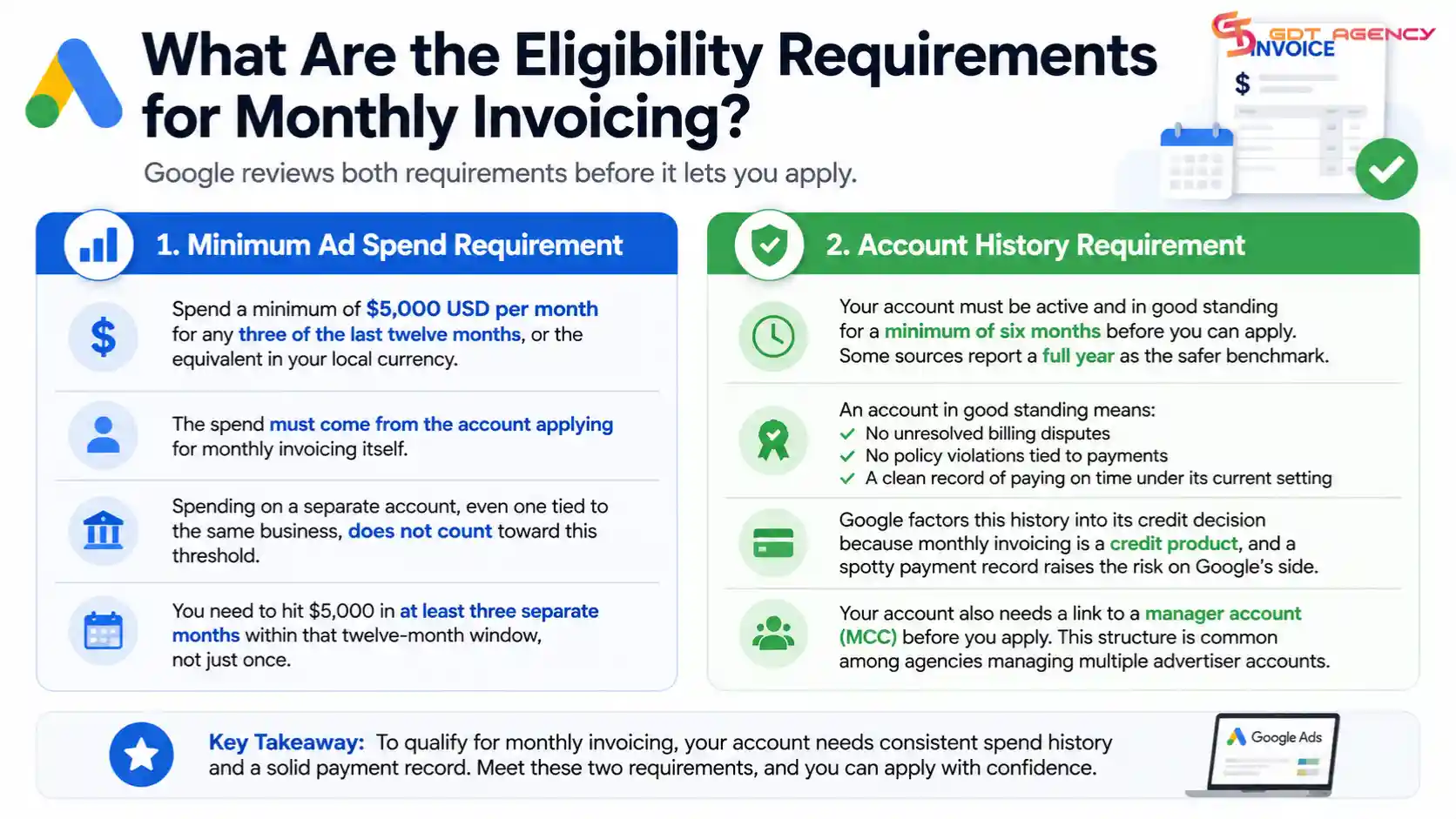
There are two main eligibility requirements for monthly invoicing: a minimum ad spend history and an account in good standing for a set period. Google reviews both before it lets you apply.
Next, let’s break down what each requirement actually means in practice, since the exact numbers matter for your application.
What Spend Threshold Do You Need to Qualify?
As an expert at GDT Agency with nearly 10 years of experience working with Google Ads through multiple types of ad accounts from standard to Google Ads agency accounts, I know that your ad account needs to spend a minimum of $5,000 USD/month for any three of the last twelve months, or the equivalent in your local currency. This spend has to come from the account applying for monthly invoicing itself.
Spending on a separate account, even one tied to the same business, does not count toward this threshold. Google only looks at what the specific account has spent within the last twelve months. This matters for agencies that run multiple accounts under one manager account, since each child account builds its own spend history.
The threshold is not a one-time spend. You need to hit $5,000 in at least three separate months within that twelve-month window, not just once. An account that spends $6,000 in a single month but stays quiet the rest of the year would not meet this bar.
What Account History Does Google Check?
Google checks how long your account has been active and whether it has stayed in good standing, with a minimum window of six months required before you can apply. Some sources report a full year as the safer benchmark, since Google’s review also weighs your payment history over that period.
An account in good standing means it has no unresolved billing disputes, no policy violations tied to payments, and a clean record of paying on time under its current setting. Google factors this history into its credit decision because monthly invoicing is essentially a credit product, and a spotty payment record raises the risk on Google’s side.
Your account also needs a link to a manager account (MCC) before you apply. Agencies that manage client accounts typically already have this structure in place, which is one reason monthly invoicing is common among agencies like GDT Agency that operate across many advertiser accounts.
How Do You Apply for Google Ads Monthly Invoicing?
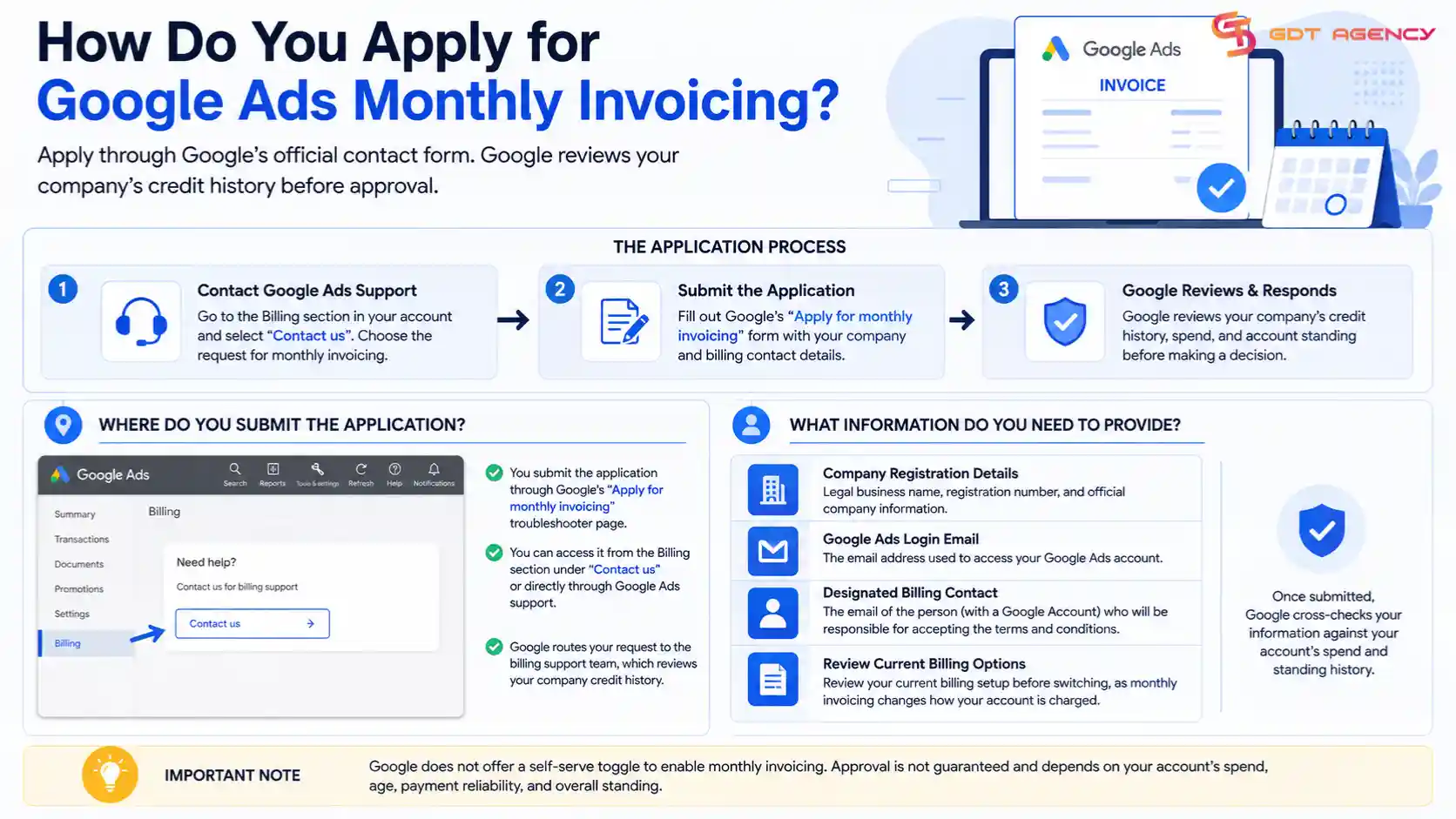
You apply for Google Ads monthly invoicing by submitting a request through Google’s official contact form, then Google reviews your company’s credit history before approval. The whole process runs through your billing settings and a short application form, not a self-serve toggle.
Once you confirm you meet the spend and account age requirements, the next step is finding where to actually submit the request.
Where Do You Submit the Application in Google Ads?
You submit the application through Google’s “Apply for monthly invoicing” troubleshooter page, which you reach from the Billing section of your account or directly through Google Ads support. Google does not currently offer a button inside the standard billing settings menu that instantly enables this option.
Instead, you select “Contact us” from the billing help section, then choose the specific request for monthly invoicing. Google routes this to its billing support team, which reviews your company credit history before responding. This step confirms that your bill-to information already listed in your Google Ads account matches the company details you plan to use for the credit application.
What Information Do You Need to Provide?
You need to provide your company registration details, your Google Ads login email, and a designated billing contact whose email is linked to a Google Account. This contact becomes the person responsible for accepting the terms and conditions tied to the credit line.
Google also asks you to review your current billing options before you switch, since moving to monthly invoicing changes how your account gets charged going forward. Once you submit this information, Google’s team cross-checks it against your account’s spend and standing history from the previous step.
What Business Verification Documents Are Required?
Business verification for monthly invoicing requires proof of business registration, a stable billing address, and in some cases financial statements that support your credit history. Google uses these documents to confirm your business is real and financially capable of paying invoiced costs.
For example, this step exists because Google is extending actual credit, not just changing a payment date, so it needs paperwork that a standard advertiser would never submit.
What Documents Prove Your Business Legitimacy?
Documents that prove business legitimacy typically include a business license, a tax ID number, and financial records tied to your company’s credit standing. Google may also ask for additional documentation depending on your business type and country.
- Business registration or license showing your company is legally established
- Tax identification number matching your billing address
- Financial statements or credit history records, when requested
- A billing address located in an eligible country for monthly invoicing
Your billing address needs to fall within a country Google supports for this payment setting. The United States, Canada, Australia, and most European countries currently qualify, though availability can shift by region.
→ To understand this better, you can explore more about the Google Ads monthly invoicing via our dedicated article: Rental Process Google Ads Monthly Invoicing Requirements Complete Guide 2026.
How Long Does Business Verification Take?
Business verification for monthly invoicing usually takes up to five business days once you submit your documentation, though more complex cases can take longer. Google reviews your credit history and documents during this window before it issues a final decision.
During this period, you should watch your email and phone closely, since Google’s team may reach out for extra documentation or clarification. Once approved, you start receiving monthly invoices, which you can find under the “Billing” tab in the “Transactions” section of your account.
What Happens If Your Monthly Invoicing Application Is Denied?
If Google denies your monthly invoicing application, it usually means your account fell short on spend history, account age, or credit standing, and you can address these gaps before trying again. A denial does not permanently block your account from ever qualifying.
Can You Reapply After a Denial?
Yes, you can reapply after a denial once you correct the specific issue that led to the rejection, whether that means building more spend history or resolving a billing dispute. Google does not publish a fixed waiting period, so the safest approach is to confirm you meet every requirement again before you submit a second request.
Most rejections trace back to one of three problems: spend that falls under the $5,000 threshold in three separate months, an account younger than the minimum standing period, or mismatched business information between your billing profile and your application. Fixing the specific gap, rather than reapplying immediately, gives you a stronger chance the second time.
What Is the Difference Between Monthly Invoicing and Automatic Payments?
Monthly invoicing lets costs accrue over a month before you pay a single bill, while automatic payments charge you right after your ads run or once you hit a preset spending threshold. The two settings sit on opposite ends of when payment actually happens relative to ad delivery.
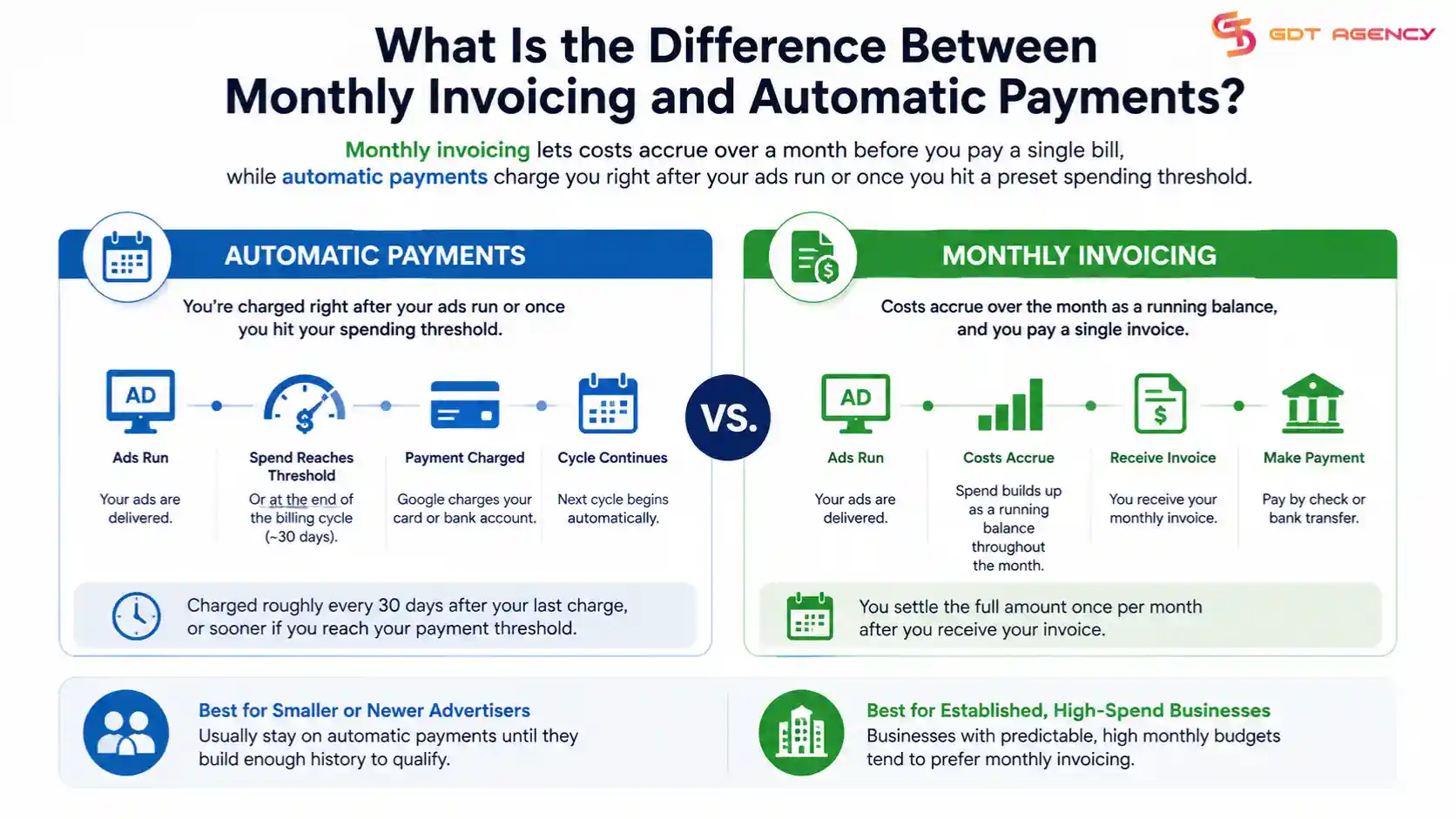
With automatic payments, Google charges your card or bank account roughly every 30 days after your last charge, or sooner if your spend crosses your payment threshold. With monthly invoicing, that same spend builds up as a running balance, and you settle it through a check or bank transfer once you receive your invoice. Businesses with predictable, high monthly budgets tend to prefer invoicing, while smaller or newer advertisers usually stay on automatic payments until they build enough history to qualify.
Final Thoughts
Monthly invoicing rewards accounts with a steady spend history and a clean billing record. If your account already spends $5,000 or more in three separate months and has stayed in good standing, you have most of what Google looks for. The parts that trip advertisers up are usually paperwork gaps, like a business address that doesn’t match your billing profile or a tax ID that’s missing from your application.
Agencies get the most value from this setup once they centralize billing under one manager account, since it turns a stack of separate client payments into a single monthly bill. If your first application gets denied, treat it as a checklist problem rather than a dead end. Fix the specific gap Google flagged, confirm your numbers again, and resubmit.
Frequently Asked Questions
Do I need a manager account to apply for Google Ads monthly invoicing?
Yes. Google requires your account to be linked to a manager account (MCC) before it will process a monthly invoicing application, since the credit relationship and billing contact are set up at that level.
Can a new business with no ad spend history apply for monthly invoicing?
No. Google requires at least six months of account history and a minimum spend of $5,000 USD in three of the last twelve months, so a brand-new account without that spend record will not qualify yet.
How do I pay a Google Ads monthly invoice?
You pay through a check, bank transfer, or another payment method available in your region, based on the terms and conditions you agree to when you enroll. You settle the full balance within the timeframe stated on your invoice.
Does spend on a different Google Ads account count toward my eligibility?
No. Google only counts spend from the specific account applying for monthly invoicing, even if a related account belongs to the same business.
What should I do if Google denies my monthly invoicing application?
Identify which requirement fell short, whether that’s spend history, account age, or a document mismatch, fix that specific issue, then reapply. Google does not block you from applying again once the gap is resolved.