
Google Ads Verification Documents: What to Prepare and Submit

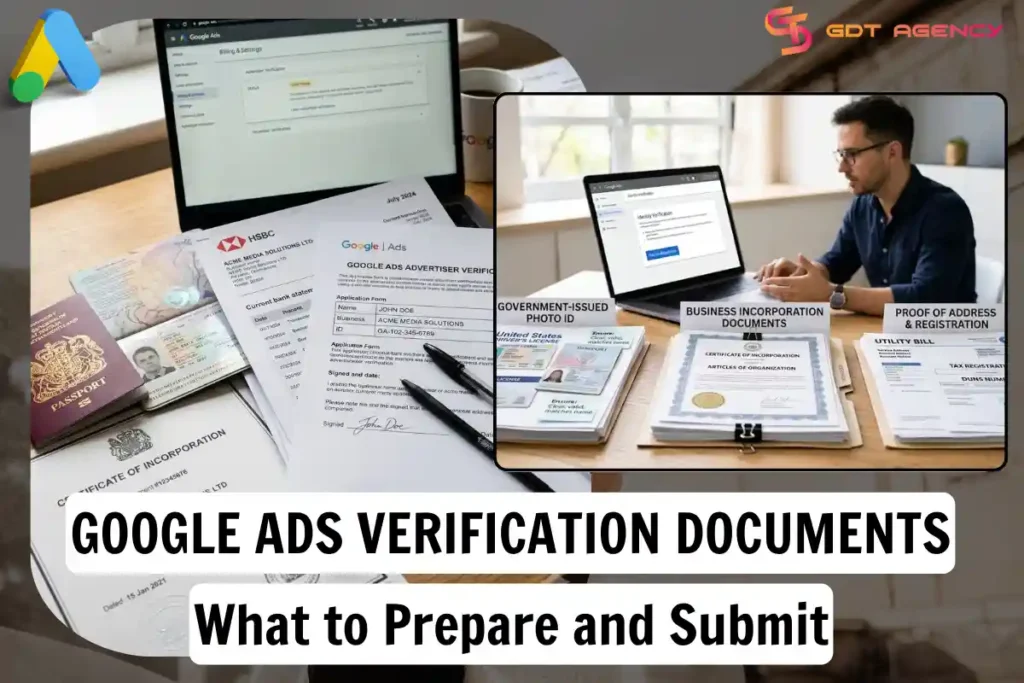
Google Ads advertiser verification requires you to submit specific documents that prove your identity and your business legitimacy. These documents include a government-issued photo ID, business registration papers, and in some cases, payment records that link back to your name or company. Google reviews these files against the information already on your account, and a mismatch is the most common reason for delays.
Before you upload anything, you need to know which documents apply to your situation. A solo advertiser running personal campaigns faces different requirements than an agency managing accounts for multiple clients. The type of business entity you operate under also changes what Google asks for, so a sole proprietor and a registered LLC won’t submit the same paperwork.
Once you gather the right files, the next step is getting them into the system correctly. Google Ads has a specific location inside the platform where verification documents go, and the review process typically takes a few business days once everything is submitted. Missing a step here often means starting the wait time over.
Not every submission goes through on the first try. Documents get rejected for reasons that are often easy to fix once you know what to look for, and agencies handling multiple accounts run into a few extra wrinkles worth understanding upfront. Below, we walk through each part of the process, starting with the documents themselves.
- What Documents Do You Need for Google Ads Advertiser Verification?
- What Personal Identification Documents Are Accepted?
- What Business Documents Are Required for Verification?
- How Do You Submit Verification Documents on Google Ads?
- Where in Google Ads Do You Upload Verification Documents?
- How Long Does Google Ads Verification Take?
- What Types of Businesses Need Different Verification Documents?
- What Documents Do LLCs and Corporations Need?
- What Documents Do Sole Proprietors and Freelancers Need?
- What Happens If Your Google Ads Verification Is Rejected?
- Why Do Verification Documents Get Rejected?
- How Do You Resubmit Documents After Rejection?
- Do Advertising Agencies Need Different Verification Documents?
- Is Video Verification Required for All Advertisers?
- Final Thoughts
- FAQs
- How long does Google Ads verification usually take?
- Can I use my passport instead of a driver’s license?
- What if my business doesn’t have formal registration papers?
- Why was my verification document rejected?
- Do I need to resubmit everything if only one document was rejected?
What Documents Do You Need for Google Ads Advertiser Verification?
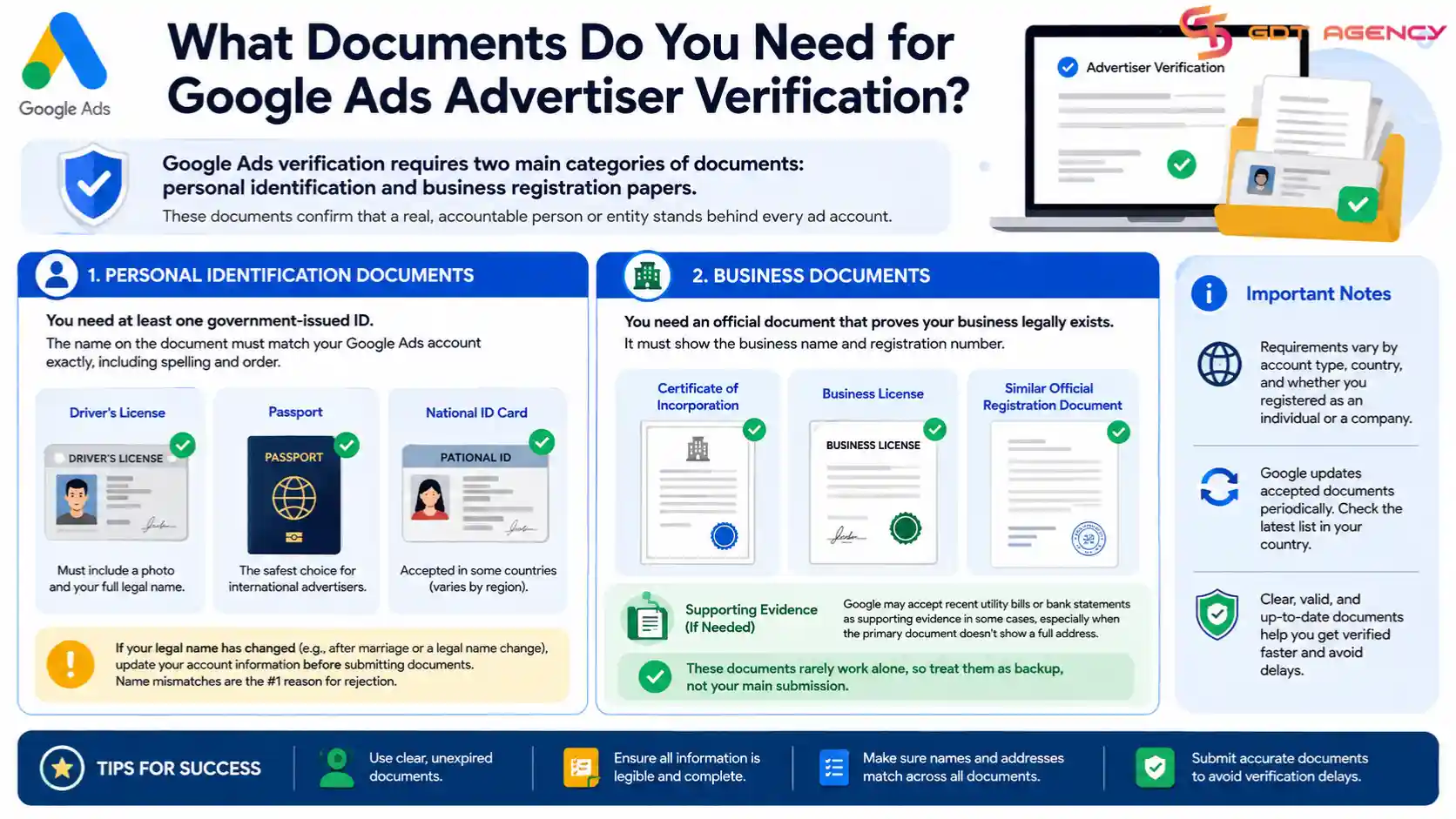
As an expert at GDT Agency with nearly 10 years of experience working with multiple types of Google Ads accounts, from standard to Google Ads agency accounts, I am very familiar with the verification process. I know that Google Ads verification requires two main categories of documents: personal identification and business registration papers. You’ll need at least one government-issued ID and, if you’re advertising as a business, proof that the business legally exists.
Google built this system to confirm that a real, accountable person or entity stands behind every ad account. The requirement grew out of years of policy tightening around ad transparency, and it now applies broadly across most countries where Google Ads operates. Your specific document list depends on your account type, your country, and whether you registered as an individual or a company.
What Personal Identification Documents Are Accepted?
Google accepts a driver’s license, a passport, or a national ID card as valid personal identification. The name on this document must match the name listed on your Google Ads account exactly, including spelling and order.
A driver’s license works well for advertisers in countries where it includes a photo and full legal name. A passport tends to be the safest choice for international advertisers, since it’s recognized everywhere and rarely raises questions about validity. Some countries also allow a national ID card, though acceptance varies by region and Google updates this list periodically.
If your legal name has changed since you set up your account, such as after marriage or a legal name change, update your account information before you submit documents. Google’s system flags mismatches automatically, and this single detail causes more rejections than any other issue on the personal ID side.
What Business Documents Are Required for Verification?
Businesses need to submit a certificate of incorporation, a business license, or a similar official registration document that shows the company’s legal name and registration number. This document proves the business exists as a legal entity, separate from any personal claims.
The specific paperwork depends on how your business is structured. An LLC or corporation typically has formal incorporation papers on file with a government agency, and those papers work as proof. A registered sole proprietorship might only have a business license or a tax registration certificate, which is usually sufficient as long as it shows the business name clearly.
Google also accepts recent utility bills or bank statements as supporting evidence in some cases, particularly when the primary document doesn’t show a full address. These secondary documents rarely work alone, so treat them as backup rather than your main submission.
How Do You Submit Verification Documents on Google Ads?
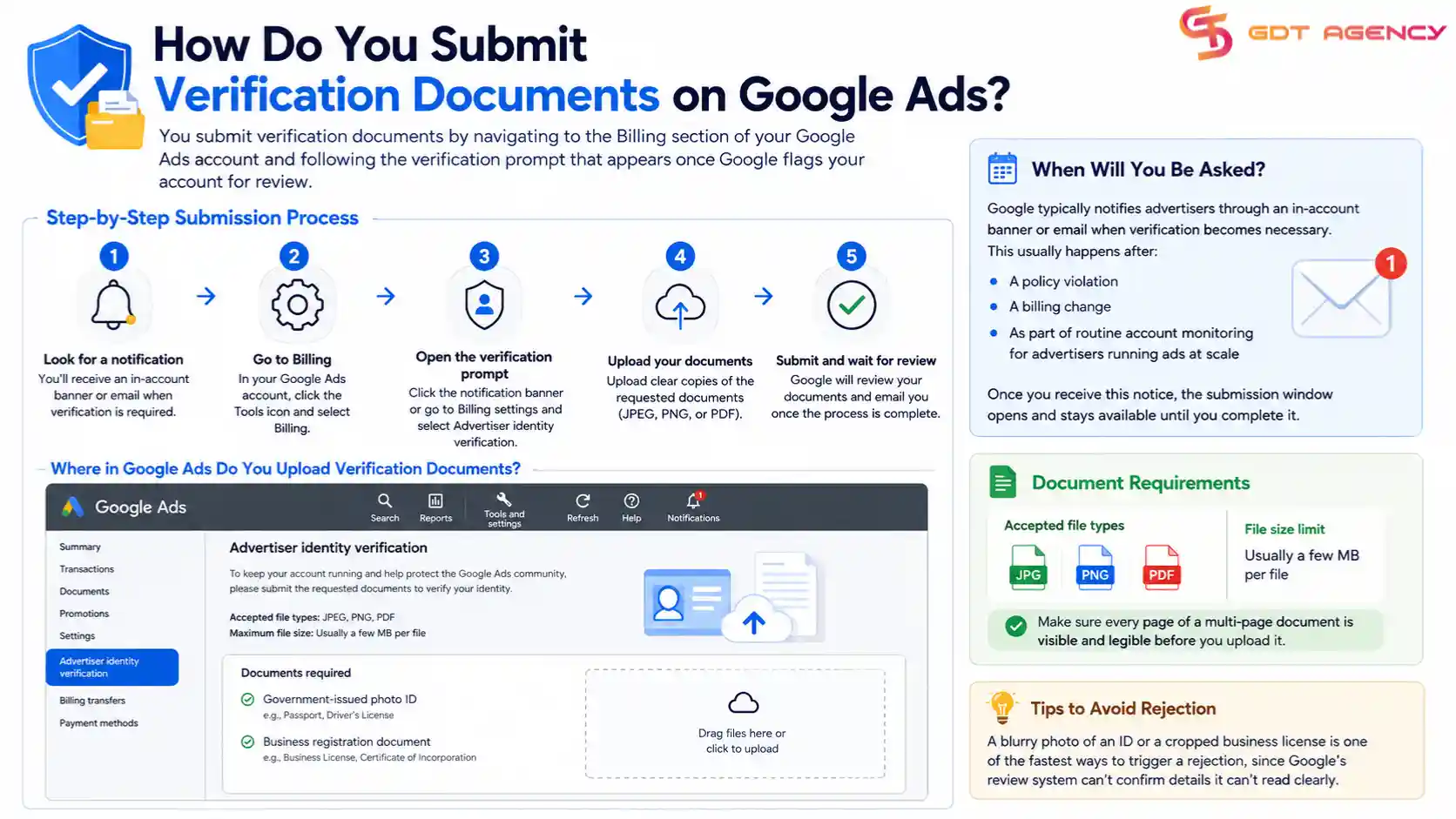
You submit verification documents by navigating to the Billing section of your Google Ads account and following the verification prompt that appears once Google flags your account for review. The process takes a few minutes to complete once you have your files ready.
Google typically notifies advertisers through an in-account banner or email when verification becomes necessary. This usually happens after a policy violation, a billing change, or as part of routine account monitoring for advertisers running ads at scale. Once you receive this notice, the submission window opens and stays available until you complete it.
Where in Google Ads Do You Upload Verification Documents?
You upload verification documents through the Advertiser Identity Verification page, which you reach by clicking the notification banner in your account or going directly through Billing settings. Google accepts JPEG, PNG, and PDF files, and each file needs to stay under the platform’s size limit, usually a few megabytes per document.
Make sure every page of a multi-page document is visible and legible before you upload it. A blurry photo of an ID or a cropped business license is one of the fastest ways to trigger a rejection, since Google’s review system can’t confirm details it can’t read clearly.
How Long Does Google Ads Verification Take?
Google Ads verification usually takes a few business days to complete, though the exact timeline depends on document quality and current review volume. Some advertisers see approval within 24 hours, while others wait a week or longer during high-traffic periods.
The clearest way to speed this up is by submitting complete, legible documents the first time. Partial submissions or files that raise questions get pushed into manual review, which adds days to the process. If you haven’t heard back after a week, checking your account’s notification center or contacting Google Ads support directly is worth the time.
What Types of Businesses Need Different Verification Documents?
Different business types face different verification requirements because Google’s system checks for proof that matches how the business is legally structured. A corporation, a sole proprietor, and an agency each submit a different combination of documents to satisfy the same underlying goal: confirming who’s actually running the ads.
This distinction matters because submitting the wrong document type is a common mistake. An advertiser running a personal side project sometimes assumes they need full corporate paperwork, while a registered business sometimes tries to verify using only a personal ID, and both approaches lead to rejection.
What Documents Do LLCs and Corporations Need?
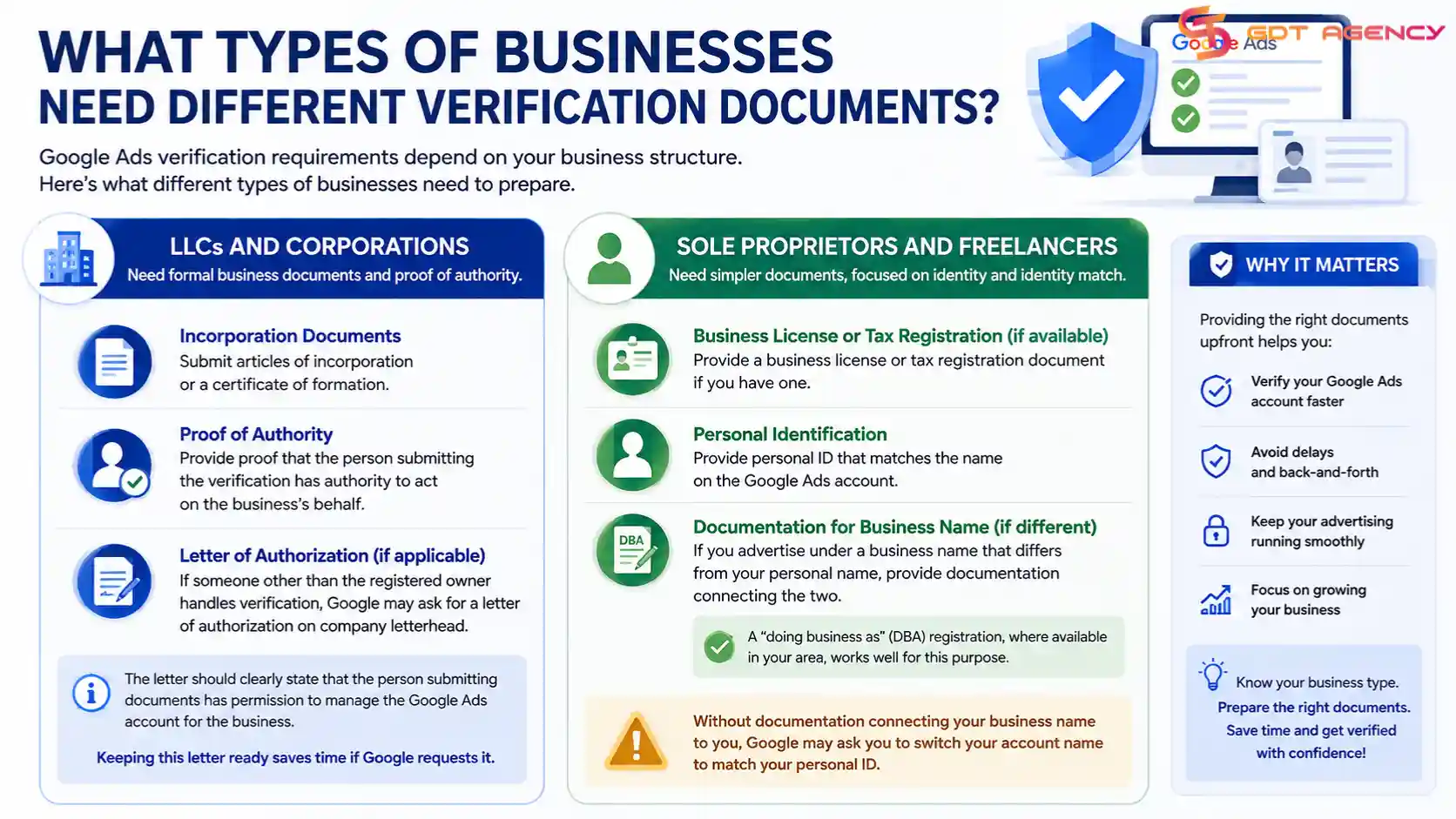
LLCs and corporations need to submit formal incorporation documents, such as articles of incorporation or a certificate of formation, along with proof that the person submitting the verification has authority to act on the business’s behalf. This second requirement often trips up larger teams where the account manager isn’t the business owner.
If someone other than the registered owner handles verification, Google may ask for a letter of authorization on company letterhead. This letter should state clearly that the person submitting documents has permission to manage the Google Ads account for the business. Keeping this letter ready in advance saves a round of back-and-forth if Google requests it.
What Documents Do Sole Proprietors and Freelancers Need?
Sole proprietors and freelancers need a business license or tax registration document if one exists, along with personal identification that matches the name on the Google Ads account. Many freelancers operate without formal business registration, and Google generally allows verification using personal ID alone in these cases.
If you’re advertising under a business name that differs from your personal name, such as a freelance brand, you’ll need documentation connecting the two. A “doing business as” (DBA) registration, where available in your area, serves this purpose well. Without it, Google may ask you to switch your account name to match your personal ID.
What Happens If Your Google Ads Verification Is Rejected?
A rejected verification means Google’s system found an issue with your submitted documents, most often a name mismatch, an illegible file, or an expired document. Google typically sends a notification explaining the general reason, though the message doesn’t always spell out the exact problem in detail.
Rejection doesn’t lock you out permanently. You can review the feedback, correct the issue, and resubmit through the same verification page in your account. Most advertisers who fix the flagged problem get approved on their second attempt.
Why Do Verification Documents Get Rejected?
Documents get rejected most often because of name mismatches between the ID and the account, expired identification, or images that are too blurry or cropped for Google’s system to verify. A less common but still frequent issue is submitting a document type that Google doesn’t accept for your account category.
Other rejection triggers include documents where personal information is partially obscured, files that don’t display a clear issue date, or business documents that list an outdated address inconsistent with the account’s billing information. Reviewing your files against these points before submission catches most issues early.
How Do You Resubmit Documents After Rejection?
You resubmit documents by returning to the Advertiser Identity Verification page and uploading corrected files, following the same process as your original submission. Google reviews resubmissions using the same timeline as first attempts, so a clean resubmission typically clears within a few business days.
Before resubmitting, cross-check every detail against your account settings, including your legal name, business name, and address. If the account information itself is wrong rather than the document, update the account first and then submit, since resubmitting a correct document against incorrect account data will fail again.
Do Advertising Agencies Need Different Verification Documents?
Advertising agencies generally submit the same core documents as any business, but they often need additional proof of authorization when managing accounts on behalf of clients. This applies especially to agencies handling multiple ad accounts under one management structure.
When an agency verifies an account that belongs to a client rather than the agency itself, Google may request documentation showing the agency’s authority to manage that account. This can include a signed management agreement or written authorization from the client. Agencies that manage dozens of accounts benefit from keeping a standard authorization template ready, since this request tends to come up repeatedly across different client accounts.
→ If you’re considering using an agency account instead of a standard advertiser account, it’s worth understanding how the rental model works before starting the verification process. Our guide on How to Rent a Google Ads Agency Account: Process, Requirements, and Benefits explains the onboarding process, eligibility requirements, and the key advantages of renting an agency account for higher spending limits, dedicated support, and simplified account management.
Is Video Verification Required for All Advertisers?
Video verification isn’t required for all advertisers, but Google may request it in specific cases where document review alone doesn’t resolve identity questions. This typically happens after repeated rejections or when an account shows unusual activity patterns that standard documents don’t fully explain.
If Google requests a video call, you’ll typically need to show your ID on camera and answer basic questions confirming the details on your account. This step adds time to the process, so most advertisers only encounter it as a secondary verification method rather than a standard part of onboarding.
Final Thoughts
Getting through Google Ads verification comes down to matching your documents exactly to what your account already shows. A driver’s license or passport handles the personal identity side, while your business registration papers confirm the company behind the account, and keeping both consistent with your account details avoids most rejections before they happen. If your first submission gets flagged, the fix is usually straightforward: correct the specific issue Google points out and resubmit through the same page. For agencies and larger teams, having authorization documents ready in advance saves time when managing verification across several accounts at once.
FAQs
How long does Google Ads verification usually take?
Most submissions clear within a few business days, though it can take longer during periods of high review volume.
Can I use my passport instead of a driver’s license?
Yes, a passport is accepted and often preferred for international advertisers since it’s recognized across countries.
What if my business doesn’t have formal registration papers?
Sole proprietors without formal registration can often verify using personal identification alone, as long as the account name matches their legal name.
Why was my verification document rejected?
The most common reasons are a name mismatch, an expired ID, or an image that’s too blurry for Google to read clearly.
Do I need to resubmit everything if only one document was rejected?
No, you only need to correct and resubmit the specific document that Google flagged.