
Google Verified Badge for Local Services Ads: Complete Guide 2026

You get verified for Local Services Ads by submitting your business documents to Google, passing a background check, and waiting for Google to review your profile. Google introduced the Verified badge to replace three older badges – Google Guaranteed, Google Screened, and License Verified – with one unified trust signal. This change started rolling out on October 20, 2025, and it affects every business that runs Local Services Ads.
The badge itself works as proof that Google reviewed your business credentials and confirmed you meet its standards. Eligibility depends on your industry, your location, and the type of service you offer, so plumbers, lawyers, and cleaning companies each face slightly different document requirements. Most businesses need to submit a business license, proof of insurance, and in some cases a background check for the owner or key employees.
Beyond the paperwork, the verification process itself follows a clear sequence. You set up your Local Services Ads profile first, then submit your documents through the Google Ads platform, and Google reviews everything before granting the badge. The review usually takes a few business days, though it can stretch longer if your documents need corrections or your industry requires extra checks.
Below, this guide breaks down what the badge means, who qualifies, how the submission process works step by step, and what to do if Google rejects your application on the first try.
- What Is the Google Verified Badge for Local Services Ads?
- Why Did Google Replace the Old Badges with a Single Verified Badge?
- Who Is Eligible to Get the Google Verified Badge?
- What Documents Do You Need to Submit for Verification?
- Does Every Industry Require a Background Check?
- How Do You Get Verified for Local Services Ads?
- Step 1 – Set Up Your Local Services Ads Profile
- Step 2 – Submit Your Verification Documents to Google
- How Long Does the Google Verification Process Take?
- Is the Google Verified Badge the Same as Google Guaranteed?
- What Happens If Your Local Services Ads Verification Gets Rejected?
- What Are the Common Reasons for a Rejected Verification?
- How Do You Reapply After a Rejected Verification?
- Do You Need to Renew the Google Verified Badge Over Time?
- Final Thoughts
- FAQs
- Does the Google Verified badge cost extra money to obtain?
- Can a new business with no operating history get verified?
- What happens to my ads if my badge lapses?
- Do all employees need a background check, or just the business owner?
- How do I know which documents my specific category requires?
- Is the Google Verified badge the same across every country?
What Is the Google Verified Badge for Local Services Ads?
As an expert at GDT Agency with nearly 10 years of experience working with Google Ads across multiple types of Google Ads accounts, from standard to Google Ads agency accounts, I know that the Google Verified badge is just a single trust signal that Google places on Local Services Ads profiles after it confirms a business meets its verification standards.
Google launched this badge to replace the separate Google Guaranteed, Google Screened, and License Verified badges that confused advertisers and consumers alike.
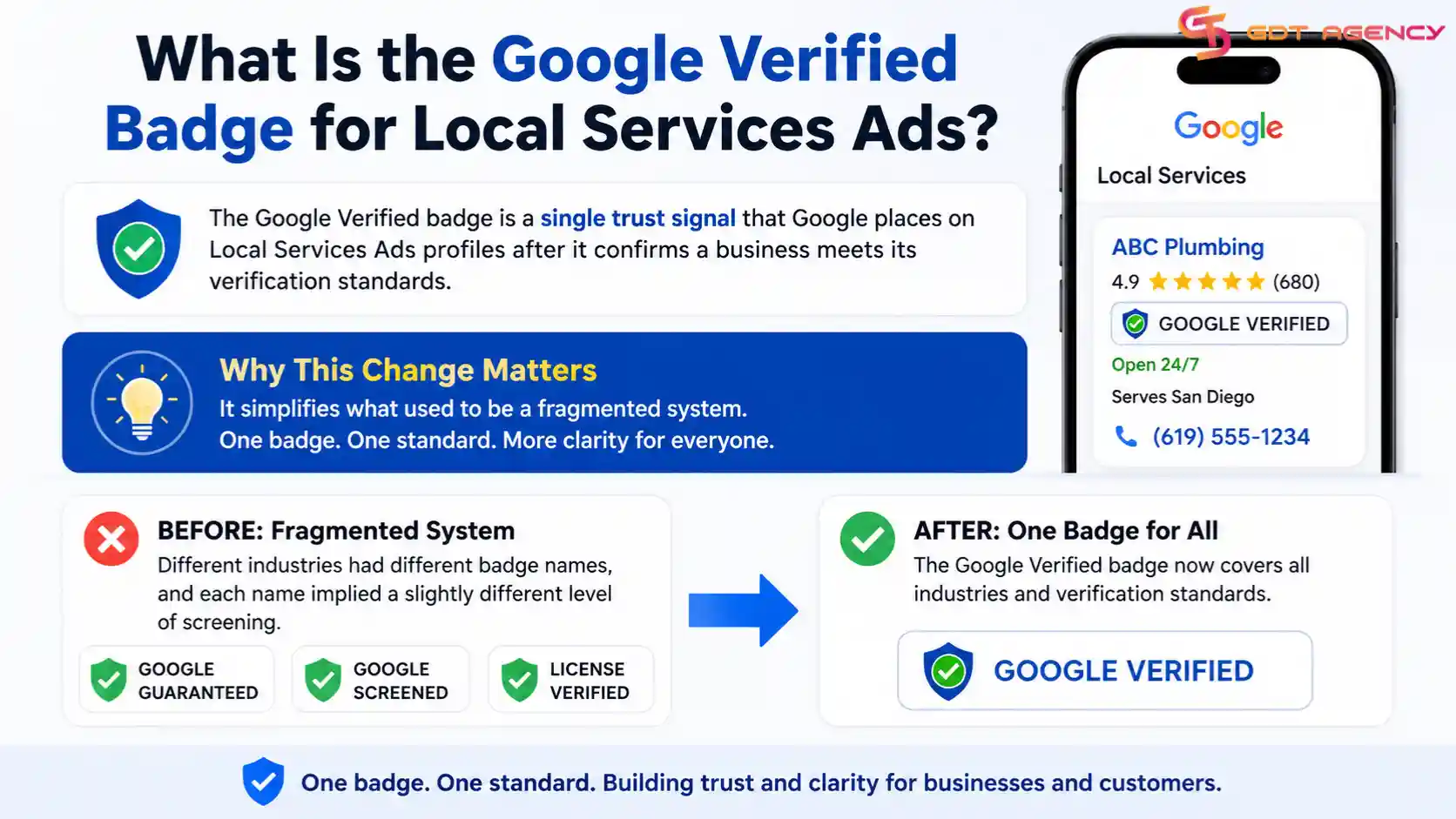
The change matters because it simplifies what used to be a fragmented system. Before this update, different industries carried different badge names, and each name implied a slightly different level of screening. Now, one badge covers all of them.
Why Did Google Replace the Old Badges with a Single Verified Badge?
Google replaced the old badges because businesses and customers found the previous system confusing and inconsistent. Three separate badge names created uncertainty about what each one actually verified.
To be specific, the Google Guaranteed badge covered background checks and licensing for certain service categories, while Google Screened applied to professional services like legal and financial advisors, and License Verified confirmed only that a business held an active license. A customer browsing search results had no easy way to compare these badges at a glance.
Google unified them under one Verified badge starting October 20, 2025. This single badge now signals the same baseline of trust across every industry that runs Local Services Ads, which makes the search results page easier to read for consumers and easier to manage for advertisers who run multiple service categories.
Who Is Eligible to Get the Google Verified Badge?
Eligibility for the Google Verified badge depends on three main factors: your business type, your service location, and the licensing requirements in your industry. Google publishes category-specific requirements for each Local Services Ads vertical, so a plumber and a lawyer face different checklists.
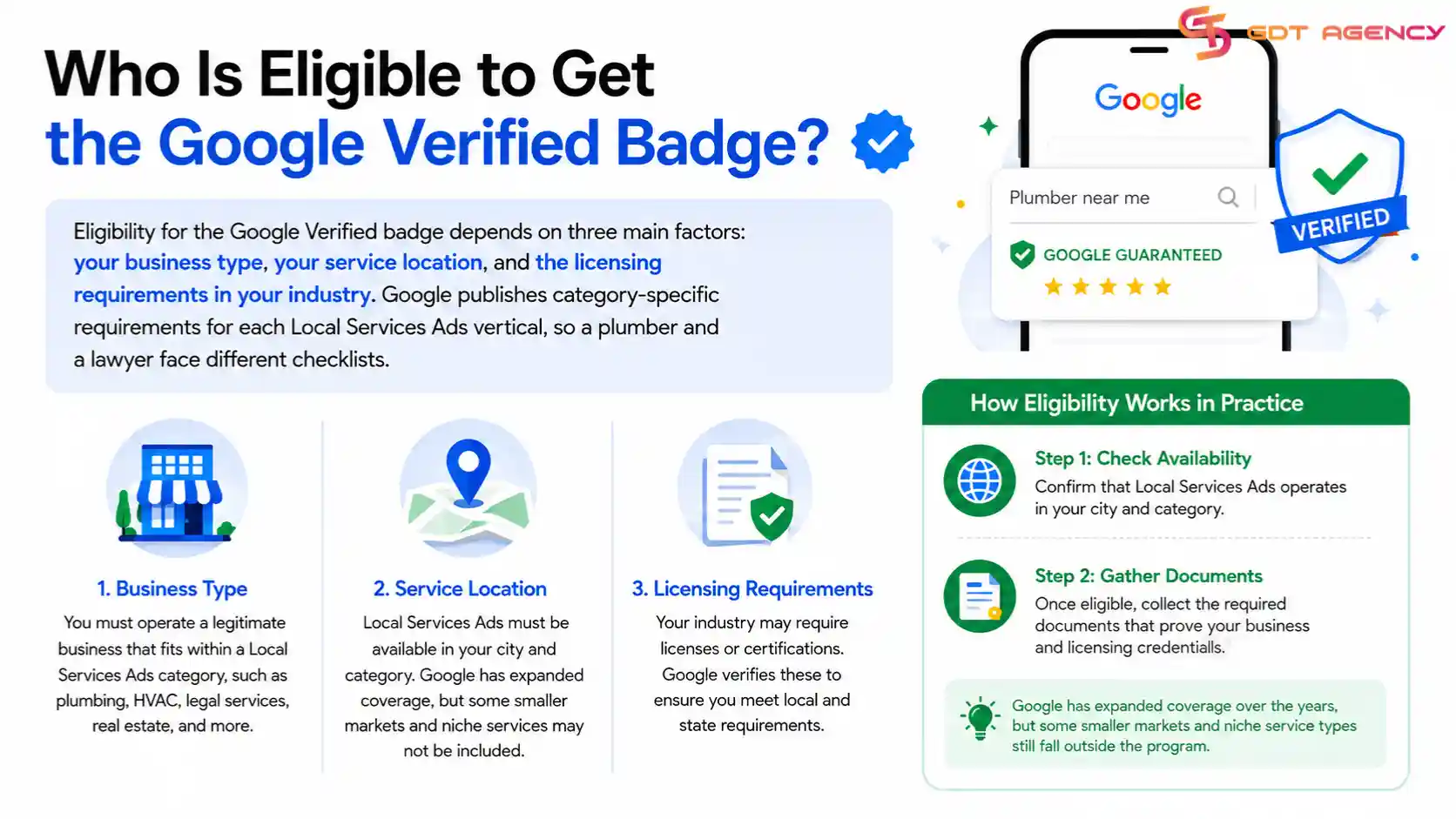
In practice, eligibility starts with confirming that Local Services Ads operates in your city and category. Google has expanded coverage over the years, but some smaller markets and niche service types still fall outside the program. Once you confirm eligibility, the next step is gathering the right documents.
What Documents Do You Need to Submit for Verification?
You need a business license, proof of liability insurance, and in some cases individual background check consent forms to submit for verification. Google requires these documents to confirm both the legitimacy of your business and the safety of the workers who show up at a customer’s home or office.
Specifically, most home service categories – plumbing, electrical work, HVAC, and cleaning – require a current business license issued by your state or local authority. Insurance documents must show active coverage with limits that meet Google’s minimum threshold, which varies by category. Professional service categories, like legal or financial consulting, often require proof of active bar membership or a relevant professional certification instead of a general business license.
- Business license or registration certificate
- Proof of general liability insurance
- Background check consent (for owners and applicable employees)
- Professional certification or bar membership (for licensed professions)
- Proof of business address and contact information
Google cross-checks each document against the name and address you entered on your Local Services Ads profile, so even a small typo can trigger a review delay. For example, if your license lists “Smith Plumbing LLC” but your profile says “Smith Plumbing,” Google’s automated system may flag the mismatch and pause your application until you fix it. Businesses that operate under a franchise name or a doing-business-as (DBA) title should upload documentation that clearly links the legal entity to the operating name, since Google reviewers look for that connection during manual checks.
>>> Related Article: Google Ads Verification Documents: What to Prepare and Submit
Does Every Industry Require a Background Check?
No, not every industry requires a background check for the Google Verified badge. Google applies background check requirements mainly to categories where employees enter a customer’s home or handle sensitive property, such as locksmiths, movers, and house cleaners.
The reasoning behind this distinction is straightforward. A category like tax preparation or legal consulting typically involves office visits or remote work, so Google leans on professional licensing instead of a criminal background check. Home service categories carry a different risk profile, since technicians often work unsupervised inside a customer’s property, so Google adds the background check as an extra safeguard.
If you run a business in a category that sits between these two groups, check the specific requirements Google lists for your category inside the Local Services Ads dashboard, since the rules can shift as Google adjusts its policy.
How Do You Get Verified for Local Services Ads?
You get verified for Local Services Ads by completing your business profile first, then submitting your required documents through the Google Ads dashboard, and finally waiting for Google’s review team to confirm your eligibility. The process runs through two main stages, and each stage requires accuracy to avoid delays.
To start, Google needs your profile information to match your submitted documents exactly. A mismatch between your business name on your license and your business name on your Local Services Ads profile is one of the most common reasons applications stall.
Step 1 – Set Up Your Local Services Ads Profile
Setting up your Local Services Ads profile means entering your business name, service area, service categories, and contact details before you submit any verification documents. Google uses this profile information as the baseline it checks your documents against.
- Enter your legal business name exactly as it appears on your license
- Select every service category your business actually performs
- Define your service area by city, zip code, or radius
- Add a working phone number and business address
- Upload your business logo and a few service photos to complete the profile
Once your profile looks complete and accurate, you move to document submission.
Google also checks how consistent your profile looks across time. If you frequently change your service area or add new categories right before submitting for verification, the review may take longer, since Google wants to confirm the profile reflects your actual business rather than a temporary setup built only to pass verification. Businesses that keep their profile stable and accurate for at least a few weeks before applying tend to move through review with fewer questions.
Step 2 – Submit Your Verification Documents to Google
Submitting your verification documents means uploading your business license, insurance proof, and any required background check forms directly through the Local Services Ads verification portal inside Google Ads. Google reviews each document against the requirements for your specific category.
For a smooth submission, upload clear, unedited scans or photos of each document, and make sure every date on your insurance and license paperwork is current, not expired. If Google requests a background check, each named employee receives a separate email invitation to complete their own consent form, and the process cannot finish until everyone responds.
How Long Does the Google Verification Process Take?
The Google verification process typically takes a few business days once you submit complete documents, though it can extend to a few weeks if background checks are required or if your first submission has errors. Timing depends heavily on how clean your initial paperwork looks.
Simple cases move fast. A business that submits a clear, current license and matching insurance documents on the first try often clears review within days. Categories that require background checks add time to the timeline, since each named individual needs to complete a separate verification step before Google finalizes the badge.
If your timeline matters for an upcoming campaign, submit your documents as early as possible and double-check every date and name before you upload anything, since a single mismatch can push your approval back by a full review cycle.
Seasonal demand also affects processing speed. Home service categories like HVAC and roofing see a surge of new advertisers applying for verification right before peak season, which can slow Google’s review queue during those months. If your business operates in a seasonal category, plan to submit your documents a few weeks earlier than you think you need to, rather than waiting until the week before you want your ads to run.
Is the Google Verified Badge the Same as Google Guaranteed?
No, the Google Verified badge is not the same badge as Google Guaranteed, though it replaces it. Google Guaranteed was one of three separate badges that Google folded into the single Google Verified badge starting October 20, 2025.
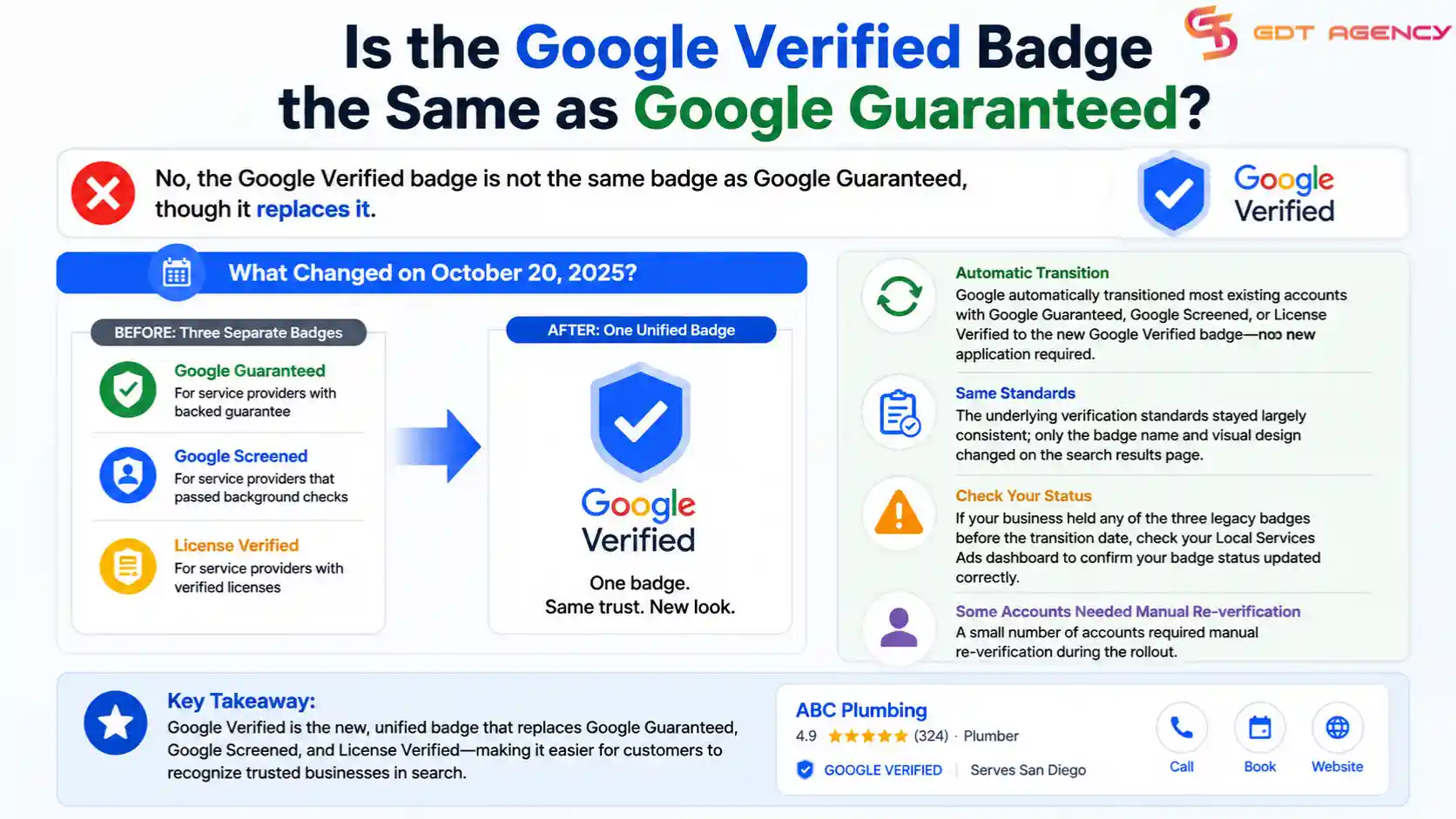
The distinction matters for businesses that already earned the old Google Guaranteed badge, since Google automatically transitioned most existing accounts to the new Verified badge without requiring a fresh application. Businesses that previously held Google Screened or License Verified went through the same automatic transition. The underlying verification standards stayed largely consistent, but the badge name and visual design on the search results page changed for everyone.
If your business held any of the three legacy badges before the transition date, check your Local Services Ads dashboard to confirm your badge status updated correctly, since a small number of accounts required manual re-verification during the rollout.
What Happens If Your Local Services Ads Verification Gets Rejected?
If Google rejects your Local Services Ads verification, you receive a notification that explains which document or requirement failed to meet the standard, and you can correct the issue and resubmit. A rejection does not permanently disqualify your business from the badge.
Rejections happen more often than most business owners expect, particularly on a first submission, since the requirements vary by category and change periodically. Understanding the common causes helps you avoid a second rejection.
What Are the Common Reasons for a Rejected Verification?
The most common reasons for a rejected verification are expired documents, a mismatch between your business name across different files, and missing background check consent from a named employee. Google’s automated review flags these issues before a human reviewer even looks at your file.
Other frequent causes include insurance coverage that falls below the minimum limit for your category, a business license that covers a different service type than the one you selected on your profile, and blurry or cropped document scans that hide required information. Each of these issues is fixable once you know what caused the rejection.
New businesses face an additional hurdle. A company that registered only a few months ago sometimes lacks the operating history Google looks for in certain categories, particularly professional services like legal or financial consulting. In that case, Google may ask for additional proof of active operations, such as client contracts or a longer insurance history, before it approves the badge. This requirement protects consumers from newly formed businesses that lack a track record, but it can catch new advertisers off guard if they expect an instant approval.
How Do You Reapply After a Rejected Verification?
You reapply after a rejected verification by correcting the specific issue Google flagged in its notification and resubmitting the updated document through the same Local Services Ads dashboard. You do not need to start a new application from scratch.
To reapply successfully, read the rejection notice carefully, since it usually names the exact document and the exact problem. Fix only that issue, keep every other part of your profile unchanged, and upload the corrected file. Most corrected resubmissions move through review faster than the original application, since Google’s reviewers already have context on your account.
Do You Need to Renew the Google Verified Badge Over Time?
Yes, you need to renew the Google Verified badge periodically, since your business license and insurance documents carry expiration dates that Google tracks. Google typically prompts you to upload updated documents before the current ones expire.
This renewal cycle protects the integrity of the badge for consumers, since an expired license or lapsed insurance policy would undermine the trust the badge is meant to signal. Set a calendar reminder a few weeks before your license or insurance renewal date, so you can upload fresh documents before Google flags your account.
If your badge lapses because a document expired, Google usually pauses the badge display rather than removing your Local Services Ads profile entirely. Your ads can keep running during a lapse, but you lose the trust signal that often influences which businesses customers click on first. Businesses that treat renewal as a routine part of their ad account management, rather than a one-time task, avoid this gap altogether.
Final Thoughts
Getting the Google Verified badge comes down to three things: knowing what Google expects from your industry, submitting clean and accurate documents, and staying on top of renewals once you earn the badge. The process replaced three separate badges with one clear standard, so businesses that adapt to the new system early gain a visible trust signal ahead of competitors who delay.
Most rejections trace back to a small, fixable issue rather than a real disqualification. If your first submission gets rejected, treat it as a checklist rather than a setback, correct the specific problem Google flags, and resubmit. Businesses that build verification into their regular ad account management, rather than treating it as a one-time task, keep their badge active without last-minute scrambles.
FAQs
Does the Google Verified badge cost extra money to obtain?
Google does not charge a separate fee for the Verified badge itself, though you still pay for any professional licensing, insurance, or background check services your business needs to meet the requirements.
Can a new business with no operating history get verified?
A new business can apply, but some categories, especially professional services, may ask for extra proof of active operations before granting the badge, since Google looks for a track record in higher-risk categories.
What happens to my ads if my badge lapses?
Your Local Services Ads campaign can keep running if your badge lapses, but your listing loses the trust signal that often influences which businesses customers choose first.
Do all employees need a background check, or just the business owner?
It depends on your category. Google typically requires background checks for owners and for employees who enter a customer’s home or handle sensitive property, while office-based professional services often rely on licensing instead.
How do I know which documents my specific category requires?
Check the Local Services Ads dashboard under your account, since Google lists the exact document requirements for each service category, and these requirements can change over time.
Is the Google Verified badge the same across every country?
No, requirements can vary by country and region, since local licensing and insurance standards differ; a business advertising in multiple countries should check the specific requirements for each market.