
What is an AB test on Facebook and How to Create?

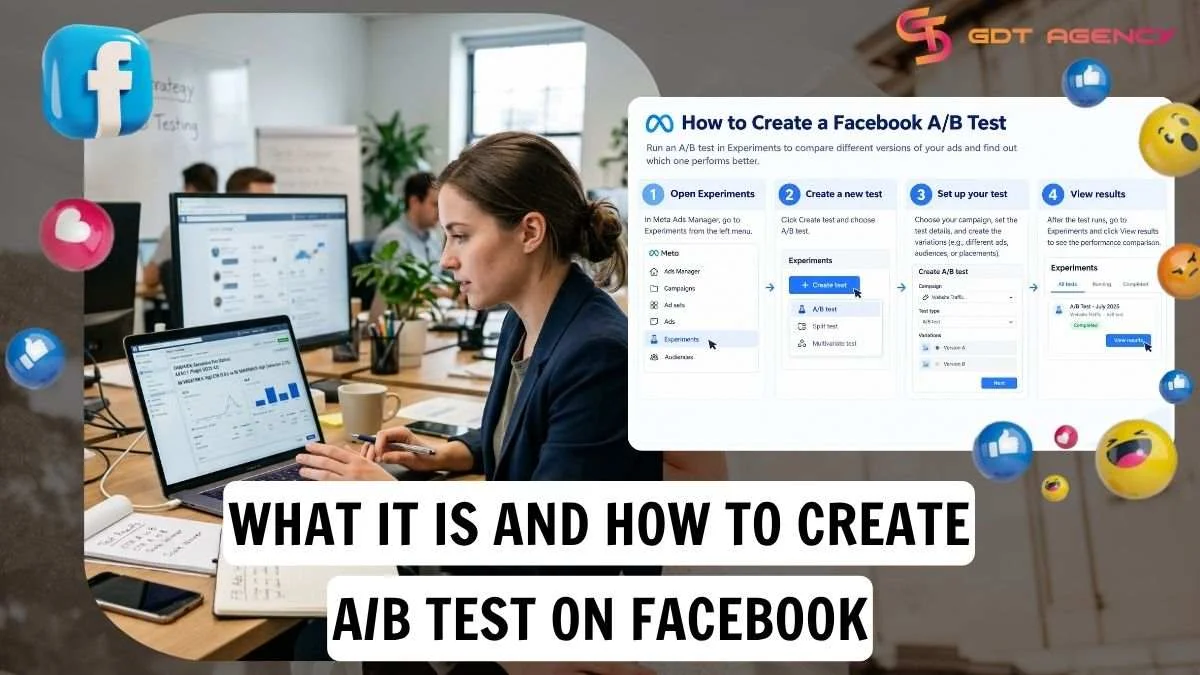
AB test on Facebook is a Meta Ads Manager feature that splits your audience into separate groups and compares ad versions that differ by one variable, so you can see which performs better. Because each group sees only one version and everything else stays equal, any difference in results points back to the change you made.
Creating an A/B test on Facebook takes 4 steps in Ads Manager: choose where to start, select the variable to test, set the key metric and schedule, then review and publish the test. Below, this guide explains how the test works, walks through each step, and shows how to read and act on the results.
- What is an A/B test on Facebook?
- How does it work?
- How long should an A/B test on Facebook run?
- How to create an A/B test on Facebook?
- Step 1: Choose where to start in Ads Manager
- Step 2: Select the variable to test
- Step 3: Set the key metric and schedule
- Step 4: Review and publish the test
- How to read the results of an A/B test on Facebook?
- Where do you find results?
- What is the minimum budget for an A/B test?
- What should you do with the results?
- Key takeaways for A/B testing
- FAQs
- Can you test more than one variable in a single A/B test on Facebook?
- Can you edit an A/B test on Facebook after you publish it?
- Do you need separate campaigns for every test?
- Is a high confidence level important before scaling the winner?
- Can an A/B test run across Facebook and Instagram?
What is an A/B test on Facebook?
An A/B test on Facebook is a controlled experiment in Meta Ads Manager that shows each audience group one version and measures which version wins on a chosen metric. More precisely, the test changes one variable, such as the creative or the audience, and holds everything else equal, which is what lets you trust the difference in results.
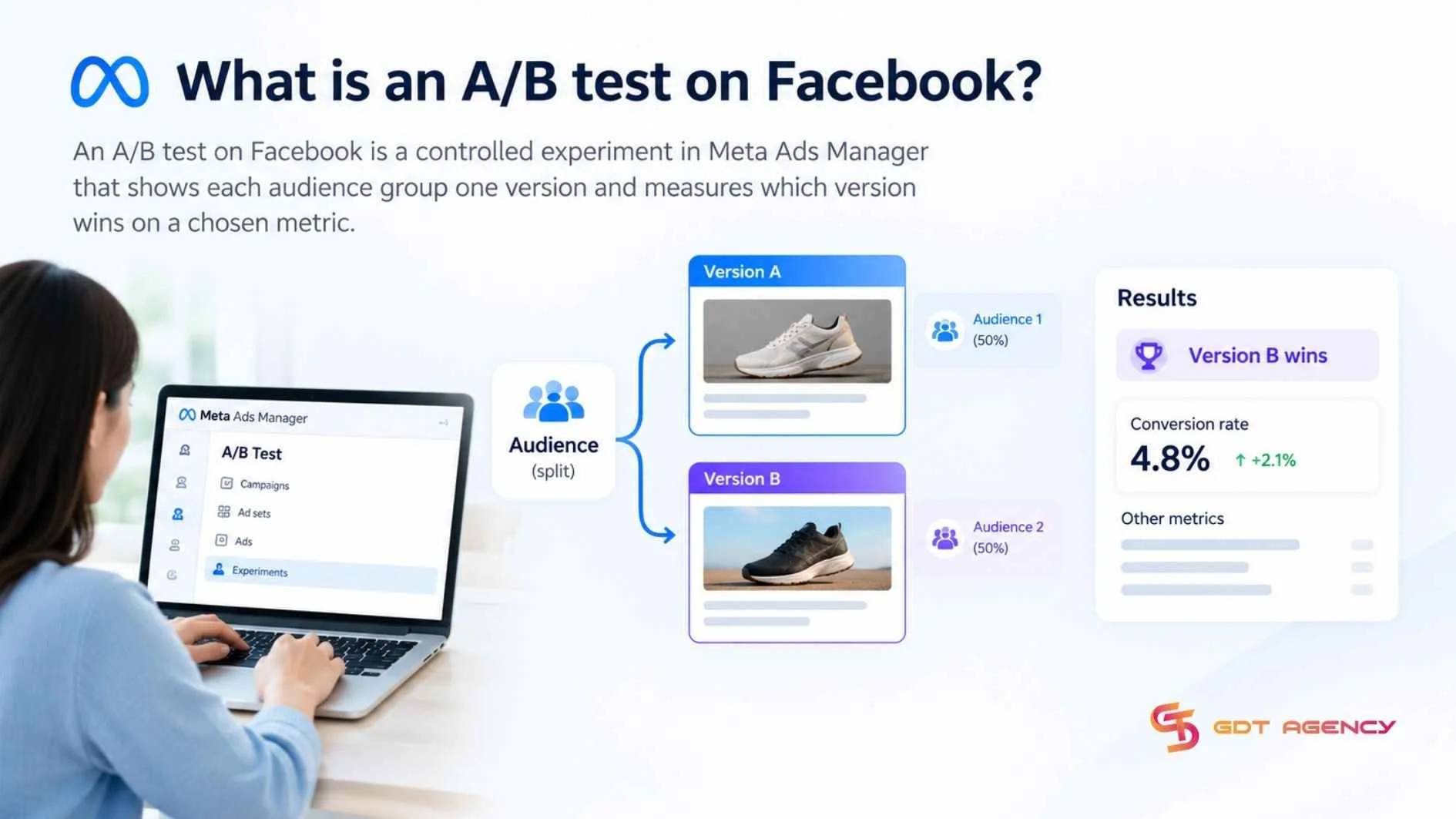
Within Meta Ads Manager, AB test on Facebook is built from four elements: the variable, the test versions, the audience split, and the key metric.
- Variable: The single setting that differs between versions, such as the creative or the audience
- Test versions: The ads, ad sets or campaigns being compared against each other
- Audience split: The division of your audience into separate groups, each shown one version
- Key metric: The result Meta uses to decide which version wins, such as cost per result
How does it work?
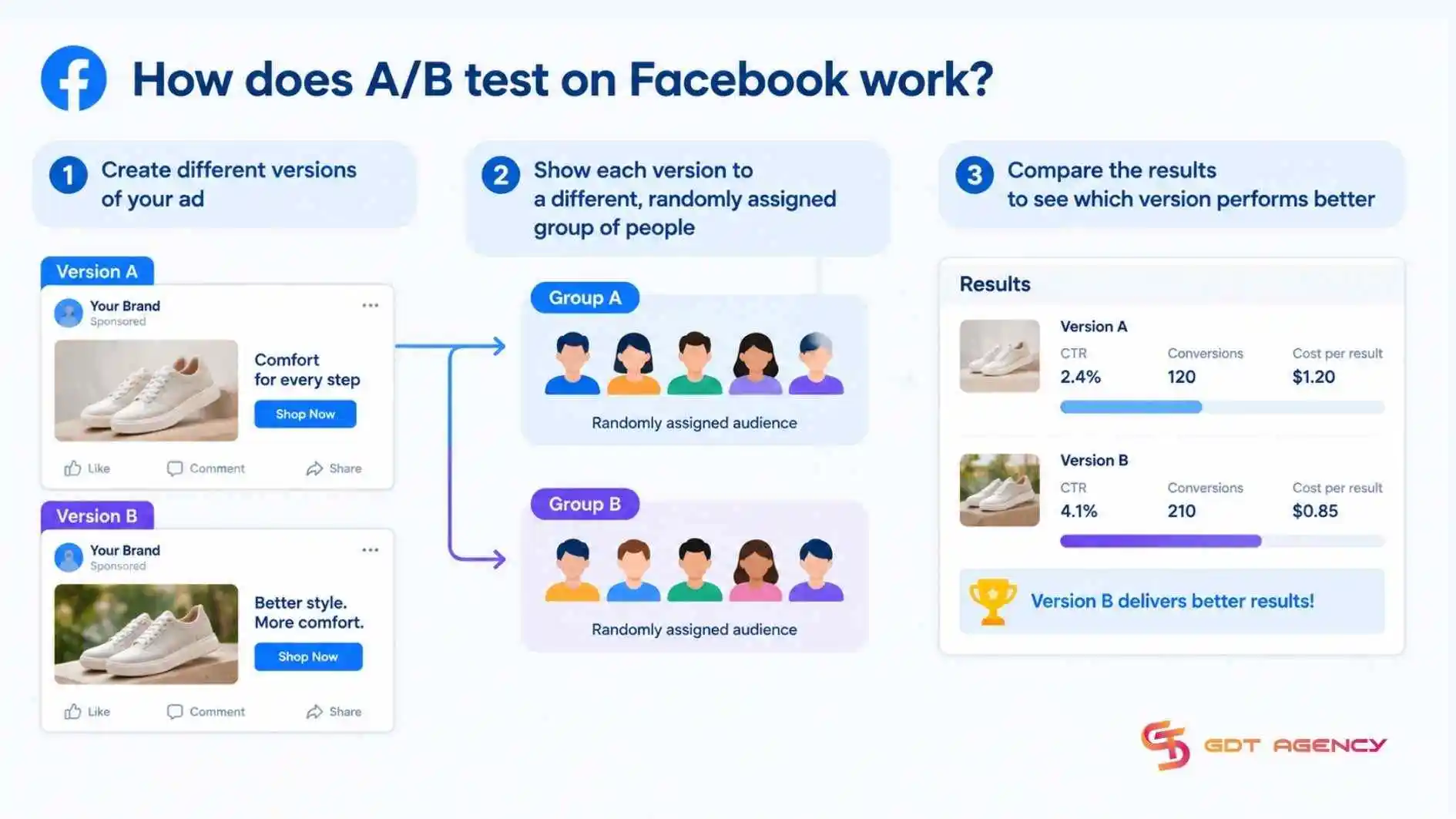
An A/B test on Facebook shows different versions of an ad to separate, randomly assigned groups of people, then measuring which version produces better results. In practice, you can compare up to 5 versions of an ad with different images, text, audiences, placements or other settings. The winning version is determined by the lowest cost per result for the key metric you select such as cost per purchase, cost per lead and cost per link click.
As an expert at GDT Agency with nearly 10 years of working with Facebook Ads, from standard to Facebook agency accounts. I’ve seen many advertisers assume that running an A/B test guarantees increased sales. In reality, an A/B test shows which version performs better under specific conditions: that audience, that message, that timing, that product and that stage of the funnel. So, you should use the result as a reference for future campaigns rather than a rule to apply rigidly to all of them.
How long should an A/B test on Facebook run?
An A/B test on Facebook should run long enough to collect enough results for a reliable comparison. Meta supports test lengths from 1 to 30 days, but recommends a minimum of 7 days for the most reliable results.
The right length depends on how quickly your test collects results, your budget, audience and how long people typically take to convert. While setting the schedule, Ads Manager shows an estimated power, which describes how likely the test is to detect a real difference between versions. Aim for at least 80% before relying on a result.
If estimated power is low, increase the test duration, budget or audience size. Where your timeline allows, include both weekdays and weekends in the schedule, since shopping and engagement behavior can differ between them.
>>> Understanding how Facebook ad account infrastructure works is also important when deciding to set up a Facebook Ads test account, connecting tracking, controlling the budget, and evaluating results before scaling.
How to create an A/B test on Facebook?
Creating an A/B test on Facebook requires 4 sequential steps in Ads Manager: choose where to start, select the variable, set the key metric and schedule, review and publish the test. Before you begin, confirm that you can access the ad account in Ads Manager and that you have at least one campaign, ad set or ad to test, since each starting method below builds on existing ad structure.
Step 1: Choose where to start in Ads Manager
Choosing where to start means deciding whether to duplicate something you already run into a split test or to compare campaigns and ad sets you have already built.
In practice, Ads Manager offers 3 entry points, and all of them lead to the same test setup.
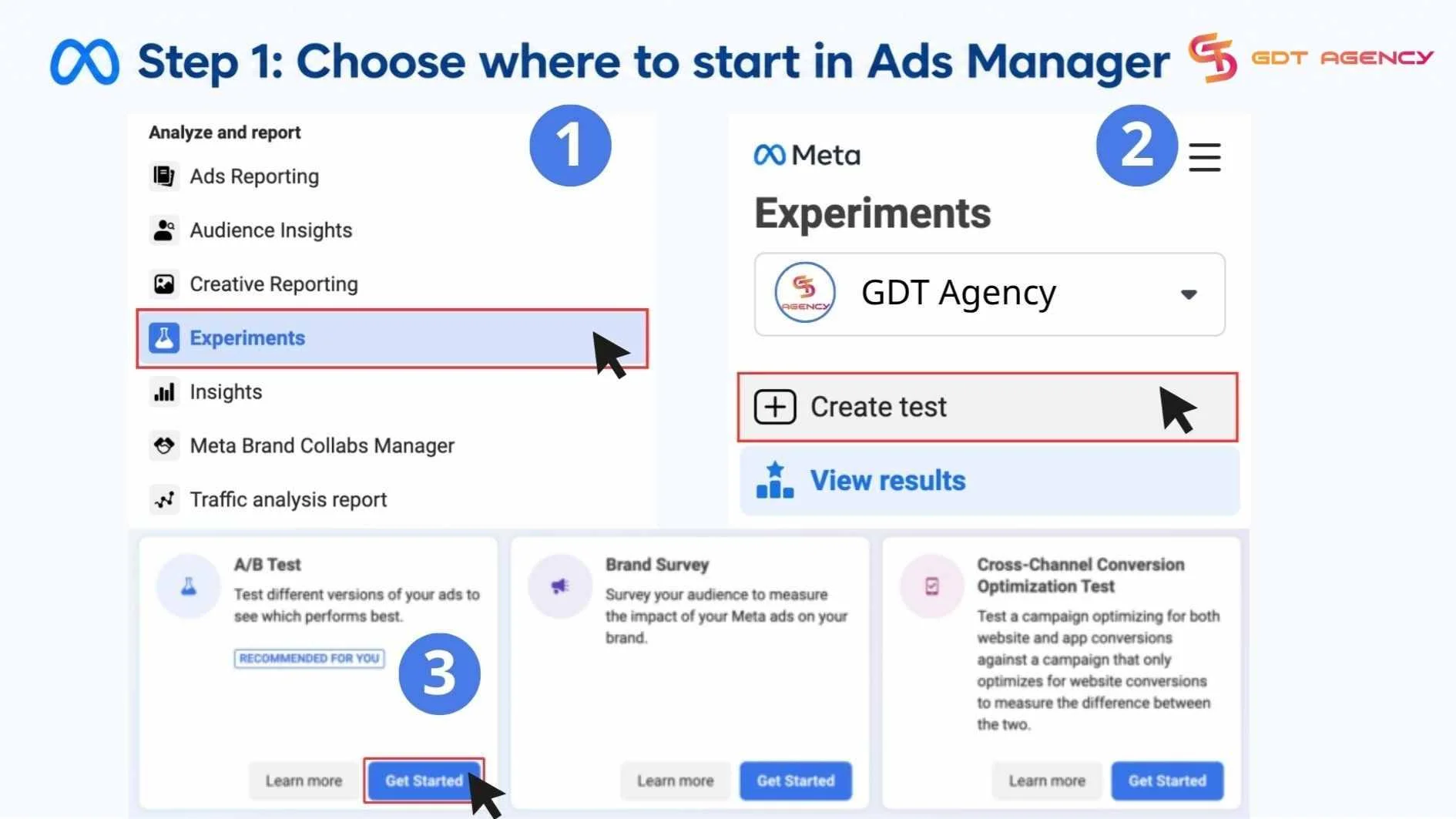
- Duplicate an ad or ad set: select it, click Duplicate, and choose New split test campaign.
- Compare existing campaigns or ad sets: tick the checkboxes beside the ones you want to compare, then click A/B Test in the toolbar.
- Use Experiments: open Experiments, choose Create test, select A/B Testing and click Get started. You can compare up to five existing campaigns, provided none is already part of another test.
Duplicating works well when you have a proven ad and want to test one change against it. Comparing existing campaigns suits cases where both versions already exist and run under similar settings. Whichever route you pick, start from a version with stable delivery, so the control reflects normal performance.
Step 2: Select the variable to test
Selecting the variable means choosing the single setting that will differ between versions, such as the creative, the audience, the placement, or the optimization strategy. The options Ads Manager shows can change over time, so confirm the current list when you open the setup screen.
Each A/B test answers a different question: creative asks what works, audience asks who responds, placement asks where, and optimization strategy asks how delivery should run. The table below pairs each variable with the question it answers and a typical example, so you can match the variable to the decision you actually need to make.
| Variable | Question it answers | Example of two versions |
| Creative | Which message or format drives more results? | Short video versus static image |
| Audience | Which group responds better? | Broad audience versus interest-based audience |
| Placement | Where does the ad perform best? | Automatic placements versus Instagram only |
| Optimization strategy | How should delivery be tuned? | Optimizing for link clicks versus optimizing for purchases |
Whichever variable you pick, change only that one. If a test changes both the image and the audience, you can’t trace a better result to either change, and the test teaches you nothing you can reuse. Write your hypothesis down before you choose, for example, that a short video will lower cost per purchase compared with a static image.
Step 3: Set the key metric and schedule
Setting the key metric and schedule means telling Meta how to judge the winner and how long the test should run. Both choices shape how you interpret the results, so they deserve the same care as the variable itself.
- Key metric: choose the result that matches your campaign goal. Ads Manager lets you use the current campaign result metric or a specific metric
- Schedule: set the start and end dates, using the duration guidance covered earlier in this guide.
- Budget: use comparable budgets across versions unless budget itself is the variable under test.
- Names: label each version clearly, for example, Test A for the video creative and Test B for the static image creative.
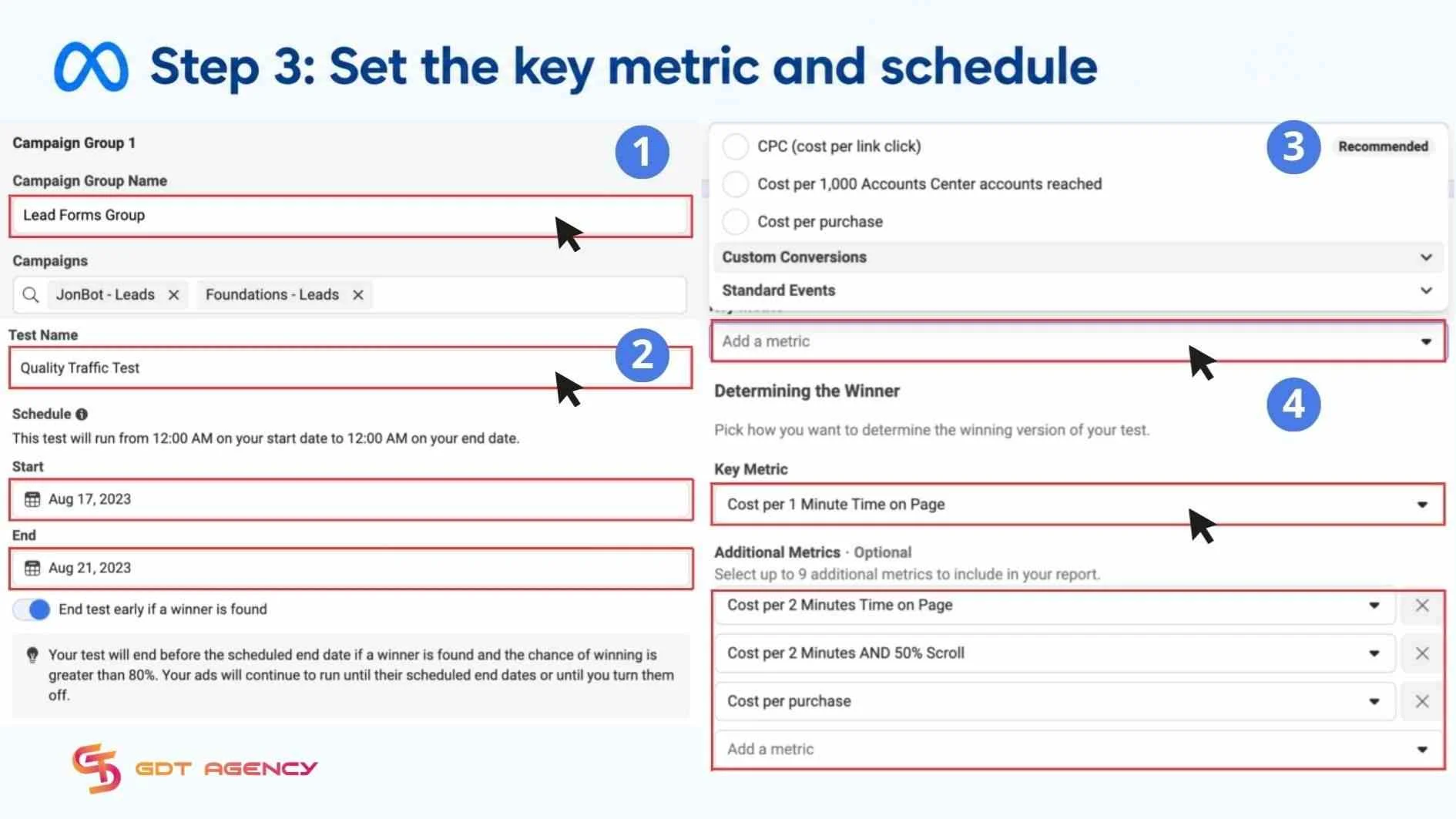
Match the metric to the decision you want to make. A lead generation test should judge cost per lead, while a sales test should judge cost per purchase, because a metric earlier in the funnel, such as clicks, can crown a version that attracts attention but not buyers.
Check the estimated power on the setup screen before you continue. A low figure is a signal to extend the schedule, raise the budget or widen the audience, rather than to launch anyway and hope for a clear winner
Step 4: Review and publish the test
Reviewing and publishing the test means checking that the setup matches your hypothesis and then confirming the test so that Meta starts delivering the versions. Before you click Create test on the final screen, run through a short checklist.
- One variable differs between versions.
- The objective and settings match across versions, apart from that variable.
- The key metric reflects your campaign goal.
- The schedule and budget give the test enough room to reach a usable estimated power.
- Each version has a clear name.
After you publish, leave the versions untouched while the test runs, because any edit changes the thing you are measuring. Meta notifies you when the test ends, and the next section shows where to look.
How to read the results of an A/B test on Facebook?
Reading the results of an A/B test on Facebook requires checking 3 things in Ads Manager: the cost per result of each version on your key metric, the winner or top performer and the confidence percentage behind that result.
- Cost per result: the performance chart shows each version’s cost per result and the winner is the version with the lowest cost per result on the key metric you selected, such as cost per purchase, cost per lead or cost per link click.
- Winner or top performer: Meta marks the best-performing version with a green trophy icon. When there is no clear winner, Meta may show top-performing versions based on other metrics, which still gives direction for future campaigns.
- Confidence percentage: Meta estimates it by simulating possible outcomes tens of thousands of times, and it shows how likely similar results would be if you repeated the test.
How you act depends on the confidence percentage. A high figure means the difference is more likely to be real and repeatable, while a low figure means you should treat the result as directional only and not scale it immediately. When there is no winner, the usual causes are a test that was too short, too few results or ignored study length guidance.
Where do you find results?
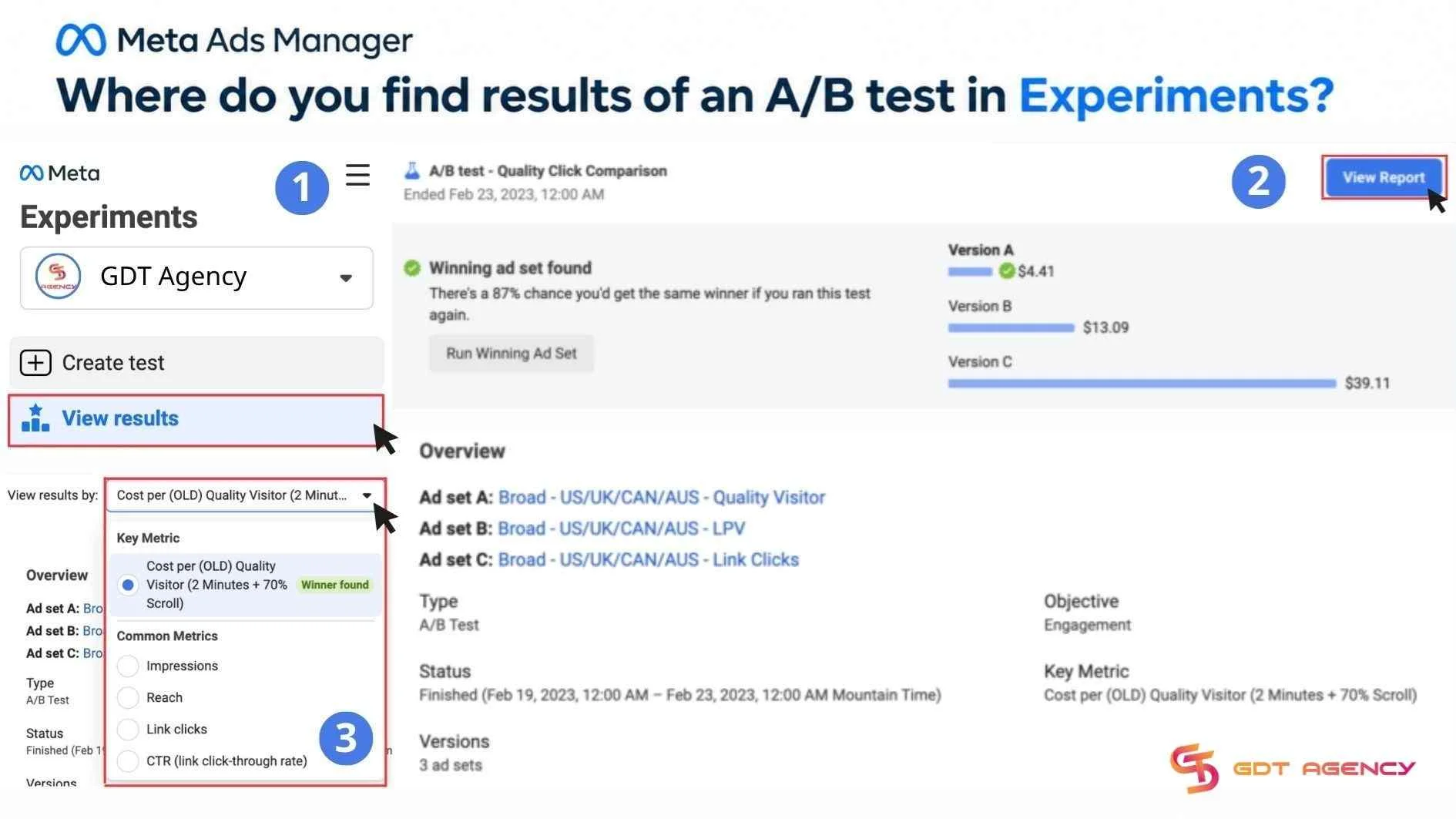
You can track results of an A/B test in Experiments in 3 steps: Go to Experiments, select the test and click View results. You can also view the same performance data in Ads Manager through View charts for the campaign, ad set or ad involved in the test. The results page includes test details, a performance chart, an explanation of the winner and age or gender breakdowns when enough data exists.
What is the minimum budget for an A/B test?
There is no single fixed minimum budget for an A/B test. Meta requires only the standard minimum for the campaign or ad set, which varies by country, currency, objective and bid strategy. Specifically, the amount Ads Manager shows at setup is the hard floor, and the practical budget sits above it. If you use a cost-per-result goal as your bid strategy, Meta advises a daily budget of at least 5 times that goal, for example, a $5 goal calls for at least a $25 daily budget.
A useful rule is: Test budget per variant = target conversions per variant x expected cost per result. For example, if you expect the cost per purchase is $20 and you want about 50 purchases per variant for a meaningful comparison, budget roughly $1,000 per variant or $2,000 total for a two-version test. Unlike a Facebook Sandbox Ad Account, which gives you a place to try out setups without delivering live ads or spending real money, A/B test runs live ads against a real budget, so the money you commit is part of the experiment.
What should you do with the results?
After A/B testing, use the results to improve current ads and guide future campaigns. The goal isn’t just to pick a “winner”, it’s to implement what works and turn the findings into your next hypothesis. There are 2 main outcomes: a clear winner and no clear winner.
- If there is a clear winner, shift budget toward it and apply its winning creative, audience, placement or strategy. Pause the underperforming variation, document the result and design the next test around the insight.
- If there is no clear winner, keep your current control running. If the test lacked sufficient data, extend or rerun it with a larger audience, higher budget or longer duration. If the variants were too similar, test a more meaningful difference next time
Key takeaways for A/B testing
An AB test on Facebook is a Meta Ads Manager experiment that gives each audience group one version and compares them on a single variable, so the winner reflects your change rather than chance. Setting one up follows 4 steps: choose where to start, select the variable, set the key metric and schedule, then review and publish. Checking the winner, the gap on your key metric and the confidence percentage, and act only when all three support the decision.
- Write a one-sentence hypothesis for the single variable you want to test.
- Choose your starting point in Ads Manager: duplicate an ad or ad set, compare existing campaigns, or use Experiments.
- Pick the key metric that matches your campaign goal and set a schedule that gives the test enough time.
- Check the estimated power and budget, then publish and leave the versions untouched.
- Read the winner, the key metric gap and the confidence percentage before applying the result or rerunning the test.
FAQs
Can you test more than one variable in a single A/B test on Facebook?
No, a single A/B test on Facebook compares versions on one variable at a time. Changing one variable keeps the comparison clean, lets you trace any difference to a specific change, and gives you a result you can reuse in later campaigns. To test a second variable, run a follow-up test after the first one finishes.
Can you edit an A/B test on Facebook after you publish it?
No, you should not edit an A/B test after you publish it. Any change to a version alters the variable under comparison, breaks the match between versions, and makes the results unreliable. If something needs to change, end the test and create a new one.
Do you need separate campaigns for every test?
Yes, each test needs its own campaigns or ad sets. Meta does not let a campaign that already belongs to a test join another one, separate structures keep each variable isolated, and clean reporting depends on that separation. Duplicating the original into a new split test campaign is the quickest way to create that structure.
Is a high confidence level important before scaling the winner?
Yes, a high confidence level matters before you scale a winner. A low figure means the difference may be chance, scaling the wrong version spends more budget on the weaker option, and Meta’s guidance is not to declare a winner on a small difference. If confidence is low, rerun the test with more budget, time or audience.
Can an A/B test run across Facebook and Instagram?
Yes, an A/B test can include ads on both Facebook and Instagram. Meta offers A/B testing for ads on both platforms, placement itself can be the variable you test, and keeping placements identical across versions keeps the comparison clean.