

Facebook BM2500 is a Business Manager account that can hold up to 2,500 ad accounts under one login, built for agencies and advertisers who run large-scale campaigns across many clients or brands. Unlike a standard Business Manager, which supports a limited number of ad accounts, a BM2500 removes that bottleneck and lets a single team manage thousands of accounts from one dashboard. This guide breaks down what a BM2500 actually is, who should use it, how to stay safe with one, and how advertisers get access to one in 2026.
A BM2500 also carries more trust and more ad account slots than a normal Business Manager, so it attracts more scams and misleading listings too. A Facebook BM2500 is safe to use when it comes from a verified source and follows Meta’s business verification requirements. The risk comes almost entirely from where and how you get one, not from the account type itself. Knowing the real risks and how to verify a BM2500 before using it protects your ad budget and keeps your accounts from getting banned. The sections below walk through each part in detail, starting with what a BM2500 actually is.
What is Facebook BM2500?
Facebook BM2500 is a type of Business Manager account verified by Meta to manage up to 2,500 ad accounts at once. It is built for agencies and large-scale advertisers who need more capacity than a standard account allows.

To understand why that matters, it helps to look at how a BM2500 actually operates and what separates it from a regular Business Manager.
How Does a BM2500 Work?
A BM2500 works like any other Business Manager, but with a much higher ceiling on ad account capacity. The account owner adds ad accounts, Pages, and team members under one central login, then assigns roles and permissions to each person who needs access.
Every ad account inside a BM2500 still runs its own campaigns, its own billing, and its own spend limits. The BM2500 layer sits on top as a management shell. It groups accounts together so an agency can switch between clients without logging in and out of separate accounts all day.
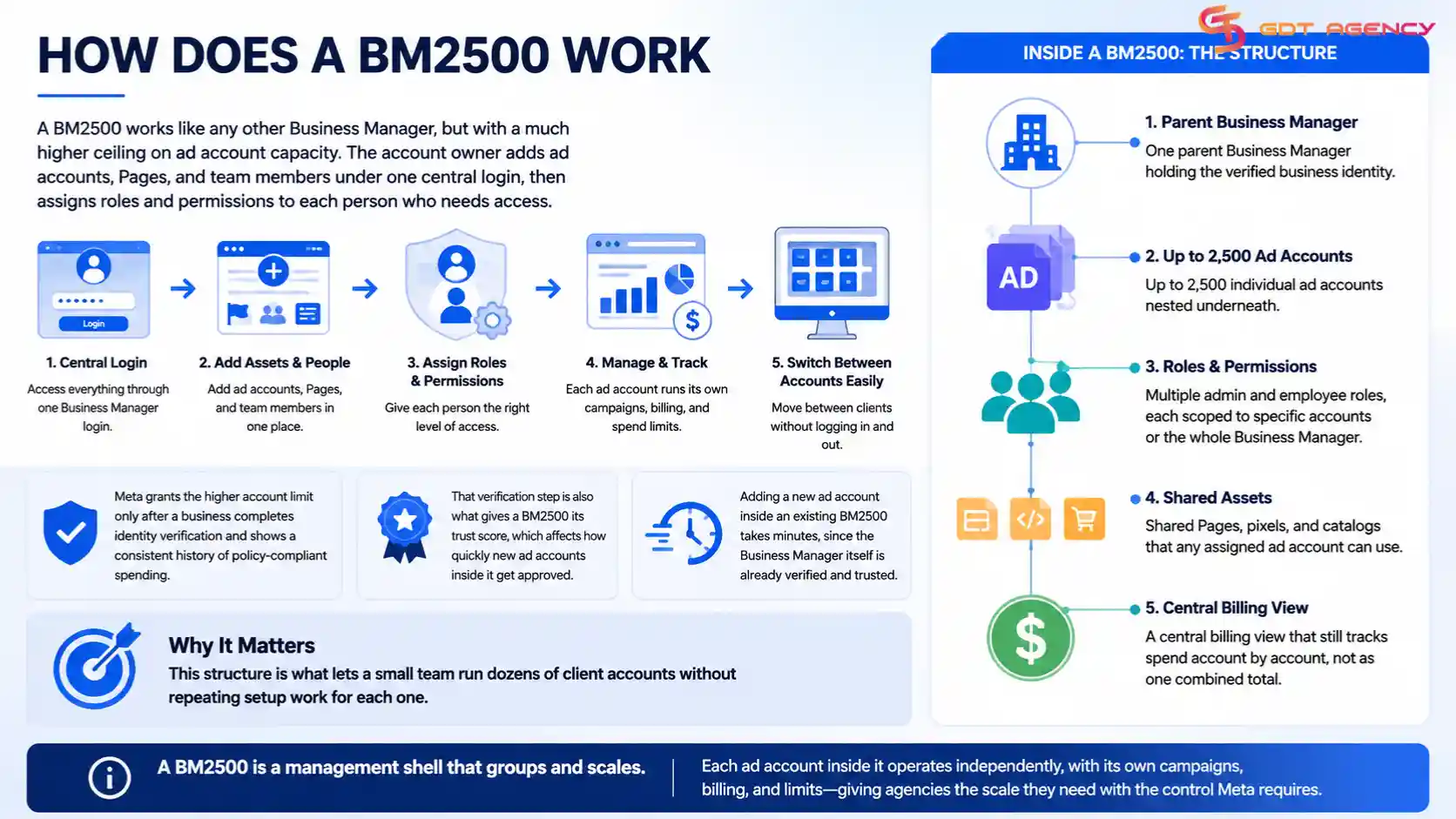
Meta grants the higher account limit only after a business completes identity verification and shows a consistent history of policy-compliant spending. That verification step is also what gives a BM2500 its trust score, which affects how quickly new ad accounts inside it get approved.
Inside a BM2500, the structure usually looks like this:
- One parent Business Manager holding the verified business identity
- Up to 2,500 individual ad accounts nested underneath it
- Multiple admin and employee roles, each scoped to specific accounts or the whole Business Manager
- Shared Pages, pixels, and catalogs that any assigned ad account can use
- A central billing view that still tracks spend account by account, not as one combined total
This structure is what lets a small team run dozens of client accounts without repeating setup work for each one. Adding a new ad account inside an existing BM2500 takes minutes, since the Business Manager itself is already verified and trusted.
Facebook BM Account Comparison:
Just like BM1, BM5, BM10, BM25, and BM50, a BM2500 account is defined by the number shown in the Advertising Account Creation Limit section. In this case, the ‘2,500’ represents the maximum number of sub-ad accounts it can create.
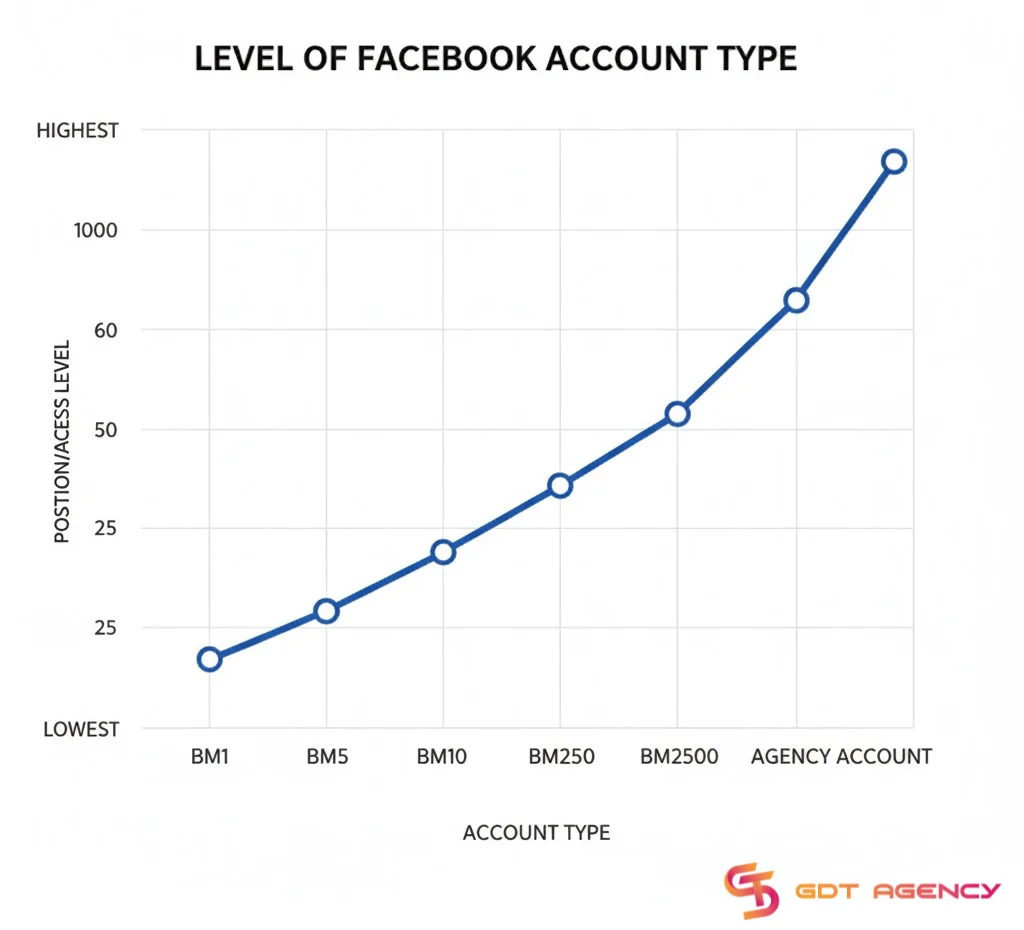
Though BM2500 has strong advantages, it is not the absolute top tier. BM2500 still sits below Meta’s true highest tier: the agency account. As an expert at GDT Agency who has spent nearly 10 years working with multiple ad accounts from standard to Facebook agency ad account, I’ll show you the differences between each BM account to make everything clearer. Take a look at this comparison below:
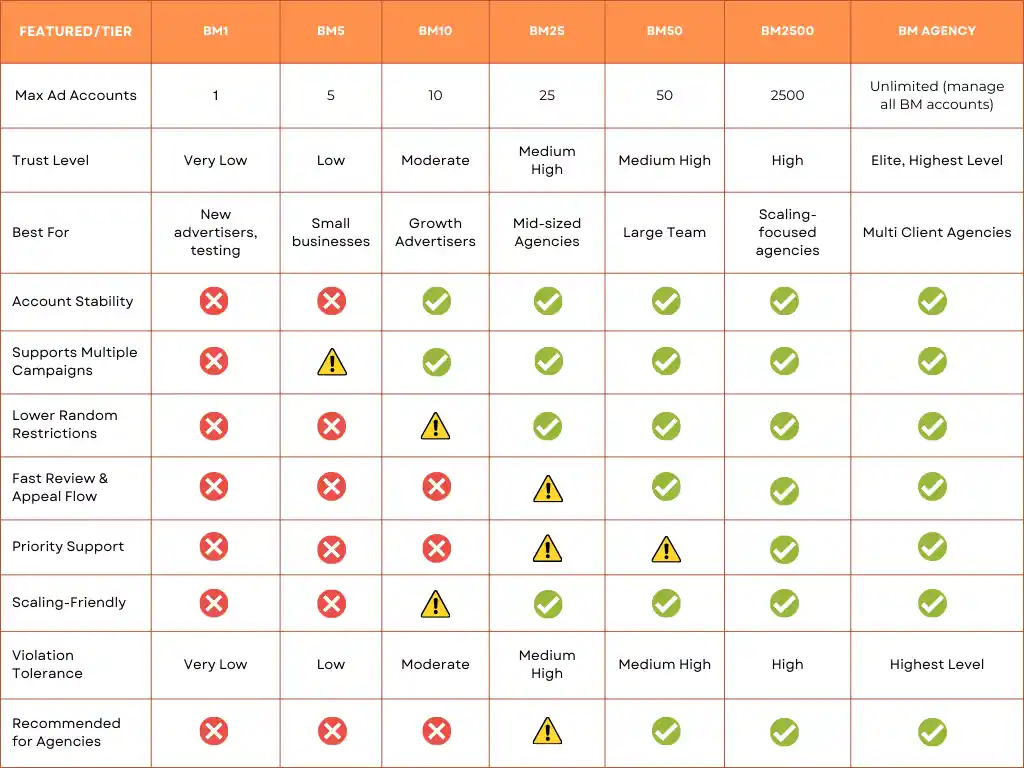
BM agency is an account that is certified as a Meta Business Partners, and they usually outperform BM2500 in flexibility and control. These accounts have unlimited spending, can attach multiple BMs, including BM2500s, manage a large mix of fanpages and pixels from different clients, and enjoy faster reviews and direct Meta support that full-service partner agencies rely on.
What Are the Benefits of Using a BM2500?
I believe that for a lot of individual advertisers, the number 2,500 sounds quite impressive. After managing thousands of ad accounts across 18 countries through GDT Agency, I’ve worked extensively with the BM2500 infrastructure, and I understand one thing:
“The number 2500 ad accounts is not the real reason that makes a lot of advertisers and agencies pursue this tier of ad accounts. But the bigger advantage of this Facebook ad account tier is the stability and trust level with Meta’s systems.”
→ That stability comes from the account’s underlying infrastructure, including its trust level, account hierarchy, operational history, and Meta partner relationship. If you’re unfamiliar with how these technical layers affect campaign stability, read our guide on Facebook Ad Account Infrastructure: What It Is & How It Works.
Here are the things you will get when you have a BM2500:
1. Higher Trust Score: I’ve seen individual advertisers who lose their entire Business Manager in one night because one ad got flagged. However, these BMs have a truly high level of trust score, and they rarely get sudden bans or restrictions unless they seriously violate policy.
2. Higher Spending Limit Warm-Up Period: BM2500 can help advertisers scale effectively with a spending limit of around $40,000/day.
3. Smoother Ad Approval Process: Thanks to the high level of trust score, advertisers can get faster review times, fewer rejections, and more consistent delivery.
4. Built-In Account Redundancy: When you have the ability to create 2500 ad accounts, you will see that policy violations don’t risk your entire operation because you can replace them instantly if you lose 1 or 2 ad accounts due to policy violations.
5. Direct Support Channels: Most partners with BM2500 access have some form of direct communication with Meta, which can help you not get stuck with automated chat support when something breaks or needs urgent attention.
How to Stay Safe When Using a Facebook BM2500?
A Facebook BM2500 is safe to use when it comes from a verified source and follows Meta’s business verification requirements. The risk comes almost entirely from where and how you get one, not from the account type itself.
To use a BM2500 safely, it helps to know the specific risks involved and how to check that an account is legitimate before you rely on it.
What Are the Risks of a BM2500?
The biggest risk is buying a BM2500 that was created through fake documents or stolen business information. Meta actively looks for these patterns, and accounts built this way often get disabled without warning, taking every client’s ad account down with them.
Shared or resold BM2500 accounts carry a second risk. If the original creator still has access, or if the account gets flagged for suspicious activity from another user, every business connected to it can lose access at the same time.
Policy violations inside any single ad account can also put the entire BM2500 at risk. Meta reviews accounts as part of a larger network, so repeated violations in one corner of the Business Manager can trigger a review of the whole account.
Other risks worth watching for include:
- Overpromised account limits: Some sellers advertise a “BM2500” that has not actually reached that verified status, and the real ad account limit turns out much lower once you start using it.
- No ownership transfer: A few providers keep partial admin access after the sale, which means they can remove your team or reclaim the account later.
- Payment method conflicts: Adding your own payment method to an account with an unclear history can sometimes trigger extra review from Meta, delaying campaign launches.
- No documentation: Accounts sold without any proof of business verification are harder to trust and harder to recover if something goes wrong.
How to Verify a BM2500 Is Legitimate?
Checking the business verification badge is the first step. A legitimate BM2500 shows a verified business name, matching website, and registered business details inside Meta’s Business Manager settings.
Ask the provider for the account’s history, including how long it has held BM2500 status and whether it has ever been restricted. A provider unwilling to share this information is a warning sign.
It also helps to request a trial ad account inside the BM2500 before committing to full use. Watching how quickly that account gets approved and how it performs over the first few days gives a real signal of the account’s standing with Meta.
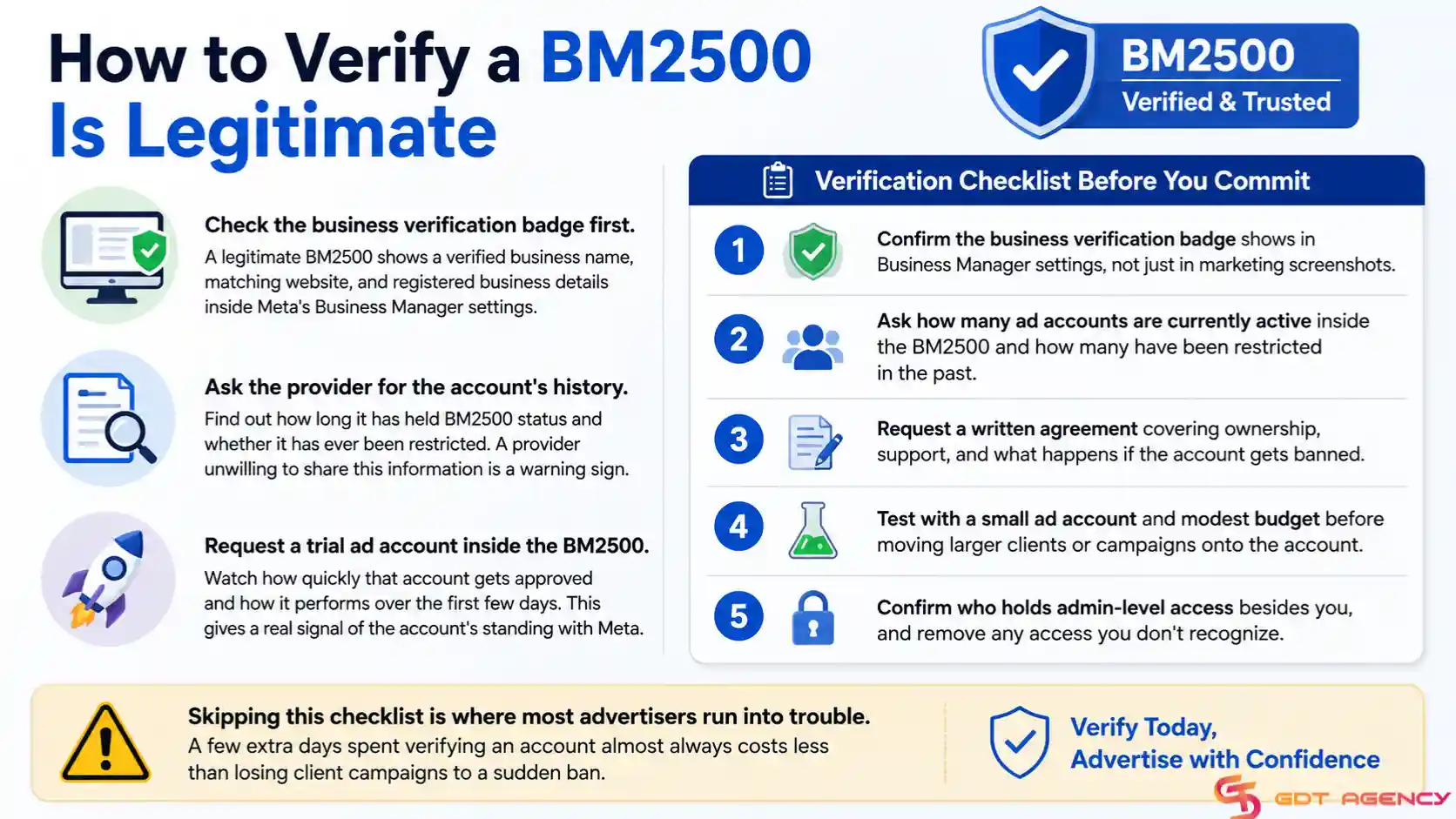
A short verification checklist before you commit:
- Confirm the business verification badge shows in Business Manager settings, not just in marketing screenshots.
- Ask how many ad accounts are currently active inside the BM2500 and how many have been restricted in the past.
- Request a written agreement covering ownership, support, and what happens if the account gets banned.
- Test with a small ad account and modest budget before moving larger clients or campaigns onto the account.
- Confirm who holds admin-level access besides you, and remove any access you don’t recognize.
Skipping this checklist is where most advertisers run into trouble. A few extra days spent verifying an account almost always costs less than losing client campaigns to a sudden ban.
How to Get a Facebook BM2500: Buy vs. Create
Advertisers get a BM2500 in one of two ways: they build one through Meta’s own verification process over time, or they buy or rent an already-verified BM2500 from a provider. Each path suits a different kind of advertiser.
Creating your own BM2500 gives you full ownership and full control over the account. The tradeoff is time. Meta typically raises a Business Manager’s limits gradually, based on spending history and account behavior, so reaching BM2500 status this way can take months or longer.
Buying or renting a BM2500 gets an agency running immediately. This path fits teams that need scale right away and don’t want to wait through Meta’s natural growth process. The tradeoff here is trust in the provider, since account quality varies a lot across the market.
Agencies with a long runway and a small number of accounts to manage often lean toward building their own. Agencies that need to onboard many clients quickly tend to rent from an established provider instead.
Here’s how the two paths compare on the factors that matter most:
| Factor | Build Your Own | Buy or Rent |
| Time to access | Months, sometimes longer | Immediate to a few days |
| Ownership | Full, from day one | Depends on the provider’s terms |
| Upfront cost | Low, mostly time investment | Higher, based on trust level |
| Control over history | Full control | Limited to what the provider built |
| Risk of scams | None, if done correctly | Real risk if the provider is unverified |
This table lays out the tradeoff in plain terms: building costs time, buying costs money and trust in a third party. Most agencies end up choosing based on how urgently they need to scale.
How Much Does Facebook BM2500 Cost?
There is no official public price for Facebook BM2500 because Meta does not directly sell these accounts. Based on publicly discussed market offers and agency-led access models, purchasing access to high-tier BM2500 infrastructure can range from approximately $50,000 to $65,000 USD or higher, depending on account history, trust level, support level, spending requirements, and ownership structure.
Some providers publicly position rentals as either a percentage of monthly ad spend or a fixed monthly fee, but there is no standard market rate.
That is why advertisers should be careful with offers that focus only on price. A lower-cost BM2500 does not automatically mean better value if account stability, support, ownership structure, or compliance controls are weak.
For most advertisers, the better question is not “How much does BM2500 cost?” but “Do I actually need BM2500 infrastructure for my current scale?”
Who Actually Needs a BM2500?
To be honest, most advertisers don’t need a BM2500. If you’re a solo advertiser who spends around $3,000/month for 1 business, having a BM2500 won’t change anything for you, a BM5 or BM25 is complete enough.
Thanks to the stability and the infrastructure that is designed for high-volume and high-trust operations, the Facebook BM2500 is suitable for:
- Agencies that handle more than 100 clients: When you require dozens or even hundreds of different ad accounts to be active at the same time.
- Affiliate networks with high-volume offers: Operations that need to carry out intensive testing on various accounts.
- Scaling businesses that are constantly creating accounts: Groups that require new ad accounts every week for testing or operating in new regions.
- Users needing constant uptime: A company where one banned ad account would shut down revenue.
- International markets teams: Companies that are running ads in several countries at once and have local account setups.
In short, most advertisers wouldn’t require a BM2500 in their whole career. However, for brands and networks that scale fast, it’s one of the optimized choices.
What Happens If Your BM2500 Gets Banned?
If a BM2500 gets banned, every ad account connected to it typically loses access at the same time, along with any active campaigns running inside those accounts. This is why relying on a single BM2500 without a backup plan carries real risk for agencies managing many clients.
Providers with a strong track record often offer account replacement or migration support if a ban happens, moving clients into a new verified BM2500 with minimal downtime. Advertisers building their own account should keep a secondary Business Manager ready as a fallback, so a ban does not stop every active campaign at once.
Appealing a ban through Meta’s support channels is possible, but response times vary, and success is not guaranteed. Treating account stability as an ongoing responsibility, not a one-time setup task, is the most reliable way to avoid losing access altogether.
Final Thought
A Facebook BM2500 solves a real problem for agencies and advertisers running many ad accounts at once, but it only works when the account comes from a legitimate, verified source. Take the time to check business verification, ask for account history, and test with a small account before moving your full client roster over. That extra diligence up front is what keeps campaigns running and clients happy long term.
Frequently Asked Questions
Is a Facebook BM2500 legal to use?
Yes, a BM2500 is legal as long as it goes through Meta’s standard business verification process. Problems only arise when an account is created with fake documents or stolen business information.
Should You Use a Facebook BM2500?
Yes, a Facebook BM2500 makes sense if you manage many ad accounts at once, need to onboard clients quickly, or run campaigns across multiple brands from one team.
How long does it take to build a BM2500 from scratch?
Building a BM2500 through Meta’s natural verification process usually takes several months, since Meta raises account limits gradually based on spending history and policy compliance.
Can a BM2500 be transferred to another owner?
Yes, ownership can be transferred, but the process should include removing the previous owner’s admin access completely. A provider who keeps partial access after the sale is a red flag.
What happens if I add too many ad accounts too fast?
Adding accounts too quickly can trigger extra review from Meta, even inside a trusted BM2500. Spacing out new ad account creation lowers this risk.
Does a BM2500 cost more to run than a regular Business Manager?
Meta does not charge extra to run a BM2500 itself. The added cost comes only from buying or renting a verified account from a provider, or from the time spent building one from scratch.