
Why Facebook Advertiser Use Proxy and How to Setup?

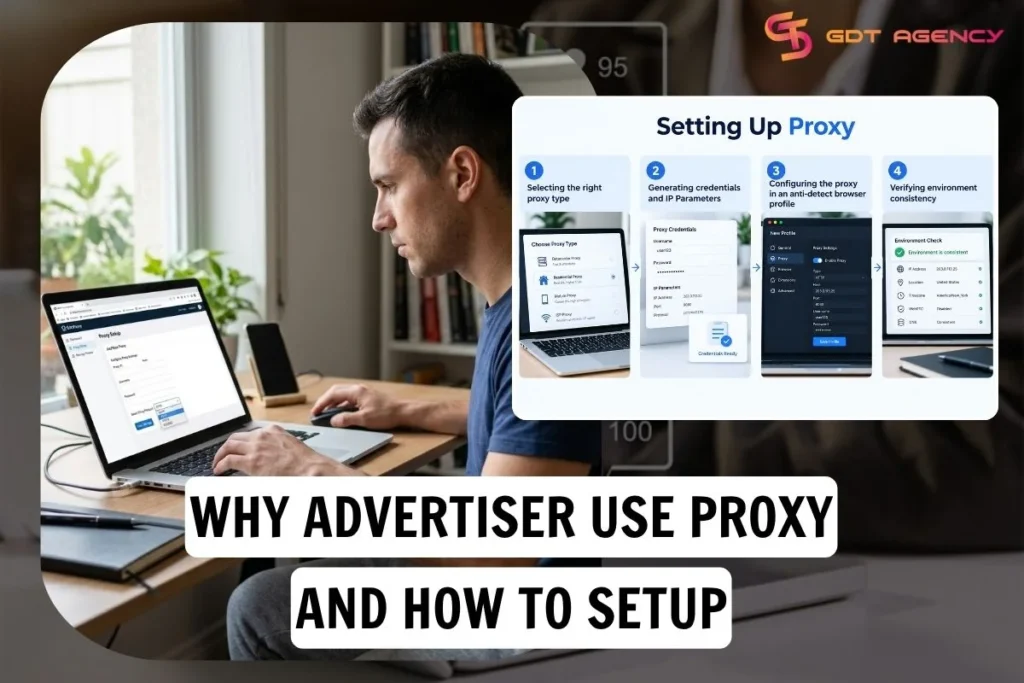
Facebook advertisers use proxies to see and test ads, landing pages and pricing exactly as users in each target country see them and to keep a stable network identity while managing ad accounts from a single location. A proxy is an intermediary server that routes your traffic through a different IP address, so ad networks, storefronts and search engines respond to the proxy’s location instead of yours.
Setting up a proxy for advertising takes 4 steps: selecting type, generating credentials, configuring them in an anti-detect browser profile, and verifying that your environment signals are consistent. Below, this guide covers the 7 benefits for advertisers and the full setup process, along with the practices that keep your use of proxies within Meta’s rules.
- 7 Practical Benefits of Proxies for Advertisers
- How to Set Up Proxies for Facebook Advertising?
- Step 1: Select the Right Proxy Architecture
- Step 2: Generate Credentials and IP Parameters
- Step 3: Configure Proxy in an Anti-Detect Browser
- Step 4: Verify Environment Consistency
- How do advertisers use proxies responsibly on Meta Platforms?
- What is the difference between Residential and ISP Proxies?
- What are Legitimate Agency Workflows on Meta Platforms?
- Best Practices for Using Proxies in Advertising
- Final Thoughts
7 Practical Benefits of Proxies for Advertisers
Proxies give advertisers 7 practical benefits across 3 purposes: research, verification & testing and operations, from viewing local ads to keeping a stable session for long-term workflows. In practice, each benefit comes down to one capability: seeing or accessing a platform from a specific location or from a stable one.
The 7 benefits are:
- Geo-Specific Ad Research: View local SERPs, regional publication ad units, and social feeds exactly as native users experience them.
- Competitor and Market Research: Audit competitors’ regional funnels, localized offers, and seasonal promotions.
- Ad Verification & Brand Safety: Ensure ad creative renders on brand-safe publisher sites and detect affiliate redirect hijacking.
- Geographic Campaign & Funnel Testing: Perform QA on localized checkout forms, payment gateways (e.g., Klarna, iDEAL, Pix), and auto-currency conversion scripts.
- E-Commerce and Pricing Research: Audit localized pricing dynamics across major marketplaces without cache distortions.
- Large-Scale Data Collection: Distribute automated public data collection requests across IP pools to stay within rate limits.
- Stable Sessions for Long-Term Workflows: Maintain a fixed network identity for administrative agency dashboards and multi-market media libraries.
As an expert at GDT Agency with nearly 10 years of working with Facebook Ads, across standard accounts to Facebook agency accounts in retail and ecommerce, I can say IP location dictates the ad environment. Websites and ad networks detect the visitor’s country, state or city, then dynamically adapt elements such as messaging, currency, product availability, language, pricing and ad placements to match that user’s local context.
How to Set Up Proxies for Facebook Advertising?
Setting up proxies for media buying and account management requires 4 sequential steps: selecting type, generating credentials, configuring in an anti-detect browser profile and verifying environment consistency to ensure profile isolation and network stability. Below is a guide using OkkProxy as an example of configuring clean IP infrastructure.
Step 1: Select the Right Proxy Architecture
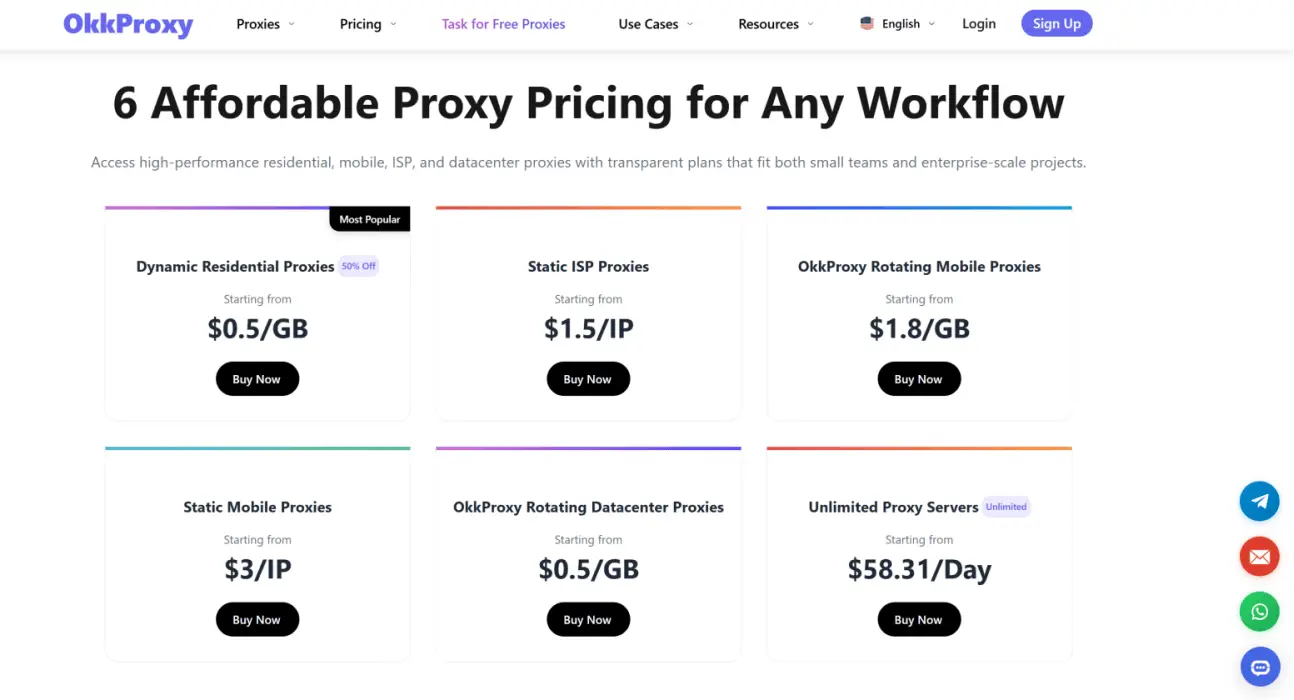
Selecting a proxy architecture means matching the type to the task you need it for.
- For long-term ad account management (e.g., Facebook Business Manager), choose Static ISP Proxies to obtain a permanent, non-rotating residential IP address.
- For high-volume ad verification or competitor ad research, choose Dynamic Residential Proxies.
Step 2: Generate Credentials and IP Parameters
Generating credentials means providing the server address and login details your browser will use to connect through the proxy. Pick the location based on the market you are testing or the region the client operates in.
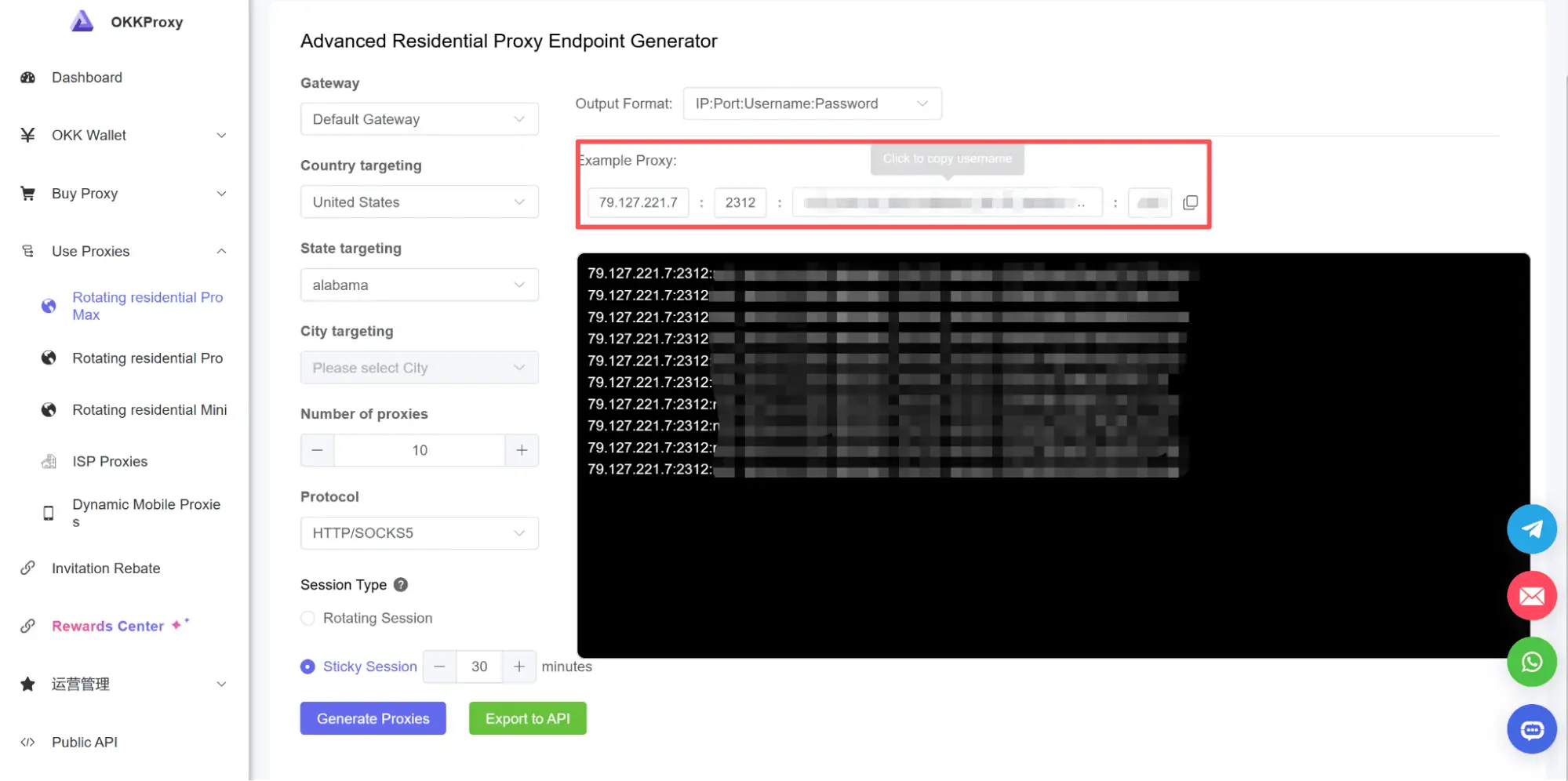
- Log into your proxy dashboard (e.g., OkkProxy).
- Navigate to the Proxy Generator section and select your target location (Country, State, or City).
- Select your preferred protocol (HTTP/HTTPS or SOCKS5).
- Copy the generated server IP address, Port number, Username, and Password.
Step 3: Configure Proxy in an Anti-Detect Browser
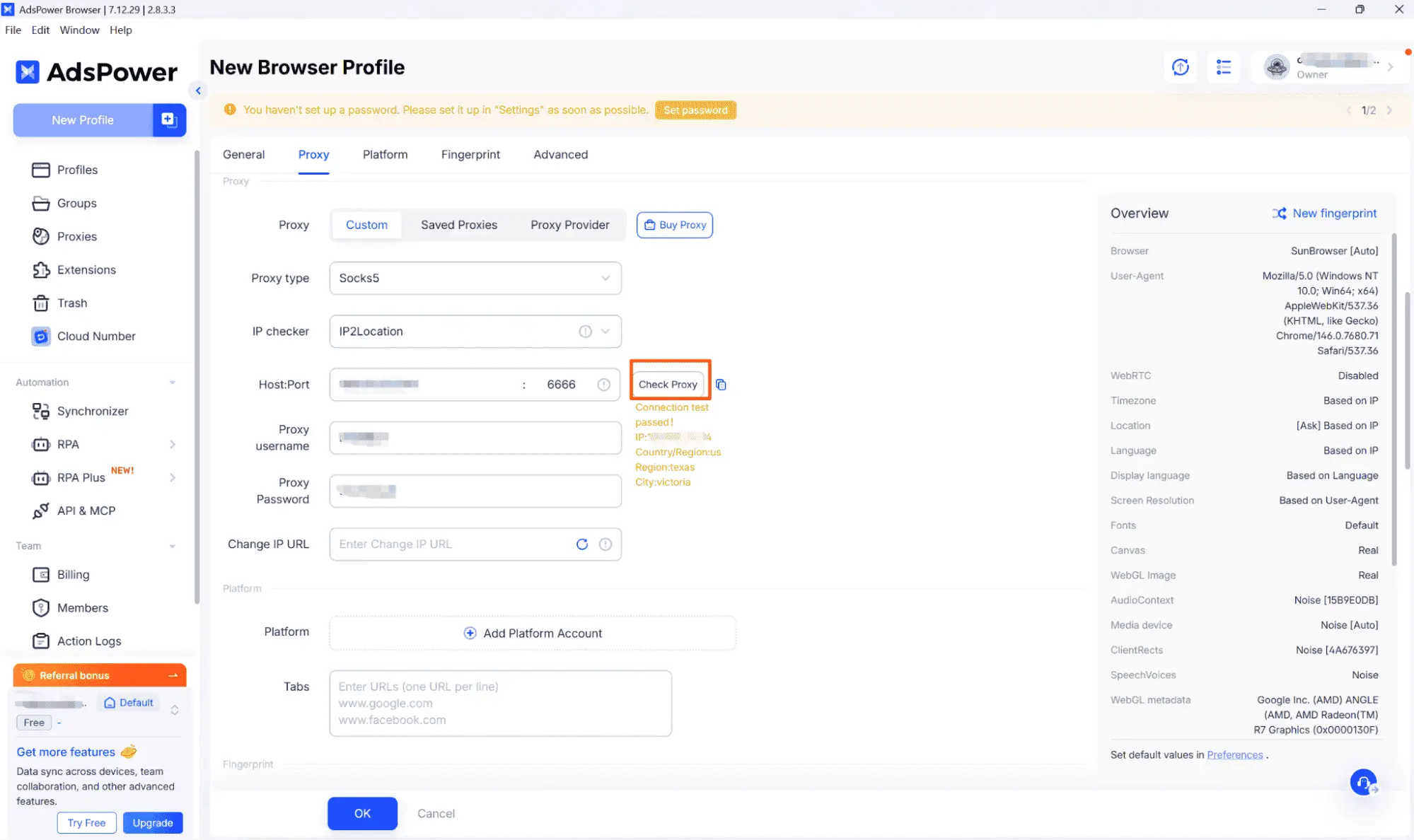
To manage multiple ad accounts safely, pair your static proxy with an anti-detect browser (such as AdsPower, Multilogin, or GoLogin):
- Create a New Browser Profile.
- Navigate to the Proxy Settings tab within the profile environment.
- Select the proxy type (e.g., SOCKS5 or HTTP).
- Paste your server address, port, username, and password into the respective fields.
- Click Check Proxy / Test Connection to confirm location, latency, and connection success.
Step 4: Verify Environment Consistency
Before accessing sensitive ad platforms, run an IP checker (e.g., Whoer.net or iphey.com) inside the anti-detect browser profile to ensure:
- The WebRTC timezone matches the proxy’s geographic location.
- The browser language aligns with the target country.
- The IP address carries a low fraud/risk score.
How do advertisers use proxies responsibly on Meta Platforms?
Advertisers use proxies responsibly on Meta Platforms by choosing the type that fits the task, limiting use to research, verification and authorized account management and following Meta’s terms.
What is the difference between Residential and ISP Proxies?
Residential proxies win on scale and rotation, while Static ISP proxies are better at persistence because they keep one fixed IP address, which suits long-term logins. The table below compares their core characteristics and best use cases, so you can match the proxy to your workflow before you buy.
| Type | Core Characteristics | Best Used For |
| Residential Proxies | Rotates IPs per request or short sticky window; routes through consumer ISP connections | High-volume ad verification, multi-region competitor research, gathering public ad library data |
| ISP connections | Fixed (non-changing) IP address; combines data center speed with official ISP ASN registration | Facebook/Meta ad account management, long-form QA across complex client dashboards |
What are Legitimate Agency Workflows on Meta Platforms?
There are 3 legitimate agency workflows on Meta platforms: Meta Ad Library research, landing page verification, local audience and creative auditing
- Meta Ad Library Research: Review local ad messaging, regional creative variations, and active promotions without regional interface redirection.
- Landing Page Verification: Verify that ad links direct users correctly across all target regions without unexpected redirects.
- Local Audience & Creative Auditing: Evaluate how creative assets render on various mobile networks and regional connections to optimize load speeds.
Note: Never use proxies to bypass Meta’s security systems, evade platform enforcement, disguise policy-violating content, or manage unauthorized ad accounts.
Best Practices for Using Proxies in Advertising
There are 4 best practices for using proxies in advertising: match the proxy type to the task, keep a 1:1 profile-to-proxy ratio, align Geolocation signals and adhere to Platform terms.
- Match Proxy Architecture to the Specific Task: Use rotating residential proxies for scraping/verification; use static ISP proxies for persistent logins.
- Maintain 1:1 Profile-to-Proxy Ratio: Assign one dedicated static ISP proxy per anti-detect browser profile to avoid cross-contamination.
- Align Geolocation Signals: Ensure IP location, browser timezone, and language parameters match perfectly.
- Adhere to Platform Terms: Respect target site rules, rate limits, and terms of service.
Final Thoughts
In modern performance marketing, proxies have transitioned from niche technical tools into vital operational infrastructure. By selecting reliable static ISP and residential solutions like OkkProxy and following proper browser setup guidelines, digital agencies can safely audit localized landing pages, conduct market research, and manage international campaigns with confidence.