
How to Add Email to Facebook Account on Mobile and Desktop?

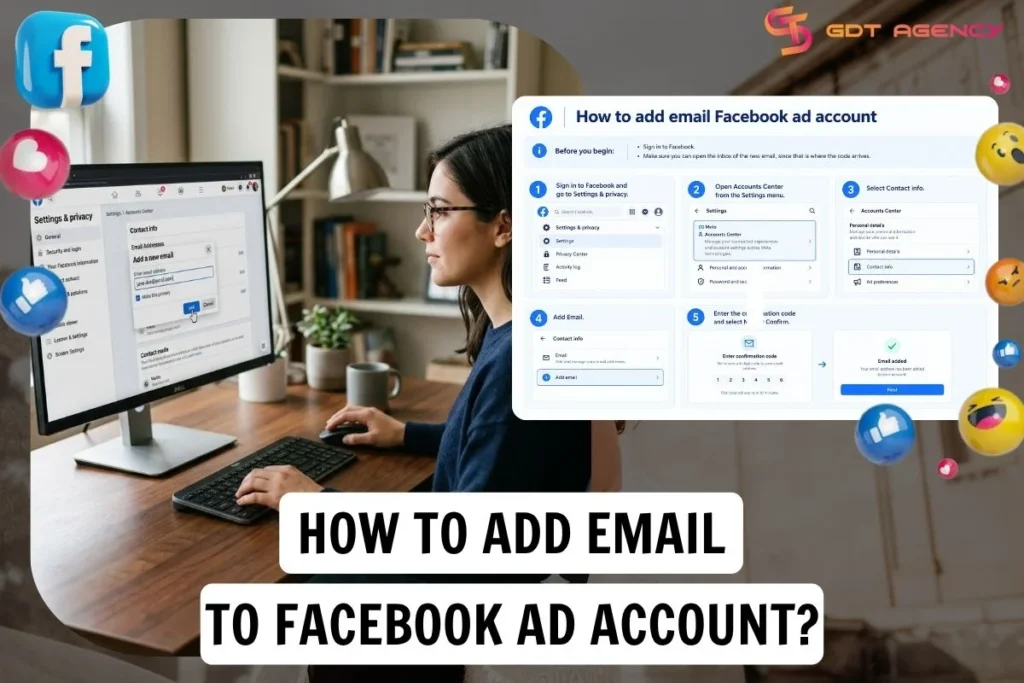
Adding email to a Facebook account takes 5 steps on both the mobile app and the website: sign in and open Accounts Center, then select Contact info, add new Email, enter the confirmation code and select Confirm. Once Facebook verifies that code, the address can be used for account communication, recovery, and signing in. Below, this guide walks through each step, explains what to do when Facebook rejects an email or the code never arrives, and shows how to change or remove an old address.
- How to Add Email to Facebook Account on Mobile and Desktop?
- How to make a new email your primary email on Facebook?
- Why won’t Facebook let you add an Email?
- Why didn’t the confirmation code arrive?
- How to change Facebook account email and remove an old email address?
- How to change Facebook account email?
- How to remove old email address?
- How is adding email different from changing or removing one?
- Final Thoughts
- FAQs
- Can you add more than one email to a Facebook Account?
- Can you use the same email on 2 Facebook accounts?
- Do you need to confirm a new email on Facebook?
- Is the email you add to Facebook visible to other people?
- Can you add email to a Facebook account if you can’t log in?
How to Add Email to Facebook Account on Mobile and Desktop?
Adding an email to a Facebook account requires 5 steps in Accounts Center: sign in, open Accounts Center, then select Contact info, add Email, enter the confirmation code and select Next or Confirm. Before you begin, sign in to Facebook and make sure you can open the inbox of the new email, since that is where the code arrives.
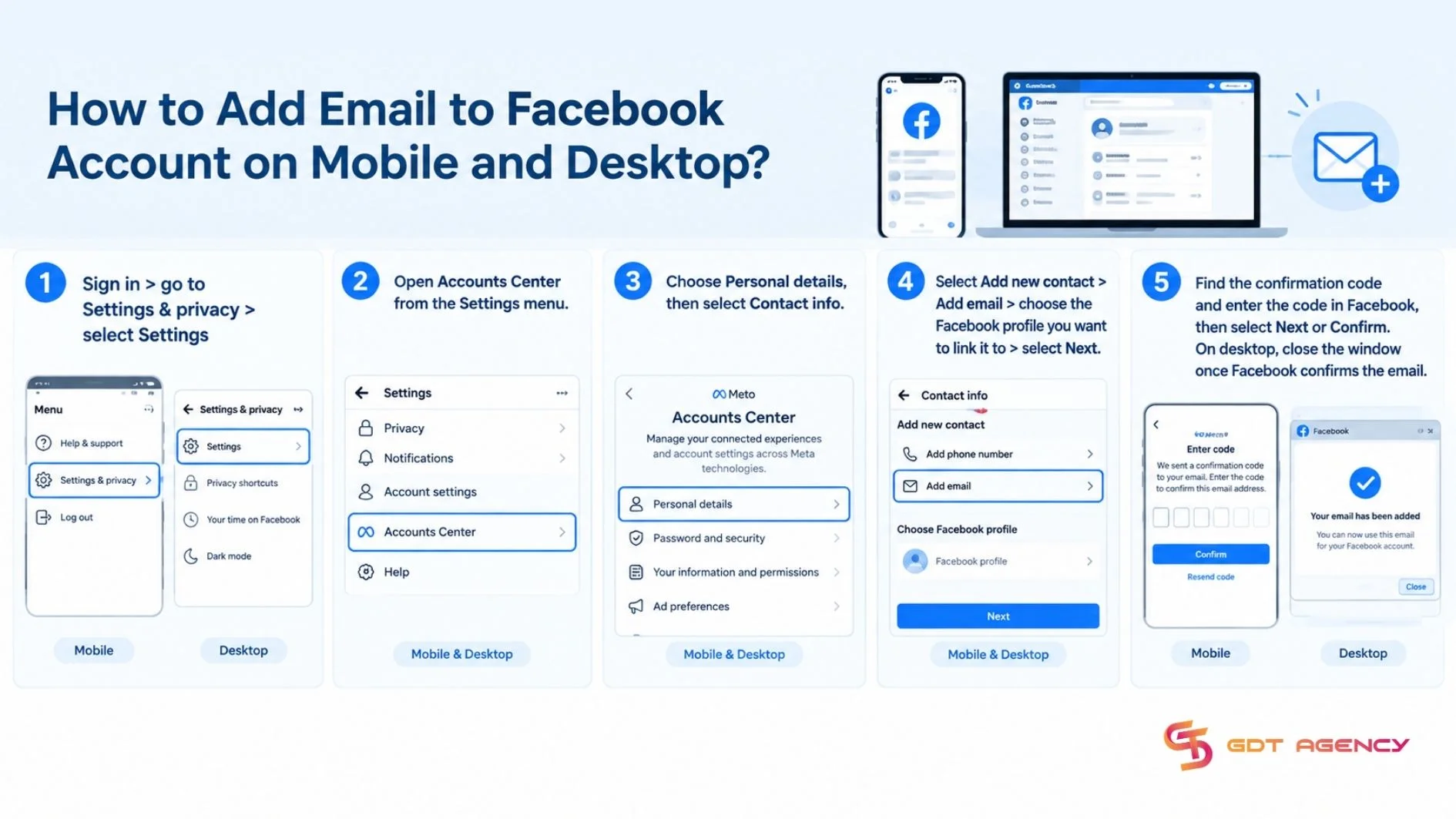
The 5 steps are the same on both platforms:
- Sign in > go to Settings & privacy > select Settings
- Open Accounts Center from the Settings menu.
- Choose Personal details, then select Contact info
- Select Add new contact > Add email > choose the Facebook profile you want to link it to > select Next
- Find the confirmation code and enter the code in Facebook, then select Next or Confirm. On desktop, close the window once Facebook confirms the email
As an expert at GDT Agency with nearly 10 years working with Facebook Ads across standard and Facebook agent accounts, I’ve seen advertisers assume that a newly added email automatically becomes their login or primary email. This can lead them to delete the old address too soon and lose the channel that receives confirmation codes, security alerts or recovery messages. In practice, adding email and setting it as the primary are separate. After adding a new address, confirm and check the options available in the account settings. For account security, always retain at least one working email address or mobile number on the account so you can recover access.
How to make a new email your primary email on Facebook?
To make a new email your primary email on Facebook, first add and confirm it in Accounts Center, then set it as your primary address in your notification settings.
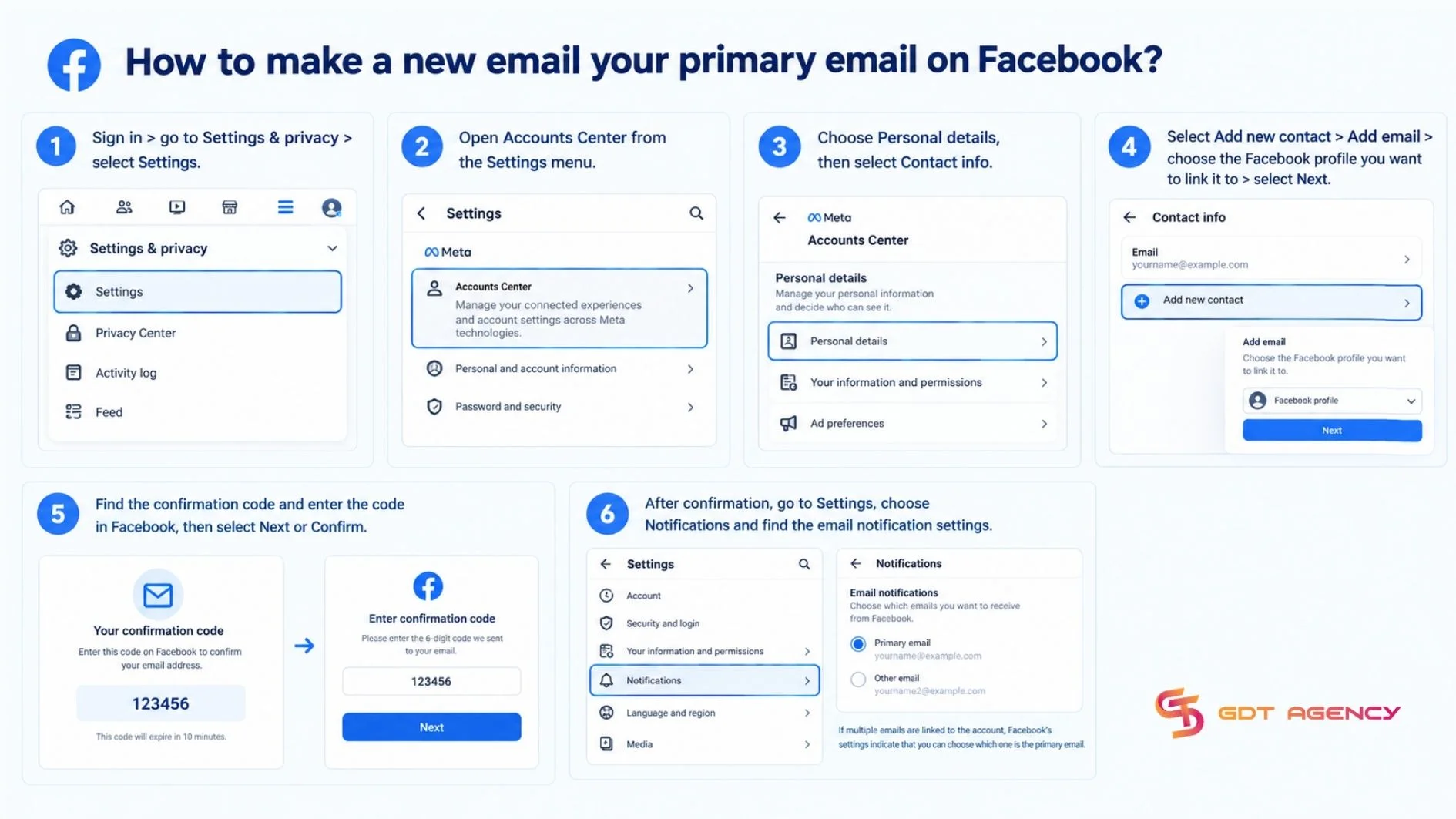
This happens after the 5 steps above, not as part of them. After confirmation, go to Settings, choose Notifications and find the email notification settings. If multiple emails are linked to the account, Facebook’s settings indicate that you can choose which one is the primary email.
An unconfirmed email can’t safely become your main address, so don’t delete the old address until the new one is confirmed. Whichever email you choose, keep at least one working email address or mobile number on the account so you can recover access.
Why won’t Facebook let you add an Email?
Facebook may reject or fail to complete an email for 1 of 3 reasons:
- The address is incorrect: missing characters or a wrong domain ending
- Already in use: try an email address that is not already tied to another Facebook account.
- Not confirmed: return to the confirmation step and enter the code Facebook sent, check spam/junk folders and use Facebook’s resend option.
Why didn’t the confirmation code arrive?
A confirmation code may be delayed for 1 of 2 reasons: delivered to a filtered folder or sent to an email address that was entered incorrectly.
Start with the inbox, then check the address and delivery time:
- Check the inbox for the exact address you added, including Spam, Junk and Trash or the Social folder.
- Confirm you typed the address correctly in step 4. If it is wrong, update it and request a new confirmation message
- Wait a few minutes, then use Resend email option if it appears. Facebook recommends avoiding requesting many codes in quick succession.
If the address is correct, you can access that inbox and the code still doesn’t arrive after waiting, try another email address that you control. Don’t use an address already associated with a different Facebook account unless you first recover or resolve that account.
>>> Once your Facebook account has a verified email and a reliable recovery method, you can move on to the advertising set process with How to Set Up a Facebook Ad Account: Step-by-Step Guide.
How to change Facebook account email and remove an old email address?
Replacing an old email on Facebook takes 2 steps: add and confirm the new address first, set it as your primary email and then remove the old one from Contact info after the new one works.
How to change Facebook account email?
To change your Facebook account email, add the new address through Accounts Center, confirm it with the code, and then set it as your primary email to replace the old one.
Follow the 5 steps above to add and confirm the new address, then use the primary email steps to make it your main contact. Keep the old address in place until the new one is verified. That way, you are never left without a confirmed email on the account while the change is in progress.
>>> With your Facebook account email confirmed, the next step is to create Facebook Ad Account and prepare the account for your advertising activities.
How to remove old email address?
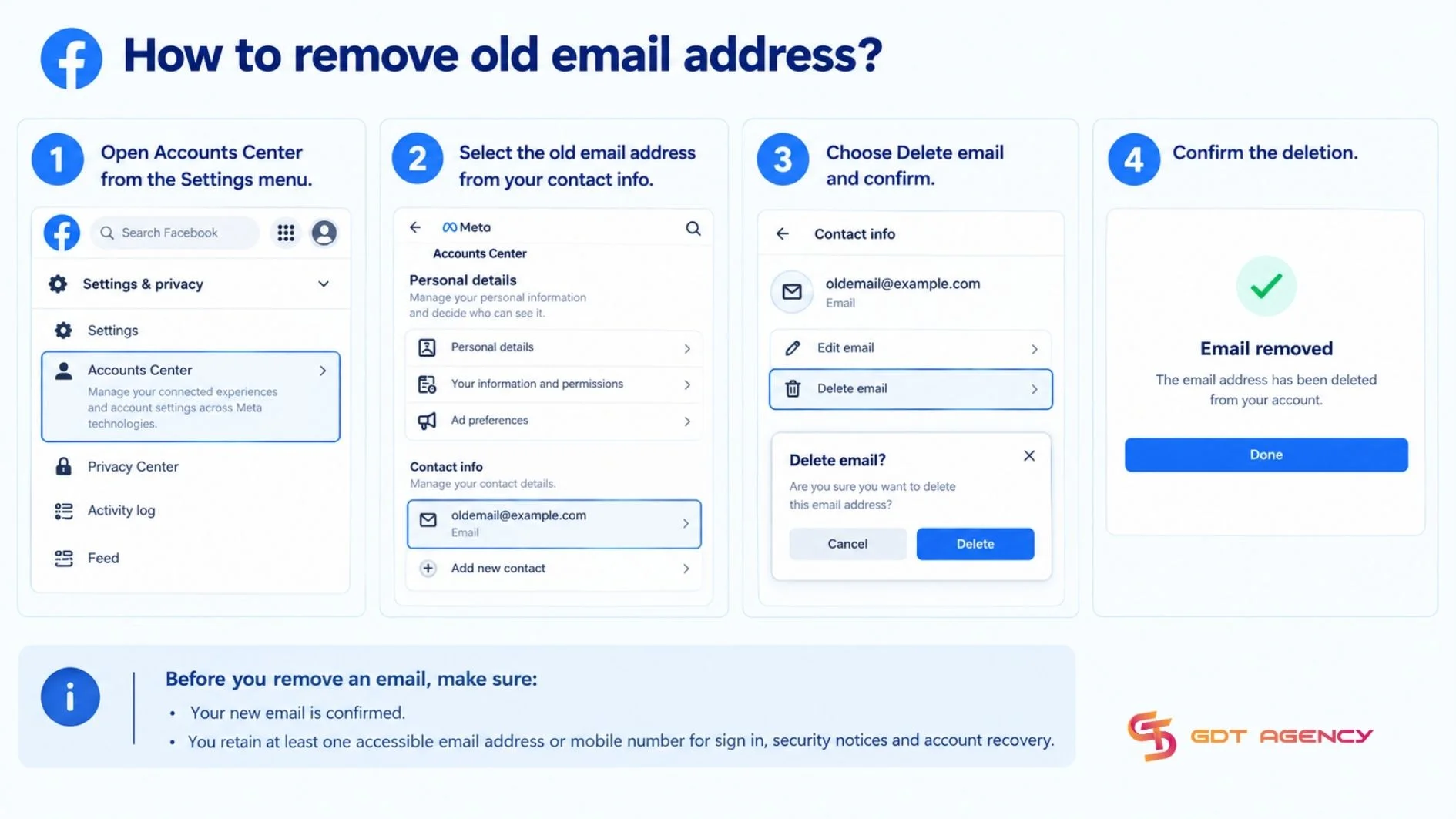
Removing an old email address takes 3 quick actions: open Accounts Center, select the old address, and choose Delete email and confirm. Before you remove an email, make sure your new email is confirmed and that you retain at least one accessible email address or mobile number for sign in, security notices and account recovery.
How is adding email different from changing or removing one?
Adding an email gives your account an extra confirmed address, while changing replaces your primary email and removing deletes an address. 3 actions use the same Contact info screen, so they are easy to confuse.
Adding email to a Facebook account, changing and removing it differ in what each action does and what can go wrong, as the table below sets out for all 3 actions.
| Action | What it does | Main risk |
| Add Email | Links an additional confirmed email address to your profile | A typo or the address may already be tied to another account |
| Change Email | Adds a new email, then makes it the primary email | The option to make it primary may not be available for every address |
| Remove Email | Deletes an email address from Contact info | Losing recovery access if it’s your only email
|
Final Thoughts
Adding an email to a Facebook account requires 5 steps in Accounts Center: open Settings, go to Contact info, add the address, and confirm it with the code sent to that inbox. Mobile and desktop follow the same path, with the only difference being how you open Settings. After confirmation, you can set the new address as your primary email, and if you are replacing an old one, verify the new address first and remove the old one second. Keeping a working email or mobile number on the account at all times is what protects your access.
FAQs
Can you add more than one email to a Facebook Account?
Yes, you can add more than one email to a Facebook account. Each address goes through the same Add new contact process and confirmation code, and one of them can be set as your primary email. Keeping an old address until the new one is verified is a common safety step.
Can you use the same email on 2 Facebook accounts?
No. Facebook allows one Facebook account per email address, so an email already associated with one account can’t be used to create another separate Facebook account. For advertising, don’t create separate personal profiles just to manage different clients or brands. Keep one authentic profile per person and use Meta Business Portfolio permissions to provide access to the appropriate ad accounts, Pages, Pixel.
Do you need to confirm a new email on Facebook?
Yes, you need to confirm a new email on Facebook. Facebook sends a confirmation code to the new address, and you must enter it to finish adding the email. Until you do, the address is not verified, so you should not rely on it for recovery or as your primary email.
Is the email you add to Facebook visible to other people?
No. An email you add to Facebook can remain private, its visibility on your profile is controlled separately through privacy settings. You can choose an audience such as Only me, Friends or Public for profile information, including contact details.
Can you add email to a Facebook account if you can’t log in?
No. Every method above starts with signing in and opening Settings, so you can’t add an email while locked out. If you can’t sign in, start with Facebook’s account recovery process then add a backup email once back in.