
How to Top Up GDT Agency via Philippine Bank Transfer

You can top up GDT Agency via Philippine bank transfer by following 4 steps: submit a funding request, review the invoice, send pesos to GDT’s UnionBank account, and wait for GDT to confirm the funds. GDT Agency accepts Philippine bank transfers as one of its available payment methods for top-ups for Facebook agency accounts, Google agency accounts, and TikTok agency accounts. Customers can send PHP to the GDT Agency UnionBank account from a UnionBank account, another Philippine bank, or an eligible international bank. This guide explains how each customer type can complete a bank transfer, calculate the required PHP amount, and confirm the payment with GDT Agency.
- How Do You Top Up GDT Agency via Philippine Bank Transfer?
- GDT Agency Philippine Bank Transfer Details
- How to Top Up GDT Agency from a UnionBank Account
- How to Top Up GDT Agency from Another Philippine Bank
- How to Top Up GDT Agency from an International Bank
- What Information Should You Send After the Transfer?
- What Happens If Your GDT Agency Bank Transfer Fails or Is Delayed?
- Why Is My Top-Up Not Showing in My GDT Account?
- Frequently Asked Questions
- Do I need a UnionBank account to top up GDT Agency?
- Can I transfer money from BDO, BPI, or another Philippine bank?
- Can customers outside the Philippines use this payment method?
- What is the current PHP exchange rate for GDT Agency?
- Does GDT Agency consider my payment completed after I send the transfer?
- What should I do if someone sends me different GDT Agency bank details?
- Final Checklist
How Do You Top Up GDT Agency via Philippine Bank Transfer?
You top up GDT Agency in 4 steps: submit a request, review the invoice, pay through the bank details GDT gives you, and wait for confirmation. The process ends with GDT processing your request once the funds arrive.
To follow along, here is the full process in order:
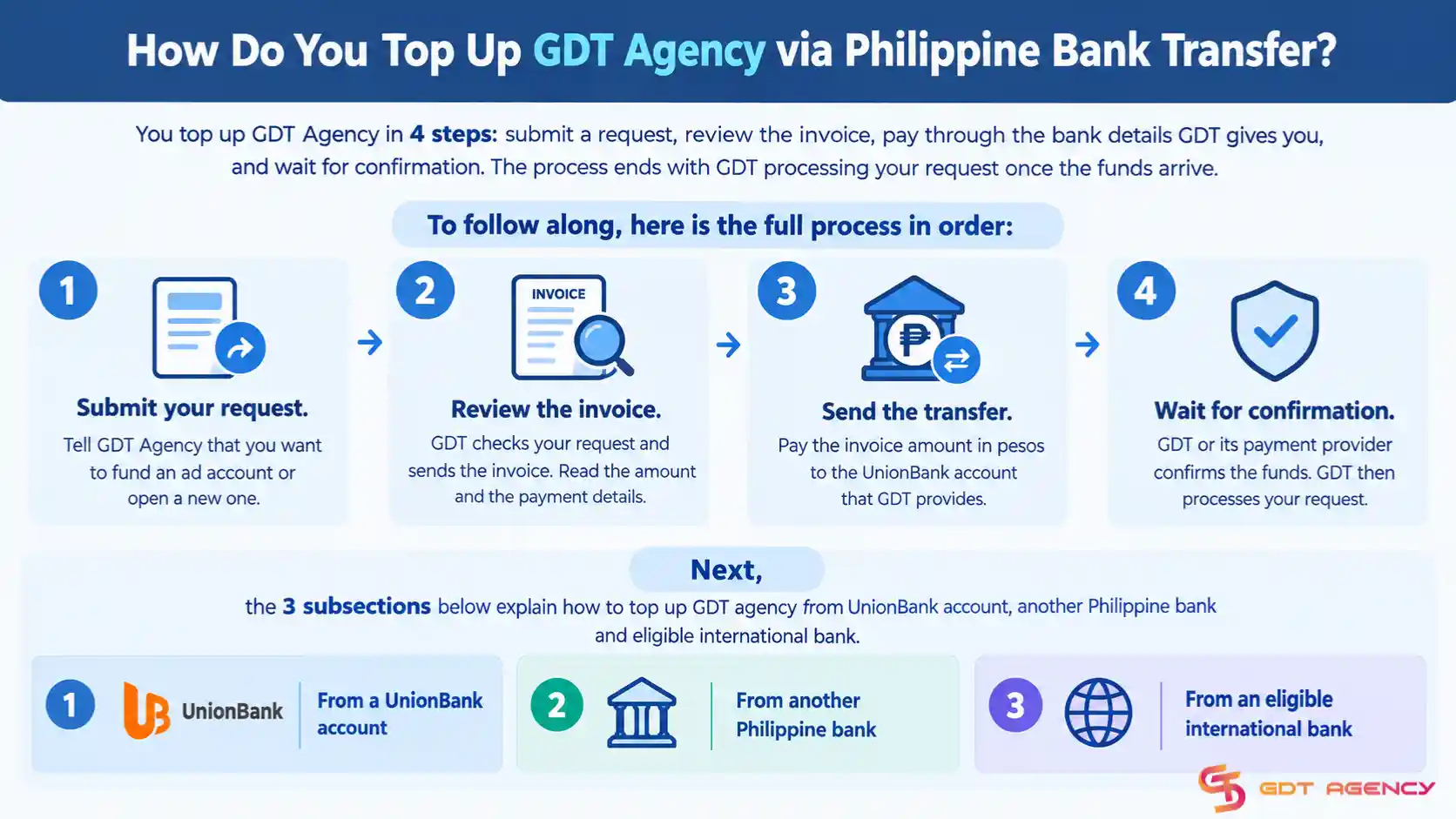
- Submit your request: Tell GDT Agency that you want to fund an ad account or open a new one.
- Review the invoice: GDT checks your request and sends the invoice. Read the amount and the payment details.
- Send the transfer: Pay the invoice amount in pesos to the UnionBank account that GDT provides.
- Wait for confirmation: GDT or its payment provider confirms the funds. GDT then processes your request.
Next, the 3 subsections below explain how to top up GDT Agency from a UnionBank account, another Philippine bank, and an eligible international bank.
GDT Agency Philippine Bank Transfer Details
Customers should always verify the latest payment information through the official GDT Agency Payment & Deposits Policy before sending money.
| Payment Detail | Information |
| Payment Method | Philippine Bank Transfer |
| Bank | Union Bank |
| Account Number | 0026 5001 4393 |
| Currency | PHP |
| Exchange Rate | PHP 64 = USD 1 |
Customers should use only the payment details provided through GDT Agency’s official channels. Customers should not send money to a different bank account because an individual provides new payment details through an unofficial account or message.
Besides, GDT Agency may apply additional payment or transfer fees depending on the payment method. GDT Agency confirms the applicable fees before payment.
Currently, for Philippine bank transfers, GDT Agency currently uses an exchange rate of PHP 64 for USD 1 for payments made in Philippine Peso. You can calculate your PHP payment with this formula: “PHP Top-Up Amount = USD Amount × 64”.
For example, for a $1,000 top-up, you would need to transfer: $1,000 × 64 = PHP 64,000
GDT Agency currently requires a minimum deposit of $200/account for a first-time advertising account application. Subsequent account applications require a minimum deposit of $500/ account. Customers should confirm the applicable deposit requirement before making a payment.
How to Top Up GDT Agency from a UnionBank Account
If you already have a UnionBank Philippines account, you can transfer the required PHP amount directly to the GDT Agency UnionBank account because UnionBank supports real-time transfers between UnionBank accounts. Here are the detailed steps:
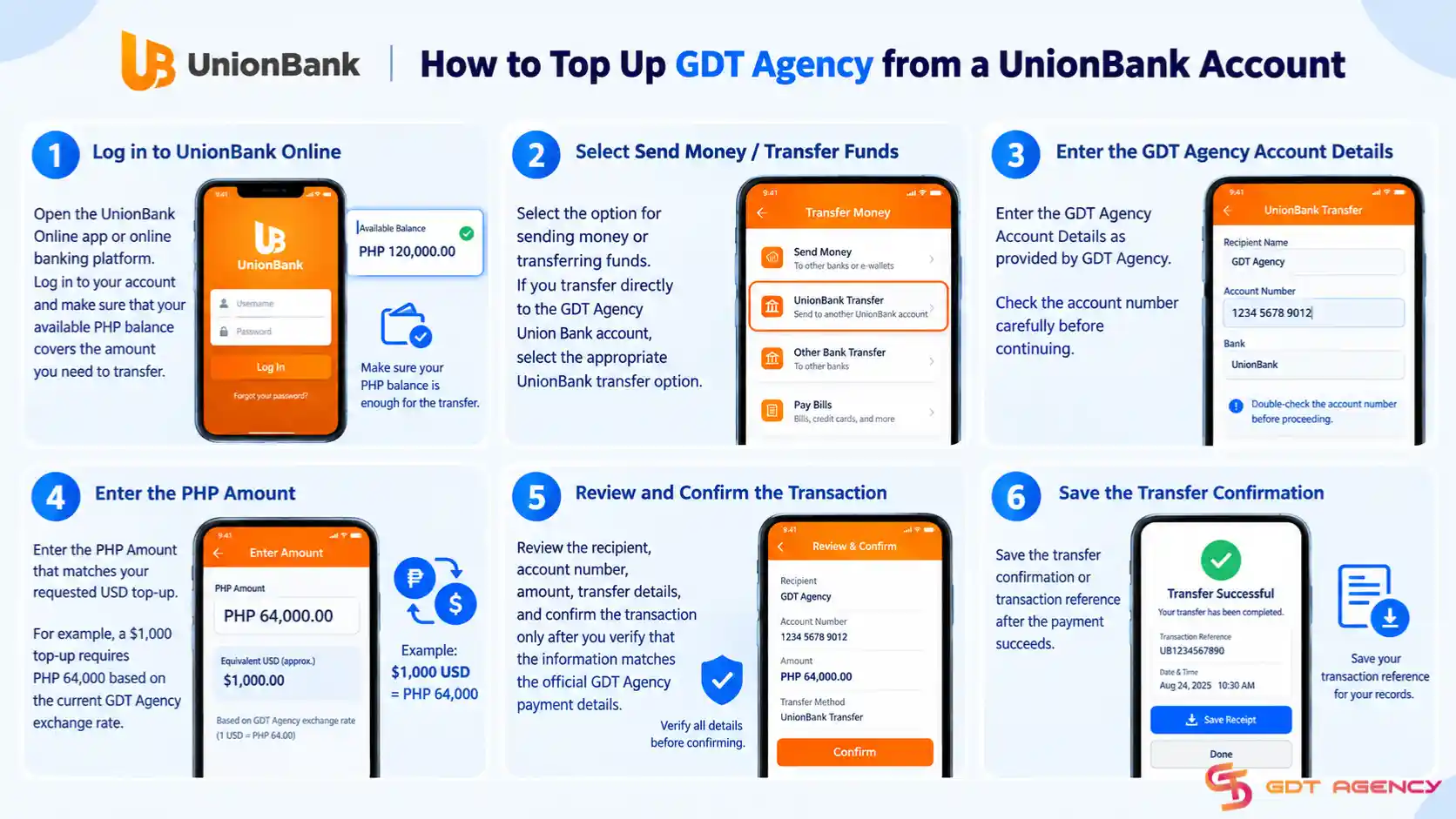
- Step 1: Open the UnionBank Online app or online banking platform. Log in to your account and make sure that your available PHP balance covers the amount you need to transfer.
- Step 2: Select the option for sending money or transferring funds. If you transfer directly to the GDT Agency UnionBank account, select the appropriate UnionBank transfer option.
- Step 3: Enter the GDT Agency Account Details as provided by GDT Agency. Check the account number carefully before continuing.
- Step 4: Enter the PHP Amount that matches your requested USD top-up. For example, a $1,000 top-up requires PHP 64,000 based on the current GDT Agency exchange rate.
- Step 5: Review the recipient, account number, amount, transfer details, and confirm the transaction only after you verify that the information matches the official GDT Agency payment details.
- Step 6: Save the transfer confirmation or transaction reference after the payment succeeds.
You should keep this information until GDT Agency confirms that the top-up has been completed.
How to Top Up GDT Agency from Another Philippine Bank
You do not need to have a UnionBank account to send money to the GDT Agency UnionBank account. Philippine banks can support local interbank PHP transfers through systems such as InstaPay and PESONet. UnionBank states that InstaPay supports real-time PHP transfers to participating banks, while PESONet supports PHP transfers to local banks.
Banks such as BDO, BPI, Metrobank, RCBC, and other participating Philippine banks may provide these transfer options through their own online banking platforms.
The exact menu names can differ between banks, but the general process follows the same steps.
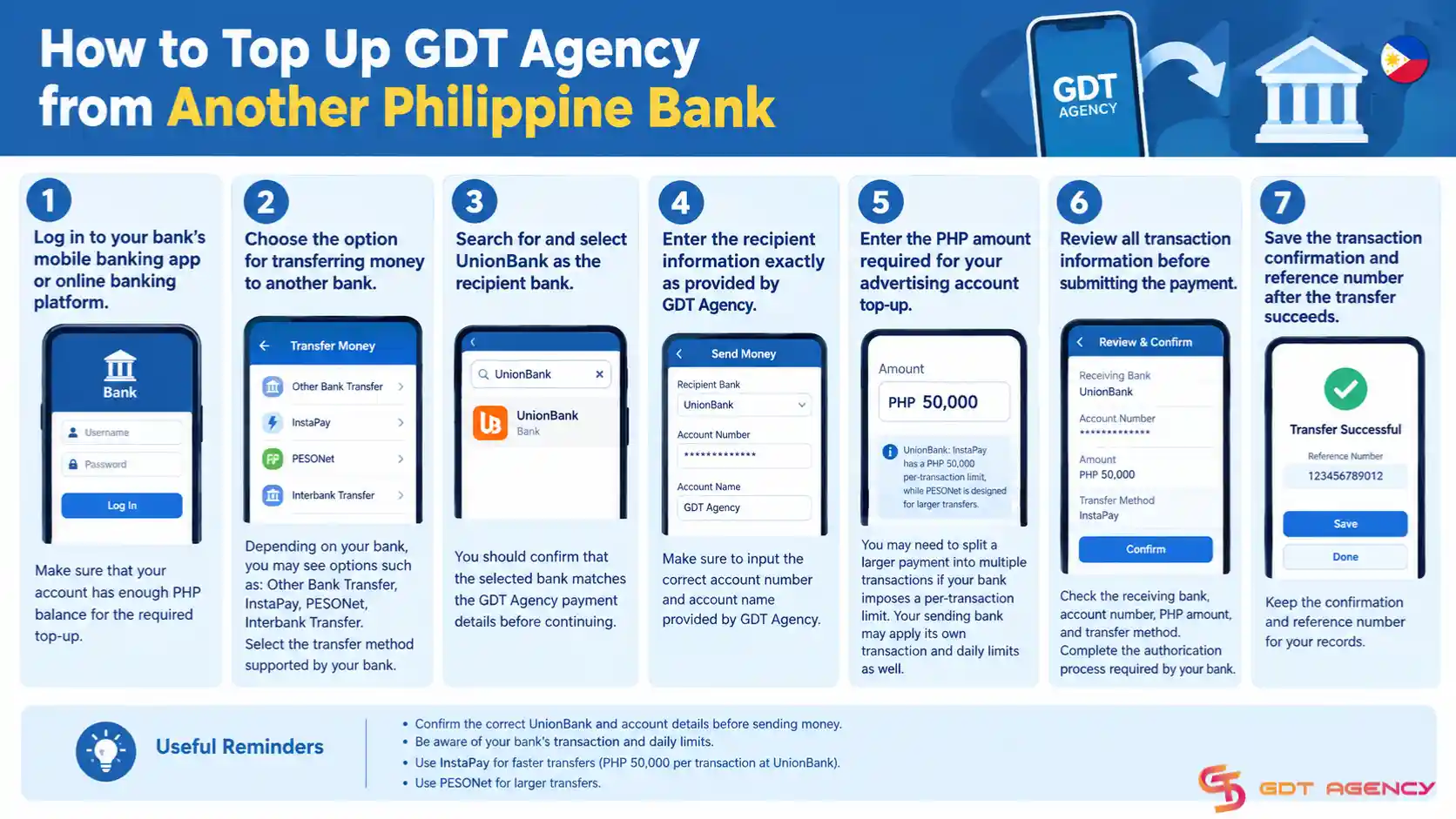
- Step 1: Log in to your bank’s mobile banking app or online banking platform. Make sure that your account has enough PHP balance for the required top-up.
- Step 2: Choose the option for transferring money to another bank. Depending on your bank, you may see options such as: Other Bank Transfer, InstaPay, PESONet, Interbank Transfer. Select the transfer method supported by your bank.
- Step 3: Search for and select UnionBank as the recipient bank. You should confirm that the selected bank matches the GDT Agency payment details before continuing.
- Step 4: Enter the recipient information exactly as provided by GDT Agency.
- Step 5: Enter the PHP amount required for your advertising account top-up. You may need to split a larger payment into multiple transactions if your bank imposes a per-transaction limit. UnionBank states that InstaPay transfers have a PHP 50,000 per-transaction limit, while PESONet is designed for larger transfers. Your sending bank may apply its own transaction and daily limits as well.
- Step 6: Review all transaction information before submitting the payment. Check the receiving bank, account number, PHP amount, and transfer method. Complete the authorization process required by your bank.
- Step 7: Save the transaction confirmation and reference number after the transfer succeeds.
You should provide the relevant transaction information to your GDT Agency representative so the payment can be identified and verified.
How to Top Up GDT Agency from an International Bank
An international customer may need to use an international bank transfer or another cross-border payment route to send funds to a Philippine bank account. UnionBank supports international bank transfers through SWIFT and other international transfer services.
However, international transfers can require different beneficiary information from a local PHP transfer.
Before sending an international payment, customers should contact GDT Agency and request the current international transfer instructions. Do not assume that the local account number alone is sufficient for an international wire transfer.
Here are the detailed steps on how to top up from an international bank:
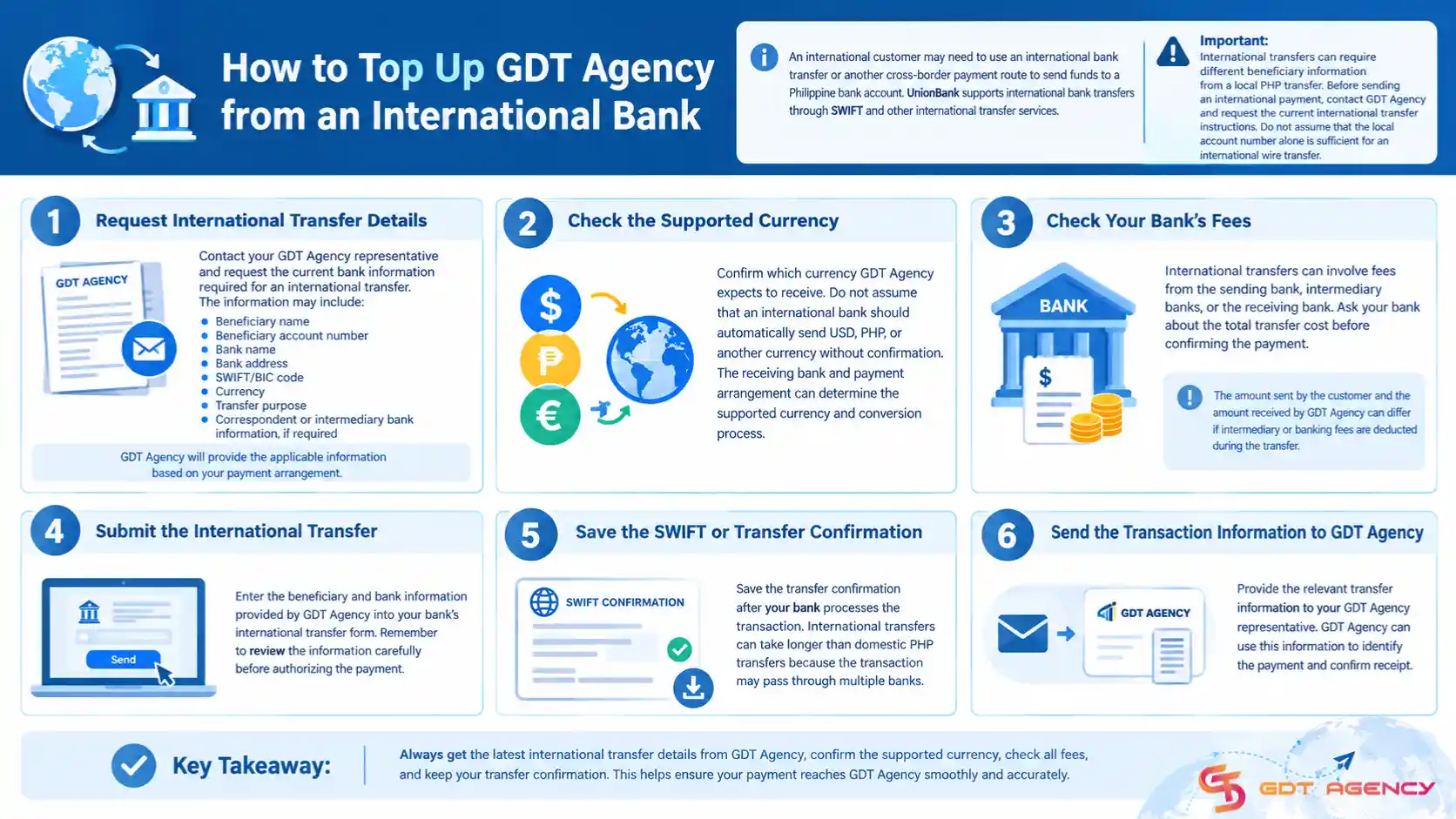
Step 1: Request International Transfer Details
The client should contact your GDT Agency representative and request the current bank information required for an international transfer. The information may include:
- Beneficiary name
- Beneficiary account number
- Bank name
- Bank address
- SWIFT/BIC code
- Currency
- Transfer purpose
- Correspondent or intermediary bank information, if required
GDT Agency will provide the applicable information based on the customer’s payment arrangement.
Step 2: Check the Supported Currency
Confirm which currency GDT Agency expects to receive. Do not assume that an international bank should automatically send USD, PHP, or another currency without confirmation. The receiving bank and payment arrangement can determine the supported currency and conversion process.
Step 3: Check Your Bank’s Fees
International transfers can involve fees from the sending bank, intermediary banks, or the receiving bank. Ask your bank about the total transfer cost before confirming the payment.
The amount sent by the customer and the amount received by GDT Agency can differ if intermediary or banking fees are deducted during the transfer.
Step 4: Submit the International Transfer
Enter the beneficiary and bank information provided by GDT Agency into your bank’s international transfer form. Remember to review the information carefully before authorizing the payment.
Step 5: Save the SWIFT or Transfer Confirmation
Save the transfer confirmation after your bank processes the transaction. International transfers can take longer than domestic PHP transfers because the transaction may pass through multiple banks.
Step 6: Send the Transaction Information to GDT Agency
Provide the relevant transfer information to your GDT Agency representative. GDT Agency can use this information to identify the payment and confirm receipt.
What Information Should You Send After the Transfer?
After completing the payment, the client should provide the relevant transaction information to your GDT Agency representative to verify payment. You should normally provide:
- Your GDT Agency account information
- Transfer amount
- Transfer date and time
- Transaction or reference number
- Payment receipt, when requested
You should not send your banking password, PIN, OTP, or other banking credentials. GDT Agency may request additional transaction information when it needs to verify a payment.
What Happens If Your GDT Agency Bank Transfer Fails or Is Delayed?
If your bank transfer fails or arrives late, you should check your bank’s transaction status first, then contact GDT Agency’s official support channels with your transaction details. GDT may ask for more information to verify the account or the payment.
Meanwhile, remember that GDT treats a payment as received only after it confirms the funds. A delay can come from your bank, from GDT’s confirmation step, or from a mismatch in the payment details. To speed things up, send GDT your name, the amount, the date, the transaction number, and your receipt in one message.
Why Is My Top-Up Not Showing in My GDT Account?
Your top-up usually does not show because GDT has not confirmed the funds yet, or because the payment details do not match the invoice. Three causes come up most often:
- The funds have not arrived: Your bank may still be processing the transfer. Check the status in your app and wait for the bank to finish.
- The amount or details do not match: You may have sent the wrong amount, used the wrong rate, or entered a different account number. Compare your receipt with the invoice.
- GDT has not confirmed the payment: The policy says GDT processes your request only after it confirms receipt. Contact support with your receipt and transaction number.
For each cause, the fix starts the same way: contact GDT through its official channels and share the transaction information.
Frequently Asked Questions
Do I need a UnionBank account to top up GDT Agency?
No. You do not need a UnionBank account if you have another Philippine bank that can send PHP to the GDT Agency UnionBank account through a supported local transfer method.
Can I transfer money from BDO, BPI, or another Philippine bank?
Yes. Customers can use supported interbank transfer methods such as InstaPay or PESONet to send PHP to the GDT Agency Union Bank account. Your bank may use different menu names or transaction limits.
Can customers outside the Philippines use this payment method?
International customers may be able to use an international bank transfer, but they should request the current international transfer instructions from GDT Agency before sending money. International transfers can require SWIFT/BIC and other beneficiary information.
What is the current PHP exchange rate for GDT Agency?
GDT Agency currently lists PHP 64 = USD 1 for payments made through Philippine bank transfer.
Does GDT Agency consider my payment completed after I send the transfer?
No. GDT Agency considers a payment received only after GDT Agency or its payment provider confirms that the funds have been successfully received.
What should I do if someone sends me different GDT Agency bank details?
Do not send the payment until you verify the information through an official GDT Agency channel. GDT Agency has warned customers about impersonation and fraudulent payment requests.
Final Checklist
Before sending your GDT Agency top-up, confirm these details:
- You verified the latest GDT Agency payment information.
- You selected the correct transfer method for your bank.
- You confirmed the receiving bank as Union Bank.
- You entered account number 0026 5001 4393 correctly.
- You calculated the PHP amount using the confirmed exchange rate.
- You checked your bank’s transfer limits and fees.
- You saved your transaction confirmation.
- You sent the relevant transaction information to GDT Agency.
- You waited for GDT Agency to confirm receipt.
The key point is simple: you do not need a UnionBank account to use the Philippine bank transfer option. UnionBank is the receiving bank for GDT Agency, while customers can use an eligible UnionBank account, another Philippine bank, or an approved international transfer route depending on their location and payment arrangement.