
How to Top Up GDT Agency via USDT (TRC20) 2026

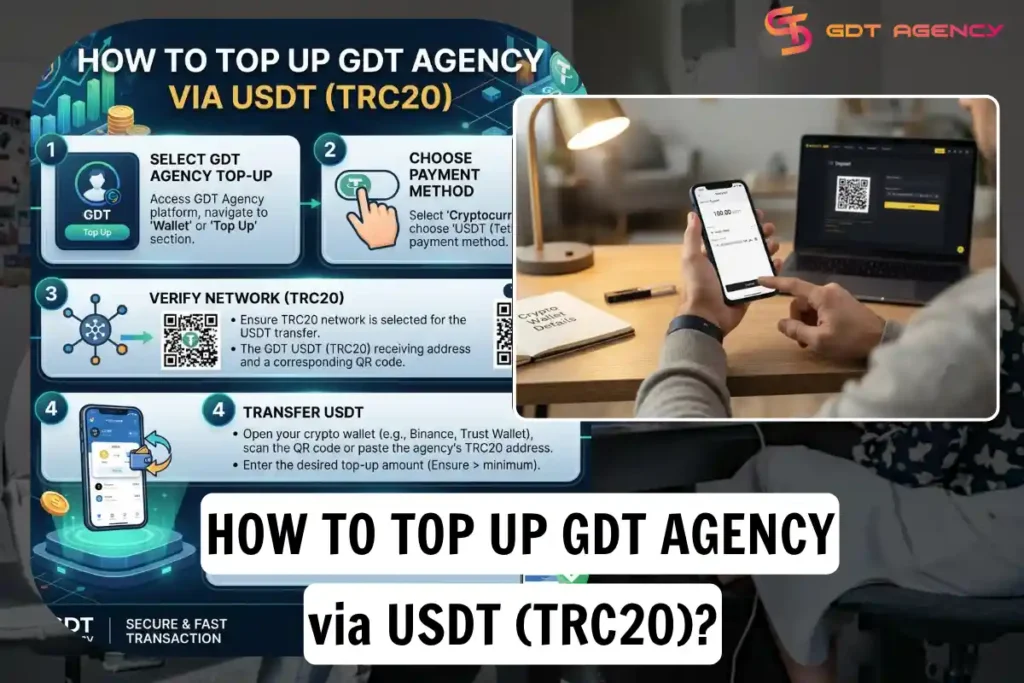
You top up GDT Agency via USDT (TRC20) in 4 steps: get the official deposit address, send USDT on the TRC20 network, submit your transaction proof, and confirm the funds in your account. GDT Agency accepts USDT (Tether) as a payment method for top-ups for advertising accounts. Customers can send USDT from a supported cryptocurrency exchange or personal crypto wallet to the official GDT Agency receiving address. This guide explains how to check the payment details, calculate your top-up amount, transfer USDT through the TRC20 network, and confirm the payment with GDT Agency.
- How to Top Up GDT Agency via USDT?
- GDT Agency USDT Payment Details
- How to Top Up GDT Agency from a Cryptocurrency Exchange
- How to Top Up GDT Agency from a Personal Crypto Wallet
- What Should You Do After Sending USDT?
- How Long Does a USDT Top-Up Take?
- What If You Send USDT Through the Wrong Network?
- Important Security Checks Before Sending USDT
- Frequently Asked Questions
- Can I top up GDT Agency with USDT?
- Which USDT network does GDT Agency accept?
- Can I send USDT from Binance or another exchange?
- Can I send USDT from a personal wallet?
- Does GDT Agency charge a fee for USDT payments?
- Is a successful blockchain transaction enough to confirm my top-up?
- What should I do if my transaction is pending?
- Final Checklist Before Sending USDT
How to Top Up GDT Agency via USDT?
You top up GDT Agency via USDT (TRC20) in 4 steps: get the official deposit address, send USDT on the TRC20 network, submit your transaction proof, and confirm the funds in your account. Your balance updates after GDT verifies the transfer.
You can top up GDT Agency via USDT from a Cryptocurrency Exchange or a Personal Crypto Wallet. This guide explains how customers can complete a top-up process in each way.
GDT Agency USDT Payment Details
Before making a transfer, review the official GDT Agency Payment & Deposits Policy to verify the current receiving address and applicable fees.
| Payment Detailed | Information |
| Payment Method | USDT (Tether) |
| Supported Network | TRC20 |
| Receiving Address | TLBVArXfkfDwJhooLnndNBs7ob8p2o5ZU1 |
| Applicable Fees | Service fee + 2% transfer fee for Facebook advertising accounts |
GDT Agency publishes the TRC20 receiving address in its official payment policy. Before sending USDT, customers should confirm the advertising balance they want to fund and ask a GDT Agency representative to confirm the address and the final payable amount, including applicable fees.
Important: USDT operates on multiple blockchain networks, including TRON (TRC20) and Ethereum (ERC20). These networks are not interchangeable for deposits. You must select USDT on the TRC20 network when sending funds to the GDT Agency address listed above.
Do not send USDT through ERC20, BEP20, or another network unless GDT Agency has explicitly confirmed that the receiving address supports that network.
Besides, GDT Agency’s payment policy lists an applicable service fee plus a 2% transfer fee for Facebook advertising accounts. The final amount depends on the applicable service charges and your payment arrangement.
How to Top Up GDT Agency from a Cryptocurrency Exchange
This option applies to customers who hold USDT in an exchange account, such as a supported cryptocurrency trading platform that allows USDT withdrawals over the TRON network.
The exact menu names may differ between exchanges, but the general process follows the same steps.
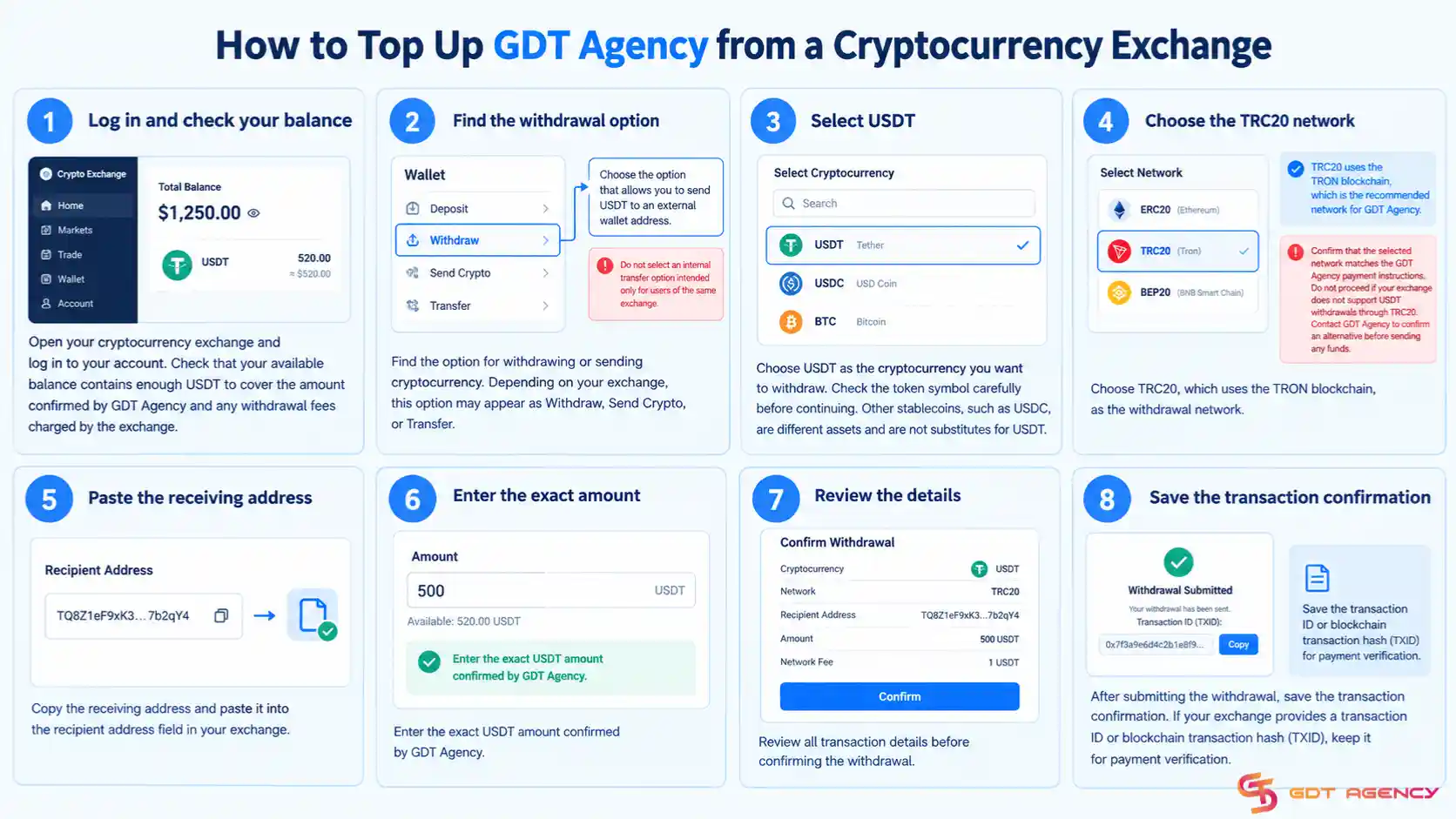
Step 1: Log In to Your Exchange Account
Open your cryptocurrency exchange and log in to your account. Check that your available balance contains enough USDT to cover the amount confirmed by GDT Agency and any withdrawal fees charged by the exchange.
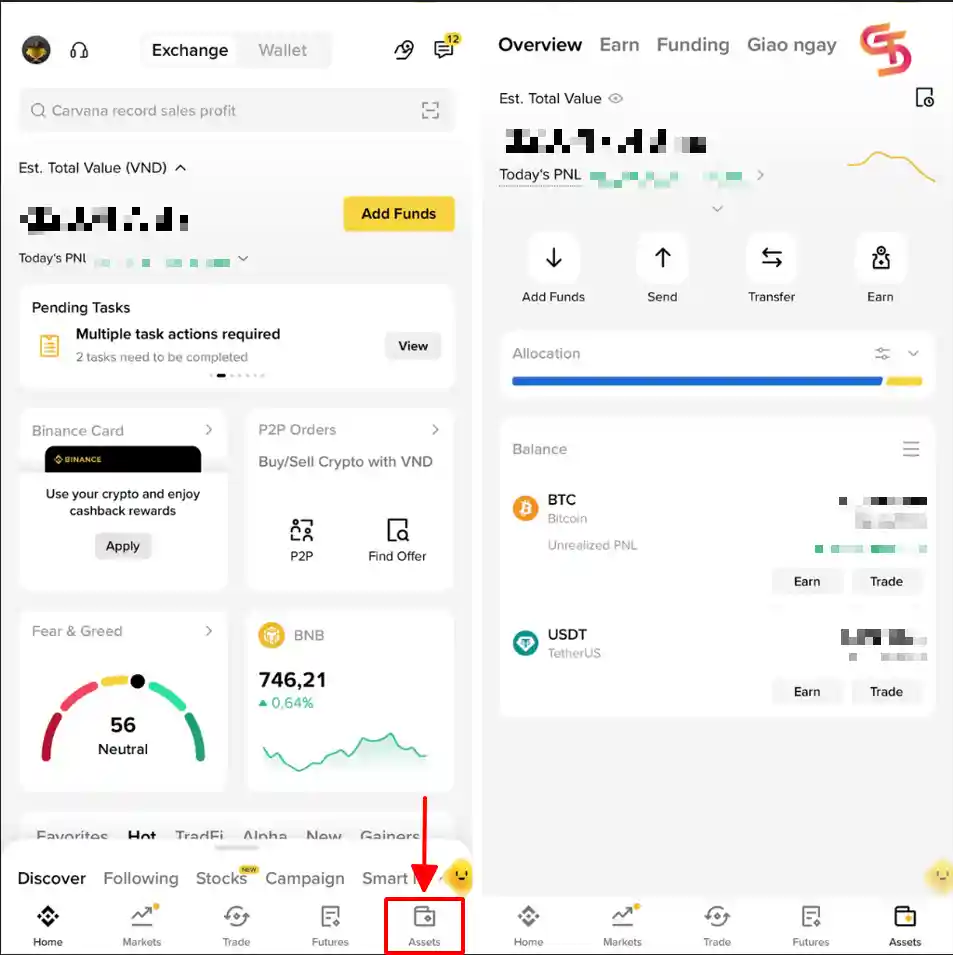
For example, on Binance, when you log in to your Binance account and open Assets or Wallet, you will see this:
Step 2: Open the Withdraw or Send Section
Find the option for withdrawing or sending cryptocurrency. Depending on your exchange, this option may appear as Withdraw, Send Crypto, or Transfer. Select the option that allows you to send USDT to an external wallet address. Do not select an internal transfer option intended only for users of the same exchange.
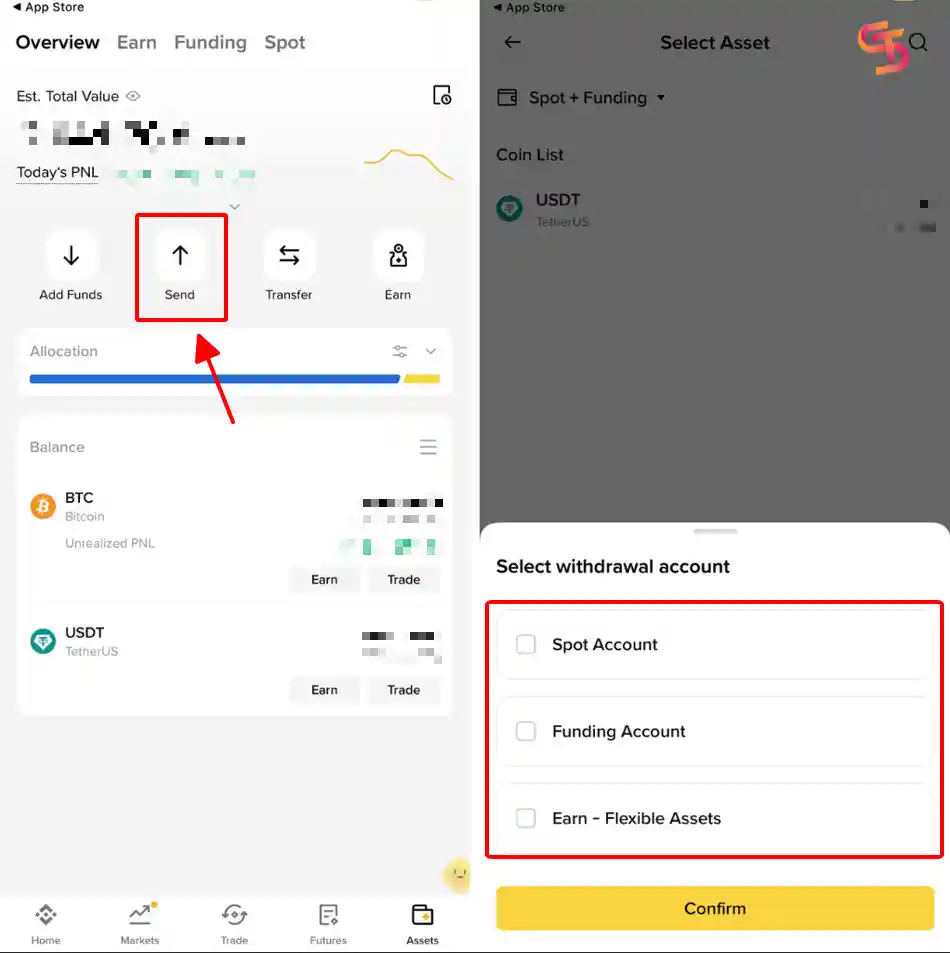
For examples on Binance:
Select Send and then choose the withdrawal account to send USDT as the cryptocurrency.
Step 3: Select USDT
Choose USDT as the cryptocurrency you want to withdraw. Check the token symbol carefully before continuing. Other stablecoins, such as USDC, are different assets and are not substitutes for USDT.
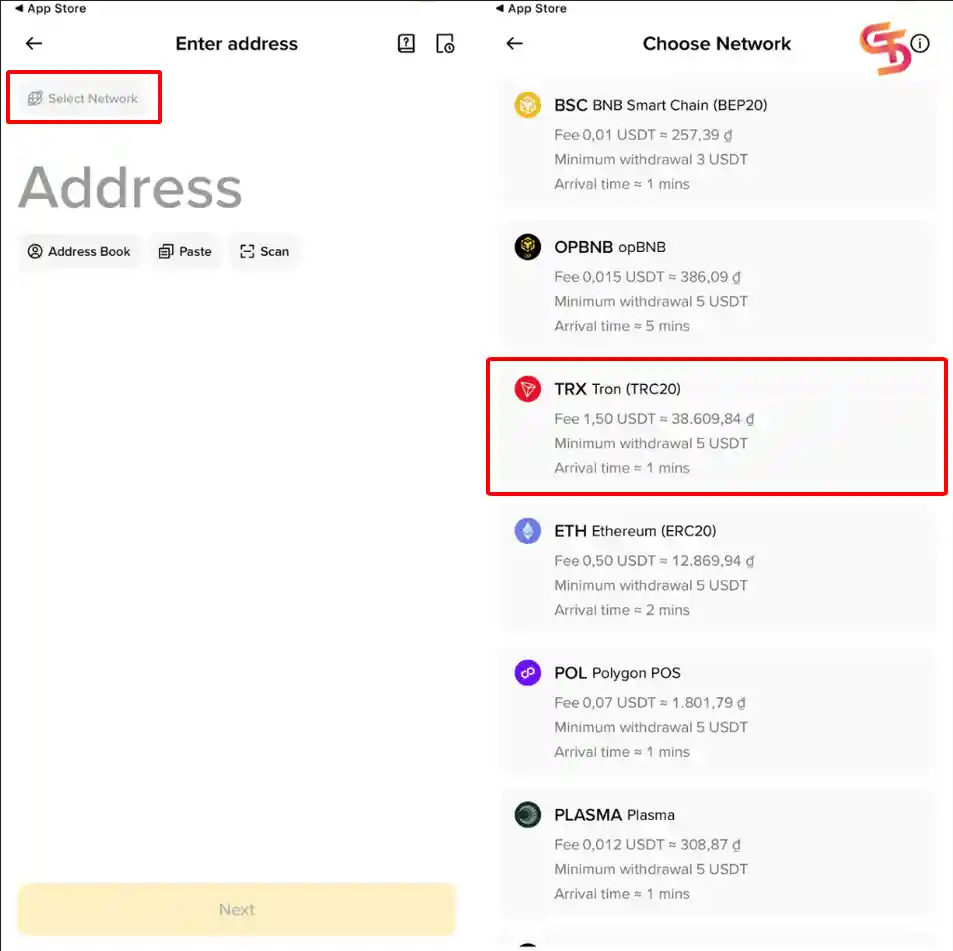
Step 4: Select the TRC20 Network
Choose TRC20, which uses the TRON blockchain, as the withdrawal network.
Your exchange may display the network as TRON or TRC20. Confirm that the selected network matches the GDT Agency payment instructions.
Do not proceed if your exchange does not support USDT withdrawals through TRC20. Contact GDT Agency to confirm an alternative before sending any funds.
For example, on Binance:
Step 5: Enter the GDT Agency Receiving Address
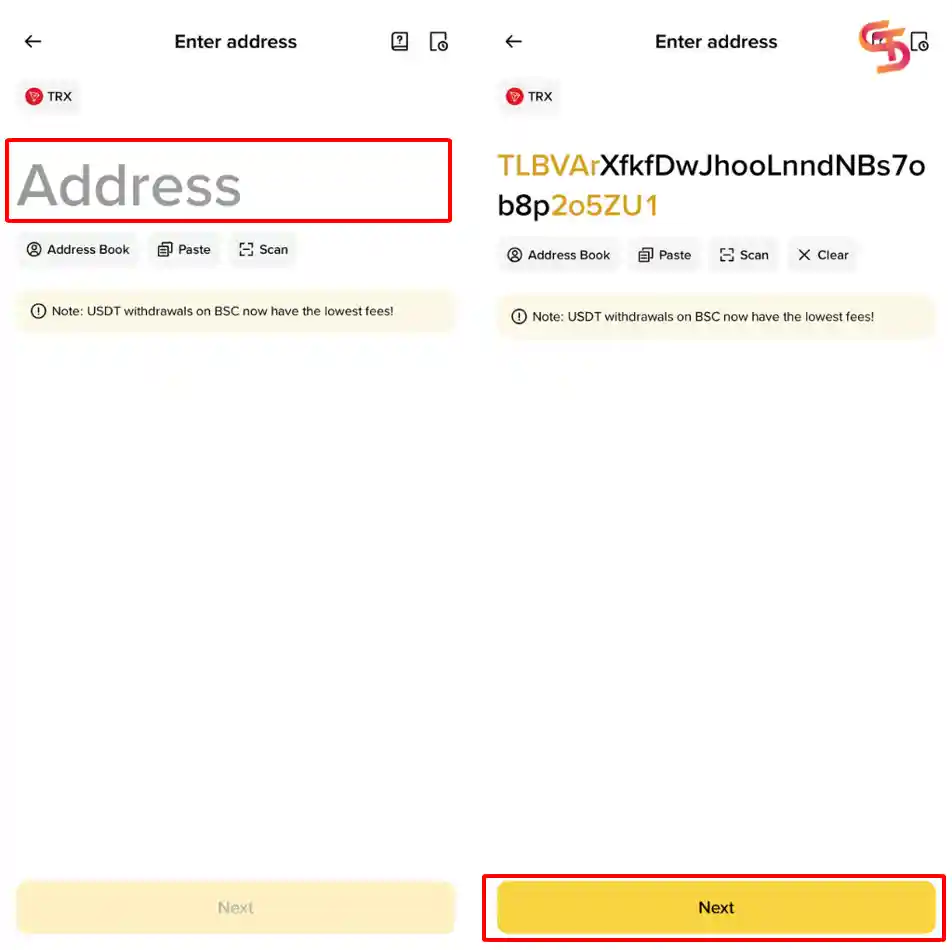
Copy the receiving address from the official GDT Agency Payment & Deposits Policy. Paste the address into the recipient address field in your exchange. Avoid typing the address manually. After pasting it, compare the beginning and end of the address with the official payment instructions.
For example, on Binance:
Step 6: Enter the USDT Amount and Authorize the Withdrawal
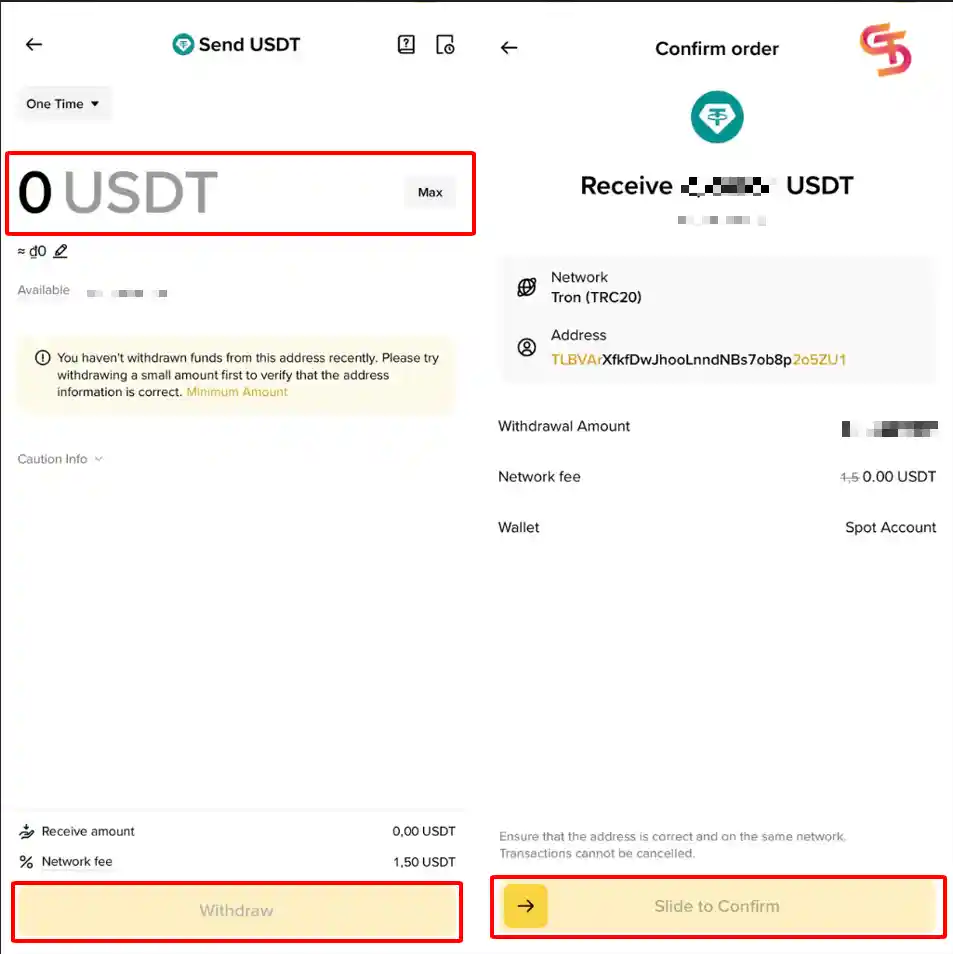
Enter the exact USDT amount confirmed by GDT Agency. Review all transaction details before confirming the withdrawal and complete the verification process required by your exchange.
For example, on Binance:
Step 7: Save the Transaction Details
After submitting the withdrawal, save the transaction confirmation.
If your exchange provides a transaction ID or blockchain transaction hash (TXID), keep it for payment verification.
The transaction may require time for processing and blockchain confirmation. You should wait for the transaction status to update before assuming that the transfer has completed.
Keep in mind that you should not proceed if your exchange does not support USDT withdrawals through TRC20.
>>> If you prefer to fund your advertising account through a traditional bank transfer, you can follow our guide on How to Top Up GDT Agency via Philippine Bank Transfer. This guide explains how to send PHP from UnionBank, another Philippine bank, or via an eligible international bank transfer method.
How to Top Up GDT Agency from a Personal Crypto Wallet
This option applies to customers who already hold USDT in a personal cryptocurrency wallet that supports the TRON network. Here is the detailed guide:

- Step 1: Open your cryptocurrency wallet and check your available USDT balance. Make sure your wallet supports USDT transfers through TRC20.
- Step 2: A TRC20 transfer may require a network fee paid through the wallet’s supported fee mechanism. The exact requirements depend on your wallet balance and the available resources on the TRON network. Check your wallet’s transaction estimate before proceeding. Keep enough funds available to cover the required network fee.
- Step 3: Choose the option to send or transfer USDT. Do not select another token simply because its value is close to one US dollar.
- Step 4: Copy the receiving address from GDT Agency’s official payment policy and paste it into the recipient address field.
- Step 5: Enter the amount of USDT that GDT Agency has confirmed for your top-up.
Review the estimated network fee and the total amount that your wallet will deduct. - Step 6: Check the recipient address, network, token, and amount one final time and authorize the transfer only after you verify that all details are correct.
- Step 7: Save the transaction details after submitting the transfer. Keep the transaction hash or TXID so you can provide it to GDT Agency if the team needs to verify the payment.
What Should You Do After Sending USDT?
After sending USDT, contact your assigned GDT Agency sales or support representative through an official communication channel and provide the relevant transaction information so the team can identify and verify your payment.
You should normally prepare the following information:
- Your GDT Agency account or customer information.
- The USDT amount sent.
- The transaction date and time.
- The blockchain network used.
- The transaction hash or TXID.
- A transaction receipt or screenshot, if requested.
GDT Agency’s payment policy states that a payment is considered received only after GDT Agency or its payment provider confirms successful receipt of the funds. A transaction receipt alone does not constitute payment confirmation. After GDT Agency confirms that the top-up has been processed, check your advertising account balance and confirm that it reflects the expected amount.
How Long Does a USDT Top-Up Take?
The completion time can depend on several factors, including the exchange or wallet provider, withdrawal processing, blockchain confirmation, and GDT Agency’s payment verification process.
An exchange may take additional time to review or process a withdrawal before broadcasting the transaction to the blockchain. A wallet transfer may also need blockchain confirmation before the receiving party can verify it.
For this reason, you should not assume that every USDT top-up will be completed within a fixed number of minutes.
If the transaction appears successful on your exchange or wallet but GDT Agency has not confirmed receipt, provide the transaction hash or TXID to your representative for verification.
What If You Send USDT Through the Wrong Network?
You should contact GDT Agency immediately if you send USDT through a network that does not match the published payment instructions.
Do not send another payment to compensate for the first transfer until GDT Agency has reviewed the situation.
A transfer sent through an unsupported network may not appear in the receiving system or may require additional recovery steps. Recovery is not guaranteed, and the outcome depends on the network, address, and receiving wallet setup.
You should provide the transaction hash, token, network, amount, and receiving address when requesting assistance.
The safest approach is to verify the network and receiving address before confirming every transfer.
Important Security Checks Before Sending USDT
Cryptocurrency transfers can be difficult or impossible to reverse after completion, therefore, customers should verify the payment details carefully before sending funds.Customers can follow these precautions:
- Verify the receiving address: Compare the address with the official GDT Agency Payment & Deposits Policy before every transfer.
- Select the correct network: Use USDT on TRC20 as specified in the official payment instructions.
- Confirm the amount: Ask GDT Agency to confirm the total payment, including applicable fees.
- Check the destination address: Review the address after pasting it into your exchange or wallet.
- Protect your wallet credentials: Never share your seed phrase, private key, password, or authentication codes with anyone claiming to represent GDT Agency.
- Use official communication channels: Verify unexpected payment instructions through the contact information published on the GDT Agency website.
- Keep transaction records: Save the transaction hash and confirmation until GDT Agency confirms the top-up.
GDT Agency has published a Scam Awareness Notice warning customers about impersonators, copied branding, unofficial accounts, and fraudulent payment requests.
A familiar username, profile picture, logo, or Telegram account does not prove that a person represents GDT Agency. You should verify payment instructions through official channels before transferring cryptocurrency.
Frequently Asked Questions
Can I top up GDT Agency with USDT?
Yes. GDT Agency lists USDT as an accepted payment method in its official Payment & Deposits Policy. Customers should follow the published network and receiving address instructions.
Which USDT network does GDT Agency accept?
GDT Agency currently publishes a TRC20 receiving address. You should use USDT on the TRON (TRC20) network and confirm any alternative arrangement directly with GDT Agency before sending funds.
Can I send USDT from Binance or another exchange?
You can use an exchange if it supports USDT withdrawals through TRC20. The exact steps and withdrawal fees depend on the exchange you use.
Can I send USDT from a personal wallet?
Yes, provided that your wallet supports USDT transfers through TRC20 and you can cover the required network fee.
Does GDT Agency charge a fee for USDT payments?
GDT Agency’s published payment policy lists an applicable service fee plus a 2% transfer fee for Facebook advertising accounts. Confirm the final applicable charges with GDT Agency before making the payment.
Is a successful blockchain transaction enough to confirm my top-up?
No. A successful transaction shows that the transfer has progressed on the blockchain, but GDT Agency must still verify receipt of the funds and confirm the top-up.
What should I do if my transaction is pending?
Check the transaction status in your exchange or wallet. If the transaction remains pending or GDT Agency cannot confirm receipt, contact your provider and GDT Agency with the relevant transaction details.
Final Checklist Before Sending USDT
Before confirming your payment, make sure you have completed the following checks:
- You verified the current payment details through the official GDT Agency website.
- You selected USDT as the cryptocurrency.
- You selected the TRC20 network.
- You copied the official receiving address correctly.
- You confirmed the final top-up amount and applicable fees.
- You checked the withdrawal or network fee.
- You reviewed the recipient address and network before confirming.
- You saved the transaction hash or TXID.
- You provided the relevant transaction information to GDT Agency.
- You waited for GDT Agency to confirm receipt and process the top-up.
The most important rule is simple: send USDT only to the verified GDT Agency address through the specified TRC20 network. Always confirm the amount and payment details before authorizing the transaction.