


Facebook Business Ad Account: Create, Management & Scaling Limits


A Facebook business ad account is a dedicated professional advertising profile housed within Meta Business Manager, essential for running, tracking, and scaling campaigns separate from your personal profile. If you are serious about marketing your brand, transitioning from a personal ad account to a verified business setup is the mandatory first step toward unlocking higher daily spending limits and team collaboration features.
Key Takeaways:
- A Facebook business ad account separates your personal profile from your company’s financial data and advertising assets.
- Standard business accounts typically start with a strict daily spending limit (usually $50), which slowly increases after weeks of consistent billing.
- Creating multiple ad accounts within one Business Manager (BM) requires you to establish a strong history of policy compliance.
- When scaling budgets aggressively, standard business accounts are prone to automated restrictions. Upgrading to a premium Facebook agency account to bypass these algorithmic roadblocks is a better strategy.
How To Create A Facebook Business Ad Account?
A Facebook business ad account is a professional advertising account created and managed through Meta Business Manager. Unlike a personal ad account, it allows businesses to separate ownership, payment methods, audiences, pixels, and advertising assets from an individual’s Facebook profile.
1. Why You Need a Dedicated Facebook Business Ad Account?
Many advertisers ask a reasonable question: “Why should I create a Facebook business ad account if I can already run ads from my personal Facebook account?”
At first glance, using a personal ad account feels easier. You already have access, setup takes minutes, and there is no immediate need to create a Business Manager. However, that convenience becomes a limitation once advertising becomes part of business growth.

As an expert at GDT Agency who has spent more than 10 years working with Facebook ads and managing hundreds of campaigns across multiple niches, a personal ad account is designed to help individuals start advertising quickly, but a business ad account is designed to help companies operate and scale safely.
Running ads from a personal profile is a temporary testing strategy, not a long-term business plan. A dedicated Facebook business ad account separates your personal identity from business assets, payment methods, audiences, and campaign data. Besides, it provides crucial advantages that are necessary for survival in 2026’s advertising landscape.
With a business ad account, you can:
- Data Asset Ownership: Keeps your Meta Pixel, Conversions API, and custom audience data securely owned by your business, even if employees or agencies change.
- Advanced Targeting Access: Unlocks the ability to upload customer lists and build lookalike audiences, which are restricted on personal accounts.
- Account Stability: Isolates risk by allowing you to hold multiple ad accounts, ensuring a single compliance flag does not completely freeze your entire marketing operation.
- Secure Collaboration: Allows you to grant granular permissions (Analyst, Advertiser, Admin) to staff or agencies without sharing personal login credentials.
- Financial Separation: Features dedicated corporate payment methods and clean, business-addressed invoicing for simpler accounting and tax tracking.
If your goal is occasional promotion, a personal ad account may work temporarily. If your goal is consistent advertising, team collaboration, and sustainable growth, a dedicated Facebook business ad account becomes the smarter foundation.
→ Not sure whether a business ad account is the right choice for you? Read our detailed comparison of Facebook personal ad accounts and business ad accounts to understand the differences in ownership, management, spending limits, and scalability before making your decision.
2. How To Create Facebook Business Ad Account?
To create a Facebook business ad account, you can follow these simple steps:
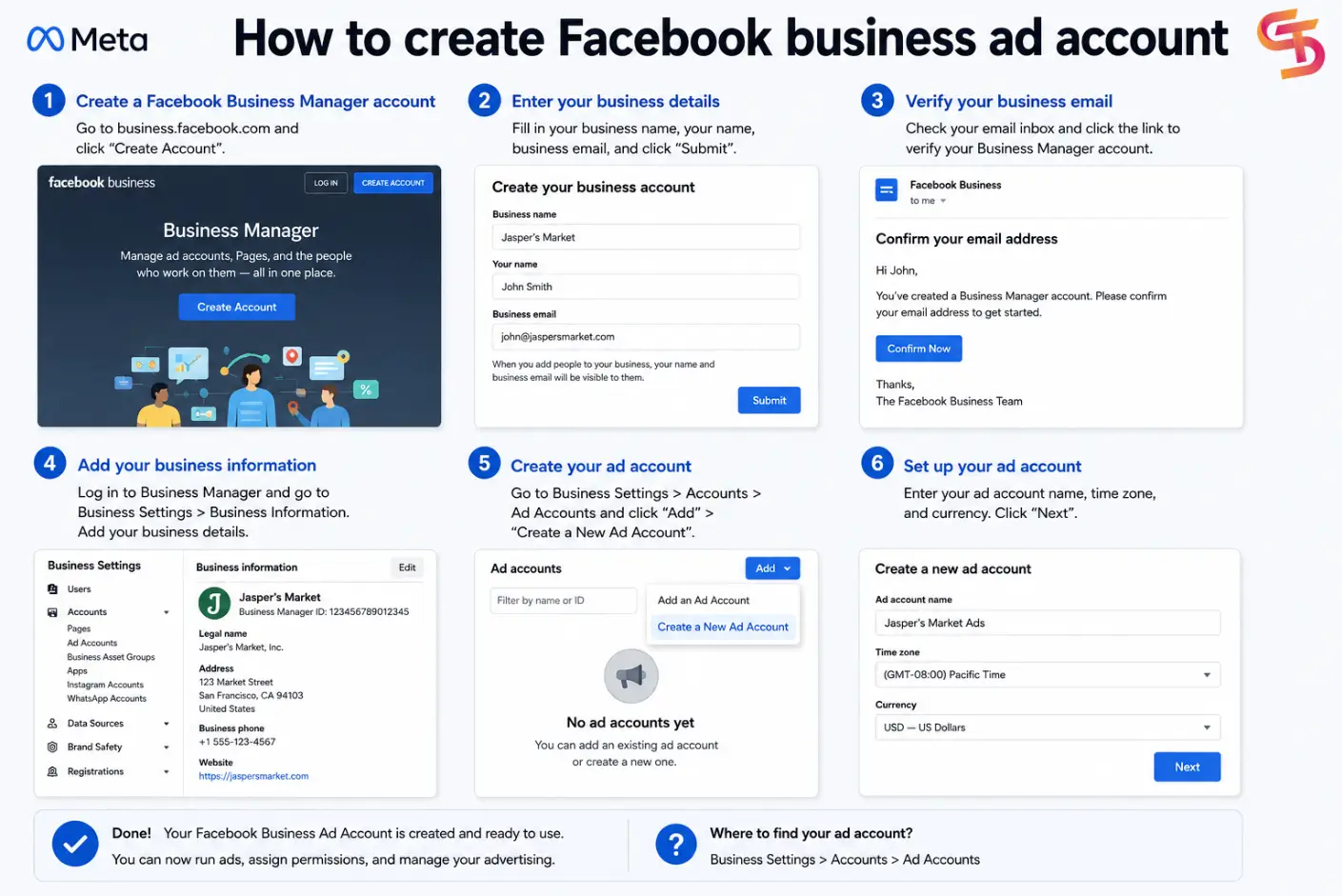
Step 1: In a browser on your desktop, go to business.facebook.com.
In case you already have a page and access to Meta Business Suite/Business Manager, click on the triangle icon to open the dropdown menu. Select Create a Business Portfolio and skip to step 4.

Step 2: Then, select Log in with Facebook using your personal Facebook account.
If you don’t have a personal account, click on Create new account > Sign up with Facebook to sign up for a new one.


Step 3: After logging in, click Create an account
Step 4: Enter information in the pop-up window:
- Business portfolio name: Name your business portfolio corresponding with the public name of your business, and do not include special characters.
- Your name: Enter your full name. Everyone you add to this business account can see it.
- Business email: Only Facebook can see this information. They will use it to contact you, and won’t show it to your customers.

Step 5: Choose Submit or Create.
Step 6: Verify your business email address.
Go to your email inbox where you should find a new email sent from notification@facebookmail.com. Open it and click Confirm Now.

Step 7: After confirmation, you will immediately be redirected to the Meta Business Suite dashboard. Click Help > Go to Business Manager in the bottom left of the screen to find your business manager ad account (business portfolio).

Step 8: Start to set up your Facebook business ad account by clicking on Settings in the left panel.
In the Settings dashboard, pay attention to the panel on your left hand where all setting options are shown.

Now, you can:
- View your business portfolio info.
- Add people, partners, and system users (non-human accounts) to your BM account, giving them partial access or full control
- Add or create a new ad account for your business. Note that for a new BM account, you can only create or claim 1 ad account. After several weeks of running ads and following Facebook policies, you can create or claim more ad accounts.
- Add other business assets such as pages, business asset groups, apps, Instagram, and WhatsApp accounts.
- Set up data sources such as catalogs, pixels, and more.
- Add a payment method in Billing and payments.
How Many Ad Accounts Can a Business Manager Have?
Meta assigns both ad account creation limits and daily spending limits based on the trust level, spending history, and verification status of your Business Manager. Within the advertising industry, buyers and advertisers commonly use shorthand terms like BM1, BM5, BM50, or BM250 to describe these varying tiers.

A newly created Business Manager always starts with strict restrictions. As the business builds a positive history through consistent spending, successful billing clearances, strict policy compliance, and official business verification, Meta gradually lifts these restrictions.
Here is the table consolidating the common Business Manager tiers based in my experience and knowledge:
| Tier Name | Technical Type | Actual Platform Behavior & Limits |
| BM50 | Daily Spend Limit | Contains a starter ad account restricted to a $50 daily spending limit. Typical for brand-new assets. |
| BM250 / BM350 | Daily Spend Limit | Contains an ad account with a $250 daily spending limit. Meta typically unlocks 3 to 5 ad account slots after the first successful billing cycles. |
| BM1 / BM5 NOLIMIT | No Daily Cap | Holds ad accounts with no daily spending restrictions, allowing instant budget scaling. The number (1 or 5) indicates the available ad account slots. |
| High-Slot BMs (BM80 – BM2500) | High-Volume Creation | Allows the creation of dozens or thousands of individual ad accounts. These are legacy assets or enterprise portfolios earned through massive, long-term ad spend. |
| BM Verified | Verification Status | A portfolio that has passed Meta’s official business verification using legal corporate documents. It has higher trust against automated flags but can still be banned for policy violations. |
| BM Agency | Partner Asset | Portfolios managed by official Meta Partners. They provide high spending limits and direct support channels, but they do not offer immunity from policy enforcement. |
Understanding Facebook Business Ad Account Scaling Limits
One of the most misunderstood aspects of Facebook advertising involves spending limits. New business ad accounts often begin with a relatively low threshold. Meta gradually increases this limit after successful billing cycles and positive account behavior.
Common factors that influence limit increases include:
- Account age
- Successful payment history
- Advertising policy compliance
- Campaign performance consistency
- Business verification status
Many advertisers expect immediate access to large budgets, but Meta generally requires trust-building before allowing aggressive scaling.
When a Standard Facebook Business Ad Account Becomes a Bottleneck
A standard business account works well for most small and medium-sized advertisers. However, larger advertisers frequently encounter challenges such as:
- Spending limits that increase slowly
- Unexpected account reviews
- Temporary payment restrictions
- Campaign interruptions during scaling
- Difficulty launching large-budget campaigns quickly
These limitations become more noticeable when daily advertising spend reaches hundreds or thousands of dollars.
Facebook Agency Ad Accounts: The Alternative for Large-Scale Advertisers
A Facebook agency ad account is a premium advertising account provided by an authorized agency partner. Unlike standard business accounts, agency accounts typically offer:
- Higher trust levels
- Faster scaling potential
- Greater account stability
- Dedicated agency support
- Reduced risk of spending-limit bottlenecks
Media buyers, affiliate marketers, ecommerce brands, and agencies often use agency accounts when rapid scaling becomes a priority.
Final Thoughts
A Facebook business ad account serves as the foundation for serious advertising on Meta’s platforms. It gives businesses greater control, stronger asset ownership, and access to professional advertising tools that are unavailable in personal ad accounts.
For most advertisers, a standard business account provides everything needed to launch and optimize campaigns. However, companies that need faster budget scaling, greater stability, and fewer operational restrictions often transition to agency ad accounts as their advertising spend grows.
Frequently Asked Questions
1. What is a Facebook business ad account?
A Facebook business ad account is a professional advertising account managed through Meta Business Manager that allows businesses to run campaigns, manage assets, and collaborate with team members.
2. Do I need a Business Manager to create a business ad account?
Yes. Meta requires businesses to create and manage business ad accounts through Business Manager.
3. What is the spending limit on a new Facebook business ad account?
New accounts often start with relatively low spending thresholds. Meta increases limits gradually based on successful billing history and account trust.
4. Can I have multiple Facebook business ad accounts?
Yes. Businesses can create multiple ad accounts within Business Manager, although the exact number depends on account history and trust level.
5. Is a Facebook business ad account better than a personal ad account?
Yes. Business ad accounts provide stronger asset ownership, team collaboration features, better security, and greater scalability.

Follow if you find it useful


You can contact us, with our experience in successfully deploying thousands of conversion advertising campaigns, GDT Agency confidently believes we can help you optimize effectiveness and maximize cost savings with advertising operations.

How To Create A Facebook Prepaid Ad Account In 5 Minutes (2026)
A Facebook prepaid ad account is a manual payment account that requires advertisers to add
15/06/2026

Facebook Postpaid Ad Account: How It Works and When You Should Use It
A Facebook postpaid ad account is a billing model that lets advertisers run campaigns first
15/06/2026

Facebook BM2500: What It Really Means And How To Get It 2026
Facebook BM2500, also known as Business Manager 2500, is a high-level Meta Business Manager account
13/06/2026


