


Managing multiple online accounts has become increasingly important for businesses operating across international markets. Cross-border e-commerce sellers, digital marketers, social media managers, and affiliate marketers often need to operate multiple accounts across different platforms. However, managing these accounts through ordinary browsers can create operational challenges, particularly when browser fingerprints, cookies, IP addresses, and device information overlap. BitBrowser provides an anti-detect browser solution designed to help businesses manage multiple accounts through separate browser environments. By combining browser fingerprint configuration, proxy integration, team collaboration, and automation tools, BitBrowser helps users organize multi-account operations more efficiently.
What Is BitBrowser?
BitBrowser is an anti-detect browser designed for multi-account management. It allows users to create multiple independent browser profiles, each with its own configurable fingerprint settings, cookies, and proxy connection.
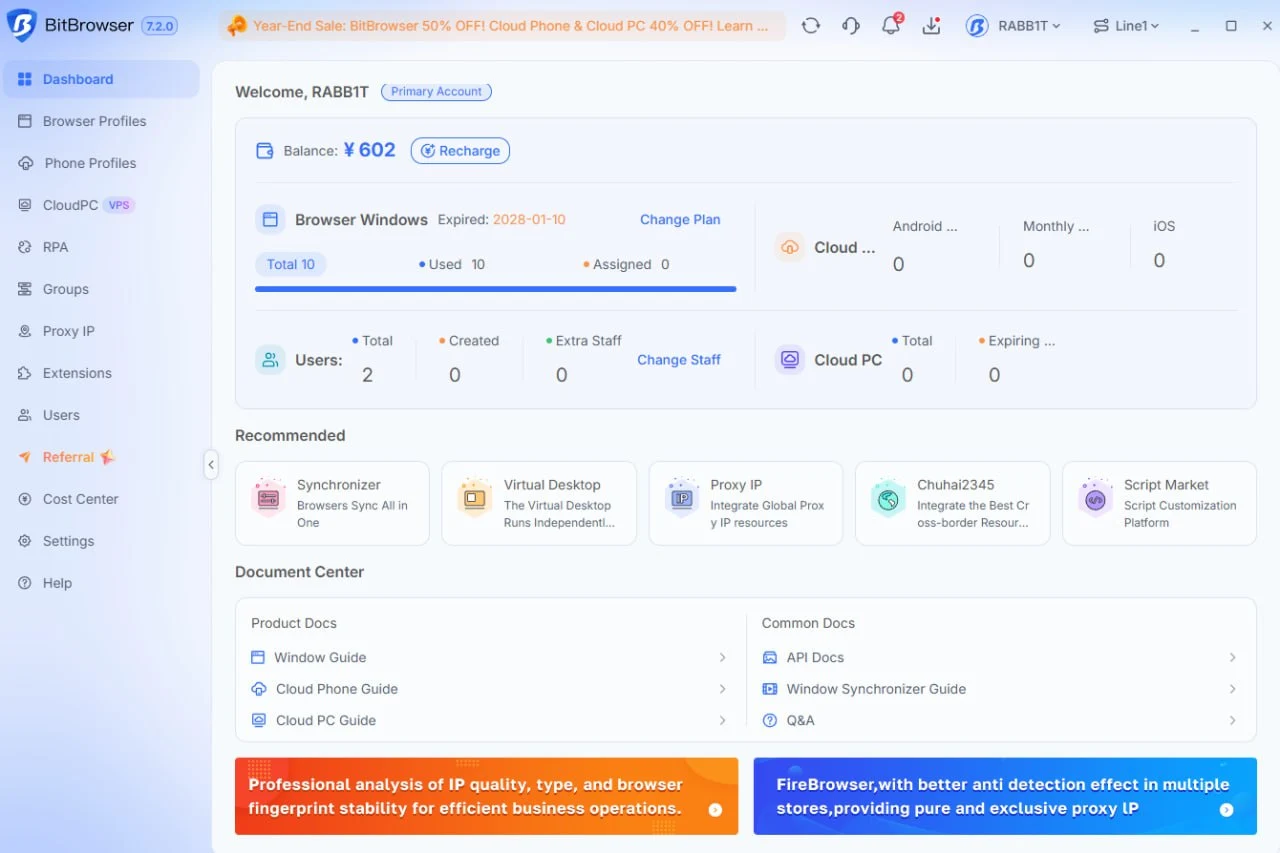
Unlike conventional browsers, which generally share the same local device environment across different tabs and sessions, BitBrowser allows users to configure separate browser environments for different accounts.
Each browser profile can maintain its own configuration, including:
- Browser fingerprint information.
- Proxy IP address and network settings.
- Cookies and browsing data.
- Browser kernel and operating environment.
- Account login sessions.
BitBrowser uses Chromium-based and Firefox-based browser technologies to provide configurable browsing environments. Users can assign different proxy connections and fingerprint settings to individual profiles according to their operational requirements.
This approach helps businesses separate account environments and organize multiple online identities within one application.
Why Is BitBrowser Different From Ordinary Browsers?
Traditional browsers are primarily designed for everyday internet access. Although users can open multiple tabs and sign in to different websites, these tabs generally share the same underlying browser and device environment.
This structure can create difficulties for businesses that need to manage multiple accounts independently.
BitBrowser addresses this requirement through isolated browser profiles.
Feature | Ordinary Browser | BitBrowser |
| Multiple browser profiles | Limited native separation | Supports multiple independent profiles |
| Fingerprint configuration | Limited customization | Configurable browser fingerprints |
| Proxy management | Usually requires extensions or manual settings | Integrated proxy configuration |
| Cookie management | Primarily manual | Individual and batch management |
| Team collaboration | Limited | Sub-account permissions |
| Batch operations | Limited | Supports batch profile operations |
| Automation | Requires external tools | Includes RPA and Local API support |
The main difference lies in how users configure and manage separate browsing environments. BitBrowser provides centralized tools for handling multiple profiles instead of requiring users to manage each environment manually.
Key Features of BitBrowser
1. Independent Browser Profiles and Fingerprint Configuration
Browser fingerprinting involves collecting information about a browser and its device environment. Websites can use signals such as operating system information, screen resolution, browser characteristics, and other technical parameters to recognize browsing environments.
BitBrowser allows users to configure individual browser profiles with different fingerprint settings.
Users can create separate environments for different accounts and assign corresponding proxy IP addresses. This helps organize account sessions and reduce unnecessary overlap between browsing environments.
2. Integrated Proxy Management
Proxy configuration plays an important role in multi-account operations, especially for businesses targeting different international markets.
BitBrowser supports static and dynamic proxy configurations, allowing users to assign different proxy connections to individual browser profiles.
Users can configure proxy information when creating or editing a browser environment. This makes it easier to manage regional access requirements and maintain consistent network settings for different accounts.
3. Multi-Window Synchronization
Managing multiple browser windows individually can consume considerable time.
BitBrowser includes a one-click synchronization feature that allows users to control multiple browser windows simultaneously.
This function can help with repetitive operational tasks, including navigating websites, entering information, and performing routine actions across multiple browser profiles.
4. RPA Automation and Local API
BitBrowser integrates automation capabilities for users who want to reduce repetitive manual operations.
Its RPA functionality supports the creation of automated workflows for routine browser tasks.
The software also provides a Local API that allows users and developers to control browser windows and execute automation scripts through local service interfaces.
These capabilities can support more organized workflows for businesses managing large numbers of browser profiles.
5. Batch Management Tools
For businesses operating dozens or hundreds of accounts, individual profile management can become difficult.
BitBrowser provides several batch operation functions:
- Browser profile import and export: Create or transfer multiple browser profiles using templates.
- Cookie import and export: Manage cookies across multiple selected profiles.
- Batch proxy configuration: Assign proxy settings to multiple browser profiles.
- Batch fingerprint configuration: Apply fingerprint settings across selected environments.
- Remote team management: Distribute browser access and operational responsibilities among employees.
These functions help reduce repetitive configuration work and make large-scale account management easier to organize.
6. Multi-Employee Collaboration
BitBrowser also supports team collaboration through sub-account management.
Administrators can assign access permissions to employees and control which browser environments each team member can use.
This structure helps businesses organize account ownership, distribute operational responsibilities, and manage access to digital assets more systematically.
BitBrowser Cloud Phone: Managing Multiple Mobile Environments
Beyond desktop browser profiles, BitBrowser also integrates cloud phone functionality.

Cloud phones allow users to operate virtual mobile environments without maintaining a large collection of physical smartphones.
BitBrowser provides configurable mobile environments designed to simulate various real-device parameters.
Its cloud phone features include:
1. Quick Mobile Environment Configuration
Users can create new mobile environments and configure proxy connections to access international applications and services. The platform also provides native Google Play support.
2. Realistic Device Parameter Simulation
BitBrowser supports the configuration of mobile device characteristics, including chipset information, language, time zone, location, carrier, SIM information, and sensor parameters.
The platform supports simulated information from more than 600 global carriers, helping users configure mobile environments for different regional requirements.
3. Flexible Sub-Account Permissions
Businesses can assign mobile environments to individual team members and adjust the number of environments available to each sub-account.
This allows teams to distribute resources according to their operational requirements and manage multiple mobile environments from a centralized system.
4. One-Click Device Creation
Users can create additional cloud phone environments when their operations expand. This reduces the need to purchase and maintain a large number of physical devices for multi-account workflows.
Who Should Use BitBrowser?
BitBrowser supports several business models that require multiple online accounts or separate digital environments.
Cross-Border E-commerce:
Cross-border sellers often operate multiple online stores across different marketplaces and regions.
BitBrowser allows sellers to create separate browser profiles for different store accounts, configure regional proxy connections, and organize login sessions.
This helps teams manage store operations through a centralized browser environment.
Social Media Marketing
Social media agencies and marketing teams frequently manage multiple accounts across platforms such as Facebook, TikTok, X, and WhatsApp.
BitBrowser provides separate browser profiles for organizing these accounts. Its team collaboration and batch management features can also support social media account maintenance and content operations.
Affiliate Marketing
Affiliate marketers often work with multiple advertising platforms, affiliate networks, and promotional accounts.
BitBrowser helps organize these activities through separate browser environments, configurable proxies, and automation tools.
Web3 and Blockchain Businesses
Web3 businesses may need to manage multiple platforms, wallets, research accounts, and online communities.
BitBrowser provides configurable browsing environments that help users separate sessions and manage different online activities.
Users should still follow each platform’s account, identity verification, and security requirements.
Digital Advertising and SEO
Digital marketing professionals often use multiple tools and accounts for advertising research, SEO analysis, competitor monitoring, and campaign management.
BitBrowser helps organize these workflows by separating browser environments and protecting local browsing information through configurable profiles and proxy connections.
For businesses running advertising campaigns across Meta, Google, and TikTok, managing multiple advertising accounts requires careful organization of browser environments, account access, and operational workflows. BitBrowser helps advertising teams separate browser profiles and organize access to different advertising platforms.
However, browser environment management is only one part of advertising operations. Businesses that need dedicated advertising account infrastructure can also explore GDT Agency, which provides agency ad account rental services for advertisers looking to manage and scale their campaigns across major advertising platforms.
BitBrowser Pricing and Free Usage
BitBrowser provides a free plan that supports up to 10 browser profiles.
This option allows individuals and small teams to explore its multi-account management capabilities without purchasing a subscription immediately.
Users who require more than 10 browser profiles can select a paid membership package based on their operational needs.
For users who manage multiple accounts, the free plan provides an accessible starting point for testing browser profile configuration, proxy integration, and basic account management workflows.
For the latest subscription details and available features, users should consult the official BitBrowser website.
Final Thoughts
Managing multiple online accounts requires more than simply opening several browser windows. Businesses need a structured way to separate browsing environments, configure proxy connections, organize account sessions, and control employee access.
BitBrowser brings these capabilities together through independent browser profiles, fingerprint configuration, proxy management, batch operations, RPA automation, and cloud phone functionality.
For cross-border e-commerce businesses, social media agencies, affiliate marketers, and digital advertising teams, these features can help make multi-account operations more organized and efficient.
Rather than relying on multiple physical devices or manually managing separate browser installations, users can manage their browsing environments through one centralized application.
BitBrowser is worth considering for businesses looking for a dedicated solution to manage multiple browser profiles and mobile environments.
Note: Browser fingerprint separation does not guarantee that accounts will never be associated. Websites may use additional signals, including behavioral patterns, account information, payment details, and platform-specific security systems. Users should follow the terms and policies of each platform.