

TikTok Ads for E-commerce: A Complete Guide to Formats, Cost, and Setup
TikTok Ads for e-commerce works as a paid promotion system that helps online stores reach buyers through short-form video on one of the fastest-growing platforms…

Setting up this account is the first step for any business that wants to run TikTok ads, and the process takes only a few steps once the right documents and payment method are ready.
Before creating the account, a business needs a valid email address, a website or app to promote, a payment method accepted in its region, and in some cases a business license or verification documents. Once these requirements are in place, account creation involves registering on TikTok Ads Manager, verifying the email, and selecting the right advertising objective for the business.
After the account is created, the next step is adding a payment method and setting an initial budget. This determines how the account will be billed and how much the business plans to spend on its first campaigns, so getting it right from the start avoids delays later.
The final step is launching the first campaign. Below, this guide walks through each stage in order, from the documents a business needs to gather, through account registration, to creating and launching the first TikTok ad.
Creating a TikTok ad account takes two main steps: registering on TikTok Ads Manager and completing the account verification process, which together usually take less than 15 minutes. Once both steps are done, the account is ready for a payment method and its first campaign.
To begin, registration starts on the TikTok Ads Manager sign-up page, where the business enters its email, sets a password, and confirms its country and time zone. From there, TikTok sends a verification link to confirm the email is active, and the advertiser chooses an initial advertising objective, which shapes the default campaign settings shown afterward. The two parts of this process are explained below.
→ Creating an account is only the first step. To understand how different account structures, Business Center relationships, and permissions work together, read our TikTok Ad Account Setup & Structure guide.
A TikTok ad account is a business profile inside TikTok Ads Manager that lets a company create campaigns, manage budgets, and track ad performance on the platform. To create a TikTok ad account, a business needs four things: a business email address, a website or app link, a supported payment method, and business verification documents in some markets. These requirements exist because TikTok checks the legitimacy of every advertiser before allowing campaigns to run.
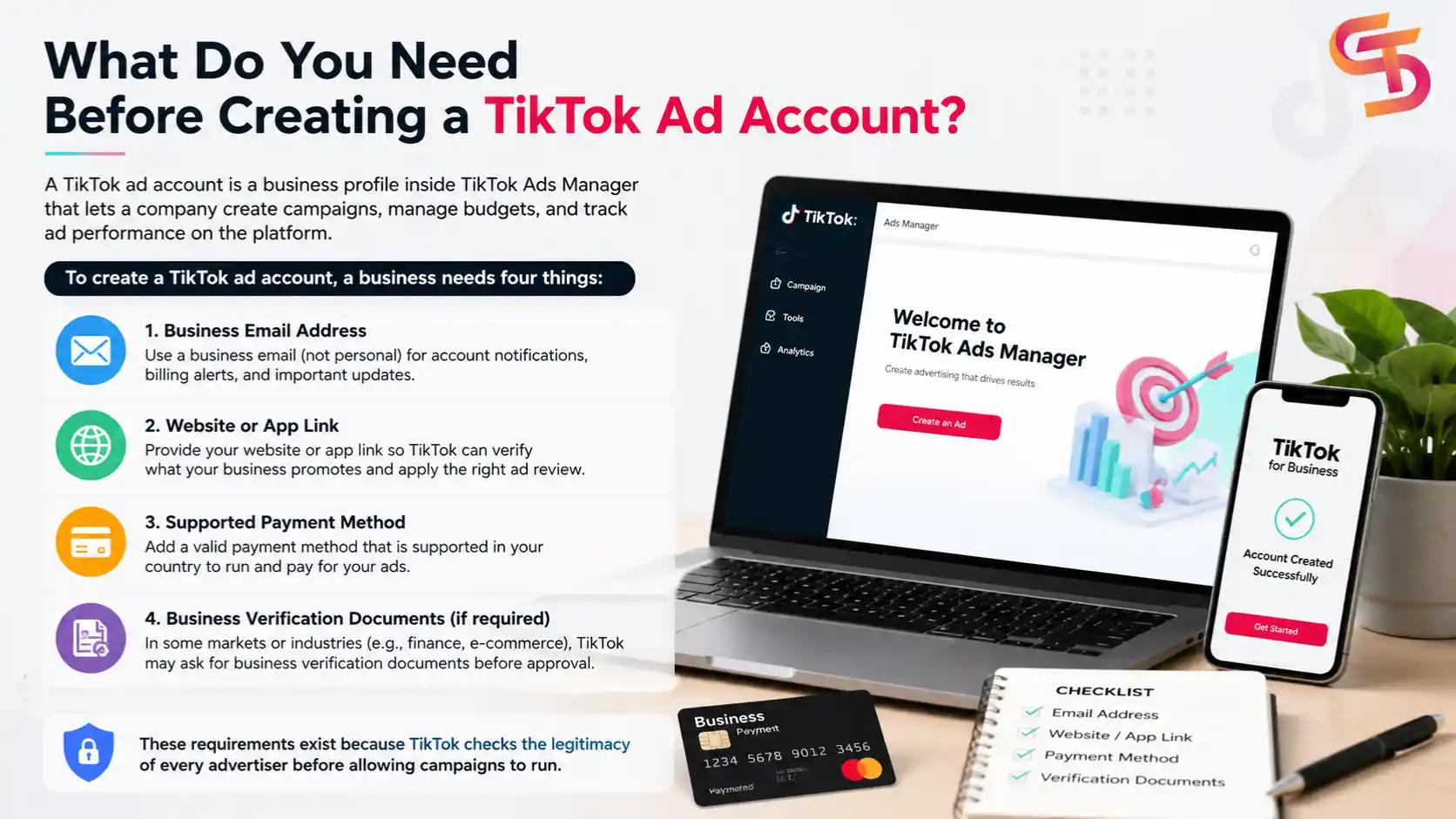
To start, the email address should belong to the business rather than a personal account, since TikTok uses it for all account notifications and billing alerts. Following this, the website or app link lets TikTok verify what the business promotes, which also helps the platform match the account with the right ad review process. Beyond that, the payment method must be valid in the advertiser's country, and business verification documents are sometimes required for certain industries or ad formats, such as finance or e-commerce.
No, a business license is not required to advertise on TikTok in most cases, though certain industries and countries require additional verification. Individuals and small businesses can create a standard ad account using just a valid email and payment method.
However, this changes once the business operates in a regulated industry such as financial services, healthcare, or alcohol. In these cases, TikTok asks for a business license or other official registration documents as part of its ad review process. This requirement also applies to businesses running ads in markets with stricter advertising laws, where TikTok needs proof that the advertiser is a registered legal entity before approving certain campaign types.
→ Verification requirements vary by country and industry. Our TikTok Ad Account Verification & Policy Compliance guide explains business verification, restricted industries, and TikTok advertising policies in detail.
TikTok Ads Manager accepts credit cards, debit cards, and in some regions, direct bank transfers or local payment gateways. The exact list of accepted methods depends on the advertiser's billing country, since TikTok partners with different payment processors across markets.
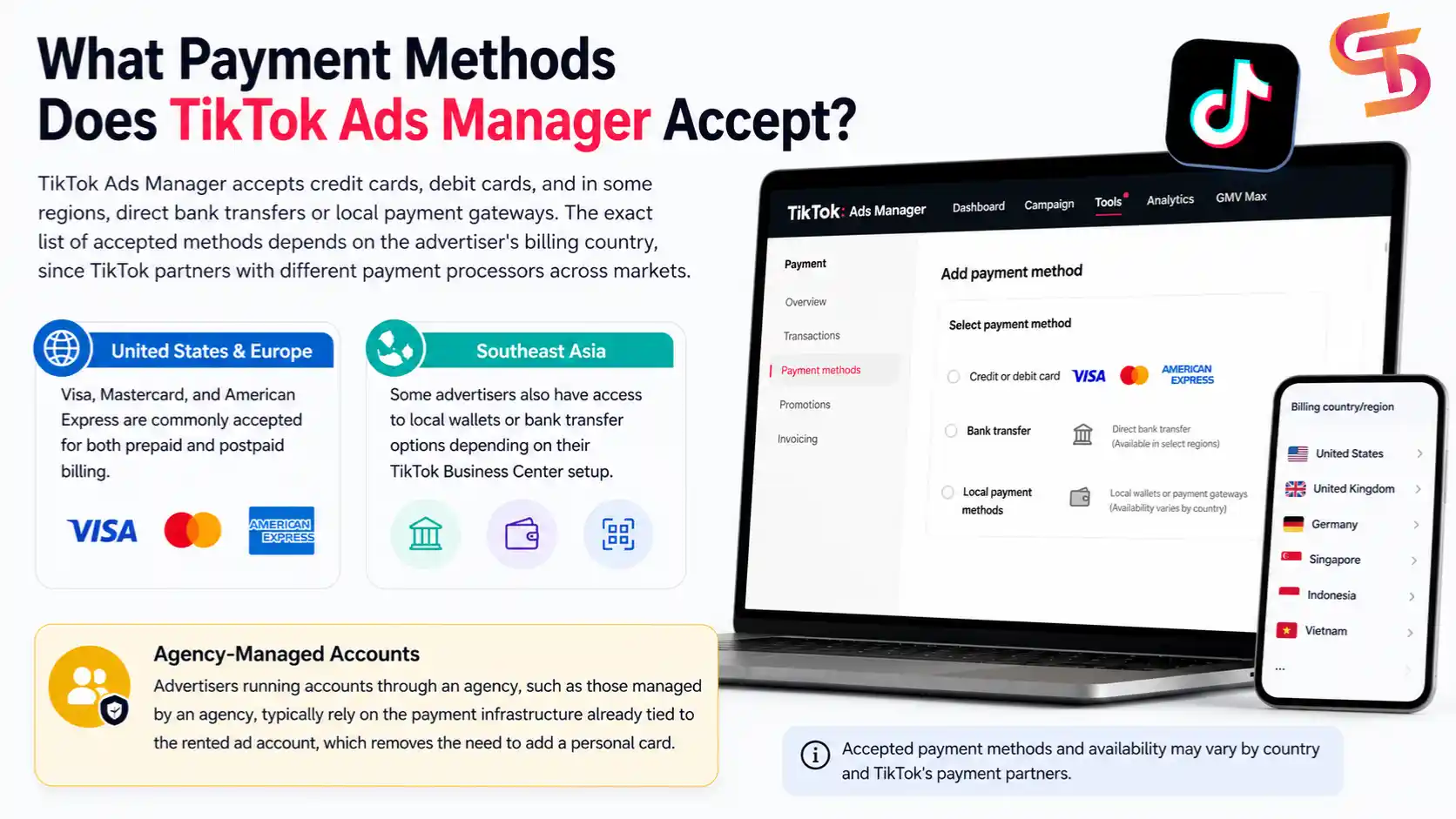
In the United States and most of Europe, Visa, Mastercard, and American Express are commonly accepted for both prepaid and postpaid billing. In Southeast Asian markets, some advertisers also have access to local wallets or bank transfer options depending on their TikTok Business Center setup. Advertisers running accounts through an agency, such as those managed by GDT Agency, typically rely on the payment infrastructure already tied to the rented ad account, which removes the need to add a personal card.
→ Billing settings affect how campaigns spend and how invoices are generated. Learn more in our guide to TikTok Ad Account Billing & Payment.
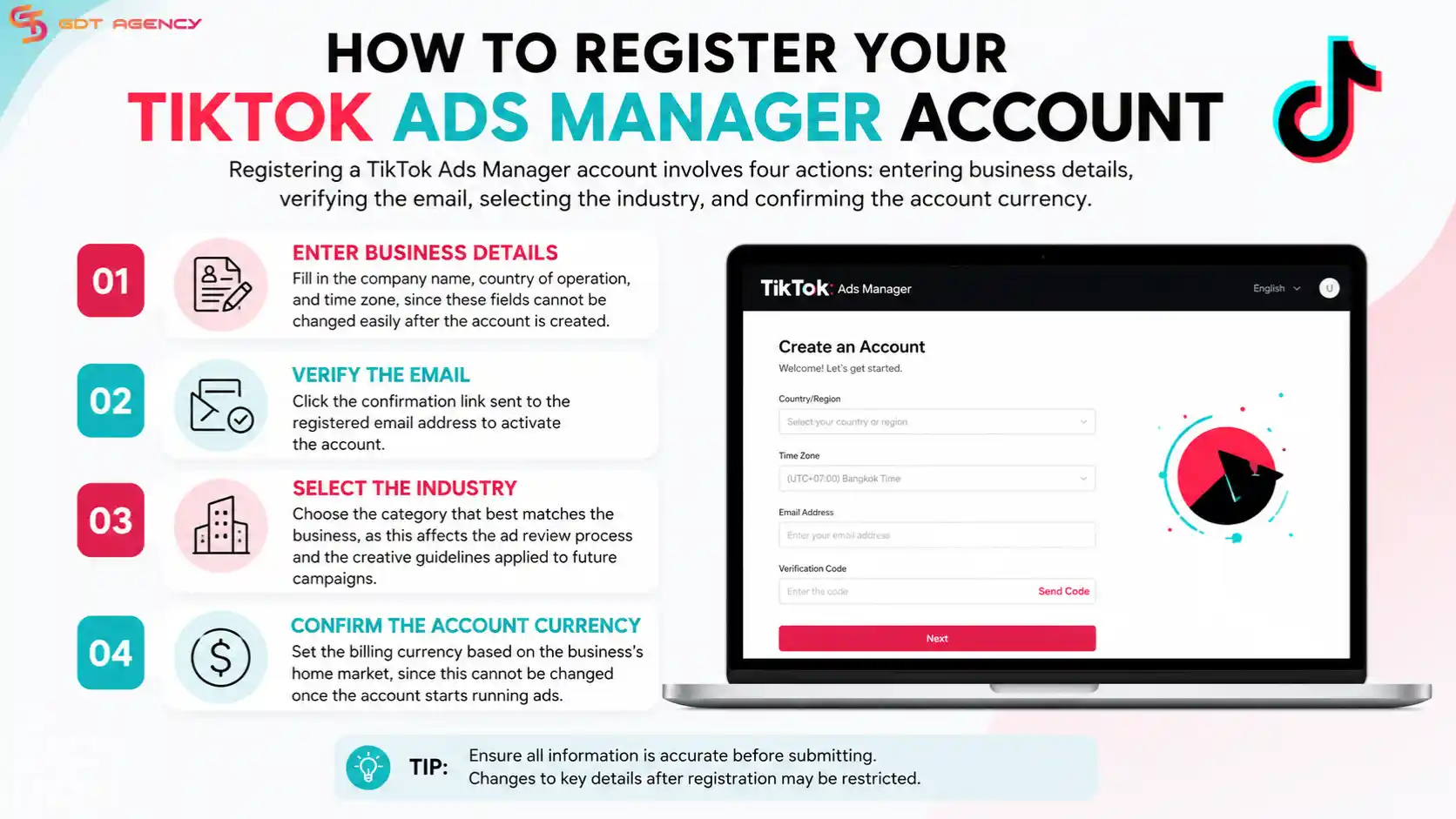
Registering a TikTok Ads Manager account involves four actions: entering business details, verifying the email, selecting the industry, and confirming the account currency. Each field affects how the account is set up later, so accuracy at this stage matters.
Adding a payment method to a TikTok ad account requires opening the Billing section inside Ads Manager, selecting a payment type, and entering the required billing information. This step activates the account for ad spend.
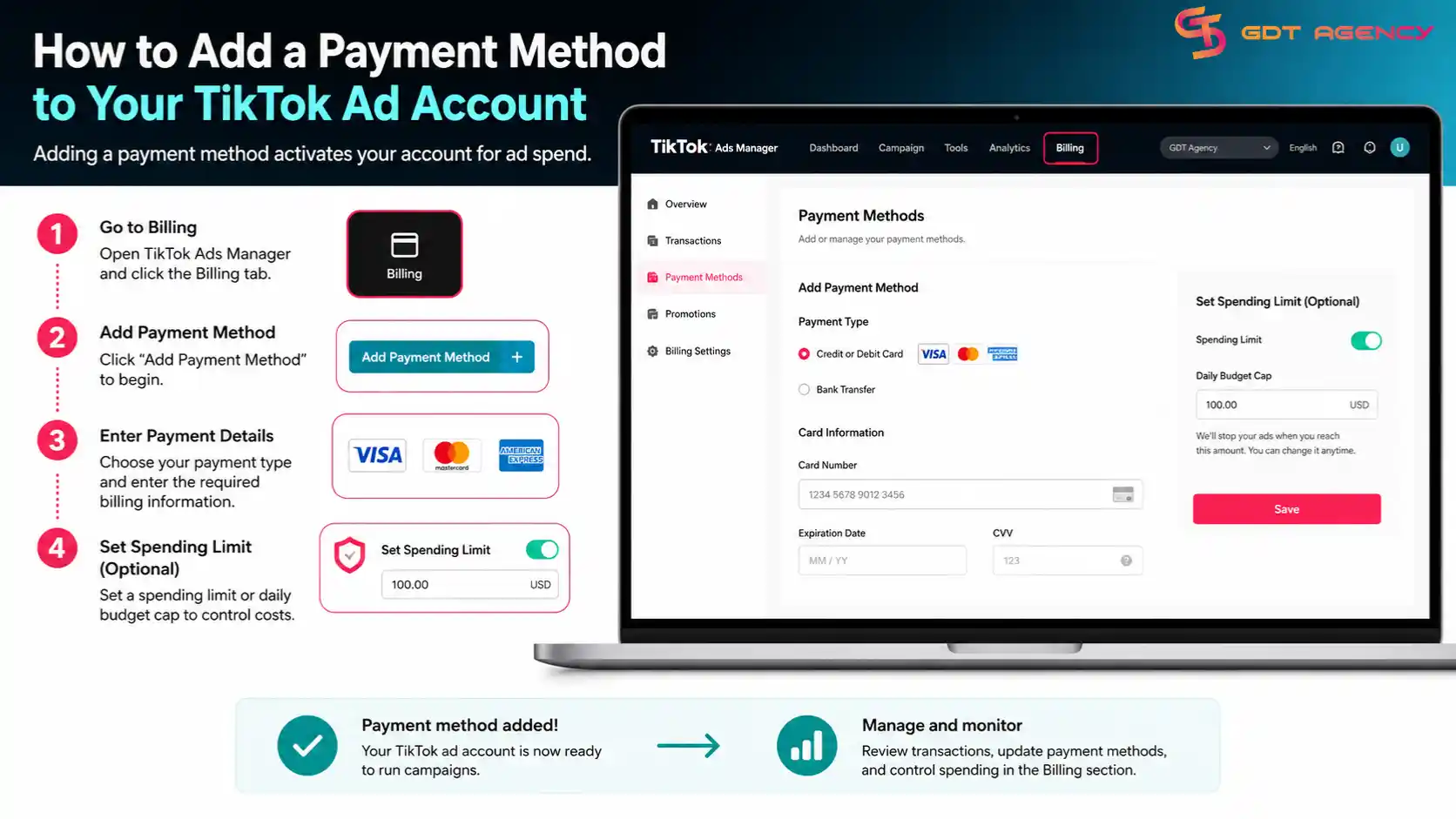
To do this, the advertiser goes to the Billing tab within Ads Manager and selects "Add Payment Method." From there, the platform prompts for card details or bank information, depending on which options are available for the account's billing country. Once the payment method is saved, the advertiser can also set a spending limit or daily budget cap in the same section, which helps control costs while the account is still new.
Creating a first TikTok ad campaign involves three steps: selecting a campaign objective, setting up an ad group with targeting and budget, and uploading the ad creative for review. This process usually takes 20 to 30 minutes for a first-time advertiser.
Starting with the campaign objective, TikTok Ads Manager offers options such as traffic, conversions, app installs, and video views, and the right choice depends on what the business wants to achieve with its first ad. After the objective is set, the next layer down is the ad group, where the advertiser defines who sees the ad and how much to spend. Finally, the creative, whether a video or image, gets uploaded and submitted for TikTok's review before it goes live.
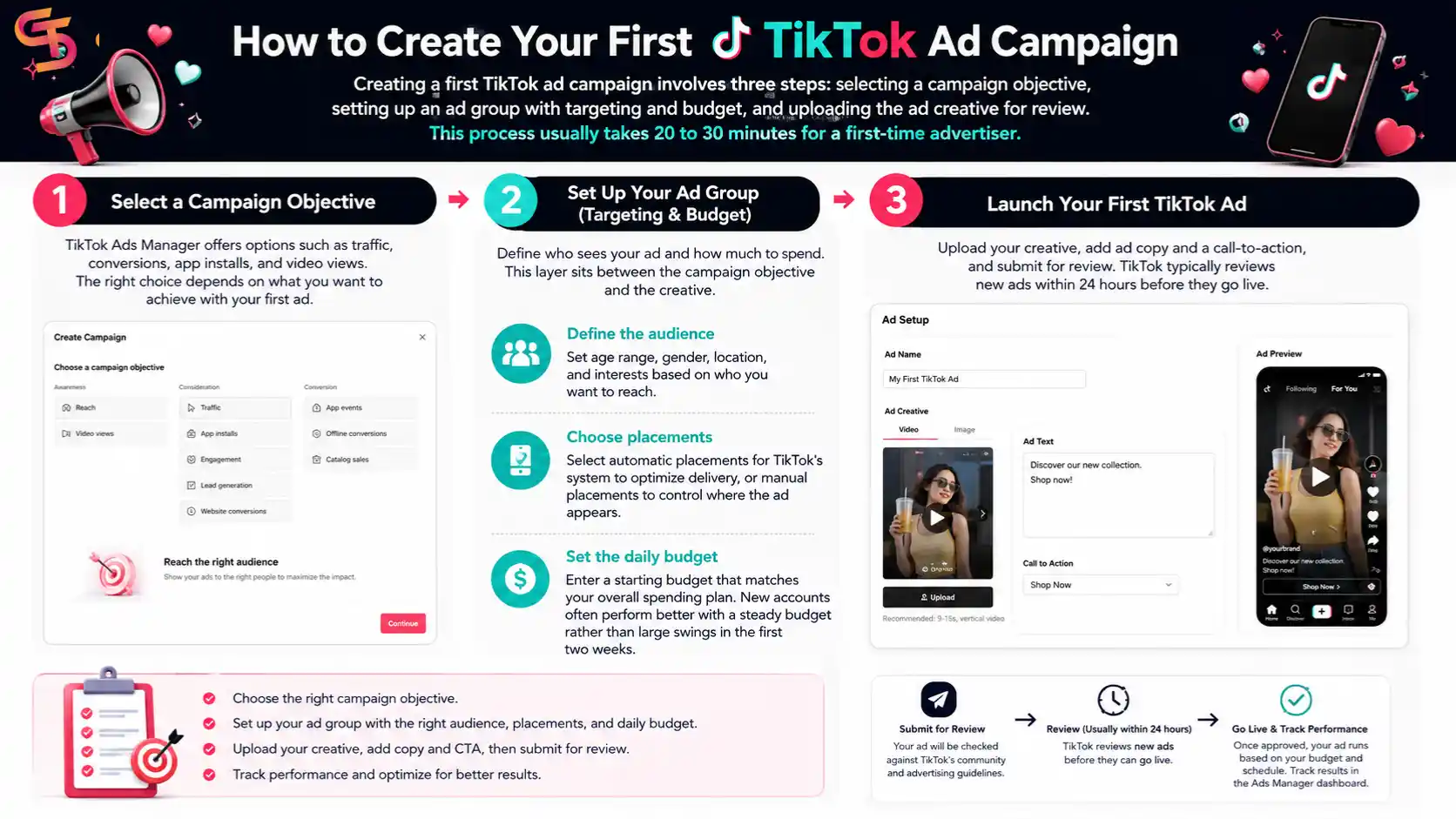
Setting up an ad group means defining the audience, placement, and daily budget for a campaign before the ad itself is created. This layer sits between the campaign objective and the creative.
Launching a TikTok ad requires uploading the creative, adding ad copy and a call-to-action, and submitting the ad for review. TikTok typically reviews new ads within 24 hours before they go live.
Once the creative file is uploaded, the advertiser adds a short caption and selects a call-to-action button, such as "Shop Now" or "Learn More," depending on the campaign objective chosen earlier. After submission, the ad enters TikTok's review queue, where the platform checks it against community and advertising guidelines. If approved, the ad starts running based on the budget and schedule set in the ad group, and the advertiser can track its early performance from the Ads Manager dashboard.
TikTok Ads Manager works best for advertisers running one or a few campaigns directly, while TikTok Business Center suits agencies and businesses managing multiple ad accounts, team members, or assets in one place. Both tools connect to the same underlying ad account, but they serve different scales of operation.
Ads Manager focuses on campaign creation, targeting, budgets, and reporting for a single account, making it the right tool for most small and medium businesses running their own ads. Business Center adds a management layer on top, letting users control multiple ad accounts, assign team permissions, and share assets like creatives or audiences across accounts. This distinction matters most once a business or agency scales beyond a single ad account.
Business Center becomes necessary once a business or agency needs to manage more than one TikTok ad account or coordinate access across multiple team members. Standard Ads Manager access is not built for this kind of multi-account structure.
Agencies renting or managing accounts for several clients typically use Business Center to keep each client's assets, permissions, and billing separate while operating from one central login. This setup also matters for businesses running ads in multiple countries, since Business Center makes it easier to organize accounts by market without mixing campaign data or team access between regions.
There are three main types of TikTok ad accounts for businesses: self-managed accounts, agency-managed accounts, and reseller accounts, and the right type depends on the scale and experience level of the advertiser. Each type differs mainly in who controls billing, verification, and account setup.
→ Understanding who owns an account and who controls billing is important before choosing between self-managed, agency-managed, or rented accounts. Learn more in TikTok Ad Account Access & Ownership.
If a TikTok ad account gets rejected or suspended, the advertiser usually receives a notification explaining the reason, and in most cases can submit an appeal or correct the issue to restore access. Common causes include policy violations, incomplete verification, or unusual billing activity.
When an account is rejected during setup, it typically means the business documents or ad content did not meet TikTok's review standards, and resubmitting corrected information often resolves it. For accounts suspended after they were already running ads, the cause more often relates to ad content violating community guidelines or a payment issue with the linked billing method. In both cases, working with an agency that manages the account relationship, such as GDT Agency, can shorten the resolution time since the agency already understands the review process and can escalate appeals through established channels.
→ If your account has been restricted or disabled, our TikTok Ad Account Suspension & Recovery guide explains common suspension reasons, appeal options, and recovery best practices.
Setting up a TikTok ad account comes down to four stages: gathering the right documents, registering and verifying the account, adding a payment method, and launching the first campaign. Each stage builds on the one before it, so skipping a step, such as confirming the payment method or picking the wrong industry category, tends to cause delays later in the process.
For businesses running a single account, Ads Manager covers everything needed from setup to reporting. Once a business or agency starts managing several accounts across markets, Business Center becomes the better fit, and working with an agency-managed or rented account can remove the verification bottleneck altogether for advertisers who need to launch quickly.
→ Different industries have different advertising requirements and account needs. Explore TikTok Ad Accounts by Business Type: Use Cases to see how e-commerce, SaaS, education, finance, healthcare, and other businesses use TikTok advertising successfully.
Registering and verifying a TikTok ad account usually takes under 15 minutes, though full approval can take longer if the business needs additional verification documents.
Yes, TikTok allows advertisers to link an app, a social media page, or a landing page instead of a traditional website, depending on the campaign objective.
TikTok sets a minimum daily budget at the campaign and ad group level, and the exact amount varies by region, so advertisers should check the current minimum inside Ads Manager before launching.
Yes, a business can operate multiple ad accounts, typically managed through TikTok Business Center rather than individual Ads Manager logins.
No, a single Ads Manager account is enough to start advertising. Business Center only becomes necessary once the business needs to manage multiple accounts or team members.

TikTok Ads for e-commerce works as a paid promotion system that helps online stores reach buyers through short-form video on one of the fastest-growing platforms…

Running TikTok ads for an MMO academy takes more careful planning than most niches. TikTok’s ad platform rewards fast-moving, high-engagement content, so an MMO academy…

Financial service brands can run ads on TikTok, but the platform holds these advertisers to a stricter standard than most industries. Banks, insurance companies, lenders,…