


How to Recover a Facebook Ad Account Disabled in 2026


To fix your Facebook ad account disabled in 2026, you must first identify the specific violation in the Business Support Home and resolve any immediate compliance issues like identity verification or payment failures. You should delete all flagged or rejected ads to ensure the account is clean before requesting a review. You must then submit a professional appeal through the official “Request Review” button or Meta Live Support while avoiding the use of aggressive language. You should wait 48 hours for a response and avoid creating new accounts immediately to prevent a permanent ban for circumventing systems.
Key Takeaways:
- Most ad account bans come from four causes inside Meta Platforms: payment issues, policy violations, unusual activity, and false positives.
- You must identify the exact reason first. Guessing or appealing blindly usually fails.
- Clean your account before appealing. Fix payments, delete flagged ads, and secure access with 2FA.
- Write a clear and calm appeal with real proof. Emotional or aggressive messages reduce approval chances.
- If you get a final decision, the account is usually gone. You should either rebuild clean or switch to a more stable setup.
Why Do Facebook Ad Accounts Get Disabled?
A Facebook ad account being disabled usually means the system detected something that violated advertising policies, payment rules, or account integrity standards.
To find the exact reasons leading to the disabled status, GDT Agency conducted an internal test in December 2025 with over 2000 standard ad accounts running ads in multiple niches.
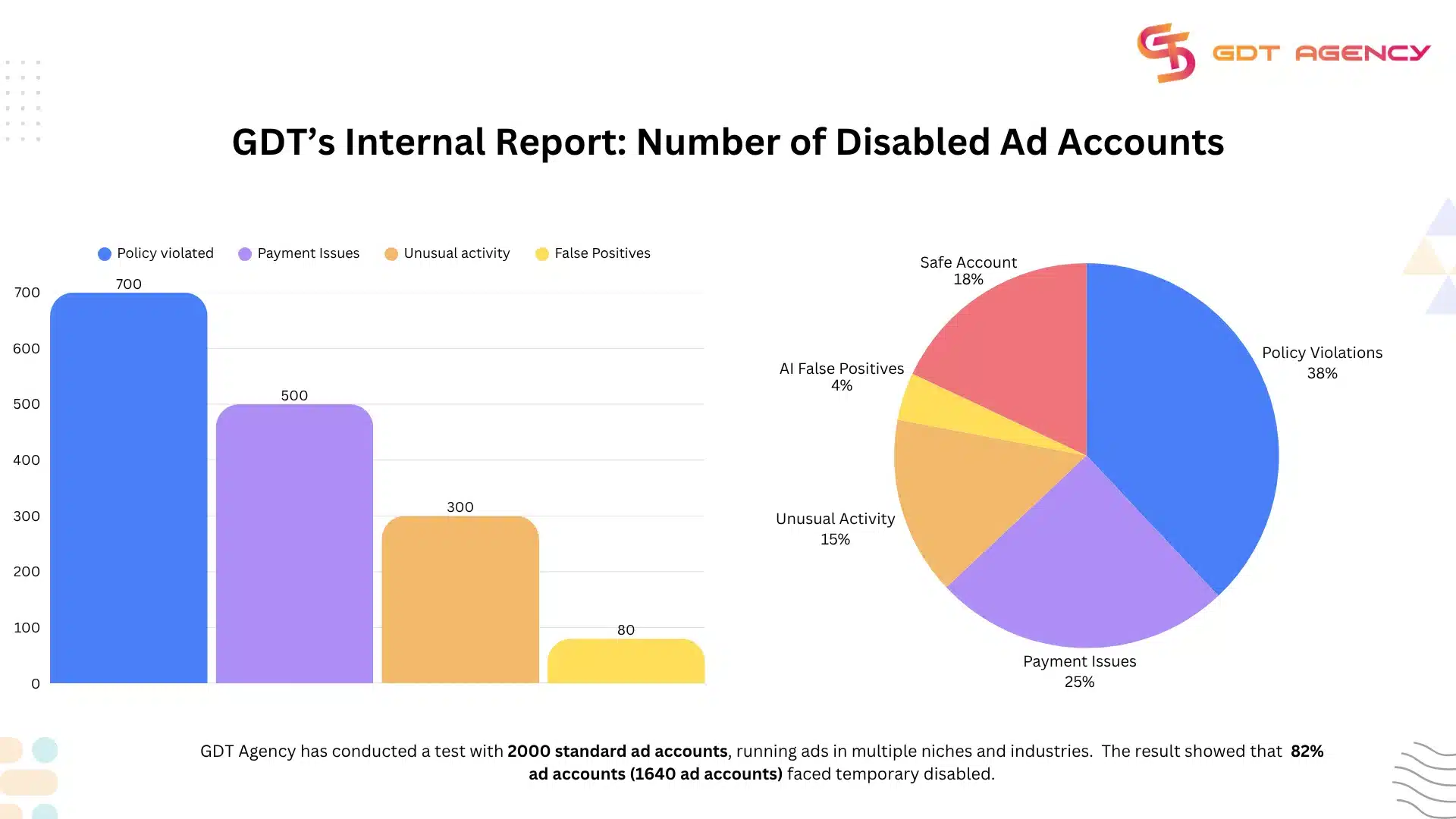
The statistics of the result showed that 82% (1640 accounts) of these accounts were disabled due to the main reasons related to payment issues (25%), policy violations (38%), unusual activity (15%), and false positives (4%).
Disabled for payment issues
When you fail to pay for your outstanding balances on time, or Facebook cannot place a temporary hold, Facebook will disable your payment method and ad account based on the mechanism against fraud, and ensure all advertisers pay for their ads on time.
- Insufficient funds: If you forget to pay the due or don’t have sufficient funds in your account, Facebook will temporarily disable your ad account until the outstanding balance is cleared.
- Incorrect or expired payment method: If the card information (number, expiry date, CVV, names, or billing address) doesn’t match the bank record, Facebook may consider it fraudulent behavior and disable your ad account.
- Credit card limits: If your credit card is at its maximum limit or restricted by the bank, the payment made by Facebook will not go through. Facebook will stop your ads automatically and also disable the ad account after several unsuccessful tries.
Disabled for Unusual Activity
Unusual activities in your ad account can trigger security alerts. Facebook may suspend your ad account as a proactive measure to protect your cards from being hacked or compromised. Here are some activities that can be seen as unusual or suspicious, including:
- Multiple IP addresses: Creating or editing ads from strange IP addresses, logging in to the account from unfamiliar geographical regions.
- Suspicious devices: Logging in from an irregular device without two-factor authentication
- A sudden surge in ad budgets: An abrupt and huge increase in ad budgets and unusual spending patterns.
- Account and billing name mismatch: A discrepancy between the name of the ad account and the card owner.
Disabled for Policy Violations
When running ads, advertisers have to comply with Facebook’s Advertising Standards and Community Standards. If your ads, landing pages, or business activity are in violation of these rules, the system can disable your account automatically.
Here is a complete list of things that are not allowed across Meta technologies, and you should take a closer look at it if your account was disabled due to the violation of Meta Advertising Standards.
Disabled for False Positives
False positives happen when Facebook’s automated system mistakenly flags a safe and legitimate account as a violation.
Facebook uses AI and pattern detection to scan behavior, payments, and ad content. The system does not always understand context like a human. The system looks for signals that match risky patterns. When something looks similar to past violations, the system may take action even if the account is actually compliant.
Fix These Root Causes (The Clean-up)
Before you talk to Facebook Support, you must clean up the “crime scene”.
- If it’s a Payment Issue: Contact your bank to ensure they aren’t blocking Facebook. Add a backup payment method if possible (use a reputable bank card, not a temporarily generated card).
- If it’s a Policy Issue: Delete the ads that were flagged. Yes, delete them. Even paused ads can trigger a re-ban.
- If it’s Unlimited Activity: Turn on Two-Factor Authentication (2FA) for all admins immediately. Meta now requires this for almost all advertisers.
- If it’s False Positives: it can be reinstated upon normal appeal.
How Do I Fix A Facebook Ad Account Disabled Through Meta Live Support?
The very first thing you should do when your Facebook ad account is disabled is contact Meta Support through live chat in Business Manager to chat with the support staff to directly address your problem.
Here’s one of the ways to contact Facebook Business Live Chat Support:
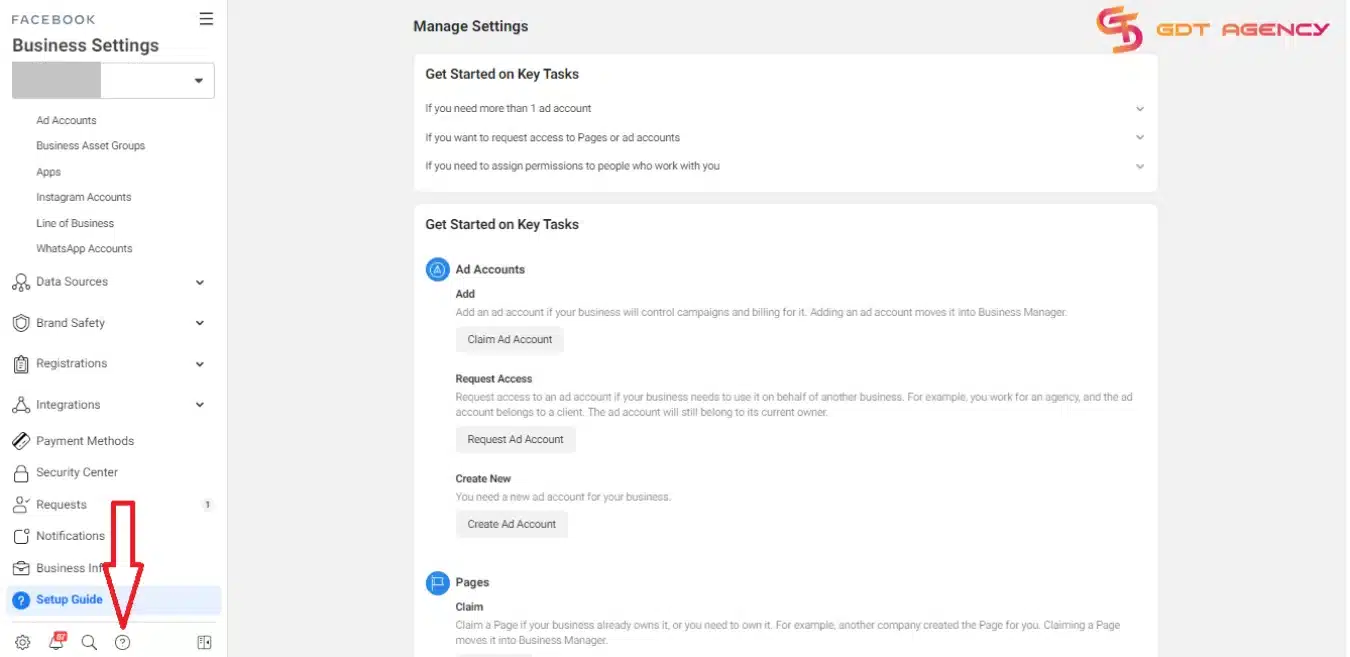
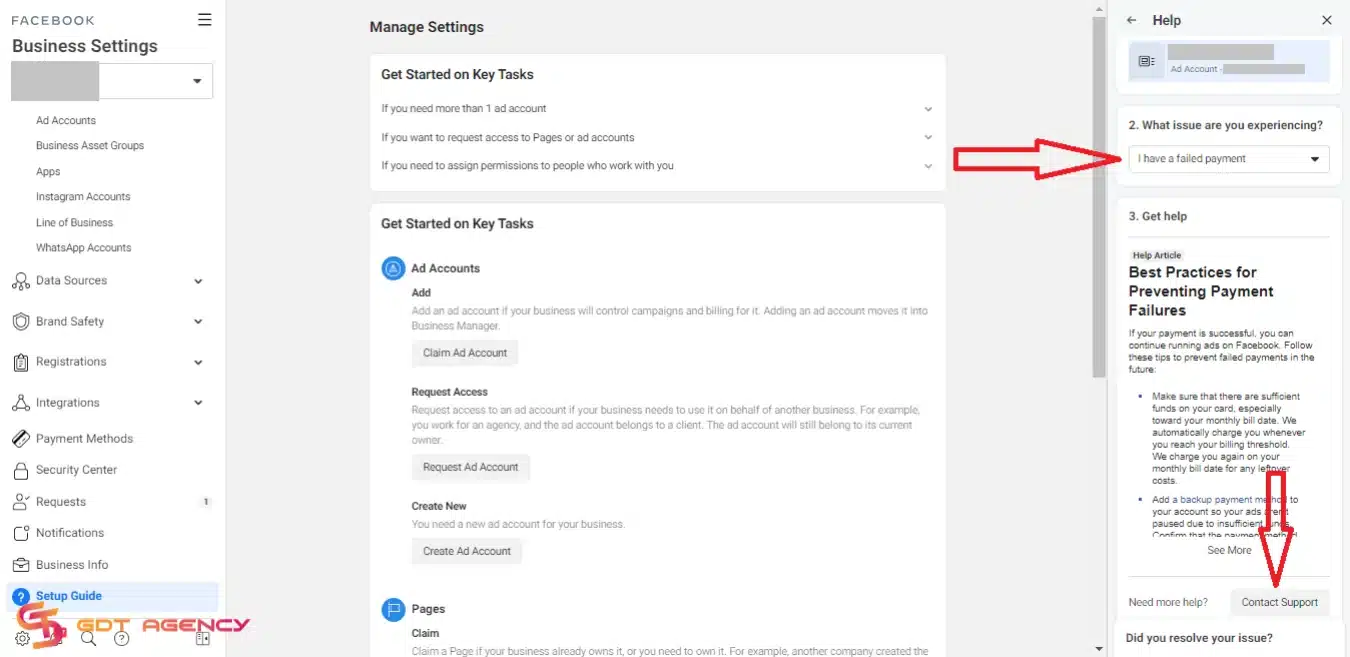
- Step 1: Go to your Facebook Business settings. Click on the “?” icon on the bottom left.
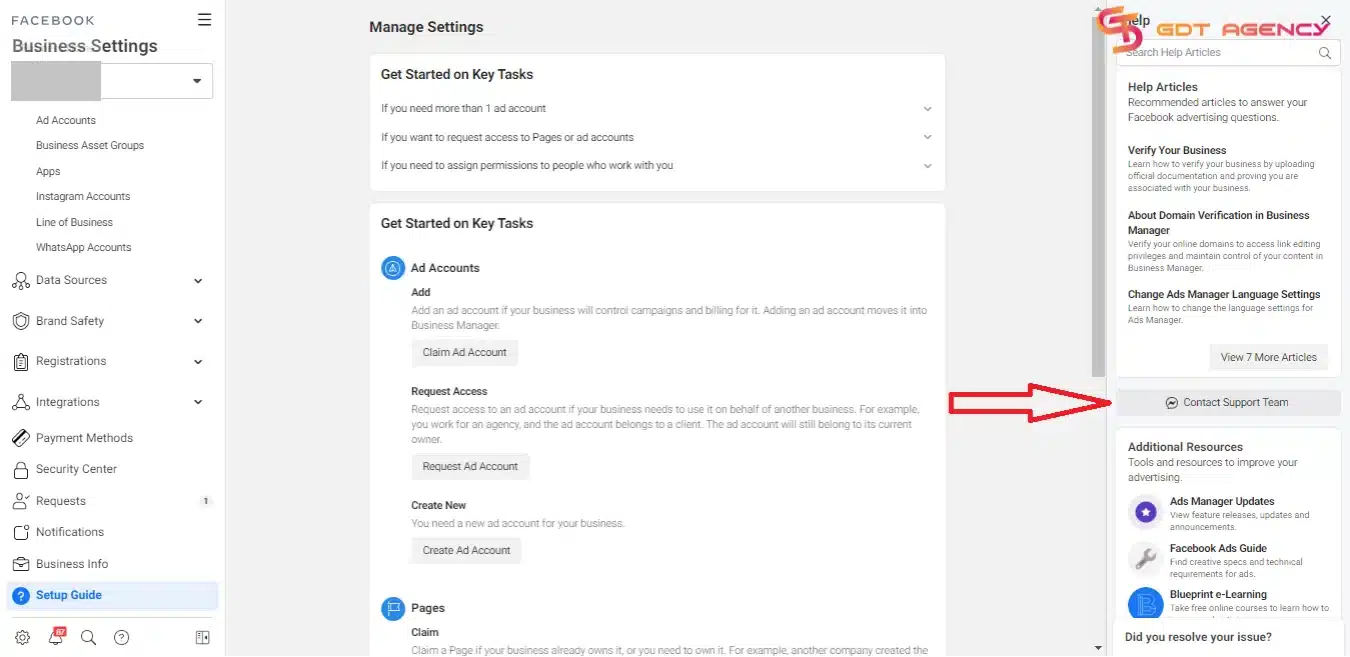
- Step 2: On the right side of the screen, the Help Section should show up. Click on “Contact Support Team“
- Step #3: Click on the drop-down box under “What issue are you experiencing“. Select the most appropriate issue. Scroll down a bit, then click on the “Contact Support” button.
- Step #4: Scroll down a bit, then select “Chat” and fill out the necessary boxes. After that, click on “Start Chat“.
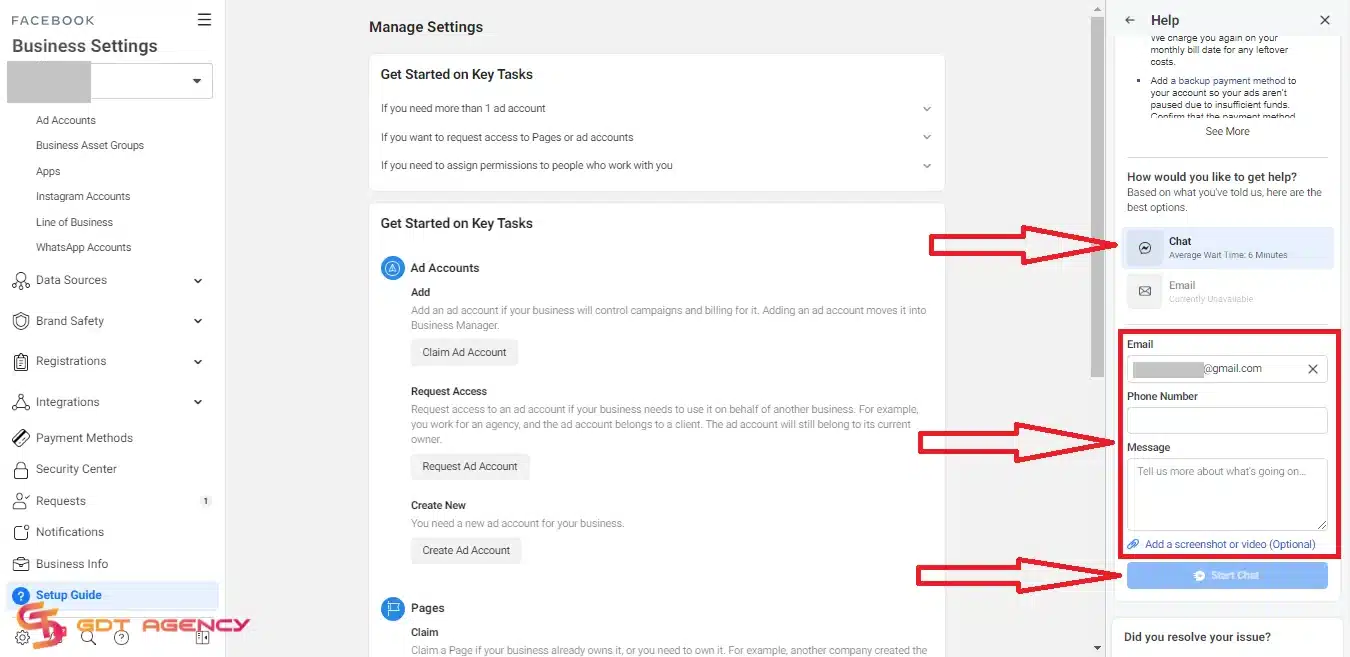
Note: Not everyone can live chat with Meta to get help with account issues. It’s only available for Facebook agency ad accounts with significant spend history and active business verification.
How Do I Appeal A Disabled Facebook Account in 2026?
If you can not find the live chat support, don’t panic. You can submit an official appeal through Meta’s Help Center, verify your identity, and wait for a manual review. You must act within 180 days, or your account becomes permanently unrecoverable.
Step-By-Step To Submit A Formal Appeal:
Keep in mind that only an admin of the account can request this review. Therefore, to be able to submit a formal appeal, you will need to have admin access first. After you have admin access, here is the step-by-step to submit a formal appeal:
- Step 1: In Business Support Home, select Account status overview in the left menu.
- Step 2: Select the disabled account.
- Step 3: In the What you can do section, select Request review.

- Step 4: In the pop-up appeal form, provide all the needed information and documents to help Facebook investigate your case.
- Step 5: Click Submit for review and wait for a Facebook response.
Typically, this review process is completed in 48 hours or even longer in some cases. Please be patient. If Facebook accepts your appeal, you can get your ad account back and continue your campaigns.
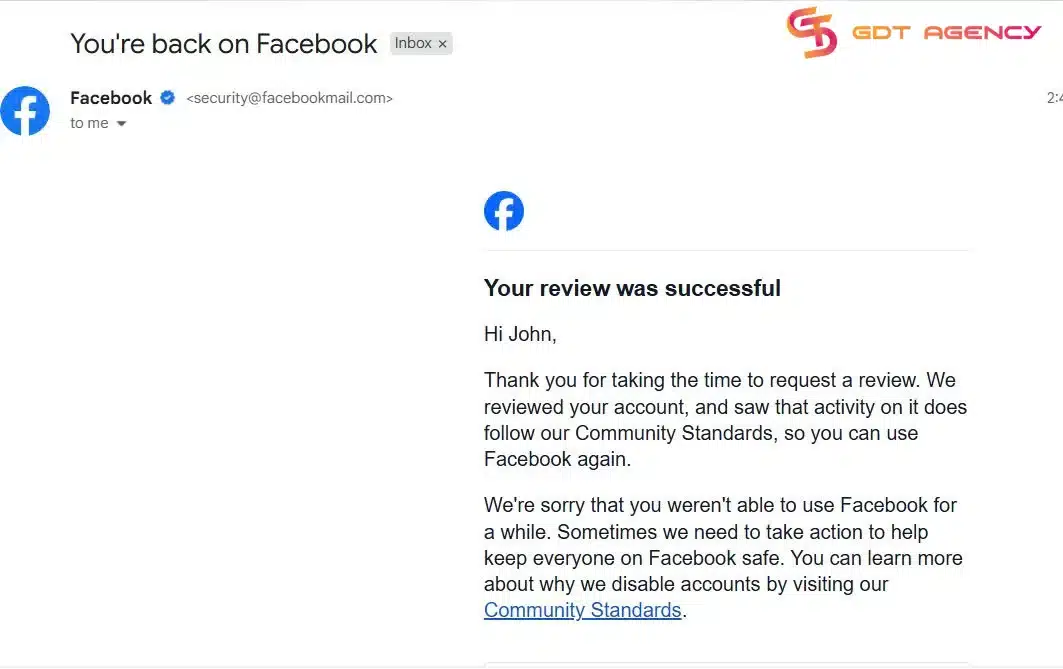
If you have waited more than 48 hours, and your account is still disabled. You can submit another appeal with new proof to prove that your ad account is disabled due to errors. There is a limited number of times that you can request a review. Therefore, never send repeated appeals without adding anything new.
If your Facebook ad account is not disabled but is only restricted by Meta, you can refer to our dedicated blog: How To Fix Facebook Ad Account Restricted from Advertising in 2026 to explore how to escape from this situation.
Facebook Ad Accounts Disabled Appeal Samples To Refer:
During our journey, GDT Agency has submitted a lot of appeal forms, and here are some appeal copy versions that helps 84% of our disabled accounts be successfully reactivated within 4 days. You can save these samples to use when necessary.

Sample 1: Appeal for policy violations
“Dear Facebook,
My ad account (ID: …..) was disabled recently due to not complying with Facebook’s advertising policies.
I believe this was a mistake because, as an experienced advertiser with over 5 years of running Facebook ads, I have always adhered to your ad guidelines.
I reviewed my ads and could not find any problem. Please review and recover my ad account so that I can continue my advertising campaigns on your platform.
Best regards,”
Sample 2: Appeal for unusual activity
“Dear Facebook,
My ad account (ID: …..) was suspended, and I received a notice that read: We noticed some unusual activity…
Recently, I was on a business trip, so I had to log in to my account from another IP. I suppose this is why the algorithm was triggered.
I confirm I’m the real owner of this Facebook account. Attached are my ID card and bank statements.
I can provide any additional documentation you need.
Please recover my ad account so that I can restart my campaigns. Thank you.”
Sample 3: Appeal for False Positive
“Hello Meta Support Team,
I am writing to request a manual review of my ad account [Insert ID], which was recently disabled for [State Reason, e.g., Unacceptable Business Practices]. After conducting an internal audit of our active and paused creatives, we believe this restriction is a false positive triggered by the automated system.
We have confirmed the following:
Compliance: Our landing page [Insert Link] is fully transparent, containing our privacy policy and clear contact information.
Creative Standards: We do not use “personal attributes” language (e.g., “Are you…”), misleading claims, or prohibited “before/after” imagery.
Security: All admins have Two-Factor Authentication (2FA) enabled, and our payment method [Insert Last 4 Digits] is active and verified.
We are a long-term advertiser committed to maintaining Meta’s 2026 Advertising Standards. Could a human reviewer please investigate this case? We are ready to make any necessary adjustments immediately if a specific element was misunderstood by the AI.
Thank you for your assistance.
Best regards,”
Disclaimer: This appeal template is provided for reference only. Using this template does not guarantee 100% reinstatement. We recommend that you review your account carefully and adjust the message to reflect your actual situation before submitting an appeal.
What If My Appeal Is Rejected?
If you get a “Final Decision” message, your account is likely gone forever. The “Permanent Restriction” is very hard to reverse.
At this point, you have two options:
- Start Over (The Hard Way): New browser fingerprint, new credit card, new IP, new Business Manager. Meta traces everything, so “incognito mode” is not enough. You need tools like anti-detect browsers (Gologin, Multilogin).
- Rent an Agency Ad Account (The Smart Way):
This is what pro media buyers do. Instead of fighting the algorithm alone, you rent a “Whitelisted” Agency Account.
- Unlimited Spend: No $50/day limit.
- Priority Support: Direct line to Facebook reps.
- Stable: Far less likely to get disabled for random AI reasons.
GDT Agency provides these premium accounts with a replacement guarantee. If an account dies (rarely), we replace it instantly. You focus on ads; we handle the compliance.

FAQs
1. Why was my ad account disabled?
Most cases fall into four buckets inside Meta Platforms’ systems.
- Payment issues: Your card fails, your balance stays unpaid, or billing looks risky.
- Policy violations: Your ads break rules like misleading claims, restricted products, or bad landing pages.
- Unusual activity: You log in from different locations, change spending fast, or trigger security flags.
- False positives: The system makes a mistake. This happens more than people think, especially with new accounts.
If you want the blunt truth, most bans are not random. The system sees patterns, and something in your setup or behavior fits a risk pattern.
2. How long does the appeal process take?
It depends on the case type.
- Simple cases: 24 to 72 hours
- Moderate cases: 3 to 7 days
- Complex or flagged accounts: up to a few weeks
If your account touches payments or repeated violations, expect slower responses.
3. How do I get my account back?
To get your account back, you must first identify the specific violation in the Business Support Home and resolve any immediate compliance issues. You should delete all flagged or rejected ads to ensure the account is clean before requesting a review. You must then submit a professional appeal through the official “Request Review” button or Meta Live Support while avoiding the use of aggressive language.
4. How to avoid future bans?
This is where most people mess up.
- Use a clean payment method with a consistent billing history
- Warm up new accounts slowly instead of scaling fast
- Follow ad policies strictly, especially in sensitive niches
- Keep your business info consistent across assets
- Avoid logging in from random IP locations
- Consider using the Meta Whitelisted Ad Account with a high-trust level to reduce risk
If you run ads seriously, you should think like a risk manager. Stability matters more than short-term wins.
5. How to delete a disabled account?
You cannot fully delete a disabled ad account under Meta Platforms. What you can do:
- Deactivate it
- Remove access from your Business Manager
If you want the exact steps and conditions, you can read this guide to find out. If the account is already disabled, focus on setting up a clean new one instead of trying to remove it completely.
Final Thought
Having a Facebook ad account disabled can be frustrating and a big headache for advertisers when all of your existing ads are stopped, creating a big impact on the whole marketing strategy. Hope that this article can help you escape the disabled status quickly to reinstate your ad account. If you have any questions relevant to the Facebook ad account being disabled, feel free to contact GDT Agency. Our experts are here to assist you.

Follow if you find it useful


You can contact us, with our experience in successfully deploying thousands of conversion advertising campaigns, GDT Agency confidently believes we can help you optimize effectiveness and maximize cost savings with advertising operations.

Top 8 Anti-detect Browsers for Multi-Ad Accounts Management
Managing multiple ad accounts across platforms like Meta, Google, and TikTok can be a significant
25/05/2026

How to Get More Followers on Instagram to Grow Your Audience in 2026?
To get more followers on Instagram in 2026, you must focus on creating highly shareable
23/05/2026

How to Run Successful Instagram Ads in 2026: The Creative & Infrastructure Blueprint
To run successful Instagram ads in 2026, advertisers must combine vertical-first creative optimization (specifically high-energy
19/05/2026


