Facebook Ads Not Spending (2026 Update): How To Fix It Quickly?


You’ve spent hours perfecting your creative, building the ideal audience, and hitting “Publish.” But 24 hours later, your spend is still sitting at $0.00. Don’t be stressed, you are not alone. Facebook ads not spending is a problem that is more common than most advertisers admit. In this article, we will explain the reasons why your Facebook ads not spending, how to fix it, and proven tips to avoid this situation in the future.
How Did I Know If My Facebook Ads Not Spending Money
Facebook ads not spending usually happens when your ads are not being delivered to the intended audience, even though the budget is available. As a result, the ads receive little to no impressions, which directly reduces their reach and overall performance.
You can tell your Facebook ads are not spending money by checking a few clear signals inside Ads Manager.
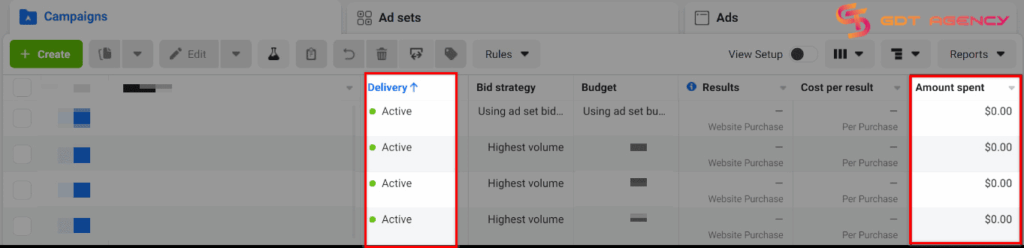
- Look at the Amount Spent column: If your campaign or ad set is active but the amount stays at $0 or barely increases after several hours, it is not delivering.
- Check impressions and reach: Ads that are spending normally will show impressions quickly. If both numbers remain at zero or very low, your ads are not being distributed.
- Review the delivery status: If you see messages like “Learning limited,” “In review,” or “No delivery,” Facebook is restricting or delaying your ads.
You can also compare the budget vs the results. If you have a daily budget set but see no clicks, no impressions, and no spend after 24 hours, that is a strong sign that something is blocking delivery.
>>>Related article: 15 Top Reasons Facebook Ads Not Delivering & How To Fix
12 Reasons Why Facebook Ads Not Spending Money And How To Fix
Facebook ads may stop spending for many reasons. Though Facebook’s system is smarter with the power of the AI system that can automatically scan and make enforcement decisions in milliseconds, like Andromeda, it can still get stuck.
Here are the most common reasons Facebook ads are not spending, explained in a practical way so you can quickly spot the real issue.
1. You Hit Your Account Spending Limit:
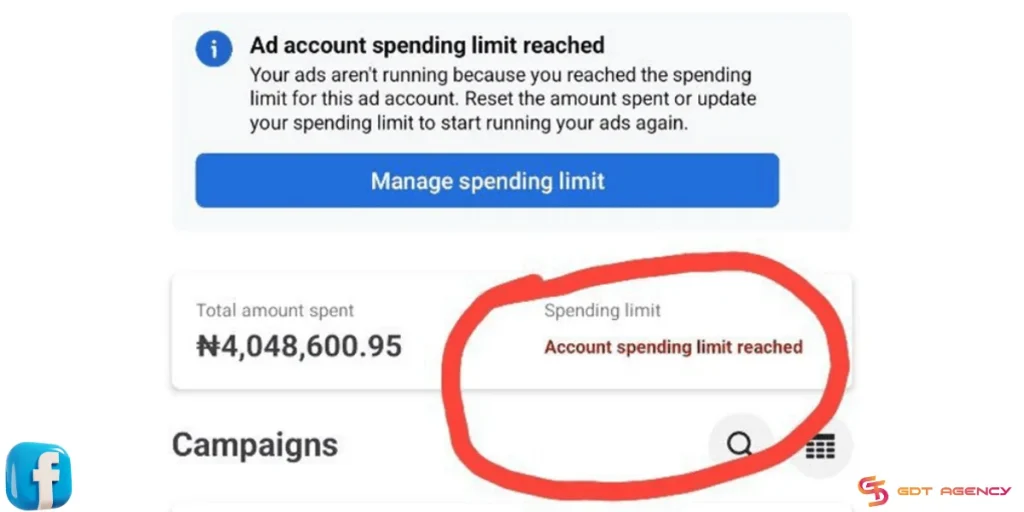
This is the #1 silent killer. If you (or a previous manager) set a lifetime limit for the entire ad account, all ads will stop once you hit that dollar amount.
How to Fix:
- Go to Billing & Payments in your Ads Manager. Look for “Account Spending Limit.“
- If it is full, click “Reset” or “Change” to a higher number.
2. Ad Account or Business Restrictions:
If your ad account, Business Manager, or payment profile is limited, ads may show as active but barely spend. This often happens after violating Facebook advertising policies, suspicious activity, or repeated ad rejections.
How to Fix:
Based on more than 6 years of experience working with Facebook ads since 2019, I can show you 2 ways to solve these issues:
- Changing Your Ads: If Facebook disapproved your ads due to policy violations, you can change the ad copy and landing page that comply with the policy, then resubmit your ad.
- Submitting an Appeal: If you feel that Facebook made a mistake and your ad has been wrongfully disapproved, you can submit an appeal.
>>>Read Now: Facebook Ad Account Restricted: 8 Ultimate Steps To Fix (2026 Updated)
3. Audience overlap
If you have multiple ad sets targeting the same audience inside one account, they can compete against each other. This drives up costs and may cause some ad sets to stop spending entirely.
To avoid this, Facebook prioritizes the ads with the highest total value and pauses the rest. This causes zero ad spend to appear.
How to Fix:
- Go to the Audience section in Meta Ads Manager and check the audience overlap percentage.
- If this number is higher than 40%, you need to eliminate these overlapping audiences. It is best to keep it below 20%.
4. Your Audience is Too Narrow
In the past, “hyper-targeting” was the goal. However, in 2026, it’s a delivery killer.
In 2026, targeting under 100,000 people is almost impossible for spending due to privacy updates. Meta’s auction system might struggle to find enough “available” users to bid on.
If you’re targeting a tiny niche with high competition, you might simply be getting outbid by everyone else.
How to Fix:
Check your “Audience Definition” meter. If it is in the red zone, remove some interests or expand the age and location settings.
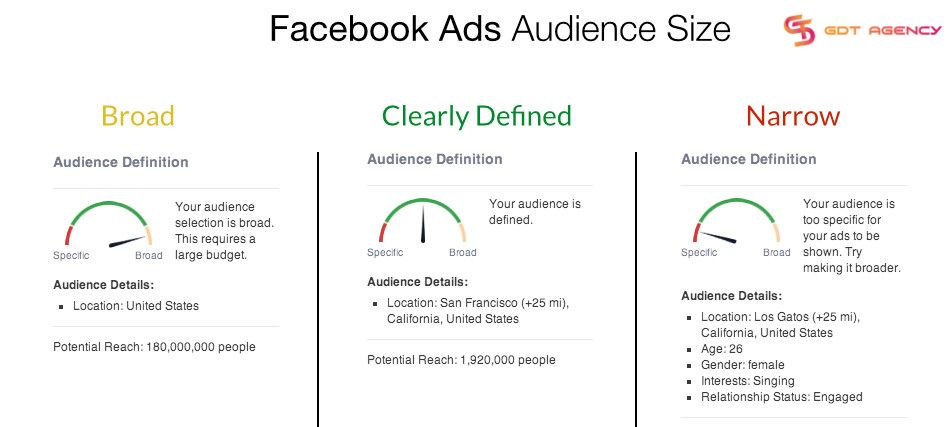
In 2026, Broad Targeting often works best. You can use Advantage+ Audience settings and let the AI find the right people based on your creative signals rather than just interests.
5. The Bid is Too Low
If you are using manual bidding (Cost Caps or Bid Caps) and your cap is too low, you will lose every auction.
In 2026, CPMs (cost per 1,000 impressions) have risen. If you tell Facebook you only want to pay $2.00 for a lead that actually costs $15.00 in the current market, the system will stop spending because it can’t meet your goal.
Even with automatic bidding, unrealistic cost controls can kill delivery.
How to Fix:
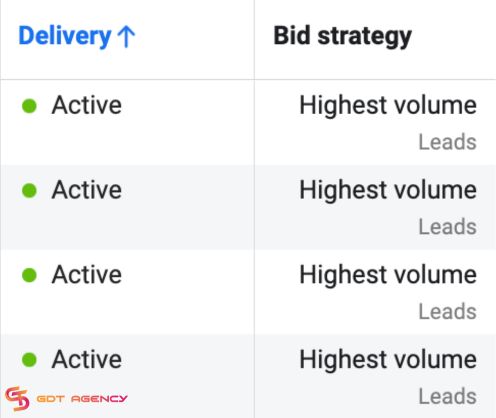
Switch to Highest Volume (formerly Lowest Cost) bidding for 48 hours to see if spend resumes. This lets Facebook’s AI find the best price for you automatically.
6. Poor “Signal” Quality
Meta now relies heavily on the Conversions API (CAPI) and your Pixel. If the selected conversion event rarely fires, Facebook has no data to optimize.
If your tracking is broken and Meta isn’t receiving “signals” (like purchases or sign-ups), the algorithm assumes the ad is a failure. Facebook will stop showing ads that don’t get engagement or results to protect its user experience.
How to Fix:
Verify your events in Events Manager. If your “Signal Quality” is low, your delivery will suffer.
7. Creative Fatigue or Low Quality Score
If you’ve been running the same image for months, your Frequency might be too high. When the same people see the same ad too many times without clicking, your “Relevance Score” drops, and delivery slows.
Besides, the 2026 Andromeda algorithm now includes a Pre-auction filter. If you try to use the exact same image across multiple ad sets, the AI flags it as ‘Repetitive Content’ and can block your spending immediately.
How to Fix:
You can combat Facebook ad fatigue by reducing ad frequency, diversely targeting audiences, and diversifying your formats like mixing in Videos, Reels, and Carousels to show the system your content is fresh and varied.
8. Your Ad Quality is Low
Low-quality ads could be the reason your ads aren’t spending. Facebook wants its users to be happy and will track how users interact with the ads.

Therefore, Facebook will stop showing ads with weak creatives, misleading claims, or low engagement history that struggle to get impressions, or if people are clicking “Hide Ad” or have a lot of negative feedback, resulting in slow or zero spend.
How to Fix:
Check your Account Quality page. If your ad has a low ranking, try using a new video or image that is more helpful and less “spammy.”
9. Payment Issues
If your credit card expired or a payment failed, low balance, spending thresholds not met, or rejected cards, Facebook will pause your campaign even if the campaign status still shows “Active”.
Even after you add a new card, you often have to “Pay Now” to clear the old balance before ads start again.

How to Fix:
Go to your Payment Settings. Make sure your primary card is valid, and there are no “Temporary Hold” errors.
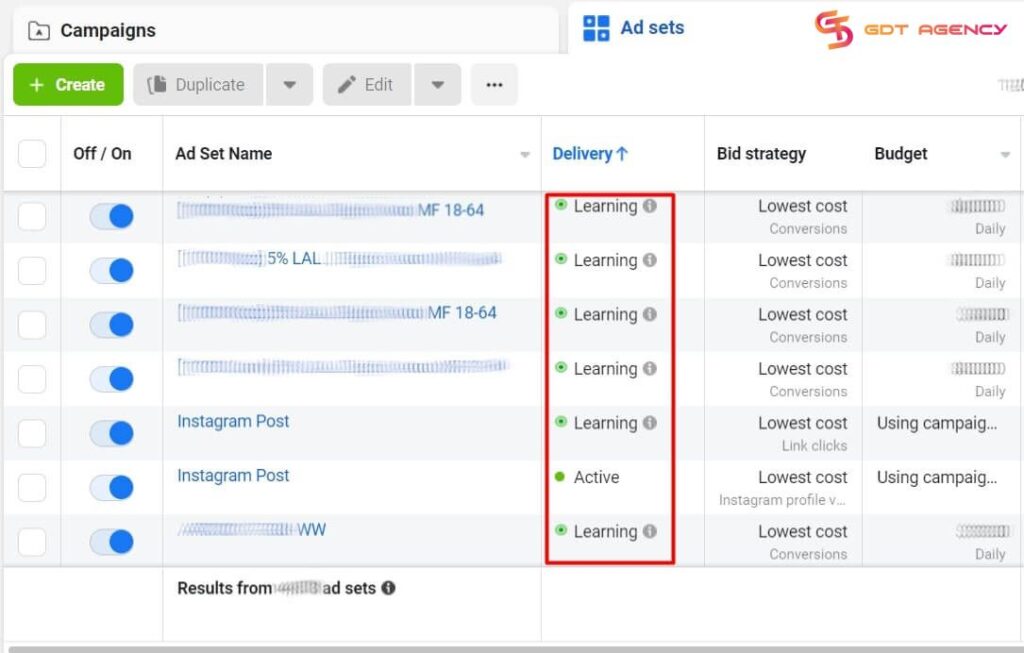
10. Campaign or Ad Set Is Still In Learning Or Review
Every ad must be checked by Facebook’s team or AI. This usually takes 2 to 24 hours. Sometimes it can take longer if the platform is busy.
New campaigns need time to exit the learning phase. If your ad is stuck in review or keeps getting re-reviewed, delivery can pause or slow down without clear warnings.
How to Fix:
Look at the Delivery column. If it says “In Review,” you just need to wait. Don’t make changes now, or the timer will start over!
11. Your Daily Budget is Too Low
A small daily budget combined with a competitive objective like conversions can block delivery. If you are trying to get sales for a $100 product but your daily budget is only $2, Facebook might not even try to show your ad.
Facebook prioritizes higher-budget competitors in the auction, so your ads simply do not win impressions. The system needs enough money to “bid” against other companies.
How to Fix:
A good rule for 2026 that I always advise GDT’s customers is to set your daily budget at least 5 times higher than what you want to pay for one result. If you want a lead for $5, set your budget to at least $25.
12. New or Low-Trust Ad Accounts
If you are running a brand-new ad account, Meta often restricts you to a low daily limit (often around $25-$50) until you prove you are a reliable payer.
How to Fix:
Building trust with Meta isn’t just about money. It’s about the consistency of payment signals sent to the AI. In 2026, the algorithm prioritizes accounts with a ‘clean’ payment history.
Keep your ads running for 21 days (even if it is just $5 a day) straight without pausing or payment failures. This consistent activity is the primary signal Meta uses to verify that you are a reliable payer, which signals the AI to gradually lift your daily spending limits.
Expert Tips To Avoid Facebook Ads Not Spending in The Future
Though our Facebook agency account for rent with higher initial trust scores and direct lines to Meta support can drastically reduce the chances of your ads not spending by removing common roadblocks like low daily limits and payment-related freezes.
However, an agency account isn’t a magic wand. You should still refer to expert troubleshooting tips to stay consistent and scale profitably.
Combine ad sets with overlapping audiences

For ad sets with overlapping audiences, consider combining them.
This will make your ads easier to deliver. In addition, it also has some very good effects. You can control and spend your budget accordingly. It also helps you reduce the time and budget needed during the machine learning phase.
This is an extremely important technique in Facebook Ads that helps you optimize your ads effectively. It also helps you get easy-to-understand metrics to control your campaign.
Use a content testing tool

To be able to advertise with peace of mind and ensure that your ads are safe and do not violate Facebook’s policies, you should use a few tools from third parties. These tools help you test your content before starting an advertising campaign.
Several tools will help you test and evaluate all ad components. Some tools also help you evaluate ad performance. Although you need to subscribe to a paid plan if you want to use all the features, these tools are worth checking out.
>>> Learn More: Main Facebook Ads Account Problems and How To Solve Them
Summary
Facebook Ads not spending is a common situation, but it will also have a big impact if you do not fix it promptly. Through this article, I hope you will gain valuable experience so you can use Facebook Ads more stably.
Don’t let technical glitches drain your potential revenue. Contact GDT Agency today for a free account audit.

Follow if you find it useful


Was this helpful?
Thanks for your feedback!
You can contact us, with our experience in successfully deploying thousands of conversion advertising campaigns, GDT Agency confidently believes we can help you optimize effectiveness and maximize cost savings with advertising operations.