
Facebook Ads for E-Commerce: Setup, Strategy, and Scaling in 2026

Facebook Ads for e-commerce is a paid advertising system on Meta’s platform that helps online stores find buyers, drive product sales, and grow revenue through targeted campaigns across Facebook, Instagram, and Messenger. Unlike general brand advertising, e-commerce ads connect directly to product catalogs, purchase events, and revenue data – which makes every dollar spent traceable to actual sales. In 2026, Meta’s ad platform will have evolved significantly, with AI-driven delivery, smarter audience matching, and deeper shopping integrations that give online stores more tools than ever to reach buyers at the right moment.
Setting up Facebook Ads for an e-commerce store requires three foundational steps: installing the Meta Pixel, connecting a product catalog, and choosing the right campaign objective. Each step builds on the previous one. Without the Pixel, you cannot track conversions. Without a catalog, you cannot run dynamic ads. Without the right objective, Meta’s algorithm optimizes for the wrong outcome.
The best Facebook Ads strategy for e-commerce combines broad targeting with strong creative and a full-funnel campaign structure. Most stores that fail with Facebook Ads do so because they target too narrowly too early, or they run conversion campaigns before the Pixel has enough data to learn. The strategy section of this guide covers how to fix both problems.
Scaling Facebook Ads comes down to reading the right signals at the right time. Increasing the budget too fast kills performance. Scaling too slowly leaves revenue on the table. Below, this guide covers all three stages – setup, strategy, and scaling – so you can build a Facebook Ads system that grows with your store in 2026.
- What Are Facebook Ads for E-Commerce?
- How Do Facebook Ads Work for Online Stores?
- Are Facebook Ads Still Effective for E-Commerce in 2026?
- How to Set Up Facebook Ads for Your E-Commerce Store
- How Do You Install and Configure the Meta Pixel for E-Commerce?
- What Campaign Objective Should E-Commerce Stores Choose?
- What Is the Best Facebook Ads Strategy for E-Commerce?
- Which Facebook Ad Formats Work Best for E-Commerce Products?
- How Should You Structure a Facebook Ads Campaign for an Online Store?
- How Do You Target the Right Audience for E-Commerce Facebook Ads?
- How Do You Scale Facebook Ads for E-Commerce?
- When Should You Scale Your Facebook Ads Budget?
- What Are the Differences Between Horizontal and Vertical Scaling on Facebook?
- What Are Advanced Facebook Ad Types Built for E-Commerce?
- What Are Dynamic Product Ads and How Do They Work for E-Commerce?
- How Do Advantage+ Shopping Campaigns Differ from Standard Campaigns?
- Can Small E-Commerce Stores Run Facebook Ads Without a Big Budget?
- Final Thoughts
- Frequently Asked Questions
- 1. How much should an e-commerce store spend on Facebook Ads per day?
- 2. How long does it take for Facebook Ads to work for e-commerce?
- 3. Do I need a Facebook Shop to run Facebook Ads for e-commerce?
- 4. What is a good ROAS for Facebook Ads in e-commerce?
- 5. Why are my Facebook Ads getting clicks but no sales?
- 6. What is the difference between a Custom Audience and a Lookalike Audience?
- 7. Should I use Advantage+ or manual campaigns for my e-commerce store?
What Are Facebook Ads for E-Commerce?
Facebook Ads for e-commerce is a performance advertising system that lets online stores promote products directly to buyers across Meta’s platforms – Facebook, Instagram, Messenger, and the Audience Network – with targeting based on behavior, interests, demographics, and purchase intent.
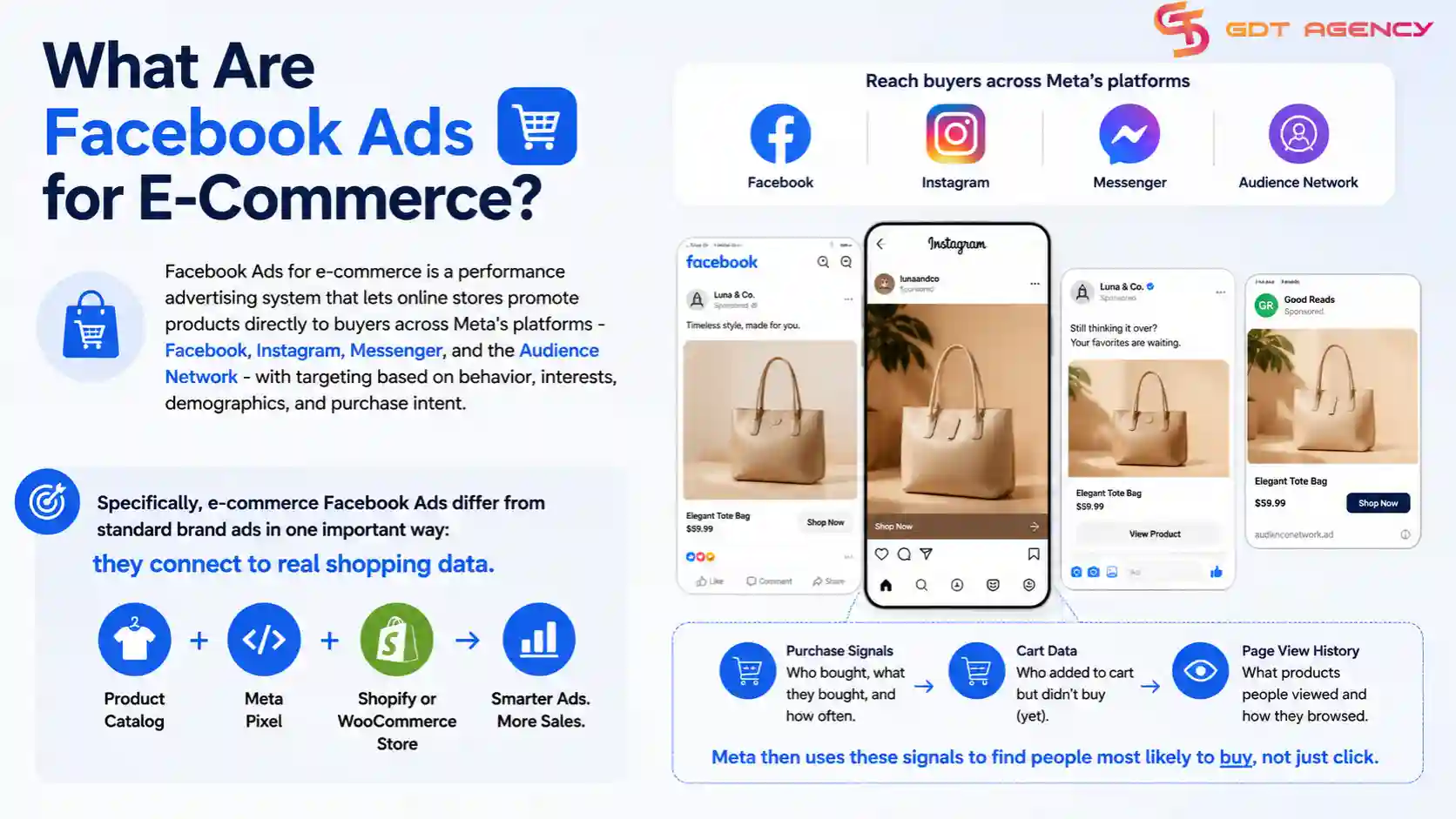
Specifically, e-commerce Facebook Ads differ from standard brand ads in one important way: they connect to real shopping data. An e-commerce advertiser ties their ad account to a product catalog, a Meta Pixel, and a Shopify or WooCommerce store. Meta then uses purchase signals, cart data, and page view history to find people most likely to buy, not just click.
How Do Facebook Ads Work for Online Stores?
Facebook Ads for online stores work through a three-layer system: the ad auction, the delivery algorithm, and the conversion funnel. When you launch a campaign, Meta enters your ads into a real-time auction every time a user loads their feed. The auction winner gets the impression. Meta decides the winner based on your bid, your estimated action rate (how likely this user is to convert), and your ad quality score.
For e-commerce stores, this system has one key dependency: data. The more purchase events your Pixel records, the smarter Meta’s algorithm gets at finding buyers. A new store with zero purchase history starts at a disadvantage, but that disadvantage shrinks quickly once the Pixel collects 50 conversions per ad set per week – the threshold Meta recommends to exit the learning phase.
The delivery system places your ads across placements automatically unless you restrict them. In 2026, Advantage+ Placements remains the recommended setting for most e-commerce stores because Meta’s AI distributes budget to the placements generating the lowest cost per purchase in real time.
Are Facebook Ads Still Effective for E-Commerce in 2026?
Yes, as an expert at GDT Agency with years of experience in this field, I believe Facebook Ads are still effective for e-commerce in 2026, and 3 factors explain why: Meta’s user base remains the largest in social advertising, AI-driven campaign tools have improved conversion efficiency, and the platform’s integration with shopping behavior data gives it a targeting advantage no other social channel matches at scale.
Meta reported over 3.27 billion daily active users across its family of apps as of early 2025. That audience size alone keeps Facebook Ads relevant for e-commerce stores in almost every product category. More importantly, Meta’s Advantage+ Shopping Campaigns – launched in 2022 and significantly improved since – now allow stores to run fully automated campaigns that consistently outperform manual setups in cost per purchase benchmarks according to Meta’s own internal data.
The honest caveat: Facebook Ads work best for e-commerce stores that have a clear product-market fit, a converting landing page, and at least $20 to $30 per day in budget to give Meta’s algorithm enough data to optimize. Stores without those conditions will struggle regardless of the platform.
→ The right account structure depends on your business model, so review our guide on Facebook Ad Account by Business Type: Use Cases and Verticals to choose the setup that best matches your e-commerce business.
How to Set Up Facebook Ads for Your E-Commerce Store
Setting up Facebook Ads for an e-commerce store takes 4 core steps: create a Meta Business Account, install and verify the Meta Pixel, connect your product catalog, and launch your first campaign with the correct objective. Completing these steps in order prevents the most common setup mistakes that waste budget from day one.
To begin, this section walks through each step in detail so your account is built on a solid technical foundation before you spend a dollar.
How Do You Install and Configure the Meta Pixel for E-Commerce?
You install the Meta Pixel by adding a base code snippet to every page of your store, then configuring standard events to fire on specific shopping actions – ViewContent, AddToCart, InitiateCheckout, and Purchase. These four events form the core conversion tracking backbone for any e-commerce Facebook Ads account.
Here is the correct event sequence for an e-commerce store:
| Event | Where It Fires | What It Tracks |
| ViewContent | Product page | Product page visits and catalog interest |
| AddToCart | Cart action | Shopping intent signals |
| InitiateCheckout | Checkout page | High-intent buyer behavior |
| Purchase | Order confirmation page | Actual revenue and ROAS data |
The table above shows the four standard Pixel events every e-commerce store needs, where each fires, and what data it sends back to Meta for optimization.
For Shopify stores, the Pixel installs natively through the Facebook & Instagram sales channel app – no manual code required. For WooCommerce, the official Meta Pixel plugin handles event firing automatically. Custom-built stores need a developer to implement the base code and event triggers manually.
One critical configuration step that many stores skip: enable Conversions API (CAPI) alongside the browser Pixel. Browser-based Pixel tracking loses data due to iOS 14+ privacy restrictions and ad blockers. CAPI sends conversion data server-side, which recovers a significant portion of that lost signal. Stores running both browser Pixel and CAPI consistently report more accurate ROAS data than those relying on browser tracking alone.
What Campaign Objective Should E-Commerce Stores Choose?
Sales objective wins for e-commerce stores that have an active Pixel with purchase data. Traffic objective works for new stores with zero Pixel history. Awareness objective suits stores running brand campaigns alongside performance campaigns – not as a primary revenue driver.
The comparison breaks down like this:
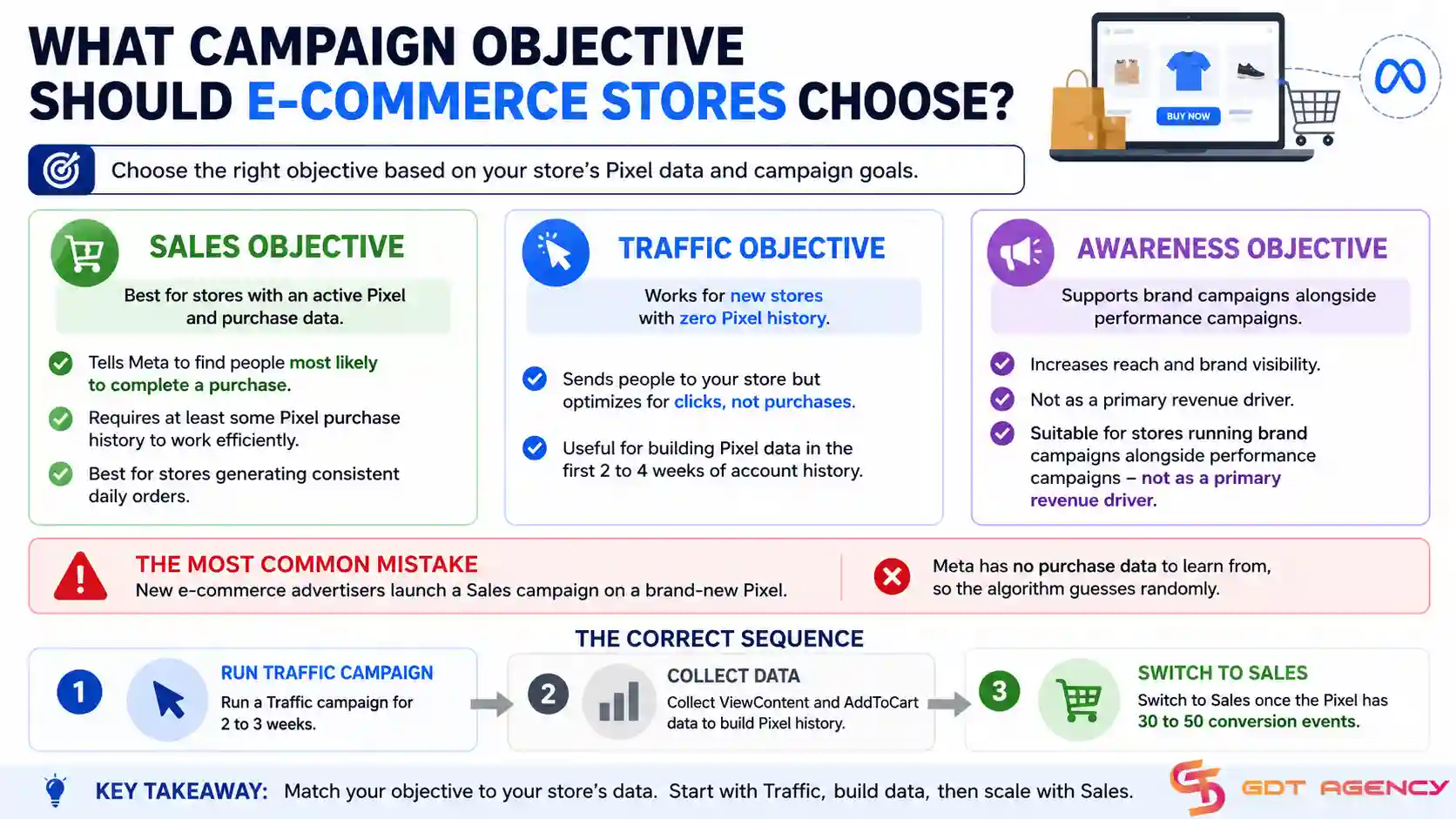
- Sales objective: Tells Meta to find people most likely to complete a purchase. Requires at least some Pixel purchase history to work efficiently. Best for stores generating consistent daily orders.
- Traffic objective: Sends people to your store but optimizes for clicks, not purchases. Useful for building Pixel data in the first 2 to 4 weeks of account history.
- Engagement objective: Optimizes for likes, comments, and shares. Not recommended as a primary e-commerce objective in 2026 unless you are running a specific community-building campaign.
The most common mistake new e-commerce advertisers make is launching a Sales campaign on a brand-new Pixel. Meta has no purchase data to learn from, so the algorithm guesses randomly. The correct sequence is: run a Traffic campaign for 2 to 3 weeks to collect ViewContent and AddToCart data, then switch to Sales once the Pixel has 30 to 50 conversion events.
What Is the Best Facebook Ads Strategy for E-Commerce?
The best Facebook Ads strategy for e-commerce in 2026 combines broad audience targeting, a full-funnel campaign structure, and creative-led testing – where the ad creative does the targeting work rather than narrow audience restrictions. This approach aligns with how Meta’s algorithm works now: less manual audience control, more data-driven delivery.
Specifically, the three components that define a high-performing e-commerce Facebook Ads strategy are audience structure, campaign funnel, and ad format selection. Each component connects to the others. Getting one wrong reduces the effectiveness of the other two.
Which Facebook Ad Formats Work Best for E-Commerce Products?
Carousel ads win for multi-product stores and retargeting. Video ads win for top-of-funnel brand building and new product launches. Collection ads win for mobile shopping experiences. Single image ads win for direct-response campaigns with a clear offer.
Here is how each format maps to e-commerce use cases:
| Ad Format | Best Use Case | Strength |
| Carousel | Product range showcase, retargeting | Shows multiple products in one ad unit |
| Video | New product launch, brand awareness | Highest engagement and reach at TOF |
| Collection | Mobile-first shopping | Instant storefront experience on mobile |
| Single Image | Promotional offers, retargeting | Simple, fast-loading, direct CTA |
The table above matches each Facebook ad format to its strongest e-commerce application so you can choose the right format for each stage of your funnel.
In 2026, video continues to dominate top-of-funnel performance. Short-form video between 15 and 30 seconds – built for vertical mobile viewing – consistently outperforms static images in reach and cost per result at the awareness stage. However, Carousel ads remain the strongest format for retargeting because they let you show multiple products to a user who has already visited your store, increasing the chance that one product matches their intent.
How Should You Structure a Facebook Ads Campaign for an Online Store?
You should structure a Facebook Ads campaign for an online store using a three-stage funnel: Top of Funnel (TOF) for new audience reach, Middle of Funnel (MOF) for warm audience engagement, and Bottom of Funnel (BOF) for high-intent conversion. Each stage uses a different objective, audience, and creative type.
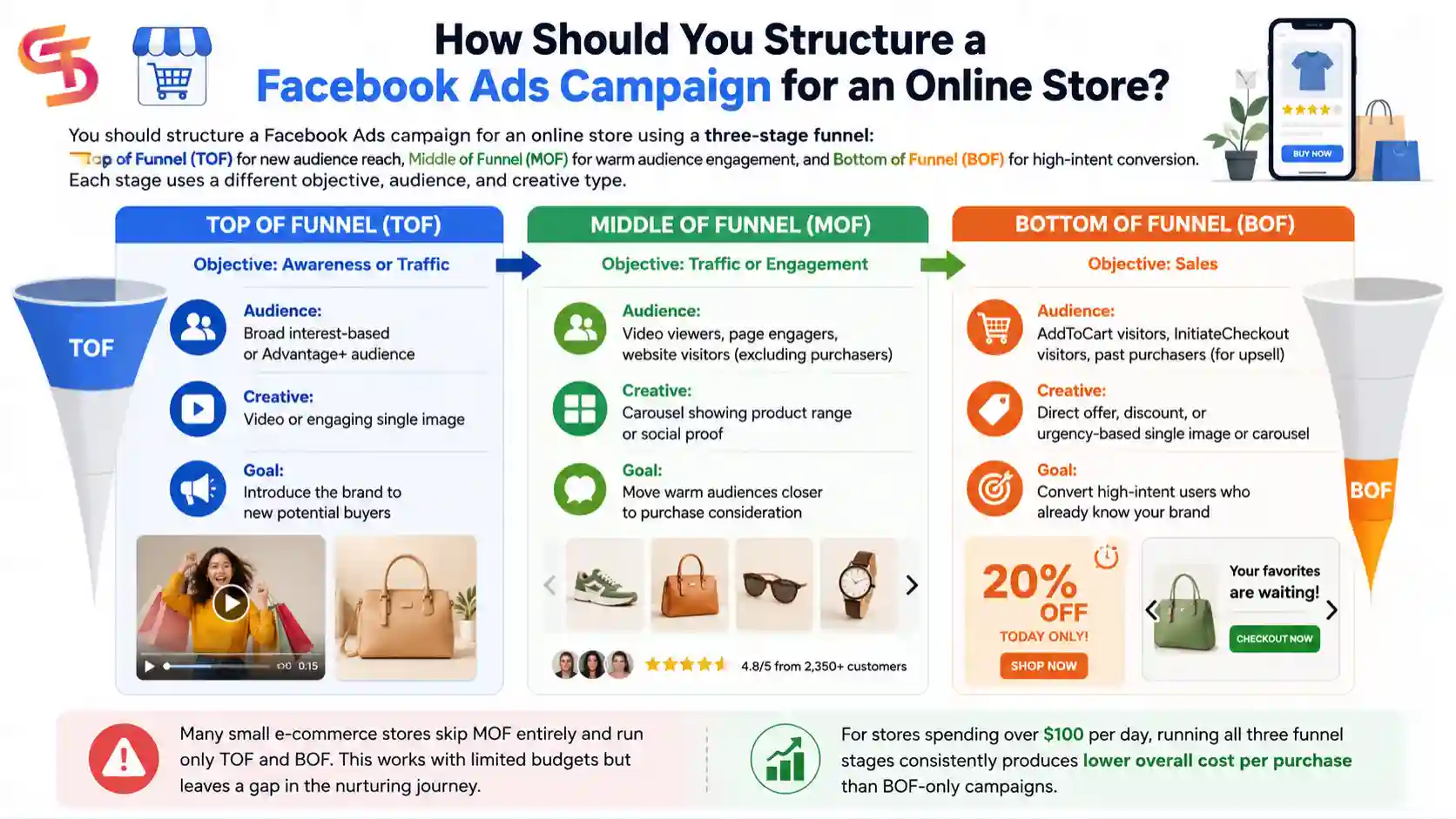
The full-funnel structure works like this:
Top of Funnel (TOF)
- Objective: Awareness or Traffic
- Audience: Broad interest-based or Advantage+ audience
- Creative: Video or engaging single image
- Goal: Introduce the brand to new potential buyers
Middle of Funnel (MOF)
- Objective: Traffic or Engagement
- Audience: Video viewers, page engagers, website visitors (excluding purchasers)
- Creative: Carousel showing product range or social proof
- Goal: Move warm audiences closer to purchase consideration
Bottom of Funnel (BOF)
- Objective: Sales
- Audience: AddToCart visitors, InitiateCheckout visitors, past purchasers (for upsell)
- Creative: Direct offer, discount, or urgency-based single image or carousel
- Goal: Convert high-intent users who already know your brand
Many small e-commerce stores skip MOF entirely and run only TOF and BOF. This works with limited budgets but leaves a gap in the nurturing journey. For stores spending over $100 per day, running all three funnel stages consistently produces a lower overall cost per purchase than BOF-only campaigns.
How Do You Target the Right Audience for E-Commerce Facebook Ads?
You target the right audience for e-commerce Facebook Ads by building three audience layers: Custom Audiences from your own store data, Lookalike Audiences based on your best customers, and broad interest-based audiences as a discovery layer for new traffic.
1. Custom Audiences pull from your Pixel data and customer lists. The most valuable Custom Audiences for e-commerce are:
- Website purchasers (last 180 days) – for exclusion from TOF, inclusion in upsell campaigns
- AddToCart visitors who did not purchase (last 30 days) – highest-intent retargeting segment
- Video viewers (25% or more) – warm MOF audience for remarketing
- Customer email list uploaded to Meta – for lookalike seed audience creation
2. Lookalike Audiences tell Meta to find new users who share behavioral and demographic similarities with your existing customers. The strongest lookalike seed for e-commerce is a purchaser list of at least 500 to 1,000 people. A 1% Lookalike of purchasers typically outperforms interest-based targeting for established stores.
3. Broad targeting – running ads with minimal audience restrictions and letting Meta’s algorithm find buyers – has become increasingly effective in 2026 as Meta’s AI has improved. Many experienced e-commerce advertisers now run broad campaigns (age range only, no interests) at the TOF stage and report competitive CPAs compared to tightly defined interest audiences.
According to Meta’s performance data shared at Advertising Week 2024, advertisers who shifted from detailed interest targeting to broad targeting with Advantage+ audience settings saw an average 12% reduction in cost per purchase across e-commerce accounts.
How Do You Scale Facebook Ads for E-Commerce?
You scale Facebook Ads for e-commerce by increasing budget incrementally on campaigns that have exited the learning phase, show stable ROAS above your target threshold, and have frequency below 3.0 on key ad sets. Scaling before these three conditions are met consistently damages performance and forces ad sets back into the learning phase.
Beyond these three conditions, scaling requires a clear distinction between vertical scaling (increasing budget on existing campaigns) and horizontal scaling (expanding reach through new audiences or creatives). Both methods work, but they serve different purposes and carry different risks.
When Should You Scale Your Facebook Ads Budget?
Yes, you should scale your Facebook Ads budget when three conditions are met: your ad set has exited Meta’s learning phase (50+ optimization events in 7 days), your ROAS has held above your target threshold for at least 7 consecutive days, and your ad frequency is below 3.0 on the primary audience.
Each condition matters for a specific reason:
- Learning phase exit: Meta needs enough conversion data to optimize delivery accurately. Scaling before exit forces the algorithm to restart learning with a larger budget, which wastes spend during the adjustment period.
- Stable ROAS: One or two good days do not justify scaling. A 7-day stable ROAS means the campaign has found a reliable audience pool and delivery pattern.
- Frequency below 3.0: High frequency means your ads are reaching the same people repeatedly. Scaling budget into a fatigued audience increases CPM without increasing conversions.
When all three conditions are met, the recommended scaling approach is the 20% rule: increase the daily budget by no more than 20% every 3 to 4 days. Larger increases (50% or more at once) trigger a new learning phase, which resets the optimization progress your campaign has built.
What Are the Differences Between Horizontal and Vertical Scaling on Facebook?
Vertical scaling wins on efficiency – it maximizes return from campaigns that are already performing. Horizontal scaling wins on reach – it expands the ceiling of how many buyers you can access. Most e-commerce stores need both, but at different stages of growth.
The key differences between the two approaches:
| Scaling Type | Method | Best For | Risk |
| Vertical | Increase budget on existing ad sets | Maximizing ROAS from proven campaigns | Triggers the learning phase if increased too fast |
| Horizontal | Duplicate ad sets with new audiences or new creatives | Reaching new buyer segments | Cannibalizes existing audiences if not managed carefully |
The table above compares vertical and horizontal Facebook Ads scaling across method, use case, and primary risk so you can choose the right approach for your current campaign stage.
Vertical scaling works best when your current audience pool is large enough to absorb more budget without driving up CPM significantly. A rule of thumb: if your target audience size is under 500,000 people, vertical scaling will hit a ceiling quickly. Horizontal scaling – launching new ad sets targeting different interest groups, lookalikes at different percentages (1%, 2%, 3%), or new geographic markets – is the right move when the primary audience starts showing diminishing returns.
For stores generating consistent revenue from Facebook Ads, a combined approach works best: maintain 2 to 3 vertically scaled campaigns on proven audiences while running 1 to 2 horizontal test campaigns on new audiences at lower budgets. When a horizontal test campaign reaches the ROAS threshold, it becomes a candidate for vertical scaling.
What Are Advanced Facebook Ad Types Built for E-Commerce?
Three advanced Facebook ad types are built specifically for e-commerce at a deeper level than standard campaigns: Dynamic Product Ads (DPA), Advantage+ Shopping Campaigns (ASC), and Collaborative Ads. Each tool solves a different problem – DPA automates product-level personalization, ASC removes manual campaign management, and Collaborative Ads enable marketplace and retail partner selling. These tools are most useful once your account has stable purchase history and your basic funnel is already working.
What Are Dynamic Product Ads and How Do They Work for E-Commerce?
Dynamic Product Ads (DPA) are a Facebook ad format that automatically pulls products from your connected catalog and serves personalized ads to users based on their browsing behavior on your store. A user who viewed a blue running shoe on your site will see that exact product – with its name, price, and image – in their Facebook or Instagram feed without you manually creating a separate ad for it.
DPA works through the connection between your Meta Pixel and your product catalog. When a user triggers a ViewContent or AddToCart event, Meta records which product ID they interacted with. DPA then matches that product ID to your catalog and serves a personalized ad automatically.
The strongest DPA use cases for e-commerce are:
- Abandoned cart retargeting: Show the exact product a user added to the cart but did not purchase, often with a discount offer to close the sale
- Cross-sell to recent purchasers: Show complementary products to customers who bought from you in the last 30 to 60 days
- Broad catalog prospecting: Show your best-performing catalog products to cold audiences based on Meta’s behavioral signals – not just retargeting
DPA campaigns require a well-structured product catalog with accurate prices, up-to-date inventory status, and high-quality images. Catalog errors – mismatched product IDs, broken image URLs, missing prices – cause DPA ads to stop serving or serve incorrectly, which wastes budget silently.
How Do Advantage+ Shopping Campaigns Differ from Standard Campaigns?
Advantage+ Shopping Campaigns (ASC) give Meta near-complete control over targeting, placements, and creative combinations, while standard campaigns require the advertiser to define audience segments, placements, and ad set structure manually. ASC removes most manual inputs; standard campaigns preserve manual control.
The core difference is optimization of ownership:
| Feature | Advantage+ Shopping | Standard Campaign |
| Audience targeting | Meta AI decides | Advertiser defines manually |
| Placement selection | Fully automated | Manual or Advantage+ Placements |
| Creative testing | AI tests combinations | Advertiser sets up A/B tests |
| Budget allocation | Single campaign budget, AI allocates | Advertiser sets per ad set |
| Learning speed | Faster (broader data pool) | Slower (narrower audience definition) |
The table above compares Advantage+ Shopping Campaigns and standard campaigns across five operational dimensions so you can decide which setup fits your account’s current needs.
ASC performs best for stores with strong Pixel data (500+ purchases) and clean product catalogs. Meta’s AI needs rich conversion history to make smart delivery decisions. For newer accounts with limited data, standard campaigns with manually defined audiences often produce more predictable results because the advertiser can control the targeting precision.
The tradeoff is control vs. efficiency. ASC is harder to analyze at the audience level because Meta doesn’t show granular audience breakdowns. Advertisers who need audience-level reporting for business decisions often prefer standard campaigns despite the higher management overhead.
Can Small E-Commerce Stores Run Facebook Ads Without a Big Budget?
Yes, small e-commerce stores can run Facebook Ads without a big budget, but three conditions determine whether low-budget campaigns produce a positive return: the product sells at a margin that supports a realistic cost per purchase target, the landing page converts at 2% or higher, and the daily budget is concentrated into one campaign rather than spread across multiple ad sets.
A common mistake small stores make is splitting a $20 daily budget across 3 or 4 ad sets. Each ad set receives $5 to $7 per day, which is not enough data for Meta’s algorithm to optimize. The result is that all ad sets stay in a permanent learning phase and never improve.
The more effective approach at small budgets:
- Run one campaign with one ad set and 3 to 5 ad creatives
- Let Meta’s Dynamic Creative Optimization test creatives within the single ad set
- Set a daily budget of $20 to $30 on that one ad set
- Let the campaign run for 7 to 14 days before making optimization decisions
At $20 to $30 per day, a store selling a $60 product with a 40% margin needs a cost per purchase below $24 to stay profitable. That is achievable with strong creative and a converting product page – but it requires patience. Most small-budget campaigns need 2 to 3 weeks of data before the algorithm finds a consistent buying pattern.
Final Thoughts
Facebook Ads for e-commerce in 2026 rewards stores that build the right foundation before they scale. The setup matters more than most advertisers realize – a misconfigured Pixel, a wrong campaign objective, or a budget spread too thin across too many ad sets can make a perfectly good product look like a bad ad account.
The strategy layer is where most stores either win or waste money. Broad targeting with strong creative now consistently outperforms the narrow audience stacking that worked in 2019 and 2020. Meta’s algorithm has improved enough that your job is less about finding the right audience manually and more about giving the algorithm the right signals – clean Pixel data, clear conversion events, and ad creative that stops the scroll.
Scaling is the part that requires the most patience. The 20% budget increase rule feels slow when a campaign is performing well, but it protects the optimization progress your account has already built. Stores that respect the learning phase and scale incrementally almost always outperform stores that double budgets, chasing a good week of ROAS.
Frequently Asked Questions
1. How much should an e-commerce store spend on Facebook Ads per day?
A new e-commerce store should spend at least $20 to $30 per day on a single campaign to give Meta’s algorithm enough data to optimize. Splitting that budget across multiple ad sets reduces the data each ad set receives and keeps campaigns in a permanent learning phase. As your account matures and ROAS stabilizes, you can increase budget incrementally using the 20% rule every 3 to 4 days.
2. How long does it take for Facebook Ads to work for e-commerce?
Most e-commerce campaigns need 2 to 4 weeks before Meta’s algorithm exits the learning phase and starts delivering optimized results. The learning phase requires approximately 50 conversion events per ad set within a 7-day window. Stores with higher traffic and more Pixel data exit the learning phase faster. Expect the first 2 weeks to be a data collection period, not a profit period.
3. Do I need a Facebook Shop to run Facebook Ads for e-commerce?
No, you do not need a Facebook Shop to run Facebook Ads. You need a Meta Business Account, a Meta Pixel installed on your store, and a campaign with the correct objective. A Facebook Shop is useful for running Collection ads and enabling in-app checkout, but it is not a requirement for standard e-commerce ad campaigns.
4. What is a good ROAS for Facebook Ads in e-commerce?
A good ROAS for Facebook Ads in e-commerce depends on your product margin. A general benchmark is 2x to 4x ROAS for stores with 30% to 50% margins. A store with a 30% margin needs at least a 3.3x ROAS to break even on ad spend after product costs. Calculate your break-even ROAS first – then set your target above that number.
5. Why are my Facebook Ads getting clicks but no sales?
Clicks without sales usually point to a landing page problem, not an ad problem. Check three things first: your product page load speed (over 3 seconds loses most mobile visitors), your price and offer clarity (buyers should know exactly what they get and what it costs within 5 seconds of landing), and your Pixel purchase event (confirm it is firing correctly on the order confirmation page so Meta is tracking conversions accurately).
6. What is the difference between a Custom Audience and a Lookalike Audience?
A Custom Audience is built from your own data – website visitors, customer email lists, or people who engaged with your Facebook page. A Lookalike Audience is built by Meta from a Custom Audience seed – Meta finds new users who share behavioral and demographic similarities with the people in your seed list. Custom Audiences are used for retargeting. Lookalike Audiences are used for prospecting new buyers who have never heard of your store.
7. Should I use Advantage+ or manual campaigns for my e-commerce store?
Use Advantage+ Shopping Campaigns if your account has 500 or more purchases recorded in the last 30 days and you want to reduce manual management time. Use manual campaigns if your account is newer, if you need audience-level reporting, or if you want tighter control over targeting and budget allocation. Many established stores run both – ASC for proven product lines and manual campaigns for new product testing.