
Facebook Business Verification Requirements: Documents, Criteria, and Steps to Get Approved


Facebook Business Verification requires businesses to meet three core requirements: valid legal registration with local authorities, an official business contact (phone number or mailing address), and supporting documents where the business name matches exactly what appears in Meta Business Suite. This process runs through the Security Center inside Meta Business Suite and applies to any business that wants to run ads, access advanced features, or increase spending limits on the platform.
To complete the verification, businesses need to prepare two document groups. The first group covers legal registration documents such as a Certificate of Incorporation, Business License, or Tax Registration document. The second group covers online presence proof, such as a business website, official social media profile, or a third-party directory listing. Both groups work together to confirm the business is legitimate and active.
The submission process follows a clear sequence: enter business details in the Security Center, upload supporting documents, and wait for Meta’s review. Meta typically processes verification within a few business days, though some cases take longer depending on document clarity and account history. Businesses that get rejected can resubmit after correcting the specific issues Meta flags in the rejection notice.
Beyond the basic approval process, understanding what separates Business Verification from Meta Verified – and how verification status affects ad account trust scores – helps businesses make better decisions about when and why to complete this step. Below is a complete breakdown of every requirement, document type, and step involved.
- What Is Facebook Business Verification?
- Who Needs to Complete Facebook Business Verification?
- What Are the Eligibility Criteria for Facebook Business Verification?
- What Documents Do You Need for Facebook Business Verification?
- What Are the Accepted Business Registration Documents?
- What Online Presence Documents Does Meta Accept?
- How Do You Complete the Facebook Business Verification Process?
- How Do You Submit Your Business Details in Meta Business Suite?
- How Do You Upload Documents to Verify Your Business on Meta?
- How Long Does Facebook Business Verification Take?
- What Happens If Your Facebook Business Verification Is Rejected?
- Facebook Business Verification vs. Meta Verified – What Is the Difference?
- Does Facebook Business Verification Affect Your Ad Account and Spending Limits?
- Do Agencies and Resellers Have Different Verification Requirements on Meta?
- What Is Advertiser Verification on Facebook and How Is It Different from Business Verification?
- Final Thoughts
- Frequently Asked Questions
- Is Facebook Business Verification free?
- What documents does Meta accept for Business Verification?
- Why was my Facebook Business Verification rejected?
- Can I run Facebook ads without completing Business Verification?
- Does Business Verification give me the blue verification badge?
- Does Business Verification increase my Facebook ad spending limit?
- Do I need to complete Business Verification if I use an agency ad account?
What Is Facebook Business Verification?
As an expert at GDT Agency with years of experience working with Facebook ads and Facebook agency ad accounts, I can affirm that Facebook Business Verification is a legal identity check that Meta runs on businesses operating inside Meta Business Suite, designed to confirm that the business entity is real, registered, and matches the information submitted. This process is separate from Meta Verified, which is a paid subscription badge for personal creators and public figures.
Specifically, Business Verification sits inside the Security Center of Meta Business Suite. When a business completes it successfully, Meta links the verified legal entity to the Business Portfolio (formerly Business Manager). This verification unlocks higher ad spending limits, access to sensitive ad categories, and eligibility for certain Meta partnership features.
Who Needs to Complete Facebook Business Verification?
Three groups need to complete Facebook Business Verification: advertisers running ads about social issues, elections, or politics; businesses applying for increased ad spending limits; and businesses accessing advanced Meta Business Suite features that require a verified status.
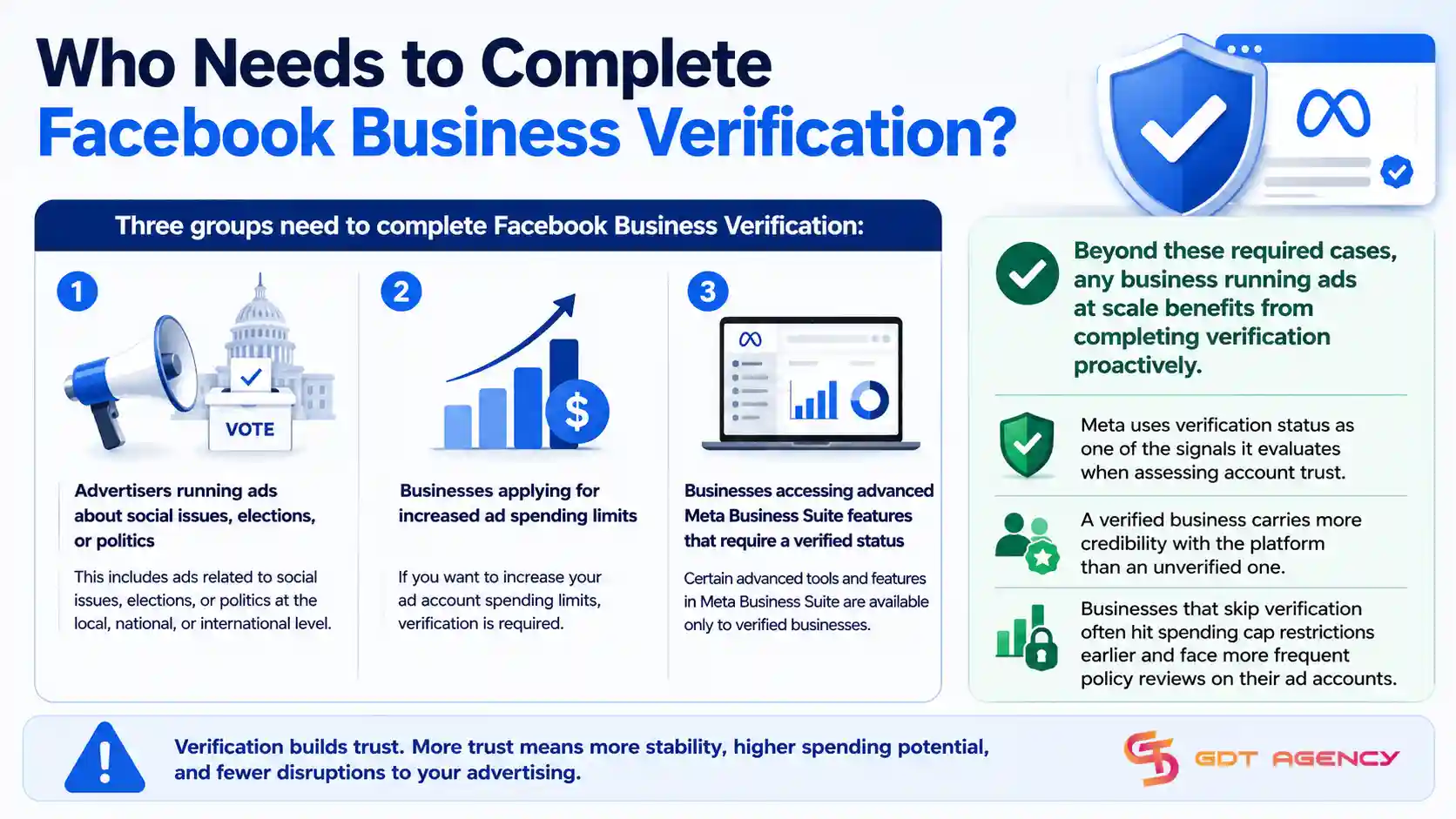
Beyond these required cases, any business running ads at scale benefits from completing verification proactively. Meta uses verification status as one of the signals it evaluates when assessing account trust – a verified business carries more credibility with the platform than an unverified one. Businesses that skip verification often hit spending cap restrictions earlier and face more frequent policy reviews on their ad accounts.
What Are the Eligibility Criteria for Facebook Business Verification?
There are three eligibility criteria for Facebook Business Verification: the business must be legally registered with local or national authorities, it must have an official phone number or mailing address, and the business name entered in Meta Business Suite must match the name on the legal documents exactly.
The name-matching requirement is the most common point of failure. If a business is registered legally as “Acme Solutions LLC” but entered “Acme Solutions” in Meta Business Suite, Meta will reject the submission. The match needs to be character-for-character accurate, including punctuation and legal suffixes. Businesses should check their Business Portfolio name in Meta Business Suite before starting the submission and correct any discrepancies first.
What Documents Do You Need for Facebook Business Verification?
Facebook Business Verification requires two document groups: Group 1 covers legal registration documents that prove the business exists as a registered entity, and Group 2 covers online presence documents that confirm the business operates publicly. Meta needs at least one document from each group to process the verification.
These two document groups work together to give Meta a complete picture – the legal document proves registration, and the online presence document proves the business is active. Below is what Meta accepts in each group.
What Are the Accepted Business Registration Documents?
There are five primary document types Meta accepts for business registration: Certificate or Articles of Incorporation, Business Registration or License Document, Business Tax Registration, Partnership Agreement, and a Utility Bill issued in the business name.
Each document must meet three conditions to be accepted. First, the document must be current and valid – expired documents will cause rejection. Second, the business name on the document must match exactly what appears in the Meta Business Portfolio. Third, the document must clearly show the issuing authority, registration number, or official seal. Below is a quick reference for each accepted type:
| Document Type | What It Confirms | Common Format |
| Certificate/Articles of Incorporation | Legal registration as a company | Government-issued PDF or official copy |
| Business Registration or License | Authorization to operate | State/local government document |
| Business Tax Registration | Tax identity of the business | Tax authority certificate |
| Partnership Agreement | Business structure for partnerships | Notarized legal document |
| Utility Bill (business name) | Physical address of the business | Monthly statement from utility provider |
This table shows the five document types alongside what each one confirms and the typical format Meta expects to receive. Businesses should avoid submitting personal documents, bank statements, or informal receipts – Meta only accepts official government or utility-issued records for this group.
What Online Presence Documents Does Meta Accept?
Meta accepts three types of online presence documents to confirm the business operates publicly: a business website, an official social media profile on a major platform, and a third-party directory listing such as Google Business Profile, Yelp, or a national business registry.
The online presence document serves a different purpose than the legal registration document. While the legal document proves the business is registered, the online presence document confirms the business is actively operating and publicly visible. Meta checks that the name and details on the online presence match the legal documents and the Business Portfolio. A website that lists a different trading name than the registered legal name can create a mismatch that triggers rejection.
How Do You Complete the Facebook Business Verification Process?
The Facebook Business Verification process follows three steps: submit business details in the Meta Business Suite Security Center, upload supporting documents from both required groups, and wait for Meta’s review decision. Completing all three steps correctly the first time reduces the risk of rejection and resubmission delays.
Below is a step-by-step walkthrough of each stage, including what to check before submitting.
How Do You Submit Your Business Details in Meta Business Suite?
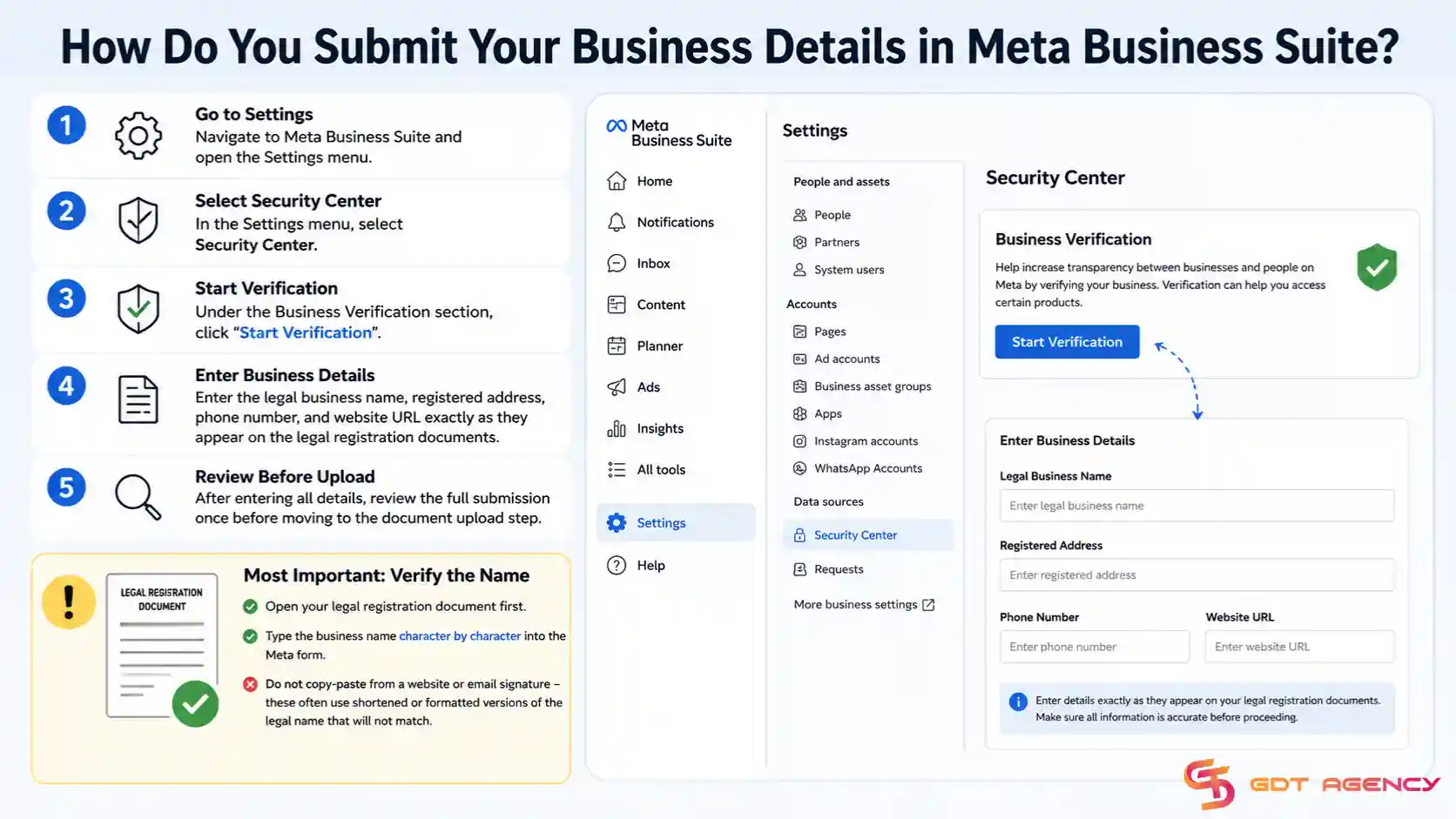
To submit business details, navigate to Meta Business Suite, open the Settings menu, select Security Center, and click “Start Verification” under the Business Verification section. From there, enter the legal business name, registered address, phone number, and website URL exactly as they appear on the legal registration documents.
The most important action at this stage is verifying the name. Businesses should open their legal registration document first, then type the business name character by character into the Meta form. Do not copy-paste from a website or email signature – these often use shortened or formatted versions of the legal name that will not match. After entering all details, review the full submission once before moving to the document upload step.
How Do You Upload Documents to Verify Your Business on Meta?

To upload documents, complete the business details submission in the Security Center, then follow the prompt to upload supporting files. Meta accepts JPEG, PNG, and PDF formats, with a maximum file size of 10MB per document. Upload one document from the legal registration group and one from the online presence group.
Three practical requirements apply to every document upload. The document must be fully visible with no cropped edges or obscured sections. The image or scan must be clear enough to read all text, especially the business name and any registration numbers. And the document must be current – if a business license has an expiration date, that date must not have passed. Submitting a blurry photo of a document is one of the most common causes of rejection that businesses could easily avoid.
How Long Does Facebook Business Verification Take?
Yes, Facebook Business Verification typically takes between two and five business days for Meta to review after submission, though some cases resolve in as little as 24 hours and others may take up to two weeks depending on document complexity and current review volume.
After submission, the Security Center will show one of three status indicators. “Pending” means the review is still in progress. “Approved” means the verification is complete and the business now carries verified status in Meta Business Suite. “Rejected” means Meta found an issue with the submission and the business needs to review the rejection reason and resubmit with corrected information.
What Happens If Your Facebook Business Verification Is Rejected?
Facebook Business Verification gets rejected for five common reasons: the business name does not match the legal document, the submitted document is expired, the document image is too blurry or incomplete to read, the business is not registered with a recognized authority, or the online presence document shows a different business name than the registered legal name.
Meta provides a rejection reason in the Security Center notification. Businesses should read this reason carefully before making any changes. The most effective approach is to fix only what Meta flagged and resubmit with corrected documents. Below are the five most common rejection causes and the correction needed for each:
| Rejection Reason | Correction Required |
| Business name mismatch | Update Business Portfolio name to match the legal document exactly |
| Expired document | Obtain a current, valid version of the same document type |
| Unreadable document | Retake photo or rescan at higher resolution; ensure the full document is visible |
| Unrecognized registration | Use a nationally issued document type such as Tax Registration or Incorporation Certificate |
| Online presence name mismatch | Update website or directory listing to show the exact legal business name |
This table maps each rejection reason to the specific fix required. After making corrections, return to the Security Center and select the option to resubmit. Meta treats each resubmission as a new review cycle, so the same two-to-five day review window applies again. Businesses should not submit multiple times in rapid succession – each resubmission replaces the previous one, so submitting corrected documents once and waiting is the correct approach.
Facebook Business Verification vs. Meta Verified – What Is the Difference?
Facebook Business Verification wins on legal compliance and ad account access, while Meta Verified leads on public-facing identity signals and customer trust features. The two serve different purposes and operate through completely separate systems inside Meta’s platform.
Business Verification is a free process inside Meta Business Suite. It confirms the legal identity of the business entity and unlocks operational capabilities such as higher ad spending limits, access to restricted ad categories, and partner-level features. Meta Verified, in contrast, is a paid subscription starting at approximately $14.99 per month (as of 2025). It provides a blue verification badge on the Facebook Page or Instagram profile, enhanced customer support access, impersonation protection, and tools designed for public-facing brand management.
Does Facebook Business Verification Affect Your Ad Account and Spending Limits?
Yes, Facebook Business Verification directly affects ad account spending limits and trust score because Meta uses verification status as a key signal when evaluating how much a business account can spend and how it is treated during policy reviews.
Specifically, unverified business accounts often reach lower default spending thresholds more quickly. When an account hits a spending cap, Meta may require additional verification before increasing it. A business that completes Business Verification before hitting these limits avoids that interruption. Meta does not publish exact figures for how much verification raises a spending limit, but the internal trust score that verification contributes to influences both limit increases and the frequency of ad account reviews.
→ Verification alone does not guarantee your ads will remain active. Every campaign must still comply with Meta’s advertising policies, prohibited content rules, and account quality standards. Understanding what Meta allows and what commonly leads to suspensions helps reduce unnecessary policy reviews and account restrictions. Learn more in our guide on Facebook Ad Account Policies: What Gets Approved, What Gets Banned, and How to Stay Compliant.
Do Agencies and Resellers Have Different Verification Requirements on Meta?
Yes, agencies and resellers operating through Meta Business Partner accounts or rented agency ad accounts face additional verification considerations beyond the standard Business Verification process because the business entity on the verified account must match the entity actually running the ads.
For agencies that rent ad accounts to clients, the verification on the account belongs to the agency or account holder – not the individual advertiser using the account. This means advertisers using rented agency accounts benefit from the verification status already attached to the account. They access higher spending limits and reduced policy friction without needing to complete verification on their own account. This is one of the practical advantages that agency ad account rental provides for businesses that want to run ads at scale without going through the verification process independently.
What Is Advertiser Verification on Facebook and How Is It Different from Business Verification?
Advertiser Verification leads on identity confirmation for ad-running individuals, while Business Verification leads on confirming legal entity status for the business as a whole. Business Verification covers the organization; Advertiser Verification covers the person running the ads.
Meta introduced Advertiser Verification as a separate requirement focused specifically on the individual advertiser identity. It applies primarily to people running ads related to social issues, elections, or politics, and requires government-issued ID, sometimes combined with a selfie video. Business Verification, by contrast, applies to the business entity in Meta Business Suite and requires legal business documents rather than personal identity documents. A business can complete Business Verification without triggering Advertiser Verification, and vice versa, depending on the type of ads being run and the account structure in use.
Final Thoughts
Facebook Business Verification is a one-time administrative step that pays off over the entire life of your ad account. The process asks for documents you already have – a registration certificate, a tax document, or a business license – and a few minutes to enter your details correctly in Meta Business Suite.
The businesses that run into problems are almost always the ones that rush the name-matching step or upload a blurry photo from their phone. Fix those two things and the approval rate goes up significantly. If Meta rejects your first submission, read the rejection reason carefully, correct only what they flagged, and resubmit once with the right document.
One distinction worth keeping in mind: Business Verification and Meta Verified are not the same thing. Business Verification is free and handles your legal identity on the platform. Meta Verified is a paid subscription for a badge. Most advertisers need the former, not the latter.
If you are running ads through an agency account, the verification is already handled at the account level. You get the benefits – higher spending limits, reduced policy friction – without going through the process yourself. That is one of the practical reasons businesses choose to work with a verified agency partner rather than building from scratch on their own account.
Frequently Asked Questions
Is Facebook Business Verification free?
Yes, Facebook Business Verification is completely free. Meta does not charge any fee to submit or complete the process. The only cost involved is the time it takes to gather your documents and submit them through the Security Center in Meta Business Suite.
What documents does Meta accept for Business Verification?
Meta accepts five types of legal registration documents: Certificate or Articles of Incorporation, Business Registration or License, Business Tax Registration, Partnership Agreement, and a utility bill issued in the business name. You also need one online presence document – a business website, official social media profile, or a third-party directory listing such as Google Business Profile.
Why was my Facebook Business Verification rejected?
The five most common rejection reasons are: the business name in Meta Business Suite does not match the document exactly, the document is expired, the document image is too blurry to read, the business registration is not recognized by Meta, or the online presence document shows a different name than the legal registration. Meta will tell you the specific reason in the Security Center notification.
Can I run Facebook ads without completing Business Verification?
Yes, you can run most Facebook ads without completing Business Verification. However, ads about social issues, elections, or politics require it. Accounts without verification also tend to hit lower spending caps and may face more frequent policy reviews as spending scales up.
Does Business Verification give me the blue verification badge?
No. The blue badge comes from Meta Verified, which is a separate paid subscription. Business Verification confirms your legal entity with Meta internally but does not add any visible badge to your Facebook Page or Instagram profile.
Does Business Verification increase my Facebook ad spending limit?
Yes, completing Business Verification contributes to your account trust score, which Meta uses when evaluating spending limit increases. Verified accounts generally reach higher spending thresholds with fewer interruptions than unverified accounts running at the same budget levels.
Do I need to complete Business Verification if I use an agency ad account?
No. If you run ads through a rented agency ad account, the verification is attached to the account at the agency level. You benefit from the verified status without going through the process yourself. This is one of the reasons advertisers choose agency accounts – the trust infrastructure is already in place.