

How do Facebook ad account and Business Manager differ?
A Facebook ad account is the workspace where you create, pay for, and run ads, while Business Manager is the layer above it that owns…

A Facebook Ad Account Business Manager is a setup owned and controlled by a business through Business Manager, rather than tied to an individual’s personal profile. The setup determines who controls the account, who can run ads and what happens when team members or agencies change.
Adding an ad account involves 1 of 3 paths, depending on ownership: claim an ad account your business owns, request access to a client's account or create a new one. This guide explains how the setup works, walks through each way and clarifies how Business Manager differs from Ads Manager.
Facebook Ad Account Business Manager is the setup in which a Facebook ad account sits inside a Business Manager (now called a Meta business portfolio) that owns it and controls access.

More precisely, Business Manager is the Meta tool that holds a company's ad accounts, Pages, and people in one place, so the ad account answers to the business rather than to whoever created it.
Adding an ad account to Business Manager is one stage of the broader Facebook ad account setup, the process that decides who owns the account, who can access it, and how it is configured before any campaign runs. Because Meta now labels this space a business portfolio inside Meta Business Suite, you may see both terms in the interface.
Business Manager works by placing the ad account inside a business portfolio, so the business owns the account and decides who can access it and what each person can do.
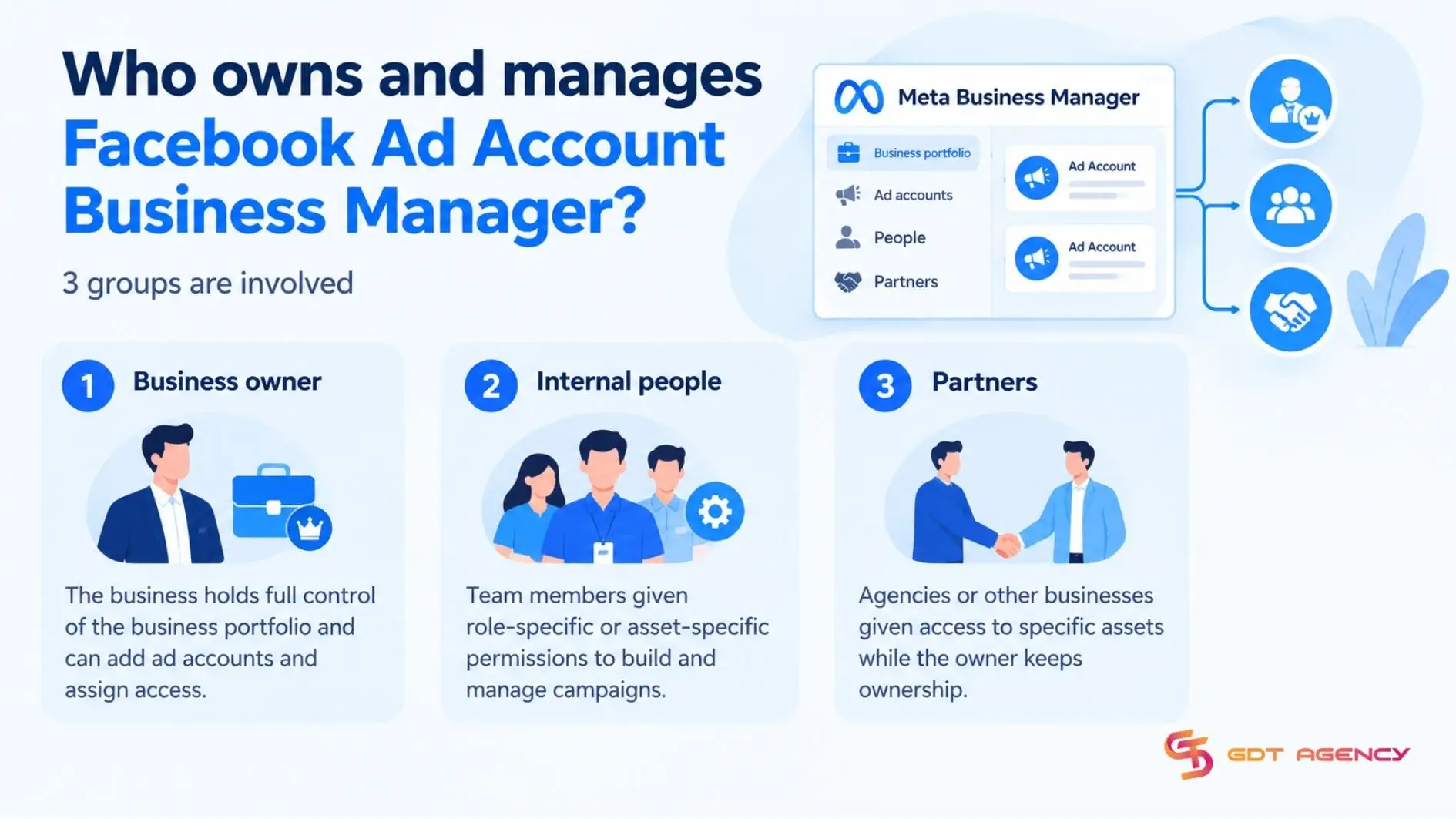
In practice, 3 components make up the arrangement:
With nearly 10 years working with Facebook Ads at GDT Agency across standard and Facebook agency accounts in retail and ecommerce, I’ve seen many advertisers assume or rely on a single shared personal Facebook profile to run Business Manager for their entire team. In reality, that shortcut puts the business at risk, as ad accounts, Pages, Pixels, and catalogs can be affected at once. The safe approach is to give each person their own account with permissions matched to their role and to run offboarding as soon as someone changes roles or leaves.
3 groups are involved: the business, the internal people and external partners such as agencies.
Business Manager offers 3 advantages: centralized asset management, granular permissions, and partner access. It also has 3 limits: claiming an ad account requires full control, an ad account can belong to only one portfolio and ad account ownership isn’t transferable. These constraints are why ownership should be clarified before setting up or claiming advertising assets.
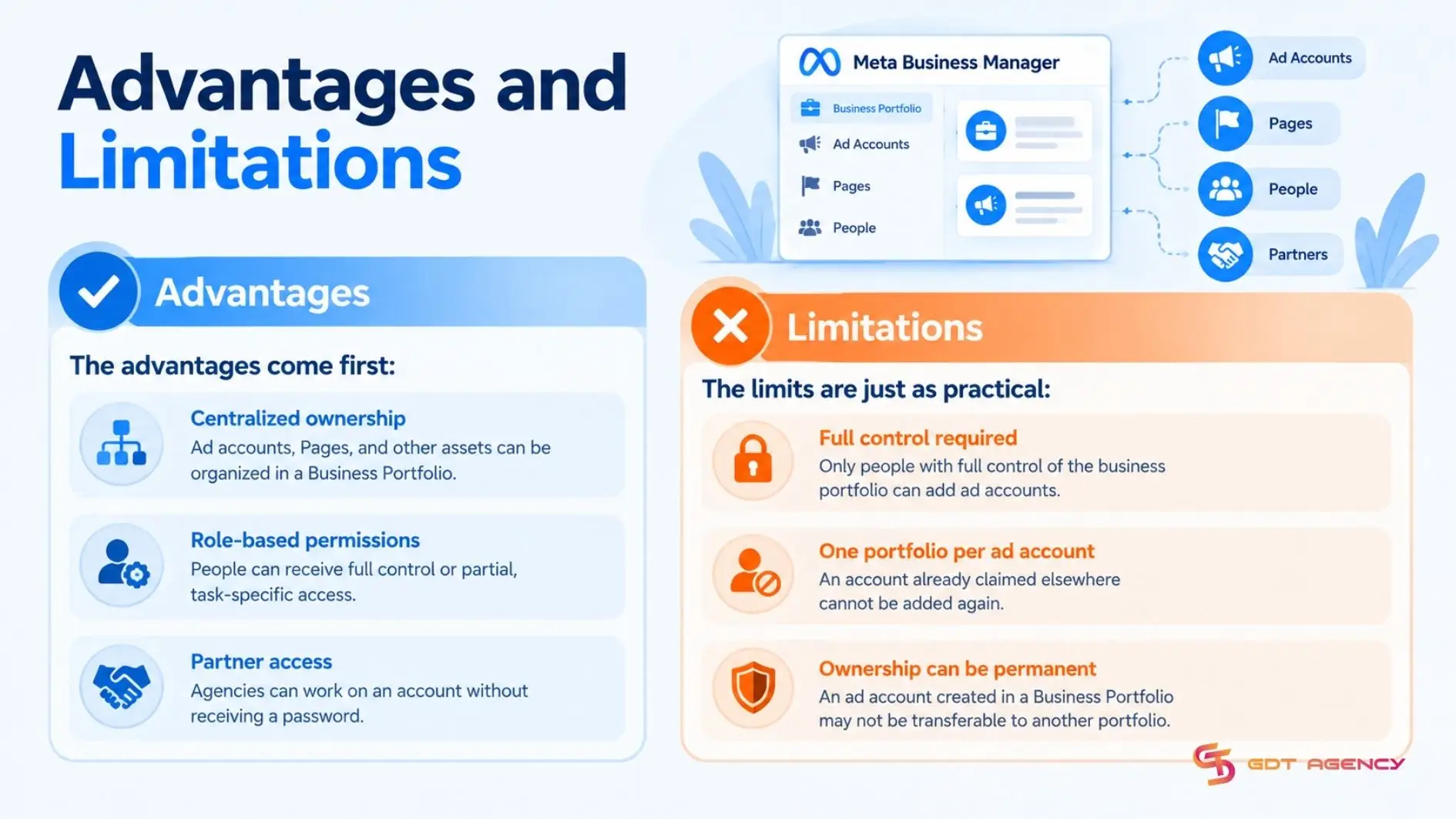
The advantages come first:
The limits are just as practical:
>>> With the ownership and access structure in place, follow How to Set Up a Facebook Ad Account to complete your ad account setup and prepare it for advertising.
Adding a Facebook ad account to Business Manager requires choosing 1 of 3 ways: claim an account your business owns, request access to a client's account, or create a new one.
Before choosing, confirm you have full control of the Business Portfolio and for an existing account, its numeric Ad Account ID. Then open Meta Business Suite, select the correct business portfolio at the top left, and go to Settings > Accounts > Ad accounts > Add.
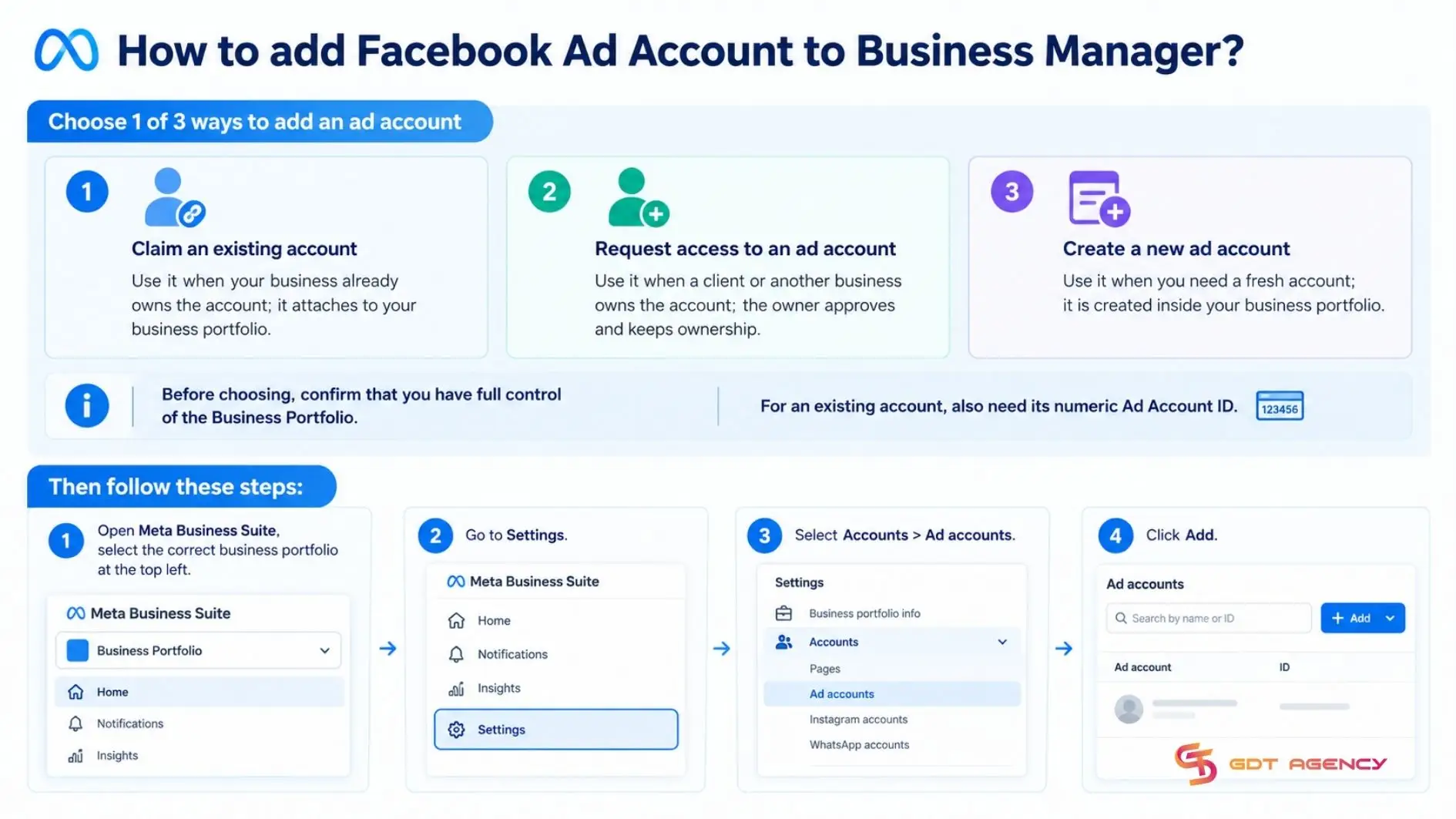
Use this option if your business should be placed under its business portfolio. Enter the Ad Account ID, confirm the portfolio shown, accept the applicable Meta terms and select Claim ad account. If the account belongs to another person, that person may need to approve the claim.
To find the Ad Account ID, follow these steps:
Use this option if managing an ad account owned by a client or another business. Enter the Ad Account ID, choose the required access level (Partial Access or Full Control) and click Confirm. This is the appropriate structure for a relationship between an agency and a client. The client retains asset ownership, while the agency manages campaigns within the permissions granted.
Use this option when no suitable account exists. Enter the ad account name, confirm the country, time zone and currency, select the portfolio and create the account. You can add a payment method and other billing information immediately afterward or later through Billing & Payment.
No, a Facebook Ads Manager account is not the same as a Business Manager account: Ads Manager is where you create and track ads, while Business Manager is where a business owns ad accounts and controls who can access them.
In a Facebook Ad Account Business Manager setup, the 2 tools differ across 4 aspects: main purpose, what each one manages, typical tasks, and relationship to the ad account. The table below puts them side by side so you can tell which one to open before you start a task.
| Aspect | Business Manager | Ads Manager |
| Main purpose | Owns and organizes the business assets and access | Creates, runs and tracks ads |
| What it manages | Ad accounts, pages, apps, people and partners | Campaigns, ad sets and ads inside an ad account |
| Typical tasks | Adding ad accounts, assigning permissions and inviting partners | Building campaigns, setting budgets and schedules, reviewing results |
| Relationship to the ad account | Owns it and controls who can access it | Operates on it once access is granted |
These differences give 3 reasons the tools are not interchangeable: they serve different purposes, they manage different things, and one operates on what the other owns.
A Facebook Ads Manager account is an ad account opened in Ads Manager, Meta's all-in-one tool for creating ads, controlling where and when they run, and tracking results across Facebook and Instagram.
It is the workspace for running ads, not the place where assets are owned. Inside it, you build campaigns, choose placements and schedules, and review performance, but the ad account it opens belongs to a personal profile or a business portfolio.
No, you do not need Business Manager to use Ads Manager. You can create and run ads directly in Ads Manager, though Business Manager adds shared ownership, role-based permissions, and partner access.
A solo advertiser running one account may never need it. A team, or a business working with an agency, usually does, because sharing a personal login offers no role-specific or asset-specific control.
Business Manager becomes worth adding when:
Ads Manager and Business Manager work together through the ad account: Business Manager owns the account and assigns access, while Ads Manager is the workspace where people with that access run campaigns.
A business admin adds the ad account and assigns people in Business Manager. Those people open Ads Manager to build and monitor campaigns. When an employee leaves or an agency contract ends, the admin removes that access in Business Manager, and the ad account stays with the business.
A Facebook Ad Account Business Manager setup places an ad account under a business portfolio, so the business, not an individual, owns it and decides who can access it. Adding one comes down to 3 ways: claim an account you own, request access to a client's account, or create a new one. Ownership is the hardest choice to undo, so settle it first. Once the account is in place, Business Manager keeps ownership and permissions organized and Ads Manager runs the campaigns. For any business running ads with a team or an agency, this structure is the foundation for everything that follows.
Yes, in many cases, but the outcome depends on how the account was added. If your business only has partner access, an admin can remove that access. If your business owns the account, removal is more consequential because ownership is hard to move later, so check Meta's Business Help Center first.
Yes, but not by claiming it. Choose Request access to an ad account, which sends a request to the owner. The owner must approve it and keeps ownership, while your business receives partner access.
Yes, a Business Manager can hold more than one ad account and repeat the Add flow for each account you own, request, or create.
No, an ad account can be owned by only one business portfolio. Another business can still work on it through partner access, which the owner approves, so ownership stays in one place.
No, adding an existing ad account to Business Manager should not pause, delete or reset its campaigns. Your campaigns, ad sets, historical results, billing setup and integrations remain in the same account; you are only changing where and how the account is managed.

A Facebook ad account is the workspace where you create, pay for, and run ads, while Business Manager is the layer above it that owns…

Facebook Ads Manager and Business Manager differ in 6 areas: purpose, tasks, scope, team permissions, multiple brands and projects, and relationship, from main purpose to…