
How do Facebook Ads Manager vs Business Manager differ?


Facebook Ads Manager and Business Manager differ in 6 areas: purpose, tasks, scope, team permissions, multiple brands and projects, and relationship, from main purpose to how the 2 tools relate. Ads Manager is the workspace for creating and optimizing ads, while Business Manager is the management layer for assets, people, and permissions. Below, this guide breaks down each area, defines both tools, and shows how Meta Business Suite and Business Manager differ.
- How do Facebook Ads Manager vs Business Manager differ?
- What is Ads Manager?
- What is Business Manager?
- Do you need both to run Facebook ads?
- How do Business Manager and Business Suite differ?
- What is Meta Business Suite?
- When to use Business Suite?
- Final Thoughts
- FAQs
- Is Business Manager and Ads Manager free to use?
- Does using Business Manager improve ad performance?
- Can you use Business Manager without running ads?
- Can you give someone Ads Manager access without full Business Manager access?
- Do you need Business Suite to run ads?
How do Facebook Ads Manager vs Business Manager differ?
Ads Manager vs Business Manager differ in 6 ways: purpose, tasks, scope, team permissions, multiple brands and projects, and relationship. The table below compares Ads Manager and Business Manager across key areas:
| Dimension | Ads Manager | Business Manager |
| Main purpose | Execute and optimize advertising | Organize assets, ownership, and access |
| Tasks | Launch ads, change budgets, test creatives, review campaign performance | Add assets, invite staff, assign permissions, manage business-level settings |
| Scope | Campaigns, ad sets, and ads in the selected ad account | Multiple ad accounts, Pages, Instagram accounts, catalogs, datasets and other assets |
| Team permissions | Access to perform tasks on a particular ad account | Portfolio-level permissions plus permissions for individual assets |
| Multiple brands and projects | Switch between the ad accounts you can access | Bring multiple assets and ad accounts under an organized business structure |
| Relationship | The advertising workspace | The management layer around that workspace |
With nearly 10 years of experience at GDT Agency working with Facebook Ads across standard and Facebook agency accounts, I’ve seen advertisers assume Business Manager replaces Ads Manager. This misunderstanding can contribute to poor performance and wasted spend. In reality, Business Manager organizes business assets and controls access, while Ads Manager provides the tools to create, manage, and optimize campaigns, ad sets and ads. They serve different purposes but work together: Business Manager determines who can access an ad account and Ads Manager is where authorized users operate the advertising inside.
What is Ads Manager?
Ads Manager is the workspace where you create, run, and optimize ads inside an ad account. Specifically, the ad account holds your campaign data and billing setup, while Ads Manager is the interface you use to work inside it.
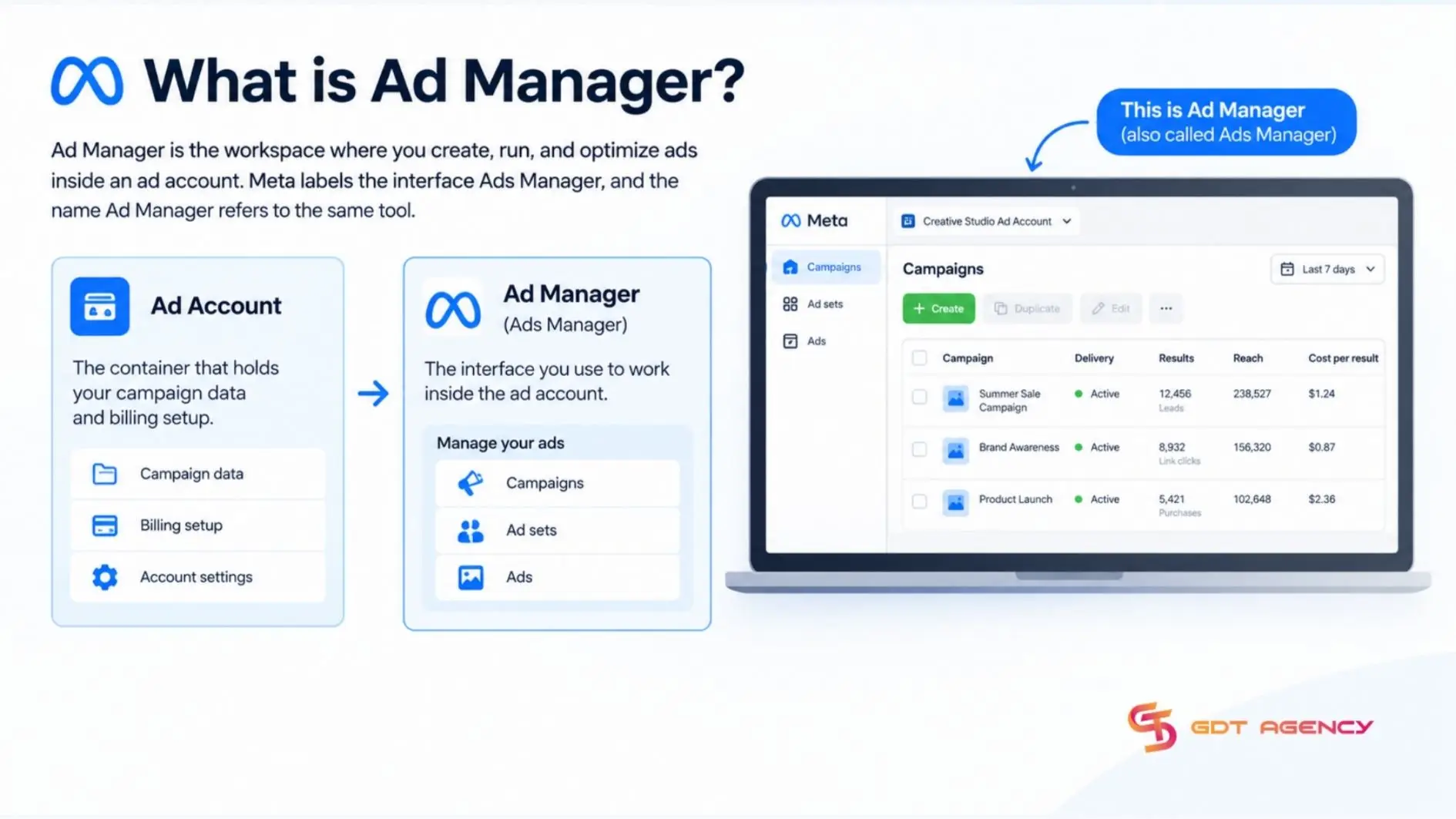
Within the workspace, you manage 3 level campaign structure: campaigns, ad sets, and ads. You can create and publish ads, adjust budgets and schedules, edit campaigns, test creatives or audiences with A/B tests and review campaign performance.
At the ad-set level, Ads Manager provides detailed targeting controls, including demographics, interests, behaviours, custom audiences and lookalike audiences. If you have access to multiple ad accounts, you can work with each in Ads Manager.
What is Business Manager?
Business Manager (now called a Meta Business Portfolio) is the management layer where a business owns and organizes its assets, people, and permissions. Unlike Ads Manager, you use it to add assets such as ad accounts, Pages, Instagram accounts, catalogs, and datasets, invite staff, and assign permissions.
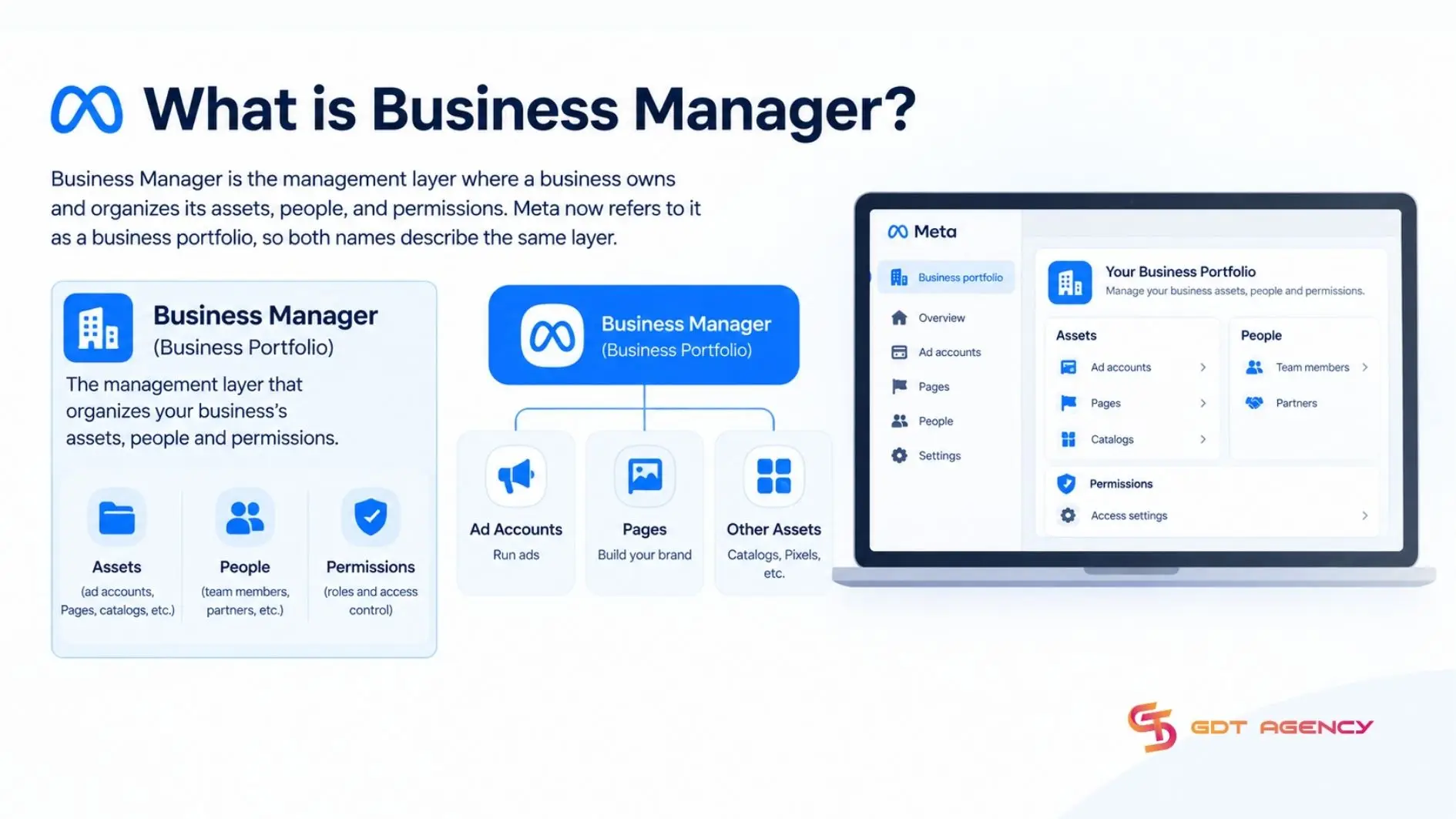
Permissions work at 2 levels: business portfolio-level and individual business-asset permissions. Business-level settings also live here. This makes Business Manager the place to decide ownership before any campaign launches.
Do you need both to run Facebook ads?
No, not necessarily. Ads Manager is the workspace for creating, publishing, managing and measuring campaigns, while Business Manager adds ownership and access control. They complement each other rather than replace one another.
In practice, the choice depends on how much structure your advertising needs:
- Ads Manager alone can run campaigns: An advertiser can use an ad account to create ads, set budgets, manage ads and review results.
- Business Manager adds ownership and access control: It becomes useful when multiple people, Pages, or ad accounts are involved. It centralizes the business assets and lets administrators assign or revoke access without sharing a personal login.
- The two tools complement each other: Ads Manager handles the advertising work while Business Manager organizes the assets and permissions around it. As a team grows, using both is generally the more controlled setup.
>>> Whether you use Ads Manager or add Business Manager for greater control, make sure your ad account is set up correctly. Follow How to Set Up a Facebook Ad Account for the complete setup process.
How do Business Manager and Business Suite differ?
Business Manager provides stronger asset control and permissions, whereas Meta Business Suite is suitable for day-to-day social media management. They differ in 5 ways: purpose, ad management, target audience, permissions, and ease of use.
| Dimension | Business Manager | Business Suite |
| Primary purpose | Asset management and collaboration across teams | Day-to-day management of Facebook and Instagram accounts |
| Ad management | Advanced ad tools reached through Ads Manager | Basic integration with Ads Manager |
| Target audience | Agencies, enterprises and advanced marketers | Small businesses and beginners in social media |
| Permissions | Granular permissions for larger teams | Simple role assignments for small teams |
| Ease of use | Designed for experienced marketers | User-friendly, no advanced skills required |
>>> After understanding the differences between Business Manager and Business Suite, you may also learn how to change your Facebook ad account to Business Manager
What is Meta Business Suite?
Meta Business Suite is a management tool for running your Facebook and Instagram business presence from one place. In practice, it covers day-to-day tasks such as scheduling content for your Pages and Instagram accounts.
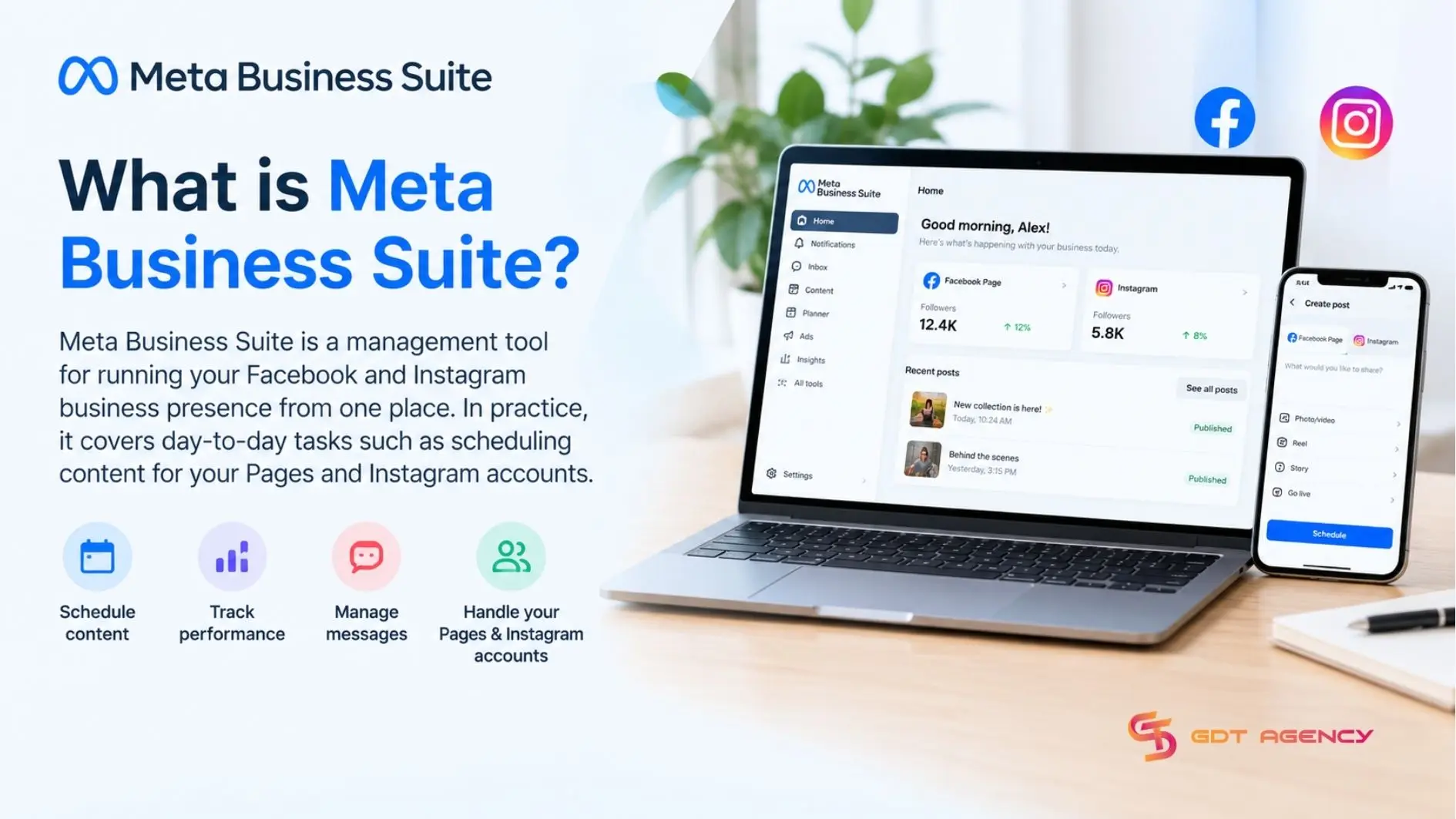
Unlike Business Manager, which decides who owns and can access each asset, Business Suite focuses on the daily work of managing what you publish. Meta’s own Business Help Center guidance treats Business Suite and Ads Manager as complementary tools that can run side by side, each handling different tasks.
When to use Business Suite?
There are 3 situations where Business Suite fits better than Business Manager: scheduling content, handling everyday Page and Instagram tasks, and working alongside Ads Manager on paid campaigns.
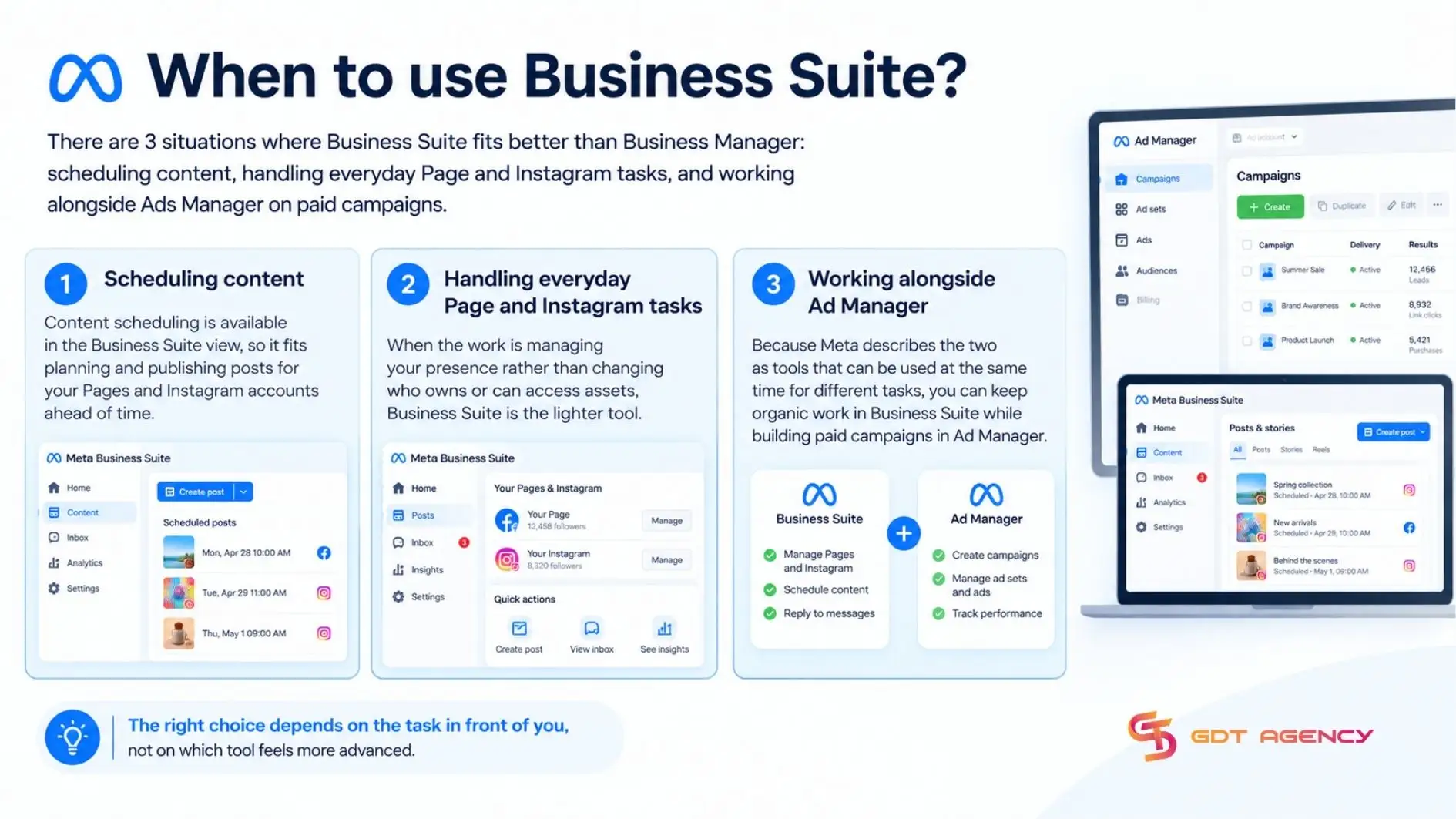
The right choice depends on your task:
- Scheduling content: Business Suite includes scheduling, so it fits planning and publishing posts for your Pages and Instagram accounts ahead of time.
- Handling everyday Page and Instagram tasks: When the work is managing your presence rather than changing who owns or can access assets, Business Suite is the lighter tool.
- Working alongside Ads Manager: Because Meta describes the 2 as tools you can use at the same time for different tasks, you can keep organic work in Business Suite while building paid campaigns in Ads Manager.
Final Thoughts
Ads Manager and Business Manager do different jobs. Ads Manager is where you build, run, and optimize, while Business Manager is where a business organizes its assets, people, and permissions. The 6 differences in purpose, daily work, scope, permissions, multi-brand handling, and relationship all trace back to that split between running ads and organizing what sits behind them. You don’t need both to start advertising, but teams with several people, Pages, or ad accounts gain control from Business Manager, so match each task to the tool built for it.
FAQs
Is Business Manager and Ads Manager free to use?
Yes, both tools are free. Meta doesn’t charge to access Ads Manager or Business Manager, and costs begin only when you run ads, based on your budget and bidding strategy.
Does using Business Manager improve ad performance?
No, Business Manager does not make your ads perform better on its own. Delivery depends mainly on auction dynamics, optimization goal, ad quality, conversion signals, budget, audience, landing page, and policy compliance. Business Manager helps operationally by separating company assets from personal logins and controlling access.
Can you use Business Manager without running ads?
Yes, you can use Business Manager without running ads. It doesn’t create ads and it can still hold Pages, Instagram accounts, catalogs, and datasets, invite staff, and assign permissions for the business.
Can you give someone Ads Manager access without full Business Manager access?
Yes, you can limit someone to a single ad account without giving them full Business Manager access. Business Manager permissions work at the asset and portfolio level, so a team member can receive access to the ad account they need and nothing more. Meta’s Help Center describes 3 ad account roles, Admin, Advertiser, and Analyst, that control what each person can do.
Do you need Business Suite to run ads?
No, you do not need Business Suite to run ads. You build campaigns in Ads Manager and Business Suite is optional and such as scheduling content. Meta treats the 2 as tools you can use together for different tasks, so adding Business Suite is a workflow choice, not a requirement.