
Can you change time zone Facebook ad account? How to edit?


You can’t change time zone Facebook ad account once it’s been created and used. If you need to change it, you must create a new ad account with the correct time zone. Meta ties the setting to the account from creation, so fix works more like a migration than a settings tweak.
Changing the time zone requires 4 steps: open Payment settings in Ads Manager, edit Business info, confirm the new time zone and set up the new ad account. The process touches running campaigns, reporting, and budgets, so it pays to prepare before you confirm anything. Below, this guide covers who can make the change, when it is worth doing, and what happens to your old account.
- Can you change time zone on Facebook ad account?
- How to change time zone on Facebook ad account?
- Who can change time zone in an ad account?
- When should you change an ad account’s time zone?
- How does changing ad account time zone affect Facebook ads performance?
- What happens to your old ad account when you change time zone?
- How is ad account time zone different from Facebook profile time zone?
- What is Facebook profile time zone?
- Does Facebook profile time zone affect when posts are published?
- Final Thoughts
- FAQs
- Does changing time zone delete your campaigns and ad history?
- Can you change time zone and currency of ad account at the same time?
- Can you change the time zone of an ad account that has already spent money?
- Can you set ad schedule in a different time zone from your ad account?
- Does ad account’s time zone determine what time customers see the ads?
Can you change time zone on Facebook ad account?
No, you can’t change time zone on a Facebook ad account. According to Meta, the only way to get a different time zone is to create a new ad account with the right time zone.
3 reasons explain why the change works this way:
- The setting belongs to the ad account: Changing it means creating a different account, not updating the old one.
- Meta handles it as a replacement: Meta’s Business Help Center describes the change as a process that closes your existing ad account and creates a new one.
- Nothing carries over automatically: Past spend and results stay with the old account, and you recreate or duplicate campaigns in the new one.
As an expert at GDT Agency with nearly 10 years of working with Facebook Ads across standard and Facebook agency accounts in retail and ecommerce, I’ve seen advertisers mistake a time zone change for a settings edit that leaves the existing account untouched. In reality, change time zone through Payment settings, Meta creates a new ad account with the new settings and closes the old one. As a result, campaigns, ad sets, and ads running on the old account stop delivering as before and must be recreated or migrated to the new account.
>>> Before creating a new ad account, understanding how to Set Up a Facebook Ad Account can help you configure the correct time zone and other account settings from the start.
How to change time zone on Facebook ad account?
Changing time zone on a Facebook ad account requires 4 steps in Payment settings: open Business info, choose a new time zone, confirm, and set up the new account. For analysis by customer time, Meta lets you view hourly reporting by either the ad account time zone or the viewer’s time zone, so a reporting question rarely requires a new account.
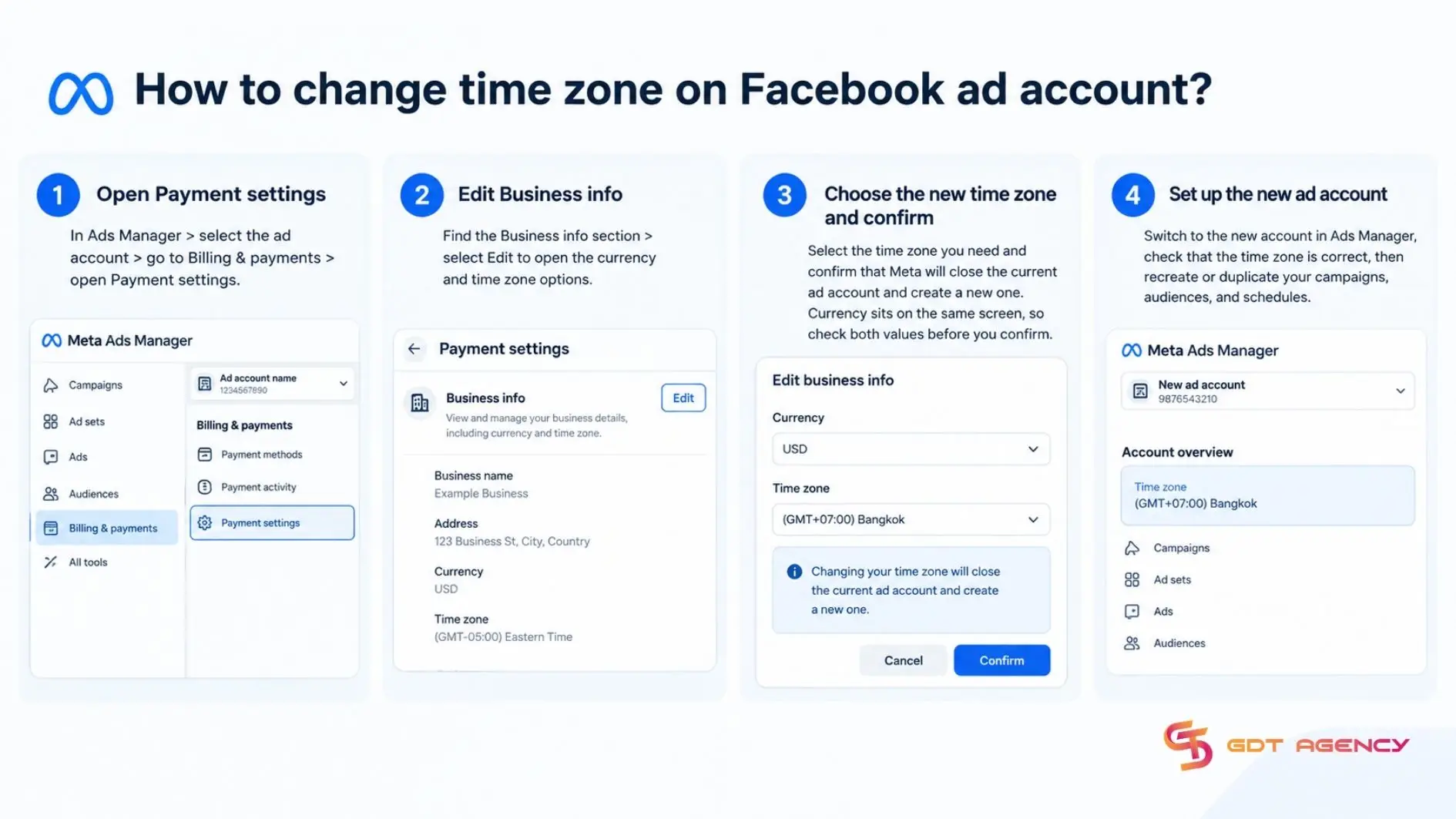
Here is the full process:
- Open Payment settings: In Ads Manager > select the ad account > go to Billing & payments > open Payment settings.
- Edit Business info: Find the Business info section > select Edit to open the currency and time zone options.
- Choose the new time zone and confirm: Select the time zone you need and confirm that Meta will close the current ad account and create a new one. Currency sits on the same screen, so check both values before you confirm.
- Set up the new ad account: Switch to the new account in Ads Manager, check that the time zone is correct, then recreate or duplicate your campaigns, audiences, and schedules.
Who can change time zone in an ad account?
Only a person with admin access to the ad account can change its time zone, because the change happens in Payment settings, which is controlled by the role that manages payments. Roles on an ad account differ in what they can do:
- Admin: full control of the ad account, including payment settings and access management.
- Advertiser: creates and manages ads, but does not manage payment settings.
- Analyst: views reporting only.
Before you start, confirm that you can select the right ad account in Ads Manager and open Payment settings. If the Business info section is missing or locked for you, ask an ad account admin to make the change or to raise your access level.
When should you change an ad account’s time zone?
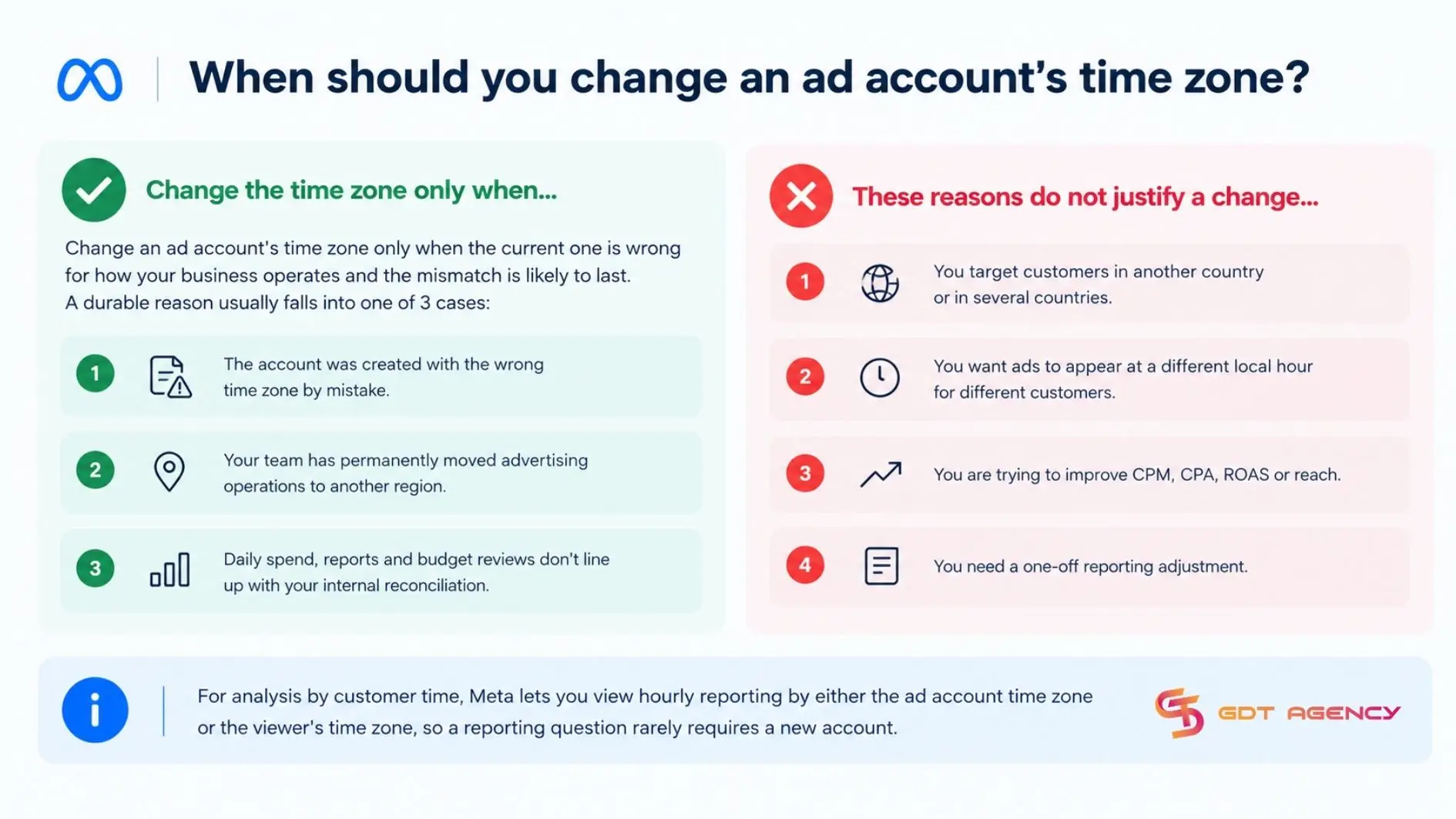
Change an ad account’s time zone only when the current one is wrong for how your business operates and the mismatch is likely to last. A durable reason usually falls into one of 3 cases:
- The account was created with the wrong time zone by mistake.
- Your team has permanently moved advertising operations to another region.
- Daily spend, reports and budget reviews don’t line up with your internal reconciliation.
On the other hand, these reasons do not justify a change:
- You target customers in another country or in several countries.
- You want ads to appear at a different local hour for different customers.
- You are trying to improve CPM, CPA, ROAS or reach.
- You need a one-off reporting adjustment
For analysis by customer time, Meta lets you view hourly reporting by either the ad account time zone or the viewer’s time zone, so a reporting question rarely requires a new account.
How does changing ad account time zone affect Facebook ads performance?
The ad account time zone does not directly change auction performance, but it does affect how your data is grouped, scheduled, and reviewed. A mismatch can still lead to poor decisions, even though delivery itself is unaffected.
When you change time zone on a Facebook ad account, 4 areas of reporting and management move with it:
- Daily budget pacing and reporting: how spend and results are grouped by calendar day
- Hourly and time-of-day reporting: which hours map to which performance in account-level views
- Ad scheduling interpretation: how start/ end times and dayparting windows are understood in the chosen scheduling time zone
- Day-by-day performance reviews: which dates are considered “yesterday”, “today” or a campaign’s “Day1/ Day 2” in internal reports
In practice, the risk is misreading data. For instance, a marketer who reviews hourly results in the account time zone might conclude a campaign performs poorly after 10 PM, while customers were actually active at a different hour. Switching to the viewer time zone breakdown removes that error without touching the account
What happens to your old ad account when you change time zone?
When you change time zone, Meta closes your old ad account and creates a new one. Ads on the old account stop running, while its past spend and results stay on record. The new account starts clean with the time zone you selected.
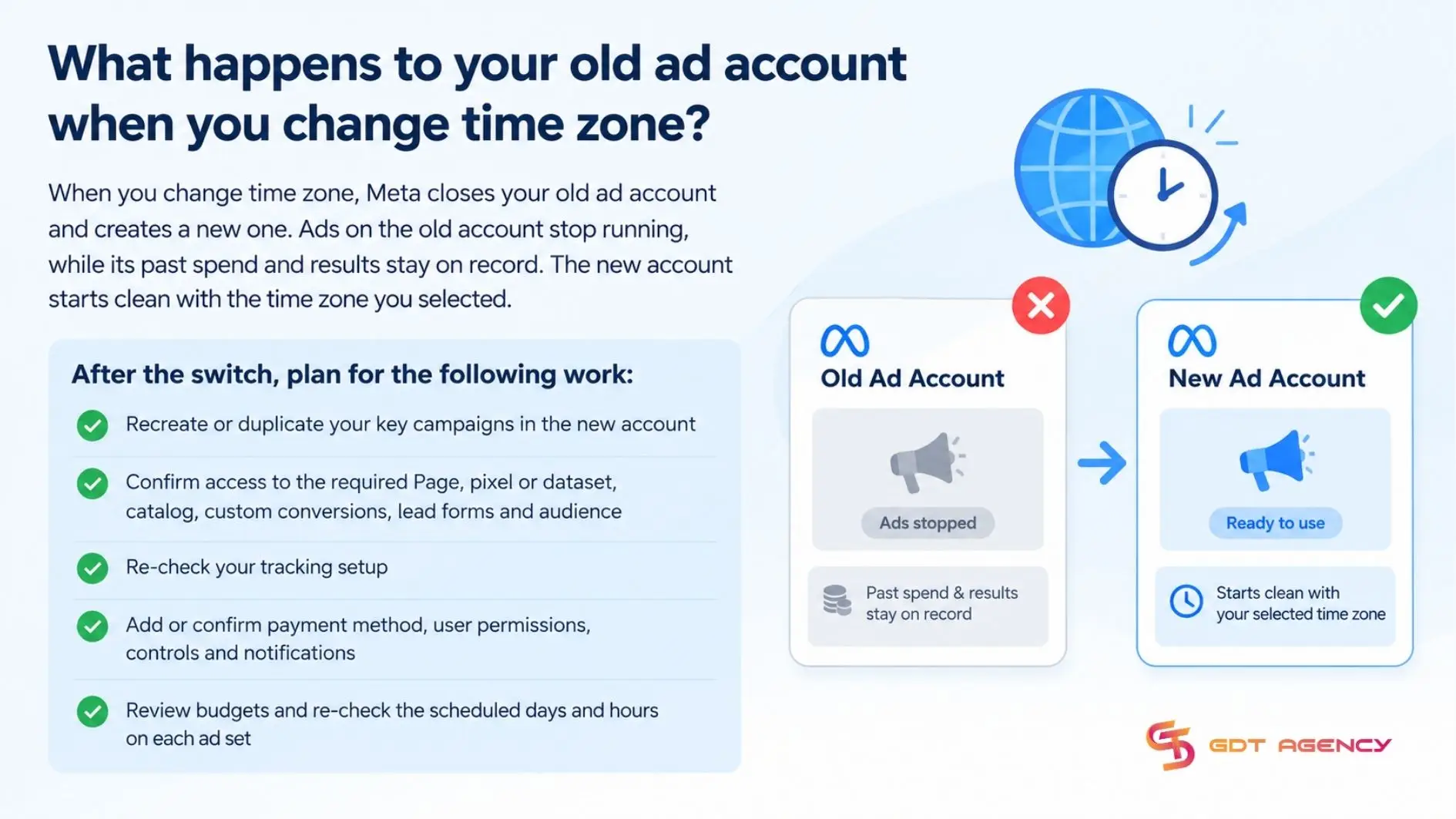
After the switch, plan for the following work:
- Recreate or duplicate your key campaigns in the new account
- Confirm access to the required Page, pixel or dataset, catalog, custom conversions, lead forms and audience
- Re-check your tracking setup
- Add or confirm payment method, user permissions, controls and notifications
- Review budgets and re-check the scheduled days and hours on each ad set
Because reporting is now split across 2 accounts, keep the old account visible for historical comparisons and label both clearly in your team’s reports.
How is ad account time zone different from Facebook profile time zone?
Ad account time zone defines the time zone context for account-level reporting and operational campaign manager. The Facebook profile time zone affects how dates and times appear on your personal Facebook. Unlike change language on Facebook ad account, the time zone is stored on the ad account itself, so changing your personal Facebook profile settings doesn’t change campaign reporting, billing or the ad account’s time zone configuration.
Ad account time zone and Facebook profile time zone differ in 4 aspects: scope, controls, what happens to change and reporting impact. The table below lays them side by side:
| Aspect | Ad account time zone | Facebook profile time zone |
| Scope | Applies to ads on one ad account | Applies to your personal experience |
| Controls | Influences account-level reporting, daily budget pacing and the time context used for ad scheduling | Influences how dates and times display scheduling to you |
| Impact of a change | Meta closes the account and creates a new one | Display changes for you only |
| Reporting impact | Yes | No |
What is Facebook profile time zone?
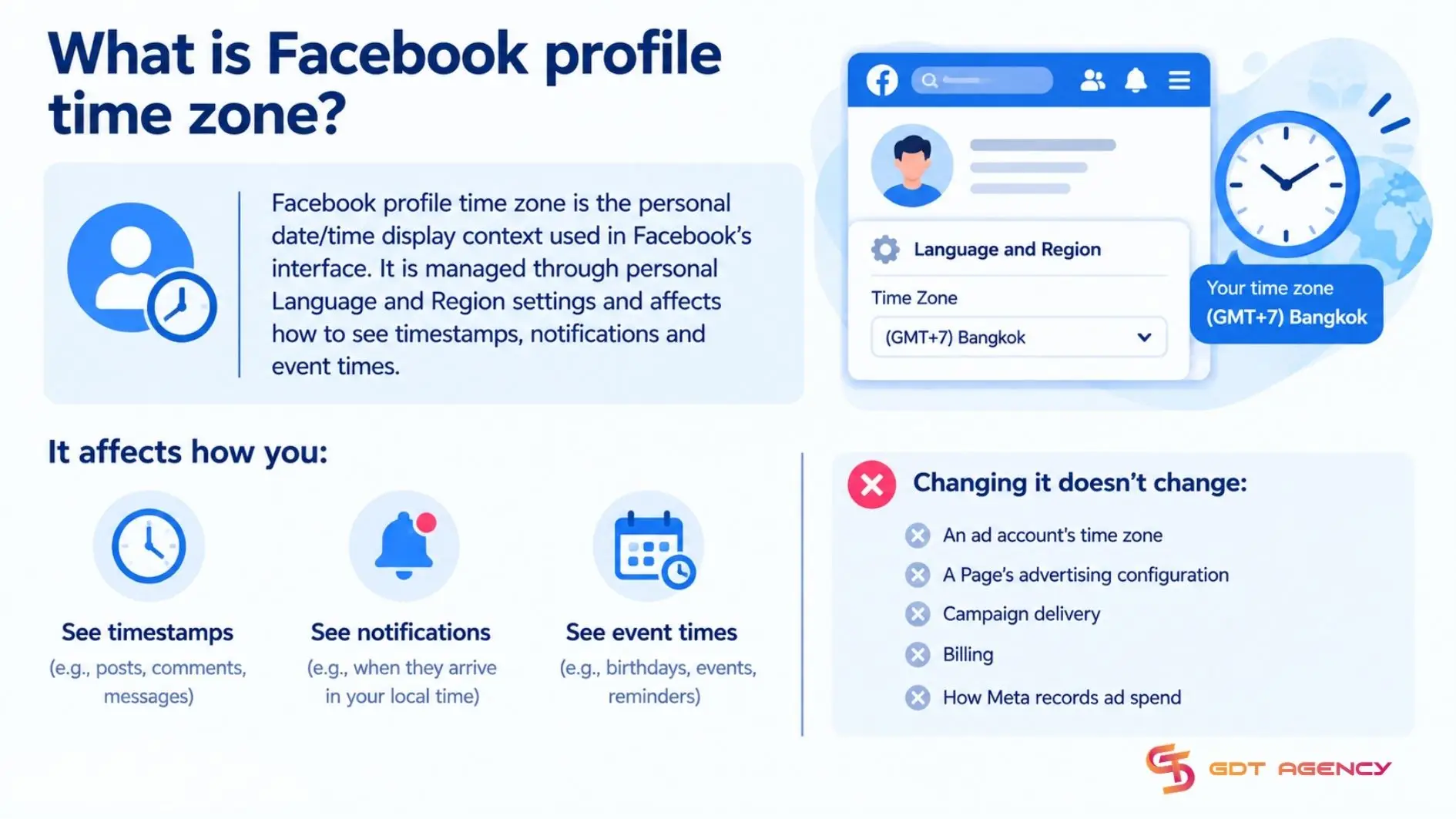
Facebook profile time zone is the personal date/time display context used in Facebook’s interface. It is managed through personal Language and Region settings and affects how to see timestamps, notifications and event times. Changing it doesn’t change an ad account’s time zone, a Page’s advertising configuration, campaign delivery, billing or how Meta records ad spend.
Does Facebook profile time zone affect when posts are published?
No, Facebook profile time zone doesn’t control when posts are published. Personal profiles cannot schedule posts, and scheduled Page posts follow the time zone of the Page or the scheduling tool.
3 points support this:
- Personal profiles cannot schedule posts. Scheduling is available for Pages, not for personal profiles.
- Scheduled Page posts follow another time zone. The Page or the scheduling tool you use decides the publish time, so the two must match to go live when you expect.
- Instant posts publish immediately. Your profile time zone only changes how you see the timestamp afterward.
If a scheduled post goes live at an unexpected hour, check the Page and the scheduling tool first, not your profile
Final Thoughts
You can change time zone of a Facebook ad account, but only through a migration: Meta closes the current account and opens a new one with the new time zone. The process takes 4 steps in Payment settings, from editing Business info to setting up the replacement account and rebuilding campaigns. Because the time zone belongs to the ad account and not to your profile, a profile change never touches your ads. Ultimately, the safest approach is to confirm the time zone at creation and to migrate only when a lasting mismatch justifies it
FAQs
Does changing time zone delete your campaigns and ad history?
No, changing time zone does not delete your campaigns or ad history. The old ad account is closed and keeps its past spend and results, but campaigns do not carry over automatically, so you recreate or duplicate them in the new account
Can you change time zone and currency of ad account at the same time?
Yes, you can change time zone and currency of an ad account at the same time, because both options sit together in Business info within Payment settings. Meta creates one new ad account with both values, so check each before you confirm
Can you change the time zone of an ad account that has already spent money?
Yes, but only by migrating to a new ad account. Past spend and results stay on the old account, and the new account starts fresh with the new time zone, so you rebuild campaigns and tracking there
Can you set ad schedule in a different time zone from your ad account?
No, because Ads Manager has no separate time zone selector for an individual ad schedule. If you need different schedules for different regions or clean reporting by time zone, create a separate campaign or ad set for each market.
Does ad account’s time zone determine what time customers see the ads?
No, Scheduled ads follow the audience’s time zone, while the account time zone only labels your reporting and budget resets.