
Google Ads Account Optimization: Complete Guide to Keywords, Creative, and ROI


Google Ads account optimization means adjusting keywords, ad creative, and bidding so a campaign spends less and converts more. Advertisers who skip this step often pay a higher cost per click and see their Quality Score drop over time. A well-optimized account, on the other hand, tends to earn cheaper clicks and a stronger position on the results page.
Optimizing keywords and audience targeting comes first in the process. You need to know who searches for your product and which terms they use before you write a single ad. Poor keyword hygiene wastes budget on searches that never lead to a sale.
Ad creative optimization follows right after. The best keyword list means little if the ad itself fails to earn a click, or if it earns clicks from the wrong people. Strong headlines, clear descriptions, and the right extensions all work together to lift click-through rate.
ROI and ROAS optimization ties everything together. Below, we walk through each of these three pillars in detail, then cover how to build a repeatable optimization routine and where account structure and tooling come into play for agencies managing several accounts at once.
- Why Does Google Ads Account Optimization Matter for Performance?
- How Do You Optimize Keywords and Audience Targeting?
- What Are the Best Practices for Keyword Match Types?
- How Do You Build Audience Segments for Better Targeting?
- How Do You Optimize Ad Creative for Higher CTR?
- What Makes a High-Performing Responsive Search Ad?
- How Do Ad Extensions Improve Ad Creative Performance?
- How Do You Improve ROI and ROAS in Google Ads?
- What Bidding Strategies Help Maximize ROAS?
- How Do You Track and Measure Google Ads ROI?
- What Is the Difference Between Manual and Automated Google Ads Optimization?
- What Is Google Ads Optimization Score and How Is It Calculated?
- How Does Account Structure Affect Optimization for Rented Ad Accounts?
- What Tools Help Manage Multiple Google Ads Accounts Safely?
- How Often Should You Review and Optimize a Google Ads Account?
- Final Thoughts
- Frequently Asked Questions
- What is the first step in Google Ads account optimization?
- Does Google Ads Optimization Score reflect actual account performance?
- How long does it take to see results from Google Ads optimization?
- Should beginners use automated bidding right away?
Why Does Google Ads Account Optimization Matter for Performance?
Google Ads account optimization is the ongoing process of adjusting keywords, audiences, ad creative, and bids to improve a campaign's cost efficiency and conversion rate. It covers everything from removing wasted spend to testing new ad copy.
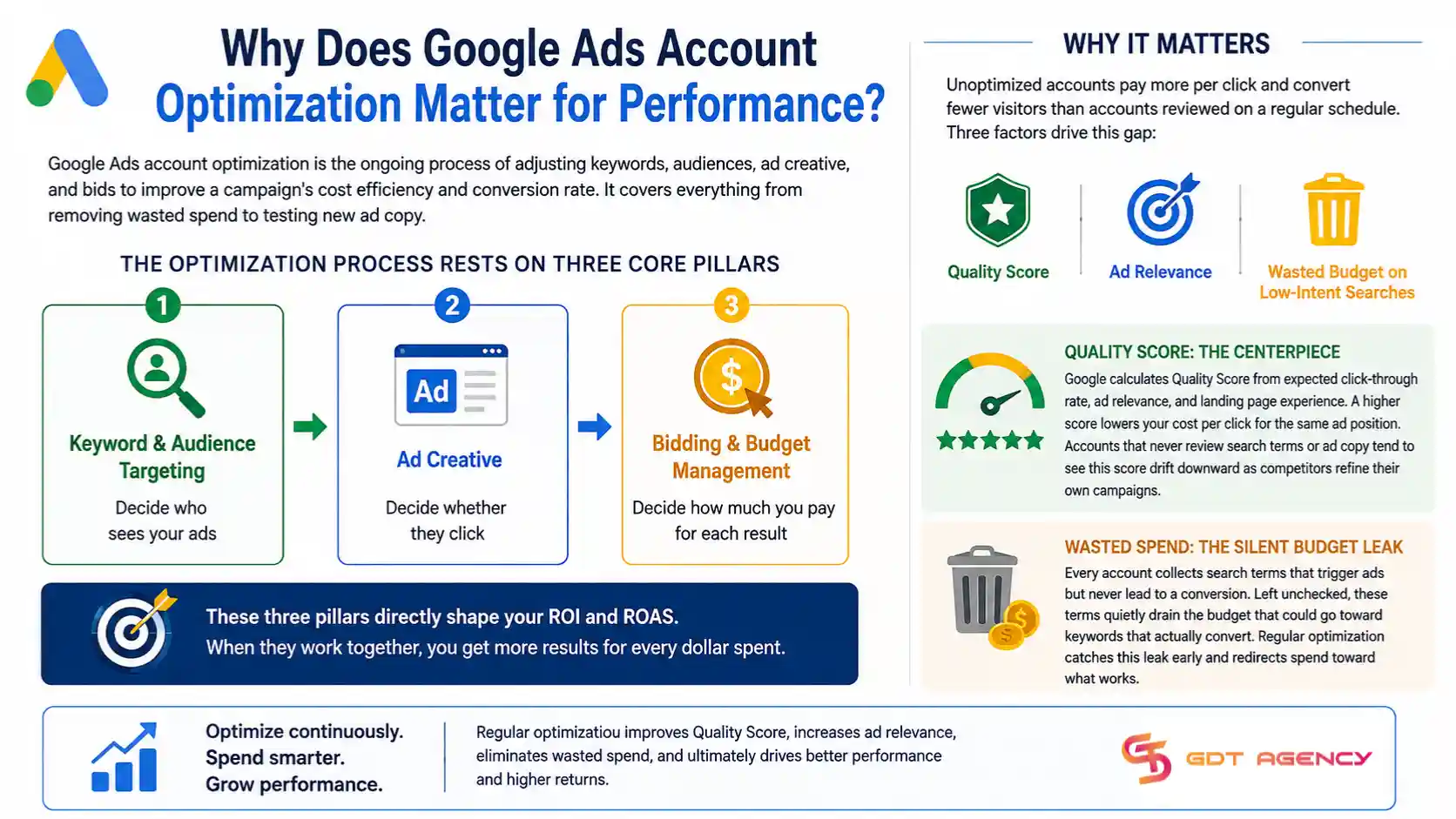
The optimization process rests on three core pillars.
- Keyword and audience targeting decide who sees your ads.
- Ad creative decides whether they click.
- Bidding and budget management decide how much you pay for each result, which directly shapes your ROI and ROAS.
As an expert at GDT Agency with nearly 10 years of experience working with multiple Google Ads accounts, from standard to Google Ads agency accounts, I strongly believe that Google Ads account optimization matters because unoptimized accounts pay more per click and convert fewer visitors than accounts reviewed on a regular schedule. Three factors drive this gap: Quality Score, ad relevance, and wasted budget on low-intent searches.
Quality Score sits at the center of this relationship. Google calculates it from expected click-through rate, ad relevance, and landing page experience, and a higher score lowers your cost per click for the same ad position. Accounts that never review search terms or ad copy tend to see this score drift downward as competitors refine their own campaigns.
Wasted spend is the other piece of the puzzle. Every account collects search terms that trigger ads but never lead to a conversion. Left unchecked, these terms quietly drain the budget that could go toward keywords that actually convert. Regular optimization catches this leak early and redirects spend toward what works.
→ If you are new to the platform or want to understand how account setup, access levels, and account management work before optimizing campaigns, read our Google Ads Account Explained: Setup, Access & Management guide.
How Do You Optimize Keywords and Audience Targeting?
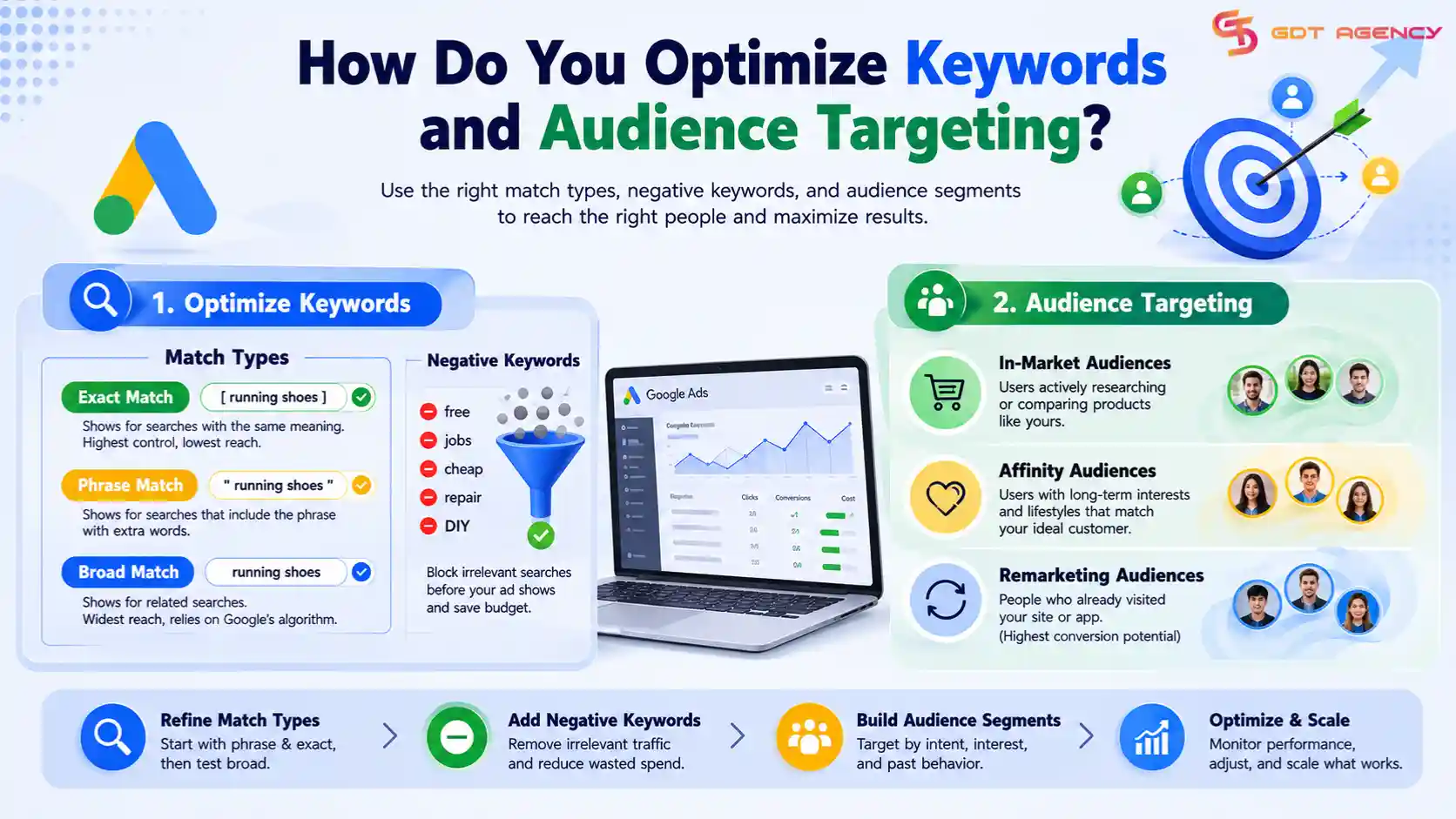
You optimize keywords and audience targeting by refining match types, adding negative keywords, and building audience segments based on intent and past behavior. These three actions form the foundation of every well-run account.
Getting this right starts with match type strategy, since the wrong match type can send your ad in front of searches that have nothing to do with your product. From there, audience segments narrow the pool further so your budget reaches people who are actually likely to buy. If you want a deeper walkthrough of match types, negative keyword lists, and audience segment building, our keyword and audience targeting guide covers each step in detail.
What Are the Best Practices for Keyword Match Types?
Google Ads offers three match types: exact, phrase, and broad. Each one controls how closely a search query must match your keyword before your ad becomes eligible to show.
- Exact match shows your ad only for searches that carry the same meaning as your keyword. It gives you the tightest control but the smallest reach.
- Phrase match shows your ad for searches that include the meaning of your phrase, even with extra words before or after it.
- Broad match casts the widest net and relies on Google's algorithm to find related searches, which works best when paired with strong conversion tracking and automated bidding.
Most advertisers start with phrase and exact match to control cost, then test broad match once they have enough conversion data for Google's algorithm to learn from. Negative keywords should sit alongside all three match types, since they block irrelevant searches before they ever trigger an ad.
How Do You Build Audience Segments for Better Targeting?
Audience segments group users by shared traits, interests, or past behavior so you can bid more or less depending on how likely each group is to convert. Google Ads offers three main segment types: in-market, affinity, and remarketing.
In-market audiences include users who have recently searched for or compared products like yours, which signals they are close to a purchase decision.
Affinity audiences group users by long-term interests and habits, useful for building brand awareness with people who fit your customer profile.
Remarketing audiences target people who already visited your site or app, often the highest-converting group since they already know your brand.
Layering these segments onto your keyword campaigns lets you raise bids for high-intent groups and lower them for casual browsers, which improves overall account efficiency without cutting reach.
How Do You Optimize Ad Creative for Higher CTR?
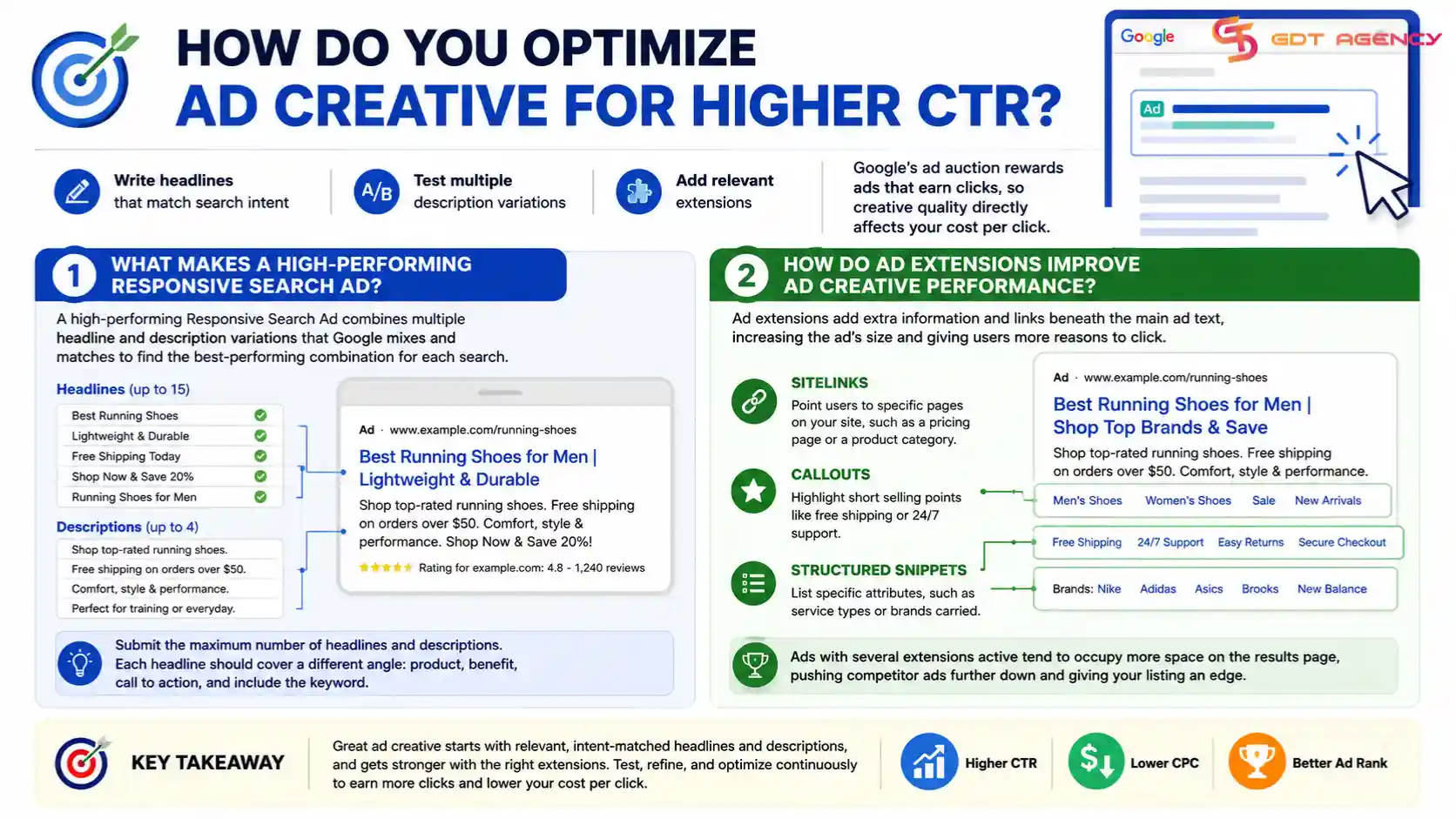
You optimize ad creative for higher CTR by writing headlines that match search intent, testing multiple description variations, and adding relevant extensions. Google's ad auction rewards ads that earn clicks, so creative quality directly affects your cost per click.
Strong creative starts with the Responsive Search Ad format, since Google now runs most search campaigns through it. From there, extensions round out the ad and give users more reasons to click. For a full breakdown of headline formulas and testing frameworks, our ad creative guide walks through each element in order.
What Makes a High-Performing Responsive Search Ad?
A high-performing Responsive Search Ad combines multiple headline and description variations that Google mixes and matches to find the best-performing combination for each search. Advertisers should submit the maximum number of headlines and descriptions the format allows, since more variations give Google's algorithm more combinations to test.
Each headline should speak to a different angle: one for the product name, one for a benefit, one for a call to action, and one that includes the keyword itself. Google's system then serves the combination most likely to earn a click based on the specific search query and user context.
How Do Ad Extensions Improve Ad Creative Performance?
Ad extensions improve ad creative performance by adding extra information and links beneath the main ad text, which increases the ad's visible size and gives users more reasons to click. Sitelinks, callouts, and structured snippets are the three most common types.
Sitelinks point users to specific pages on your site, such as a pricing page or a product category.
Callouts highlight short selling points like free shipping or 24/7 support.
Structured snippets list specific attributes, such as service types or brands carried.
Ads with several extensions active tend to occupy more space on the results page, which pushes competitor ads further down and gives your listing an edge even before a user reads the copy.
How Do You Improve ROI and ROAS in Google Ads?
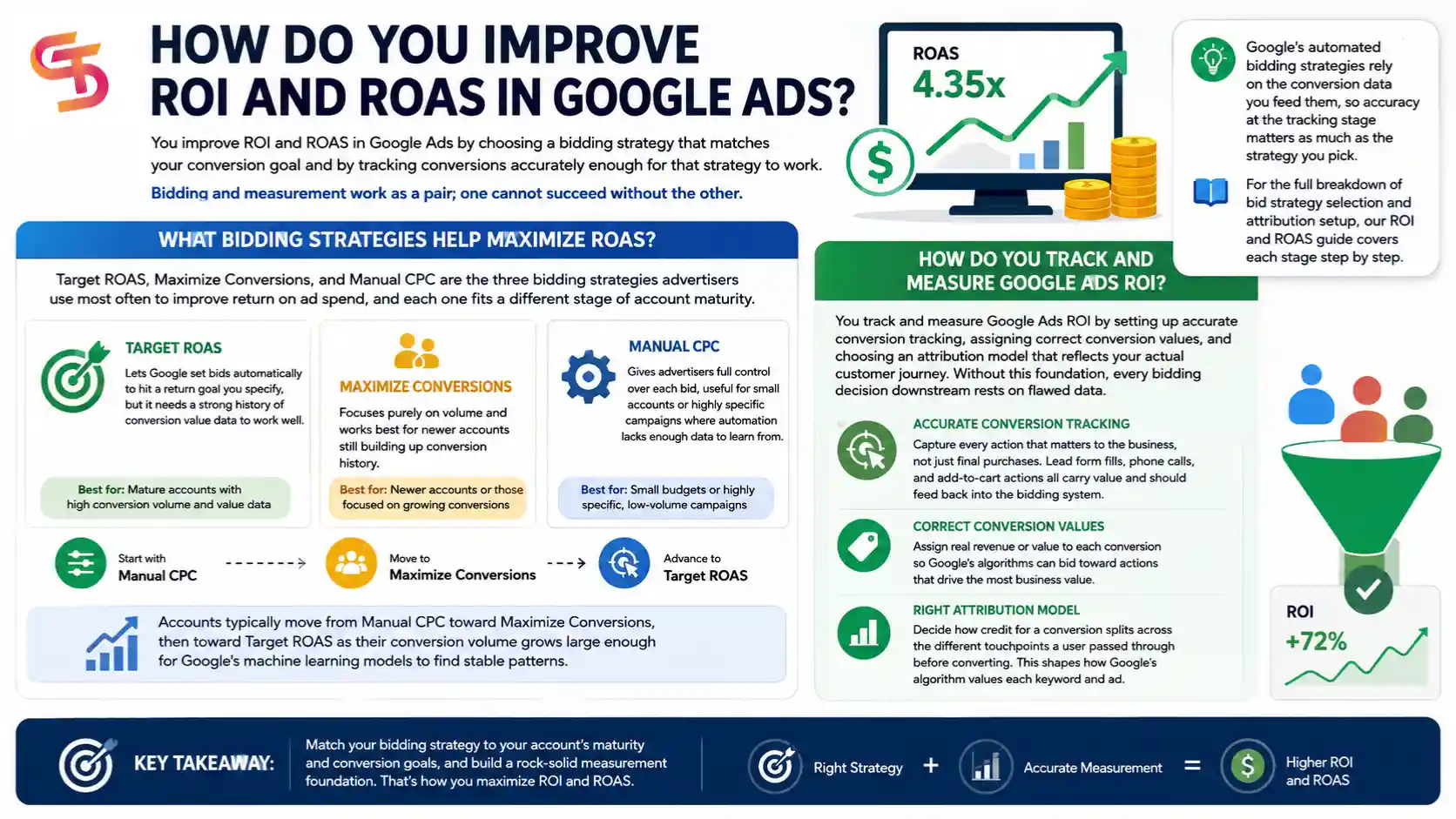
You improve ROI and ROAS in Google Ads by choosing a bidding strategy that matches your conversion goal and by tracking conversions accurately enough for that strategy to work. Bidding and measurement work as a pair; one cannot succeed without the other.
Google's automated bidding strategies rely on the conversion data you feed them, so accuracy at the tracking stage matters as much as the strategy you pick. For the full breakdown of bid strategy selection and attribution setup, our ROI and ROAS guide covers each stage step by step.
What Bidding Strategies Help Maximize ROAS?
Target ROAS, Maximize Conversions, and Manual CPC are the three bidding strategies advertisers use most often to improve return on ad spend, and each one fits a different stage of account maturity.
- Target ROAS lets Google set bids automatically to hit a return goal you specify, but it needs a strong history of conversion value data to work well.
- Maximize Conversions focuses purely on volume and works best for newer accounts still building up conversion history.
- Manual CPC gives advertisers full control over each bid, useful for small accounts or highly specific campaigns where automation lacks enough data to learn from.
Accounts typically move from Manual CPC toward Maximize Conversions, then toward Target ROAS as their conversion volume grows large enough for Google's machine learning models to find stable patterns.
How Do You Track and Measure Google Ads ROI?
You track and measure Google Ads ROI by setting up accurate conversion tracking, assigning correct conversion values, and choosing an attribution model that reflects your actual customer journey. Without this foundation, every bidding decision downstream rests on flawed data.
Conversion tracking should capture every action that matters to the business, not just final purchases. Lead form fills, phone calls, and add-to-cart actions all carry value and should feed back into the bidding system. Attribution models then decide how credit for a conversion splits across the different touchpoints a user passed through before converting, which shapes how Google's algorithm values each keyword and ad.
What Is the Difference Between Manual and Automated Google Ads Optimization?
Manual optimization means an account manager reviews data and makes changes by hand, while automated optimization means Google's machine learning models adjust bids and, in some cases, ad combinations on their own. Most accounts today use a mix of both.
Manual optimization gives full control and works well for accounts with limited conversion data or highly specific business rules that automation cannot account for. Automated optimization, through Smart Bidding strategies like Target ROAS, tends to outperform manual bidding once an account has enough conversion history, since the algorithm can react to auction signals faster than a person can.
The two approaches are not mutually exclusive. Many experienced managers set the strategy and guardrails manually, then let Google's automation handle the moment-to-moment bid adjustments within those boundaries.
What Is Google Ads Optimization Score and How Is It Calculated?
Google Ads Optimization Score is a percentage that estimates how close an account's settings are to its full performance potential, calculated from campaign status, settings, bids, and ad relevance factors. Google updates the score in real time as the account changes.
The score comes with a list of specific recommendations, each with an estimated impact percentage. Advertisers should treat these recommendations as suggestions to evaluate, not instructions to apply blindly, since some recommendations may not fit every business goal or budget constraint.
How Does Account Structure Affect Optimization for Rented Ad Accounts?
Account structure affects optimization for rented ad accounts by determining how cleanly campaigns, budgets, and conversion data separate between different advertisers sharing the same manager account. A poorly structured rented account can mix signals across unrelated campaigns and confuse Google's bidding algorithms.
Agencies that manage rented Google Ads accounts for multiple clients need clear campaign naming conventions, separate conversion actions per client, and careful budget caps to keep each account's optimization data clean. Without this structure, one client's traffic patterns can distort the learning phase for another client sharing the same account.
What Tools Help Manage Multiple Google Ads Accounts Safely?
Google's own Manager Account (MCC) feature is the primary tool for overseeing multiple Google Ads accounts from one login, since it lets managers switch between accounts, apply bulk changes, and pull cross-account reports without logging in and out repeatedly.
For agencies that also manage related Meta or TikTok ad accounts alongside Google Ads, anti-detect browsers add a layer of session separation that keeps each account's cookies, fingerprint, and login activity isolated from the others. This matters most when several accounts run under one manager but need to stay technically distinct from a platform's perspective.
→ Google's own Manager Account (MCC) feature is the primary tool for overseeing multiple Google Ads accounts from one login, since it lets managers switch between accounts, apply bulk changes, and pull cross-account reports without logging in and out repeatedly. If you want a complete walkthrough of MCC setup, account hierarchy, permission levels, and best practices for agencies, see our Google Ads Account Management: Manage Multiple Accounts with MCC guide.
How Often Should You Review and Optimize a Google Ads Account?
Most accounts benefit from a weekly review of search terms and bids, paired with a deeper monthly review of ad creative, audience segments, and overall account structure. Accounts with larger budgets or more volatile performance may need daily attention during the first few weeks of a new campaign.
The right frequency depends on spend and volatility. A small account spending a modest daily budget may only need biweekly check-ins, while a high-spend account running several campaigns at once should stay under close, near-daily observation until performance stabilizes.
Final Thoughts
Google Ads account optimization works best as a routine, not a one-time fix. Keyword and audience targeting decide who sees your ads, ad creative decides who clicks, and bidding strategy decides what you pay for each result. Reviewing all three on a regular schedule, backed by a checklist, keeps an account performing at its full potential over time.
Frequently Asked Questions
What is the first step in Google Ads account optimization?
Reviewing your keyword list and search term report comes first, since it reveals wasted spend before you touch bids or creative.
Does Google Ads Optimization Score reflect actual account performance?
It reflects potential improvement based on Google's own criteria, not your actual conversion rate or profit margin, so treat it as one input among several.
How long does it take to see results from Google Ads optimization?
Most changes show measurable impact within two to four weeks, though bidding strategy changes may need longer for Google's algorithm to relearn patterns.
Should beginners use automated bidding right away?
New accounts usually lack enough conversion data for automated bidding to perform well, so starting with Manual CPC or Maximize Conversions makes more sense until volume builds up.
Articles in the category Google Ads Account Optimization
No articles found in this category yet.
