
Google Ads Account Usage: Activation, Campaign & Policy Guide


Google Ads account usage involves 3 connected stages: activation, campaign creation, and policy compliance. Activation confirms billing, business identity, and payment details before any ad can serve. Campaign creation then determines how a business reaches its audience, covering campaign types, targeting, and budget configuration. Policy compliance runs underneath both steps, since Google enforces rules on content, targeting, and account behavior at every stage of usage.
Advertisers typically activate a new account by completing billing setup, business verification, and identity verification, in that order. Each of these steps unlocks a specific account capability — billing enables spending, verification restores or preserves ad-serving eligibility depending on the account's history and region.
Once activation is complete, campaign creation follows a structured path: choosing a campaign type, setting a budget and bidding strategy, defining targeting, and installing conversion tracking. The campaign type selected — Search, Display, Performance Max, Shopping, or Video — shapes which settings apply and which policies are most relevant to monitor.
Beyond activation and campaign setup, ongoing usage depends on staying within Google's advertising policies. Violations can range from a single disapproved ad to a full account suspension, and enforcement severity typically scales with the type and frequency of the violation. The sections below walk through activation requirements, campaign creation steps, applicable policies, and how account usage differs from account setup.
- Is a Google Ads Account Ready to Use Immediately After Creation?
- What Are the Steps to Activate a Google Ads Account?
- What Documents or Verifications Are Required Before Use?
- How Do You Create a Campaign in a Google Ads Account?
- What Are the Main Campaign Types Available?
- What Settings Are Required Before Launching a Campaign?
- What Are the Google Ads Policies That Govern Account Usage?
- What Actions Violate Google Ads Policies?
- How Are Policy Violations Enforced?
- What Are the Common Use Cases for a Google Ads Account?
- What Are the Restrictions on Using a Google Ads Account for Regulated Industries?
- How Does MCC Access Affect Account Usage?
- What Happens If an Account Is Suspended During Active Campaign Usage?
- Final Thought
- Frequently Asked Questions
- How long does Google Ads account activation usually take?
- Can a campaign run while business verification is still pending?
- Does a policy violation on one campaign affect other campaigns in the same account?
- Is Performance Max a good starting point for a new advertiser?
- Who is responsible for policy compliance in a rented Google Ads account?
Is a Google Ads Account Ready to Use Immediately After Creation?
No, a Google Ads account is not ready to use immediately after creation, since it requires billing setup, identity verification, and often business verification first. As an expert at GDT agency with nearly 10 years of experience working with multiple types of Google Ads accounts, from standard to Google Ads agency accounts, I strongly believe that these steps confirm the advertiser's legitimacy and payment eligibility before Google allows any campaign to serve.
Activation exists as a gate between account creation and account usage. Without completing it, campaigns can be built in the interface, but ads will not deliver to the intended audience.
What Are the Steps to Activate a Google Ads Account?
Activation generally follows four steps, each unlocking a different account function:
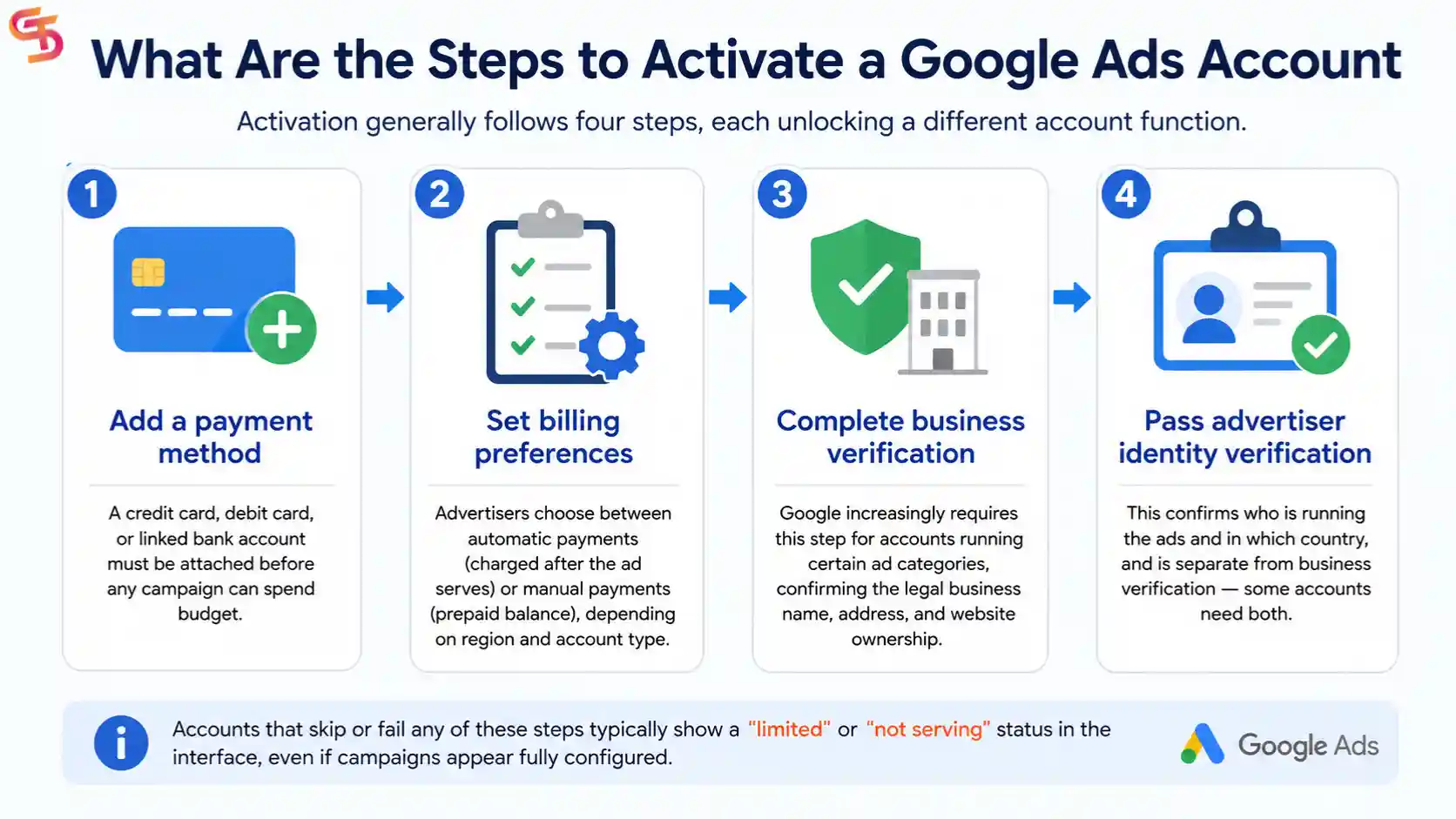
- Add a payment method. A credit card, debit card, or linked bank account must be attached before any campaign can spend budget.
- Set billing preferences. Advertisers choose between automatic payments (charged after the ad serves) or manual payments (prepaid balance), depending on region and account type.
- Complete business verification. Google increasingly requires this step for accounts running certain ad categories, confirming the legal business name, address, and website ownership.
- Pass advertiser identity verification. This confirms who is running the ads and in which country, and is separate from business verification — some accounts need both.
Accounts that skip or fail any of these steps typically show a "limited" or "not serving" status in the interface, even if campaigns appear fully configured.
What Documents or Verifications Are Required Before Use?
The documents required depend on the verification type triggered. Business verification usually asks for a government-issued business registration number, a matching business name, and a website domain that resolves to that business. Advertiser identity verification asks for a government-issued photo ID and confirmation of the country from which ads will be managed.
For agency-managed or rented accounts, an additional layer applies: the entity actually running ads (the agency) may need to confirm its relationship to the account, particularly if billing and ad content originate from different parties. Mismatches between the verified business and the actual advertiser are a common cause of activation delays.
How Do You Create a Campaign in a Google Ads Account?
Creating a campaign in Google Ads involves five core steps: selecting a campaign type, setting a budget, choosing a bidding strategy, defining targeting, and installing conversion tracking. Completing all five is what separates a campaign in "draft" state from one that is actively serving ads.
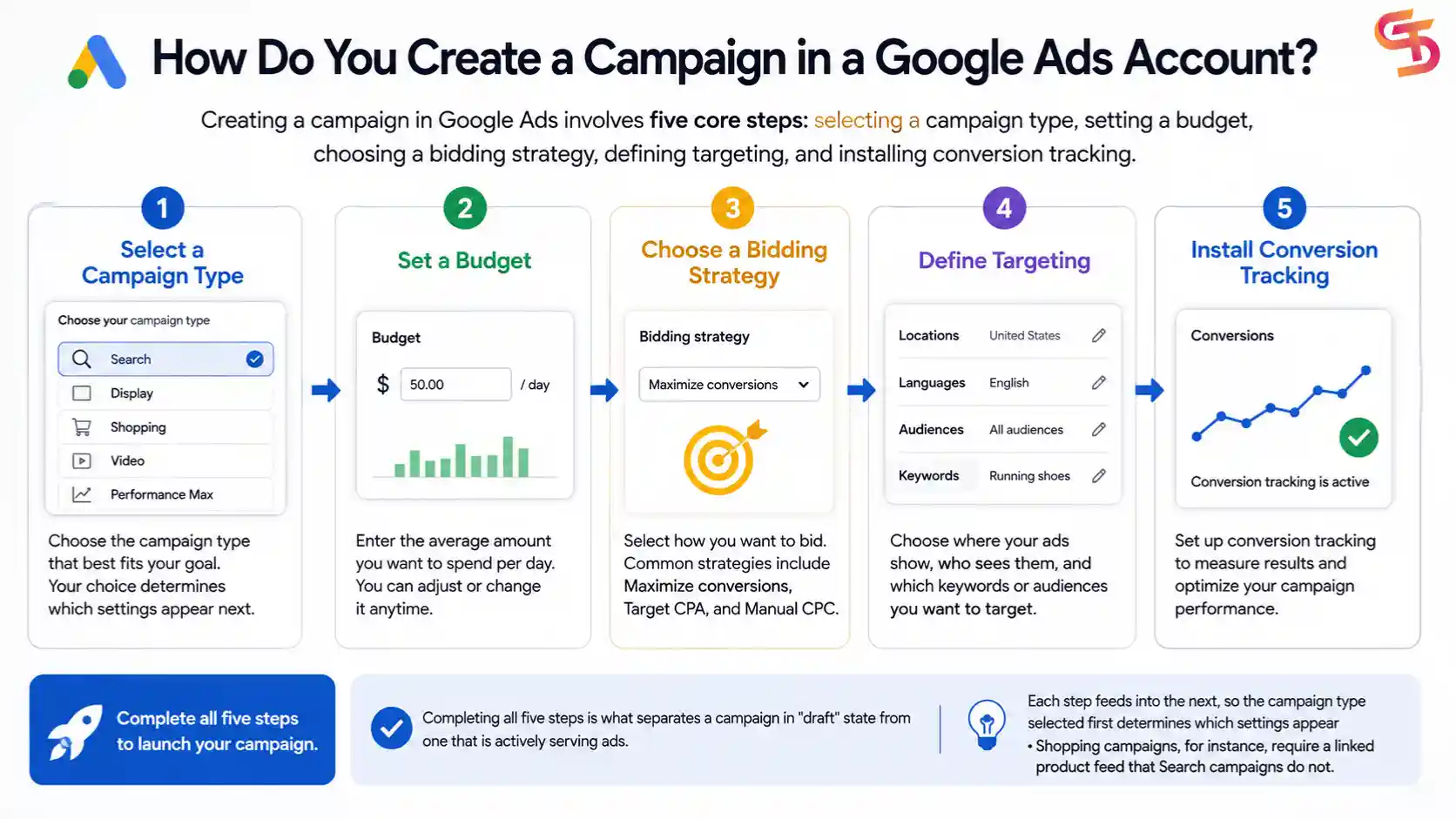
Each step feeds into the next, so the campaign type selected first determines which settings appear afterward — Shopping campaigns, for instance, require a linked product feed that Search campaigns do not.
What Are the Main Campaign Types Available?
Google Ads groups campaigns into five main types, each suited to a different objective:
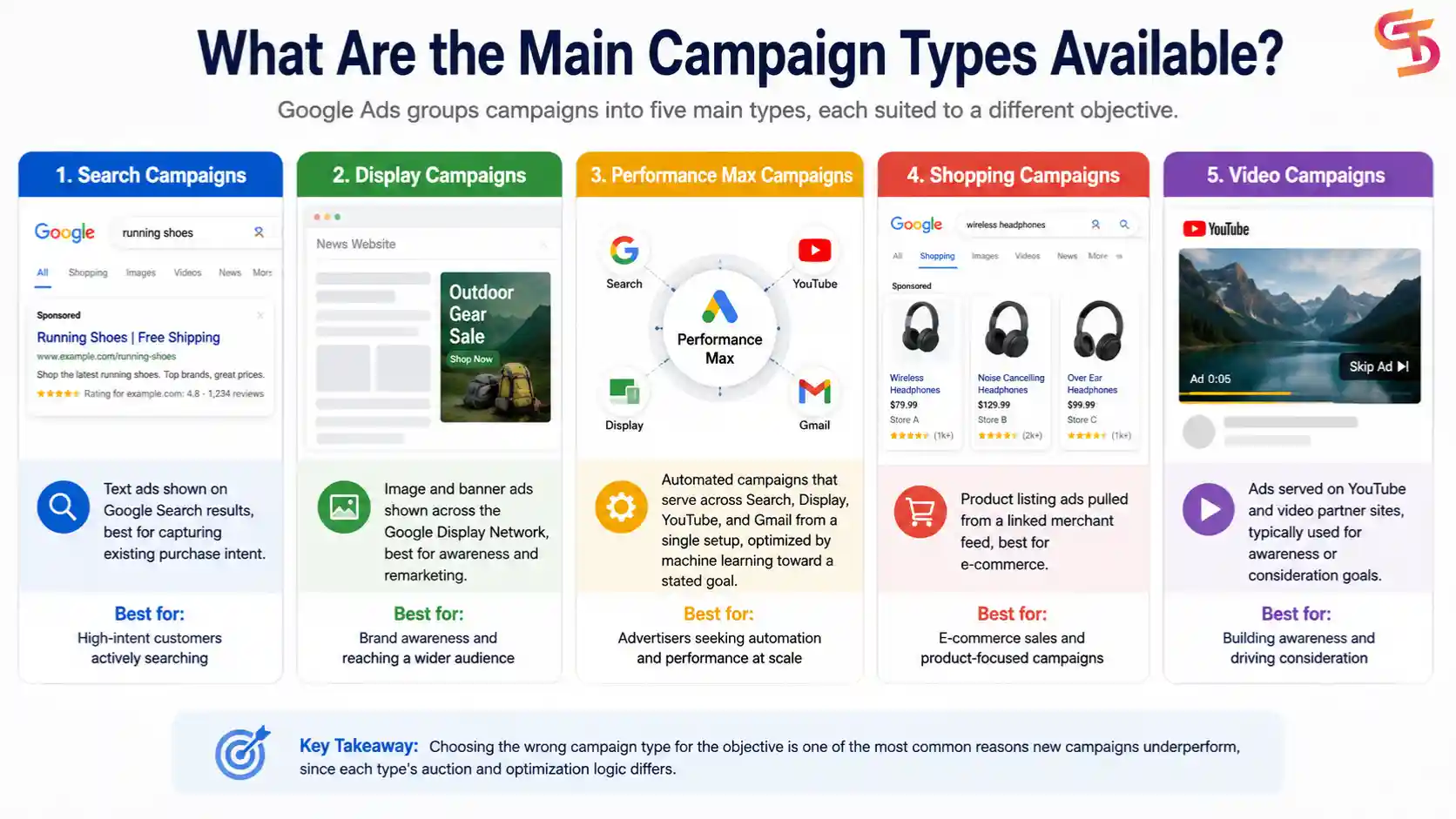
- Search campaigns — text ads shown on Google Search results, best for capturing existing purchase intent.
- Display campaigns — image and banner ads shown across the Google Display Network, best for awareness and remarketing.
- Performance Max campaigns — automated campaigns that serve across Search, Display, YouTube, and Gmail from a single setup, optimized by machine learning toward a stated goal.
- Shopping campaigns — product listing ads pulled from a linked merchant feed, best for e-commerce.
- Video campaigns — ads served on YouTube and video partner sites, typically used for awareness or consideration goals.
Choosing the wrong type for the objective is one of the most common reasons new campaigns underperform, since each type's auction and optimization logic differs.
What Settings Are Required Before Launching a Campaign?
Four settings must be finalized before a campaign can go live:
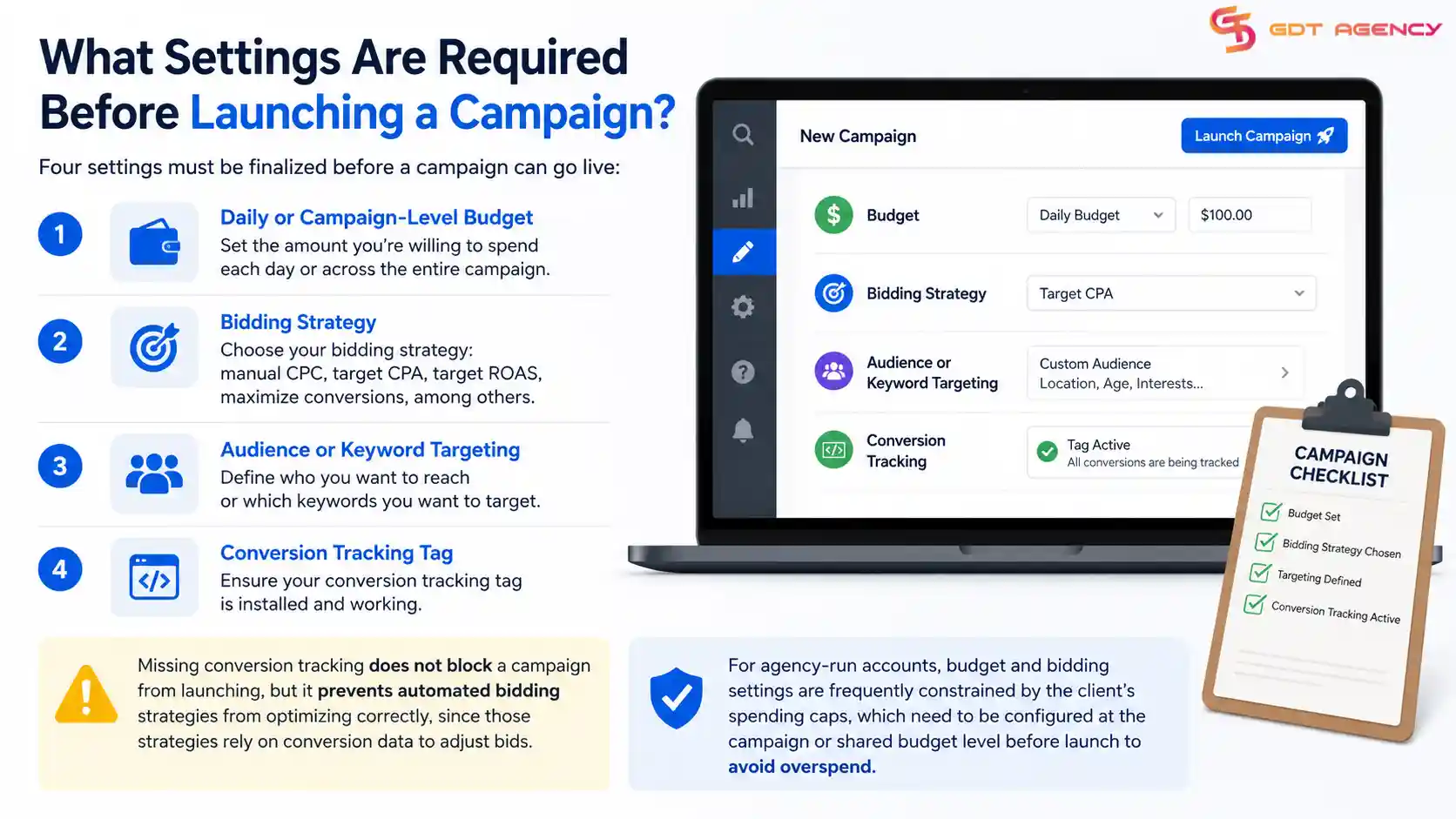
- A daily or campaign-level budget
- A bidding strategy (manual CPC, target CPA, target ROAS, or maximize conversions, among others)
- Audience or keyword targeting
- A working conversion tracking tag.
Missing conversion tracking does not block a campaign from launching, but it prevents automated bidding strategies from optimizing correctly, since those strategies rely on conversion data to adjust bids.
For agency-run accounts, budget and bidding settings are frequently constrained by the client's spending caps, which need to be configured at the campaign or shared budget level before launch to avoid overspend.
What Are the Google Ads Policies That Govern Account Usage?
Google Ads policies cover ad content, targeting practices, and account behavior, and they apply to every account regardless of size or industry. These policies exist to keep the ad ecosystem safe for users, advertisers, and publishers alike.
Policy categories break down into content restrictions (what an ad can say or show), destination requirements (what the landing page must contain), and behavioral rules (how an account or advertiser must act, such as not creating duplicate accounts to bypass a suspension).
What Actions Violate Google Ads Policies?
Common policy violations include prohibited content (such as counterfeit goods, dangerous products, or misleading claims), destination mismatches (where the ad promises something the landing page does not deliver), and circumvention tactics (such as cloaking, which shows different content to Google's review system than to actual users). Misrepresentation — inaccurate business information, hidden fees, or false urgency claims — is another frequently cited violation.
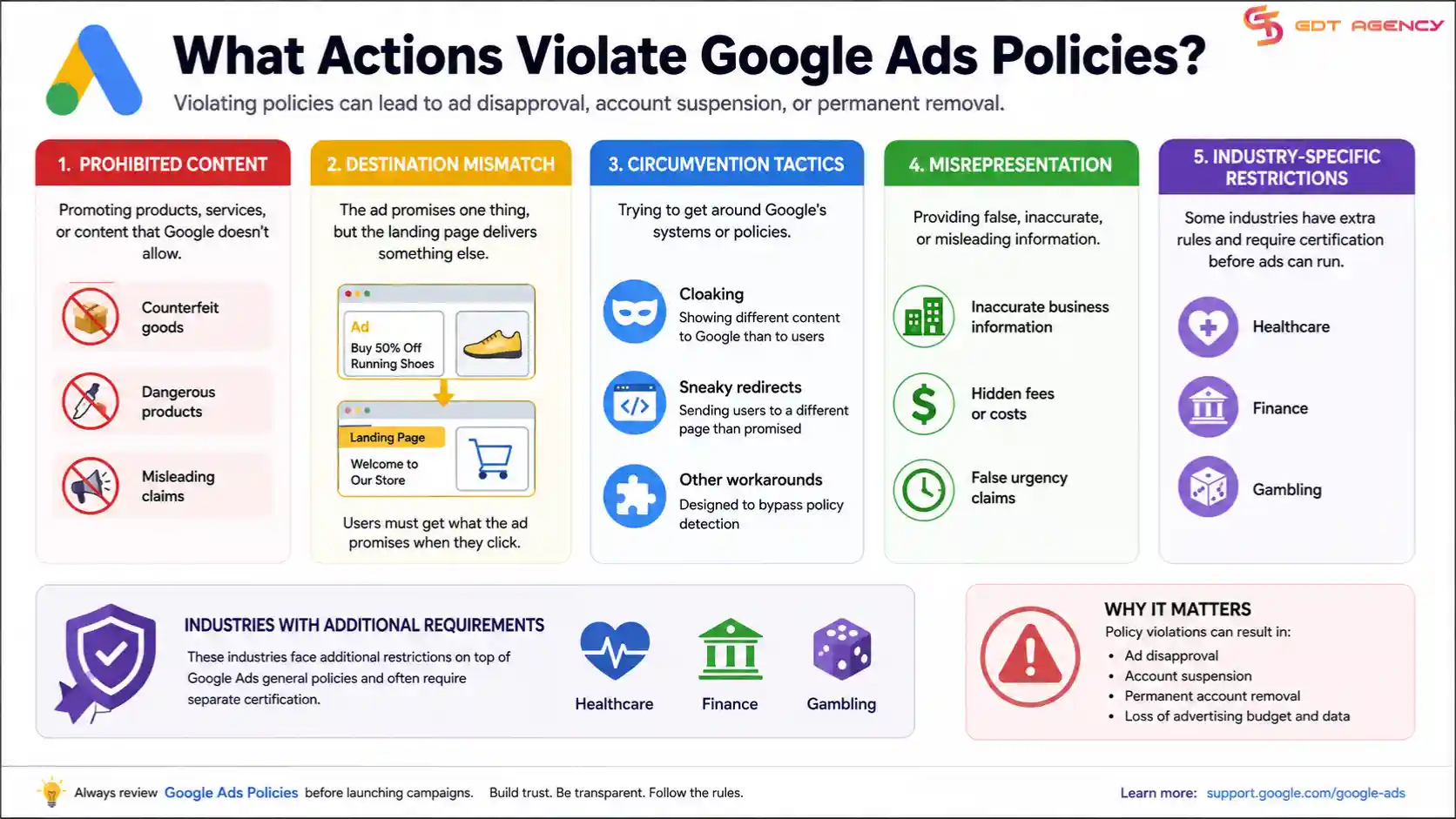
Some violations are content-specific to an industry: healthcare, finance, and gambling advertisers face additional restrictions layered on top of the general policy set, often requiring separate certification before ads in those categories are eligible to run at all.
How Are Policy Violations Enforced?
Enforcement escalates through 3 main tiers: a warning with the option to fix and resubmit, ad or campaign disapproval that halts serving until corrected, and account suspension for repeated or severe violations. A single disapproved ad rarely affects the rest of the account, but a pattern of violations — or one serious violation like circumvention — can trigger suspension of the entire account, including any campaigns that were otherwise compliant.
Suspended accounts generally cannot self-reinstate; recovery requires submitting an appeal that addresses the specific violation cited, and approval timelines vary by violation type and account history.
What Are the Common Use Cases for a Google Ads Account?
Google Ads accounts are commonly used for five business objectives: lead generation, e-commerce sales, app installs, local business visibility, and brand awareness. Each use case maps to a preferred campaign type and measurement approach.
- Lead generation: typically run through Search campaigns with call or form-fill conversion tracking, common for B2B and service businesses.
- E-commerce sales: built around Shopping and Performance Max campaigns tied to a product feed, measured by ROAS.
- App installs: run through App campaigns, optimized toward install or in-app action events.
- Local business visibility: combines Search campaigns with location extensions and Local campaigns, targeting users near a physical location.
- Brand awareness: typically Display or Video campaigns, measured by reach and view rate rather than direct conversions.
An account can run multiple use cases simultaneously, provided the budget and campaign structure keep each objective's performance measurable on its own.
>>> Maybe you are also interested in: Google Ads Business Use Cases: Examples & Strategies That Convert
What Are the Restrictions on Using a Google Ads Account for Regulated Industries?
Regulated industries — including finance, healthcare, and gambling — face certification requirements on top of standard policy compliance before ads in those categories are eligible to serve. Google requires industry-specific certification for these categories in many countries, and ads that run without it are disapproved regardless of content quality.
- Finance — advertisers promoting loans, crypto products, or financial services may need to complete a certification process and, in some regions, hold a specific license.
- Healthcare — pharmacy and healthcare advertisers face restrictions on prescription drug promotion and often require certification tied to their operating country.
- Gambling — online gambling ads require country-specific certification and are blocked entirely in jurisdictions where such advertising is not permitted.
For rented accounts, regulated-industry certification is particularly sensitive, since the certification is typically tied to the account owner's verified business identity rather than the renter's.
How Does MCC Access Affect Account Usage?
MCC (My Client Center) access determines what level of control a user has within a linked account — view-only, standard, or admin — and this directly shapes what usage activities are possible. A user with view-only MCC access can monitor performance but cannot create or edit campaigns, while admin access allows full campaign management and billing visibility.
Agencies managing rented or client accounts through MCC links need admin-level access to perform day-to-day usage tasks like campaign creation and policy troubleshooting; anything less restricts usage to reporting only.
What Happens If an Account Is Suspended During Active Campaign Usage?
A suspension during active usage immediately halts all ad serving across every campaign in the account, regardless of whether individual campaigns were compliant. Budget spending stops the moment the suspension takes effect, and any campaigns in a learning phase for automated bidding lose that progress if the suspension lasts beyond a short window.
Recovery requires an appeal addressing the specific violation, and for rented accounts, the renter typically depends on the account owner to file or support that appeal, since the underlying verification and billing identity belong to the owner rather than the renter. This dependency is one of the main reasons rented-account usage carries higher operational risk than owned-account usage, even when the renter's own campaign content is fully compliant.
Final Thought
Using a Google Ads account well comes down to sequencing: activation has to be complete before campaigns can serve, campaign settings have to be correct before spend is efficient, and policy compliance has to hold throughout, not just at launch. Skipping or rushing any one of these stages tends to surface as the same symptom — an account that looks fully configured but won't deliver.
For advertisers working through agency-managed or rented accounts, usage carries an extra layer of dependency, since verification, billing, and suspension recovery are tied to the account owner rather than the day-to-day campaign manager. Building that relationship transparently and understanding where control sits at each stage is what keeps usage stable over time rather than reactive.
Frequently Asked Questions
How long does Google Ads account activation usually take?
Activation timing depends on which verifications are triggered. Billing setup is typically instant, but business verification and advertiser identity verification can take anywhere from a few hours to several business days, depending on the country and industry.
Can a campaign run while business verification is still pending?
In most cases, no. Accounts flagged for mandatory business verification will not serve ads until verification is approved, even if the campaign itself is fully built and budgeted.
Does a policy violation on one campaign affect other campaigns in the same account?
A single disapproved ad usually stays isolated to that ad or campaign. However, a pattern of violations, or one severe violation like circumvention, can lead to a full account suspension that halts every campaign, not just the one that triggered it.
Is Performance Max a good starting point for a new advertiser?
It depends on the objective. Performance Max works well when conversion tracking is already reliable and the goal is broad reach across channels, but advertisers who want granular control over placements or keywords are often better served starting with Search or Display.
Who is responsible for policy compliance in a rented Google Ads account?
Both the renter and the owner share responsibility in practice. The renter typically controls ad content and campaign settings, while the account owner controls billing and verification identity, so a compliance issue usually requires cooperation between both parties to resolve.
Articles in the category Google Ads Account Usage
No articles found in this category yet.
