

What is an AB test on Facebook and How to Create?
AB test on Facebook is a Meta Ads Manager feature that splits your audience into separate groups and compares ad versions that differ by one…

A Facebook Ad Account is a dedicated container inside Meta's advertising infrastructure where advertisers create campaigns, manage budgets, and pay for ad delivery across Facebook, Instagram, and the Audience Network. By using a Facebook ad account, advertisers can access powerful advertising tools and analytics that help improve marketing strategies and reach the right audience. This guide on what a Facebook ad account is will explain everything you need to know about it because understanding what a Facebook ad account is the first step to running paid traffic on Meta’s platforms effectively.
A Facebook ad account is the account inside Meta Ads Manager that advertisers use to create, manage, and pay for ad delivery across Meta's platforms. A Facebook ad account stores the core advertising settings and assets, including:
A business can also use different types of Facebook ad accounts to access Meta’s advertising infrastructure. Businesses choose the right type of Facebook ad account based on their advertising needs, account structure, and spending requirements.
There are 3 main types of Facebook ad accounts, classified by ownership structure and access level, including: Personal ad account, Business Manager account, and Agency ad account.
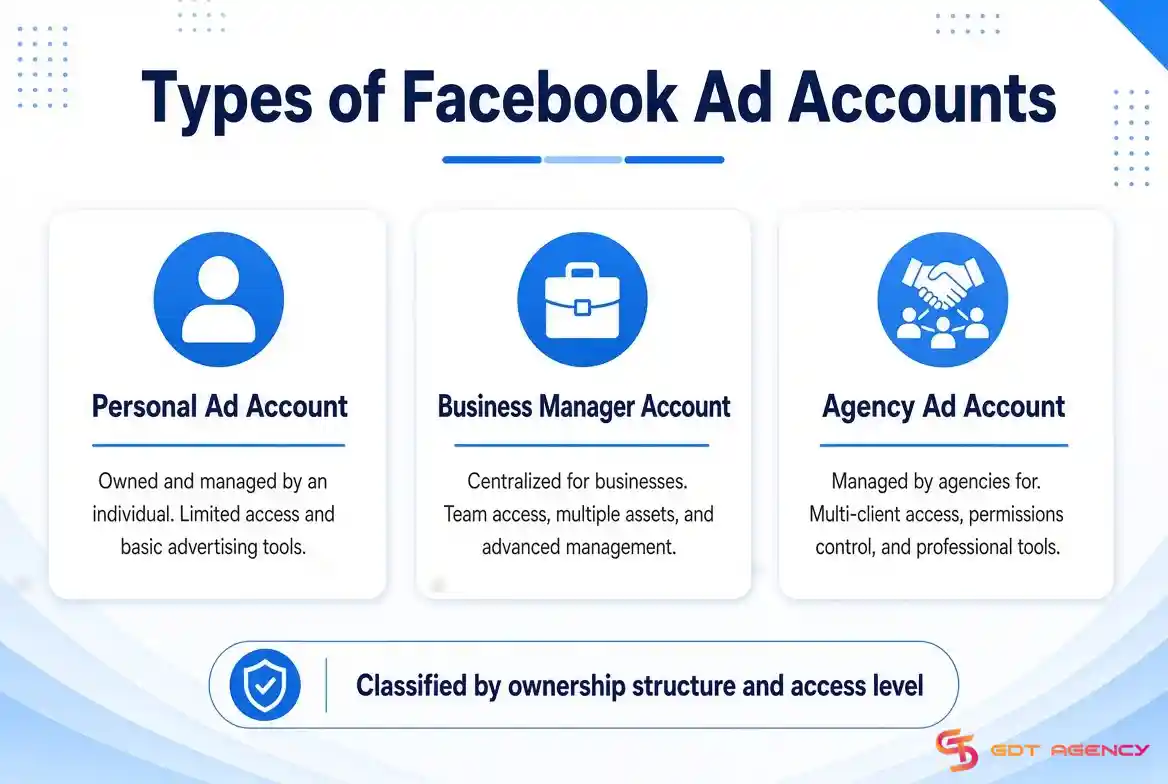
To get a clearer overview and better understand the key features of each account type, the table below compares these three Facebook ad account types based on ownership, access, management, spending flexibility, and typical use cases.
| Feature | Facebook Personal Ad Account | Facebook Business Manager Account | Facebook Agency Ad Account |
| Ownership | Individual user | Business | An Agency |
| Primary Use | Personal or small-scale advertising | Business and in-house advertising | Scaling campaigns with agency-level infrastructure |
| Access | Primarily tied to the individual account | Multiple users can receive assigned permissions | Clients can receive access based on the agency's setup |
| Asset Management | Limited business asset management | Centralized management of Pages, ad accounts, Pixels, catalogs, and other assets | Agency manages advertising assets and account access based on its infrastructure |
| User Management | Limited | Supports role-based access for team members | Agency controls access and can assign client or team permissions |
| Spending Capacity | Usually more limited and can depend on account history | Can support higher spending as the account builds trust | Designed for higher and more scalable advertising spend |
| Account Stability | More dependent on individual account history and activity | Depends on business verification, account history, and policy compliance | Can provide additional infrastructure for advertisers seeking greater stability |
| Best For | Individuals, freelancers, and small advertisers | Businesses with internal marketing teams | Agencies, high-spend advertisers, and businesses that need scalable ad infrastructure |
| Management | Individual user | Business or internal marketing team | Advertising agency or infrastructure provider |
For anyone running ads professionally, choosing the right account structure can improve campaign management, access control, and scalability, so consider your business model, spending needs, and long-term advertising goals before choosing an account type for your business.
→ The account itself is only one part of the system. The overall business structure behind it also affects review speed, spending capacity, and long-term stability. Learn more about Facebook ad account infrastructure.
Using a Facebook ad account gives businesses the infrastructure they need to run, manage, and measure paid campaigns across Facebook. These benefits include:
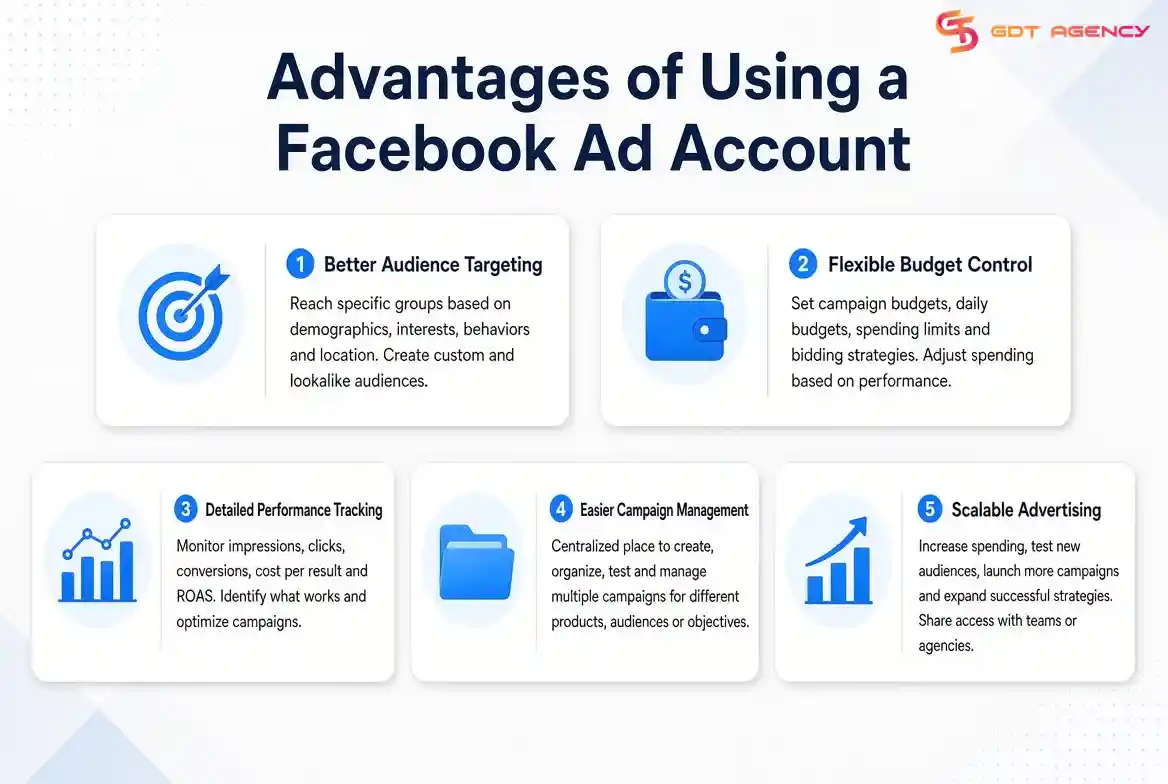
Facebook ad accounts allow businesses to reach specific groups of potential customers based on demographics, interests, behaviors, location, and other available audience signals. Advertisers can also create custom audiences and lookalike audiences to reach people who are more likely to interact with or purchase from the business.
Advertisers can control how much they spend by setting campaign budgets, daily budgets, spending limits, and bidding strategies. This control helps businesses manage advertising costs and adjust spending based on campaign performance instead of committing to a fixed advertising budget.
A Facebook ad account provides performance data across campaigns, ad sets, and individual ads. Businesses can monitor metrics such as impressions, clicks, conversions, cost per result, and return on ad spend (ROAS). These insights help advertisers identify which campaigns generate results and where they need to make changes.
Facebook ad accounts give advertisers a centralized place to create, organize, test, and manage multiple campaigns. Businesses can run different campaigns for different products, audiences, objectives, or stages of the customer journey without managing each campaign separately.
A properly managed ad account allows businesses to increase spending, test new audiences, launch additional campaigns, and expand successful strategies as their results improve. The account structure also allows businesses to work with internal teams, freelancers, or agencies through assigned access and permissions.
→ Overall, a Facebook ad account gives businesses more control over targeting, spending, performance tracking, campaign management, and advertising growth.
A Facebook Ad Account works by moving through a 5-stage process: account setup and payment, campaign creation, ad submission for Meta's review, auction entry for each ad impression, and budget execution through delivery. Each stage controls what happens at the next one.
Stage 1 - Account Setup: After creating an ad account (either through a personal profile or Business Manager), you link a payment method and configure the account-level settings. The spending limit, currency, and timezone you set here govern everything that follows.
Stage 2 - Campaign structure: Inside Ads Manager, you choose a campaign objective depending on the goal. Under the campaign, you build Ad Sets that define your audience, placement, schedule, and budget. Under each Ad Set, you create individual Ads with the creative, which includes an image or video, copy, headline, call-to-action button, and destination URL.
Stage 3 - Ad Review: Before any ad runs, Meta's automated review system checks it against the Advertising Policies. Most ads clear review in minutes. Ads in special categories (credit, housing, employment, social issues, politics) trigger a longer review process and require additional targeting restrictions.
Stage 4 - The Ad Auction: Meta does not sell ad placements at fixed prices. Every time a person opens Facebook and an ad slot becomes available, Meta runs a real-time auction. Your ad competes against other advertisers targeting the same person. Higher relevance and better creative quality can beat a higher bid.
Stage 5 - Budget execution and delivery: Meta's delivery system paces your budget across the day (or lifetime of the campaign) to avoid front-loading spend early in the day. Campaign Budget Optimization (CBO) lets Meta distribute budget across ad sets automatically to favor the best-performing ones. Ad Set Budget allows you to control distribution manually.
>>> Understanding Meta's review process becomes much easier when you know the rules behind it. See our complete guide to policy compliance to learn what gets approved, what commonly triggers violations, and how to stay compliant.
A Facebook ad account includes 4 core components that work together to run and track paid campaigns.
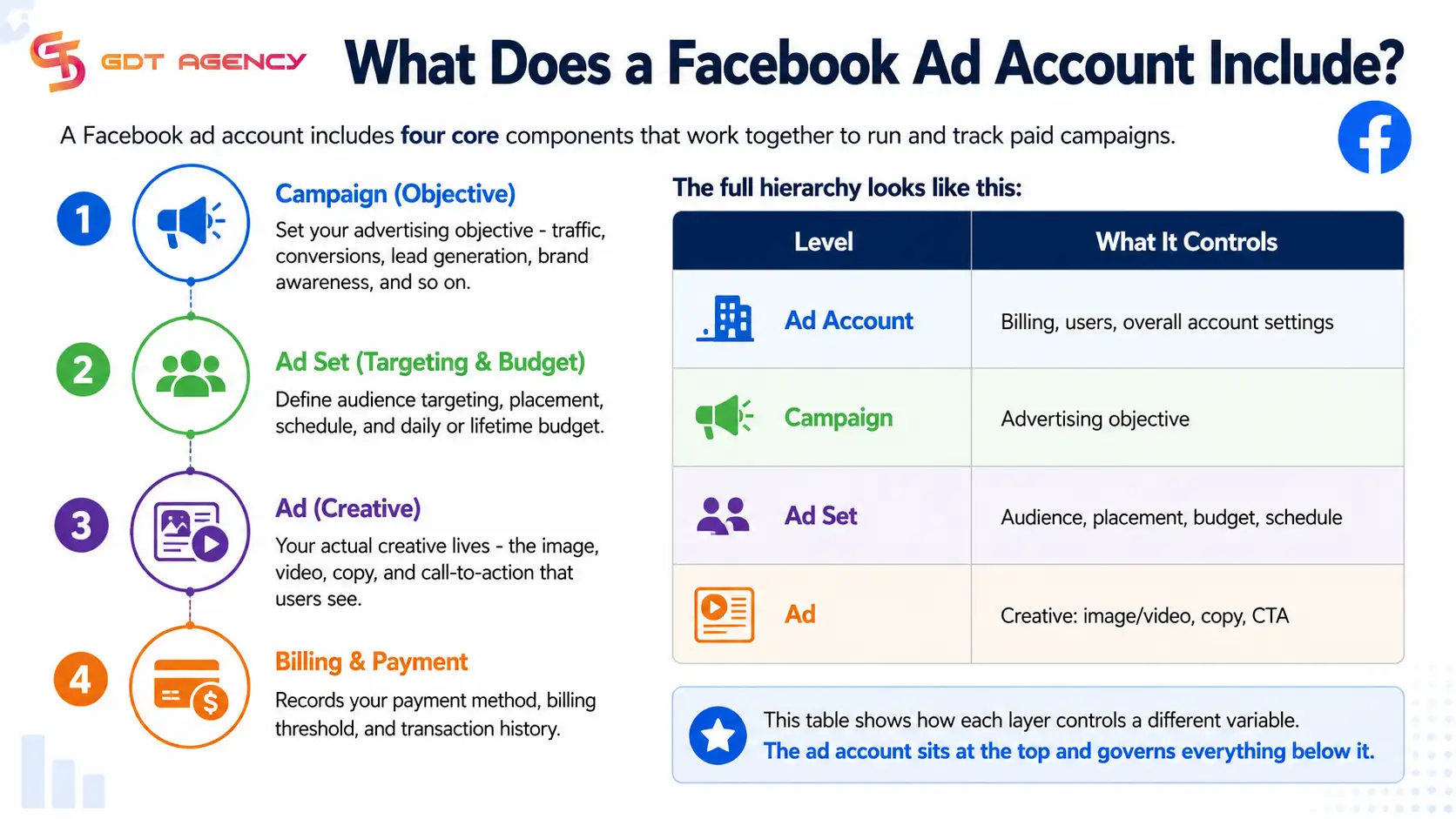
Each level sits inside the one above it. One account can hold multiple campaigns. One campaign can hold multiple ad sets. One ad set can hold multiple ads. This structure gives advertisers control at different levels of granularity - you can pause a single ad without touching the campaign, or duplicate an ad set with a different audience to run a split test.
Facebook allows businesses to boost posts directly from a Page for but the ad account controls how advertising operates behind the scenes, including campaign creation, budget allocation, billing, audience targeting, reporting, and user permissions.
During years of work as the CEO and Founder of GDT Agency, I have had the chance to take part in a lot of marketing and advertising conferences, and I have found that many businesses still think a Facebook Page is the main advertising tool instead of the ad account.
At the conferences, they asked me why a Facebook ad account only serves as an operational back-end, and businesses can launch campaigns directly from their Facebook Page, boost posts, and reach audiences without actively managing account structures.
Facebook allows businesses to boost posts directly from a Page because Meta simplifies the experience for smaller advertisers. However, the Page controls what audiences see publicly, including content, branding, and engagement. The ad account controls how advertising operates behind the scenes, including campaign creation, budget allocation, billing, audience targeting, reporting, and user permissions.
You can think of it simply as the functions of the Facebook Page as the storefront, while the ad account functions as the operating system that powers paid distribution. One creates public presence. The other enables scalable advertising execution.
A Facebook ad account is the foundation for running and managing paid advertising on Facebook and Instagram. It gives businesses control over campaigns, budgets, audience targeting, performance tracking, payment methods, and access permissions. The right account structure depends on how a business runs advertising. For anyone running ads professionally, choosing the right account structure should come before increasing your advertising budget. A suitable setup can give you better control, easier campaign management, and a stronger foundation for scaling campaigns over time.
A Facebook ad account is used to create, manage, pay for, and track advertising campaigns across Facebook and Instagram. It stores campaign settings, billing information, performance data, and access permissions.
Yes. A business can have multiple ad accounts depending on its business structure, Meta's account limits, and its advertising needs. Businesses may use separate accounts to organize different brands, markets, or advertising operations.
Yes. A Facebook ad account can manage advertising campaigns that appear on both Facebook and Instagram. Advertisers can select Instagram placements and connect the relevant Instagram account when setting up their campaigns.
The ad account itself does not automatically improve campaign performance. However, factors such as account history, spending activity, payment reliability, policy compliance, and campaign quality can influence how smoothly an account operates and how advertisers manage their campaigns.
A restricted ad account may lose the ability to create or run ads. The advertiser should check Account Quality or the relevant restriction notice to identify the reason and follow Meta's available review or appeal process when applicable. Read the full guide on Facebook ad account recovery to find out the full detailed guide

AB test on Facebook is a Meta Ads Manager feature that splits your audience into separate groups and compares ad versions that differ by one…
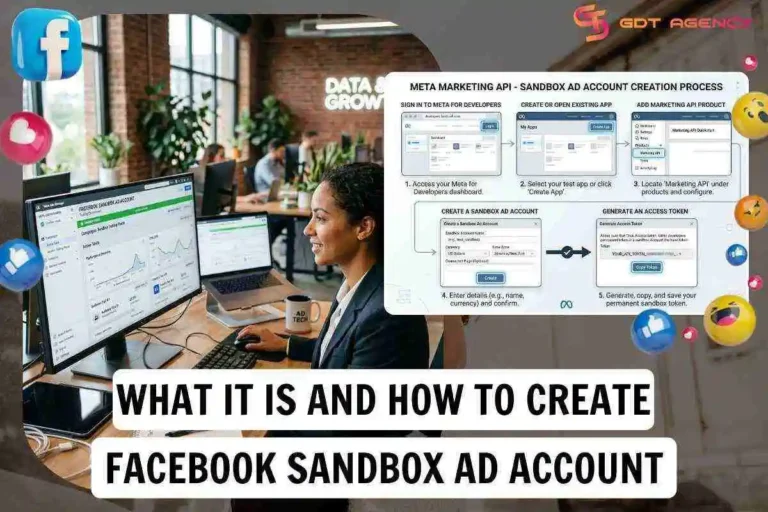
A Facebook Sandbox Ad Account is a test ad account tied to an app in Meta for Developers, where ads can be created but are…

Whitelisting Ads on Meta is an industry term for giving a brand or agency permission to run Meta Partnership Ads using a creator’s authorized Facebook…

A Commerce Account is the Meta business asset in Commerce Manager that connects your business’s catalog, Facebook Page and Instagram account to Meta’s commerce tools.…

Setting up a Facebook agency ad account takes 6 steps: confirm ownership and the access model, establish the partner connection, connect the dataset to the…

A Facebook agency ad account gives advertisers 9 main benefits: unlimited daily spending limits, a high trust score with stable delivery, an auction advantage with…

A Collaborative Ad Account is Meta’s advertising program that enables brands or retailers to run performance campaigns using a product catalogue, audience data, and campaign…

You onboard a new client onto a Facebook agency ad account through 4 steps: submit assets, pass compliance and setup review, link the Business Manager,…
The 5 best Facebook agency ad account providers for unlimited ad spend in 2026 are GDT Agency, Aurora, Threasury, Squarewave and AdShow. Each of these…

A Facebook agency ad account price typically ranges from $500 to $10000+/month, or a percentage of ad spend that ranges from 1% to 20% in…